---
title: "Appearance & Theme Customization Module Documentation"
description: "Documentation for Appearance & Theme"
---
> **Module Code:** `billing/client/appearance-theme`
> **Route:** `/portal/settings/appearance`
> **Frontend Store:** `useThemeStore.ts` (Zustand / LocalStorage)
> **Styling Framework:** Tailwind CSS 3.4 / CSS Variables
> **Brand Purity:** 100% White-Label Compliant (Ring2All Billing)
---
## Table of Contents
1. [Executive Summary & Personalized User Experience](#1-executive-summary--personalized-user-experience)
2. [Technical Architecture & CSS Variable Engine](#2-technical-architecture--css-variable-engine)
3. [🎯 User Roles & Key Capabilities](#3--user-roles--key-capabilities)
4. [Visual Interface & Screen Breakdown](#4-visual-interface--screen-breakdown)
5. [Theme Modes, Dark Variants & Color Presets](#5-theme-modes-dark-variants--color-presets)
6. [Interactive Theme Previews & Border Radius Engine](#6-interactive-theme-previews--border-radius-engine)
7. [Local Storage Persistence & State Hydration](#7-local-storage-persistence--state-hydration)
8. [Diagnostic CLI & Operational Playbooks](#8-diagnostic-cli--operational-playbooks)
9. [Domain Glossary](#9-domain-glossary)
---
## 1. Executive Summary & Personalized User Experience
The **Appearance & Theme Customization** module provides subscribers with granular control over the visual presentation of their self-care portal, including dark/light mode toggling, color palette presets, and corner border-radius styling.
```
+-------------------------------------------------------------------------------+
| COMMERCIAL & OPERATIONAL IMPACT |
+-------------------------------------------------------------------------------+
| • Reduced Visual Fatigue: High-contrast Dark Mode options tailored for NOC |
| operators and enterprise technicians working night shifts. |
| • Corporate Brand Alignment: Allows enterprise subscribers to match portal |
| accent colors with their corporate visual identity. |
| • Instant Zero-Reload Switching: Theme mutations apply in real time via CSS |
| variable injection without requiring browser page refreshes. |
| • Persistent Multi-Device Experience: Client preferences are cached locally |
| in browser storage and optionally synchronized to customer user settings. |
+-------------------------------------------------------------------------------+
```
---
## 2. Technical Architecture & CSS Variable Engine
Theme modifications update a centralized Zustand store, which injects runtime HSL/RGB CSS variables directly into the document root element (`:root` / `html`):
```
┌────────────────────────────────────────────────────────────────────────┐
│ Appearance Controls (AppearancePage.tsx) │
│ Mode: 'dark' | Variant: 'navy' | Color: '#3B82F6' │
└───────────────────────────────────┬────────────────────────────────────┘
│
▼ updateThemePrefs()
┌────────────────────────────────────────────────────────────────────────┐
│ Zustand Theme Store (useThemeStore.ts) │
│ • Evaluates System Media Query Precedence │
│ • Computes Primary HSL, Background & Foreground Tokens│
└─────────────────┬──────────────────────────────────┬───────────────────┘
│ │
LocalStorage │ Cache DOM Mutation │ documentElement
▼ ▼
┌───────────────────────────────────┐ ┌─────────────────────────────────┐
│ Browser LocalStorage │ │ Document Root (:root) │
│ Key: 'theme_preferences' │ │ --primary: 217 91% 60%; │
│ Payload: JSON ThemePrefs │ │ --radius: 0.5rem; │
│ │ │ class="dark navy-theme" │
└───────────────────────────────────┘ └─────────────────────────────────┘
```
---
## 3. 🎯 User Roles & Key Capabilities
Visual personalization is accessible to all portal users independently:
| User Role | Access Level | Primary Operational Capabilities |
| :--- | :--- | :--- |
| **All Portal Users / Operators** | Individual Preferences | Toggles dark/light modes, selects preferred color accents, customizes card radius. |
| **Enterprise Account Administrator** | Corporate Branding | Tests and recommends default color presets for internal department operators. |
| **NOC Dispatcher** | Night-Shift Optimization | Selects deep dark themes (`Pitch Black` or `Deep Navy`) to reduce eye strain in monitoring rooms. |
---
## 4. Visual Interface & Screen Breakdown
### 4.1 Appearance & Theme Customization View
The configuration page features interactive cards and real-time live preview widgets:
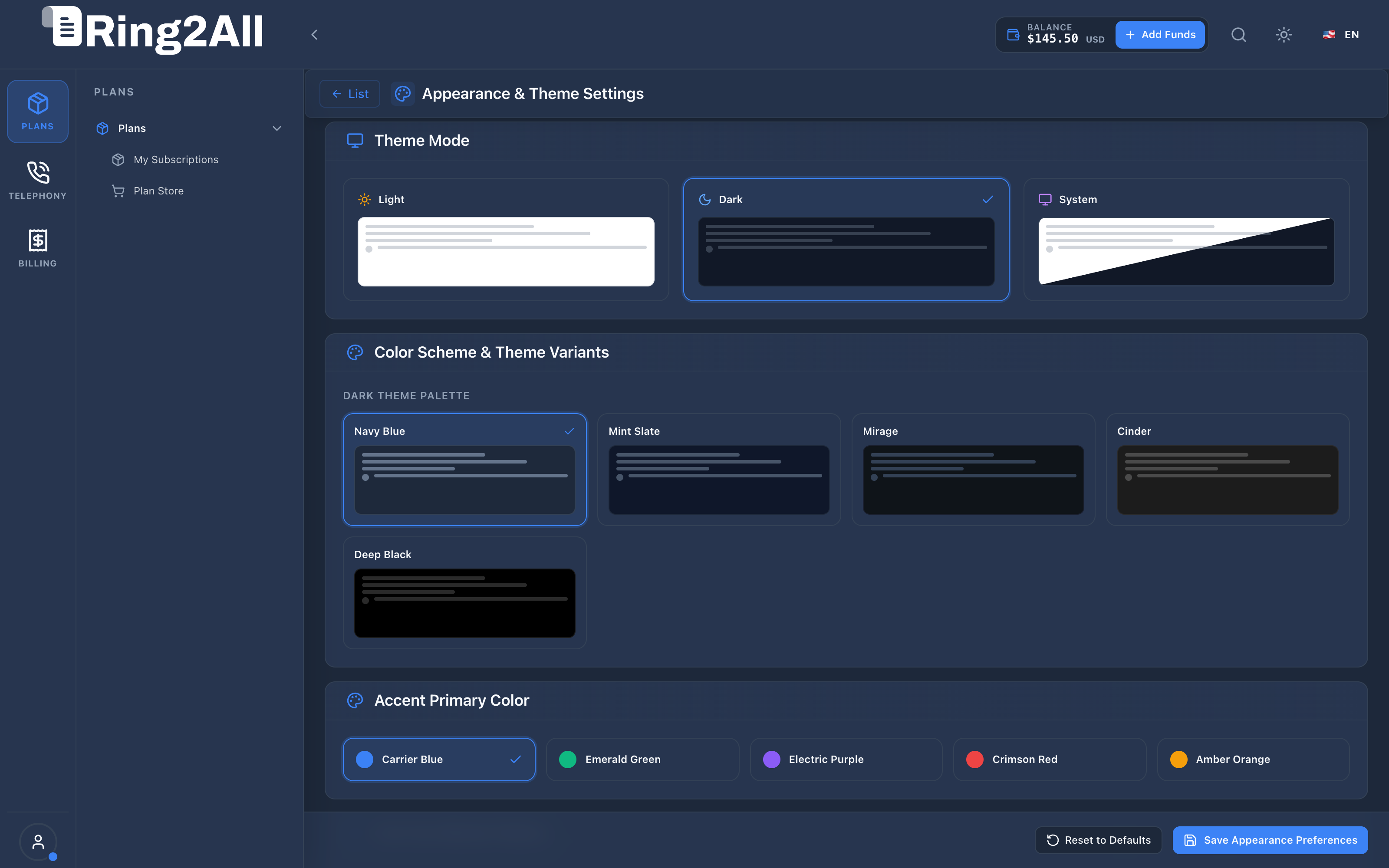
* **Theme Mode Selector:** Radio cards for `Dark Mode`, `Light Mode`, and `System Automatic` (syncs with OS preferences).
* **Dark Mode Variants:** Nuanced background choices including `Deep Navy`, `Slate Gray`, `Pitch Black (OLED)`, and `Emerald Night`.
* **Color Presets & Smart Palette Hierarchy:** Unified 7-slot interactive card grid featuring the carrier's **Corporate Brand** as Slot 1, 5 curated presets, and an inline custom picker.
* **Border Radius Slider:** Slider adjusting UI curvature from `0.0rem` (sharp square) to `1.0rem` (curved modern).
* **Live Theme Preview:** Instant interactive preview strip showing simulated data cards, call-to-action buttons, ghost buttons, and billing status badges.
---
## 5. Theme Modes, Dark Variants & Color Presets
### Unified 7-Slot Preset Grid & Smart Palette Hierarchy
Ring2All BSS features a **Smart Coexistence & Hierarchy Model** that balances wholesale carrier brand governance with individual subscriber visual preferences.
| Slot | Preset Name | Swatch & Hex Values | Functional Role |
| :---: | :--- | :--- | :--- |
| **1** | **Corporate Brand**
*(Marca Corporativa)* | Dynamically bound to the carrier's corporate `primaryColor` and `secondaryColor` configured in **BSS White-Label Branding**. Displays dynamic badge: **Default** (`Por defecto`) or **Active**. | **Authoritative Default:** Inherited automatically via `useCorporateColors: true`. |
| **2** | **Carrier Blue** | `#3B82F6` Primary / `#60A5FA` Secondary | Classic telecom corporate portal aesthetic. |
| **3** | **Emerald Green** | `#10B981` Primary / `#34D399` Secondary | Recommended for finance, accounting, and billing managers. |
| **4** | **Electric Purple**| `#8B5CF6` Primary / `#A78BFA` Secondary | Modern high-tech SaaS look for enterprise cloud portals. |
| **5** | **Crimson Red** | `#EF4444` Primary / `#F87171` Secondary | High-visibility contrast for urgent billing and credit monitoring. |
| **6** | **Amber Orange** | `#F59E0B` Primary / `#FBBF24` Secondary | Warm carrier billing and retail merchant styling. |
| **7** | **Custom**
*(Personalizado)* | Interactive card featuring inline color picker swatches for custom primary and secondary hex values. | Complete aesthetic autonomy for corporate client accounts. |
### Smart Hierarchy & State Synchronization (`useCorporateColors`)
1. **Carrier Brand Inheritance (Default):** All subscriber and operator accounts default to `useCorporateColors = true`. When the service provider or wholesale carrier updates corporate brand colors in **BSS Admin Branding**, the customer self-care portal automatically and instantly reflects the new color identity.
2. **Subscriber Personal Override:** When a customer selects an alternative color preset (Slots 2–6) or picks a custom color (Slot 7), `useCorporateColors` switches to `false`. Their visual choice is persisted in browser local storage and will not be overwritten by future carrier branding modifications.
3. **One-Click Brand Realignment:** If the subscriber wishes to return to the official carrier branding, clicking the **Corporate Brand** card immediately sets `useCorporateColors = true` and re-synchronizes with the carrier's brand tokens.
4. **Brand Security & Integrity:** Subscriber customization is strictly limited to accent highlights and dark/light modes. Carrier logos, invoice headers, tax numbers, and legal copyright notices remain immutable and fully controlled by the service provider.
---
## 6. Interactive Theme Previews & Border Radius Engine
Adjusting the corner radius slider modifies the CSS variable `--radius`, which automatically propagates to all buttons, input fields, modals, and container boxes:
```css
:root {
--radius: 0.5rem; /* Default rounded */
}
.rounded-xl {
border-radius: calc(var(--radius) + 4px);
}
```
---
## 7. Local Storage Persistence & State Hydration
Preferences are preserved across sessions and tabs via the client storage key `theme-preferences`:
* On application boot in `index.html`, an inline initialization script reads the cached mode to prevent "flash of unstyled content" (FOUC) before React hydrates.
---
## 8. Diagnostic CLI & Operational Playbooks
### Inspect Browser Theme State via Console
```javascript
// Open DevTools in Portal Browser
console.log(localStorage.getItem('theme_preferences'));
console.log(getComputedStyle(document.documentElement).getPropertyValue('--primary'));
```
---
## 9. Domain Glossary
* **FOUC:** Flash of Unstyled Content occurring when theme stylesheets load after initial DOM render.
* **OLED Black:** Pure `#000000` background optimizing energy efficiency on mobile and OLED monitors.
* **System Mode:** Dynamic mode synchronization that listens to OS `prefers-color-scheme` media queries.