---
title: "Appearance & Theming Engine"
description: "Ergonomic visual themes, high-contrast dark mode variants, curated color palettes, custom widget borders, shadows, and operator interface scaling."
---
## 📖 Introduction
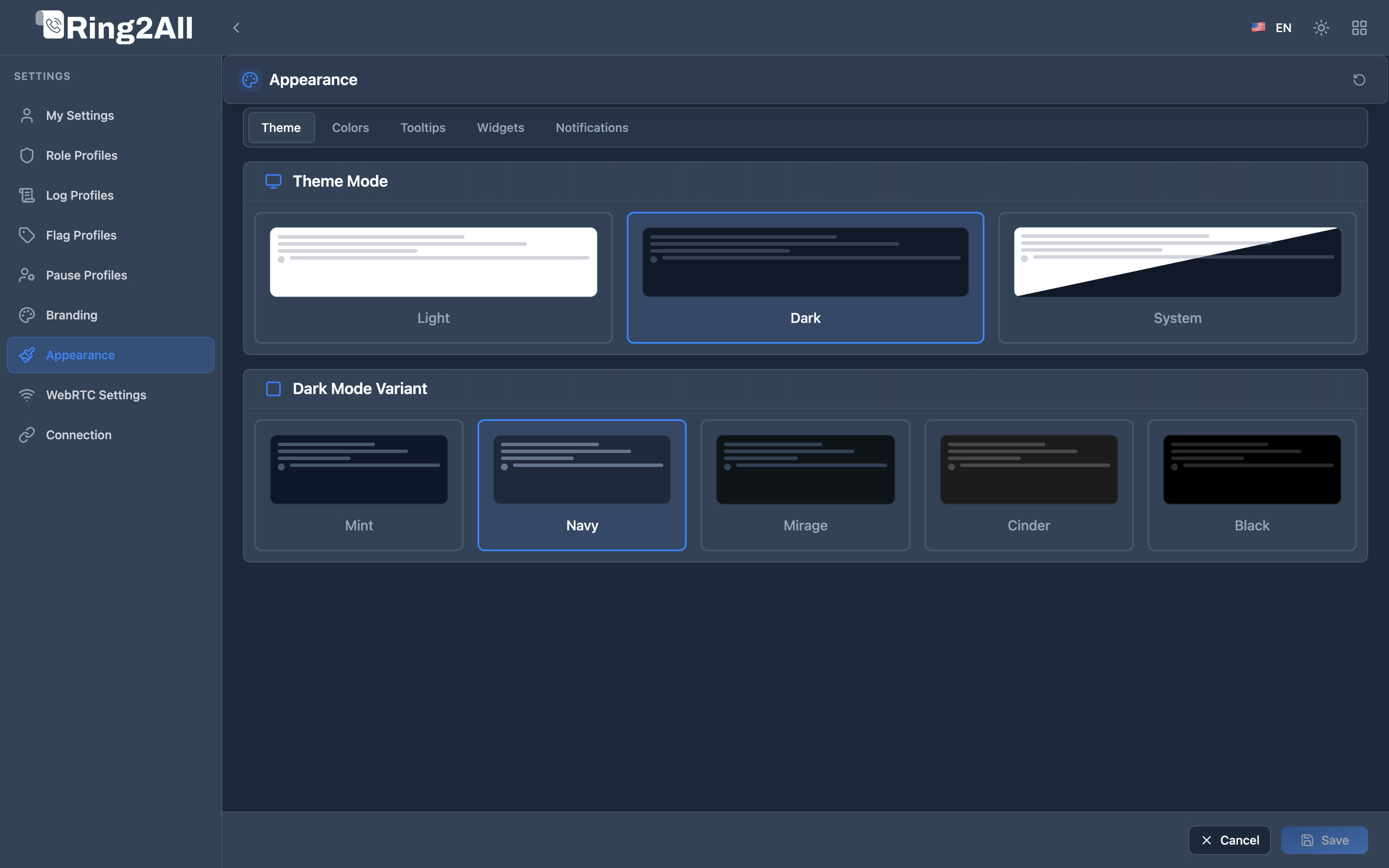
Call center operators and dispatchers often spend 8 to 12 hours a day monitoring Switchboard screens. The **Appearance** module provides an ergonomic, customizable styling engine engineered to reduce eye strain, maximize readability under varying ambient lighting conditions, and deliver a sleek, state-of-the-art aesthetic.
Administrators can configure system-wide visual presets, while individual users can override themes to match their personal lighting preferences.
---
## 🎯 User Roles & Key Capabilities
| Role | Primary Use Case | Key Capabilities |
| :--- | :--- | :--- |
| **PBX / Switchboard Operator** | Active Call Dispatching | Select specialized dark variants (Navy, Mint, Jet Black) and high-contrast color swatches to monitor live extensions without visual fatigue. |
| **Call Center Supervisor** | Console Oversight | Standardize console styling or audit operator ergonomic themes across monitoring workstations. |
| **Telephony Administrator** | Enterprise Visual Governance | Define corporate branding tokens that serve as the default Corporate Brand preset for all operator cockpits. |
---
## 🌓 Theme Modes & Palette Variants
The theming engine supports three top-level display modes: **Dark Mode**, **Light Mode**, and **System Auto** (which follows OS-level dark/light switching).
### Dark Mode Variants
Because one dark theme does not fit all display types (OLED vs IPS vs low-glare TN), Switchboard includes tailored dark mode color variants:
| Variant | Base Background | Palette Philosophy & Intended Use Case |
| :--- | :--- | :--- |
| **Navy** (Default) | `#0f172a` (Deep Blue-Gray) | High-contrast balanced palette optimized for indoor office lighting and dual-monitor setups. |
| **Mint** | `#0b1a1a` (Deep Emerald Dark) | Soothing dark teal aesthetic favored for night shifts and low-fatigue operations. |
| **Slate** | `#1e293b` (Neutral Slate) | Standard professional slate background with soft gray borders. |
| **Mirage** | `#181b2a` (Midnight Indigo) | Deep celestial indigo tones for sleek modern workstations. |
| **Cinder** | `#121216` (Warm Charcoal) | Low-saturation warm gray for minimizing blue light exposure. |
| **Jet Black** | `#000000` (Pure AMOLED Black) | True black background for maximum contrast and power conservation on OLED displays. |
### Light Mode Variants
For bright reception lobbies and sunlit reception desks:
- **Slate Light**: Crisp cool gray cards with slate accents.
- **Pure White**: High-brightness neutral white with crisp typography.
- **Stone**: Warm earthy tones for comfortable daytime viewing.
---
## 🎨 Accent Colors & Smart Palette Hierarchy
Switchboard incorporates Ring2All's **Smart Coexistence & Hierarchy Model**, allowing operators to customize interactive call buttons, active BLF extension indicators, and status rings while maintaining corporate alignment:
#### Unified 7-Slot Preset Grid
| Slot | Preset Name | Swatch & Primary / Secondary Hex | Operational Role |
| :---: | :--- | :--- | :--- |
| **1** | **Corporate Brand**
*(Marca Corporativa)* | Dynamically bound to the corporate `primaryColor` and `secondaryColor` configured in **Branding**. Shows dynamic badge: **Default** (`Por defecto`) or **Active**. | **Authoritative Default:** Inherited automatically via `useCorporateColors: true`. |
| **2** | **Carrier Blue** | `#3B82F6` Primary / `#60A5FA` Secondary | Classic high-contrast blue for reception desks and daytime dispatching. |
| **3** | **Emerald Green** | `#10B981` Primary / `#34D399` Secondary | Natural soothing tone for long call handling sessions. |
| **4** | **Electric Purple** | `#8B5CF6` Primary / `#A78BFA` Secondary | High-vibrancy accent for quick extension identification. |
| **5** | **Crimson Red** | `#EF4444` Primary / `#F87171` Secondary | High-contrast urgency palette for emergency dispatch consoles. |
| **6** | **Amber Orange** | `#F59E0B` Primary / `#FBBF24` Secondary | Warm amber glow reducing optic strain during evening shifts. |
| **7** | **Custom**
*(Personalizado)* | Interactive card featuring inline color picker swatches for custom primary and secondary hex values. | Exact color tuning for specialized console monitors. |
#### Smart Hierarchy & Synchronization Engine (`useCorporateColors`)
1. **Automatic Corporate Inheritance (Default):** All operator accounts default to `useCorporateColors = true`. When the administrator updates corporate branding, the Switchboard console immediately applies the updated colors.
2. **Operator Ergonomic Override:** When an operator selects an alternative preset (Slots 2–6) or sets custom hues (Slot 7), `useCorporateColors` switches to `false`. The personal selection is preserved and will not be overwritten by administrative brand updates.
3. **One-Click Brand Realignment:** Operators can realign with corporate branding at any time with a single click on the **Corporate Brand** card.
4. **Brand Asset Integrity:** Corporate logos, favicons, and application names remain strictly managed in **Branding** and cannot be altered by operators.
#### Interactive Live Theme Preview Strip
Directly beneath the swatches, an interactive preview strip validates the selected palette in real time across primary call buttons, ghost buttons, BLF extension ring indicators, and focus outlines.
---
## 🪟 Widget Styling & Glassmorphism
Operators can customize how information cards and widgets render across the console grid:
| Parameter | Options / Range | Operational Effect |
| :--- | :--- | :--- |
| **Border Radius** | `0px` (Square) to `24px` (Rounded) | Sets the global corner rounding for all widget containers. |
| **Opacity** | `70%` to `100%` | Controls container translucency, enabling modern semi-transparent frosted glassmorphism over desktop wallpapers. |
| **Shadow Intensity** | `None`, `Light`, `Medium`, `Heavy` | Adjusts depth elevation to separate telemetry cards from the background canvas. |
| **Header Visibility** | `Always Visible` / `Minimalist` | Allows hiding widget headers on compact screens to gain vertical workspace. |
---
## ⏱️ Tooltips & Micro-Interactions
Fine-tune hover tooltips and dynamic feedback:
- **Tooltips Enabled**: Toggles hover explanations across buttons and telemetry indicators.
- **Hover Delay**: Adjustable from `100ms` (instantaneous) to `1000ms` (deliberate), preventing unwanted hover popups while moving the mouse rapidly.
- **Micro-Animations**: Smooth CSS transitions for card state changes and real-time BLF status pulses. Can be disabled for low-power thin clients.