🖥️ Single Server Installation Guide
Complete step-by-step guide for installing Ring2All PBX on a single server
---
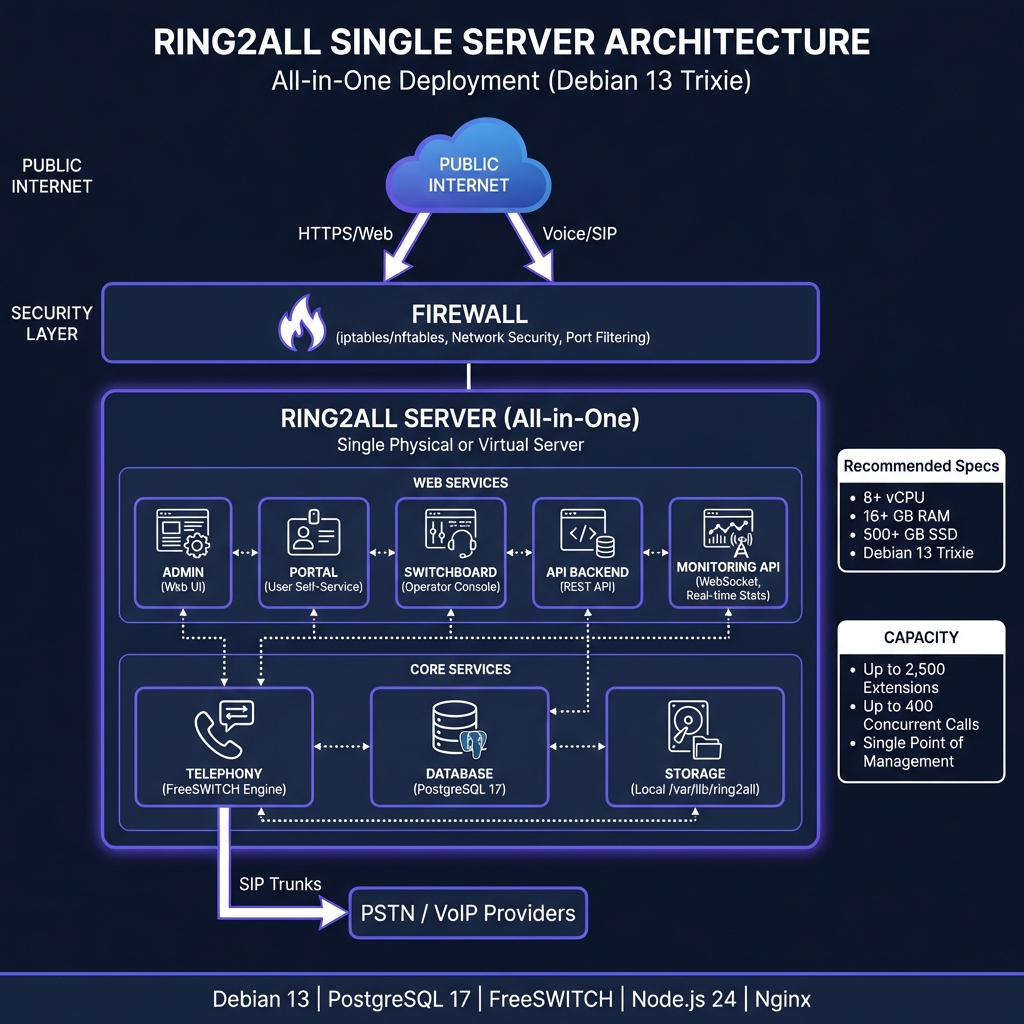
🏛️ Architecture Diagram
Ring2All Single Server Architecture ---
📋 Prerequisites
Hardware Requirements
Component Minimum Recommended High Performance CPU 4 vCPU 8 vCPU 16+ vCPU RAM 8 GB 16 GB 32+ GB Storage 100 GB SSD 250 GB SSD 500+ GB NVMe Network 100 Mbps 1 Gbps 10 Gbps
Software Requirements
Operating System: Debian 13 (Trixie) - 64-bit
Network: Static IP address configured
Root Access: Required for installation
Capacity Reference
Configuration Extensions Concurrent Calls Minimum (4 vCPU, 8GB) ~500 ~50 Recommended (8 vCPU, 16GB) ~2,500 ~400 High Performance (16+ vCPU, 32GB+) ~10,000 ~1,500
🚀 Quick Installation (3 Steps)
Step 1: Add Ring2All Repository
# Install prerequisites
apt update && apt install -y curl gnupg2

# Add GPG key
curl -fsSL https://repo.softswitchone.com/gpg.key | gpg --dearmor -o /etc/apt/keyrings/ring2all.gpg

# Add repository
echo "deb [signed-by=/etc/apt/keyrings/ring2all.gpg] https://repo.softswitchone.com/apt stable main" > /etc/apt/sources.list.d/ring2all.list

# Update package list
apt update
Step 2: Install All Packages
# 1. Database (creates user, databases, schemas)
apt install softswitch-db

# 2. Admin Dashboard + Portal + Switchboard + API
apt install softswitch-admin

# 3. FreeSWITCH + Telephony scripts
apt install softswitch-telephony

# 4. Audio files (optional but recommended)
apt install softswitch-music
apt install softswitch-voiceguide-emma    # English prompts
apt install softswitch-voiceguide-paloma  # Spanish prompts
Step 3: Start Services
# FreeSWITCH
systemctl enable --now freeswitch

# API Services
systemctl enable --now softswitch-api
systemctl enable --now softswitch-monitoring-api

# Nginx
systemctl enable --now nginx
That's it! 🎉 Your Ring2All PBX is now running.
---
✅ Post-Installation Verification
Check Services Status
# All services should show "active (running)"
systemctl status postgresql
systemctl status freeswitch
systemctl status softswitch-api
systemctl status softswitch-monitoring-api
systemctl status nginx
Check Database Connection
# Read generated credentials
cat /etc/softswitch/db-credentials

# Test connection (should show 6 databases)
sudo -u postgres psql -c "\l"
# Expected: ss_admin, ss_telephony, ss_cdr, ss_cc, ss_logs, freeswitch
Check FreeSWITCH
# Enter FreeSWITCH CLI
fs_cli

# Check status (should show internal and external profiles)
sofia status

# Exit
/exit
Access Web Interfaces
Interface URL Description Admin Dashboard https://your-server/adminSystem administration User Portal https://your-server/portalEnd-user self-service Switchboard https://your-server/switchboardOperator console
admin / (check setup wizard or database)
---
🔒 Firewall Configuration
# Allow essential ports
ufw allow 22/tcp      # SSH
ufw allow 80/tcp      # HTTP (redirect to HTTPS)
ufw allow 443/tcp     # HTTPS
ufw allow 5060/udp    # SIP
ufw allow 5060/tcp    # SIP over TCP
ufw allow 5061/tcp    # SIP TLS
ufw allow 16384:32768/udp  # RTP media

# Enable firewall
ufw enable
---
🔐 SSL Certificate (Let's Encrypt)
# Install certbot
apt install certbot python3-certbot-nginx

# Obtain certificate (replace with your domain)
certbot --nginx -d pbx.example.com

# Auto-renewal is configured automatically
systemctl status certbot.timer
---
⚙️ Nginx Configuration
The softswitch-admin package includes a default Nginx configuration. For customization:
nano /etc/nginx/sites-available/softswitch
server {
    listen 80;
    server_name _;

    # Redirect all HTTP to HTTPS
    return 301 https://$host$request_uri;
}

server {
    listen 443 ssl http2;
    server_name _;

    # SSL Certificates
    ssl_certificate /etc/ssl/certs/softswitch.crt;
    ssl_certificate_key /etc/ssl/private/softswitch.key;

    # Security headers
    add_header X-Frame-Options "SAMEORIGIN" always;
    add_header X-Content-Type-Options "nosniff" always;

    # API Backend (Node.js)
    location /api {
        proxy_pass http://127.0.0.1:3000;
        proxy_http_version 1.1;
        proxy_set_header Upgrade $http_upgrade;
        proxy_set_header Connection 'upgrade';
        proxy_set_header Host $host;
        proxy_set_header X-Real-IP $remote_addr;
        proxy_set_header X-Forwarded-For $proxy_add_x_forwarded_for;
        proxy_set_header X-Forwarded-Proto $scheme;
    }

    # WebSocket (Monitoring API)
    location /ws {
        proxy_pass http://127.0.0.1:3001;
        proxy_http_version 1.1;
        proxy_set_header Upgrade $http_upgrade;
        proxy_set_header Connection "upgrade";
        proxy_set_header Host $host;
        proxy_read_timeout 86400;
    }

    # Admin Dashboard
    location /admin {
        alias /var/www/softswitch/web;
        try_files $uri $uri/ /admin/index.html;
    }

    # User Portal
    location /portal {
        alias /var/www/softswitch/portal;
        try_files $uri $uri/ /portal/index.html;
    }

    # Switchboard Console
    location /switchboard {
        alias /var/www/softswitch/switchboard;
        try_files $uri $uri/ /switchboard/index.html;
    }

    # Root redirect to Admin
    location = / {
        return 302 /admin;
    }
}
Apply changes:
ln -sf /etc/nginx/sites-available/softswitch /etc/nginx/sites-enabled/
nginx -t && systemctl reload nginx
---
📁 Credentials & Configuration Files
File Description /etc/softswitch/db-credentialsDatabase username and password /etc/softswitch/api.envAPI environment variables /etc/odbc.iniODBC connections for FreeSWITCH /etc/freeswitch/FreeSWITCH configuration
View Credentials
cat /etc/softswitch/db-credentials
# Softswitch Database Credentials
# Generated: 2026-01-27 15:00:00
DB_USER=ss_db_user
DB_PASSWORD=Xk9mN2pQ4rT7
DB_HOST=127.0.0.1
DB_PORT=5432
---
🔧 Resource Optimization
Since all services share the same server, optimize resource allocation:
PostgreSQL Tuning
nano /etc/postgresql/17/main/postgresql.conf
# Memory (adjust based on available RAM)
shared_buffers = 2GB          # 25% of RAM
effective_cache_size = 6GB    # 75% of RAM
work_mem = 32MB
maintenance_work_mem = 512MB

# Connections
max_connections = 200

# WAL
wal_buffers = 64MB
checkpoint_completion_target = 0.9
FreeSWITCH Tuning
nano /etc/freeswitch/autoload_configs/switch.conf.xml
<configuration name="switch.conf">
  <settings>
    <!-- Limit concurrent sessions based on server capacity -->
    <param name="max-sessions" value="200"/>
    <param name="sessions-per-second" value="30"/>

    <!-- RTP port range -->
    <param name="rtp-start-port" value="16384"/>
    <param name="rtp-end-port" value="32768"/>
  </settings>
</configuration>
---
💾 Backup Strategy
Automated Daily Backup Script
Create /opt/softswitch-backup.sh:
#!/bin/bash
# Softswitch Single Server Backup Script

BACKUP_DIR="/var/backups/softswitch"
DATE=$(date +%Y%m%d_%H%M%S)
RETENTION_DAYS=7

mkdir -p $BACKUP_DIR

# Backup all databases
for db in ss_admin ss_telephony ss_cdr ss_cc ss_logs ss_switchboard; do
    sudo -u postgres pg_dump $db | gzip > "$BACKUP_DIR/${db}_${DATE}.sql.gz"
done

# Backup FreeSWITCH configs
tar -czf "$BACKUP_DIR/freeswitch_config_${DATE}.tar.gz" /etc/freeswitch

# Backup recordings (if any)
if [ -d "/var/lib/freeswitch/recordings" ]; then
    tar -czf "$BACKUP_DIR/recordings_${DATE}.tar.gz" /var/lib/freeswitch/recordings
fi

# Backup credentials
cp /etc/softswitch/db-credentials "$BACKUP_DIR/db-credentials_${DATE}"

# Remove old backups
find $BACKUP_DIR -type f -mtime +$RETENTION_DAYS -delete

echo "Backup completed: $BACKUP_DIR"
Enable and schedule:
chmod +x /opt/softswitch-backup.sh

# Add to cron (daily at 2 AM)
echo "0 2 * * * root /opt/softswitch-backup.sh" >> /etc/crontab
---
🔍 Troubleshooting
Service Not Starting
# Check logs
journalctl -u softswitch-api -f
journalctl -u freeswitch -f

# Check ports
ss -tlnp | grep -E '3000|3001|5060|5432'
Database Connection Issues
# Test PostgreSQL
sudo -u postgres psql -c "SELECT 1"

# Check ODBC
isql -v ss_telephony ss_db_user YOUR_PASSWORD
FreeSWITCH SIP Issues
# Check SIP profiles
fs_cli -x "sofia status"

# Check registrations
fs_cli -x "sofia status profile internal reg"

# Debug SIP traffic
fs_cli -x "sofia profile internal siptrace on"
Nginx 502 Bad Gateway
# Check if API is running
curl http://127.0.0.1:3000/api/health

# Check API logs
journalctl -u softswitch-api --since "5 minutes ago"
---
📈 Scaling Up
When your single server reaches capacity, consider:
Vertical Scaling: Upgrade CPU/RAM
Database Separation: Move PostgreSQL to dedicated server
Distributed Deployment: See Distributed Installation Guide
Capacity Indicators (Time to Scale)
Metric Warning Critical CPU Usage > 70% sustained > 85% RAM Usage > 80% > 90% Concurrent Calls > 100 > 150 Database Connections > 150 > 180
📊 Installation Summary
Component Location Port Admin Dashboard /var/www/softswitch/web443 (/admin) User Portal /var/www/softswitch/portal443 (/portal) Switchboard /var/www/softswitch/switchboard443 (/switchboard) API /var/www/softswitch/api3000 Monitoring WS /var/www/softswitch/monitoring-api3001 PostgreSQL System service 5432 FreeSWITCH /etc/freeswitch5060/5061 Credentials /etc/softswitch/db-credentials-
Next: Distributed Deployment Overview