

Application Keys Module Documentation
Table of Contents
Section titled “Table of Contents”- Module Overview (Technical)
- Module Overview (Commercial & Business Value)
- 🎯 User Roles & Key Capabilities
- Visual Interface & Form Structure
- Token Cryptography & API Rate Limiting Architecture
- Common Scenarios & Operational Playbooks
- Troubleshooting & Diagnostic Commands
- Model Context Protocol (MCP) AI Integration
- Glossary
1. Module Overview (Technical)
Section titled “1. Module Overview (Technical)”The Application Keys module (public.api_keys) manages machine-to-machine (M2M) credentials, external programmatic API tokens, and rate-limiting enforcement within Ring2All Billing. Designed for secure integration with third-party ERP accounting suites (such as QuickBooks, Odoo, and NetSuite), carrier provisioning portals, automated payment gateways, and CRM systems, Application Keys provide scoped programmatic access without requiring interactive administrative user sessions.
Data Model & Token Security Architecture
Section titled “Data Model & Token Security Architecture” ┌────────────────────────────────────────────────────────────────────────┐ │ API Key Entity (public.api_keys) │ │ • id: bigint (Canonical Invariant Numeric Primary Key) │ │ • uuid: uuid (Public Resource Identifier) │ │ • user_id: bigint (Owning Administrative User FK) │ │ • name: VARCHAR(100) (e.g. "ERP Accounting Sync Key") │ │ • description: TEXT (Integration Purpose & Scope) │ │ • key_prefix: VARCHAR(32) (Public Key Identifier, e.g. "r2a_live_..") │ │ • key_hash: VARCHAR(255) (One-Way SHA-256 / Argon2id Token Hash) │ │ • rate_limit_rpm: INTEGER (Requests Per Minute Limiter, e.g. 120, 300)│ │ • expires_at: TIMESTAMP WITH TIME ZONE (Optional Auto-Expiration) │ │ • is_active: BOOLEAN (Operational State Switch) │ │ • last_used_at: TIMESTAMP WITH TIME ZONE (Usage Telemetry) │ └───────────────────────────────────┬────────────────────────────────────┘ │ ▼ ┌────────────────────────────────────────────────────────────────────────┐ │ One-Time Generation Workflow │ │ 1. Server generates high-entropy CSPRNG secret: │ │ "r2a_live_erp99_f8a2b3c4d5e6f7a8b9c0d1e2f3a4b5c6" │ │ 2. Key prefix is saved in plain text: "r2a_live_erp99" │ │ 3. Full secret is hashed and stored in database: key_hash │ │ 4. Plain secret is returned ONCE to the administrator │ │ 5. Raw secret is NEVER retrievable again from the database │ └────────────────────────────────────────────────────────────────────────┘PostgreSQL Schema Architecture (public.api_keys)
Section titled “PostgreSQL Schema Architecture (public.api_keys)”- Zero-Cleartext Storage: Following industry best practices (matching GitHub and Stripe token architectures), the raw secret token is hashed immediately upon generation and never stored in cleartext.
- Key Prefix Lookups: The
key_prefixcolumn allows high-speed $O(1)$ database indexing to identify the appropriate key record before evaluating the cryptographic hash, avoiding table-wide hash scans. - Per-Token Rate Limiting: Every key includes an independent
rate_limit_rpmthreshold enforced in memory by Redis or the Fastify rate limiter, preventing automated external scripts from overwhelming core billing services.
2. Module Overview (Commercial & Business Value)
Section titled “2. Module Overview (Commercial & Business Value)”- Seamless Enterprise System Integration: Enables automated, zero-touch synchronization between Ring2All Billing and external accounting packages (ledger journal postings), billing analytics platforms, and enterprise CRM software.
- Protection Against Token Compromise: If an integration server or environment file is exposed, administrators can instantly deactivate or revoke the specific compromised key without interrupting other integrations or changing system-wide passwords.
- Automated Expiration & Lifecycle Management: Supports time-bound tokens for short-term third-party development teams or contractor projects, automatically expiring after a specified date.
3. 🎯 User Roles & Key Capabilities
Section titled “3. 🎯 User Roles & Key Capabilities”| User Role | Key Permissions | Core Responsibilities & Workflows |
|---|---|---|
| Super Administrator | Full Control (CRUD on API Keys) |
Generates new integration tokens, configures global rate limits, monitors token usage telemetry, and revokes compromised credentials. |
| Integration / DevOps Engineer | Read & Create | Requests or provisions dedicated API keys for backend microservices, verifies rate-limiting headers, and tests programmatic webhook endpoints. |
| Security Auditor | Read-Only | Audits active API tokens, verifies that inactive or unused keys are pruned, and validates that expiration policies are properly enforced. |
4. Visual Interface & Form Structure
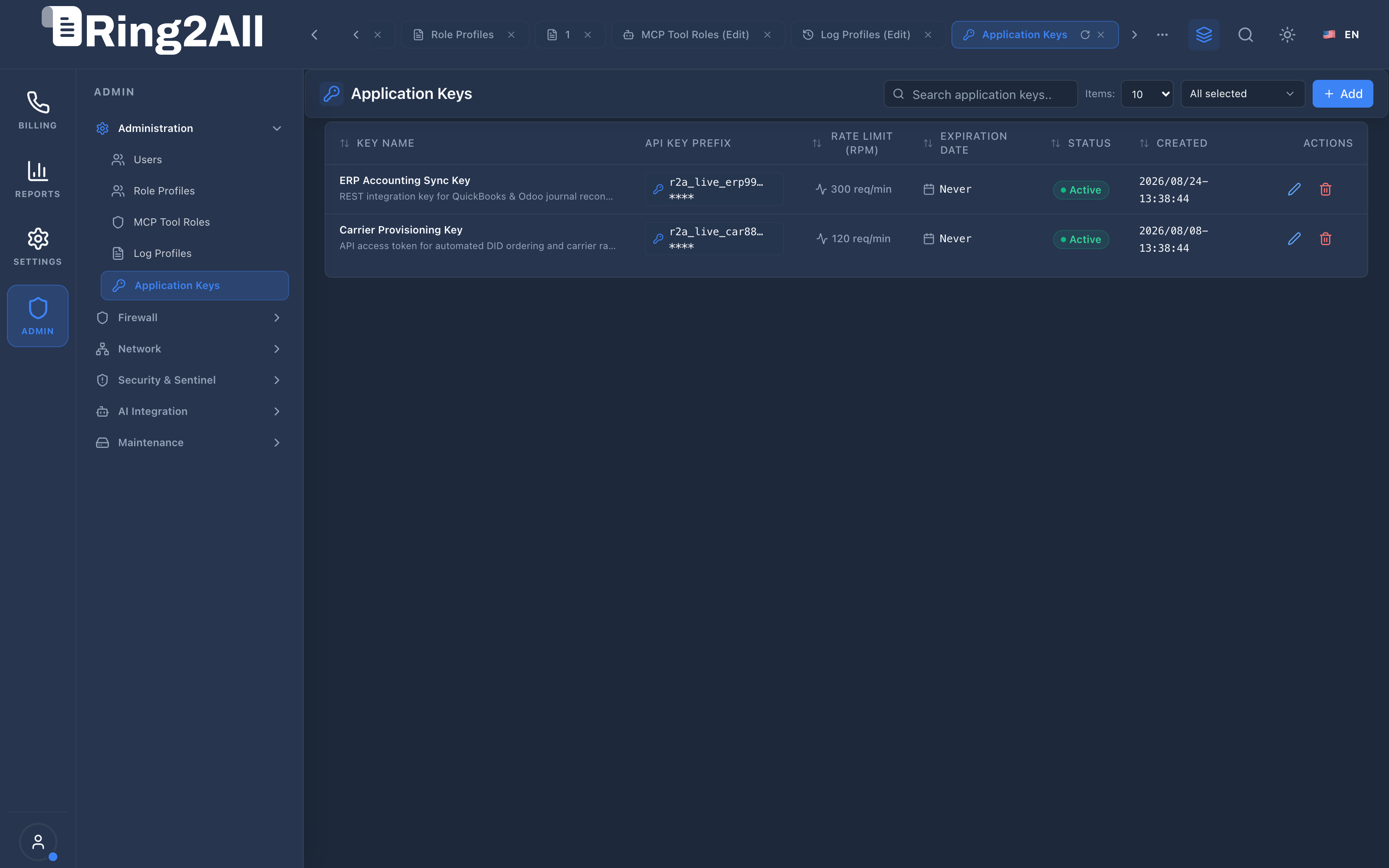
Section titled “4. Visual Interface & Form Structure”Level 1 — Application Keys List View
Section titled “Level 1 — Application Keys List View”The list view displays all active programmatic credentials, their public prefixes (with masked secrets), assigned rate limits (RPM), expiration dates, and real-time operational status badges.
Level 2 — Application Key Creation & Edit Form
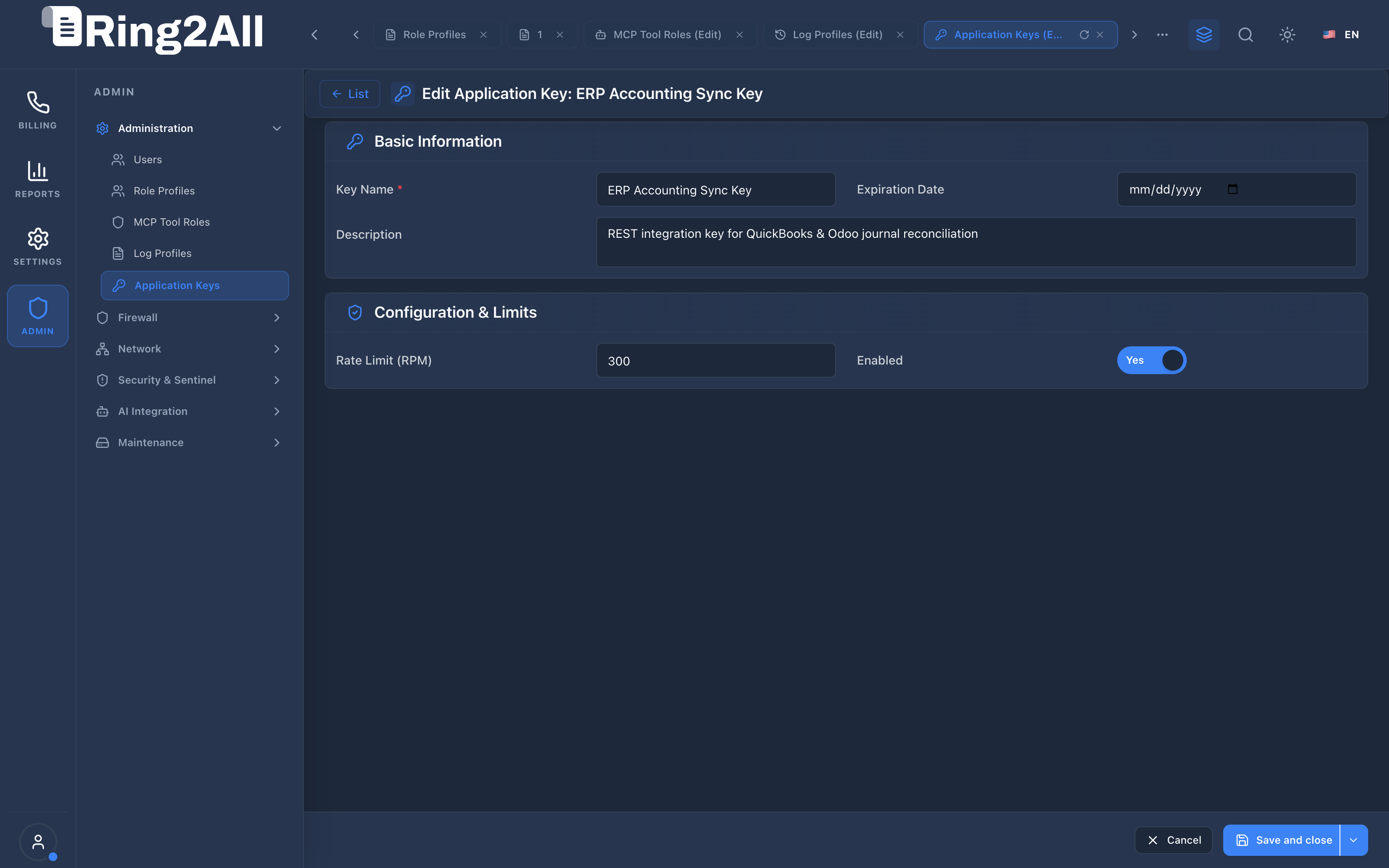
Section titled “Level 2 — Application Key Creation & Edit Form”The form view is divided into Basic Information and Configuration & Limits, utilizing a standardized 4-column layout for clean, unambiguous configuration.
Parameters Reference
Section titled “Parameters Reference”- Key Name: Identifier describing the external application or system (e.g.,
ERP Accounting Sync Key). - Description: Integration details, owning team, or server hostname.
- Expiration Date: Optional calendar picker specifying the date after which the token is automatically rejected.
- Rate Limit (RPM): Maximum allowable requests per minute (e.g.,
120or300req/min). - Enabled: Operational toggle; disabling immediately cuts off external API access.
5. Token Cryptography & API Rate Limiting Architecture
Section titled “5. Token Cryptography & API Rate Limiting Architecture” ┌────────────────────────────────┐ │ External Client / ERP │ └───────────────┬────────────────┘ │ 1. HTTP Request with Header: │ Authorization: Bearer r2a_live_erp99_f8a2... ▼ ┌────────────────────────────────────────────────────────┐ │ Fastify 5 Auth & Rate Guard │ │ • Extract prefix: "r2a_live_erp99" │ │ • Query public.api_keys WHERE key_prefix = prefix │ └───────────────┬────────────────────────────────────────┘ │ ┌─────────┴─────────┐ │ Key Exists & Active? ▼ ▼ NO YES ┌───────────┐ ┌─────────────────────────────────────────────────┐ │ Reject │ │ 2. Verify Cryptographic Hash: │ │ HTTP 401 │ │ hash(incoming_secret) === key_hash │ └───────────┘ └───────────────┬─────────────────────────────────┘ │ ┌─────────┴─────────┐ │ Hash Match? │ ▼ ▼ NO YES ┌───────────┐ ┌───────────────────────────────┐ │ Reject │ │ 3. Check Redis Rate Limiter: │ │ HTTP 401 │ │ requests_this_minute < RPM │ └───────────┘ └───────────────┬───────────────┘ │ ┌─────────┴─────────┐ │ Below Limit? │ ▼ ▼ NO YES ┌───────────┐ ┌─────────────┐ │ Reject │ │ Forward to │ │ HTTP 429 │ │ API Handler │ └───────────┘ └─────────────┘6. Common Scenarios & Operational Playbooks
Section titled “6. Common Scenarios & Operational Playbooks”Playbook 1: Generating a New Key for an ERP Integration
Section titled “Playbook 1: Generating a New Key for an ERP Integration”- Navigate to ADMIN > Administration > Application Keys.
- Click + Add in the upper toolbar.
- Enter Key Name:
QuickBooks Ledger Sync. - Enter Description:
Automated daily sync of closed invoices to corporate accounting ledger. - Set Rate Limit (RPM) to
300. - Leave Expiration Date empty for perpetual service, or set an annual rotation date.
- Click Save and close.
- CRITICAL: Copy the generated raw API key from the post-creation confirmation banner and securely store it in your application’s vault. The key cannot be viewed again once dismissed.
Playbook 2: Emergency Revocation of a Leaked Key
Section titled “Playbook 2: Emergency Revocation of a Leaked Key”- Locate the compromised key in the Application Keys list.
- Option A (Temporary Pause): Click the edit icon, toggle Enabled to
Inactive, and save. - Option B (Permanent Revocation): Click the trash/delete icon and confirm deletion in the confirmation modal.
- Result: Any subsequent API request using the revoked key is immediately rejected with
HTTP 401 Unauthorized.
7. Troubleshooting & Diagnostic Commands
Section titled “7. Troubleshooting & Diagnostic Commands”Inspecting Active Application Keys via CLI
Section titled “Inspecting Active Application Keys via CLI”# Query active API keys, prefixes, and rate limitssu - postgres -c "psql -d ss_billing -c 'SELECT id, name, key_prefix, rate_limit_rpm, is_active, last_used_at, expires_atFROM public.api_keysORDER BY id ASC;'"Testing API Key Authentication via cURL
Section titled “Testing API Key Authentication via cURL”# Test API key authentication against billing status endpointcurl -i -H "Authorization: Bearer <RAW_API_KEY>" \ https://192.168.10.29/api/v1/billing/status8. Model Context Protocol (MCP) AI Integration
Section titled “8. Model Context Protocol (MCP) AI Integration”The Application Keys module connects directly to the Ring2All BSS MCP Server, allowing system administrators and security auditor agents to inspect machine-to-machine integrations, verify prefix identifiers, and track rate limiting thresholds.
Available MCP Tools
Section titled “Available MCP Tools”| Tool Name | Access Role | Description & Primary Function | Example Arguments |
|---|---|---|---|
list_api_keys |
Super Administrator |
Lists administrative and external API application keys with prefix, rate limit, and status. | {} |
Sample MCP Tool Execution: list_api_keys
Section titled “Sample MCP Tool Execution: list_api_keys”Request Payload
Section titled “Request Payload”{ "name": "list_api_keys", "arguments": {}}Response Payload
Section titled “Response Payload”[ { "id": 1, "name": "QuickBooks ERP Sync", "keyPrefix": "r2a_live_qb9", "rateLimitRpm": 120, "isActive": true, "lastUsedAt": "2026-09-09T04:00:00Z", "expiresAt": null }, { "id": 2, "name": "Customer Portal Integration", "keyPrefix": "r2a_live_cp2", "rateLimitRpm": 300, "isActive": true, "lastUsedAt": "2026-09-09T05:01:22Z", "expiresAt": null }]Conversational AI Prompts for Copilot
Section titled “Conversational AI Prompts for Copilot”- “List all active machine-to-machine API application keys and their rate limits.”
- “Which API keys have not been used in the last 30 days?”
- “Verify if the QuickBooks ERP Sync key is active.”
9. Glossary
Section titled “9. Glossary”- M2M (Machine-to-Machine): Direct automated communication between independent software systems without manual human intervention.
- Bearer Token: Security credential that grants access to the bearer possessing the token secret.
- CSPRNG (Cryptographically Secure Pseudo-Random Number Generator): Algorithmic generator producing random numbers suitable for cryptographic secrets.
- Rate Limit (RPM): Protective threshold restricting the maximum number of requests a client can execute within a 60-second window to prevent system degradation.
- Model Context Protocol (MCP): Open protocol standard that enables secure, controlled integration between Large Language Models and external tools, databases, and telecom rating engines.