

AI Profiles, Hyperparameter Tuning & Model Policy Engine
Table of Contents
Section titled “Table of Contents”- Overview & Architecture
- Business & Operational Significance
- 🎯 User Roles & Key Capabilities
- Visual Interface & Layout
- Field Reference & Hyperparameter Specification
- Telecom-Specific Hyperparameter Tuning & Domain Prompts
- Operational Security Hardening & Prompt Safety
- Verification & Diagnostics
- Model Context Protocol (MCP) AI Integration
- Glossary
1. Overview & Architecture
Section titled “1. Overview & Architecture”In Ring2All SBC, the AI Profiles module governs the runtime intelligence policies, model selections, and cryptographic parameter bounds for all artificial intelligence workflows. While AI Providers define where models reside and how they are authenticated, AI Profiles determine how models behave—binding specific foundation models (gpt-4o, claude-3-5-sonnet, llama3.1:8b) to discrete telecom operational tasks, injecting specialized domain system prompts, and tuning execution hyperparameters.
┌────────────────────────────────────────────────────────────┐ │ UPSTREAM AI PROVIDERS GATEWAY │ │ (OpenAI, Anthropic, ElevenLabs, Local Ollama) │ └─────────────────────────────┬──────────────────────────────┘ │ ▼ ┌────────────────────────────────────────────────────────────┐ │ RING2ALL SBC AI PROFILES ENGINE │ │ (Stored in sbc_admin.ai_profiles) │ ├────────────────────────────────────────────────────────────┤ │ • Model Binding (gpt-4o, claude-3-5-sonnet, llama3.1) │ │ • Hyperparameters (Temperature: 0.0–1.0, Max Tokens) │ │ • Resilience Policies (Timeout ms, Retry Attempts) │ │ • Domain System Prompts (SIP Diagnostics, Threat Scoring) │ └─────────────────────────────┬──────────────────────────────┘ │ ┌───────────────────────────┼───────────────────────────┐ ▼ ▼ ▼┌──────────────────┐ ┌──────────────────┐ ┌──────────────────┐│ NOC COPILOT │ │ PERIMETER GUARD │ │ USER ACCOUNT ││ (MCP TOOLS) │ │ (AI THREATS) │ │ (DEFAULT CHAT) │├──────────────────┤ ├──────────────────┤ ├──────────────────┤│ Temp: 0.3 │ │ Temp: 0.1 │ │ Temp: 0.7 ││ Kamailio RPC │ │ Heuristic IP Ban │ │ Multilingual UI ││ Ladder Summaries │ │ Toll Fraud Score │ │ Platform Guide │└──────────────────┘ └──────────────────┘ └──────────────────┘Profiles are recorded in sbc_admin.ai_profiles and referenced orthogonally by administrative users, Model Context Protocol (MCP) agents, and real-time security monitors.
2. Business & Operational Significance
Section titled “2. Business & Operational Significance”- Deterministic Telecom Analysis: Operational telecom tasks (e.g., diagnosing a 488 Not Acceptable Here or interpreting SDP codec mismatches) require strict determinism. AI Profiles enforce low temperature settings (0.0–0.2), preventing hallucinations and ensuring repeatable diagnostics.
- Cost & Token Quota Control: Enforces hard token limits (
max_tokens) and request timeouts (timeout_ms), preventing runaway token consumption or billing spikes during high-volume telemetry ingestion. - Task Specialization via Domain System Prompts: Profiles inject deep telecommunications domain instructions directly into model contexts, instructing agents on Kamailio architecture, RTPEngine MOS thresholds, and SIP RFC 3261 compliance without requiring user prompting.
- Granular Profile Assignment: Individual administrative users or security monitoring daemons can be bound to distinct profiles, providing tailored reasoning capacity matched to operational privilege.
3. 🎯 User Roles & Key Capabilities
Section titled “3. 🎯 User Roles & Key Capabilities”| Role | Administrative Permissions | Operational Responsibilities |
|---|---|---|
| AI Systems Architect | Full Read & Write | Creates specialized profiles, calibrates temperature and token thresholds, and authors domain prompts. |
| Security Operations Lead | Read & Write | Configures deterministic profiles for AI Perimeter Guard and audits threat analysis prompt guidelines. |
| NOC Telecom Engineer | Read & Consume | Utilizes assigned AI Profiles via the NOC Copilot to perform ladder trace diagnostics and dispatcher rebalancing. |
| AI Hyperparameter Tuner / Automation Copilot | Programmatic Tuning & Calibration | Audits active prompt templates, inspects model hyperparameter bounds, and adjusts temperature and token limits via MCP. |
4. Visual Interface & Layout
Section titled “4. Visual Interface & Layout”AI Profiles Inventory Table
Section titled “AI Profiles Inventory Table”The main repository interface provides a structured listing of all defined AI behavioral profiles:
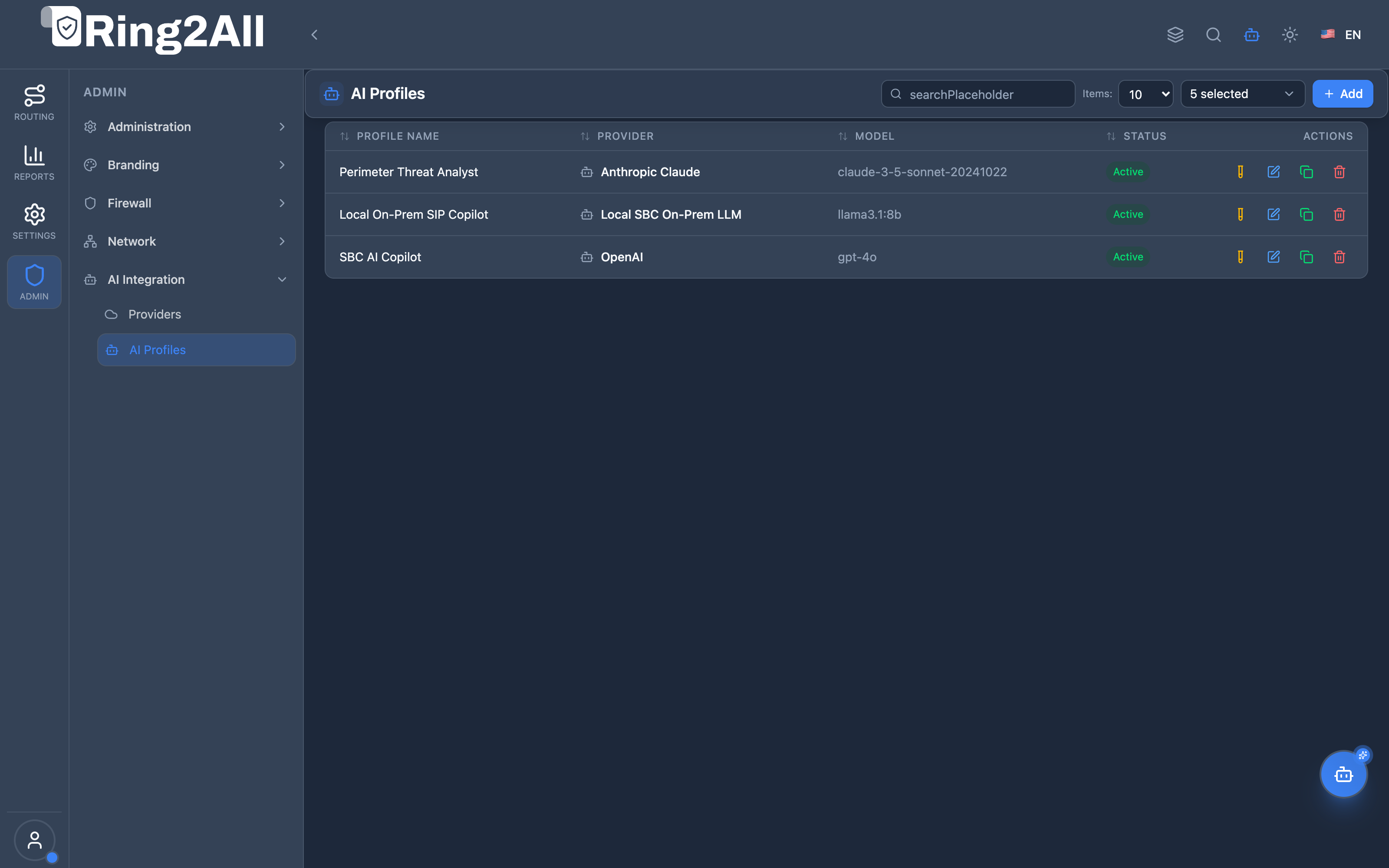
- Profile Name & Provider: Displays the profile label and its linked upstream AI Provider.
- Model & Status: Highlights the targeted LLM model identifier and active toggle state.
- Quick Actions: Edit profile parameters, test TTS voice synthesis, duplicate profile, or delete.
AI Profile Configuration Form
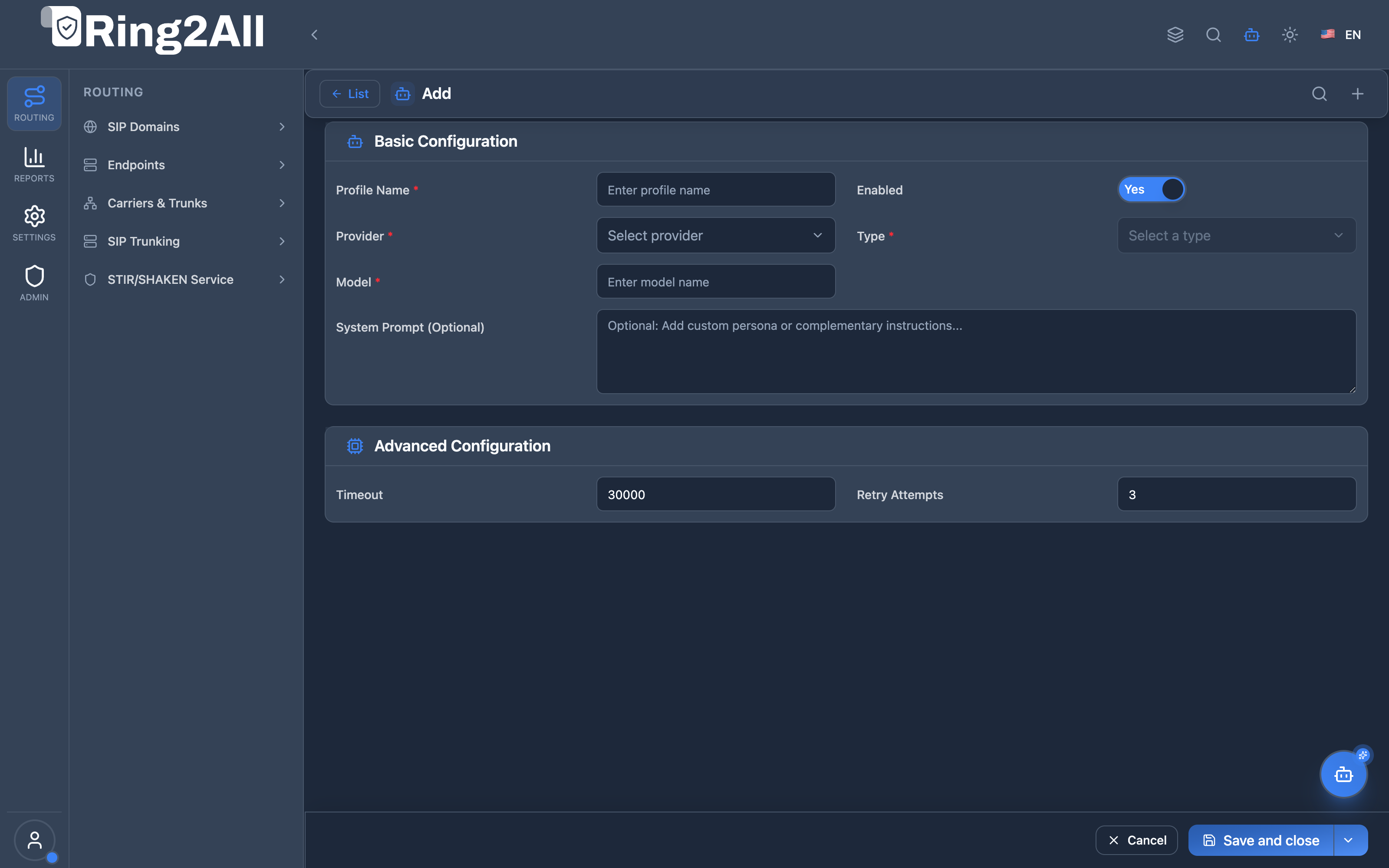
Section titled “AI Profile Configuration Form”The creation and editing view manages model parameters, timeouts, and domain prompts:
5. Field Reference & Hyperparameter Specification
Section titled “5. Field Reference & Hyperparameter Specification”| Field Name | Type | Recommended Range | Description |
|---|---|---|---|
| Profile Name | string |
3–100 chars | Unique, descriptive name identifying the profile’s operational role (e.g., Perimeter Threat Analyst). |
| Provider | select |
Active Provider | Upstream AI engine supplying the underlying API execution. |
| Type | select |
general, security, voice |
Operational category scoping where this profile can be consumed across the platform. |
| Model | string |
Valid model ID | Exact model string recognized by the provider (e.g., gpt-4o, claude-3-5-sonnet-20241022). |
| Temperature | numeric |
0.0 to 1.0 |
Controls randomness. Lower values (0.1–0.3) yield focused, analytical answers; higher values yield creative prose. |
| Max Tokens | integer |
512 to 8192 |
Maximum number of tokens the model is permitted to generate in a single response. |
| Timeout (ms) | integer |
5000 to 60000 |
Maximum round-trip latency in milliseconds before the SBC aborts the request. |
| Retry Attempts | integer |
0 to 3 |
Number of automated retry attempts executed upon encountering upstream 5xx errors or rate limits. |
| System Prompt | text |
Telecom domain guidelines | Permanent base instructions framing the role, guidelines, and constraints of the AI model. |
| Default Chatbot | boolean |
true / false |
When enabled, designates this profile as the platform-wide default for the interactive NOC Copilot. |
| Enabled | boolean |
true / false |
Global administrative toggle enabling or disabling profile consumption. |
6. Telecom-Specific Hyperparameter Tuning & Domain Prompts
Section titled “6. Telecom-Specific Hyperparameter Tuning & Domain Prompts”| Operational Scenario | Recommended Model | Temperature | Max Tokens | System Prompt Focus |
|---|---|---|---|---|
| SIP Trace Diagnostics | gpt-4o or claude-3-5-sonnet |
0.2 |
2048 |
Focus on RFC 3261 compliance, SIP response codes, SDP codec mismatches, and RTP port routing. |
| Perimeter Threat Scoring | claude-3-5-sonnet |
0.1 |
1024 |
Strict mathematical evaluation of SIP scanning patterns (SIPCLI, friendly-scanner), brute-force REGISTERS, and dynamic IP bans. |
| NOC Copilot Assistant | gpt-4o |
0.4 |
4096 |
Interactive problem solving, multi-step Kamailio binrpc troubleshooting, and documentation retrieval. |
| Sovereign Local Diagnostics | llama3.1:8b (Ollama) |
0.1 |
2048 |
Air-gapped CDR log classification and private telecom network troubleshooting. |
7. Operational Security Hardening & Prompt Safety
Section titled “7. Operational Security Hardening & Prompt Safety”- System Prompt Immutability: Domain system prompts are locked against user-session overrides, ensuring agents cannot be jailbroken into executing unapproved telephony operations.
- Tool Whitelisting Correlation: AI Profiles correlate with MCP Tool Roles, ensuring that an agent operating under a specific profile only has access to relevant tools (e.g., a diagnostic profile cannot execute IP bans).
- Deterministic Seed Control: Where supported by upstream providers (OpenAI
seed), diagnostic profiles set deterministic seeds to reproduce exact analysis trajectories during incident investigations.
8. Verification & Diagnostics
Section titled “8. Verification & Diagnostics”To audit configured AI Profiles, verify active bindings, and test model responses via CLI:
# 1. Query all registered AI profiles and their hyperparameter settingssudo -u postgres psql -d sbc_admin -c "SELECT p.profile_name, pr.name AS provider, p.model, p.temperature, p.max_tokens, p.statusFROM ai_profiles pJOIN ai_providers pr ON p.provider_id = pr.id;"
# 2. Verify default chatbot profile assignmentsudo -u postgres psql -d sbc_admin -c "SELECT profile_name, model, is_default_chatbotFROM ai_profilesWHERE is_default_chatbot = true;"
# 3. Test prompt evaluation latency via SBC backend logsjournalctl -u softswitch-sbc-api -n 50 --no-pager | grep -E '(ai_profile|llm_execution)'
9. Model Context Protocol (MCP) AI Integration
Section titled “9. Model Context Protocol (MCP) AI Integration”The AI Profiles module exposes dedicated tools in the Ring2All SBC Model Context Protocol (MCP) server, allowing autonomous systems and supervisors to inspect runtime model parameters, verify default copilot assignments, and adjust hyperparameter bounds dynamically.
9.1 MCP Tool Summary
Section titled “9.1 MCP Tool Summary”| Tool Name | Action | Risk Level | Purpose |
|---|---|---|---|
list_sbc_ai_profiles |
Read | read |
List all AI profiles with models, temperatures, max tokens, and active states. |
get_sbc_ai_profile |
Read | read |
Retrieve full profile configuration including system prompt instructions and timeouts. |
update_sbc_ai_profile |
Write | operational |
Update model assignment, temperature, max tokens, timeout, or system prompt guidelines. |
9.2 Tool Schemas & Input Parameters
Section titled “9.2 Tool Schemas & Input Parameters”Schema: list_sbc_ai_profiles
Section titled “Schema: list_sbc_ai_profiles”{ "type": "object", "properties": {}, "additionalProperties": false}Schema: get_sbc_ai_profile
Section titled “Schema: get_sbc_ai_profile”{ "type": "object", "properties": { "id": { "type": "number", "description": "Unique integer ID of the AI profile" } }, "required": ["id"], "additionalProperties": false}Schema: update_sbc_ai_profile
Section titled “Schema: update_sbc_ai_profile”{ "type": "object", "properties": { "id": { "type": "number", "description": "Unique integer ID of the AI profile to update" }, "model": { "type": "string", "description": "Target model identifier (e.g., 'gpt-4o', 'claude-3-5-sonnet')" }, "temperature": { "type": "number", "description": "Sampling temperature between 0.0 (strictly deterministic) and 1.0" }, "maxTokens": { "type": "number", "description": "Maximum token output limit" }, "timeoutMs": { "type": "number", "description": "Request execution timeout in milliseconds" }, "systemPrompt": { "type": "string", "description": "Domain system prompt instructions" }, "isDefaultChatbot": { "type": "boolean", "description": "Designate this profile as the platform-wide default copilot" }, "status": { "type": "boolean", "description": "True to activate profile; false to disable" } }, "required": ["id"], "additionalProperties": false}9.3 Sample Tool Execution Payloads
Section titled “9.3 Sample Tool Execution Payloads”Example 1: Listing All Configured AI Profiles
Section titled “Example 1: Listing All Configured AI Profiles”Request Payload:
{ "tool": "list_sbc_ai_profiles", "parameters": {}}Response Payload:
{ "success": true, "data": { "total": 2, "profiles": [ { "id": 1, "uuid": "3e4f5a6b-7c8d-9e0f-1a2b-3c4d5e6f7a8b", "profileName": "NOC Copilot Primary", "providerId": 1, "providerName": "OpenAI Production", "model": "gpt-4o", "type": "general", "temperature": 0.3, "maxTokens": 4096, "timeoutMs": 30000, "isDefaultChatbot": true, "status": true, "createdAt": "2026-06-15T11:00:00Z" }, { "id": 2, "uuid": "4f5a6b7c-8d9e-0f1a-2b3c-4d5e6f7a8b9c", "profileName": "Perimeter Threat Analyst", "providerId": 2, "providerName": "Anthropic Reasoning Engine", "model": "claude-3-5-sonnet", "type": "security", "temperature": 0.1, "maxTokens": 2048, "timeoutMs": 45000, "isDefaultChatbot": false, "status": true, "createdAt": "2026-07-20T15:00:00Z" } ] }}Example 2: Updating Temperature & Timeout on NOC Copilot Profile
Section titled “Example 2: Updating Temperature & Timeout on NOC Copilot Profile”Request Payload:
{ "tool": "update_sbc_ai_profile", "parameters": { "id": 1, "temperature": 0.2, "timeoutMs": 25000 }}Response Payload:
{ "success": true, "data": { "message": "AI profile 'NOC Copilot Primary' updated successfully", "profile": { "id": 1, "profileName": "NOC Copilot Primary", "model": "gpt-4o", "temperature": 0.2, "maxTokens": 4096, "timeoutMs": 25000, "isDefaultChatbot": true, "status": true } }}9.4 Bilingual Natural Language Copilot Prompts
Section titled “9.4 Bilingual Natural Language Copilot Prompts”English Prompts
Section titled “English Prompts”- “List all AI profiles and show which one is currently designated as the default NOC Copilot.”
→ Agent invokes
list_sbc_ai_profiles(). - “Inspect AI profile ID 2 to review its system prompt instructions for threat analysis.”
→ Agent invokes
get_sbc_ai_profile({"id": 2}). - “Tune AI profile ID 1 by setting temperature to 0.2 for more deterministic SIP ladder diagnostics.”
→ Agent invokes
update_sbc_ai_profile({"id": 1, "temperature": 0.2}).
Spanish Prompts (Español)
Section titled “Spanish Prompts (Español)”- “Lista todos los perfiles de IA y muestra cuál está configurado como el Copilot por defecto.”
→ Agente invoca
list_sbc_ai_profiles(). - “Inspecciona el perfil de IA con ID 2 para revisar sus instrucciones de system prompt para análisis de amenazas.”
→ Agente invoca
get_sbc_ai_profile({"id": 2}). - “Calibra el perfil de IA ID 1 ajustando la temperatura a 0.2 para diagnósticos de trazas SIP más deterministas.”
→ Agente invoca
update_sbc_ai_profile({"id": 1, "temperature": 0.2}).
9.5 Enterprise Security & Execution Safeguards
Section titled “9.5 Enterprise Security & Execution Safeguards”- Strict Operational Clearance: Updating AI profiles or system prompts requires
operationalclearance under theai_profilestool category. - Boundary Validation: Values for
temperatureare validated to remain strictly between0.0and1.0, andmaxTokensis capped at platform-safe boundaries (128 to 16384). - Audit History Tracking: Every prompt modification or hyperparameter update is recorded in
sbc_admin.audit_logs, enabling rollback if unexpected reasoning behaviors emerge.
10. Glossary
Section titled “10. Glossary”- Hyperparameter: A configuration parameter set before model execution that directly dictates its reasoning behavior, length, and randomness.
- System Prompt: Foundational contextual instructions prepended to every conversation that define the model’s persona, operational rules, and safety boundaries.
- Temperature: A numerical scaling factor (typically 0.0 to 1.0) governing the probability distribution of predicted output tokens.
- Token: A basic unit of text (roughly 4 characters or 0.75 words) processed and generated by LLM architectures.
- Model Context Protocol (MCP): An open architectural standard allowing AI copilots to programmatically manage and tune reasoning profiles.