

AI Profiles Module Documentation
Table of Contents
Section titled “Table of Contents”- Module Overview (Technical)
- Module Overview (Commercial & Business Value)
- 🎯 User Roles & Key Capabilities
- Visual Interface & Form Structure
- Architectural Flow & Security Governance
- Common Scenarios & Operational Playbooks
- Troubleshooting & Diagnostic Commands
- Model Context Protocol (MCP) AI Integration
- Glossary
1. Module Overview (Technical)
Section titled “1. Module Overview (Technical)”The AI Profiles module (public.ai_profiles) encapsulates specialized behavior, system prompts, inference parameters, and persona definitions for AI workloads in Ring2All Billing. While the AI Providers module handles physical connection credentials to cloud engines, AI Profiles define how those models interact with telecom operations, accounting ledgers, CDR fraud forensics, and conversational customer support.
Each profile couples a designated upstream provider with an exact inference model (e.g., gpt-4o, claude-3-5-sonnet-20241022, deepseek-reasoner), customized temperature and token boundaries, structured system prompts, Text-To-Speech (TTS) voice parameters, and an active operational state.
Data Model & Architecture Diagram
Section titled “Data Model & Architecture Diagram” ┌────────────────────────────────────────────────────────────────────────┐ │ AI Profiles (public.ai_profiles) │ │ • id: bigint (Primary Key) │ │ • uuid: UUID (Unique Public Identifier) │ │ • provider_id: bigint (FK to public.ai_providers) │ │ • profile_name: VARCHAR(100) (e.g., 'Billing Copilot Pro') │ │ • type: 'general' | 'chatbot' | 'voice' | 'reasoner' │ │ • model: VARCHAR(100) (e.g., 'gpt-4o', 'deepseek-reasoner') │ │ • temperature: numeric(3,2) (e.g., 0.70) │ │ • max_tokens: integer (e.g., 2048) │ │ • voice_config: jsonb (TTS voice ID, speed, pitch, engine) │ │ • embeddings_model: VARCHAR(100) (e.g., 'text-embedding-3-small') │ │ • system_prompt: text (Domain system instructions) │ │ • is_default_chatbot: boolean │ │ • status: boolean (Active / Inactive) │ └───────────────────────────────────┬────────────────────────────────────┘ │ Directs Workflows ▼ ┌────────────────────────────────────────────────────────────────────────┐ │ Operational AI Workflows │ │ • Interactive Billing Copilot (Portal Assistance & Natural Queries) │ │ • CDR Anomaly & Fraud Reasoner (Explains IRSF & Velocity Spikes) │ │ • Automated Customer Billing Support (Payment & Invoice Inquiries) │ └────────────────────────────────────────────────────────────────────────┘PostgreSQL Schema Architecture
Section titled “PostgreSQL Schema Architecture”public.ai_profiles:id: Numeric primary key (bigserial).uuid: Immutable UUID utilized in routing and API endpoints.provider_id: Referencespublic.ai_providers.id, dictating which upstream credentials and transport to utilize.profile_name: User-facing name describing the specialized role.type: Categorization of operational mode (general,chatbot,voice,reasoner).model: Specific model slug passed to the upstream inference API.temperature: Creativity vs determinism parameter (range0.00to2.00).max_tokens: Upper bound ceiling on tokens generated per single response.voice_config: JSONB payload containing voice synthesis configurations for voice-enabled agents.system_prompt: Foundational context guiding the AI’s identity, constraints, and operational guidelines.is_default_chatbot: Boolean designating the default profile assigned to incoming user chat sessions.status: Active/inactive toggle.
2. Module Overview (Commercial & Business Value)
Section titled “2. Module Overview (Commercial & Business Value)”- Domain-Specific Specialization: Rather than relying on generic model responses, profiles enforce strict telecom accounting constraints, financial accuracy guidelines, and privacy guards.
- Deterministic Financial Reasoning: Setting low temperature (
0.1–0.2) for CDR audit profiles prevents hallucination during invoice reconciliation and tax dispute analysis. - Zero Disruption Model Upgrades: When newer frontier models release (e.g., GPT-5 or Claude 4), administrators update the profile’s model parameter in one location, instantly upgrading all dependent applications across the billing system.
- Contextual Copilot Assistance: Powers the embedded Ring2All billing assistant, allowing operators to ask complex operational questions (e.g., “Summarize top 5 carrier spend increases this week”) in plain English.
3. 🎯 User Roles & Key Capabilities
Section titled “3. 🎯 User Roles & Key Capabilities”| Role | Key Capabilities & Permissions in AI Profiles |
|---|---|
| System Administrator | Full authority to create, edit, duplicate, and delete AI Profiles; configures system prompt templates, sets token limits, and designates the default chatbot. |
| Security Analyst | Verifies system prompts to prevent prompt injection vulnerabilities and reviews token bounds to prevent accidental financial denial-of-service. |
| Billing Operations Lead | Tunes temperature settings, tests voice synthesis configurations, and tests model responses against sample rating and invoice data. |
| Customer Support Manager | Customizes customer-facing persona prompts, greeting messages, and billing query explanation styles. |
4. Visual Interface & Form Structure
Section titled “4. Visual Interface & Form Structure”The AI Profiles module provides an organized list view and an in-depth profile customization form.
4.1 AI Profiles Listing
Section titled “4.1 AI Profiles Listing”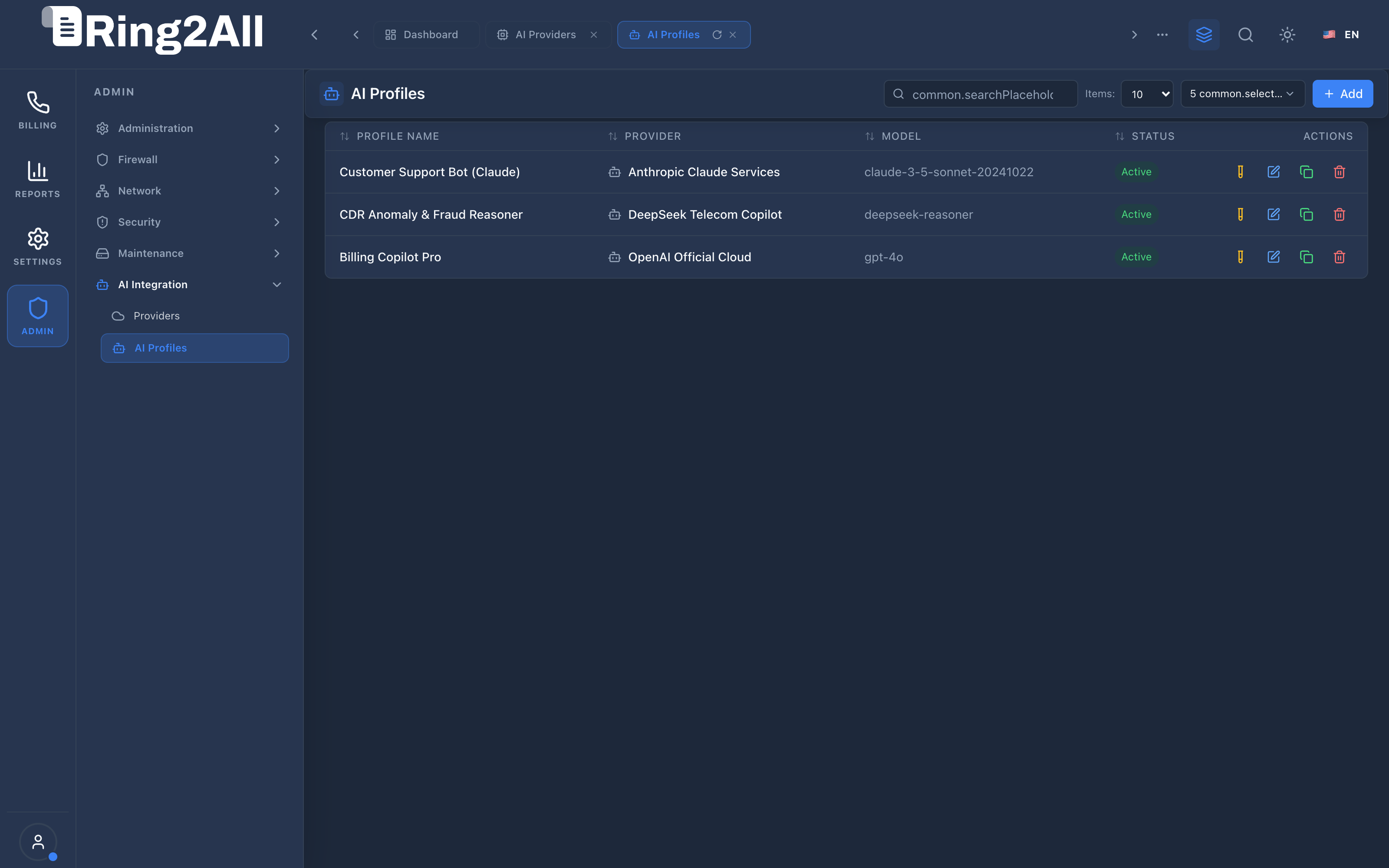
The list view displays all configured AI Profiles:
- Header Controls:
Search Input: Filters profiles by name, model, or provider.+ Add: Navigates to/ai-profiles/newto create a profile.
- Data Grid Columns:
Profile Name: Descriptive title (e.g.,Billing Copilot Pro,CDR Anomaly & Fraud Reasoner,Customer Support Bot (Claude)).Provider: Upstream provider name with Bot icon (e.g.,OpenAI Official Cloud,DeepSeek Telecom Copilot,Anthropic Claude Services).Model: Exact engine string (e.g.,gpt-4o,deepseek-reasoner,claude-3-5-sonnet-20241022).Status: Operational state badge (Activein green).Actions: Direct inline actions to edit profile (Pencil), duplicate configuration (Copy), or delete (Trash).
4.2 Create / Edit AI Profile Form
Section titled “4.2 Create / Edit AI Profile Form”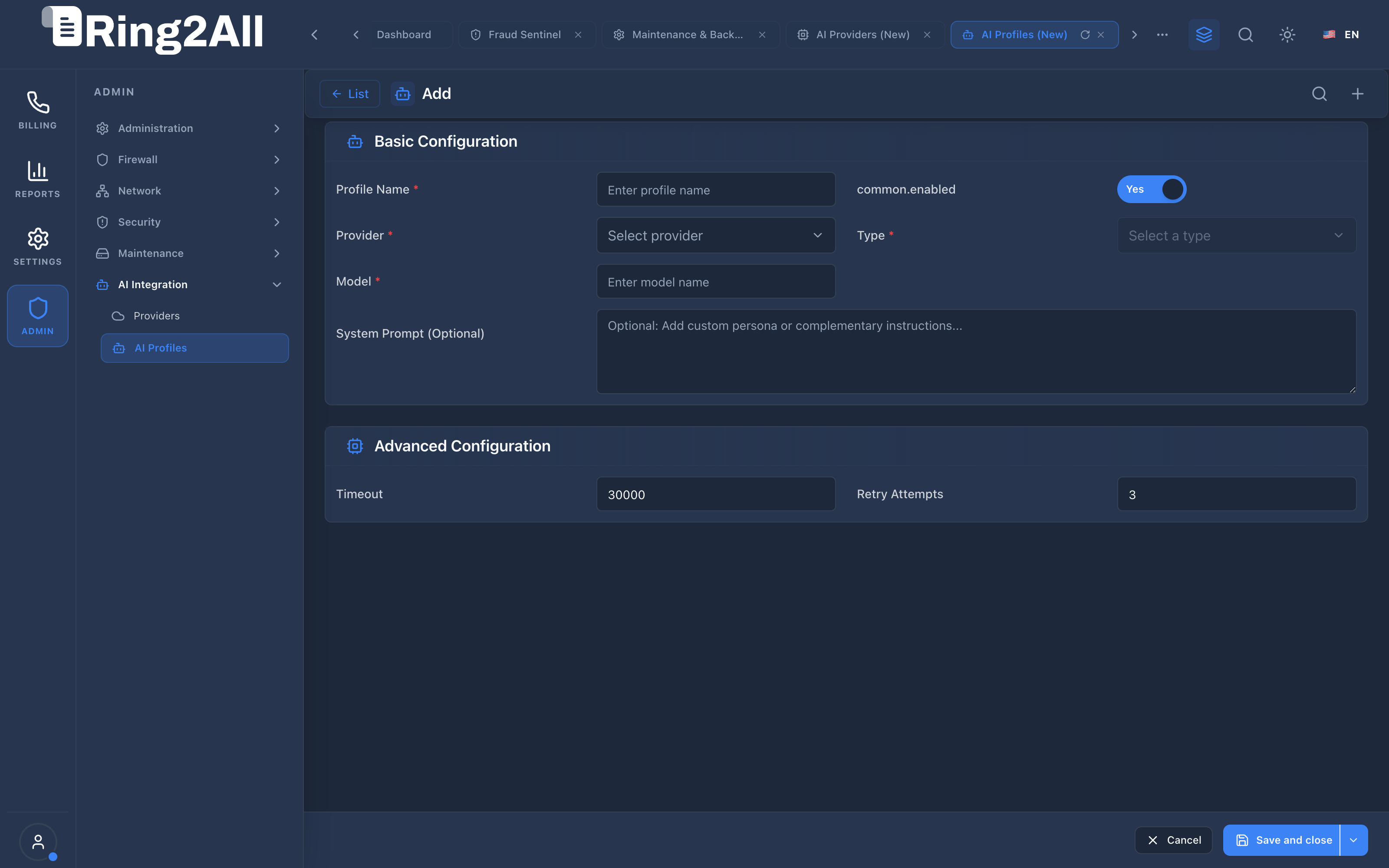
The Level 2 form organizes profile attributes into intuitive configuration cards:
- Header:
< List: Back button returning to the profiles grid.- Title:
Create NeworEdit AI Profile.
- Profile Configuration Fields:
Profile Name *: Unique operational title.Provider *: Dropdown selecting one of the active providers configured in the AI Providers module.Model *: Model identifier (e.g.,gpt-4o,claude-3-5-sonnet-20241022).Type: Operational category (General,Chatbot,Voice Assistant,Forensic Reasoner).Temperature: Slider or numeric field controlling output variance (0.0for strict logic,0.7for natural conversation).Max Tokens: Maximum generation limit per turn (e.g.,2048).System Prompt: Rich multiline text area defining the persona, instructions, and telecom boundaries.Active Status: Switch enabling the profile for platform consumption.
- Sticky Bottom Bar (
FixedActionBar):Cancel: Restores original values.Save and close: Persists profile configurations.
5. Architectural Flow & Security Governance
Section titled “5. Architectural Flow & Security Governance” ┌──────────────────────┐ │ Portal / Copilot User│ └──────────┬───────────┘ │ ▼ ┌────────────────────────────────────────────────────────┐ │ AI Profile Manager │ │ 1. Loads System Prompt & Temperature parameters │ │ 2. Enforces Max Token limits & context boundaries │ │ 3. Injects sanitized tenant billing data into context │ └──────────────────────────┬─────────────────────────────┘ │ ▼ ┌────────────────────────────────────────────────────────┐ │ AI Provider Gateway │ │ Routes request to authorized cloud or on-prem model │ └────────────────────────────────────────────────────────┘- Prompt Sanitization: Customer-specific proprietary data (e.g., credit card numbers, raw passwords) is stripped before prompt assembly.
- Deterministic Fallbacks: If a profile encounters an upstream provider rate limit, the dispatcher can automatically fallback to a secondary profile.
- Token Usage Bounds: Hard limits on
max_tokensprevent runaway billing costs during complex multi-turn automated interactions.
6. Common Scenarios & Operational Playbooks
Section titled “6. Common Scenarios & Operational Playbooks”Playbook A: Deploying a Forensic CDR Fraud Reasoner Profile
Section titled “Playbook A: Deploying a Forensic CDR Fraud Reasoner Profile”- Navigate to ADMIN > AI Integration > AI Profiles.
- Click + Add.
- Set Profile Name to
CDR Anomaly & Fraud Reasoner. - Select Provider as
DeepSeek Telecom Copilot. - Enter Model as
deepseek-reasoner. - Set Temperature to
0.1(ensuring rigorous analytical consistency). - In System Prompt, enter:
You are an expert telecommunications fraud investigator. Analyze call detail records, spend velocities, and routing prefixes to identify patterns of IRSF, PBX brute-forcing, and anomalous traffic bursts. Provide concise, bulleted explanations of detected threats.
- Click Save and close.
Playbook B: Tuning the General Billing Copilot
Section titled “Playbook B: Tuning the General Billing Copilot”- In the AI Profiles list, locate
Billing Copilot Pro. - Click the Edit (
Pencil) icon. - Adjust Temperature to
0.5for balanced, natural dialogue. - Set Max Tokens to
4096. - Click Save and close.
7. Troubleshooting & Diagnostic Commands
Section titled “7. Troubleshooting & Diagnostic Commands”Inspecting Profiles & Associated Providers via SQL
Section titled “Inspecting Profiles & Associated Providers via SQL”SELECT p.id, p.profile_name, prov.name AS provider_name, p.model, p.temperature, p.max_tokens, p.statusFROM public.ai_profiles pLEFT JOIN public.ai_providers prov ON prov.id = p.provider_idORDER BY p.id ASC;Validating Profile System Prompts
Section titled “Validating Profile System Prompts”SELECT id, profile_name, LENGTH(system_prompt) AS prompt_length, substring(system_prompt from 1 for 60) AS prompt_previewFROM public.ai_profiles;8. Model Context Protocol (MCP) AI Integration
Section titled “8. Model Context Protocol (MCP) AI Integration”The AI Profiles module connects directly to the Ring2All BSS MCP Server, providing administrators and cognitive orchestrators with programmatic tools to query profile templates, temperature boundaries, and active LLM model associations.
Available MCP Tools
Section titled “Available MCP Tools”| Tool Name | Access Role | Description & Primary Function | Example Arguments |
|---|---|---|---|
list_ai_profiles |
Super Administrator |
Lists configured AI persona profiles, system prompts, inference models, and temperature parameters. | {} |
Sample MCP Tool Execution: list_ai_profiles
Section titled “Sample MCP Tool Execution: list_ai_profiles”Request Payload
Section titled “Request Payload”{ "name": "list_ai_profiles", "arguments": {}}Response Payload
Section titled “Response Payload”[ { "id": 1, "profileName": "Billing Copilot Pro", "providerName": "OpenAI Production", "model": "gpt-4o", "temperature": 0.5, "maxTokens": 4096, "status": "active" }, { "id": 2, "profileName": "NOC Anomaly Analyst", "providerName": "Anthropic Claude Core", "model": "claude-3-5-sonnet-20241022", "temperature": 0.2, "maxTokens": 8192, "status": "active" }]Conversational AI Prompts for Copilot
Section titled “Conversational AI Prompts for Copilot”- “List all configured AI assistant profiles and their inference models.”
- “What is the active model and temperature configured for Billing Copilot Pro?”
- “Show all profiles utilizing Anthropic Claude Core.”
9. Glossary
Section titled “9. Glossary”- Temperature: A parameter between 0 and 2 that governs the randomness of the model’s output; lower values make outputs more focused and deterministic.
- Max Tokens: The maximum number of tokens that can be generated in the model’s completion response.
- System Prompt: The foundational instructions provided to the language model that establish its role, behavioral guidelines, constraints, and format requirements.
- Embeddings Model: A specialized model that converts text into high-dimensional vector representations for semantic search and retrieval-augmented generation (RAG).
- Model Context Protocol (MCP): Open protocol standard that enables secure, controlled integration between Large Language Models and external tools, databases, and telecom rating engines.