

Certificates Module Documentation
Table of Contents
Section titled “Table of Contents”- Navigation & Access
- Screenshots & Visual Interface
- Module Overview (Technical)
- Module Overview (Commercial/Business)
- Module Overview (End User/Administrator)
- Configuration Sections
- Settings Reference
- Common Scenarios & Examples
- Limitations & Important Notes
- Troubleshooting Tips
- Glossary
Navigation & Access
Section titled “Navigation & Access”To access the SSL/TLS Certificates module:
- Log in to the Ring2All Web Portal (
https://<domain-or-ip>/login). - In the left navigation sidebar, expand Administration.
- Under Network, click Certificates (
/admin/system-settings/certificates). - Click + Add Certificate or select an existing certificate to view or edit public certificates, private keys, Subject Alternative Names (SANs), auto-renewal rules, and service bindings for HTTPS, SIP TLS, and WebRTC WSS (
/admin/system-settings/certificates/:uuid).
Screenshots & Visual Interface
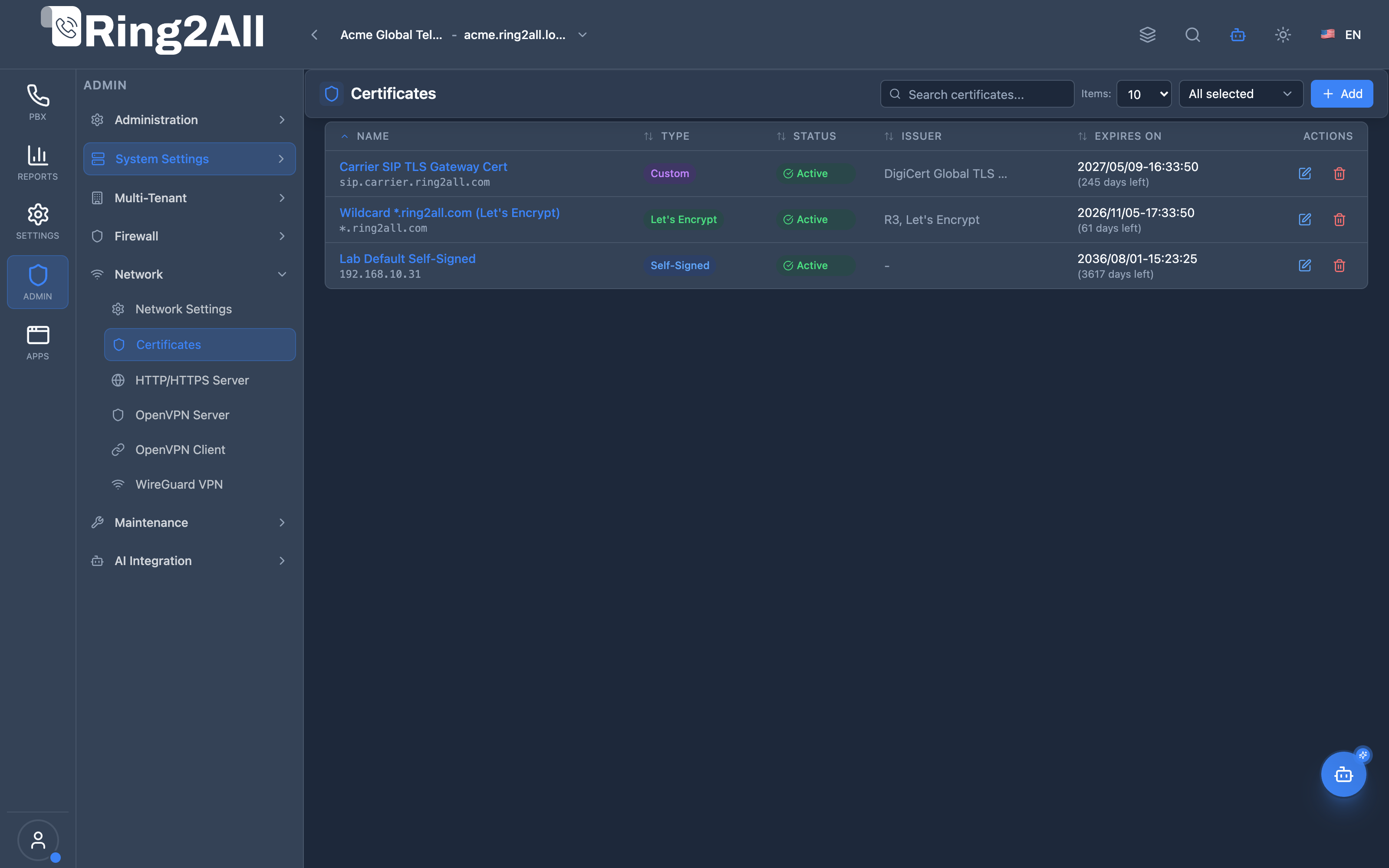
Section titled “Screenshots & Visual Interface”SSL/TLS Certificate Registry & Trust Vault
Section titled “SSL/TLS Certificate Registry & Trust Vault”Central certificate manager listing installed public certificates, issuance authorities (Let’s Encrypt ACME, Custom CA, Self-Signed), expiration horizons, auto-renewal indicators, and active service associations.
SSL/TLS Certificate Provisioning & Key Enrollment
Section titled “SSL/TLS Certificate Provisioning & Key Enrollment”Modal editor for enrolling new X.509 cryptographic pairs, selecting certificate providers, configuring domain SANs, uploading PEM cert chains and RSA/ECC private keys, and designating TLS application roles.
1. Module Overview (Technical)
Section titled “1. Module Overview (Technical)”What Is the Certificates Module?
Section titled “What Is the Certificates Module?”Certificates is an SSL/TLS certificate management module that handles certificate lifecycle for HTTPS, SIP TLS, and WebRTC. It supports Self-Signed, Let’s Encrypt (ACME), and Custom certificate types with usage assignment and auto-renewal.
Architecture
Section titled “Architecture”┌─────────────────────────────────────────────────────────────────┐│ Certificates Architecture │├─────────────────────────────────────────────────────────────────┤│ ││ Certificate Definition ││ ┌──────────────────────────────────────────────────────────┐ ││ │ Certificate: Production SSL │ ││ │ │ ││ │ Type: Let's Encrypt │ ││ │ Domain: pbx.company.com │ ││ │ SANs: sip.company.com, webrtc.company.com │ ││ │ │ ││ │ Status: ● Active │ ││ │ Expires: 2025-04-15 (90 days) │ ││ │ Auto Renew: ✓ │ ││ │ │ ││ │ Usage: │ ││ │ ├─ ✓ HTTPS │ ││ │ ├─ ✓ SIP TLS │ ││ │ └─ ✓ WebRTC │ ││ │ │ ││ └──────────────────────────────────────────────────────────┘ ││ │ ││ ▼ Applied to services ││ ┌──────────────────────────────────────────────────────────┐ ││ │ Services Using Certificate │ ││ │ │ ││ │ HTTPS (Nginx) │ ││ │ ├─ Admin panel │ ││ │ └─ API endpoints │ ││ │ │ ││ │ SIP TLS (Telephony Server) │ ││ │ ├─ Encrypted SIP registrations │ ││ │ └─ Secure voice traffic │ ││ │ │ ││ │ WebRTC (via Nginx Proxy) │ ││ │ ├─ Browser → wss://domain/ws (Nginx TLS on 443) │ ││ │ └─ Nginx → ws://127.0.0.1:5066 (Telephony Server local) │ ││ │ │ ││ └──────────────────────────────────────────────────────────┘ ││ │└─────────────────────────────────────────────────────────────────┘2. Module Overview (Commercial/Business)
Section titled “2. Module Overview (Commercial/Business)”Business Value
Section titled “Business Value”Certificates provides secure communications:
| Without Certificates | With Certificates |
|---|---|
| Insecure HTTP | HTTPS encrypted |
| Plain SIP | SIP TLS encrypted |
| No WebRTC | Secure WebRTC |
| Manual renewal | Auto-renewal |
Use Cases
Section titled “Use Cases”-
HTTPS Web Interface
- Secure admin panel
- API encryption
-
SIP TLS
- Encrypted registrations
- Secure voice traffic
-
WebRTC
- Browser calling via Nginx proxy (wss://domain/ws)
- TLS terminated at Nginx, forwarded as plain WS to Telephony Server
-
Let’s Encrypt
- Free certificates
- Automatic renewal
Feature Highlights
Section titled “Feature Highlights”| Feature | Benefit |
|---|---|
| Self-Signed | Quick setup |
| Let’s Encrypt | Free, auto-renew |
| Custom | Enterprise PKI |
| SANs | Multiple domains |
| Usage Config | Per-service assignment |
| Expiry Tracking | Alerts for renewal |
3. Module Overview (End User/Administrator)
Section titled “3. Module Overview (End User/Administrator)”What Can You Do?
Section titled “What Can You Do?”- Create self-signed certificates
- Request Let’s Encrypt certificates
- Upload custom certificates
- Configure Subject Alternative Names
- Assign certificates to services
- Enable auto-renewal
- Monitor expiration
Certificates Interface
Section titled “Certificates Interface”┌─────────────────────────────────────────────────────────────────┐│ Certificates │├─────────────────────────────────────────────────────────────────┤│ ││ Manage SSL/TLS certificates for HTTPS, SIP TLS, and WebRTC ││ ││ [+ Create Certificate] ││ ││ [🔍 Search certificates...] ││ ││ ┌───────────────────────────────────────────────────────────┐ ││ │ Name │ Type │ Domain │ Expires │ Usage│ ││ ├──────────────┼─────────────┼─────────────┼─────────┼──────┤ ││ │ Production │ Let's Enc. │ pbx.co.com │ 85 days │ H S W│ ││ │ Dev Cert │ Self-Signed │ dev.local │ 364 days│ H │ ││ │ Enterprise │ Custom │ *.corp.com │ 729 days│ H S W│ ││ └───────────────────────────────────────────────────────────┘ ││ ││ Usage: H=HTTPS, S=SIP TLS, W=WebRTC ││ │└─────────────────────────────────────────────────────────────────┘Create Certificate - Self-Signed
Section titled “Create Certificate - Self-Signed”┌─────────────────────────────────────────────────────────────────┐│ Create Certificate │├─────────────────────────────────────────────────────────────────┤│ ││ ▼ General Information ││ ││ Name: [Development Certificate ] ││ Description: [Local development use ] ││ Type: [Self-Signed ▼] ││ ││ ──────────────────────────────────────────────────────────────││ ││ ▼ Domain Configuration ││ ││ Domain: [dev.local ] ││ The primary domain name for this certificate ││ ││ Alt. Domains: ││ [+ Add Domain] ││ - sip.dev.local ││ - webrtc.dev.local ││ ││ ──────────────────────────────────────────────────────────────││ ││ ▼ Organization Information ││ ││ Organization: [My Company ] ││ Organization Unit: [IT Department ] ││ City: [New York ] ││ State/Province: [NY ] ││ Country: [US ] ││ ││ ──────────────────────────────────────────────────────────────││ ││ ▼ Self-Signed Options ││ ││ Key Size: [2048 ▼] (2048, 4096) ││ Validity Period: [365 ] days ││ ││ ──────────────────────────────────────────────────────────────││ ││ ▼ Usage Configuration ││ ││ Use for HTTPS: ✓ ││ Use for SIP TLS: ✓ ││ Use for WebRTC: ✓ ││ Set as Default: ✓ ││ ││ [Create Certificate] [Cancel] ││ │└─────────────────────────────────────────────────────────────────┘Create Certificate - Let’s Encrypt
Section titled “Create Certificate - Let’s Encrypt”┌─────────────────────────────────────────────────────────────────┐│ Create Certificate │├─────────────────────────────────────────────────────────────────┤│ ││ ▼ General Information ││ ││ Name: [Production SSL ] ││ Type: [Let's Encrypt ▼] ││ ││ ──────────────────────────────────────────────────────────────││ ││ ▼ Domain Configuration ││ ││ Domain: [pbx.company.com ] ││ ││ Alt. Domains: ││ - sip.company.com ││ - webrtc.company.com ││ ││ ──────────────────────────────────────────────────────────────││ ││ ▼ Let's Encrypt Configuration ││ ││ ACME Account Email: [admin@company.com ] ││ Required for certificate notifications ││ ││ Challenge Type: [HTTP-01 ▼] ││ HTTP-01 or DNS-01 ││ ││ Auto Renew: ✓ ││ Renew Before: [30 ] days ││ ││ ℹ️ The certificate will be automatically requested from ││ Let's Encrypt. Make sure your domain is publicly accessible. ││ ││ ──────────────────────────────────────────────────────────────││ ││ ▼ Usage Configuration ││ ││ Use for HTTPS: ✓ ││ Use for SIP TLS: ✓ ││ Use for WebRTC: ✓ ││ ││ [Create Certificate] [Cancel] ││ │└─────────────────────────────────────────────────────────────────┘Create Certificate - Custom
Section titled “Create Certificate - Custom”┌─────────────────────────────────────────────────────────────────┐│ Create Certificate │├─────────────────────────────────────────────────────────────────┤│ ││ ▼ General Information ││ ││ Name: [Enterprise Wildcard ] ││ Type: [Custom ▼] ││ ││ ──────────────────────────────────────────────────────────────││ ││ ▼ Certificate Data ││ ││ Certificate (PEM): ││ ┌─────────────────────────────────────────────────────────────┐││ │ -----BEGIN CERTIFICATE----- │││ │ MIIDxTCCAq2gAwIBAgIJAJJp+C... │││ │ -----END CERTIFICATE----- │││ └─────────────────────────────────────────────────────────────┘││ ││ Private Key (PEM): ││ ┌─────────────────────────────────────────────────────────────┐││ │ -----BEGIN RSA PRIVATE KEY----- │││ │ MIIEpAIBAAKCAQEA0Z3VS... │││ │ -----END RSA PRIVATE KEY----- │││ └─────────────────────────────────────────────────────────────┘││ ││ Certificate Chain (CA Bundle): ││ ┌─────────────────────────────────────────────────────────────┐││ │ Optional: Paste intermediate CA certificates │││ └─────────────────────────────────────────────────────────────┘││ ││ [Validate Certificate] ││ ✓ Private key matches certificate ││ ││ [Create Certificate] [Cancel] ││ │└─────────────────────────────────────────────────────────────────┘Quick Tips
Section titled “Quick Tips”[!TIP] Let’s Encrypt: Free, auto-renewing, trusted by browsers.
[!TIP] SANs: Add all needed domains in one certificate.
[!WARNING] Private Key: Keep private keys secure. Never share.
4. Configuration Sections
Section titled “4. Configuration Sections”General Information
Section titled “General Information”| Field | Description |
|---|---|
| Name | Certificate identifier |
| Description | Optional notes |
| Type | Self-Signed, Let’s Encrypt, Custom |
Domain Configuration
Section titled “Domain Configuration”| Field | Description |
|---|---|
| Domain | Primary domain (CN) |
| Alt. Domains | Subject Alternative Names |
Organization (Self-Signed)
Section titled “Organization (Self-Signed)”| Field | Description |
|---|---|
| Organization | Company name |
| Organization Unit | Department |
| City | Locality |
| State/Province | Region |
| Country | Country code |
Self-Signed Options
Section titled “Self-Signed Options”| Field | Description |
|---|---|
| Key Size | 2048 or 4096 bits |
| Validity Period | Days until expiry |
Let’s Encrypt Configuration
Section titled “Let’s Encrypt Configuration”| Field | Description |
|---|---|
| ACME Email | Notification address |
| Challenge Type | HTTP-01 or DNS-01 |
| Auto Renew | Enable auto-renewal |
| Renew Before | Days before expiry |
Certificate Data (Custom)
Section titled “Certificate Data (Custom)”| Field | Description |
|---|---|
| Certificate (PEM) | Public certificate |
| Private Key (PEM) | Private key |
| Certificate Chain | CA bundle |
Usage Configuration
Section titled “Usage Configuration”| Field | Description |
|---|---|
| Use for HTTPS | Web traffic |
| Use for SIP TLS | SIP encryption |
| Use for WebRTC | WSS protocol |
| Set as Default | Default certificate |
5. Settings Reference
Section titled “5. Settings Reference”Certificate Types
Section titled “Certificate Types”| Type | Description | Use Case |
|---|---|---|
| Self-Signed | Generated locally | Development, internal |
| Let’s Encrypt | Free, auto ACME | Production, public |
| Custom | Upload your own | Enterprise PKI |
Certificate Status
Section titled “Certificate Status”| Status | Meaning |
|---|---|
| Pending | Being issued |
| Active | Valid and in use |
| Expired | Past validity date |
| Revoked | Manually revoked |
| Error | Issue/validation error |
Key Sizes
Section titled “Key Sizes”| Size | Security | Performance |
|---|---|---|
| 2048 | Good | Faster |
| 4096 | Better | Slower |
6. Common Scenarios & Examples
Section titled “6. Common Scenarios & Examples”Scenario 1: Self-Signed for Development
Section titled “Scenario 1: Self-Signed for Development”- Create Certificate
- Type = Self-Signed
- Domain = dev.local
- Key Size = 2048
- Validity = 365 days
- Enable all usage
- Create
Scenario 2: Let’s Encrypt for Production
Section titled “Scenario 2: Let’s Encrypt for Production”- Create Certificate
- Type = Let’s Encrypt
- Domain = pbx.company.com
- Add SANs for sip and webrtc
- Enter ACME email
- Enable Auto Renew
- Create (waits for validation)
Scenario 3: Upload Enterprise Certificate
Section titled “Scenario 3: Upload Enterprise Certificate”- Create Certificate
- Type = Custom
- Paste certificate PEM
- Paste private key PEM
- Paste CA bundle (if any)
- Validate (key match check)
- Configure usage
- Create
Scenario 4: Add Domain to Existing
Section titled “Scenario 4: Add Domain to Existing”- Edit certificate
- Add new Alt. Domain
- Save
- (Let’s Encrypt re-validates)
7. Limitations & Important Notes
Section titled “7. Limitations & Important Notes”Technical Notes
Section titled “Technical Notes”[!NOTE] Let’s Encrypt: Domain must be publicly accessible.
[!NOTE] Rate Limits: Let’s Encrypt has issuance limits.
[!WARNING] Key Security: Never expose private keys.
Best Practices
Section titled “Best Practices”- Use Let’s Encrypt: Free and trusted
- Auto Renew: Prevent expiry
- Include SANs: All needed domains
- Strong Keys: Use 2048+ bits
- Monitor Expiry: Watch warning alerts
Let’s Encrypt Requirements
Section titled “Let’s Encrypt Requirements”| Requirement | Details |
|---|---|
| Public DNS | Domain must resolve |
| Port 80 | HTTP-01 challenge |
| No Firewall | Allow Let’s Encrypt |
| Valid Email | Notifications |
8. Troubleshooting Tips
Section titled “8. Troubleshooting Tips”Common Issues
Section titled “Common Issues”| Symptom | Possible Cause | Solution |
|---|---|---|
| Let’s Encrypt fails | DNS not public | Check DNS resolution |
| Key mismatch | Wrong private key | Verify key matches cert |
| Browser warning | Self-signed | Use Let’s Encrypt |
| Expired | Renewal failed | Manually renew |
Check Certificate
Section titled “Check Certificate”# View certificate detailsopenssl x509 -in cert.pem -text -noout
# Check expiryopenssl x509 -in cert.pem -enddate -noout
# Verify key matches certopenssl x509 -noout -modulus -in cert.pem | openssl md5openssl rsa -noout -modulus -in key.pem | openssl md5Test HTTPS
Section titled “Test HTTPS”# Test certificate chainopenssl s_client -connect pbx.company.com:443 -servername pbx.company.com
# Check Let's Encrypt validationcurl -I http://pbx.company.com/.well-known/acme-challenge/test9. Glossary
Section titled “9. Glossary”| Term | Definition |
|---|---|
| SSL/TLS | Encryption protocols |
| PEM | Certificate text format |
| SANs | Subject Alternative Names |
| ACME | Let’s Encrypt protocol |
| CA | Certificate Authority |
| Fingerprint | Certificate hash |
Documentation last updated: January 2026