

Payment Gateways & Electronic Settlement Module Documentation
Table of Contents
Section titled “Table of Contents”- Module Overview (Technical)
- Module Overview (Commercial & Business Value)
- 🎯 User Roles & Key Capabilities
- Visual Interface & Form Structure
- Architectural Flow & Automated Payment Settlement
- Common Scenarios & Operational Playbooks
- Troubleshooting & Diagnostic Commands
- Model Context Protocol (MCP) AI Integration
- Glossary
1. Module Overview (Technical)
Section titled “1. Module Overview (Technical)”The Payment Gateways & Electronic Settlement module manages the global integrations connecting Ring2All Billing to external merchant banking, credit card processing, and digital wallet payment gateways. It provides out-of-the-box support for:
- Stripe Payments & Stripe Connect: Hosted Elements, PaymentIntents API, Customer PaymentMethods tokenization, and cryptographically verified Webhooks (
whsec_...). - PayPal REST Gateway: Digital wallet capture and Instant Payment Notification (IPN) webhooks.
- Manual Bank Wire & Remittance: Institutional ACH, Fedwire, and SEPA remittance instructions with customizable bank routing metadata and payment memo reconciliation.
PCI-DSS SAQ A Compliance Architecture
Section titled “PCI-DSS SAQ A Compliance Architecture”Payment card data (PAN, CVV, expiry dates) is captured exclusively via client-side hosted iframes (Stripe Elements / Stripe Checkout). Sensitive financial credentials never traverse or touch the Ring2All Billing application servers, ensuring strict PCI-DSS SAQ A level compliance. Only cryptographically opaque tokens (pm_..., cus_...) are stored in the database.
2. Module Overview (Commercial & Business Value)
Section titled “2. Module Overview (Commercial & Business Value)”- Instant Customer Self-Care Monetization: Enables clients in the Customer Portal to execute instant prepaid wallet top-ups via debit/credit cards, keeping services active 24/7.
- Automated Postpaid Auto-Debit: Automatically charges customer saved payment methods upon completion of monthly billing sweeps, slashing Days Sales Outstanding (DSO) and bad debt.
- Global Multi-Currency Settlement: Supports billing and receiving customer settlements in USD, EUR, CAD, GBP, and Latin American currencies with automatic currency conversion.
- Low-Fee Wholesale Wire Remittance: Directs large-scale wholesale carrier interconnect clients to bank wire transfer options, eliminating credit card interchange processing fees on high-volume accounts.
3. 🎯 User Roles & Key Capabilities
Section titled “3. 🎯 User Roles & Key Capabilities”| User Role | Key Permissions | Core Responsibilities & Workflows |
|---|---|---|
| Super Administrator | Full Control & API Key Management | Inputs live production API keys, manages merchant account settings, and configures webhook endpoints. |
| Chief Financial Officer / Controller | Read & Bank Details Edit | Defines institutional wire transfer details, audits merchant transaction fees, and reconciles Stripe payouts. |
| Billing Analyst | Payment Verification | Matches incoming manual wire transfer deposits with customer ledger invoices and manually credits customer wallets. |
| End Customer (Portal User) | Online Checkout & Auto-Debit | Saves default credit cards for automatic monthly invoice clearance and initiates one-click prepaid wallet refills. |
4. Visual Interface & Form Structure
Section titled “4. Visual Interface & Form Structure”4.1 Payment Gateways Management (View)
Section titled “4.1 Payment Gateways Management (View)”The Payment Gateways interface consolidates all payment processors into dedicated, structured configuration boxes featuring toggle switches, API key visibility masking, and webhook URL copying.
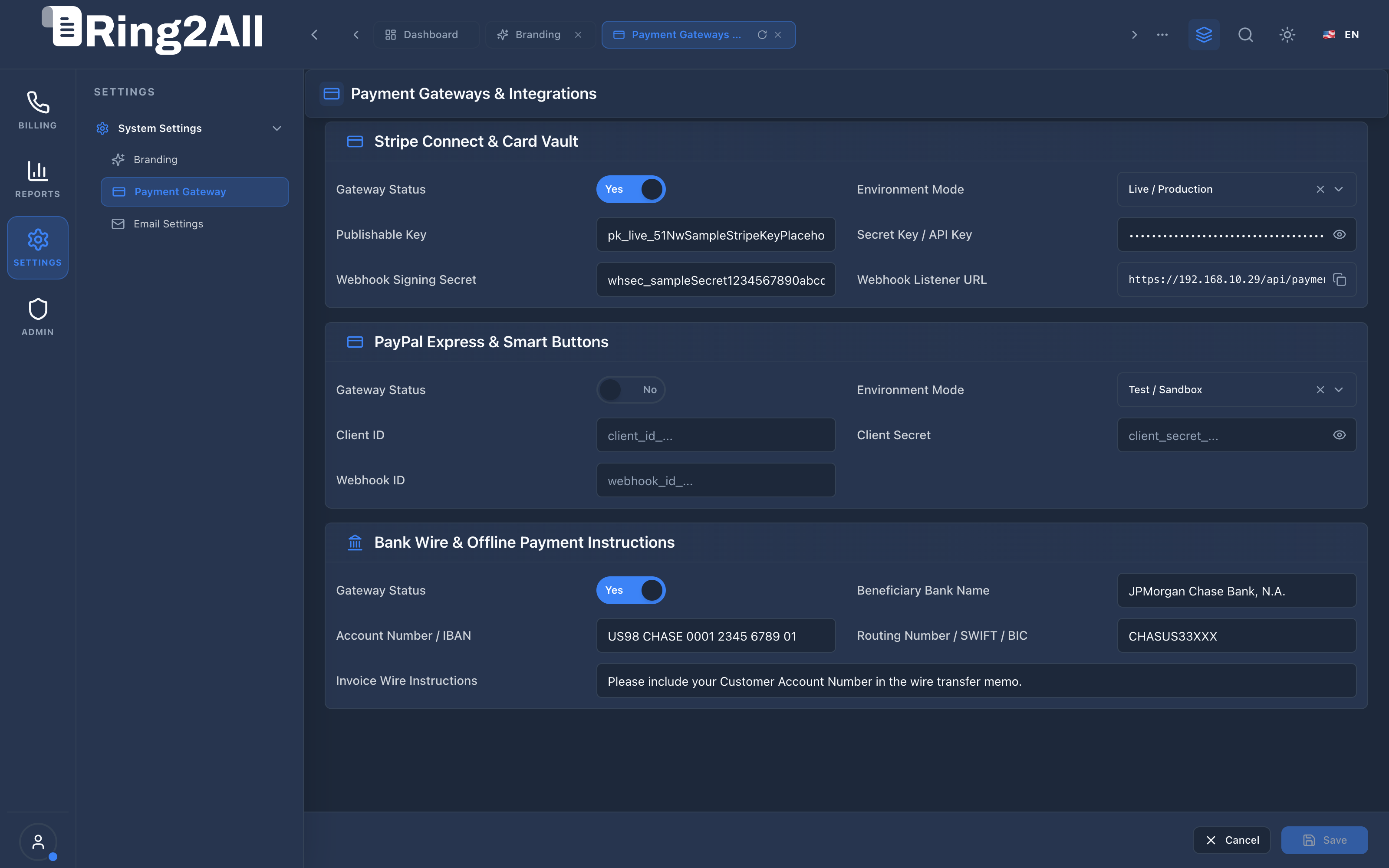
4.2 Configuration Parameters Reference
Section titled “4.2 Configuration Parameters Reference”| Parameter Name | Data Type | Required | Default Value | Description & Constraints |
|---|---|---|---|---|
| Stripe Gateway Enabled | Boolean |
Yes | true |
Activates credit/debit card checkout and auto-debit processing across the platform. |
| Stripe Operation Mode | Enum |
Yes | live |
Operation environment: test (sandbox using test card 4242) or live (production charges). |
| Stripe Publishable Key | String |
Yes (if enabled) | — | Public API key (pk_live_... or pk_test_...) used by client-side checkout iframes. |
| Stripe Secret Key | String |
Yes (if enabled) | — | Restricted backend secret key (sk_live_... or sk_test_...) used to create PaymentIntents. |
| Stripe Webhook Secret | String |
Yes (if enabled) | — | Signing secret (whsec_...) used to cryptographically verify incoming Stripe event webhooks. |
| PayPal Gateway Enabled | Boolean |
Yes | false |
Enables PayPal button checkout in the Customer Self-Care Portal. |
| PayPal Client ID / Secret | String |
No | — | OAuth 2.0 API credentials from the PayPal Developer Portal. |
| Bank Wire Instructions | Text |
No | Default Wire Memo | Wire instructions, bank name, IBAN/SWIFT, and mandatory customer account reference format. |
5. Architectural Flow & Automated Payment Settlement
Section titled “5. Architectural Flow & Automated Payment Settlement” ┌────────────────────────────────────────────────────────────────────────┐ │ Monthly Billing Sweep Finalizes Customer Invoice │ └───────────────────────────────────┬────────────────────────────────────┘ │ ▼ ┌────────────────────────────────────────────────────────────────────────┐ │ Step 1: Check Customer Default Payment Method │ │ • If Postpaid & Auto-Debit Enabled: Load `customer.stripe_customer_id`│ │ • Create `PaymentIntent` via Stripe REST API │ └───────────────────────────────────┬────────────────────────────────────┘ │ ▼ ┌────────────────────────────────────────────────────────────────────────┐ │ Step 2: External Payment Execution & Gateway Processing │ │ • Stripe executes charge against customer card with cardholder bank │ │ • Gateway dispatches asynchronous webhook: `invoice.payment_succeeded`│ └───────────────────────────────────┬────────────────────────────────────┘ │ ▼ ┌────────────────────────────────────────────────────────────────────────┐ │ Step 3: Webhook Verification & Ledger Clearance │ │ • Verify `Stripe-Signature` using `stripe_webhook_secret` │ │ • Mark Invoice status as `paid` in `public.invoices` │ │ • Insert payment transaction into `public.transactions` │ │ • Send PDF receipt notification to customer primary email │ └────────────────────────────────────────────────────────────────────────┘6. Common Scenarios & Operational Playbooks
Section titled “6. Common Scenarios & Operational Playbooks”Scenario A: Configuring Stripe Webhook Integration
Section titled “Scenario A: Configuring Stripe Webhook Integration”- In the Payment Gateways module, locate the Stripe Webhook Endpoint URL field and click Copy.
- Log into the Stripe Dashboard (
https://dashboard.stripe.com). - Navigate to Developers → Webhooks → Add Endpoint.
- Paste the copied URL (
https://billing.yourdomain.com/api/payments/webhooks/stripe). - Select events:
payment_intent.succeeded,payment_intent.payment_failed, andcharge.refunded. - Reveal the Signing Secret (
whsec_...), copy it into the Stripe Webhook Secret field in Ring2All Billing, and click Save Changes.
Scenario B: Testing Sandbox Transactions with Test Cards
Section titled “Scenario B: Testing Sandbox Transactions with Test Cards”- Set Stripe Operation Mode to
test. - Input test API keys (
pk_test_...andsk_test_...). - Open the Customer Self-Care Portal in a separate browser tab.
- Execute a wallet top-up using test card
4242 4242 4242 4242with any future expiry date and 3-digit CVC. - Verify that the wallet balance credits immediately upon successful mock charge.
7. Troubleshooting & Diagnostic Commands
Section titled “7. Troubleshooting & Diagnostic Commands”Inspect Gateway Settings in Browser Storage / Database
Section titled “Inspect Gateway Settings in Browser Storage / Database”// Test retrieval from local configuration cacheconsole.log(JSON.parse(localStorage.getItem('ring2all_billing_gateway_settings') || '{}'));Query Recent Failed Stripe Transactions
Section titled “Query Recent Failed Stripe Transactions”SELECT t.id, c.name, t.amount, t.gateway, t.status, t.error_message, t.created_atFROM transactions tJOIN customers c ON c.id = t.customer_idWHERE t.gateway = 'stripe' AND t.status = 'failed'ORDER BY t.created_at DESCLIMIT 10;8. Model Context Protocol (MCP) AI Integration
Section titled “8. Model Context Protocol (MCP) AI Integration”The Payment Gateways & Electronic Settlement module connects directly to the Ring2All BSS MCP Server, allowing billing administrators and autonomous finance copilots to verify merchant gateway connectivity and test/live mode flags safely without exposing private API keys.
Available MCP Tools
Section titled “Available MCP Tools”| Tool Name | Access Role | Description & Primary Function | Example Arguments |
|---|---|---|---|
list_payment_gateways_status |
Billing Operations / Admin |
Lists merchant payment gateways (Stripe, PayPal, Bank Wire) with configuration status, currencies, and test/live mode. | {} |
Sample MCP Tool Execution: list_payment_gateways_status
Section titled “Sample MCP Tool Execution: list_payment_gateways_status”Request Payload
Section titled “Request Payload”{ "name": "list_payment_gateways_status", "arguments": {}}Response Payload
Section titled “Response Payload”[ { "gateway": "stripe", "displayName": "Stripe Payments", "isEnabled": true, "mode": "live", "supportedCurrencies": ["USD", "EUR", "GBP", "CAD"], "webhookConfigured": true }, { "gateway": "paypal", "displayName": "PayPal REST", "isEnabled": false, "mode": "sandbox", "supportedCurrencies": ["USD", "EUR"], "webhookConfigured": false }, { "gateway": "bank_wire", "displayName": "Wire Transfer / Remittance", "isEnabled": true, "mode": "live", "supportedCurrencies": ["USD"], "webhookConfigured": false }]Conversational AI Prompts for Copilot
Section titled “Conversational AI Prompts for Copilot”- “Which payment gateways are currently enabled in production mode?”
- “Is the Stripe payment gateway properly configured with active webhooks?”
- “What currencies are supported for customer self-care top-ups?”
9. Glossary
Section titled “9. Glossary”- ACH (Automated Clearing House): Electronic bank-to-bank payment network in the United States.
- Auto-Debit: Automated pull transaction where the merchant charges the customer’s stored credit card without requiring interactive authentication.
- PaymentIntent: The foundational object in Stripe representing a customer’s intent to pay with full 3D Secure SCA handling.
- PCI-DSS: Payment Card Industry Data Security Standard governing how cardholder information is protected.
- SAQ A: Self-Assessment Questionnaire validating that cardholder data is completely outsourced to a validated third party (Stripe).
- Model Context Protocol (MCP): Open protocol standard that enables secure, controlled integration between Large Language Models and external tools, databases, and telecom rating engines.