

My Activity Module Documentation
Table of Contents
Section titled “Table of Contents”- Navigation & Access
- Screenshots & Visual Interface
- Module Overview (Technical)
- Module Overview (Commercial/Business)
- Module Overview (End User/Administrator)
- Activity Fields Reference
- Common Scenarios & Examples
- Limitations & Important Notes
- Troubleshooting Tips
- Glossary
- Model Context Protocol (MCP) AI Integration
Navigation & Access
Section titled “Navigation & Access”To access the User Activity (My Activity) interface:
- Log in to the Ring2All Web Portal (
https://<domain-or-ip>/login). - In the left navigation sidebar, expand Reports.
- Under System Reports, click User Activity (
/reports/system/user-activity). - Inspect your individual session actions, login events, and resource modifications.
Screenshots & Visual Interface
Section titled “Screenshots & Visual Interface”User Activity Individual Audit Ledger
Section titled “User Activity Individual Audit Ledger”Personal activity trail filtering system events down strictly to the authenticated user account, detailing operational timestamps, event descriptions, targeted modules, and IP addresses.
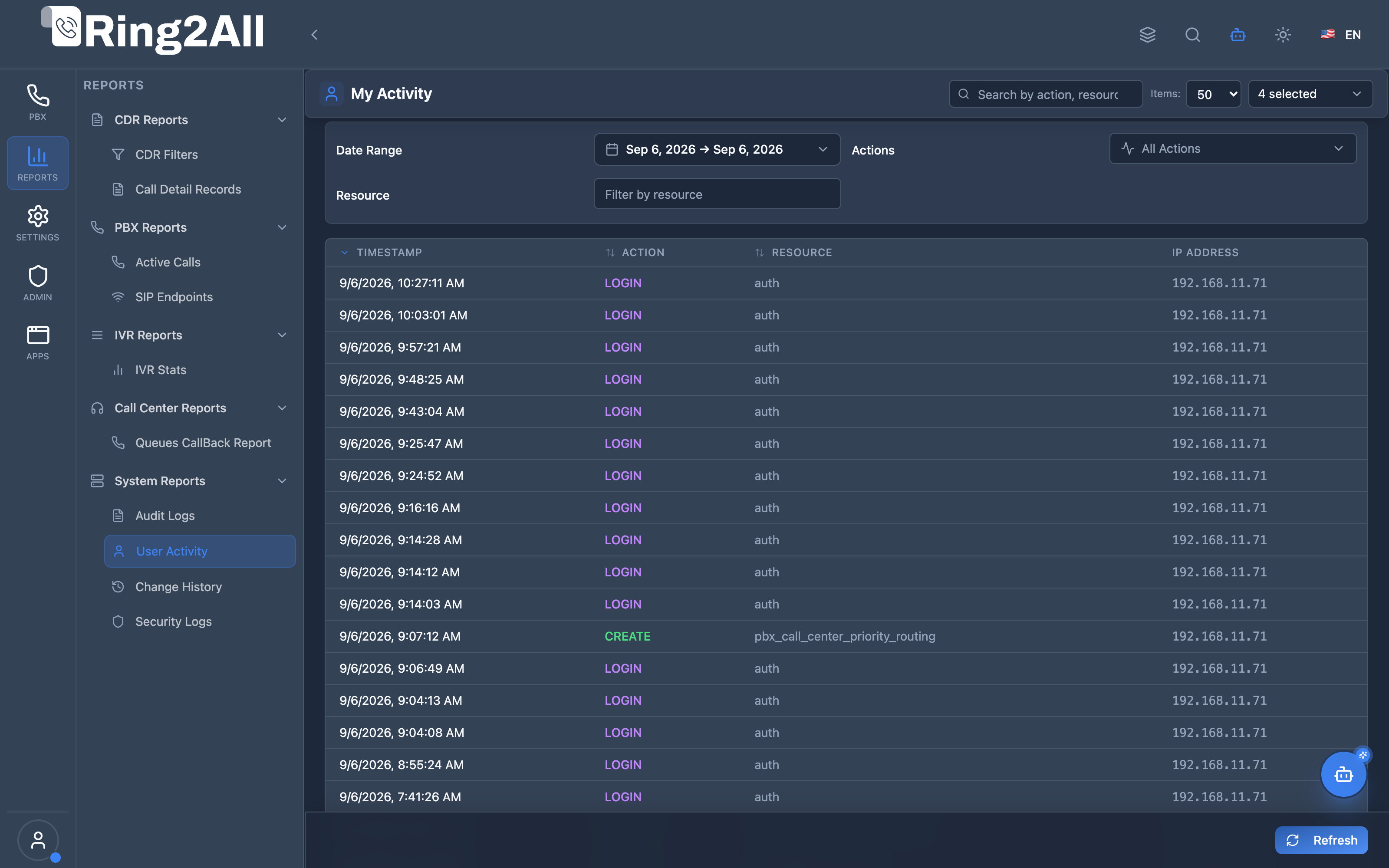
1. Module Overview (Technical)
Section titled “1. Module Overview (Technical)”What Is My Activity?
Section titled “What Is My Activity?”My Activity is a personal audit log viewer that displays the current user’s own activity in the system. Unlike the full Audit Logs (which shows all users), My Activity is limited to the logged-in user’s actions, providing personal accountability and activity review.
Architecture
Section titled “Architecture”┌─────────────────────────────────────────────────────────────────┐│ My Activity Architecture │├─────────────────────────────────────────────────────────────────┤│ ││ User Actions ││ ┌──────────────────────────────────────────────────────────┐ ││ │ Any Module │ ││ │ │ ││ │ User creates, updates, deletes records │ ││ │ User logs in/out │ ││ │ User exports data │ ││ │ │ ││ └──────────────────────────────────────────────────────────┘ ││ │ ││ ▼ Logged to audit_logs with user_id ││ ┌──────────────────────────────────────────────────────────┐ ││ │ public.audit_logs │ ││ │ │ ││ │ | action | resource | user_id | ip | timestamp | meta | │ ││ │ │ ││ └──────────────────────────────────────────────────────────┘ ││ │ ││ ▼ Filtered by current user ││ ┌──────────────────────────────────────────────────────────┐ ││ │ My Activity Page │ ││ │ │ ││ │ WHERE user_id = current_user │ ││ │ │ ││ │ ┌─────────────────────────────────────────────────────┐ │ ││ │ │Timestamp│Action │Resource│Res ID│IP │Details │ │ ││ │ ├─────────┼───────┼────────┼──────┼─────────┼────────┤ │ ││ │ │10:30:45 │UPDATE │extensn │ 123 │192.168.1│ [👁️] │ │ ││ │ │10:25:12 │CREATE │user │ 456 │192.168.1│ [👁️] │ │ ││ │ │10:20:00 │LOGIN │session │ - │192.168.1│ [👁️] │ │ ││ │ └─────────────────────────────────────────────────────┘ │ ││ │ │ ││ └──────────────────────────────────────────────────────────┘ ││ │└─────────────────────────────────────────────────────────────────┘2. Module Overview (Commercial/Business)
Section titled “2. Module Overview (Commercial/Business)”Business Value
Section titled “Business Value”My Activity provides personal accountability:
| Without My Activity | With My Activity |
|---|---|
| Unknown own history | Full personal trail |
| Forgotten changes | Easy activity recall |
| No self-audit | Personal accountability |
| Memory-dependent | Logged record |
Use Cases
Section titled “Use Cases”-
Personal Activity Review
- “What did I change yesterday?”
- Review own recent actions
-
Self-Audit
- Verify own actions
- Check for errors
-
Session Tracking
- View own login history
- Check access from different IPs
-
Change Recall
- Find what you modified
- Confirm changes were saved
Feature Highlights
Section titled “Feature Highlights”| Feature | Benefit |
|---|---|
| Personal Only | Only your actions |
| Action Types | Create/Update/Delete |
| IP Tracking | See access locations |
| Metadata View | Change details |
| Date Filtering | Historical queries |
| Quick Search | Find specific actions |
3. Module Overview (End User/Administrator)
Section titled “3. Module Overview (End User/Administrator)”What Can You Do?
Section titled “What Can You Do?”- View your own activity history
- Filter by date range
- Filter by action type
- Search by resource or IP
- View change details/metadata
- Track login sessions
My Activity Interface
Section titled “My Activity Interface”┌─────────────────────────────────────────────────────────────────┐│ My Activity │├─────────────────────────────────────────────────────────────────┤│ ││ Filters: ││ ├─ Range: [Today ▼] ││ ├─ Actions: [All Actions ▼] ││ ├─ Resource: [ ] ││ └─ [🔄 Refresh] [Clear Filters] ││ ││ 🔍 [Search by action, resource, or IP address... ] ││ ││ ┌───────────────────────────────────────────────────────────┐ ││ │ Timestamp │ Action │ Resource │ Res ID │ IP │👁️│ ││ ├──────────────┼─────────┼───────────┼────────┼─────────┼──┤ ││ │ 01/16 10:30 │ Update │ extension │ 123 │ 192.168 │👁️│ ││ │ 01/16 10:28 │ Create │ user │ 456 │ 192.168 │👁️│ ││ │ 01/16 10:25 │ Delete │ gateway │ 789 │ 192.168 │👁️│ ││ │ 01/16 10:00 │ Login │ session │ - │ 192.168 │👁️│ ││ │ 01/15 18:30 │ Logout │ session │ - │ 192.168 │👁️│ ││ └───────────────────────────────────────────────────────────┘ ││ ││ Showing 1-25 of 156 records ││ │└─────────────────────────────────────────────────────────────────┘Quick Tips
Section titled “Quick Tips”[!TIP] View Details: Click 👁️ to see full metadata including old/new values.
[!TIP] Quick Ranges: Use Today, 7 Days, 15 Days, 30 Days for fast filtering.
[!NOTE] Personal Only: You can only see your own activity, not others’.
4. Activity Fields Reference
Section titled “4. Activity Fields Reference”Display Columns
Section titled “Display Columns”| Column | Description |
|---|---|
| ID | Unique activity ID |
| Timestamp | When action occurred |
| Action | Type of action |
| Resource | What was affected |
| Resource ID | Specific item ID |
| IP Address | Your access IP |
| User Agent | Browser/client info |
| Details | View metadata button |
Action Types
Section titled “Action Types”| Action | Description |
|---|---|
| Create | New record created |
| Update | Record modified |
| Delete | Record removed |
| Login | You logged in |
| Logout | You logged out |
| Read | Data accessed |
| Execute | Command executed |
5. Common Scenarios & Examples
Section titled “5. Common Scenarios & Examples”Scenario 1: What Did I Change Today?
Section titled “Scenario 1: What Did I Change Today?”- Set Range to “Today”
- Review all your actions
- Click Details for specifics
Scenario 2: Find a Specific Edit
Section titled “Scenario 2: Find a Specific Edit”- Filter by Action “Update”
- Search for resource name
- View metadata for changes
Scenario 3: Check Login History
Section titled “Scenario 3: Check Login History”- Filter Action by “Login”
- Review login times
- Check IP addresses
Scenario 4: Verify a Deletion
Section titled “Scenario 4: Verify a Deletion”- Filter Action by “Delete”
- Find the record
- View metadata for deleted item details
6. Limitations & Important Notes
Section titled “6. Limitations & Important Notes”Technical Notes
Section titled “Technical Notes”[!NOTE] Personal Only: Only shows your own activity.
[!NOTE] Read-Only: Activity logs cannot be modified.
[!WARNING] Not Real-time: Click Refresh for latest.
Best Practices
Section titled “Best Practices”- Regular Review: Check your activity periodically
- Verify Changes: Confirm important edits were saved
- Check IPs: Monitor for unusual access locations
- Use Filters: Quickly find specific actions
- View Details: Check metadata for full context
7. Troubleshooting Tips
Section titled “7. Troubleshooting Tips”Common Issues
Section titled “Common Issues”| Symptom | Possible Cause | Solution |
|---|---|---|
| No records | Too restrictive filter | Clear filters |
| Missing action | Not logged | Some actions may not be tracked |
| Wrong date | Date filter | Check date range |
| No details | Minimal metadata | Some actions have limited details |
| Old data | Not refreshed | Click Refresh |
Comparison: My Activity vs Audit Logs
Section titled “Comparison: My Activity vs Audit Logs”| Feature | My Activity | Audit Logs |
|---|---|---|
| Scope | Current user only | All users |
| Purpose | Personal review | Admin oversight |
| Access | Any user | Admin only |
| Data | Same format | Same format |
8. Glossary
Section titled “8. Glossary”| Term | Definition |
|---|---|
| Activity | Single logged action |
| Action | Type of operation |
| Resource | Object affected |
| Metadata | Additional change details |
| Session | Login/logout period |
| User Agent | Browser identification |
9. Model Context Protocol (MCP) AI Integration
Section titled “9. Model Context Protocol (MCP) AI Integration”The Ring2All Platform Copilot enables users and system administrators to review their own operational actions, login history, and configuration edits via the Model Context Protocol (MCP).
Exposed MCP Tools
Section titled “Exposed MCP Tools”| Tool Name | Operation | Primary Parameters | Description |
|---|---|---|---|
get_user_activity |
Personal Activity Trail | userId (number, optional), username (string, optional), limit (number, default: 25) |
Fetches operations, changes, and authentication sessions performed by the authenticated user account. |
query_audit_logs |
General Audit Search | search (string, optional), action (string, optional), limit (number) |
Queries audit events with free-text search across change details and IP addresses. |
Operational Safeguards & Identity Scoping
Section titled “Operational Safeguards & Identity Scoping”- Self-Identity Default: In user-scoped sessions,
get_user_activityautomatically binds tocontext.userId. Standard users cannot query activity logs belonging to other staff members. - Tenant Confinement: Requests are strictly bound to
context.tenantId, preventing cross-tenant visibility. - Audit Tamper Resistance: Activity records are read directly from the immutable
ss_logs.audit_logsledger.
Example MCP Payloads
Section titled “Example MCP Payloads”1. Querying My Recent Administrative Actions (get_user_activity)
Section titled “1. Querying My Recent Administrative Actions (get_user_activity)”{ "limit": 10}Response:
{ "success": true, "data": { "userId": 3, "total": 2, "activities": [ { "id": "e817a012-3321-419b-88a2-aa9182740201", "action": "UPDATE", "resource": "sip_extensions", "resourceId": "1004", "user": "Rodrigo Cuadra (admin)", "ipAddress": "190.212.45.18", "details": { "field": "voicemail_enabled", "value": true }, "timestamp": "2026-09-08T09:12:00.000Z" }, { "id": "b71949cc-1142-4912-881a-bb1928471182", "action": "LOGIN", "resource": "auth", "resourceId": "3", "user": "Rodrigo Cuadra (admin)", "ipAddress": "190.212.45.18", "details": { "method": "password_argon2id" }, "timestamp": "2026-09-08T08:30:15.000Z" } ] }}Copilot Natural Language Prompts
Section titled “Copilot Natural Language Prompts”- “What actions have I performed in the system today?”
- “When was the last time I logged into the Ring2All Web Portal?”
- “Show me all extension edits I completed during the last 48 hours.”
- “Verify whether I created or modified any ring groups yesterday.”
Documentation last updated: January 2026