

AI Service Hub Module Documentation
Table of Contents
Section titled “Table of Contents”- Navigation & Access
- Screenshots & Visual Interface
- 🎯 User Roles & Key Capabilities
- Module Overview (Technical)
- Module Overview (Commercial/Business)
- Module Overview (End User/Administrator)
- Architectural Principles: “AI as a Plus” & “Zero Clutter”
- Tabs & Configuration Sections
- Cascading Profile Resolution Hierarchy
- Settings Reference
- Model Context Protocol (MCP) AI Integration
- Common Scenarios & Best Practices
- Troubleshooting & Diagnostics
- Glossary
Navigation & Access
Section titled “Navigation & Access”To access the AI Service Hub module:
- Log in to the Ring2All Web Portal (
https://<domain-or-ip>/login). - In the left navigation sidebar, expand Administration.
- Under AI Integration, click AI Service Hub (
/admin/ai-integration/service-hub). - Select the target telephony domain from the global context switcher to manage domain-specific AI bindings.
- Navigate through the 3 centralized management tabs: System Services, Admin Users, and Extensions.
Screenshots & Visual Interface
Section titled “Screenshots & Visual Interface”System Services AI Orchestration (Tab 1)
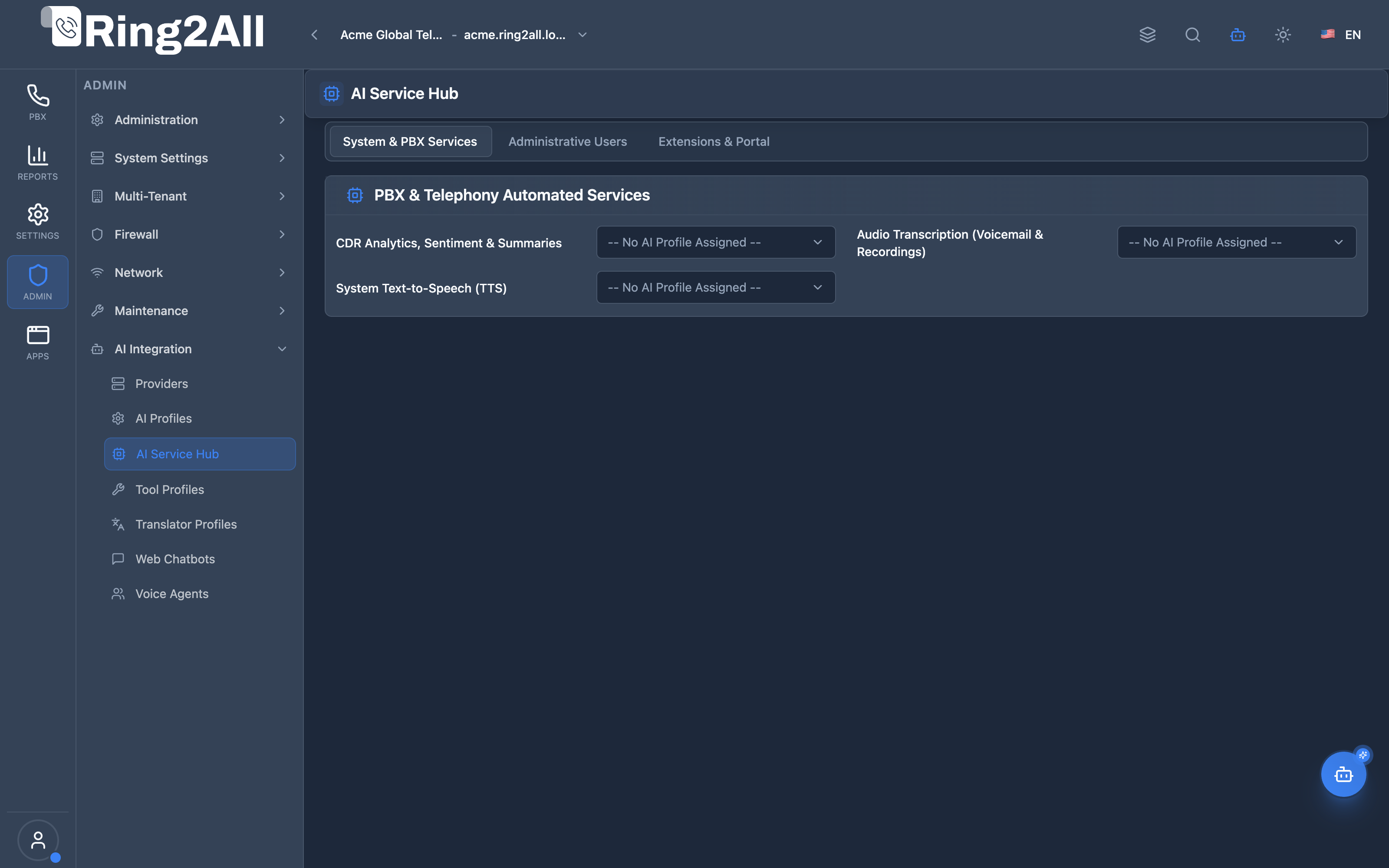
Section titled “System Services AI Orchestration (Tab 1)”Central dashboard defining automated domain-wide background AI services: Post-Call CDR Transcription & Sentiment Analysis, Smart Visual Voicemail with intent extraction, Natural Language Smart IVR routing, Heuristic AI Telephony Guard anti-fraud, and Neural TTS engines.
Administrative Users & Copilot Access (Tab 2)
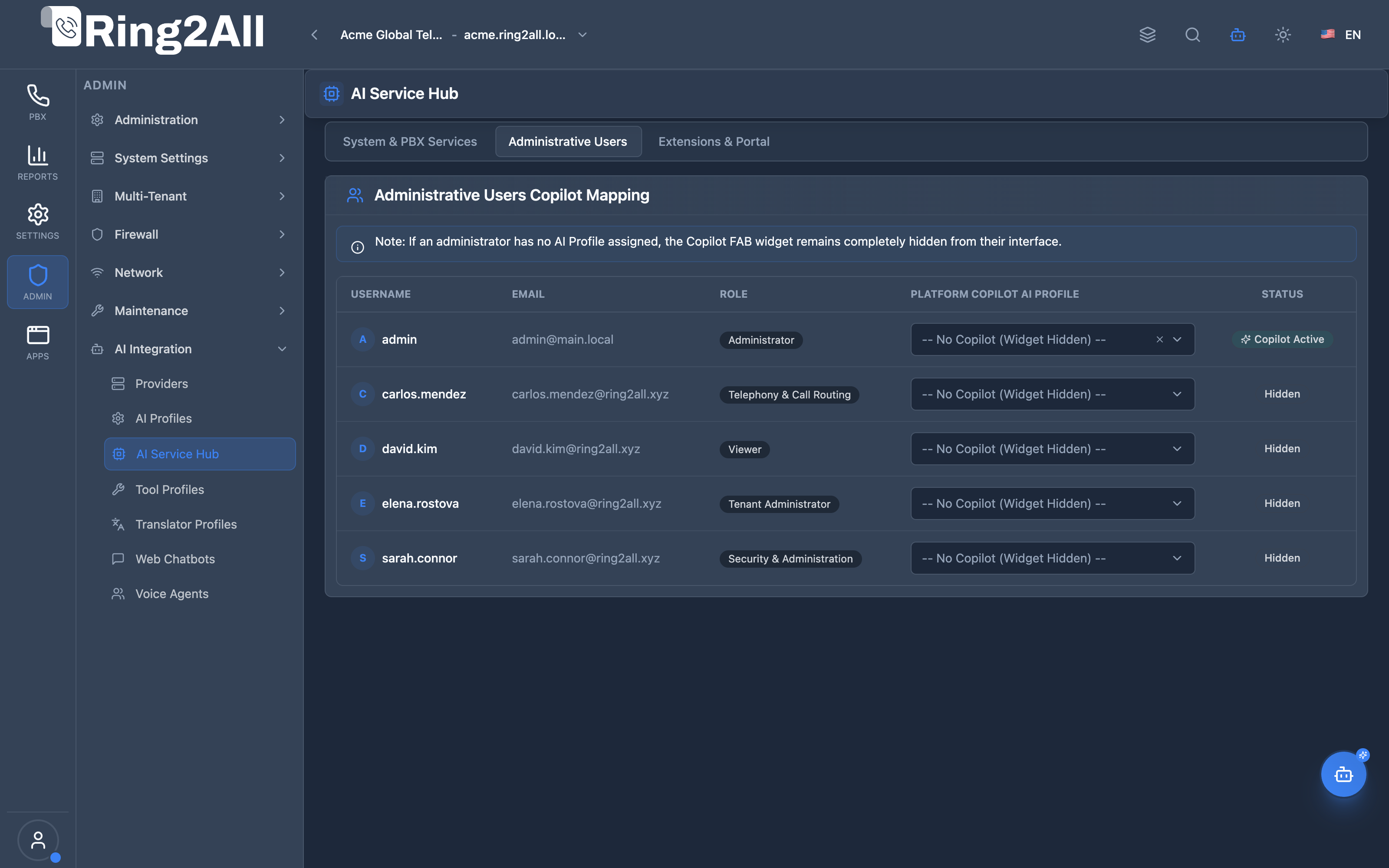
Section titled “Administrative Users & Copilot Access (Tab 2)”Per-user AI enablement matrix binding specific Large Language Model reasoning profiles to administrative accounts for the Platform Copilot (MCP). Accounts with no profile assigned automatically hide the Copilot interface widget.
Extensions & Portal AI Assignment (Tab 3)
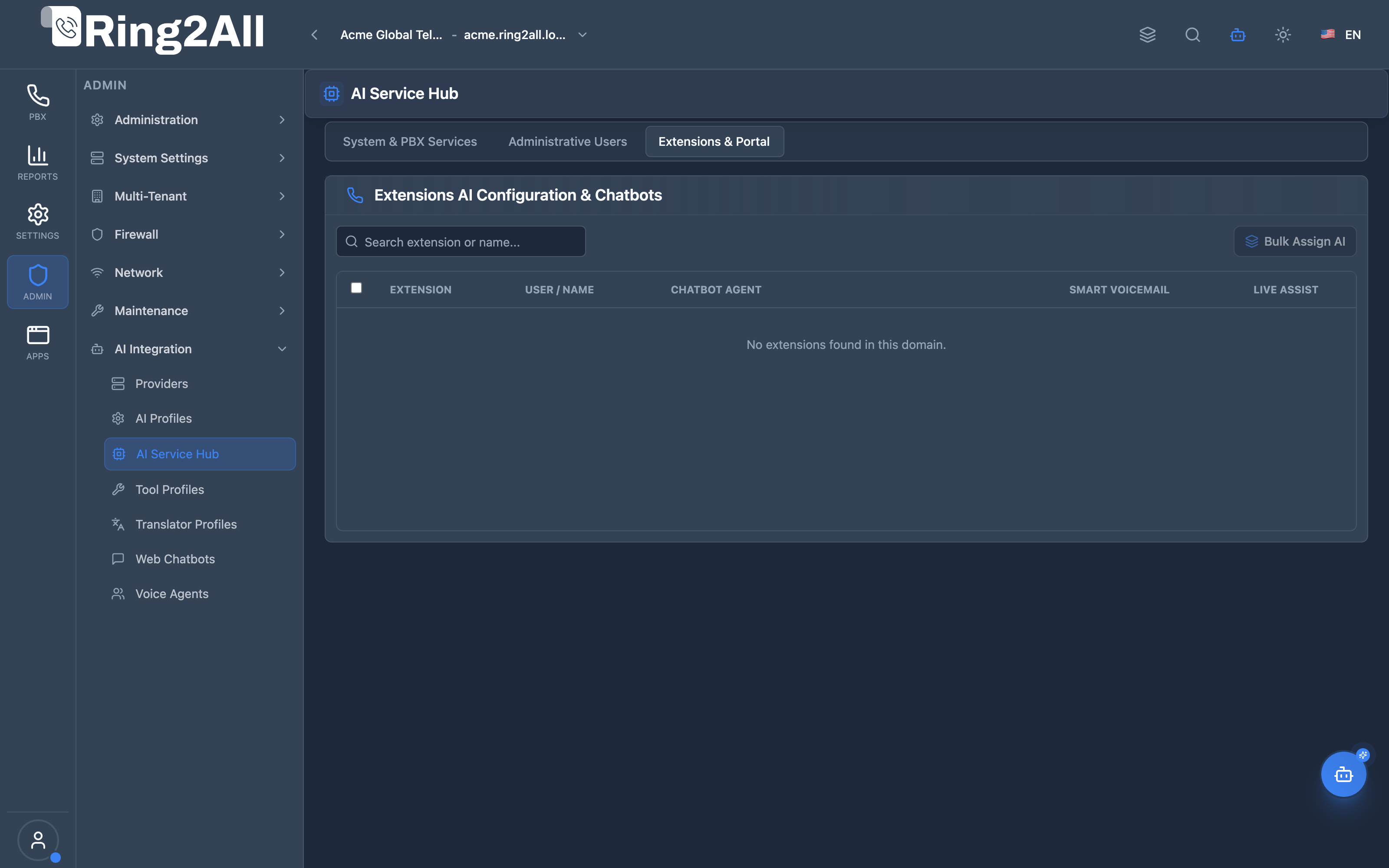
Section titled “Extensions & Portal AI Assignment (Tab 3)”Bulk and individual assignment panel linking corporate chatbots and live agent assist models to PBX extension ranges, departments, and user portal accounts.
🎯 User Roles & Key Capabilities
Section titled “🎯 User Roles & Key Capabilities”| Role | Access Level | Responsibilities & Capabilities |
|---|---|---|
| PBX Super Administrator | Full Access (RW) |
Map domain-level background AI capabilities (smart voicemail, CDR sentiment, neural TTS), assign Copilot profiles to admins, and configure extension ranges. |
| Telephony Operations Manager | Domain Scoped (RW) |
Toggle AI feature enablement per telephony domain, configure fallback modes (traditional, retry, drop), and inspect token consumption. |
| Tenant Administrator | Portal View (RO) |
Review which telephony services (smart voicemail, call transcription) are AI-augmented within their subscribed tenant plan. |
| AI Platform Copilot / MCP Agent | Orchestration Audit (RO) |
Execute get_ai_service_hub_status to audit active domain mappings, model profiles, and traditional fallback failover states. |
1. Module Overview (Technical)
Section titled “1. Module Overview (Technical)”What Is the AI Service Hub?
Section titled “What Is the AI Service Hub?”The AI Service Hub is the centralized control plane that orchestrates all Artificial Intelligence capabilities across Ring2All PBX. Instead of dispersing AI toggles across dozens of disparate menus (voicemails, IVRs, CDRs, extensions, firewall), the AI Service Hub provides a single, unified, multi-domain control center.
Architecture
Section titled “Architecture”┌────────────────────────────────────────────────────────────────────────────────────────┐│ AI Service Hub Central Control Plane │├────────────────────────────────────────────────────────────────────────────────────────┤│ ││ Domain Context (public.domains) ││ ┌──────────────────────────────────────────────────────────────────────────────────┐ ││ │ Domain: ring2all.xyz (tenant_id: 1) │ ││ └────────────────────────────────────────┬─────────────────────────────────────────┘ ││ │ ││ ┌───────────────────────────────────┼────────────────────────────────────┐ ││ ▼ ▼ ▼ ││ ┌────────────────────────┐ ┌─────────────────────────┐ ┌──────────────────┐ ││ │ 1. System Services │ │ 2. Admin Users │ │ 3. Extensions │ ││ ├────────────────────────┤ ├─────────────────────────┤ ├──────────────────┤ ││ │ • Natural Language IVR │ │ • SuperAdmin -> GPT-4o │ │ • Default Chatbot│ ││ │ • Smart Voicemail │ │ • Support -> Qwen 2.5 │ │ • Live Assist │ ││ │ • CDR Summary & STT │ │ • Billing -> Claude 3.5 │ │ • Dept Overrides │ ││ │ • AI Telephony Guard │ │ • Operator -> [None] │ │ • Ext Range 1000 │ ││ │ • Neural TTS Engine │ │ │ │ │ ││ └────────────────────────┘ └─────────────────────────┘ └──────────────────┘ ││ │ │ │ ││ ▼ ▼ ▼ ││ ┌──────────────────────────────────────────────────────────────────────────────────┐ ││ │ Resolved AI Profiles (public.ai_profiles) via Multi-Provider API Layer │ ││ │ [OpenAI Realtime] [Claude 3.5] [Whisper Large] [LM Studio / Local GPU Cluster] │ ││ └──────────────────────────────────────────────────────────────────────────────────┘ ││ │└────────────────────────────────────────────────────────────────────────────────────────┘Database Persistence
Section titled “Database Persistence”| Table | Purpose |
|---|---|
public.ai_service_mappings |
Domain-level service toggles and profile foreign keys (domain_id, service_key, ai_profile_id, is_enabled, config, fallback_mode). |
public.users.ai_profile_id |
User-specific Copilot LLM profile assignment. |
public.sip_extensions.ai_agent_id |
Extension-level default chatbot or voice agent binding. |
2. Module Overview (Commercial/Business)
Section titled “2. Module Overview (Commercial/Business)”Business Value
Section titled “Business Value”- Zero Fragmented Billing: Consolidates AI consumption and profile policies in one place.
- Tiered Enterprise Packaging: Service providers can sell AI packages as premium add-ons per domain or per user without altering core PBX infrastructure.
- Cost Predictability: Set lightweight models (e.g. GPT-4o-mini or local Ollama) for routine tasks like voicemail transcription, reserving flagship frontier models for executive Copilot users.
3. Module Overview (End User/Administrator)
Section titled “3. Module Overview (End User/Administrator)”Administrators can:
- Turn individual AI capabilities on or off with instantaneous live effect.
- Select which underlying AI profile (e.g. OpenAI GPT-4o vs on-premise LM Studio) drives each PBX feature.
- Restrict Platform Copilot access exclusively to authorized system engineers.
- Push default customer service chatbots to entire call center groups with a single click.
4. Architectural Principles: “AI as a Plus” & “Zero Clutter”
Section titled “4. Architectural Principles: “AI as a Plus” & “Zero Clutter””Principle 1: “AI as a Plus” (Telephony Independence)
Section titled “Principle 1: “AI as a Plus” (Telephony Independence)”- Telephony is Deterministic: Core SIP signaling, IVRs, ring groups, and dialplans in Telephony Server function autonomously without any internet or AI connectivity.
- Graceful Degradation: If an AI provider experiences latency or an outage, calls fall back instantly to traditional PBX handling (
fallback_mode: traditional) within $< 800\text{ms}$.
Principle 2: “Zero Clutter” (Conditional UI Rendering)
Section titled “Principle 2: “Zero Clutter” (Conditional UI Rendering)”- If an AI service or Copilot profile is inactive for a user or tenant, all corresponding buttons, widgets, modals, and badges are completely hidden from the user interface.
- No broken placeholders or disabled buttons appear to non-AI subscribers.
5. Tabs & Configuration Sections
Section titled “5. Tabs & Configuration Sections”Tab 1: System Services
Section titled “Tab 1: System Services”- Natural Language IVR: Routes callers using speech recognition and intent classification instead of DTMF tone menus.
- Smart Voicemail: Transcribes incoming audio messages and generates concise summaries with action items.
- CDR Analytics & Transcription: Performs dual-channel diarized speech-to-text and sentiment scoring on completed recordings.
- AI Telephony Guard: Scans call patterns in real time to detect toll fraud, robocall bursts, and spoofing attempts.
- Neural TTS Engine: Generates studio-grade voice prompts on the fly from text descriptions.
Tab 2: Admin Users (Platform Copilot)
Section titled “Tab 2: Admin Users (Platform Copilot)”- Default Copilot Profile: Global baseline LLM profile for administrators without individual overrides.
- User Authorization Table: Lists system operators with individual profile assignments, active MCP tools, and query rate caps.
Tab 3: Extensions & User Portal
Section titled “Tab 3: Extensions & User Portal”- Default Web Chatbot: Assigns the primary virtual assistant available in the web portal.
- Live Agent Assist: Enables real-time transcription, CRM knowledge retrieval, and suggested answers in the Switchboard console.
- Mass Range Provisioning: Applies AI policies across extension batches (e.g.
1000-1099).
6. Cascading Profile Resolution Hierarchy
Section titled “6. Cascading Profile Resolution Hierarchy”When an event requires AI processing, Ring2All resolves the target profile in $< 1\text{ms}$:
1. Does the specific Extension or User have an explicit profile assigned? ├── YES ➔ Use Extension/User Profile └── NO ➔ 2. Does the Domain have an active mapping in AI Service Hub? ├── YES ➔ Use Domain Service Profile └── NO ➔ 3. Standard Non-AI PBX Operation (Traditional Fallback)7. Settings Reference
Section titled “7. Settings Reference”| Parameter | Type | Default | Description |
|---|---|---|---|
service_key |
String | Required | Unique identifier (natural_ivr, smart_voicemail, cdr_summary, telephony_guard, system_tts). |
ai_profile_id |
Integer | Nullable | References public.ai_profiles(id). |
is_enabled |
Boolean | false |
Master toggle for the specific domain service. |
fallback_mode |
Enum | traditional |
Strategy when AI fails: traditional, retry, or drop. |
config |
JSONB | {} |
Service-specific parameters (e.g. confidence_threshold, sentiment_detection). |
Model Context Protocol (MCP) AI Integration
Section titled “Model Context Protocol (MCP) AI Integration”The AI Service Hub module exposes domain-level orchestration endpoints to the Model Context Protocol (MCP), allowing autonomous agents to verify which model engines power telephony background subsystems.
Available MCP Tools
Section titled “Available MCP Tools”| Tool Name | Scope | Description |
|---|---|---|
get_ai_service_hub_status |
Domain AI Mapping (RO) |
Retrieves centralized AI Service Hub mappings for a domain, showing which AI Profiles and providers power CDR analytics, smart voicemail, system TTS, copilot, and chatbots. |
Tool Schemas & Payloads
Section titled “Tool Schemas & Payloads”get_ai_service_hub_status
Section titled “get_ai_service_hub_status”{ "name": "get_ai_service_hub_status", "description": "Retrieves centralized AI Service Hub mappings for a domain, showing which AI Profiles and providers power CDR analytics, smart voicemail, system TTS, copilot, and chatbots.", "parameters": { "type": "object", "properties": { "domain_id": { "type": "number", "description": "Optional telephony domain ID (defaults to primary domain of active tenant)." } } }}Realistic Execution Response:
{ "success": true, "data": { "domainId": 1, "servicesCount": 6, "mappings": [ { "serviceKey": "cdr_analytics", "isEnabled": true, "fallbackMode": "traditional", "profileName": "OpenAI Recording Transcriber & Sentiment Analyzer", "model": "gpt-4o-mini", "profileType": "llm", "providerName": "Primary OpenAI Account", "providerType": "openai" }, { "serviceKey": "smart_voicemail", "isEnabled": true, "fallbackMode": "traditional", "profileName": "Deepgram Nova-2 Fast Transcription", "model": "nova-2-general", "profileType": "stt", "providerName": "Deepgram Speech Cloud", "providerType": "deepgram" }, { "serviceKey": "system_tts", "isEnabled": true, "fallbackMode": "traditional", "profileName": "ElevenLabs Studio Voice Generator", "model": "eleven_multilingual_v2", "profileType": "tts", "providerName": "ElevenLabs Voice Cloud", "providerType": "elevenlabs" }, { "serviceKey": "admin_copilot_default", "isEnabled": true, "fallbackMode": "traditional", "profileName": "Claude 3.5 Sonnet Telephony Copilot", "model": "claude-3-5-sonnet", "profileType": "llm", "providerName": "Anthropic Enterprise", "providerType": "anthropic" }, { "serviceKey": "extension_chatbot_default", "isEnabled": true, "fallbackMode": "traditional", "profileName": "GPT-4o Mini Assistant", "model": "gpt-4o-mini", "profileType": "llm", "providerName": "Primary OpenAI Account", "providerType": "openai" }, { "serviceKey": "switchboard_live_assist", "isEnabled": false, "fallbackMode": "traditional", "profileName": "None (Disabled)", "model": null, "profileType": null, "providerName": null, "providerType": null } ] }}Bilingual Natural Language Prompt Examples
Section titled “Bilingual Natural Language Prompt Examples”English Prompts
Section titled “English Prompts”- “Copilot, show me all active AI Service Hub mappings for the primary telephony domain.”
- “Which AI profile and provider are currently powering Smart Voicemail transcription?”
- “Verify if CDR analytics and sentiment scoring are enabled on domain ID 1.”
Spanish Prompts
Section titled “Spanish Prompts”- “Copilot, muéstrame el estado y mapeos del AI Service Hub para el dominio principal.”
- “¿Qué modelo y proveedor están configurados para la transcripción inteligente del buzón de voz?”
- “Verifica si el análisis de sentimiento en CDRs está activo en el dominio 1.”
Enterprise Safeguards & Execution Boundaries
Section titled “Enterprise Safeguards & Execution Boundaries”- Zero Clutter Enforcement: If a service key has
isEnabled: false, corresponding AI action buttons are completely removed from the user portal and switchboard to prevent UI clutter. - Deterministic Multi-Tenant Scoping: Domain mappings are strictly bound to numeric
domain_idand verified against the user’s authorizedtenant_id. - Graceful Traditional Fallback: If an external AI provider experiences rate-limiting or outages, calls immediately proceed through traditional Telephony dialplans without failure.
8. Common Scenarios & Best Practices
Section titled “8. Common Scenarios & Best Practices”- Hybrid Cost Optimization: Use cloud OpenAI Realtime for VIP voice agents, while routing high-volume voicemail transcriptions to an internal on-premise Whisper/Ollama server.
- Strict Multi-Tenant Isolation: Configure Domain A with OpenAI Enterprise and Domain B with local LM Studio without data crossover.
9. Troubleshooting & Diagnostics
Section titled “9. Troubleshooting & Diagnostics”- Copilot Widget Not Visible: Verify in Tab 2 that the logged-in administrator has an active
ai_profile_idassigned. - Voicemail Not Transcribing: Check that
smart_voicemailis enabled in Tab 1 and that the assigned AI Profile has valid API credentials in AI Providers.
10. Glossary
Section titled “10. Glossary”- AI Service Hub: Centralized orchestration module for domain-level AI capabilities.
- AI as a Plus: Design standard ensuring uninterrupted PBX call flows when AI is disabled or unreachable.
- Zero Clutter: Frontend design paradigm suppressing AI UI controls when features are unassigned.