

White-Label Branding & Identity Customization Module Documentation
Table of Contents
Section titled “Table of Contents”- Module Overview (Technical)
- Module Overview (Commercial & Business Value)
- 🎯 User Roles & Key Capabilities
- Visual Interface & Form Structure
- Architectural Flow & White-Label Asset Propagation
- Common Scenarios & Operational Playbooks
- Troubleshooting & Diagnostic Commands
- Model Context Protocol (MCP) AI Integration
- Glossary
1. Module Overview (Technical)
Section titled “1. Module Overview (Technical)”The White-Label Branding & Identity Customization module provides carrier-grade aesthetic and organizational customization for Ring2All BSS (softswitch-bss). It enables telecommunications service providers and MSPs to customize application titles, legal copyright footers, support contact metadata, primary and secondary brand colors, high-resolution vector logos (light and dark mode), mobile app icons, multi-format favicon sets, and login portal welcome graphics.
Configuration Model & Data Architecture
Section titled “Configuration Model & Data Architecture”Branding configurations are persisted in a centralized configuration entity containing application metadata, brand color tokens (primaryColor, secondaryColor), vectorized logo endpoints, and authentication view assets. All updates are versioned and broadcast in real time across the billing administration panel, customer self-care portals, and generated commercial documents.
Static Asset Lifecycle & NGINX Delivery
Section titled “Static Asset Lifecycle & NGINX Delivery”All uploaded branding assets (PNG, SVG, ICO, JPG) are validated for dimensions, sanitized to prevent malicious script execution, and served directly by NGINX with long-term cache headers (Cache-Control: public, max-age=31536000, immutable). URL version hashing guarantees instant cache busting across user browser sessions upon file replacement.
2. Module Overview (Commercial & Business Value)
Section titled “2. Module Overview (Commercial & Business Value)”- Carrier-Grade White-Labeling: Eliminates vendor lock-in and platform traces, allowing wholesale VoIP operators to present an authoritative corporate appearance to their reseller tiers and enterprise tenants.
- Corporate Consistency Across Touchpoints: Synchronizes visual identity across the Administrative BSS Portal, the Customer Self-Care Portal, and generated commercial PDF invoices.
- Frictionless Onboarding Experience: Personalized login screens with corporate hero imagery, support contact links, and institutional welcome text instill customer trust.
- Instant Brand Rebranding: Visual brand updates take effect across all browser sessions within milliseconds without requiring backend daemon restarts or code recompilation.
3. 🎯 User Roles & Key Capabilities
Section titled “3. 🎯 User Roles & Key Capabilities”| User Role | Key Permissions | Core Responsibilities & Workflows |
|---|---|---|
| Super Administrator | Full Control (CRUD, Asset Upload, Reset Defaults) |
Manages enterprise branding parameters, uploads official corporate vector assets, configures legal documentation URLs, and oversees white-label deployments. |
| Marketing / Brand Manager | Edit Visual Assets & Texts | Verifies color contrast ratios, uploads seasonal login screen graphics, and ensures alignment with corporate typography standards. |
| Billing Analyst | Read-Only | Verifies that generated customer PDF invoice headers accurately reflect updated corporate names and tax addresses. |
| End Customer (Portal User) | Read-Only View | Interacts with a completely white-labeled Self-Care customer portal carrying the service provider’s unique corporate brand. |
4. Visual Interface & Form Structure
Section titled “4. Visual Interface & Form Structure”4.1 Application Information (Tab 1)
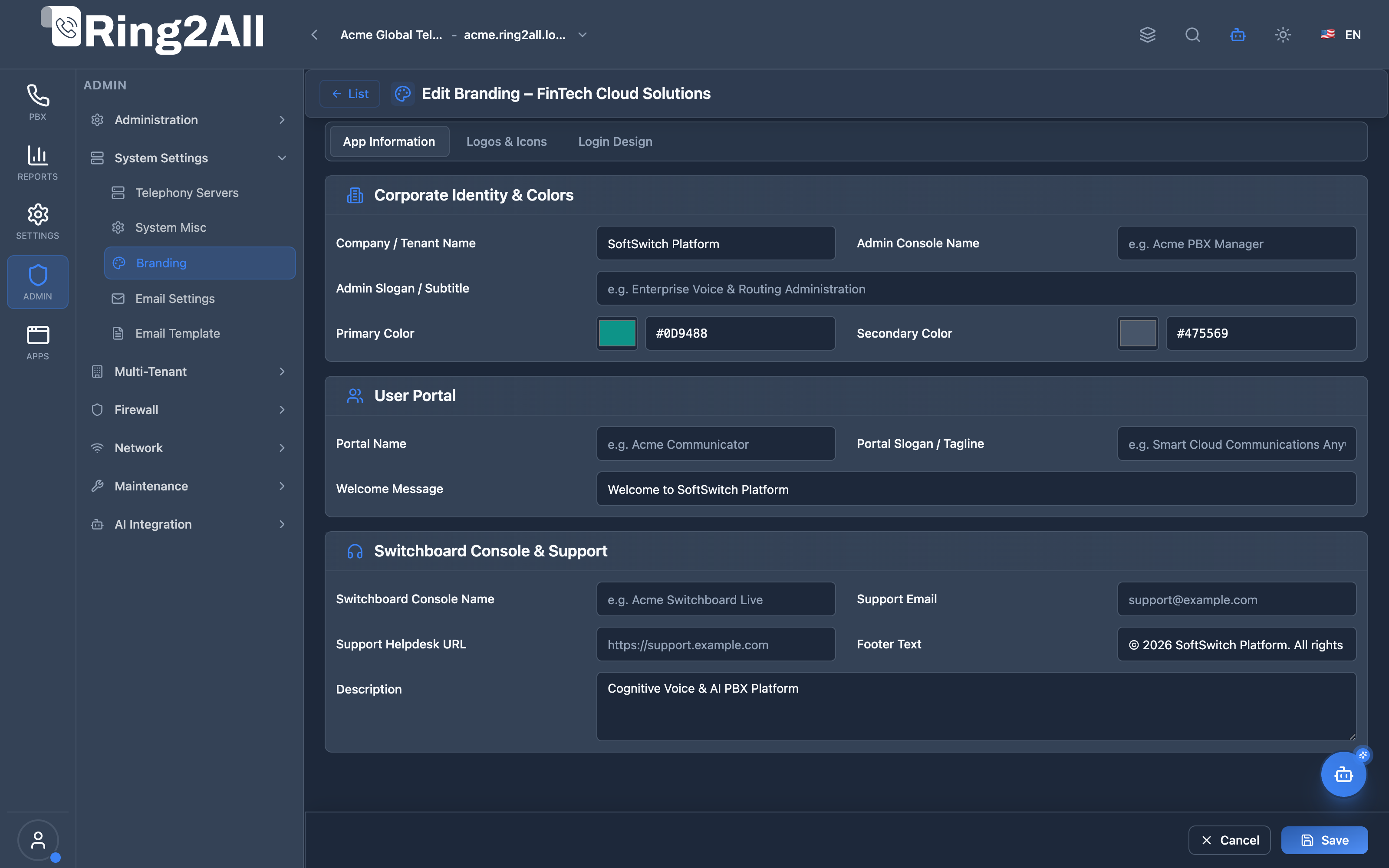
Section titled “4.1 Application Information (Tab 1)”The App Info tab configures platform metadata, public corporate names, support emails, helpdesk URLs, and institutional legal footer text.
4.2 Corporate Logos & Icons (Tab 2)
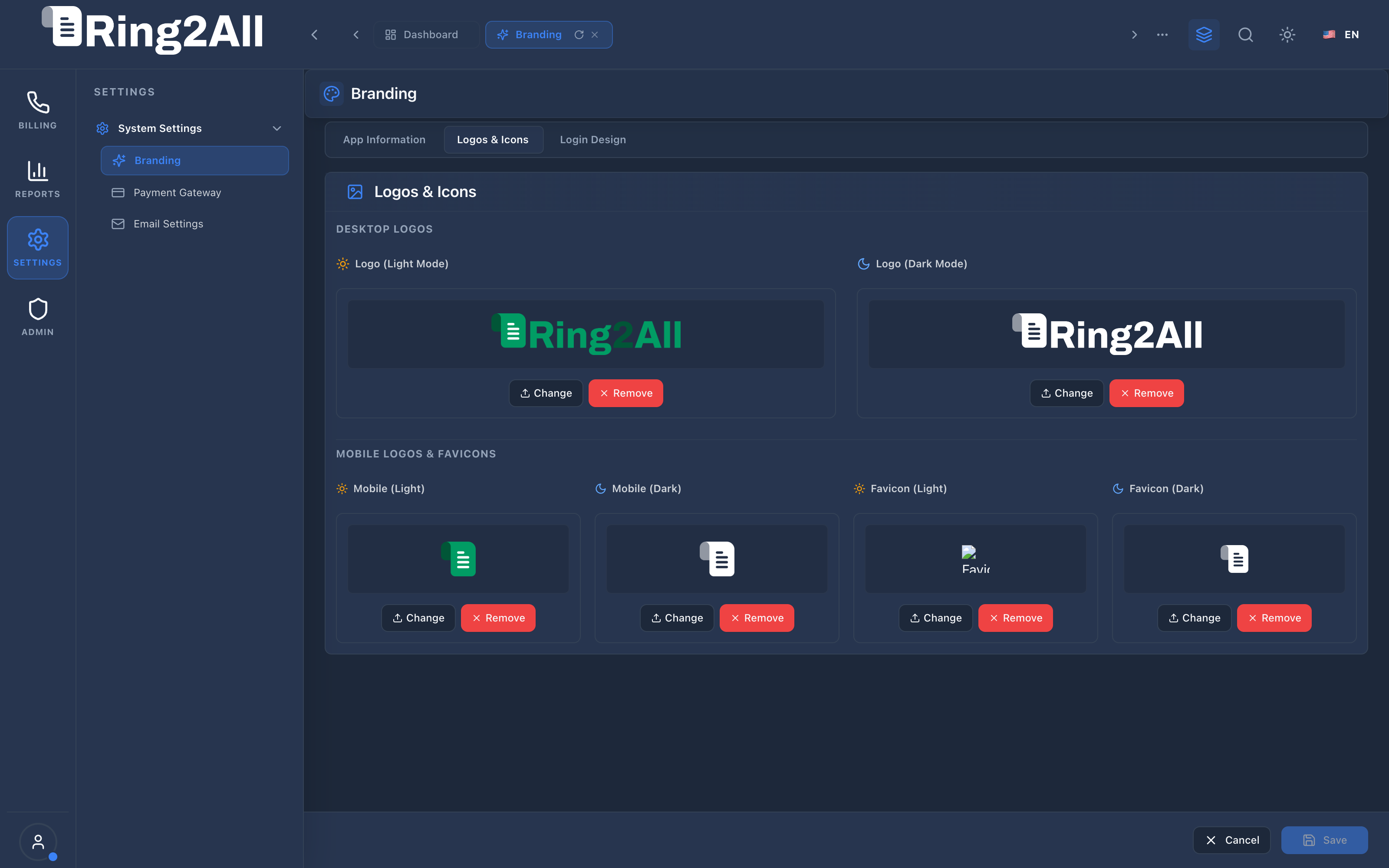
Section titled “4.2 Corporate Logos & Icons (Tab 2)”The Logos & Icons tab manages high-resolution vector and raster assets for desktop navigation headers, mobile drawer sidebars, and browser favicons in both light and dark display modes.
4.3 Login Screen Design & Interactive Live Simulator (Tab 3)
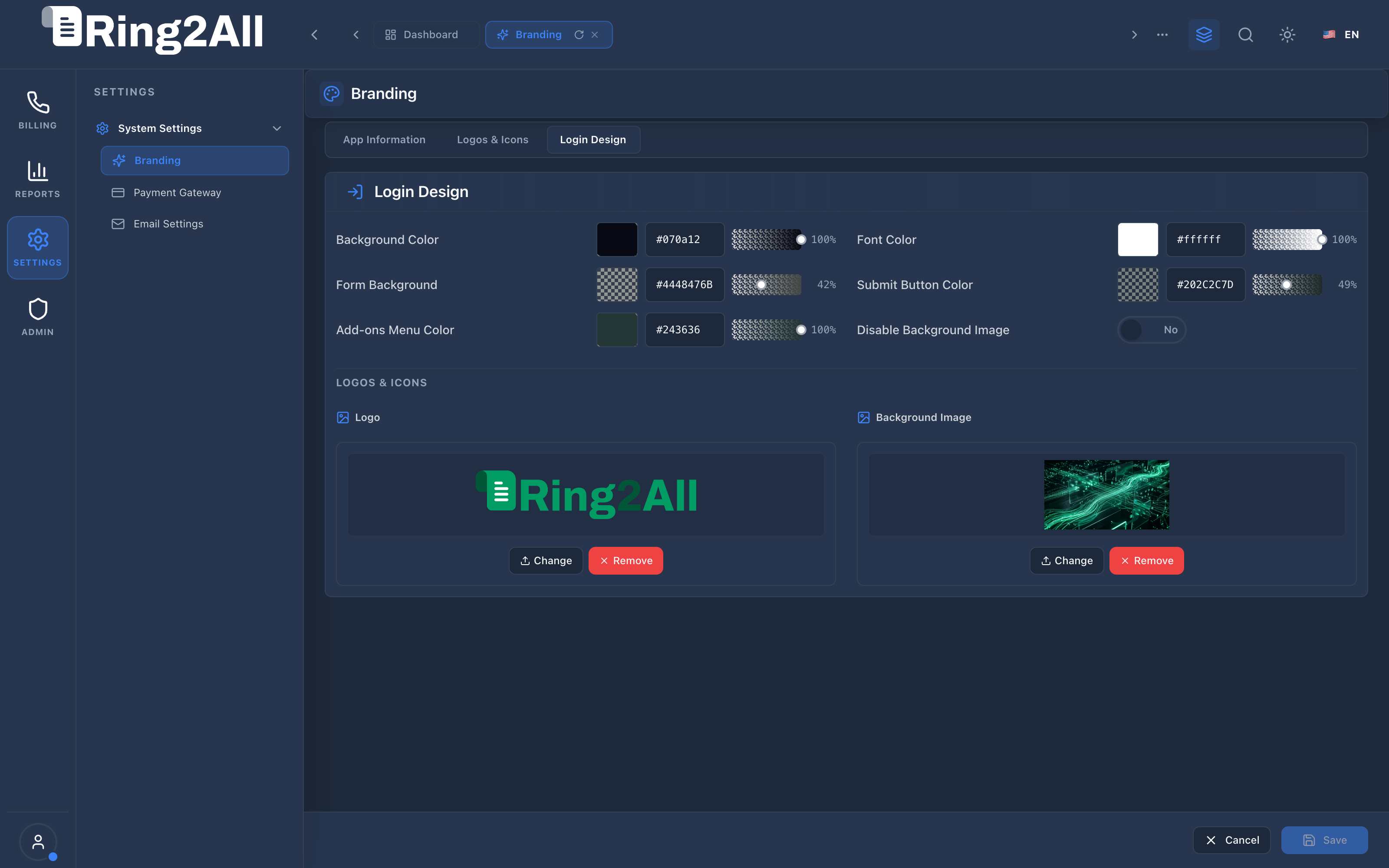
Section titled “4.3 Login Screen Design & Interactive Live Simulator (Tab 3)”The Login Screen Design tab configures the visual presentation of the public authentication gateway, supporting high-definition background imagery, custom welcome typography, and an interactive Live Brand Simulator:
- Real-Time Visual Validation: Administrators can dynamically preview how background wallpapers, color swatches, card alpha transparencies, and brand monograms render together before saving.
- Ergonomic Information Action: The modal information icon
[ℹ️]is placed cleanly in the bottom corner of the viewport canvas, eliminating visual clutter and preventing any interference or confusion with corporate logos or character letterforms.
4.4 Form Parameter Reference
Section titled “4.4 Form Parameter Reference”| Parameter Name | Data Type | Required | Default Value | Description & Constraints |
|---|---|---|---|---|
| Application Name | String |
Yes | Ring2All BSS |
Displayed in browser title bars, email notifications, and top navigation header. |
| Corporate Name | String |
Yes | Ring2All Telecom |
Legal corporate entity name used for billing invoice headers and terms. |
| Primary Color | Hex Code |
Yes | #3b82f6 |
Dominant accent color for active navigation links, call-to-action buttons, and corporate highlights. |
| Secondary Color | Hex Code |
Yes | #64748b |
Auxiliary accent color for badges, subtle borders, and secondary controls. |
| Support Email | Email |
Yes | billing@ring2all.com |
Destination for invoice dispute inquiries and automated billing notifications. |
| Support Helpdesk URL | URL |
No | https://www.ring2all.com |
Link embedded in customer portal headers and invoice remit instructions. |
| Welcome Message | Text |
No | Enterprise BSS Engine |
Subtitle displayed on the public login card below the corporate emblem. |
| Desktop Logo (Light / Dark) | File (PNG/SVG) |
No | Default Ring2All Logos | Primary header logo (recommended size: 240x48px, transparent background). |
| Favicon (Light / Dark) | File (ICO/PNG) |
No | Default Favicons | Browser tab icon supporting multi-resolution .ico (16x16, 32x32, 48x48) and high-DPI .png with automated light/dark mode adaptation. |
| Login Background Image | File (JPG/PNG) |
No | Default Cybernetic Wave | Full-screen background for authentication views (recommended: 1920x1080px). |
4.5 Corporate Brand Synchronization & Client Portal Appearance Hierarchy
Section titled “4.5 Corporate Brand Synchronization & Client Portal Appearance Hierarchy”The corporate Primary Color and Secondary Color configured here form the foundational aesthetic for both the administrative BSS environment and customer self-care portals:
- Automatic Client Synchronization (
useCorporateColors: true): All new customer accounts and billing operator profiles default to corporate color inheritance. When an administrator updates branding colors in this module, the customer portal visual accents synchronize automatically. - The “Corporate Brand” Preset Slot: In customer and operator Appearance > Colors settings, these corporate values populate Slot 1 (“Corporate Brand / Marca Corporativa”) with an active status badge.
- Subscriber Autonomy: End users and subscribers can choose personal dark-mode variants or alternative presets without losing alignment with the carrier brand, and can restore corporate defaults with a single click.
- Legal & Commercial Asset Protection: Carrier logos, remit addresses, VAT tax IDs, and copyright notices remain strictly administered within this module, preventing unauthorized tenant modification.
5. Architectural Flow & White-Label Asset Propagation
Section titled “5. Architectural Flow & White-Label Asset Propagation” ┌────────────────────────────────────────────────────────────────────────┐ │ Administrator Uploads New Logo Asset via Web UI │ └───────────────────────────────────┬────────────────────────────────────┘ │ ▼ ┌────────────────────────────────────────────────────────────────────────┐ │ Step 1: Validation & Sanitization (`uploadBrandingFile`) │ │ • Check MIME type (`image/png`, `image/svg+xml`, `image/x-icon`) │ │ • Enforce 5MB size limit & scan for embedded binary exploits │ └───────────────────────────────────┬────────────────────────────────────┘ │ ▼ ┌────────────────────────────────────────────────────────────────────────┐ │ Step 2: Atomic File Storage & Database Persistence │ │ • Write file to `/public/assets/branding-templates/<hash>-logo.png` │ │ • Update record in `public.branding` with generated asset URI │ └───────────────────────────────────┬────────────────────────────────────┘ │ ▼ ┌────────────────────────────────────────────────────────────────────────┐ │ Step 3: Real-Time Cache Invalidation & DOM Broadcast │ │ • Zustand store (`useBrandingStore`) updates in-memory React state │ │ • Dynamic `<link rel="icon">` update changes browser favicon live │ │ • Subsequent PDF invoice generations ingest new logo URL atomically │ └────────────────────────────────────────────────────────────────────────┘6. Common Scenarios & Operational Playbooks
Section titled “6. Common Scenarios & Operational Playbooks”Scenario A: Deploying Custom Dark-Mode Logos
Section titled “Scenario A: Deploying Custom Dark-Mode Logos”- Navigate to SETTINGS / System Settings / Branding.
- Select the Logos & Icons tab.
- Locate the Desktop Logo (Dark Mode) card and click Upload New Image.
- Select a transparent PNG or SVG asset formatted for dark backgrounds (white or vibrant typography).
- Click Save Changes in the bottom action bar. The navigation header immediately renders the new logo when switching themes.
Scenario B: Restoring Factory Default Visual Identity
Section titled “Scenario B: Restoring Factory Default Visual Identity”- In the Branding Settings view, click Restore Defaults in the action bar.
- Confirm the dialogue prompt.
- The platform clears custom asset references and restores the canonical Ring2All Billing visual theme.
7. Troubleshooting & Diagnostic Commands
Section titled “7. Troubleshooting & Diagnostic Commands”Validate Active Branding Configuration via API
Section titled “Validate Active Branding Configuration via API”Verify that the BSS REST backend delivers the updated corporate branding record:
curl -sk https://127.0.0.1/api/branding | jq .Verify NGINX Static File Permissions
Section titled “Verify NGINX Static File Permissions”ls -la /var/www/softswitch/billing/web/dist/assets/branding-templates/8. Model Context Protocol (MCP) AI Integration
Section titled “8. Model Context Protocol (MCP) AI Integration”The White-Label Branding & Identity Customization module connects directly to the Ring2All BSS MCP Server, allowing system administrators and automation agents to query and adjust organizational branding, support contact details, and application headers programmatically.
Available MCP Tools
Section titled “Available MCP Tools”| Tool Name | Access Role | Description & Primary Function | Example Arguments |
|---|---|---|---|
get_system_branding_config |
Super Administrator |
Retrieves white-label corporate branding configuration, application titles, and legal metadata. | {} |
update_system_branding_config |
Super Administrator |
Updates white-label branding configuration including app name, company, support email, and footer. | {"appName": "VoIP Telecom Portal", "companyName": "Acme Telco"} |
Sample MCP Tool Execution: get_system_branding_config
Section titled “Sample MCP Tool Execution: get_system_branding_config”Request Payload
Section titled “Request Payload”{ "name": "get_system_branding_config", "arguments": {}}Response Payload
Section titled “Response Payload”{ "id": 1, "appName": "Ring2All BSS", "companyName": "Ring2All Technologies", "supportEmail": "support@ring2all.com", "footerText": "© 2026 Ring2All Technologies. All rights reserved.", "logoLight": "/branding/logo-light.svg", "logoDark": "/branding/logo-dark.svg", "updatedAt": "2026-09-08T12:00:00Z"}Conversational AI Prompts for Copilot
Section titled “Conversational AI Prompts for Copilot”- “What is our currently configured application title and support email address?”
- “Update the platform company name to Acme Telecom Services LLC.”
- “Display the active white-label branding metadata.”
9. Glossary
Section titled “9. Glossary”- Favicon: Small square icon (16x16 or 32x32 px) displayed in browser tab bars and bookmarks.
- Vector Graphic (SVG): Resolution-independent XML-based image format that scales crisply to any Retina display size without pixelation.
- White-Label: Software design architecture enabling a platform to be completely rebranded with a third party’s corporate identity.
- Model Context Protocol (MCP): Open protocol standard that enables secure, controlled integration between Large Language Models and external tools, databases, and telecom rating engines.