

CDR Settings Module Documentation
Table of Contents
Section titled “Table of Contents”- Navigation & Access
- Screenshots & Visual Interface
- Module Overview (Technical)
- Module Overview (Commercial/Business)
- Module Overview (End User/Administrator)
- User Roles & Key Capabilities
- Configuration Sections
- Settings Reference
- Common Scenarios & Examples
- Limitations & Important Notes
- Troubleshooting Tips
- Glossary
- Model Context Protocol (MCP) AI Integration
Navigation & Access
Section titled “Navigation & Access”To access the CDR Settings configuration module:
- Log in to the Ring2All Web Portal (
https://<domain-or-ip>/login). - In the left navigation sidebar, expand Settings.
- Under PBX, click CDR Settings (
/settings/pbx/cdr-settings). - Configure database target connections, spool directory paths, CSV export formats, and customized field mappings, then click Save Changes in the bottom action bar.
Screenshots & Visual Interface
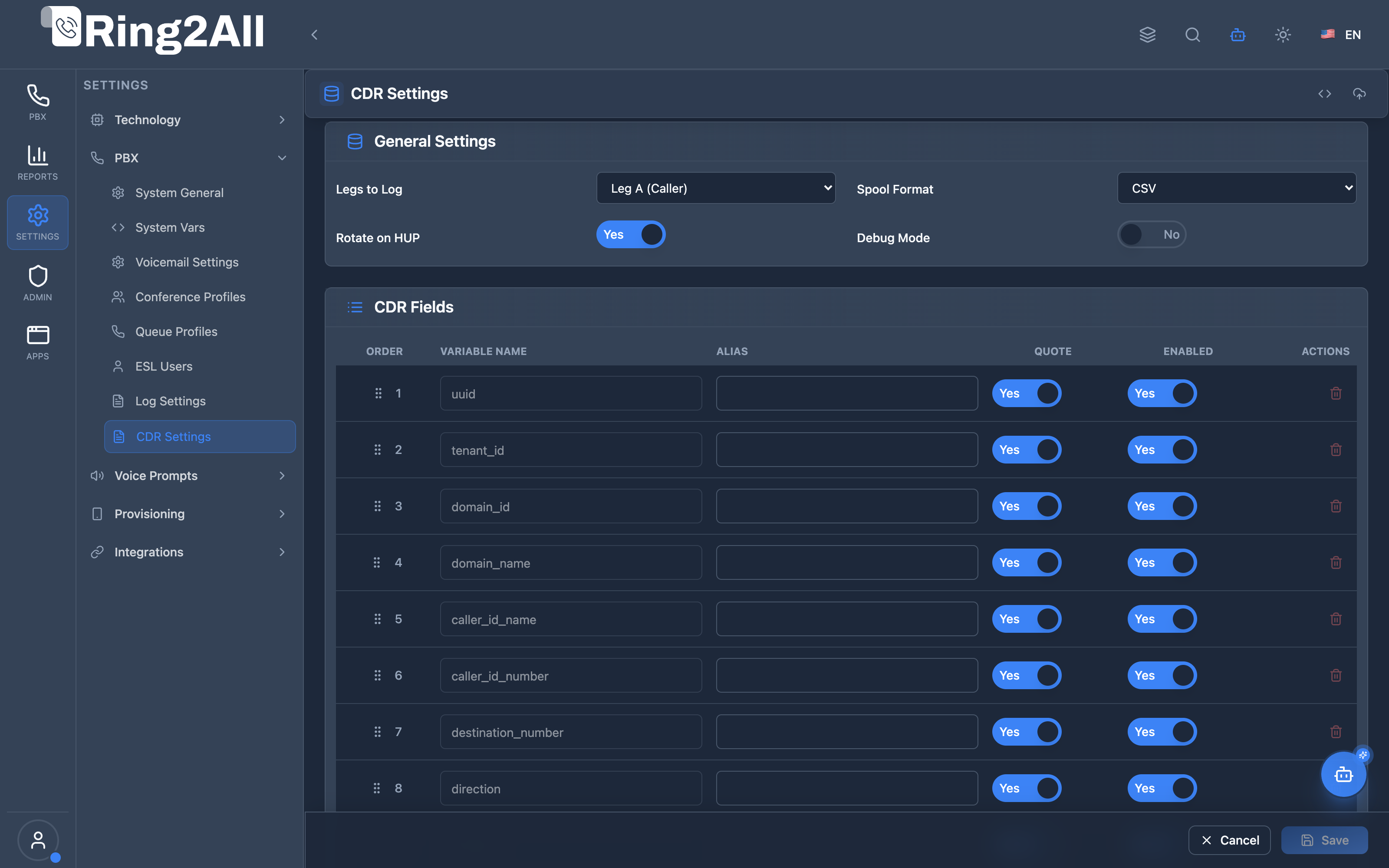
Section titled “Screenshots & Visual Interface”CDR Configuration & Schema Mapping Form
Section titled “CDR Configuration & Schema Mapping Form”Central administrative interface for configuring PostgreSQL real-time CDR insertion, spool path fallbacks, and drag-and-drop custom column schema mappings with live XML preview and node sync.
1. Module Overview (Technical)
Section titled “1. Module Overview (Technical)”What Is CDR Settings?
Section titled “What Is CDR Settings?”CDR Settings is a Telephony Server mod_cdr_pg_csv configuration module that manages Call Detail Record export to PostgreSQL. It configures database connection, field mappings, and export options for real-time CDR storage.
Architecture
Section titled “Architecture”┌─────────────────────────────────────────────────────────────────┐│ CDR Settings Architecture │├─────────────────────────────────────────────────────────────────┤│ ││ Admin Panel ││ ┌──────────────────────────────────────────────────────────┐ ││ │ CDR Settings │ ││ │ │ ││ │ General Settings: │ ││ │ ├─ Database Connection │ ││ │ ├─ Table Name │ ││ │ ├─ Legs to Log │ ││ │ └─ Spool Format │ ││ │ │ ││ │ CDR Fields: │ ││ │ ├─ uuid → call_uuid │ ││ │ ├─ caller_id_number → caller_number │ ││ │ ├─ duration → duration │ ││ │ └─ (custom fields) │ ││ │ │ ││ └──────────────────────────────────────────────────────────┘ ││ │ ││ ▼ Generates XML ││ ┌──────────────────────────────────────────────────────────┐ ││ │ cdr_pg_csv.conf.xml │ ││ │ │ ││ │ <configuration name="cdr_pg_csv.conf"> │ ││ │ <db-info> │ ││ │ <db-host>127.0.0.1</db-host> │ ││ │ <db-name>r2a_cdr</db-name> │ ││ │ </db-info> │ ││ │ <field-list> │ ││ │ <field var="uuid" column="call_uuid"/> │ ││ │ </field-list> │ ││ │ </configuration> │ ││ │ │ ││ └──────────────────────────────────────────────────────────┘ ││ │ ││ ▼ Used by Telephony Server ││ ┌──────────────────────────────────────────────────────────┐ ││ │ mod_cdr_pg_csv │ ││ │ │ ││ │ Call ends → Extract fields → INSERT into PostgreSQL │ ││ │ │ ││ └──────────────────────────────────────────────────────────┘ ││ │└─────────────────────────────────────────────────────────────────┘2. Module Overview (Commercial/Business)
Section titled “2. Module Overview (Commercial/Business)”Business Value
Section titled “Business Value”CDR Settings provides configurable CDR export:
| Without CDR Settings | With CDR Settings |
|---|---|
| Default fields only | Custom field mapping |
| Fixed schema | Flexible columns |
| Manual XML editing | Web interface |
| No field control | Enable/disable fields |
Use Cases
Section titled “Use Cases”-
Custom Reporting
- Export specific fields
- Custom column names
-
Data Integration
- Map to existing schema
- Third-party billing
-
Storage Optimization
- Export only needed fields
- Reduce database size
-
Compliance
- Log required fields
- Track specific data
Feature Highlights
Section titled “Feature Highlights”| Feature | Benefit |
|---|---|
| Database Config | PostgreSQL connection |
| Field Mapping | Variable to column |
| Legs Selection | A, B, or both |
| Spool Fallback | CSV/SQL backup |
| Custom Fields | Add any variable |
| XML Preview | Verify before deploy |
3. Module Overview (End User/Administrator)
Section titled “3. Module Overview (End User/Administrator)”What Can You Do?
Section titled “What Can You Do?”- Configure PostgreSQL connection
- Map Telephony Server variables to columns
- Select which call legs to log
- Enable/disable individual fields
- Set column aliases
- Configure spool fallback format
- Preview generated XML
CDR Settings Interface
Section titled “CDR Settings Interface”┌─────────────────────────────────────────────────────────────────┐│ CDR Settings │├─────────────────────────────────────────────────────────────────┤│ ││ Configure CDR export to PostgreSQL and manage exported fields. ││ ││ ▼ General Settings ││ ││ Host: [127.0.0.1 ] ││ Port: [5432 ] ││ Database Name: [r2a_cdr ] ││ User: [r2a_user ] ││ Password: [•••••••• ] ││ CDR Table Name: [cdr ] ││ ││ Connect Timeout (s): [10 ] ││ Additional Options: [sslmode=require ] ││ ││ Legs to Log: [Both Legs ▼] ││ ├─ Leg A (Caller) ││ ├─ Leg B (Callee) ││ └─ Both Legs ││ ││ Spool Format: [CSV ▼] ││ Rotate on HUP: ✓ ││ Debug Mode: ☐ ││ ││ [Save Settings] [Preview XML] [Apply to Nodes] ││ │└─────────────────────────────────────────────────────────────────┘CDR Fields Section
Section titled “CDR Fields Section”┌─────────────────────────────────────────────────────────────────┐│ CDR Settings - Fields │├─────────────────────────────────────────────────────────────────┤│ ││ ▼ CDR Fields ││ ││ [+ Add Field] ││ ││ ┌─────────────────────────────────────────────────────────────┐││ │ Order │ Variable Name │ Alias │ Quote │ On │││ ├───────┼────────────────────┼────────────────┼───────┼─────┤││ │ 1 │ uuid │ call_uuid │ ✓ │ ✓ │││ │ 2 │ caller_id_number │ caller_number │ ✓ │ ✓ │││ │ 3 │ destination_number │ called_number │ ✓ │ ✓ │││ │ 4 │ start_stamp │ start_time │ ✓ │ ✓ │││ │ 5 │ answer_stamp │ answer_time │ ✓ │ ✓ │││ │ 6 │ end_stamp │ end_time │ ✓ │ ✓ │││ │ 7 │ duration │ duration │ ☐ │ ✓ │││ │ 8 │ billsec │ billsec │ ☐ │ ✓ │││ │ 9 │ hangup_cause │ hangup_cause │ ✓ │ ✓ │││ │ 10 │ accountcode │ account_code │ ✓ │ ☐ │││ └─────────────────────────────────────────────────────────────┘││ ││ [Save Fields] ││ │└─────────────────────────────────────────────────────────────────┘Quick Tips
Section titled “Quick Tips”[!TIP] Quote Text Fields: Enable Quote for string/text values.
[!TIP] Disable Unused: Turn off fields you don’t need.
[!NOTE] System Fields: Some fields are required and cannot be removed.
🎯 User Roles & Key Capabilities
Section titled “🎯 User Roles & Key Capabilities”| Role | Permissions | Key Capabilities |
|---|---|---|
| Super Administrator | Full Access (read, write, apply) |
Configure PostgreSQL real-time CDR insertion endpoints, disk spool directories, and apply generated cdr_pg_csv.conf.xml directly to the telephony core. |
| Billing & Telecom Engineer | Schema Management (read, write) |
Customize exported CDR fields (account codes, MOS QoS scores, carrier rates, hangup causes), configure text quoting, and adjust field column aliases. |
| Database Auditor | Read & Diagnostic (read, preview) |
Inspect active CDR database schema mappings, preview raw XML configuration, and verify spool fallback directory health. |
| Tenant Administrator | Restricted Read | View tenant-level CDR export mappings and column structures. |
4. Configuration Sections
Section titled “4. Configuration Sections”General Settings
Section titled “General Settings”| Field | Description |
|---|---|
| Host | PostgreSQL server address |
| Port | PostgreSQL port (5432) |
| Database Name | Target database |
| User | Database username |
| Password | Database password |
| CDR Table Name | Destination table |
| Connect Timeout | Connection timeout (seconds) |
| Additional Options | Extra connection parameters |
Export Options
Section titled “Export Options”| Field | Description |
|---|---|
| Legs to Log | Leg A, Leg B, or Both |
| Spool Format | CSV or SQL fallback |
| Rotate on HUP | Reload on signal |
| Debug Mode | Verbose logging |
CDR Fields
Section titled “CDR Fields”| Field | Description |
|---|---|
| Variable Name | Telephony Server channel variable |
| Alias | Database column name |
| Quote | Wrap value in quotes |
| Enabled | Include in export |
| Order | Column order in schema |
5. Settings Reference
Section titled “5. Settings Reference”Common CDR Variables
Section titled “Common CDR Variables”| Variable | Description |
|---|---|
| uuid | Call unique ID |
| caller_id_number | Caller’s number |
| caller_id_name | Caller’s name |
| destination_number | Called number |
| start_stamp | Call start time |
| answer_stamp | Call answer time |
| end_stamp | Call end time |
| duration | Total duration (seconds) |
| billsec | Billable seconds |
| hangup_cause | Hangup reason |
| accountcode | Account code |
Legs Options
Section titled “Legs Options”| Option | Description |
|---|---|
| Leg A | Caller/originating leg |
| Leg B | Callee/terminating leg |
| Both | Both legs recorded |
Spool Formats
Section titled “Spool Formats”| Format | Use Case |
|---|---|
| CSV | Comma-separated fallback |
| SQL | SQL INSERT statements |
6. Common Scenarios & Examples
Section titled “6. Common Scenarios & Examples”Scenario 1: Basic CDR Export
Section titled “Scenario 1: Basic CDR Export”- Configure database connection
- Set table name = cdr
- Enable default fields
- Legs = Both Legs
- Save and apply
Scenario 2: Custom Billing Fields
Section titled “Scenario 2: Custom Billing Fields”- Add field: accountcode → account_code
- Add field: billsec → billable_seconds
- Add field: rate → billing_rate
- Enable Quote for text fields
- Save
Scenario 3: Minimal CDR
Section titled “Scenario 3: Minimal CDR”- Disable non-essential fields
- Keep: uuid, caller, destination, duration, hangup_cause
- Save (reduces storage)
Scenario 4: SSL Connection
Section titled “Scenario 4: SSL Connection”- Set Additional Options = sslmode=require
- Configure database connection
- Save and apply
7. Limitations & Important Notes
Section titled “7. Limitations & Important Notes”Technical Notes
Section titled “Technical Notes”[!NOTE] mod_cdr_pg_csv: Uses Telephony Server PostgreSQL CDR module.
[!NOTE] Spool Fallback: If database unavailable, records spool to file.
[!WARNING] Schema Match: Field aliases must match database columns.
Best Practices
Section titled “Best Practices”- Test Connection: Verify database connectivity
- Match Schema: Ensure aliases match table columns
- Quote Text: Use Quote for string fields
- Enable Essentials: Always log uuid, duration, hangup_cause
- Monitor Spool: Check for spooled files
Required Fields
Section titled “Required Fields”| Field | Why Required |
|---|---|
| uuid | Unique call identifier |
| start_stamp | Call timing |
| end_stamp | Call timing |
| hangup_cause | Call result |
8. Troubleshooting Tips
Section titled “8. Troubleshooting Tips”Common Issues
Section titled “Common Issues”| Symptom | Possible Cause | Solution |
|---|---|---|
| No CDR records | Connection failed | Check database settings |
| Column mismatch | Wrong alias | Match alias to column |
| Spool files growing | DB unavailable | Fix database connection |
| Null values | Quoting issue | Check Quote setting |
| Missing field | Not enabled | Enable field |
Test Database Connection
Section titled “Test Database Connection”# Test PostgreSQL connectionpsql -h <host> -p <port> -U <user> -d <database>
# Check CDR tableSELECT * FROM cdr ORDER BY start_stamp DESC LIMIT 10;Check Spooled Files
Section titled “Check Spooled Files”# Check for spooled CDR filesls -la /var/log/freeswitch/cdr-csv/ls -la /var/log/freeswitch/cdr-pg-csv/Verify Configuration
Section titled “Verify Configuration”Use “Preview XML” to verify generated configuration before applying.
9. Glossary
Section titled “9. Glossary”| Term | Definition |
|---|---|
| CDR | Call Detail Record |
| mod_cdr_pg_csv | Telephony Server PostgreSQL CDR module |
| Leg A | Caller/originating leg |
| Leg B | Callee/terminating leg |
| Spool | File-based fallback storage |
| Alias | Database column name |
| Quote | Text value quoting |
Model Context Protocol (MCP) AI Integration
Section titled “Model Context Protocol (MCP) AI Integration”The Ring2All PBX platform integrates deep AI assistance via the Model Context Protocol (MCP). The CDR Settings module allows the PBX AI Copilot to safely query Call Detail Record database parameters, inspect spool directories, and verify exported schema fields without accessing backend configuration files directly.
Available MCP Tools
Section titled “Available MCP Tools”| Tool Name | Operation Type | RBAC Risk Level | Description |
|---|---|---|---|
get_cdr_settings |
Read / Query | low |
Retrieves CDR (Call Detail Record) storage engine configuration, mod_cdr_pg_csv / cdr_csv parameters, and active export fields. |
Tool Input Schemas & Parameters
Section titled “Tool Input Schemas & Parameters”1. get_cdr_settings
Section titled “1. get_cdr_settings”{ "name": "get_cdr_settings", "description": "Get CDR (Call Detail Record) storage engine configuration, mod_cdr_pg_csv / cdr_csv parameters, and active export fields.", "inputSchema": { "type": "object", "properties": {} }}Natural Language Prompts
Section titled “Natural Language Prompts”| User Request | Invoked MCP Tool | Expected AI Response |
|---|---|---|
| “Show me our CDR database configuration and active export fields.” | get_cdr_settings |
Returns database host, table name, spool directory, and list of enabled column mappings. |
| “Are call quality MOS scores and packet loss fields enabled in our CDRs?” | get_cdr_settings |
Checks mapped fields for rtp_audio_in_mos, rtp_audio_in_quality_percentage, and reporting status. |
| “Where are CDR records spooled when the database is unreachable?” | get_cdr_settings |
Reports fallback disk spool directory path (e.g. /var/log/freeswitch/cdr-pg-csv). |
Multi-Tenant & Security Safeguards
Section titled “Multi-Tenant & Security Safeguards”- Engine Level Protection: CDR export engine configuration operates at the core PBX level; database credentials and passwords are strictly redacted from AI tool responses.
- Read-Only Verification: Copilot queries are strictly read-only; schema changes require explicit administrative approval and confirmation.
- Fail-Safe Spooling: Spool directory paths are verified against system storage permissions to prevent data loss during database maintenance.
- Audit Logging: All CDR settings inquiries are recorded in the central platform audit log.
Documentation last updated: January 2026