

Dial Profiles Module Documentation
Table of Contents
Section titled “Table of Contents”- Navigation & Access
- Screenshots & Visual Interface
- Module Overview (Technical)
- Module Overview (Commercial/Business)
- Module Overview (End User/Administrator)
- User Roles & Key Capabilities
- Configuration Fields
- Common Scenarios & Examples
- Limitations & Important Notes
- Troubleshooting Tips
- Glossary
- Model Context Protocol (MCP) AI Integration
Navigation & Access
Section titled “Navigation & Access”To access the Dial Profiles configuration module:
- Log in to the Ring2All Web Portal (
https://<domain-or-ip>/login). - In the left navigation sidebar, expand Settings.
- Under Technology, click Dial profiles (
/settings/technology/dial-profile). - To create a new dial profile template, click + Add Profile (
/settings/technology/dial-profile/new). To edit an existing profile, click on the profile row or the Edit action button (/settings/technology/dial-profile/:id).
Screenshots & Visual Interface
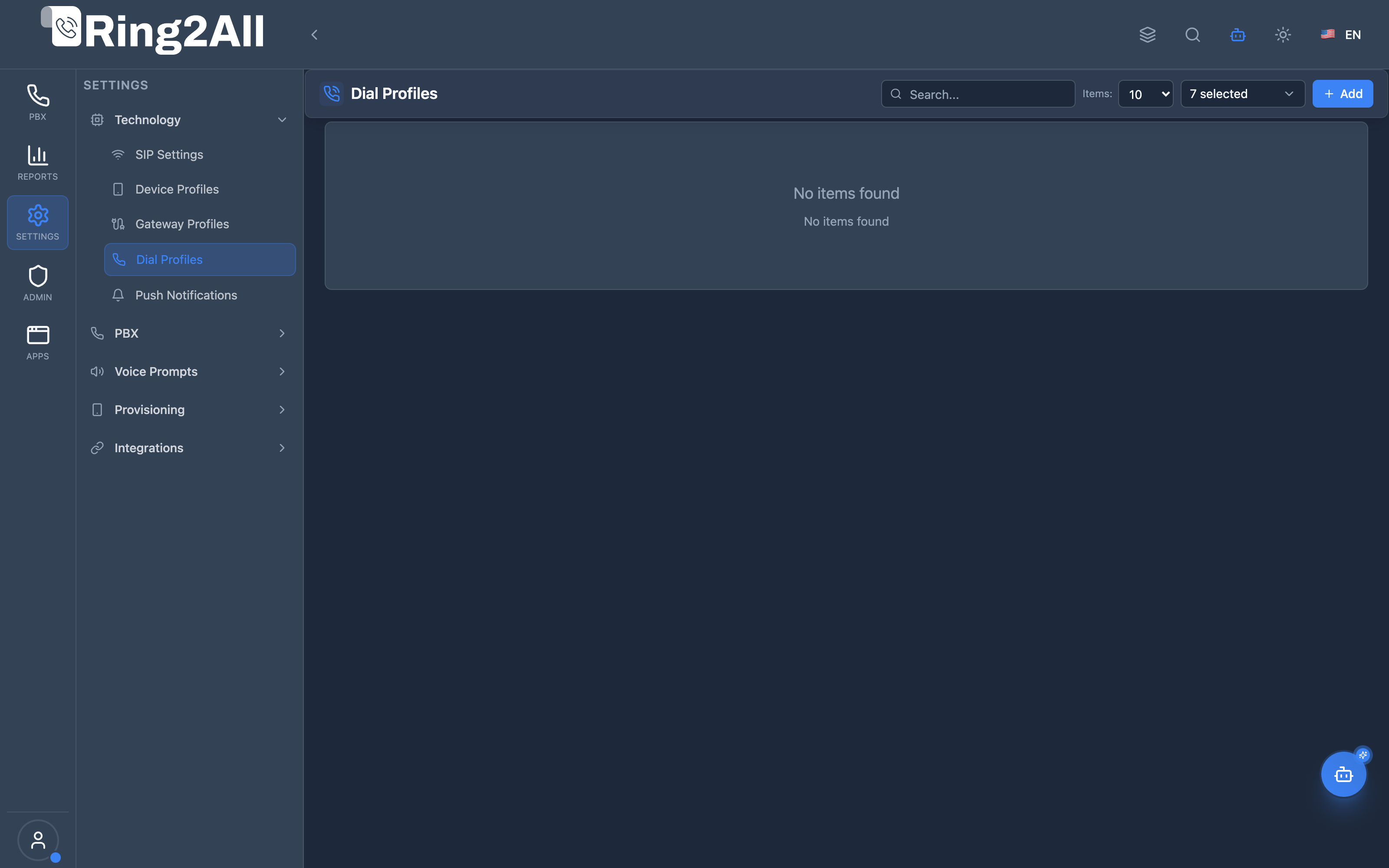
Section titled “Screenshots & Visual Interface”Dial Profiles Directory
Section titled “Dial Profiles Directory”Directory of reusable call-bridging behavior templates, displaying profile names, descriptions, associated tenants, and status indicators.
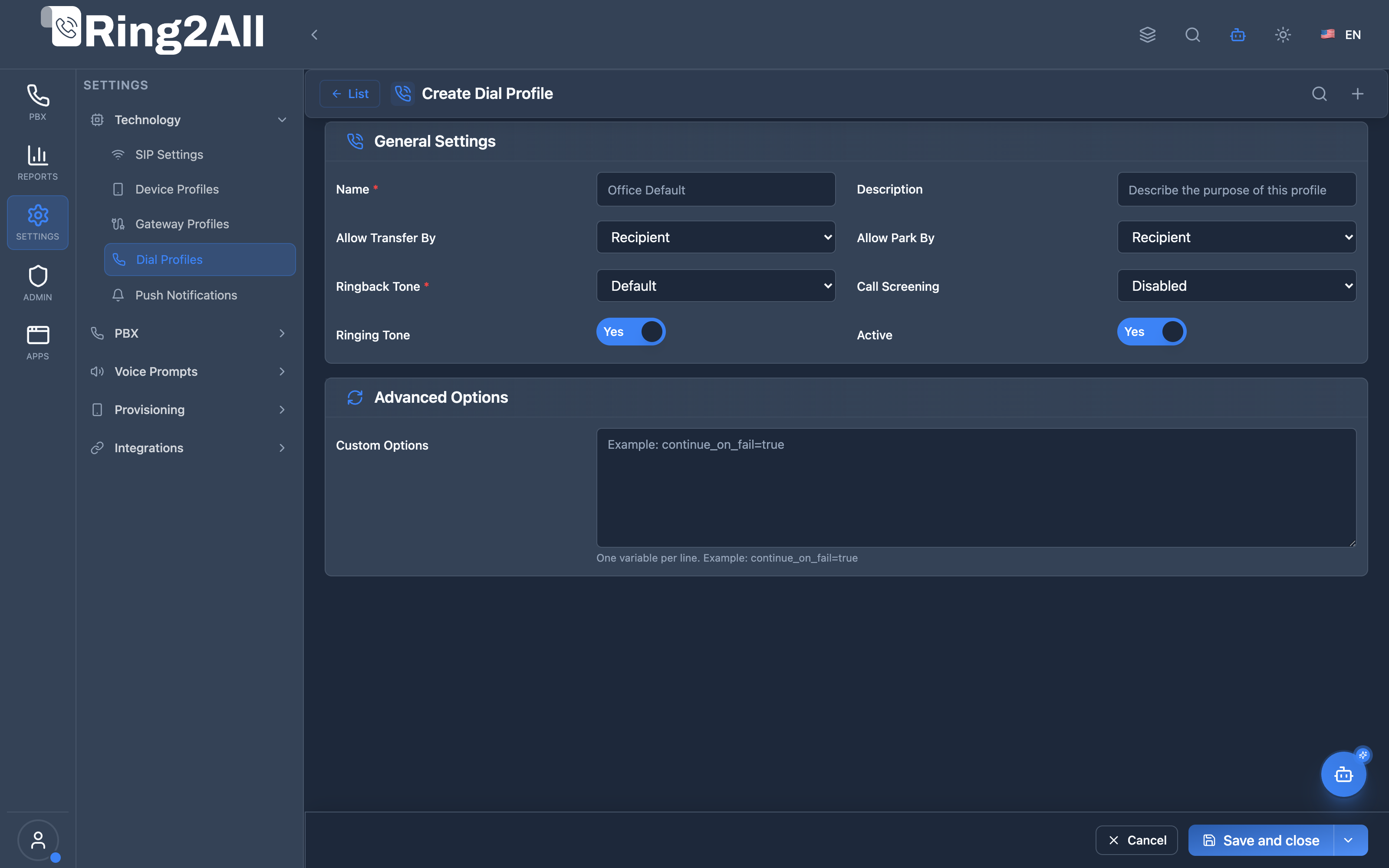
Dial Profile Configuration Form
Section titled “Dial Profile Configuration Form”Comprehensive form for defining in-call operational controls, including DTMF transfer permissions (caller/callee/both), call parking permissions, custom music-on-hold ringback streams, call screening modes, and dynamic Telephony Server channel variables.
1. Module Overview (Technical)
Section titled “1. Module Overview (Technical)”What Are Dial Profiles?
Section titled “What Are Dial Profiles?”Dial Profiles are reusable call behavior templates that control how calls behave before they are bridged or transferred. They define who can transfer/park calls, what ringback callers hear, call screening behavior, and custom Telephony Server channel variables.
Architecture
Section titled “Architecture”┌─────────────────────────────────────────────────────────────────┐│ Dial Profiles Architecture │├─────────────────────────────────────────────────────────────────┤│ ││ Admin Panel ││ ┌──────────────────────────────────────────────────────────┐ ││ │ Dial Profiles │ ││ │ │ ││ │ Templates: │ ││ │ ├─ Office Default (Both transfer, MOH ringback) │ ││ │ ├─ Queue Calls (No transfer, screening) │ ││ │ └─ VIP Handling (Caller transfer, custom ringback) │ ││ │ │ ││ └──────────────────────────────────────────────────────────┘ ││ │ ││ ▼ Applied to routing destinations ││ ┌──────────────────────────────────────────────────────────┐ ││ │ Routing (Inbound, IVR, Queues, etc.) │ ││ │ │ ││ │ Inbound Route A → Office Default profile │ ││ │ Queue Sales → Queue Calls profile │ ││ │ VIP DID → VIP Handling profile │ ││ │ │ ││ └──────────────────────────────────────────────────────────┘ ││ │ ││ ▼ Variables set on call ││ ┌──────────────────────────────────────────────────────────┐ ││ │ Telephony Server Call Processing │ ││ │ │ ││ │ Channel variables applied: │ ││ │ ├─ transfer_enable = caller │ ││ │ ├─ park_enable = both │ ││ │ ├─ ringback = local_stream://moh │ ││ │ ├─ call_screening = askOnce │ ││ │ └─ (custom vars) │ ││ │ │ ││ └──────────────────────────────────────────────────────────┘ ││ │└─────────────────────────────────────────────────────────────────┘2. Module Overview (Commercial/Business)
Section titled “2. Module Overview (Commercial/Business)”Business Value
Section titled “Business Value”Dial Profiles provides consistent call handling:
| Without Dial Profiles | With Dial Profiles |
|---|---|
| Configure each route | Apply templates |
| Inconsistent behavior | Standardized handling |
| Manual variable setting | Reusable profiles |
| Hard to change | Update once, apply everywhere |
Use Cases
Section titled “Use Cases”-
Transfer Control
- Allow only internal transfers
- Restrict external caller transfers
-
Ringback Customization
- Play hold music while ringing
- Custom branded audio
-
Call Screening
- Confirm before connecting
- Announce caller info
-
Advanced Call Flows
- Custom Telephony Server variables
- Specialized behavior
Feature Highlights
Section titled “Feature Highlights”| Feature | Benefit |
|---|---|
| Transfer Control | Who can transfer |
| Park Control | Who can park calls |
| Ringback Options | Custom ringback/MOH |
| Call Screening | Caller confirmation |
| Custom Variables | Telephony Server flexibility |
| Reusable | Apply to many routes |
3. Module Overview (End User/Administrator)
Section titled “3. Module Overview (End User/Administrator)”What Can You Do?
Section titled “What Can You Do?”- Create dial profile templates
- Configure transfer permissions
- Configure park permissions
- Set ringback tones
- Enable call screening
- Add custom Telephony Server variables
- Apply profiles to routes
Dial Profiles Interface
Section titled “Dial Profiles Interface”┌─────────────────────────────────────────────────────────────────┐│ Dial Profiles │├─────────────────────────────────────────────────────────────────┤│ ││ Define reusable call behavior profiles that control transfers, ││ ringback tones, call screening, and more. ││ ││ [+ Add Dial Profile] ││ ││ ┌───────────────────────────────────────────────────────────┐ ││ │ Name │ Description │ Status │ ││ ├─────────────────┼───────────────────────┼───────────────┤ ││ │ Office Default │ Standard office calls │ ✓ Active │ ││ │ Queue Calls │ Call center queues │ ✓ Active │ ││ │ VIP Handling │ VIP customer calls │ ✓ Active │ ││ │ External Only │ Outside calls only │ ✓ Active │ ││ └───────────────────────────────────────────────────────────┘ ││ │└─────────────────────────────────────────────────────────────────┘Profile Edit View
Section titled “Profile Edit View”┌─────────────────────────────────────────────────────────────────┐│ Edit Dial Profile: Office Default │├─────────────────────────────────────────────────────────────────┤│ ││ General Settings ││ Control transfer, parking, ringback, and screening behavior. ││ ││ Name: [Office Default ] ││ Description: [Standard office call handling ] ││ Active: ✓ ││ ││ Allow Transfer By: [Both ▼] ││ ├─ None ││ ├─ Caller ││ ├─ Recipient ││ └─ Both ││ ││ Allow Park By: [Both ▼] ││ ├─ None ││ ├─ Caller ││ ├─ Recipient ││ └─ Both ││ ││ Ringback Tone: [music/default ▼] ││ ├─ Default ││ ├─ None (Ringback) ││ ├─ music/default ││ └─ Custom value ││ ││ Call Screening: [Disabled ▼] ││ ├─ Disabled ││ ├─ Ask Once ││ └─ Always Ask ││ ││ Ringing Tone: ☐ ││ ││ ──────────────────────────────────────────────────────────────││ ││ Advanced Options ││ Fine-tune the call flow with custom Telephony Server variables. ││ ││ Custom Options: ││ ┌─────────────────────────────────────────────────────────────┐││ │ continue_on_fail=true │││ │ ignore_early_media=true │││ └─────────────────────────────────────────────────────────────┘││ One variable per line. Example: continue_on_fail=true ││ ││ [Save] [Cancel] ││ │└─────────────────────────────────────────────────────────────────┘Quick Tips
Section titled “Quick Tips”[!TIP] Transfer Control: Set “None” to prevent any transfers.
[!TIP] MOH Ringback: Use “music/default” for hold music while ringing.
[!NOTE] Custom Variables: Advanced users can add Telephony Server channel variables.
🎯 User Roles & Key Capabilities
Section titled “🎯 User Roles & Key Capabilities”| Role | Permissions | Key Capabilities |
|---|---|---|
| Super Administrator | Full Access (read, write, delete) |
Configure tenant dial profiles, define platform-wide channel variable policies, and manage screening defaults. |
| Call Center / PBX Admin | Domain Management (read, write) |
Create call behavior templates controlling in-call DTMF transfers, call parking permissions, and custom music-on-hold ringback tones. |
| Routing Specialist | Operational (read, write) |
Attach dial profiles to outbound routes and ring groups to enforce transfer policies or append Telephony Server channel parameters. |
| Support Specialist | Read & Diagnostic (read) |
Check active dial profiles, verify channel variables, and diagnose why transfers or call screening are failing. |
4. Configuration Fields
Section titled “4. Configuration Fields”General Settings
Section titled “General Settings”| Field | Description |
|---|---|
| Name | Profile identifier |
| Description | Purpose notes |
| Active | Enable/disable profile |
Transfer & Parking
Section titled “Transfer & Parking”| Field | Options | Description |
|---|---|---|
| Allow Transfer By | None, Caller, Recipient, Both | Who can transfer |
| Allow Park By | None, Caller, Recipient, Both | Who can park calls |
Ringback Options
Section titled “Ringback Options”| Option | Description |
|---|---|
| Default | System default ringback |
| None (Ringback) | Standard phone ring |
| music/default | Hold music while ringing |
| Custom value | Custom stream/file path |
Call Screening
Section titled “Call Screening”| Option | Description |
|---|---|
| Disabled | Connect immediately |
| Ask Once | Confirm once per call |
| Always Ask | Confirm every transfer |
Advanced Options
Section titled “Advanced Options”| Field | Description |
|---|---|
| Custom Options | Telephony Server channel variables (key=value) |
| Ringing Tone | Enable ringing before bridge |
5. Common Scenarios & Examples
Section titled “5. Common Scenarios & Examples”Scenario 1: Standard Office Profile
Section titled “Scenario 1: Standard Office Profile”- Create new profile
- Allow Transfer By = Both
- Allow Park By = Both
- Ringback = music/default
- Call Screening = Disabled
- Save and apply to routes
Scenario 2: Queue Calls (No Transfer)
Section titled “Scenario 2: Queue Calls (No Transfer)”- Create new profile
- Allow Transfer By = Recipient only
- Allow Park By = Recipient only
- Ringback = music/default
- Call Screening = Ask Once
- Apply to queue destinations
Scenario 3: VIP Handling
Section titled “Scenario 3: VIP Handling”- Create new profile
- Allow Transfer By = Both
- Ringback = Custom (VIP music)
- Call Screening = Disabled
- Add custom var: absolute_codec_string=OPUS
- Apply to VIP routes
Scenario 4: External Call Control
Section titled “Scenario 4: External Call Control”- Create new profile
- Allow Transfer By = Recipient
- Allow Park By = None
- Call Screening = Always Ask
- Apply to external DIDs
6. Limitations & Important Notes
Section titled “6. Limitations & Important Notes”Technical Notes
Section titled “Technical Notes”[!NOTE] Module Assignment: Dial Profiles can be applied to the following modules:
- Extensions: Set under the Advanced settings tab to define variables and permissions for user calls.
- Gateways: Assigned under the Basic Information settings of a SIP Trunk to control behavior on all incoming calls through the gateway.
- Inbound Routes: Configured under the Destination settings of a route to control call variables (transfers, custom ringbacks, screening) for incoming DIDs.
- Outbound Routes: Configured under the Advanced Options tab of the route to apply variables on outbound bridged calls.
[!NOTE] Variables: Custom options are Telephony Server channel variables.
[!WARNING] Invalid Variables: Incorrect custom options may cause call failures.
Best Practices
Section titled “Best Practices”- Create Purpose-Specific: Different profiles for different call types
- Test Changes: Verify behavior after changes
- Document Profiles: Use description field
- Limit Custom Vars: Only use when necessary
- Standard Naming: Use clear, descriptive names
Transfer/Park Permission Matrix
Section titled “Transfer/Park Permission Matrix”| Setting | Caller Can | Recipient Can |
|---|---|---|
| None | ✗ | ✗ |
| Caller | ✓ | ✗ |
| Recipient | ✗ | ✓ |
| Both | ✓ | ✓ |
7. Troubleshooting Tips
Section titled “7. Troubleshooting Tips”Common Issues
Section titled “Common Issues”| Symptom | Possible Cause | Solution |
|---|---|---|
| Can’t transfer | Wrong permission | Check Allow Transfer By |
| No ringback | Wrong setting | Check Ringback Tone |
| Screening not working | Profile not applied | Verify route assignment |
| Call fails | Bad custom var | Check Custom Options |
| Wrong music | Invalid path | Verify ringback path |
Common Custom Variables
Section titled “Common Custom Variables”| Variable | Purpose |
|---|---|
continue_on_fail=true |
Try next route on failure |
ignore_early_media=true |
Ignore early media |
hangup_after_bridge=true |
Hangup after bridge |
call_timeout=30 |
Ring timeout seconds |
absolute_codec_string=OPUS |
Force codec |
Debug Workflow
Section titled “Debug Workflow”- Check profile is active
- Verify route uses correct profile
- Check Telephony Server logs for variables
- Test with simple profile first
- Add custom options one at a time
8. Glossary
Section titled “8. Glossary”| Term | Definition |
|---|---|
| Dial Profile | Call behavior template |
| Ringback | Audio caller hears while ringing |
| Call Screening | Confirm before connecting |
| Transfer | Move call to another party |
| Park | Hold call in shared lot |
| Channel Variable | Telephony Server call setting |
Model Context Protocol (MCP) AI Integration
Section titled “Model Context Protocol (MCP) AI Integration”The Ring2All PBX platform integrates deep AI assistance via the Model Context Protocol (MCP). The Dial Profiles module allows the PBX AI Copilot to query call-behavior templates, inspect transfer/parking policies, and verify channel variable injections before calls are bridged.
Available MCP Tools
Section titled “Available MCP Tools”| Tool Name | Operation Type | RBAC Risk Level | Description |
|---|---|---|---|
list_dial_profiles |
Read / Query | low |
Lists Dial Profiles (digit normalization, country code prefixes, and caller ID transformation templates) with tenant/domain isolation. |
Tool Input Schemas & Parameters
Section titled “Tool Input Schemas & Parameters”1. list_dial_profiles
Section titled “1. list_dial_profiles”{ "name": "list_dial_profiles", "description": "List Dial Profiles (digit normalization, country code prefixes, and caller ID transformation templates).", "inputSchema": { "type": "object", "properties": { "search": { "type": "string", "description": "Filter by dial profile name or description (e.g. 'Standard Inbound', 'Secure Transfer')." } } }}Natural Language Prompts
Section titled “Natural Language Prompts”| User Request | Invoked MCP Tool | Expected AI Response |
|---|---|---|
| “List all dial profiles configured for our PBX.” | list_dial_profiles |
Returns available dial profiles with transfer permissions, screening mode, and active status. |
| “Which dial profile prevents callers from blind transferring calls?” | list_dial_profiles |
Identifies profiles where allow_transfer_by is restricted to callee or none. |
| “Show me the custom channel variables configured on the primary dial profile.” | list_dial_profiles({ search: "Standard" }) |
Details profile variables (e.g. continue_on_fail=true, hangup_after_bridge=true). |
Multi-Tenant & Security Safeguards
Section titled “Multi-Tenant & Security Safeguards”- Strict Domain Isolation: Dial profiles are filtered strictly by the tenant’s associated domain (
dp.domain_id = domain.id), preventing unauthorized cross-tenant visibility. - Anti-Collision Protection: Dial profile names are uniquely checked per domain upon creation to avoid ambiguous route assignment.
- Safe Variable Sanitization: Channel variable inputs are checked against restricted Telephony Server command primitives (
system,sched_api) to prevent remote code injection. - Audit Logging: All administrative profile operations are captured in the tenant’s security audit log.
Documentation last updated: January 2026