

AI Tool Profiles & MCP RBAC Documentation
Table of Contents
Section titled “Table of Contents”- Navigation & Access
- Screenshots & Visual Interface
- 🎯 User Roles & Key Capabilities
- Overview & Architectural Concept
- Dual-Layer Security: UI Permissions vs AI Tool Permissions
- The AI Tool Library
- Configuring an AI Tool Profile
- Assigning Tool Profiles to Users
- Model Context Protocol (MCP) AI Integration
- Referential Integrity & System Protection Guards
- Best Practices & Security Scenarios
Navigation & Access
Section titled “Navigation & Access”To access the AI Tool Profiles module:
- Log in to the Ring2All Web Portal (
https://<domain-or-ip>/login). - In the left navigation sidebar, expand Administration.
- Under AI Integration, click AI Tool Profiles (
/admin/ai-integration/tool-profiles). - View configured MCP tool packages, linked functions, category tags, and active domain assignments.
- Click + Add to construct a new tool profile (
/admin/ai-integration/tool-profiles/new), or choose from pre-built integrations in the Tool Library.
Screenshots & Visual Interface
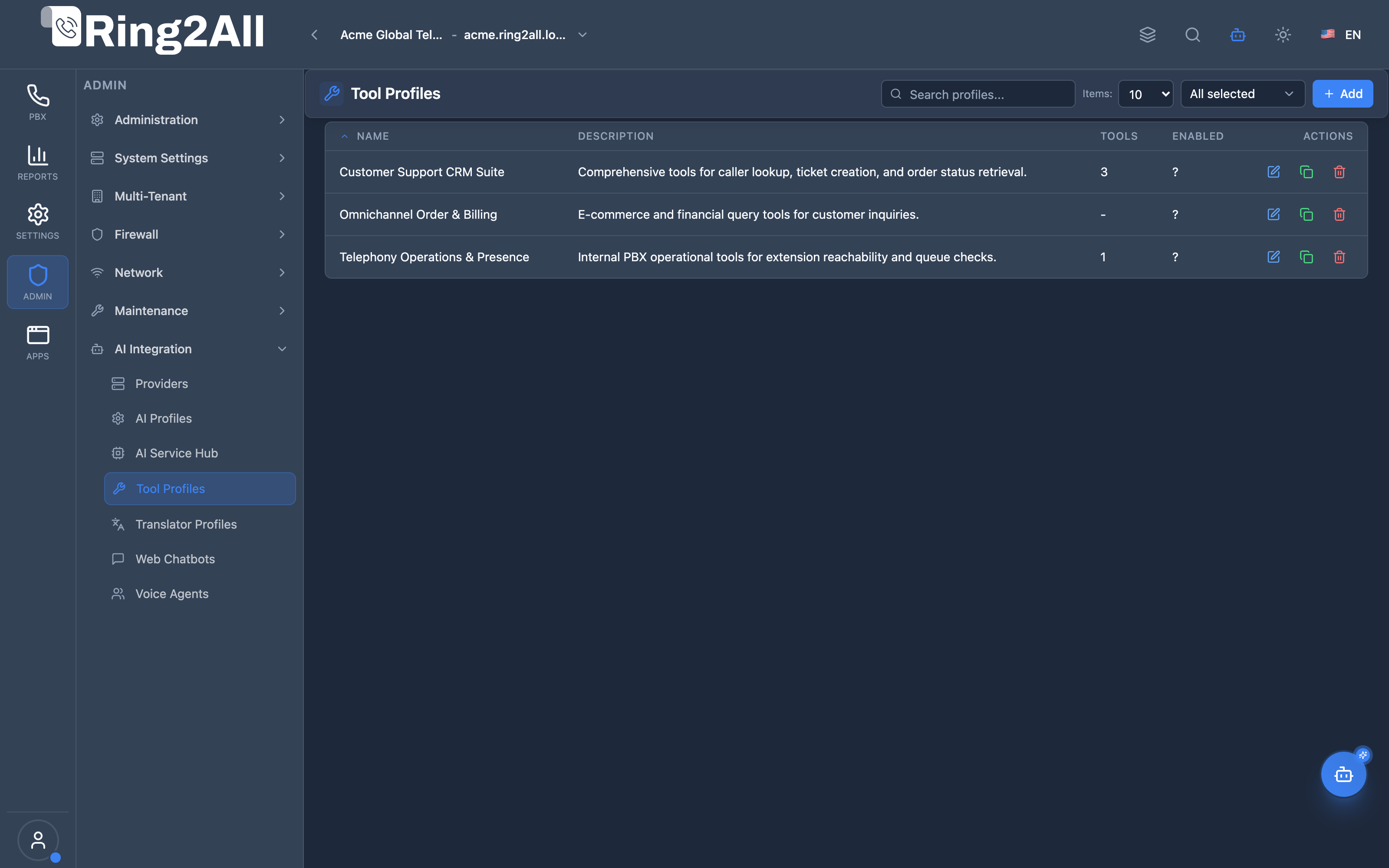
Section titled “Screenshots & Visual Interface”AI Tool Profiles Directory
Section titled “AI Tool Profiles Directory”Central catalog displaying configured MCP tool bundles, assigned action capabilities (CRM lookup, ticket creation, SIP presence checks), and active state toggles.
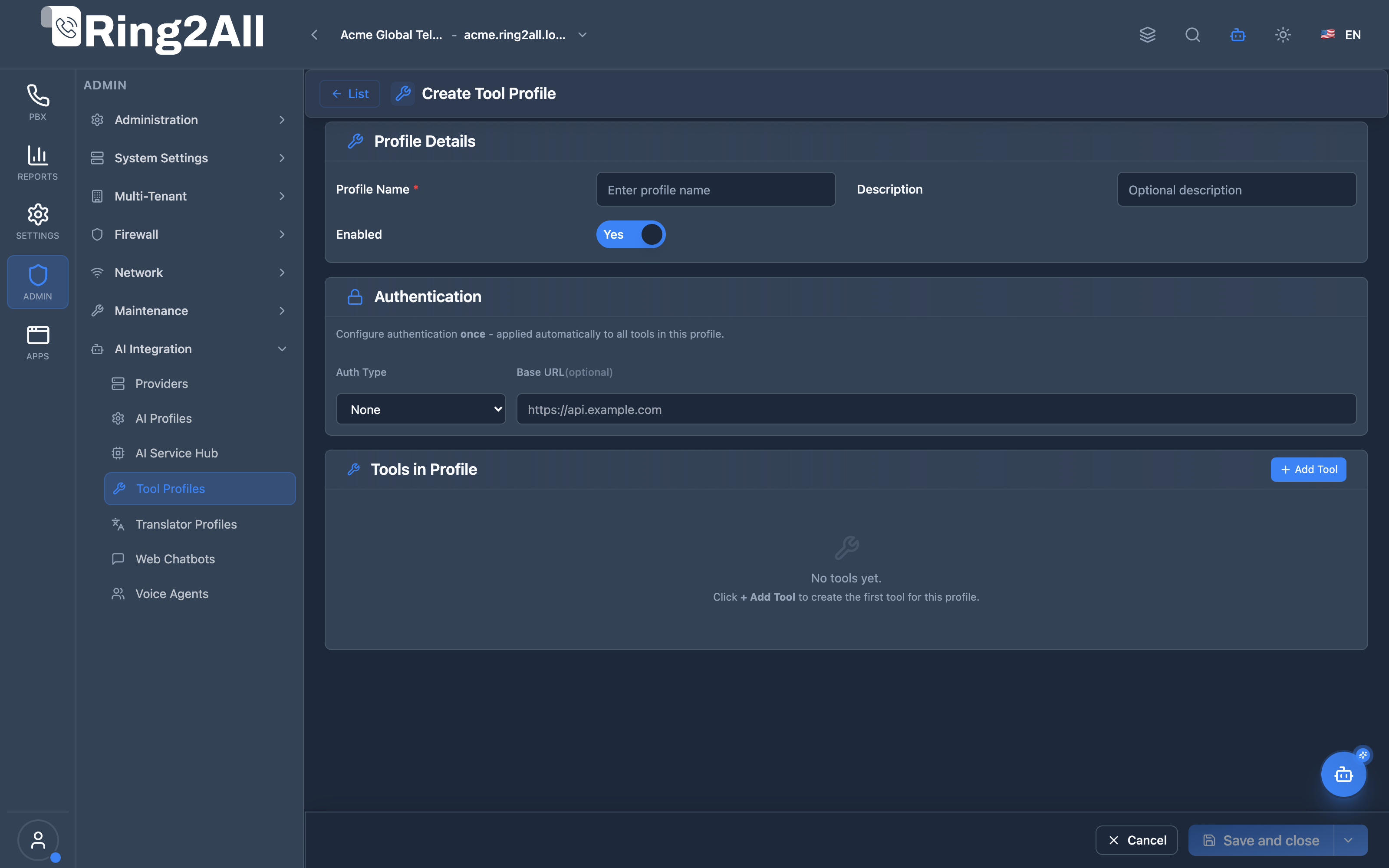
Create / Edit AI Tool Profile Form
Section titled “Create / Edit AI Tool Profile Form”Configuration editor for naming the profile, attaching specific executable tools from the catalog, defining parameter restrictions, setting timeout thresholds, and adjusting execution priorities.
🎯 User Roles & Key Capabilities
Section titled “🎯 User Roles & Key Capabilities”| Role | Access Level | Responsibilities & Capabilities |
|---|---|---|
| PBX Super Administrator | Full Access (RW) |
Define and manage AI Tool RBAC profiles, configure granular tool permissions, and assign default profiles across organizations. |
| Security & Compliance Officer | Policy Audit (RO) |
Audit which telephony mutations (call drop, forward, transfer, recording deletion) are authorized for LLMs, copilots, and voice bots. |
| Contact Center Supervisor | Reusable Selection (RW) |
Bind supervisory tool profiles (queue monitoring, live call barge, agent status update) to AI virtual assistants. |
| AI Platform Copilot / MCP Agent | Programmatic Audit (RO) |
Execute list_ai_tool_profiles and get_ai_tool_profile_status to evaluate allowed functions before issuing model tool calls. |
1. Overview & Architectural Concept
Section titled “1. Overview & Architectural Concept”As Artificial Intelligence assistants gain the capability to execute real actions within mission-critical telephony systems, security governance requires fine-grained control over what the AI is allowed to do on behalf of a specific user.
AI Tool Profiles provide Role-Based Access Control (RBAC) specifically tailored for the Model Context Protocol (MCP). Instead of granting blanket tool access to every user, administrators define granular profiles that whitelist or blacklist individual telephony, database, and system maintenance tools.
┌────────────────────────────────────────────────────────────────────────────────────────┐│ AI Tool Profiles & MCP RBAC Workflow │├────────────────────────────────────────────────────────────────────────────────────────┤│ ││ User Authenticates (JWT) ──► Profile: "NOC Tier 1 Support" ││ │ ││ ▼ Associated AI Tool Profile ││ ┌─────────────────────────────┐ ││ │ MCP Tool Role: NOC_T1 │ ││ │ ├─ query_cdr: ALLOWED │ ││ │ ├─ check_status: ALLOWED │ ││ │ ├─ hangup_call: DENIED │ ││ │ └─ reload_xml: DENIED │ ││ └──────────────┬──────────────┘ ││ │ ││ ▼ Filtered Tool Schema ││ User asks Copilot: │ ││ "Hang up call on ext 1001" ───────────────► │ Tool Schema does NOT include ││ │ "hangup_call" ││ ▼ ││ Copilot responds: ──────────────────────────┴───────────────────────────────────────► ││ "I do not have authorization to terminate active calls in this session." ││ │└────────────────────────────────────────────────────────────────────────────────────────┘2. Dual-Layer Security: UI Permissions vs AI Tool Permissions
Section titled “2. Dual-Layer Security: UI Permissions vs AI Tool Permissions”The SoftSwitch Platform enforces a dual-layer authorization architecture:
| Layer | Module | Purpose |
|---|---|---|
| Layer 1: UI Module Permissions | Role Profiles (admin/users/role-profiles) |
Governs visual web navigation, menu visibility, and REST API route access (FULL, READ, NONE). |
| Layer 2: AI Tool Permissions | AI Tool Profiles (admin/ai/ai-tool-profiles) |
Governs which backend MCP tools the AI Copilot can summon when interacting with that specific user. |
A user might have FULL control over Extensions in the web UI, but their AI Tool Profile can restrict the Copilot to read-only tools to prevent accidental batch modifications via conversational prompts.
3. The AI Tool Library
Section titled “3. The AI Tool Library”The AI Tool Library (Admin → AI → Tool Library) catalogs every registered Model Context Protocol function supported by the platform backend.
Each tool entry displays:
- Canonical Tool Name: Machine-readable identifier (e.g.,
telephony_get_extension_status). - Category: Functional domain (Telephony, CDR Analytics, System Maintenance, Security, SBC).
- Risk Level:
- 🟢 Low (Read-Only): Telemetry, status checks, listing resources.
- 🟡 Medium (Mutation): Creating extensions, updating forwards, scheduling cleanups.
- 🔴 High (Disruptive): Dropping active calls, reloading Telephony Server, modifying firewall rules.
- Input Parameters & Schema: JSON schema describing all accepted arguments.
4. Configuring an AI Tool Profile
Section titled “4. Configuring an AI Tool Profile”To create or edit an AI Tool Profile:
- Navigate to Admin → AI → Tool Profiles.
- Click + Create Tool Profile (or edit an existing profile).
- Fill in the general details:
- Profile Name: Descriptive label (e.g.
Call Center Supervisor Copilot). - Description: Target operational role.
- Is Default: Automatically assigned to new users of this organization.
- Profile Name: Descriptive label (e.g.
- Tool Selection Matrix:
- Toggle individual tool permissions on or off.
- Use category-level master switches (
Enable All Telephony Tools,Enable All Read Tools).
- Click Save Changes in the bottom action bar.
5. Assigning Tool Profiles to Users
Section titled “5. Assigning Tool Profiles to Users”AI Tool Profiles are assigned directly in Admin → Users → Edit User:
- Select the desired AI Tool Profile from the dropdown selector.
- If unassigned, the user inherits the tenant’s default tool profile.
- Guest and unauthenticated sessions have zero MCP tool access.
Model Context Protocol (MCP) AI Integration
Section titled “Model Context Protocol (MCP) AI Integration”The AI Tool Profiles module represents the authorization heartbeat of the Model Context Protocol (MCP), providing the programmatic registry that defines which tools each agent persona or user copilot may execute.
Available MCP Tools
Section titled “Available MCP Tools”| Tool Name | Scope | Description |
|---|---|---|
list_ai_tool_profiles |
RBAC Registry (RO) |
Lists all AI Tool RBAC Profiles that govern which MCP tools conversational voice agents and chatbots are permitted to execute. |
get_ai_tool_profile_status |
Permission Audit (RO) |
Retrieves configuration and assigned MCP tool catalog for a specific AI Tool Profile. |
Tool Schemas & Payloads
Section titled “Tool Schemas & Payloads”list_ai_tool_profiles
Section titled “list_ai_tool_profiles”{ "name": "list_ai_tool_profiles", "description": "Lists all AI Tool RBAC Profiles that govern which Model Context Protocol (MCP) tools conversational voice agents and chatbots are permitted to execute.", "parameters": { "type": "object", "properties": { "search": { "type": "string", "description": "Filter by profile name or description." } } }}Realistic Execution Response:
{ "success": true, "data": { "total": 3, "profiles": [ { "id": 1, "name": "Full Telephony Admin Profile", "description": "Unrestricted access to all PBX telephony and routing tools", "enabled": true, "toolCount": 78, "createdAt": "2026-08-10T10:00:00Z" }, { "id": 2, "name": "Call Center Supervisor Copilot", "description": "Allows live call monitoring, queue inspection, and agent status toggles", "enabled": true, "toolCount": 24, "createdAt": "2026-08-15T14:30:00Z" }, { "id": 3, "name": "Receptionist Read-Only Helper", "description": "Restricted to extension lookup, presence status, and company directory", "enabled": true, "toolCount": 6, "createdAt": "2026-09-01T08:00:00Z" } ] }}get_ai_tool_profile_status
Section titled “get_ai_tool_profile_status”{ "name": "get_ai_tool_profile_status", "description": "Retrieves configuration and assigned MCP tool catalog for a specific AI Tool Profile.", "parameters": { "type": "object", "properties": { "profile_id": { "type": "number", "description": "AI Tool Profile ID." }, "name": { "type": "string", "description": "AI Tool Profile name." } } }}Realistic Execution Response:
{ "success": true, "data": { "profile": { "id": 2, "name": "Call Center Supervisor Copilot", "description": "Allows live call monitoring, queue inspection, and agent status toggles", "enabled": true, "assignedToolsCount": 4, "tools": [ { "toolName": "get_active_calls", "isAllowed": true }, { "toolName": "list_queues", "isAllowed": true }, { "toolName": "get_call_center_agent_status", "isAllowed": true }, { "toolName": "update_call_center_agent_status", "isAllowed": true } ] } }}Bilingual Natural Language Prompt Examples
Section titled “Bilingual Natural Language Prompt Examples”English Prompts
Section titled “English Prompts”- “Copilot, list all AI Tool Profiles and show how many MCP tools are assigned to each.”
- “What specific MCP tools are permitted within the Call Center Supervisor Copilot profile?”
- “Verify if the receptionist assistant profile has permission to originate or transfer calls.”
Spanish Prompts
Section titled “Spanish Prompts”- “Copilot, lista todos los perfiles de herramientas de IA (Tool Profiles) configurados en el sistema.”
- “¿Qué herramientas MCP tiene habilitadas el perfil de supervisor de call center?”
- “Comprueba si el asistente de recepción tiene restringida la eliminación de extensiones.”
Enterprise Safeguards & Execution Boundaries
Section titled “Enterprise Safeguards & Execution Boundaries”- Zero Blanket Execution: AI voice agents and copilot assistants cannot execute any MCP tool that is not explicitly whitelisted in their assigned AI Tool Profile.
- Dual-Layer RBAC Alignment: Even if a tool is permitted in the AI Tool Profile, execution fails if the underlying authenticated human operator lacks the corresponding UI permission level.
- Active Assignment Deletion Block: Tool profiles linked to live user accounts or active voice bots cannot be removed until reassignments are completed.
6. Referential Integrity & System Protection Guards
Section titled “6. Referential Integrity & System Protection Guards”To prevent accidental outages and broken authorization states, the platform enforces strict referential integrity:
- System Role Immutability: Built-in system profiles (e.g.
System Superadmin,System Read-Only) cannot be modified or deleted. - Active Assignment Safeguards: An AI Tool Profile currently assigned to one or more active users cannot be deleted. The API rejects the deletion request with a
REFERENTIAL_INTEGRITY_ERROR, indicating how many users are currently bound to the profile.
7. Best Practices & Security Scenarios
Section titled “7. Best Practices & Security Scenarios”Scenario A: Receptionist / Office Staff
Section titled “Scenario A: Receptionist / Office Staff”- Permitted Tools:
get_extension_status,list_extensions,check_voicemail_count. - Blocked Tools: All routing mutations, CDR exports, firewall rules, and call termination tools.
Scenario B: NOC Tier 1 Engineer
Section titled “Scenario B: NOC Tier 1 Engineer”- Permitted Tools: All read-only telephony queries,
query_cdr_records,analyze_sip_trace,get_dispatcher_status. - Blocked Tools:
hangup_call,delete_extension,reload_freeswitch_xml.
Scenario C: Telecom Superadmin
Section titled “Scenario C: Telecom Superadmin”- Permitted Tools: 100% of the AI Tool Library.
Documentation updated: September 2026