

License Information
📖 Introduction
Section titled “📖 Introduction”The License Information module provides real-time verification of software entitlements, capacity allocations, expiration timelines, and hardware binding for the Ring2All PBX platform.
Commercial installations require an active license to authenticate feature sets, maximum provisioned SIP extensions, and concurrent telephony sessions. This module empowers primary system administrators to inspect active capacities, validate license health against the central licensing authority, apply renewal keys, or safely deactivate licenses prior to server migrations.
🖥️ Accessing the Module
Section titled “🖥️ Accessing the Module”- Locate the User Account Avatar in the bottom-left corner of the sidebar navigation.
- Click the user container to open the account dropdown menu.
- Select License (
/admin/licensing). - The Licensing view opens with current entitlements and status telemetry.
[!NOTE] The License menu item is only visible and accessible to users with Primary Administrator privileges (
isPrimaryAdmin = true).
📸 Screenshots & Visual Interface
Section titled “📸 Screenshots & Visual Interface”License Entitlements & Hardware Verification View
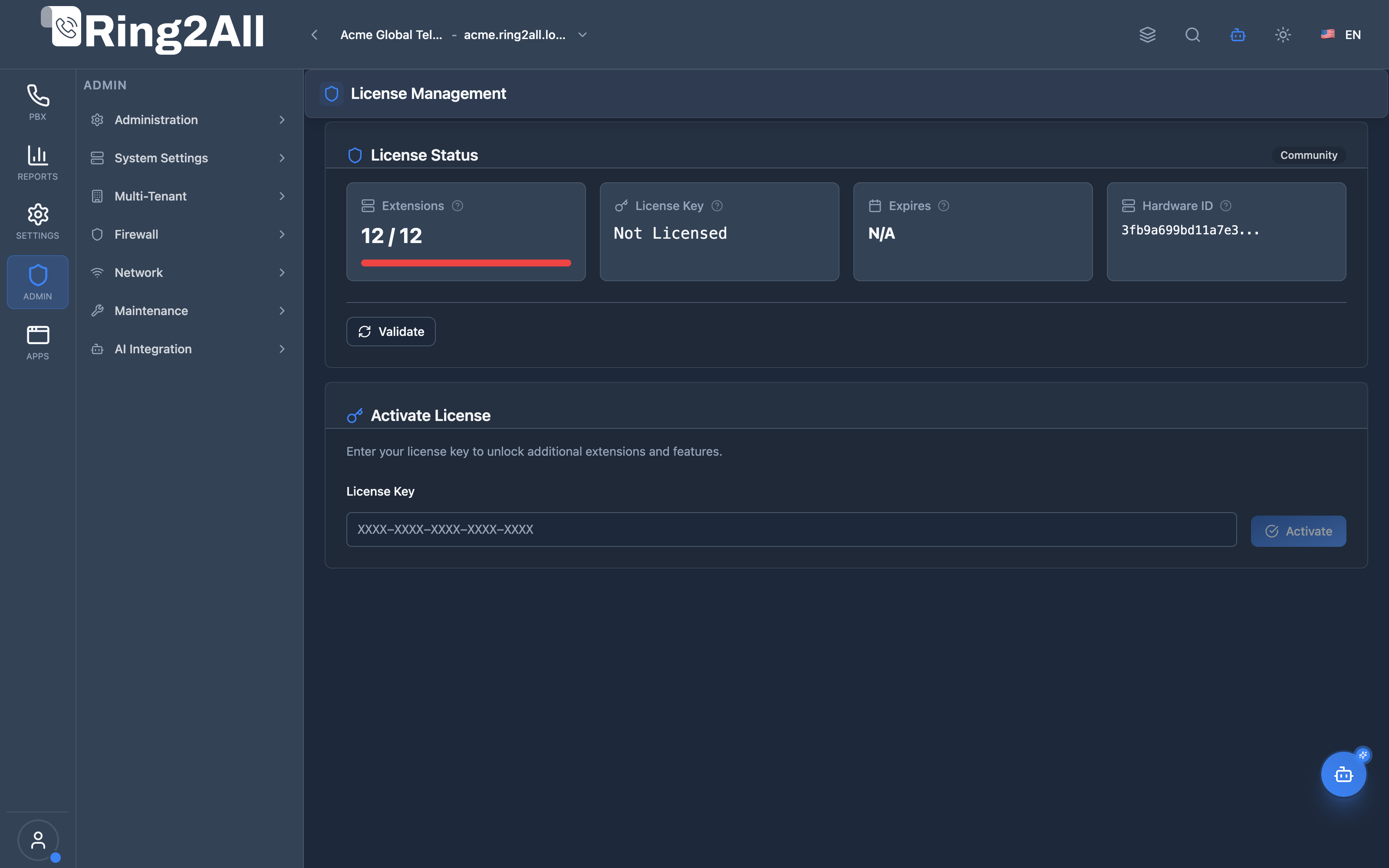
Section titled “License Entitlements & Hardware Verification View”The screenshot below shows the primary Licensing overview, displaying the active status badge, extension utilization progress bar, masked software key, expiration status, hardware fingerprint, and administrative action buttons.
🔍 Interface Overview & Entitlement Metrics
Section titled “🔍 Interface Overview & Entitlement Metrics”The module presents system entitlements across four dedicated telemetry cards:
1. Capacity & Status Panels
Section titled “1. Capacity & Status Panels”| Panel / Metric | UI Type | Description & Purpose | Operational Thresholds |
|---|---|---|---|
| License Status | Badge | Indicates the current cryptographic state of the installation. Possible values: ACTIVE, COMMUNITY, EXPIRED, or REVOKED. |
When inactive or expired, system broadcasts persistent warnings in the administrative toolbar. |
| Extensions | Metric & Progress Bar | Displays currently registered/configured SIP extensions versus the maximum capacity permitted by the license tier (used / max). |
Dynamic color coding: Green (<70%), Amber Warning (70-90%), Red Critical (>90%). |
| License Key | Masked Monospace | The unique 32-character software registration key bound to the PBX installation. | Masked for security. Unlicensed installations display Not Licensed. |
| Expiration Date | Calendar Metric | Indicates the exact calendar date on which the license subscription terminates, along with a real-time countdown of days remaining. | Perpetual licenses display Perpetual. Subscriptions nearing expiration (<7 days) highlight in amber. |
| Hardware ID | Cryptographic Hash | A unique SHA-256 fingerprint derived from physical server hardware (motherboard UUID, primary MAC address, and CPU processor signature). | Licenses are cryptographically bound to this hardware identifier to prevent unauthorized duplication. |
2. Administrative Actions
Section titled “2. Administrative Actions”| Action Button | Icon | Technical Operation | Recommended Usage |
|---|---|---|---|
| Validate License | <RefreshCw /> |
Sends an authenticated HTTPS handshake to the Ring2All licensing authority to refresh entitlements and capacity upgrades. | Use after purchasing add-on extension packs or renewing support contracts to instantly sync limits without restarting the PBX. |
| Deactivate License | <Trash2 /> |
Prompts with a high-priority confirmation modal before releasing the server’s cryptographic lease on the licensing server. | Mandatory before hardware migrations. Releasing the license allows the key to be cleanly reused on a replacement host. |
3. License Activation (Community Edition)
Section titled “3. License Activation (Community Edition)”When operating under the free Community Edition, an Activate License form box appears at the bottom of the view:
- Enter your purchased commercial license key into the License Key input field.
- Click Activate License.
- The server authenticates against the licensing portal, downloads the cryptographic certificate payload, binds the current hardware fingerprint, and elevates platform capabilities in real time without downtime.
⚠️ Hardware Migrations & Grace Period Policies
Section titled “⚠️ Hardware Migrations & Grace Period Policies”[!CAUTION] Virtual Machine & Hardware Migrations: Because the software license is bound to the server’s Hardware ID (CPU and hypervisor UUID), cloning a virtual machine to another physical host or replacing the motherboard will trigger a hardware mismatch error. Always click Deactivate License before shutting down the old host, or contact support to request a license re-homing.
[!IMPORTANT] Subscription Expiration & Grace Period: If a subscription reaches its expiration date, the PBX enters a 7-day Grace Period. Telephony services continue uninterrupted during this window, but administrators are alerted via email and high-priority banner notifications. Once the grace period ends, Telephony Server call routing halts until a valid key is provided.
🔗 Related Modules
Section titled “🔗 Related Modules”- PBX Dashboard — Where system-level health warnings and licensing alerts appear.
- Users Administration — Manage administrative user accounts and primary administrator status.
- Telephony Servers — Monitor underlying Telephony Server and Kamailio infrastructure nodes.