

AI Agents Module Documentation
Table of Contents
Section titled “Table of Contents”- Navigation & Access
- Screenshots & Visual Interface
- 🎯 User Roles & Key Capabilities
- Module Overview (Technical)
- Module Overview (Commercial/Business)
- Module Overview (End User/Administrator)
- Configuration Sections
- Settings Reference
- Common Scenarios & Examples
- Limitations & Important Notes
- Model Context Protocol (MCP) AI Integration
- Troubleshooting Tips
- Glossary
Navigation & Access
Section titled “Navigation & Access”To access the Voice Agents module:
- Log in to the Ring2All Web Portal (
https://<domain-or-ip>/login). - In the left navigation sidebar, expand Administration.
- Under AI Integration, click Voice Agents (
/admin/ai-integration/agents). - Monitor registered autonomous voice assistants, internal extension numbers (e.g.
2000,2001), synthetic voices, call history, and dialplan synchronization status. - Click + Add to provision a new conversational voice agent (
/admin/ai-integration/agents/new), or edit speech cadence, barge-in sensitivity, and call transfer destinations.
Screenshots & Visual Interface
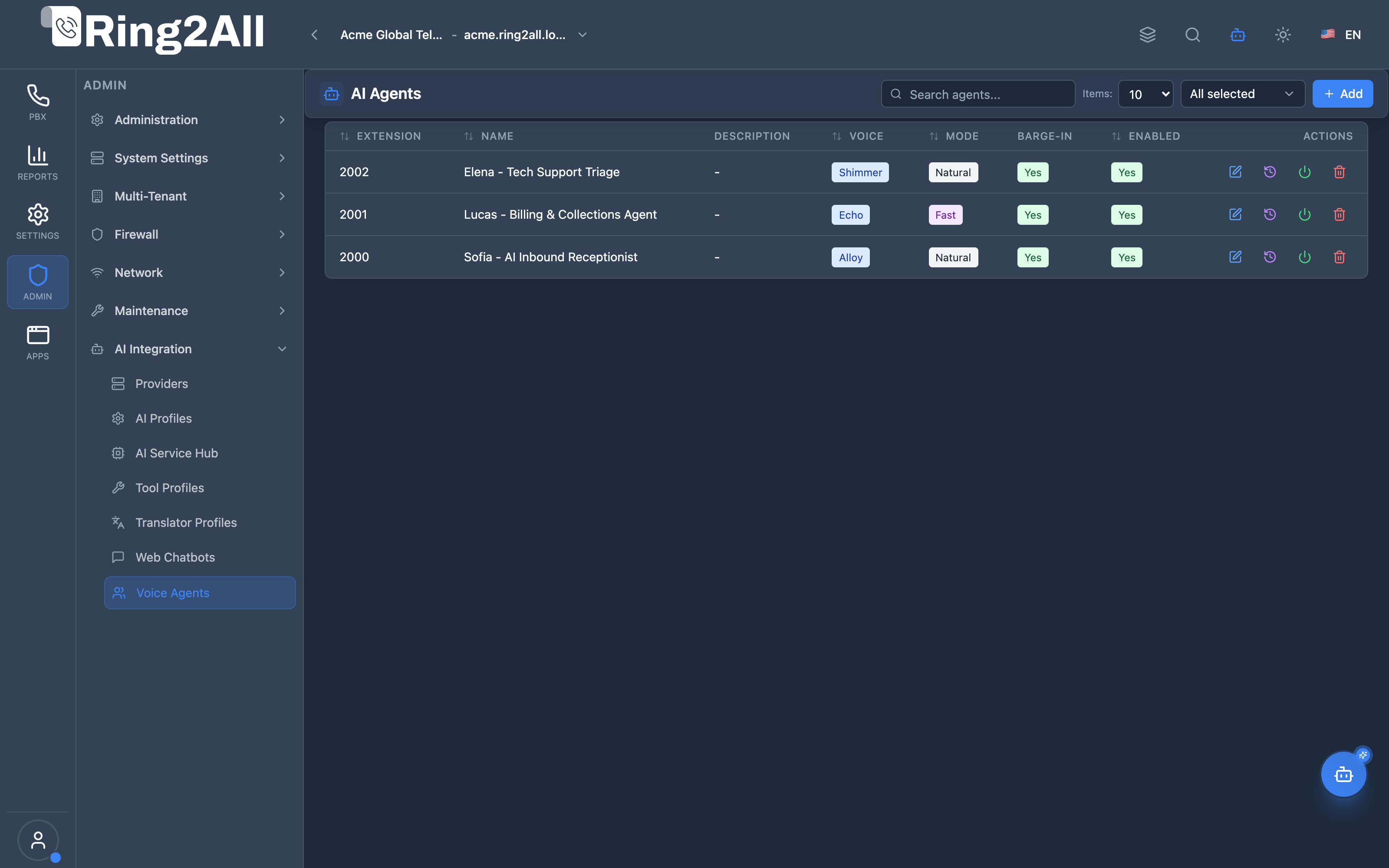
Section titled “Screenshots & Visual Interface”Voice Agents Registry
Section titled “Voice Agents Registry”Central directory listing active real-time conversational voice agents, assigned PBX extension numbers, voice personas (Alloy, Echo, Shimmer), and quick links to call recordings and transcripts.
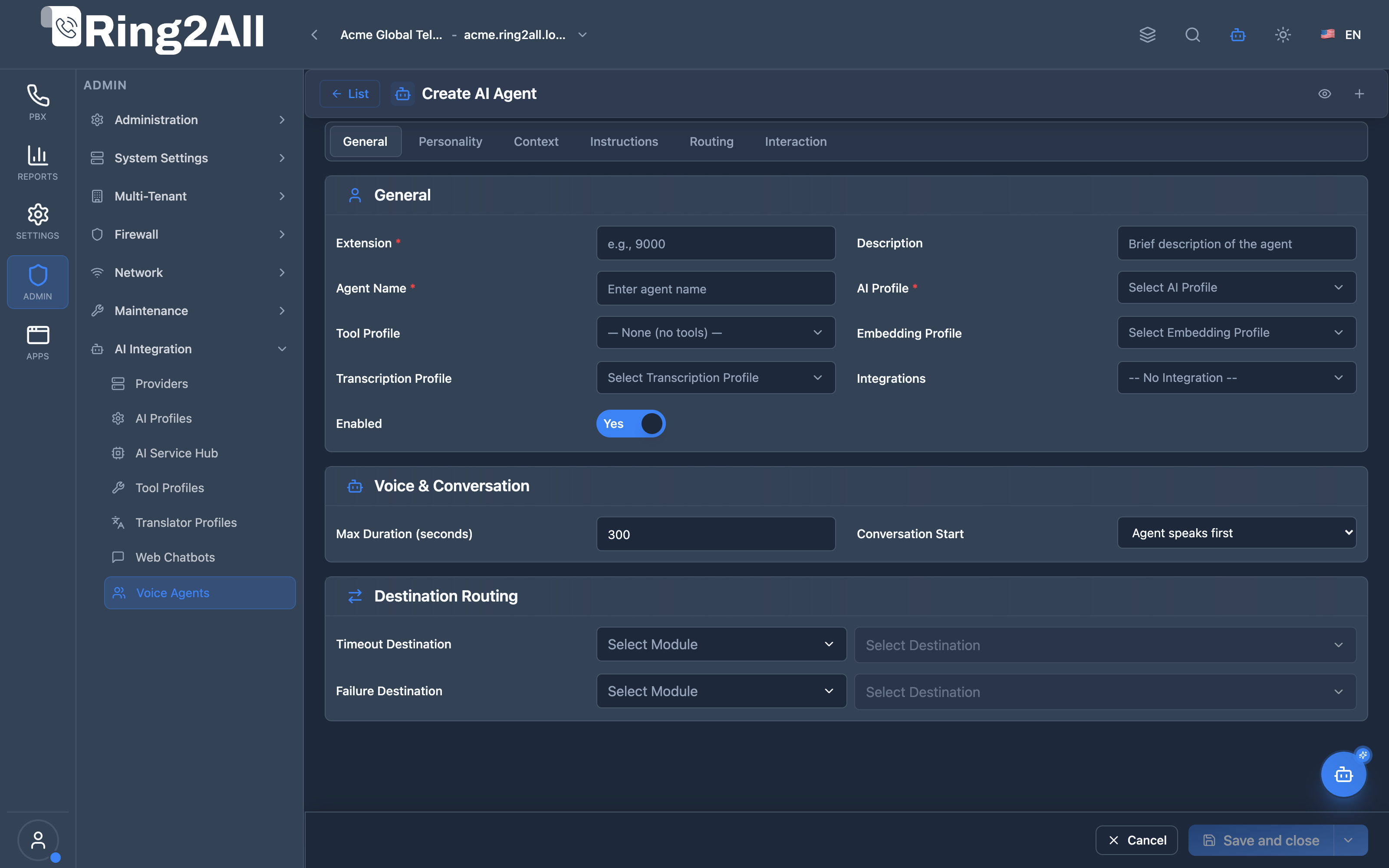
Create / Edit Voice Agent Form
Section titled “Create / Edit Voice Agent Form”Multi-tab configuration suite for personalizing agent identity, assigning telephony extensions, tuning speech acoustics (voice model, greeting protection, barge-in sensitivity, audio drain), crafting system prompts, attaching MCP tool profiles, and setting transfer routes.
🎯 User Roles & Key Capabilities
Section titled “🎯 User Roles & Key Capabilities”| Role | Access Level | Responsibilities & Capabilities |
|---|---|---|
| PBX Super Administrator | Full Access (RW) |
Provision and maintain autonomous AI Voice Agents, assign dedicated SIP extensions, configure OpenAI Realtime WebSocket parameters, and manage tenant-wide audio routing. |
| Contact Center Operations Director | Flow & Persona Design (RW) |
Craft multi-turn conversational personas, define business guardrails (do_rules & dont_rules), calibrate transfer destinations, and bind MCP tool profiles. |
| Quality Assurance & Compliance Analyst | Call Audit (RO) |
Review live call transcripts, evaluate turn-by-turn dialogue performance, verify barge-in behavior, and audit acoustic latency metrics. |
| AI Platform Copilot / MCP Agent | Programmatic Automation (RW) |
Execute list_ai_voice_agents, get_ai_voice_agent_status, create_ai_voice_agent, update_ai_voice_agent, delete_ai_voice_agent, and list_ai_agent_call_transcripts to provision, update, and audit voice bots autonomously. |
1. Module Overview (Technical)
Section titled “1. Module Overview (Technical)”What Are AI Agents?
Section titled “What Are AI Agents?”AI Agents is a conversational AI management module that enables real-time voice conversations between callers and AI assistants powered by OpenAI’s Realtime API. Each agent has a unique persona, voice, behavioral rules, and can be reached via a dedicated extension.
[!IMPORTANT] Dependency: This module requires the mod_openai_realtime Telephony Server module to be compiled and loaded. Without it, AI call handling will not function.
Architecture
Section titled “Architecture”┌─────────────────────────────────────────────────────────────────┐│ AI Agents Architecture │├─────────────────────────────────────────────────────────────────┤│ ││ ┌─────────────────────────────────────────────────────────────┐││ │ Frontend (Admin UI) │││ │ ┌──────────────┐ ┌───────────────┐ ┌─────────────────┐ │││ │ │ Agent List │ │ 6-Tab Form │ │ Prompt Preview │ │││ │ │ & Wizard │ │ Configuration │ │ & AI Generator │ │││ │ └──────────────┘ └───────────────┘ └─────────────────┘ │││ └─────────────────────────────────────────────────────────────┘││ │ ││ ▼ ││ ┌─────────────────────────────────────────────────────────────┐││ │ Backend API │││ │ POST /ai-agents (create) │ PUT /ai-agents/:id (update) │││ │ POST /ai-agents/generate-prompt (AI synthesis) │││ └─────────────────────────────────────────────────────────────┘││ │ ││ ▼ ││ ┌─────────────────────────────────────────────────────────────┐││ │ PostgreSQL (ss_telephony) │││ │ ai_agents ◄── ai_profiles ◄── ai_providers │││ └─────────────────────────────────────────────────────────────┘││ │ ││ ▼ ││ ┌─────────────────────────────────────────────────────────────┐││ │ Telephony Server Layer │││ │ lua/ai/ai_realtime_handler.lua ──► mod_openai_realtime │││ │ │ │││ │ ▼ │││ │ OpenAI Realtime API │││ │ (wss://api.openai.com) │││ └─────────────────────────────────────────────────────────────┘││ │└─────────────────────────────────────────────────────────────────┘Module Dependency
Section titled “Module Dependency”┌─────────────────┐ ┌─────────────────┐ ┌─────────────────┐│ AI Providers │◄────│ AI Profiles │◄────│ AI Agents ││ (Credentials) │ │ (Templates) │ │ (Personas) │└─────────────────┘ └─────────────────┘ └─────────────────┘ │ ▼ ┌─────────────────┐ │mod_openai_realtime│ │ (REQUIRED) │ └─────────────────┘2. Module Overview (Commercial/Business)
Section titled “2. Module Overview (Commercial/Business)”Business Value
Section titled “Business Value”AI Agents provides automated voice interactions:
| Without Module | With Module |
|---|---|
| Manual call handling | 24/7 AI assistants |
| High staffing costs | Reduced labor costs |
| Inconsistent service | Uniform experience |
| Limited scalability | Unlimited concurrent calls |
Use Cases
Section titled “Use Cases”-
Customer Support
- First-line call screening
- FAQ handling
- Ticket creation
-
Sales & Leads
- Product information
- Appointment scheduling
- Lead qualification
-
Internal Services
- IT help desk
- HR inquiries
- Directory assistance
-
After-Hours Coverage
- Message taking
- Emergency routing
- Callback scheduling
Feature Highlights
Section titled “Feature Highlights”| Feature | Benefit |
|---|---|
| 6 Voices Available | Choose from alloy, echo, fable, onyx, nova, shimmer |
| Structured Persona | Name, Role, Personality, Company context |
| Behavioral Rules | Do/Don’t guidelines for consistent responses |
| AI Prompt Generation | Professional prompts created by AI |
| Real-time Barge-In | Natural conversation interruption |
| Call Transfer | AI can route calls to humans |
| Transcription | Full conversation logging |
| Multi-language | Auto-detect or force language |
| Multi-Modal Support | Deploy as Voice Agents (telephony) or Web Chatbots (text) |
Voice Agents vs. Web Chatbots
Section titled “Voice Agents vs. Web Chatbots”The AI Agents module supports two distinct deployment modalities from the exact same persona engine:
- Voice Agents: Connect to extensions in the PBX and handle live telephony calls using the OpenAI Realtime API (audio-in/audio-out). They require voice parameters like TTS, pitch, and barge-in sensitivity.
- Web Chatbots: Connect to website widgets for text-based chatting. The system automatically normalizes the configuration form for chatbots, removing voice-exclusive parameters (like filler words or speaking style) and optimizing the prompts for text interaction.
3. Module Overview (End User/Administrator)
Section titled “3. Module Overview (End User/Administrator)”What Can You Do?
Section titled “What Can You Do?”- Create AI voice agents with unique personas
- Assign dedicated extensions for call routing
- Configure behavioral rules (Do/Don’t)
- Generate professional prompts with AI assistance
- Enable/disable call control features (hangup, transfer)
- Monitor regeneration status for outdated prompts
- Test and preview system instructions
AI Agents - List View
Section titled “AI Agents - List View”┌─────────────────────────────────────────────────────────────────┐│ AI Agents │├─────────────────────────────────────────────────────────────────┤│ ││ Configure AI-powered voice assistants ││ ││ [+ Create New] [🪄 AI Wizard] ││ ││ [🔍 Search agents...] ││ ││ ┌───────────────────────────────────────────────────────────┐ ││ │ Name │ Extension │ Voice │ Profile │ Status │ ││ ├───────────────┼───────────┼─────────┼────────────┼────────┤ ││ │ Maya Support │ 8001 │ nova │ GPT-4o RT │ ● Active│ ││ │ Sales Bot │ 8002 │ alloy │ GPT-4o RT │ ● Active│ ││ │ HR Assistant │ 8003 │ shimmer │ GPT-4o RT │ ○ Draft │ ││ └───────────────────────────────────────────────────────────┘ ││ ││ Actions: [👁️ Preview] [✏️ Edit] [🗑️ Delete] ││ │└─────────────────────────────────────────────────────────────────┘Add/Edit AI Agent (6-Tab Form)
Section titled “Add/Edit AI Agent (6-Tab Form)”┌─────────────────────────────────────────────────────────────────┐│ Create AI Agent [👁️ Preview Prompt]│├─────────────────────────────────────────────────────────────────┤│ ││ [General] [Context] [Instructions] [Advanced] [Behavior] [Security]│ ││ ▼ General Tab ││ ┌─────────────────────────────────────────────────────────────┐││ │ Extension: [8001 ] Agent Name: [Maya Support ] │││ │ AI Profile: [GPT-4o Realtime ▼] │││ │ Description: [Customer support AI assistant ] │││ │ Transcription Profile: [OpenAI Whisper ▼] │││ │ Prompt Generator: [GPT-4o Mini ▼] (for AI synthesis) │││ │ Personality: [Professional ▼] │││ │ Conversation Mode: [Natural ▼] Max Duration: [300] sec │││ └─────────────────────────────────────────────────────────────┘││ ││ ▼ Context Tab ││ ┌─────────────────────────────────────────────────────────────┐││ │ Company Name: [ACME Corporation ] │││ │ Products/Services: │││ │ ┌───────────────────────────────────────────┐ │││ │ │ Cloud hosting │ │││ │ │ Managed services │ │││ │ │ 24/7 support │ │││ │ └───────────────────────────────────────────┘ │││ │ Key Points: [Brief company info and key messages...] │││ └─────────────────────────────────────────────────────────────┘││ ││ ▼ Instructions Tab ││ ┌─────────────────────────────────────────────────────────────┐││ │ Persona Name: [Maya ] │││ │ Role Description: [Customer support specialist...] │││ │ ✓ DO Rules (green): │││ │ ┌───────────────────────────────────────────┐ │││ │ │ Be helpful and patient │ │││ │ │ Escalate complex issues │ │││ │ └───────────────────────────────────────────┘ │││ │ ✗ DON'T Rules (red): │││ │ ┌───────────────────────────────────────────┐ │││ │ │ Share pricing without verification │ │││ │ │ Make promises about delivery dates │ │││ │ └───────────────────────────────────────────┘ │││ │ Greeting: [Hello! This is Maya from ACME...] │││ │ Closing: [Thank you for calling ACME...] │││ └─────────────────────────────────────────────────────────────┘││ ││ ▼ Advanced Tab ││ ┌─────────────────────────────────────────────────────────────┐││ │ Additional Instructions: │││ │ ┌───────────────────────────────────────────────────────┐ │││ │ │ (Manual expert notes that persist across generations) │ │││ │ │ - Always verify customer ID before discussing account │ │││ │ │ - Spanish speakers: route to extension 8010 │ │││ │ └───────────────────────────────────────────────────────┘ │││ └─────────────────────────────────────────────────────────────┘││ ││ ▼ Behavior Tab ││ ┌─────────────────────────────────────────────────────────────┐││ │ Barge-In Enabled: ✓ Sensitivity: [0.5] │││ │ Live Transcript: ✓ Store Transcripts: ✓ │││ │ ── AI Function Capabilities ── │││ │ Enable Hang Up: ✓ Enable Transfer: ✗ │││ └─────────────────────────────────────────────────────────────┘││ ││ ▼ Security Tab ││ ┌─────────────────────────────────────────────────────────────┐││ │ AI Disclosure: ✓ │││ │ Disclosure Message: [You are speaking with an AI...] │││ │ PII Redaction: ✗ │││ └─────────────────────────────────────────────────────────────┘││ ││ [Save ▼] [Cancel] ││ │└─────────────────────────────────────────────────────────────────┘Prompt Preview Modal
Section titled “Prompt Preview Modal”┌─────────────────────────────────────────────────────────────────┐│ System Prompt Preview [AI Generated ▼]│├─────────────────────────────────────────────────────────────────┤│ ││ ┌───────────────────────────────────────────────────────────┐ ││ │ ## IDENTITY │ ││ │ I am Maya, a customer support specialist at ACME Corp. │ ││ │ │ ││ │ ## PERSONALITY │ ││ │ I maintain a professional tone while being helpful... │ ││ │ │ ││ │ ## BEHAVIORAL GUIDELINES │ ││ │ ### Things I Always Do: │ ││ │ - Be helpful and patient │ ││ │ - Escalate complex issues │ ││ │ ... │ ││ └───────────────────────────────────────────────────────────┘ ││ ││ [🪄 Generate with AI] [📋 Copy] [✓ Apply to System Prompt] ││ │└─────────────────────────────────────────────────────────────────┘Quick Tips
Section titled “Quick Tips”[!TIP] Preview First: Always preview the prompt before saving to verify AI output.
[!TIP] Use AI Generation: The “Generate with AI” button creates professional prompts from your structured data.
[!WARNING] Orange Indicator: When the “Preview Prompt” button turns orange, form changes haven’t been regenerated into the prompt yet.
4. Configuration Sections
Section titled “4. Configuration Sections”General Tab
Section titled “General Tab”| Field | Description |
|---|---|
| Agent Name | Display name for the agent |
| Extension | Dialable extension number |
| AI Profile | Realtime API profile to use |
| Description | Brief description of the agent’s purpose |
| Transcription Profile | Whisper profile for caller speech-to-text |
| Prompt Generator | Profile for AI prompt synthesis |
| Conversation Mode | Fast or Natural |
| Max Duration | Call time limit (seconds) |
Personality Tab
Section titled “Personality Tab”The Personality Tab provides fine-grained control over how the AI agent communicates. These settings follow OpenAI’s Realtime Prompting Guide recommendations.
| Field | Description | Options |
|---|---|---|
| Voice | AI voice persona for speech synthesis | alloy, ash, ballad, cedar, coral, echo, marin, sage, shimmer, verse |
| Agent Personality | Core personality trait defining interaction style | Friendly & Approachable, Professional & Polished, Calm & Patient, Enthusiastic & Energetic, Empathetic & Supportive |
| Tone of Voice | Emotional delivery style | Warm, Confident, Neutral, Encouraging, Direct |
| Language Level | Formality of language used | Casual (informal), Conversational (friendly & clear), Formal (professional), Technical (domain-specific) |
| Speaking Style | Pacing and delivery of responses (Voice Agents only) | Natural (balanced), Fast-paced (quick), Slow & Clear (emphasis on clarity), Expressive (dynamic emotions) |
| Response Length | Sentences per response turn | Brief (1-2), Standard (2-3), Detailed (3-4) |
| Natural Filler Words | Allow “um”, “uh”, “well” for human-like speech (Voice Agents only) | On/Off |
| Reduce Repetition | Prevent repeated phrases for natural variety | On/Off |
[!NOTE] Form Normalization: When configuring a Web Chatbot, the UI automatically hides voice-exclusive fields (Voice, Speaking Style, and Natural Filler Words) to maintain a clean, text-centric configuration experience.
Personality Matrix Recommendations
Section titled “Personality Matrix Recommendations”| Use Case | Personality | Tone | Language | Style | Length |
|---|---|---|---|---|---|
| Customer Support | Empathetic | Warm | Conversational | Natural | Standard |
| Sales/Leads | Enthusiastic | Confident | Conversational | Natural | Standard |
| Technical Help | Calm | Direct | Technical | Slow & Clear | Detailed |
| Appointment Booking | Friendly | Warm | Conversational | Fast-paced | Brief |
| Executive Assistant | Professional | Neutral | Formal | Natural | Brief |
| Casual Hotline | Friendly | Encouraging | Casual | Expressive | Standard |
[!TIP] Enable Natural Filler Words for casual/conversational agents to sound more human. Disable for professional/formal contexts.
[!TIP] Enable Reduce Repetition (recommended) to prevent the AI from using the same phrases repeatedly during longer calls.
Context Tab
Section titled “Context Tab”| Field | Description |
|---|---|
| Company Name | Organization identity |
| Products/Services | What the company offers |
| Key Points | Important information to convey |
| Team Members | People the AI should know about |
| Pronunciations | Special word pronunciations |
Instructions Tab
Section titled “Instructions Tab”| Field | Description |
|---|---|
| Persona Name | The AI’s display name |
| Role Description | What the AI does |
| Do Rules | Things to always do |
| Don’t Rules | Things to avoid |
| Greeting Message | How to start calls |
| Closing Message | How to end calls |
Advanced Tab
Section titled “Advanced Tab”| Field | Description |
|---|---|
| Additional Instructions | Manual expert notes (never overwritten by AI) |
Behavior Tab
Section titled “Behavior Tab”| Field | Description |
|---|---|
| Barge-In Enabled | Allow caller interruption |
| Barge-In Sensitivity | Detection threshold (0-1) |
| Min Speech (ms) | Minimum speech duration to trigger barge-in (prevents false triggers from brief sounds) |
| Greeting Protection (ms) | Duration to ignore caller audio at call start (prevents speakerphone noise from interrupting greeting) |
| Live Transcript | Real-time text output |
| Store Transcripts | Save conversation logs |
| Enable Hang Up | AI can end calls |
| Enable Transfer | AI can route calls |
Understanding Greeting Protection
Section titled “Understanding Greeting Protection”[!IMPORTANT] Greeting Protection is a critical setting when using speakerphone or hands-free devices.
The Problem: When calls are made on speakerphone, environmental noise from the caller’s device can reach the AI’s microphone during the first few seconds. The AI may interpret this noise as:
- An interruption (barge-in), cutting off its own greeting
- Speech in another language (causing “language hallucinations” where the AI suddenly switches to Mandarin or other languages)
The Solution: Greeting Protection ignores ALL caller audio for a configurable duration at the start of the call. This gives the AI a “protected window” to complete its greeting without being interrupted by speakerphone noise.
Recommended Settings:
| Environment | Greeting Protection | Notes |
|---|---|---|
| Headset/Handset | 1000-2000 ms | Low noise, minimal protection needed |
| Speakerphone | 3000-4000 ms | Default, good for most scenarios |
| Noisy Environments | 5000-7000 ms | Call centers, open offices |
| Long Greetings | Match greeting length | Protect entire greeting message |
[!TIP] Set Greeting Protection to at least the duration of your AI’s greeting message to ensure it completes before caller audio is processed.
Security Tab
Section titled “Security Tab”| Field | Description |
|---|---|
| AI Disclosure | Reveal AI identity when asked |
| Disclosure Message | What to say when asked if AI |
| PII Redaction | Remove sensitive data from logs |
5. Settings Reference
Section titled “5. Settings Reference”Available Voices
Section titled “Available Voices”| Voice | Description |
|---|---|
| alloy | Neutral, versatile |
| echo | Warm, approachable |
| fable | Storytelling quality |
| onyx | Deep, authoritative |
| nova | Bright, energetic |
| shimmer | Pleasant, professional |
Personality Styles
Section titled “Personality Styles”| Style | Behavior |
|---|---|
| Professional | Formal, business-appropriate |
| Friendly | Warm, personal |
| Casual | Relaxed, conversational |
| Formal | Very structured, corporate |
| Enthusiastic | Energetic, positive |
Conversation Modes
Section titled “Conversation Modes”| Mode | Description |
|---|---|
| Natural | Allows pauses, more human-like |
| Fast | Quick responses, efficient |
Language Modes
Section titled “Language Modes”| Mode | Description |
|---|---|
| Auto | Detect caller language |
| Forced | Always use specified language |
Prompt Status Indicators
Section titled “Prompt Status Indicators”| Indicator | Meaning |
|---|---|
| Normal button | Prompt is up-to-date |
| Orange button with ! | Form has changes not reflected in prompt |
6. Common Scenarios & Examples
Section titled “6. Common Scenarios & Examples”Scenario 1: Create Customer Support Agent
Section titled “Scenario 1: Create Customer Support Agent”- Click Create New
- General Tab:
- Name = “Maya Support”
- Extension = “8001”
- AI Profile = GPT-4o Realtime
- Voice = nova
- Personality = Professional
- Context Tab:
- Company Name = “ACME Corporation”
- Products = Cloud hosting, Support services
- Instructions Tab:
- Persona Name = “Maya”
- Role = “Customer support specialist”
- Do Rules = Be helpful, Escalate when needed
- Don’t Rules = No pricing without verification
- Greeting = “Hello! This is Maya from ACME…”
- Click “Preview Prompt” → “Generate with AI” → “Apply”
- Save
Scenario 2: Sales Lead Qualification Bot
Section titled “Scenario 2: Sales Lead Qualification Bot”- Create New
- Configure General with sales-appropriate voice (alloy)
- Context with product information
- Instructions with qualification questions in Do Rules
- Enable Transfer in Behavior tab
- Generate AI prompt
- Save
Scenario 3: After-Hours Message Taker
Section titled “Scenario 3: After-Hours Message Taker”- Create New
- Set Extension to after-hours hunt group destination
- Configure with message-taking instructions
- Disable Transfer (only take messages)
- Enable Hang Up so AI can end gracefully
- Generate and apply prompt
- Save
Scenario 4: Update Existing Agent
Section titled “Scenario 4: Update Existing Agent”- Edit agent
- Modify Context or Instructions
- Notice orange “Preview Prompt” indicator
- Click Preview → Generate with AI → Apply
- Save (indicator clears)
7. Limitations & Important Notes
Section titled “7. Limitations & Important Notes”Technical Requirements
Section titled “Technical Requirements”[!IMPORTANT] mod_openai_realtime Required: The Telephony Server module must be compiled and loaded:
Terminal window
AI Profiles Prerequisites
Section titled “AI Profiles Prerequisites”[!IMPORTANT] Minimum 2 AI Profiles Required for full functionality:
| Profile | Type | Purpose | Required |
|---|---|---|---|
| Realtime Voice | Real Time | Powers live AI conversations via OpenAI Realtime API | ✓ YES |
| Prompt Generator | General | Generates system prompts from form data | ✓ YES |
| Whisper Transcription | Whisper | Speech-to-text for caller audio transcription | Optional |
| Wizard Assistant | General | Powers the AI Agent creation wizard | Optional |
1. Realtime Voice Profile (REQUIRED)
Section titled “1. Realtime Voice Profile (REQUIRED)”- Type: Real Time
- Model: gpt-4o-realtime-preview (or compatible)
- Purpose: Handles all live voice conversations
- Used by:
AI Profilefield in agent configuration
2. Prompt Generator Profile (REQUIRED)
Section titled “2. Prompt Generator Profile (REQUIRED)”- Type: General
- Model: gpt-4o-mini, gpt-4o, or similar
- Purpose: Synthesizes professional system prompts from structured form data
- Used by:
Prompt Generatorfield in agent configuration
3. Whisper Transcription Profile (OPTIONAL)
Section titled “3. Whisper Transcription Profile (OPTIONAL)”- Type: Whisper
- Model: whisper-1 (or compatible)
- Purpose: Transcribes caller speech to text in real-time
- Used by:
Transcription Profilefield in agent configuration
[!NOTE] If no Transcription Profile is selected but transcription is enabled, the system defaults to
whisper-1. Selecting a specific profile allows future flexibility when OpenAI releases new Whisper models.
[!TIP] The Prompt Generator can have a custom system prompt optimized for creating AI agent instructions. If not provided, the system uses a default template.
Suggested Prompt Generator System Prompt:
You are an expert at writing system prompts for conversational AI voice agents.Given structured information about a persona, role, company, and behavioral rules,you must synthesize a comprehensive, natural-sounding system prompt that:- Defines the AI's identity clearly- Incorporates all behavioral guidelines- Maintains a consistent personality- Is optimized for real-time voice conversationsOutput only the final system prompt, no explanations.3. Wizard Assistant Profile (OPTIONAL)
Section titled “3. Wizard Assistant Profile (OPTIONAL)”- Type: General
- Model: gpt-4o-mini, gpt-4o, or similar
- Purpose: Powers the conversational AI Agent creation wizard
- Used by: Wizard modal when creating new agents
If not configured, the wizard uses the default system prompt. For optimal results, use a specialized prompt:
Click to expand: Recommended Wizard System Prompt
You are an expert Conversational AI Architect specialized in real-time voice systems,Telephony Server telephony, and low-latency AI agents using OpenAI Realtime API.
Your role is NOT to chat casually.Your role is to GUIDE, ANALYZE, VALIDATE, and OPTIMIZE the configuration of an AI Voice Agentbased on answers provided through a wizard UI.
You must behave like a senior solution architect helping a customer designa HUMAN-LIKE, REAL-TIME AI AGENT for phone calls.
---
## 🎯 PRIMARY OBJECTIVE
Your objective is to:1) Collect configuration preferences through the wizard2) Analyze them holistically3) Detect contradictions, risks, or suboptimal choices4) Propose improvements and defaults5) Produce a FINAL, OPTIMIZED AGENT CONFIGURATION   that is technically feasible, low-latency, and natural for telephony
You must always prioritize:- Real-time performance- Natural conversation- Barge-in capability- Telephony Server constraints- OpenAI Realtime API capabilities
---
## 🧩 CONTEXT YOU MUST ASSUME
- Platform: Ring2All- Telephony engine: Telephony Server- Audio is real-time (RTP / media stream)- Multi-domain environment- AI runs via OpenAI Realtime API over WebSocket- Calls are live; latency above ~300–400 ms is noticeable- Users are NOT AI experts
---
## 🧠 HOW YOU MUST THINK
You must think in these layers simultaneously:1) Telephony reality (latency, codecs, barge-in, VAD)2) Conversational UX (turn-taking, interruptions, human rhythm)3) AI constraints (model behavior, streaming, context)4) Business use case (support, sales, IVR replacement)5) Operational stability (timeouts, fallbacks)
Never blindly accept a choice if it creates a bad experience.
---
## 🧭 WIZARD GUIDANCE RULES
### 1️⃣ Ask ONE question at a time- Do not overwhelm the user- Each question must be clearly motivated
### 2️⃣ Explain WHY you are askingBefore each question, briefly explain its impact.
### 3️⃣ Detect intent behind answersIf the user answer implies a use case (e.g. call center vs IVR),adapt future questions accordingly.
### 4️⃣ Challenge bad configurationsIf a choice would cause:- High latency- No barge-in- Robotic behavior- User frustration
You MUST explain the issue and propose a better alternative.
### 5️⃣ Suggest defaults when user is unsureNever leave the user blocked.
---
## 🧩 CONFIGURATION DIMENSIONS YOU MUST COVER
You must guide the wizard through ALL these areas:
### A) Use Case- Receptionist- Support agent- Sales agent- IVR replacement- Queue overflow- Internal assistant
### B) Conversation Style- Short / concise- Natural / friendly- Formal / professional
### C) Language Handling- Auto-detect language- Force a language- Multilingual handling
### D) Barge-in (INTERRUPTION)Guide configuration for:- Enable barge-in (default: YES)- Sensitivity- Minimum speech duration to interrupt
### E) Transcription- Live transcription?- Store transcripts?
### F) Translation- Real-time translation needed?- Target language?
### G) Voice & Audio- Voice selection- Speaking speed
### H) Error Handling & Fallbacks- What happens if AI fails?
---
## 🧪 VALIDATION PHASE
Once all answers are collected:1) Summarize the configuration2) Identify latency risks and UX problems3) Propose improvements4) Mark REQUIRED vs RECOMMENDED vs OPTIONAL changes
---
## 📦 FINAL OUTPUT FORMAT
At the end, output:1) Configuration Summary (User-friendly)2) Technical Configuration (Structured JSON)3) Risk & Notes
---
## 🎯 SUCCESS CRITERIA
A successful session results in:- A configuration that feels HUMAN on the phone- Minimal latency- Safe interruption (barge-in)- Clear fallback behavior
4. Quick Import System Prompt
Section titled “4. Quick Import System Prompt”When using the Quick Import wizard mode (paste a description or JSON), the system uses a specialized parsing prompt:
Click to expand: Quick Import System Prompt
You are an expert AI Configuration Parser specialized in real-time voice agentsfor telephony systems (Telephony Server + OpenAI Realtime API).
## 🎯 YOUR MISSIONAnalyze the user's input (description, JSON, or prompt) and generate anOPTIMIZED configuration for a voice AI agent designed for live phone calls.
## 🧠 CRITICAL CONTEXTThis is for a REAL-TIME VOICE AGENT on phone calls:- Responses are SPOKEN, not displayed- Latency matters (300ms+ is noticeable)- Barge-in (interruption) is essential- Conversations happen live with real humans
## 📋 PARSING RULES1) Extract agent name, purpose, and personality2) Infer voice characteristics from tone/style3) Identify behavioral rules (DOs and DON'Ts)4) Detect company/product context5) Map any existing configuration to our format
## 🎛️ SMART DEFAULTS (if not specified)- conversation_mode: "natural" (better for voice)- barge_in_enabled: true (always for phone)- barge_in_sensitivity: "medium"- max_duration_seconds: 300 (5 minutes)- greeting_message: SHORT (max 15 words for voice)- personality: Infer from description
## ⚠️ VALIDATIONBefore outputting, verify:- Greeting is SHORT (under 15 words) and natural for SPEAKING- No long pauses or complex sentences- Barge-in is enabled- Persona sounds human, not robotic
## 📤 OUTPUT FORMATRespond ONLY with a valid JSON object matching our schema.No explanations, no markdown, just the pure JSON.
Default System Prompts (Automatic Fallback)
Section titled “Default System Prompts (Automatic Fallback)”[!NOTE] No Profile Required for Wizard: If you don’t configure a Wizard Assistant Profile, the wizard will use the built-in default prompts described above.
The system automatically falls back to these prompts when:
- No AI Profile is selected for the wizard
- The selected profile has no system_prompt configured
This ensures the wizard always works, even without custom configuration.
Destination Routing
Section titled “Destination Routing”The General tab includes Destination Routing fields that control where calls are routed after the AI session ends:
| Field | Purpose | Use Case |
|---|---|---|
| Timeout Destination | Where to route when AI session times out | Transfer to queue/voicemail after max_duration |
| Failure Destination | Fallback when AI encounters errors | Route to live agent on connection issues |
[!NOTE] Transfer Destination is Dynamic: The AI decides transfer destinations during the conversation. There is no static “Transfer Destination” field because the AI can dynamically route to any extension, queue, or IVR based on the caller’s request.
Supported Destination Types:
- Extension
- Queue
- IVR
- Ring Group
- Voicemail
- Time Condition
- Hangup
[!TIP] Always configure a Failure Destination to ensure callers are never left in silence if the AI connection fails.
[!NOTE] AI Profile Required: An AI Profile with a valid OpenAI API key must be configured first.
[!WARNING] Realtime API Costs: OpenAI Realtime API has per-minute pricing. Monitor usage.
Prompt Management
Section titled “Prompt Management”| Field | Purpose |
|---|---|
additional_instructions |
User’s manual notes (NEVER overwritten) |
system_prompt |
AI-generated/final prompt |
prompt_outdated |
Flag indicating regeneration needed |
Best Practices
Section titled “Best Practices”- Generate After Changes: Always regenerate prompt after modifying form fields
- Use Additional Instructions: Keep custom notes that persist across regenerations
- Test Before Deploy: Use the preview to verify prompts sound correct
- Enable Carefully: Only enable Transfer if agent should route calls
- Set Time Limits: Use max_duration to prevent runaway call costs
Model Context Protocol (MCP) AI Integration
Section titled “Model Context Protocol (MCP) AI Integration”The AI Agents (Voice Agents) module exposes a comprehensive suite of tools within the SoftSwitch Model Context Protocol (MCP) server. Authorized AI Copilots and orchestrators can programmatically list active voice bots, inspect deep persona prompts, provision new voice assistants, modify conversational guardrails, and audit live call transcripts.
MCP Tools Catalog
Section titled “MCP Tools Catalog”| Tool Name | Type | Access | Description |
|---|---|---|---|
list_ai_voice_agents |
Query | ai_system_admin / Read |
List all Conversational AI Voice Agents in the PBX (shows agent name, extension, voice model, personality, and active status). |
get_ai_voice_agent_status |
Query | ai_system_admin / Read |
Get full persona configuration, system prompt, greeting message, and voice synthesis parameters of an AI Voice Agent. |
create_ai_voice_agent |
Mutation | ai_system_admin / Write |
Create an interactive Conversational AI Voice Agent / Bot with custom persona, system instructions, call transfer rules, and optional direct SIP extension. |
update_ai_voice_agent |
Mutation | ai_system_admin / Write |
Update an AI Voice Agent’s system prompt instructions, greeting message, voice model, call transfer routes, or enabled status. |
delete_ai_voice_agent |
Mutation | ai_system_admin / Delete |
Delete an AI Voice Agent from the PBX (protected by referential integrity guardrails). |
list_ai_agent_call_transcripts |
Query | ai_system_admin / Read |
Get dialogue turns and transcripts of a call handled by an AI Voice Agent. |
Tool Schemas & Execution Responses
Section titled “Tool Schemas & Execution Responses”list_ai_voice_agents
Section titled “list_ai_voice_agents”{ "name": "list_ai_voice_agents", "description": "List all Conversational AI Voice Agents in the PBX (shows agent name, extension, voice model, personality, and active status).", "parameters": { "type": "object", "properties": { "search": { "type": "string", "description": "Filter by agent name or description." } } }}Realistic Execution Response:
{ "success": true, "data": { "total": 2, "agents": [ { "id": 1, "name": "Tier 1 Telecom Concierge", "extension": "2000", "voice": "alloy", "personality": "professional", "enabled": true, "aiProfileName": "OpenAI Realtime Production", "enableTransfer": true }, { "id": 2, "name": "Billing & Payments Assistant", "extension": "2001", "voice": "shimmer", "personality": "empathetic", "enabled": true, "aiProfileName": "OpenAI Realtime Production", "enableTransfer": true } ] }}get_ai_voice_agent_status
Section titled “get_ai_voice_agent_status”{ "name": "get_ai_voice_agent_status", "description": "Get full persona configuration, system prompt, greeting message, and voice synthesis parameters of an AI Voice Agent.", "parameters": { "type": "object", "properties": { "agentName": { "type": "string", "description": "Name or extension of the AI Voice Agent." } }, "required": ["agentName"] }}Realistic Execution Response:
{ "success": true, "data": { "agent": { "id": 1, "agentName": "Tier 1 Telecom Concierge", "extension": "2000", "personaName": "Sofía", "greetingMessage": "Thank you for calling Ring2All Support. My name is Sofia. How can I assist with your phone system today?", "voice": "alloy", "personality": "professional", "systemPrompt": "You are Sofia, a calm and highly knowledgeable telecom specialist for Ring2All Platform. Assist callers with extensions, voicemail, and basic routing. When in doubt, offer transfer to human engineering.", "enableTransfer": true, "transferRoutes": [ { "name": "NOC Engineering Desk", "destinationType": "ring_group", "destination": "600" }, { "name": "Billing Department", "destinationType": "queue", "destination": "700" } ], "enableHangup": true, "enabled": true } }}create_ai_voice_agent
Section titled “create_ai_voice_agent”{ "name": "create_ai_voice_agent", "description": "Create an interactive Conversational AI Voice Agent / Bot with custom persona, system instructions, call transfer rules, and optional direct SIP extension.", "parameters": { "type": "object", "properties": { "agentName": { "type": "string", "description": "Name of the AI Agent." }, "extension": { "type": "string", "description": "Optional SIP extension number." }, "personaName": { "type": "string", "description": "Persona name (e.g. 'Sofía')." }, "systemPrompt": { "type": "string", "description": "System instructions for the LLM." }, "greetingMessage": { "type": "string", "description": "Opening greeting spoken to callers." }, "voice": { "type": "string", "description": "Voice model (e.g. 'alloy', 'echo', 'shimmer')." }, "personality": { "type": "string", "description": "Personality style ('friendly', 'professional')." }, "enableTransfer": { "type": "boolean", "description": "Whether the agent can transfer calls." }, "transferRoutes": { "type": "array", "description": "Transfer routes for human escalation." } }, "required": ["agentName", "systemPrompt"] }}Realistic Execution Response:
{ "success": true, "data": { "agentId": 3, "agentName": "VIP Account Representative", "extension": "2005", "status": "created", "dialplanSynchronized": true }}list_ai_agent_call_transcripts
Section titled “list_ai_agent_call_transcripts”{ "name": "list_ai_agent_call_transcripts", "description": "Get dialogue turns and transcripts of a call handled by an AI Voice Agent.", "parameters": { "type": "object", "properties": { "callId": { "type": "number", "description": "ID of the AI Agent call." } }, "required": ["callId"] }}Realistic Execution Response:
{ "success": true, "data": { "callId": 8412, "callerNumber": "+13055550199", "agentName": "Tier 1 Telecom Concierge", "durationSeconds": 68, "turns": [ { "speaker": "agent", "text": "Thank you for calling Ring2All Support. My name is Sofia. How can I assist with your phone system today?", "timestamp": "2026-09-08T10:14:02Z" }, { "speaker": "caller", "text": "Hi Sofia, I'm trying to check voicemail for extension 1024.", "timestamp": "2026-09-08T10:14:08Z" }, { "speaker": "agent", "text": "Certainly! You can dial star 97 directly from your desk phone to access your voicemail inbox. Would you like me to connect you now?", "timestamp": "2026-09-08T10:14:14Z" } ] }}Bilingual Natural Language Prompt Examples
Section titled “Bilingual Natural Language Prompt Examples”English Prompts
Section titled “English Prompts”- “Copilot, list all active AI Voice Agents and their assigned PBX extensions.”
- “Show me the full persona configuration and system prompt for the Telecom Concierge agent.”
- “Retrieve the turn-by-turn dialogue transcript for AI call ID 8412.”
- “Update the greeting message of voice agent ‘Tier 1 Telecom Concierge’ to mention the upcoming maintenance window.”
Spanish Prompts
Section titled “Spanish Prompts”- “Copilot, lista todos los agentes de voz con IA activos y sus extensiones PBX asignadas.”
- “Muéstrame la configuración de persona y las instrucciones del sistema del agente Telecom Concierge.”
- “Obtén la transcripción paso a paso de la llamada con IA número 8412.”
- “Actualiza el mensaje de bienvenida del agente ‘Tier 1 Telecom Concierge’ para avisar sobre la ventana de mantenimiento.”
Enterprise Safeguards & Execution Boundaries
Section titled “Enterprise Safeguards & Execution Boundaries”- Referential Integrity & Dialplan Safety (
assertCanDeleteAiVoiceAgent): Voice agents assigned to active ring groups, queues, or inbound DIDs cannot be deleted until dialplan routes are safely migrated. - Strict Multi-Tenant Scoping: All operations enforce numeric
domain_idandtenant_idboundaries. Agents cannot dial or transfer to extensions outside their isolated organization. - Call Guardrails & Duration Thresholds: Automated voice agent interactions enforce maximum call duration (
max_duration), barge-in acoustic clamping, and immediate graceful hangup capability to prevent runaway API billing.
8. Troubleshooting Tips
Section titled “8. Troubleshooting Tips”Common Issues
Section titled “Common Issues”| Symptom | Possible Cause | Solution |
|---|---|---|
| Call goes silent | mod_openai_realtime not loaded | Check fs_cli: module_exists mod_openai_realtime |
| AI doesn’t respond | Invalid API key | Verify AI Provider credentials |
| Wrong voice | Profile mismatch | Check AI Profile assignment |
| Orange indicator won’t clear | Changes not applied | Generate with AI → Apply → Save |
| AI promises transfer but can’t | Transfer disabled | Enable in Behavior tab |
Verify Module Installation
Section titled “Verify Module Installation”# Check if module is loadedfs_cli -x "module_exists mod_openai_realtime"# Should return: true
# Check syntax helpfs_cli -x "help uuid_openai_realtime"# Should list command optionsCheck Lua Handler
Section titled “Check Lua Handler”# Verify Lua script existsls -la /usr/share/freeswitch/scripts/ai/ai_realtime_handler.luaTest API Connection
Section titled “Test API Connection”# Test OpenAI Realtime API accesscurl https://api.openai.com/v1/realtime/sessions \ -H "Authorization: Bearer sk-xxxxxx" \ -H "Content-Type: application/json"Common Log Messages
Section titled “Common Log Messages”| Term | Definition |
|---|---|
AI Handler: Agent X loaded |
Agent configuration found |
mod_openai_realtime loaded |
Module is active |
WebSocket connected |
OpenAI connection established |
Instructions configured (length=X) |
Prompt successfully sent |
Transcription enabled from channel variable |
Whisper transcription active |
Arg[X]: transcription_enabled=1 |
Parameter parsed correctly |
Caller Transcription Issues
Section titled “Caller Transcription Issues”[!IMPORTANT] Caller Transcription Architecture: Caller audio is transcribed using OpenAI Whisper (configured via Transcription Profile). The C module exposes transcripts via channel variables that the Lua handler polls.
| Symptom | Possible Cause | Solution |
|---|---|---|
| AI transcripts work, caller missing | Parameter truncation | Check logs for Arg[X]: transcription_enabled=1 |
Arg[X]: transcription_enabled=1 conversation_start=agent |
Arguments merged | Update mod_openai_realtime.c to argv[20] |
| Transcription always disabled | Channel variable not set | Verify Lua sets openai_transcription_enabled |
How Transcription Parameters Are Passed
Section titled “How Transcription Parameters Are Passed”The system uses a Channel Variable Offloading pattern to avoid Telephony Server’s argument limit:
┌─────────────────────────────────────────────────────────────────┐│ Parameter Flow │├─────────────────────────────────────────────────────────────────┤│ ││ ai_realtime_handler.lua ││ ┌────────────────────────────────────────────────────────────┐ ││ │ session:setVariable("openai_transcription_enabled", "1") │ ││ │ session:setVariable("openai_transcription_model", "...") │ ││ │ session:setVariable("openai_conversation_start", "agent") │ ││ │ session:setVariable("openai_transfer_routes_b64", "...") │ ││ └────────────────────────────────────────────────────────────┘ ││ │ ││ ▼ ││ mod_openai_realtime.c ││ ┌────────────────────────────────────────────────────────────┐ ││ │ 1. Parse command-line arguments (api_key, model, etc.) │ ││ │ 2. Read channel variables for optional configs │ ││ │ 3. Merge into final openai_config_t structure │ ││ └────────────────────────────────────────────────────────────┘ ││ │└─────────────────────────────────────────────────────────────────┘Channel Variables Used:
| Variable | Purpose | Values |
|---|---|---|
openai_transcription_enabled |
Enable Whisper for caller audio | 1 or 0 |
openai_transcription_model |
Whisper model to use | whisper-1 |
openai_conversation_start |
Who speaks first | agent or caller |
openai_transfer_routes_b64 |
Base64 transfer destinations | JSON array |
9. Glossary
Section titled “9. Glossary”| Term | Definition |
|---|---|
| AI Agent | A configured AI persona for voice calls |
| AI Profile | Template with model, temperature, and base config |
| AI Provider | API credentials for AI services |
| Barge-In | Caller interrupting AI speech |
| System Prompt | Instructions sent to the AI model |
| Additional Instructions | Manual notes appended to prompts |
| Prompt Outdated | Flag indicating form changes need regeneration |
| mod_openai_realtime | Telephony Server C module for OpenAI Realtime |
| VAD | Voice Activity Detection |
| Realtime API | OpenAI’s WebSocket-based voice API |
Documentation last updated: January 2026