

Device Models Module Documentation
Table of Contents
Section titled “Table of Contents”- Navigation & Access
- Screenshots & Visual Interface
- Module Overview (Technical)
- Module Overview (Commercial/Business)
- Module Overview (End User/Administrator)
- User Roles & Key Capabilities
- Configuration Fields
- Common Scenarios & Examples
- Limitations & Important Notes
- Model Context Protocol (MCP) AI Integration
- Troubleshooting Tips
- Glossary
Navigation & Access
Section titled “Navigation & Access”To access the Device Models configuration module:
- Log in to the Ring2All Web Portal (
https://<domain-or-ip>/login). - In the left navigation sidebar, expand Settings.
- Under Provisioning, click Device Models (
/settings/provisioning/provisioning-device-models). - To configure hardware capabilities, DSS key profiles, expansion module limits, and base templates, click on any model or the Edit action button (
/settings/provisioning/provisioning-device-models/:id).
Screenshots & Visual Interface
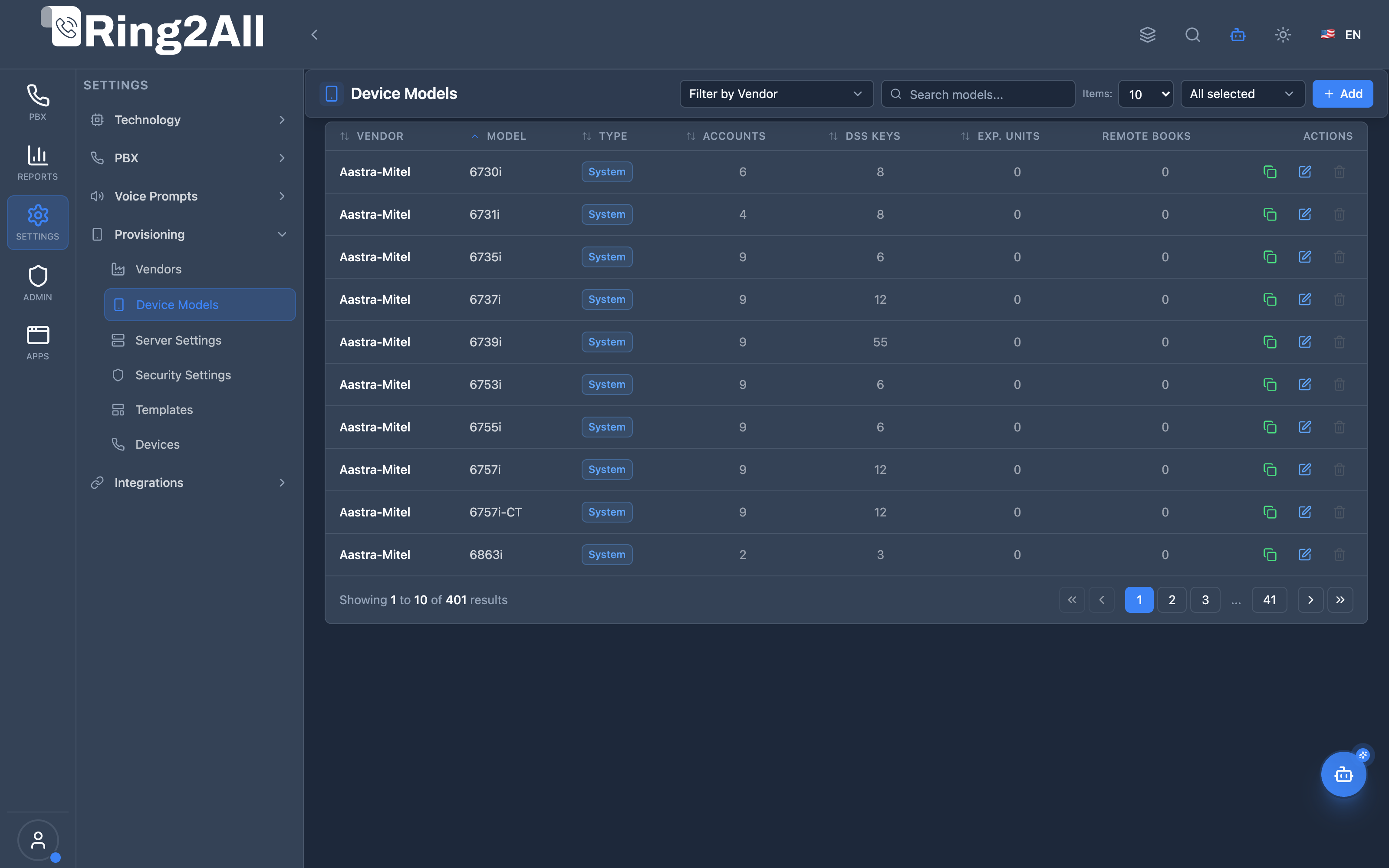
Section titled “Screenshots & Visual Interface”Device Models Catalog & Capabilities
Section titled “Device Models Catalog & Capabilities”Comprehensive list of supported IP terminal models grouped by manufacturer, displaying model names, line capacities, expansion capabilities, and firmware versions.
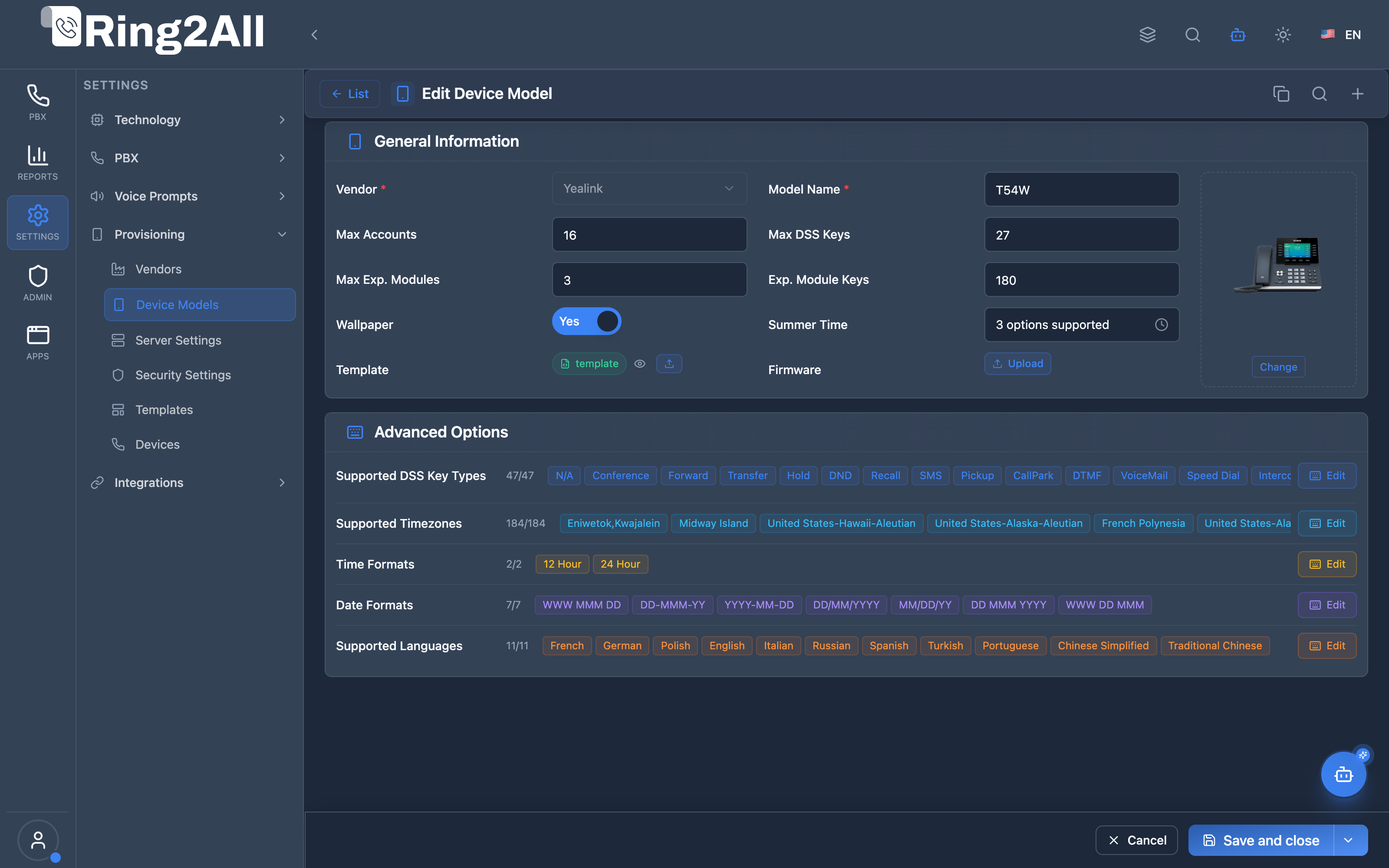
Device Model Specification & Hardware Customization
Section titled “Device Model Specification & Hardware Customization”Advanced model configuration interface defining account limits, physical DSS key counts, expansion module limits, supported timezones, date/time formats, localized languages, and default configuration templates.
1. Module Overview (Technical)
Section titled “1. Module Overview (Technical)”What Are Device Models?
Section titled “What Are Device Models?”Device Models is a phone model catalog module that maintains specific phone models within the provisioning system. Models are linked to vendors and define hardware capabilities like DSS keys, expansion modules, and SIP lines.
Architecture
Section titled “Architecture”┌─────────────────────────────────────────────────────────────────┐│ Device Models Architecture │├─────────────────────────────────────────────────────────────────┤│ ││ Provisioning Hierarchy: ││ ││ ┌──────────────────────────────────────────────────────────┐ ││ │ Vendors │ ││ │ ├─ Yealink │ ││ │ ├─ Grandstream │ ││ │ └─ Polycom │ ││ └──────────────────────────────────────────────────────────┘ ││ │ ││ ▼ Device Models (this module) ││ ┌──────────────────────────────────────────────────────────┐ ││ │ Device Models │ ││ │ │ ││ │ Yealink: │ ││ │ ├─ T54W (10 DSS keys, 2 exp modules, 16 lines) │ ││ │ ├─ T46U (27 DSS keys, 6 exp modules, 16 lines) │ ││ │ └─ T42S (6 DSS keys, 0 exp modules, 12 lines) │ ││ │ │ ││ │ Grandstream: │ ││ │ ├─ GXP2170 (48 DSS keys, 4 exp modules, 12 lines) │ ││ │ └─ GRP2612 (8 DSS keys, 0 exp modules, 4 lines) │ ││ │ │ ││ └──────────────────────────────────────────────────────────┘ ││ │ ││ ▼ Used by templates and devices ││ ┌──────────────────────────────────────────────────────────┐ ││ │ Templates → Devices │ ││ │ │ ││ │ Template selects model → Device inherits capabilities │ ││ │ │ ││ └──────────────────────────────────────────────────────────┘ ││ │└─────────────────────────────────────────────────────────────────┘2. Module Overview (Commercial/Business)
Section titled “2. Module Overview (Commercial/Business)”Business Value
Section titled “Business Value”Device Models provides hardware capability management:
| Without Device Models | With Device Models |
|---|---|
| Unknown capabilities | Defined specs |
| Manual key counting | Auto DSS keys |
| No expansion info | Module support |
| Generic templates | Model-specific config |
Use Cases
Section titled “Use Cases”-
Capability Definition
- DSS key counts
- Expansion module support
-
Template Matching
- Model-specific templates
- Accurate key mapping
-
Device Inventory
- Track by model
- Report by type
-
Multi-model Support
- Different phone types
- Consistent provisioning
Feature Highlights
Section titled “Feature Highlights”| Feature | Benefit |
|---|---|
| DSS Keys | Line/BLF key count |
| Expansion Modules | Attachment support |
| SIP Lines | Account capacity |
| Vendor Linking | Organized catalog |
| MAC Prefix | Auto-detection |
| Image | Visual identification |
3. Module Overview (End User/Administrator)
Section titled “3. Module Overview (End User/Administrator)”What Can You Do?
Section titled “What Can You Do?”- View all supported phone models
- Add new device models
- Define hardware capabilities
- Set DSS key counts
- Configure expansion module support
- Associate with vendors
- Upload model images
Device Models Interface
Section titled “Device Models Interface”┌─────────────────────────────────────────────────────────────────┐│ Device Models │├─────────────────────────────────────────────────────────────────┤│ ││ [+ Create Model] ││ ││ [🔍 Search models...] ││ ││ Filter by Vendor: [All ▼] ││ ││ ┌───────────────────────────────────────────────────────────┐ ││ │ Model │ Vendor │ DSS │ Lines │ Exp │ Devices │ │ ││ ├───────────┼─────────────┼─────┼───────┼─────┼─────────┤ │ ││ │ T54W │ Yealink │ 10 │ 16 │ 2 │ 25 │ ✏️│ ││ │ T46U │ Yealink │ 27 │ 16 │ 6 │ 12 │ ✏️│ ││ │ T42S │ Yealink │ 6 │ 12 │ 0 │ 8 │ ✏️│ ││ │ GXP2170 │ Grandstream │ 48 │ 12 │ 4 │ 15 │ ✏️│ ││ │ GRP2612 │ Grandstream │ 8 │ 4 │ 0 │ 20 │ ✏️│ ││ │ VVX450 │ Polycom │ 30 │ 12 │ 3 │ 5 │ ✏️│ ││ └───────────────────────────────────────────────────────────┘ ││ │└─────────────────────────────────────────────────────────────────┘Create/Edit Model
Section titled “Create/Edit Model”┌─────────────────────────────────────────────────────────────────┐│ Create Device Model │├─────────────────────────────────────────────────────────────────┤│ ││ Vendor: [Yealink ▼] ││ ││ Model Name: [T54W ] ││ ││ Description: [Mid-range color IP phone ] ││ ││ ──────────────────────────────────────────────────────────────││ ││ Hardware Capabilities ││ ││ DSS Keys: [10 ] ││ Number of programmable line/BLF keys ││ ││ SIP Lines: [16 ] ││ Maximum SIP account registrations ││ ││ Expansion Modules: [2 ] ││ Number of expansion module slots ││ ││ Keys per Module: [20 ] ││ DSS keys per expansion module ││ ││ ──────────────────────────────────────────────────────────────││ ││ Identification ││ ││ MAC Prefix: [80:5E:C0 ] ││ For automatic vendor detection ││ ││ Model Image: [📤 Upload] ││ ││ Status: [Active ▼] ││ ││ [Save] [Cancel] ││ │└─────────────────────────────────────────────────────────────────┘Quick Tips
Section titled “Quick Tips”[!TIP] MAC Prefix: Used for auto-detection during network scanning.
[!TIP] Expansion Modules: Set to 0 if model doesn’t support attachments.
[!NOTE] Pre-populated: Common models typically come pre-installed.
🎯 User Roles & Key Capabilities
Section titled “🎯 User Roles & Key Capabilities”| Role | Key Capabilities & Permissions | Operational Scope |
|---|---|---|
| PBX Super Administrator | • Global hardware model catalog administration and firmware compatibility baseline • Hardware limit definition: SIP account lines, physical DSS keys, and expansion modules • MAC OUI prefix assignment for automated DHCP Option 66 / Zero-Touch provisioning • Base vendor XML/CFG template linkage across all PBX tenants |
Platform-Wide |
| Tenant Administrator | • Read-only catalog inspection of supported phone models • Assessment of hardware capabilities (lines, BLF keys) for corporate role assignment • Selection of certified models for company extensions and department provisioning |
Domain Scope |
| VoIP Support Engineer | • Hardware profile verification and physical DSS key layout debugging • Expansion module (sidecar) configuration validation and key count troubleshooting • Device compatibility testing against SIP Sofia profiles |
Platform / Domain |
| AI Copilot / MCP Agent | • Autonomous model inventory queries (list_provisioning_models)• Vendor model matching and hardware limit validation ( list_provisioning_vendors)• Automated recommendation of optimal hardware models based on user extension requirements |
Autonomous Assistant |
4. Configuration Fields
Section titled “4. Configuration Fields”Basic Information
Section titled “Basic Information”| Field | Description |
|---|---|
| Vendor | Parent manufacturer |
| Model Name | Model identifier |
| Description | Model details |
| Status | Active/Inactive |
Hardware Capabilities
Section titled “Hardware Capabilities”| Field | Description |
|---|---|
| DSS Keys | Programmable keys count |
| SIP Lines | Max SIP registrations |
| Expansion Modules | Attachment slots |
| Keys per Module | Keys per expansion |
Identification
Section titled “Identification”| Field | Description |
|---|---|
| MAC Prefix | OUI for auto-detection |
| Model Image | Visual reference |
5. Common Scenarios & Examples
Section titled “5. Common Scenarios & Examples”Scenario 1: Browse Models
Section titled “Scenario 1: Browse Models”- Navigate to Provisioning → Device Models
- Filter by vendor (optional)
- View hardware specs
Scenario 2: Add New Model
Section titled “Scenario 2: Add New Model”- Click “Create Model”
- Select vendor
- Enter model name
- Define DSS keys, lines, expansion
- Add MAC prefix
- Upload image (optional)
- Save
Scenario 3: Update Capabilities
Section titled “Scenario 3: Update Capabilities”- Find model in list
- Click Edit
- Update DSS keys or lines
- Save
Scenario 4: Check Model Usage
Section titled “Scenario 4: Check Model Usage”- View models list
- Check “Devices” column
- See how many devices use each model
6. Limitations & Important Notes
Section titled “6. Limitations & Important Notes”Technical Notes
Section titled “Technical Notes”[!NOTE] Vendor Required: Every model must belong to a vendor.
[!NOTE] Template Dependency: Models with templates cannot be deleted.
[!WARNING] DSS Key Accuracy: Incorrect counts affect template key mapping.
Best Practices
Section titled “Best Practices”- Verify Specs: Check manufacturer specs for accuracy
- MAC Prefixes: Use correct OUI for auto-detection
- Add Images: Visual identification helps users
- Keep Updated: Add new models as released
- Model Naming: Use official model names
Popular Models Reference
Section titled “Popular Models Reference”| Vendor | Model | DSS | Lines | Exp |
|---|---|---|---|---|
| Yealink | T54W | 10 | 16 | 2 |
| Yealink | T46U | 27 | 16 | 6 |
| Yealink | T42S | 6 | 12 | 0 |
| Grandstream | GXP2170 | 48 | 12 | 4 |
| Grandstream | GRP2612 | 8 | 4 | 0 |
| Polycom | VVX450 | 30 | 12 | 3 |
| Cisco | 8851 | 10 | 10 | 2 |
Model Context Protocol (MCP) AI Integration
Section titled “Model Context Protocol (MCP) AI Integration”The Device Models module provides Model Context Protocol (MCP) integration enabling AI Copilots, auto-provisioning bots, and helpdesk assistants to query hardware specifications, programmable DSS key layouts, line capacities, and vendor models in real time.
Available MCP Telephony Tools
Section titled “Available MCP Telephony Tools”| Tool Name | Action Type | Access Level | Description |
|---|---|---|---|
list_provisioning_models |
READ |
Read-Only |
Lists supported IP phone models in Ring2All PBX, optionally filtered by hardware manufacturer (vendor_id). |
list_provisioning_vendors |
READ |
Read-Only |
Lists all supported VoIP hardware manufacturers to resolve vendor IDs for model queries. |
Tool Schemas & Input Parameters
Section titled “Tool Schemas & Input Parameters”list_provisioning_models
Section titled “list_provisioning_models”Retrieves certified IP phone models, including DSS key limits, line registrations, and expansion module capabilities.
{ "name": "list_provisioning_models", "description": "Lists supported IP phone models in Ring2All PBX, optionally filtered by hardware manufacturer.", "parameters": { "type": "object", "properties": { "vendor_id": { "type": "number", "description": "Optional vendor ID to filter models (e.g. Yealink, Grandstream, Cisco)" } }, "additionalProperties": false }}Natural Language Prompt Examples
Section titled “Natural Language Prompt Examples”English Prompts
Section titled “English Prompts”💬 “List all available Yealink phone models in the provisioning system.” 💬 “Which phone models support more than 10 programmable DSS keys and expansion sidecars?” 💬 “Show all device models certified under Grandstream along with their SIP line capacities.”
Spanish Prompts (Español)
Section titled “Spanish Prompts (Español)”💬 “Lista todos los modelos de teléfonos Yealink disponibles en el sistema de aprovisionamiento.” 💬 “¿Cuáles modelos soportan más de 10 teclas DSS programables y módulos de expansión?” 💬 “Muestra los modelos certificados para el fabricante Grandstream con sus capacidades de líneas SIP.”
Enterprise Safeguards & Compliance
Section titled “Enterprise Safeguards & Compliance”- Referential Integrity: Models linked to active template profiles or physical assigned devices cannot be deleted until all dependent configurations are reassigned.
- Role-Based Access Control: Executing
list_provisioning_modelsrequiresauxiliary_devicesMCP role permission. - Hardware Capacity Enforcement: The PBX provisioning engine strictly rejects template configurations exceeding the physical DSS key or line limit defined in the model catalog.
7. Troubleshooting Tips
Section titled “7. Troubleshooting Tips”Common Issues
Section titled “Common Issues”| Symptom | Possible Cause | Solution |
|---|---|---|
| Can’t delete model | Has templates/devices | Remove dependencies |
| Wrong key count | Incorrect DSS value | Update model specs |
| Auto-detect fails | Wrong MAC prefix | Correct OUI |
| Model not in dropdown | Not created | Add model first |
Check Model Data
Section titled “Check Model Data”SELECT m.model_name, v.name AS vendor, m.dss_keys, m.sip_lines, m.expansion_modulesFROM public.provisioning_device_models mJOIN public.provisioning_vendors v ON v.id = m.vendor_idORDER BY v.name, m.model_name;Check Device Count
Section titled “Check Device Count”SELECT m.model_name, COUNT(d.id) AS device_countFROM public.provisioning_device_models mLEFT JOIN public.provisioning_devices d ON d.model_id = m.idGROUP BY m.id, m.model_nameORDER BY device_count DESC;8. Glossary
Section titled “8. Glossary”| Term | Definition |
|---|---|
| DSS Keys | Direct Station Selection keys |
| BLF | Busy Lamp Field |
| SIP Lines | SIP account capacity |
| Expansion Module | Attached key panel |
| OUI | Organizationally Unique Identifier (MAC prefix) |
| MAC Address | Hardware address |
Documentation last updated: January 2026