

Bulk Modification Module Documentation
Table of Contents
Section titled “Table of Contents”- Module Overview (Technical)
- Module Overview (Commercial/Business)
- Module Overview (End User/Administrator)
- Configuration Fields Reference
- Operation Flow / Logic Explanation
- Common Scenarios & Examples
- Model Context Protocol (MCP) AI Integration
- Limitations & Important Notes
- Troubleshooting Tips
- Glossary
1. Module Overview (Technical)
Section titled “1. Module Overview (Technical)”What Is Bulk Modification?
Section titled “What Is Bulk Modification?”Bulk Modification is an administrative tool that allows applying configuration changes to multiple extensions simultaneously instead of editing each one individually. It provides four flexible selection methods and can modify various extension attributes in a single operation.
Architecture
Section titled “Architecture”┌─────────────────────────────────────────────────────────────────┐│ Bulk Modification System │├─────────────────────────────────────────────────────────────────┤│ ││ ┌──────────────────────────────────────────────────────────┐ ││ │ SELECTION METHODS │ ││ ├──────────────────────────────────────────────────────────┤ ││ │ 1️⃣ Individual │ 2️⃣ Ranges │ 3️⃣ Patterns │ 4️⃣ Filters │ ││ │ Select by ID │ 1000-1099 │ 10*, *00 │ By CoS │ ││ └──────────────────────────────────────────────────────────┘ ││ │ ││ ▼ ││ ┌──────────────────────────────────────────────────────────┐ ││ │ PREVIEW OPERATION │ ││ │ POST /api/telephony/bulk-modification/preview │ ││ │ → Returns count of affected extensions │ ││ └──────────────────────────────────────────────────────────┘ ││ │ ││ ▼ ││ ┌──────────────────────────────────────────────────────────┐ ││ │ APPLY MODIFICATIONS │ ││ │ POST /api/telephony/bulk-modification │ ││ │ → Executes changes in transaction │ ││ └──────────────────────────────────────────────────────────┘ ││ │ ││ ▼ ││ ┌──────────────────────────────────────────────────────────┐ ││ │ DATABASE UPDATE │ ││ │ UPDATE public.sip_extensions SET ... WHERE id IN (...) │ ││ │ → Updates settings, recording config, language, etc. │ ││ └──────────────────────────────────────────────────────────┘ ││ │└─────────────────────────────────────────────────────────────────┘API Endpoints
Section titled “API Endpoints”| Method | Endpoint | Purpose |
|---|---|---|
POST |
/api/telephony/bulk-modification/preview |
Preview which extensions will be affected |
POST |
/api/telephony/bulk-modification |
Apply the modifications |
2. Module Overview (Commercial/Business)
Section titled “2. Module Overview (Commercial/Business)”Business Value
Section titled “Business Value”Bulk Modification dramatically reduces administrative overhead:
| Manual Approach | With Bulk Modification |
|---|---|
| Change 100 extensions: ~2 hours | Change 100 extensions: ~2 minutes |
| High error rate from repetitive work | Consistent changes across all selected |
| Requires skilled administrators | Simple interface for routine changes |
Use Cases
Section titled “Use Cases”-
Department Restructuring
- Move all Sales team extensions to new Class of Service
- Change language settings for entire floor
-
Compliance Updates
- Enable call recording for all customer-facing extensions
- Update account codes for billing changes
-
System Migration
- Mass update ring times during transition
- Apply new default settings to all extensions
-
Onboarding/Offboarding
- Configure batch of new hire extensions
- Disable extensions for departing employees
Licensing Considerations
Section titled “Licensing Considerations”- This is typically a System Administrator level feature
- Consider restricting access to prevent accidental mass changes
- Include in Enterprise tier to justify technical support costs
3. Module Overview (End User/Administrator)
Section titled “3. Module Overview (End User/Administrator)”What Can You Do?
Section titled “What Can You Do?”Bulk Modification allows you to:
-
Select Extensions using multiple methods:
- Individual: Pick specific extensions from a list
- Ranges: Specify numeric ranges (e.g., 1000-1099)
- Patterns: Use wildcards (e.g.,
10*= all starting with 10) - Filters: Select by properties (Class of Service, status, language)
-
Preview Before Applying:
- See exactly how many extensions will be affected
- Confirm before making changes
-
Apply Modifications:
- Class of Service
- Ring Time (call timeout)
- Language
- Account Code
- Call Recording Settings
User Workflow
Section titled “User Workflow”┌─────────────────────────────────────────────────────────────────┐│ Administrator Workflow │├─────────────────────────────────────────────────────────────────┤│ ││ Step 1: Choose Selection Method ││ ├─ Individual → Click extensions from list ││ ├─ Ranges → Enter 1000-1099 ││ ├─ Patterns → Enter 10* for "starts with 10" ││ └─ Filters → Select Class of Service, Status, etc. ││ ││ Step 2: Preview Selection ││ ├─ Click "Preview Selection" button ││ └─ ✓ "Preview: 47 extension(s) will be modified" ││ ││ Step 3: Configure Modifications ││ ├─ ☐ Class of Service → [Select new CoS] ││ ├─ ☐ Ring Time → [30 seconds] ││ ├─ ☐ Language → [Spanish] ││ ├─ ☐ Account Code → [SALES-2024] ││ └─ ☐ Call Recording → [Enable incoming/outgoing] ││ ││ Step 4: Apply Changes ││ ├─ Click "Apply Changes" button ││ └─ ✓ "Successfully modified 47 extension(s)" ││ │└─────────────────────────────────────────────────────────────────┘Navigation
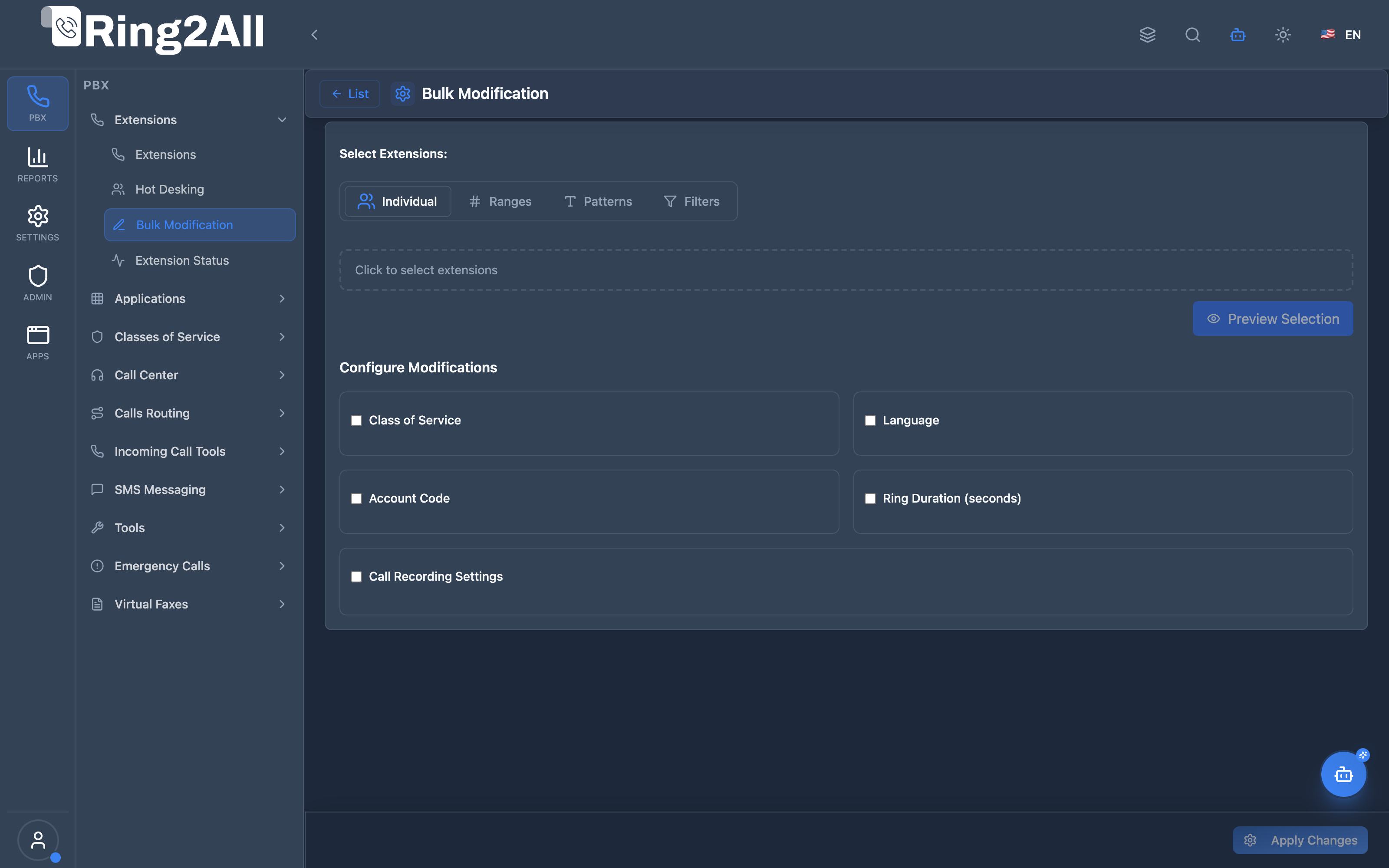
Section titled “Navigation”- Go to PBX → Extensions → Bulk Modification
- Choose your extension selection method (Individual, Ranges, Patterns, or Filters).
- Select which parameters to update across the chosen extensions.
- Click Preview to review affected extensions, then Apply Changes to execute.
Quick Tips
Section titled “Quick Tips”[!TIP] Always Preview First: Use the Preview button to verify your selection before applying changes. This prevents accidental modifications to wrong extensions.
[!TIP] Use Ranges for Floors/Departments: If extensions are numbered by floor (1000s = Floor 1, 2000s = Floor 2), ranges make selection easy.
[!CAUTION] Recording Changes Are Immediate: Enabling call recording applies to calls made/received after the change—existing calls are not affected.
4. Configuration Fields Reference
Section titled “4. Configuration Fields Reference”Selection Methods
Section titled “Selection Methods”Individual Selection
Section titled “Individual Selection”| Feature | Description | Example |
|---|---|---|
| Extension Search | Search by number, name, or email | Type “John” to find John’s extension |
| Multi-Select | Click to toggle selection | Click ext 1001, click ext 1005, click ext 1010 |
| Select All | Load all domain extensions | Click “Select All Extensions” button |
| Clear All | Remove all selected | Click “Clear” button |
Ranges
Section titled “Ranges”| Feature | Description | Example |
|---|---|---|
| Start/End | Define numeric range bounds | Start: 1000, End: 1099 |
| Multiple Ranges | Add multiple non-contiguous ranges | 1000-1099 + 2050-2099 + 3000-3010 |
| Behavior | Includes both start and end values | 1000-1005 = extensions 1000, 1001, 1002, 1003, 1004, 1005 |
Patterns
Section titled “Patterns”| Pattern | Meaning | Matches |
|---|---|---|
10* |
Starts with 10 | 1000, 1001, 1099, 10 |
*00 |
Ends with 00 | 1000, 2000, 9900, 100 |
3*5 |
Starts with 3, ends with 5 | 305, 3005, 3125, 35 |
* |
All extensions | Every extension in domain |
Filters
Section titled “Filters”| Filter | Options | Description |
|---|---|---|
| Class of Service | Dropdown of available CoS | Only extensions with selected CoS |
| Extension Status | Any / Enabled Only / Disabled Only | Filter by enabled state |
| Voicemail | Any / Enabled / Disabled | Filter by voicemail status |
| Language | Language selector | Filter by extension language |
Modification Options
Section titled “Modification Options”| Modification | Type | Description | Range/Options |
|---|---|---|---|
| Class of Service | Dropdown | Change permission level for calls (local, long-distance, international) | Available CoS from domain |
| Ring Time | Number Input | Seconds before call goes to voicemail | 10-120 seconds |
| Language | Dropdown | Language for voicemail prompts and IVR menus | en-us-emma, es-us-paloma, etc. |
| Account Code | Text Input | Billing/reporting code for the extension | Any text string |
| Call Recording | Checkboxes | Enable/disable recording by direction | Incoming, Outgoing, Internal, On-Demand |
5. Operation Flow / Logic Explanation
Section titled “5. Operation Flow / Logic Explanation”Preview Flow
Section titled “Preview Flow”┌─────────────────────────────────────────────────────────────────┐│ Preview Operation │├─────────────────────────────────────────────────────────────────┤│ ││ 1. User configures selection (extensionIds, ranges, patterns, ││ or filters) ││ │ ││ ▼ ││ 2. Frontend sends POST to /api/telephony/bulk-modification/ ││ preview ││ │ ││ ▼ ││ 3. Backend normalizes payload ││ ├─ sanitizeSelectionPayload() ││ └─ Resolves domainId from tenant context ││ │ ││ ▼ ││ 4. Backend generates WHERE clause ││ ├─ Individual: WHERE id IN (1, 2, 3) ││ ├─ Ranges: WHERE extension::int BETWEEN 1000 AND 1099 ││ ├─ Patterns: WHERE extension LIKE '10%' ││ └─ Filters: WHERE class_of_services_id = 5 AND enabled = t ││ │ ││ ▼ ││ 5. Backend executes COUNT query ││ │ SELECT COUNT(*) FROM sip_extensions WHERE ... ││ │ ││ ▼ ││ 6. Returns response: { success: true, count: 47 } ││ │ ││ ▼ ││ 7. Frontend displays: "Preview: 47 extension(s) will be ││ modified" ││ │└─────────────────────────────────────────────────────────────────┘Apply Flow
Section titled “Apply Flow”┌─────────────────────────────────────────────────────────────────┐│ Apply Operation │├─────────────────────────────────────────────────────────────────┤│ ││ 1. User clicks "Apply Changes" ││ │ ││ ▼ ││ 2. Frontend validates: ││ ├─ At least one selection method has values ││ └─ At least one modification checkbox is enabled ││ │ ││ ▼ ││ 3. Frontend builds payload: ││ { ││ extensionIds: [1, 2, 3], // or ranges/patterns/filters ││ modifications: { ││ classOfServicesId: 5, ││ callTimeout: 30, ││ languageCode: "es-us-paloma", ││ recording: { recordIncoming: true, ... } ││ } ││ } ││ │ ││ ▼ ││ 4. POST /api/telephony/bulk-modification ││ │ ││ ▼ ││ 5. Backend validates and selects target extensions: ││ SELECT id, extension FROM sip_extensions WHERE ... ││ │ ││ ▼ ││ 6. Backend generates UPDATE query: ││ generateBulkUpdateQuery(extensionIds, modifications) ││ │ ││ ▼ ││ 7. Executes in transaction: ││ UPDATE sip_extensions SET ││ class_of_services_id = 5, ││ call_timeout = 30, ││ language_code = 'es-us-paloma', ││ updated_at = NOW(), ││ updated_by = 123 ││ WHERE id IN (1, 2, 3, ...) ││ │ ││ ▼ ││ 8. Returns: { success: true, updatedCount: 47 } ││ │ ││ ▼ ││ 9. Frontend shows success and clears form ││ │└─────────────────────────────────────────────────────────────────┘6. Common Scenarios & Examples
Section titled “6. Common Scenarios & Examples”Scenario 1: Department Language Change
Section titled “Scenario 1: Department Language Change”Context: Marketing department (extensions 2000-2099) needs Spanish prompts.
Selection: Ranges  → Start: 2000, End: 2099
Preview: "55 extension(s) will be modified"
Modifications:  ☑️ Language → es-us-paloma
Apply → "Successfully modified 55 extension(s)"
Scenario 2: Enable Recording for Customer Service
Section titled “Scenario 2: Enable Recording for Customer Service”Context: All extensions with Class of Service “Customer Service” need call recording.
Selection: Filters  → Class of Service: "Customer Service"  → Extension Status: Enabled Only
Preview: "23 extension(s) will be modified"
Modifications:  ☑️ Call Recording    ☑️ Record Incoming Calls    ☑️ Record Outgoing Calls    ☐ Record Internal Calls    ☐ Record On Demand
Apply → "Successfully modified 23 extension(s)"
Scenario 3: Pattern-Based Ring Time Adjustment
Section titled “Scenario 3: Pattern-Based Ring Time Adjustment”Context: All executive extensions (starting with 1) should ring longer.
Selection: Patterns  → Pattern: "1*"
Preview: "12 extension(s) will be modified"
Modifications:  ☑️ Ring Time → 45 seconds (from default 30)
Apply → "Successfully modified 12 extension(s)"
Scenario 4: Mass Account Code Assignment
Section titled “Scenario 4: Mass Account Code Assignment”Context: Year-end billing requires new account codes for all extensions.
Selection: Individual  → Click "Select All Extensions"  → 347 extensions selected
Modifications:  ☑️ Account Code → "FY2026-Q1"
Apply → "Successfully modified 347 extension(s)"
7. Model Context Protocol (MCP) AI Integration
Section titled “7. Model Context Protocol (MCP) AI Integration”Ring2All exposes mass management capabilities via the Model Context Protocol (MCP), allowing AI agents, NOC copilots, and administrative assistants to safely inspect, preview, and apply bulk modifications to extension cohorts using natural language or automated scripts.
Available MCP Tools
Section titled “Available MCP Tools”| Tool Name | Operation | Description | Access Level |
|---|---|---|---|
bulk_modify_extensions |
Execute Bulk Update | Applies unified configuration changes across an array of target extensions or a pattern match within the tenant domain. | Admin / Superadmin |
Tool Definitions & Parameter Reference
Section titled “Tool Definitions & Parameter Reference”bulk_modify_extensions
Section titled “bulk_modify_extensions”Executes batch configuration updates on one or multiple extensions simultaneously.
{ "name": "bulk_modify_extensions", "description": "Bulk modify settings for multiple extensions (Class of Service, outbound caller ID, call recording, account code, call timeout, enabled/disabled status).", "inputSchema": { "type": "object", "properties": { "extensionIds": { "type": "array", "items": { "type": "number" }, "description": "Array of extension IDs to modify." }, "extensionNumbers": { "type": "array", "items": { "type": "string" }, "description": "Array of extension numbers to modify (alternative to extensionIds)." }, "classOfServiceId": { "type": "number", "description": "New Class of Service ID to assign." }, "classOfServiceName": { "type": "string", "description": "Class of Service name to assign (auto-resolves to classOfServiceId)." }, "outboundCallerIdName": { "type": "string", "description": "New outbound caller ID name." }, "outboundCallerIdNumber": { "type": "string", "description": "New outbound caller ID number." }, "accountCode": { "type": "string", "description": "New billing/accounting code (e.g., 'SALES-2026', 'CORP-HQ')." }, "recordCalls": { "type": "boolean", "description": "Enable or disable both incoming and outgoing call recording." }, "callTimeout": { "type": "number", "description": "New call ring timeout in seconds (10-120)." }, "enabled": { "type": "boolean", "description": "Enable or disable the selected extensions." } } }}Safety & Audit Safeguards
Section titled “Safety & Audit Safeguards”- Multi-Tenant Scoping: All bulk modifications automatically inject
tenant_idanddomain_idfilters from the authenticated session context. No prompt or external parameter can alter extensions outside the active domain. - Explicit Target Requirement: At least one targeting filter (
extensionIdsorextensionNumbers) must be provided with at least one target to prevent accidental domain-wide updates. - Atomic Batch Updates: The backend applies modifications within structured transactional blocks, returning the exact count of modified records alongside individual extension numbers.
- Audit Trail: Every bulk update executed via MCP is logged with the authenticated administrative user ID, target count, and list of changed fields.
Example AI Assistant Prompts & Workflow
Section titled “Example AI Assistant Prompts & Workflow”Example 1: Assigning Departmental Class of Service
Section titled “Example 1: Assigning Departmental Class of Service”Admin Prompt:
“Assign the ‘International-VIP’ Class of Service to extensions 1001, 1002, 1003, 1004, and 1005.”
AI Tool Execution:
{ "tool": "bulk_modify_extensions", "arguments": { "extensionNumbers": ["1001", "1002", "1003", "1004", "1005"], "classOfServiceName": "International-VIP" }}MCP Response:
{ "success": true, "modifiedCount": 5, "extensions": ["1001", "1002", "1003", "1004", "1005"], "changes": { "classOfServiceId": 14, "classOfServiceName": "International-VIP" }}Example 2: Mass Emergency Outbound Caller ID Update
Section titled “Example 2: Mass Emergency Outbound Caller ID Update”Admin Prompt:
“Change the outbound caller ID for extensions 200 through 215 to ‘Support Desk’ with number ‘+15550199000’.”
AI Tool Execution:
{ "tool": "bulk_modify_extensions", "arguments": { "extensionNumbers": ["200", "201", "202", "203", "204", "205", "206", "207", "208", "209", "210", "211", "212", "213", "214", "215"], "outboundCallerIdName": "Support Desk", "outboundCallerIdNumber": "+15550199000" }}Example 3: Enabling Call Recording for Support Team
Section titled “Example 3: Enabling Call Recording for Support Team”Admin Prompt:
“Enable call recording and set ring timeout to 45 seconds for all agents in support: 301, 302, 303, 304.”
AI Tool Execution:
{ "tool": "bulk_modify_extensions", "arguments": { "extensionNumbers": ["301", "302", "303", "304"], "recordCalls": true, "callTimeout": 45 }}8. Limitations & Important Notes
Section titled “8. Limitations & Important Notes”Technical Limitations
Section titled “Technical Limitations”[!WARNING] No Undo: Bulk modifications cannot be automatically reversed. Keep a backup or document previous settings before large changes.
[!WARNING] Domain Scope: Operations are scoped to the currently selected domain. You cannot modify extensions across multiple domains in one operation.
[!IMPORTANT] XML Regeneration: Some changes (like recording settings) may require XML regeneration for the extension. The system handles this automatically, but very large batches may experience brief delays.
Best Practices
Section titled “Best Practices”- Always Preview First: Never skip the preview step, especially for ranges and patterns
- Start Small: Test with a small range before applying to entire departments
- Document Changes: Keep a log of bulk modifications for audit purposes
- Off-Peak Hours: Run large bulk modifications during low-traffic periods
- Verify After: Spot-check a few extensions after bulk changes
Security Considerations
Section titled “Security Considerations”[!CAUTION] Access Control: Only System Administrators should have access to this module. Misconfigured bulk changes can disrupt service for many users.
[!CAUTION] Audit Trail: All bulk modifications should be logged with the administrator’s user ID and timestamp.
9. Troubleshooting Tips
Section titled “9. Troubleshooting Tips”Common Issues
Section titled “Common Issues”| Symptom | Possible Cause | Solution |
|---|---|---|
| “No extensions found” | Domain filter mismatch | Verify correct domain is selected in header |
| Preview shows 0 | Pattern syntax incorrect | Check wildcard usage: * not % |
| “No modifications selected” | No checkbox enabled | Enable at least one modification checkbox |
| Partial success | Some extensions have constraints | Check for unique constraint violations |
| Slow operation | Too many extensions | Split into smaller batches (500 max recommended) |
Validation Errors
Section titled “Validation Errors”| Error | Meaning | Resolution |
|---|---|---|
| “Please select at least one extension” | Individual tab empty | Search and select extensions |
| “Please add at least one range” | Ranges tab empty | Add start/end range values |
| “Please add at least one pattern” | Patterns tab empty | Add at least one pattern |
| “Please select at least one filter” | Filters tab, no selections | Select at least one filter option |
Diagnostic SQL
Section titled “Diagnostic SQL”Check extensions matching a range:
SELECT extension, name, enabledFROM public.sip_extensionsWHERE domain_id = [domain_id] AND extension::int BETWEEN 1000 AND 1099ORDER BY extension;Check extensions matching a pattern:
SELECT extension, name, enabledFROM public.sip_extensionsWHERE domain_id = [domain_id] AND extension LIKE '10%'ORDER BY extension;Verify recent bulk changes:
SELECT extension, updated_at, updated_byFROM public.sip_extensionsWHERE domain_id = [domain_id] AND updated_at > NOW() - INTERVAL '1 hour'ORDER BY updated_at DESC;10. Glossary
Section titled “10. Glossary”| Term | Definition |
|---|---|
| Bulk Modification | The process of applying the same configuration change to multiple extensions at once |
| Preview | A non-destructive operation that shows how many extensions would be affected before changes are made |
| Selection Method | The technique used to choose which extensions to modify (individual, ranges, patterns, filters) |
| Range | A numeric span of extension numbers (e.g., 1000-1099) |
| Pattern | A wildcard expression to match extensions (e.g., 10* matches 1000, 1001, etc.) |
| Filter | Criteria based on extension properties (Class of Service, enabled status, language) |
| Class of Service (CoS) | Permission level controlling what types of calls an extension can make |
| Account Code | A text identifier used for billing and reporting purposes |
| Ring Time | Duration in seconds before an unanswered call proceeds to voicemail or next action |
| Transaction | Database operation that either completes fully or rolls back entirely—no partial updates |
Documentation last updated: January 2026