

Queues (Call Center) Module Documentation
Table of Contents
Section titled “Table of Contents”- Module Overview (Technical)
- Module Overview (Commercial/Business)
- Module Overview (End User/Administrator)
- Configuration Fields Reference
- Queue Strategies
- Tiers and Agents
- Announcements & Caller Experience
- Common Scenarios & Examples
- Model Context Protocol (MCP) AI Integration
- Limitations & Important Notes
- Troubleshooting Tips
- Glossary
1. Module Overview (Technical)
Section titled “1. Module Overview (Technical)”What Are Queues?
Section titled “What Are Queues?”Queues are call distribution points that hold incoming calls until agents become available. They use Telephony Server’s mod_callcenter to manage call distribution, agent status, and real-time queue metrics.
Architecture
Section titled “Architecture”┌─────────────────────────────────────────────────────────────────┐│ Queue System │├─────────────────────────────────────────────────────────────────┤│ ││ Caller dials Queue extension (e.g., 6000) ││ │ ││ ▼ ││ ┌──────────────────────────────────────────────────────────┐ ││ │ queue_join.lua │ ││ │ - Answer call │ ││ │ - Play welcome message │ ││ │ - Announce position/wait time │ ││ │ - Enable callback option (if configured) │ ││ └──────────────────────────────────────────────────────────┘ ││ │ ││ ▼ ││ ┌──────────────────────────────────────────────────────────┐ ││ │ mod_callcenter (Telephony Server) │ ││ │ │ ││ │ Queue: Support@domain.com │ ││ │ Strategy: longest-idle-agent │ ││ │ │ ││ │ Waiting Callers: │ ││ │ ├─ Position 1: +1555123456 (waiting 45s) │ ││ │ └─ Position 2: +1555789012 (waiting 20s) │ ││ │ │ ││ │ Available Agents: │ ││ │ ├─ 101@domain.com (Available, idle 120s) │ ││ │ ├─ 102@domain.com (Available, idle 60s) │ ││ │ └─ 103@domain.com (On Break) │ ││ │ │ ││ └──────────────────────────────────────────────────────────┘ ││ │ ││ ▼ ││ Agent answers → Call connected ││ │└─────────────────────────────────────────────────────────────────┘2. Module Overview (Commercial/Business)
Section titled “2. Module Overview (Commercial/Business)”Business Value
Section titled “Business Value”Queues provide enterprise call center capabilities:
| Without Queues | With Queues |
|---|---|
| Calls ring busy | Calls wait in order |
| No hold time info | Position/wait announcements |
| Random distribution | 9 distribution strategies |
| No metrics | SLA tracking |
Use Cases
Section titled “Use Cases”-
Customer Support
- Tiered support levels
- Skill-based routing
- SLA management
-
Sales Teams
- Lead distribution
- Priority handling for VIPs
- Callback options
-
Help Desks
- Ticket-based routing
- Escalation paths
- After-hours handling
Feature Highlights
Section titled “Feature Highlights”| Feature | Benefit |
|---|---|
| 9 Strategies | From Ring All to Least Talk Time |
| Position/Wait Announcements | Caller expectations |
| Callback Option | Reduce abandonment |
| VIP Lists | Priority routing |
| Max Wait Limits | Overflow handling |
| Tier System | Skill-based distribution |
| Recording | Quality assurance |
| SLA Tracking | Service level metrics |
3. Module Overview (End User/Administrator)
Section titled “3. Module Overview (End User/Administrator)”What Can You Do?
Section titled “What Can You Do?”- Create queues with extensions
- Configure distribution strategies
- Set up announcements
- Configure timeouts and overflow
- Assign agents via Tiers
- Enable callback profiles
- Set VIP priority lists
Navigation
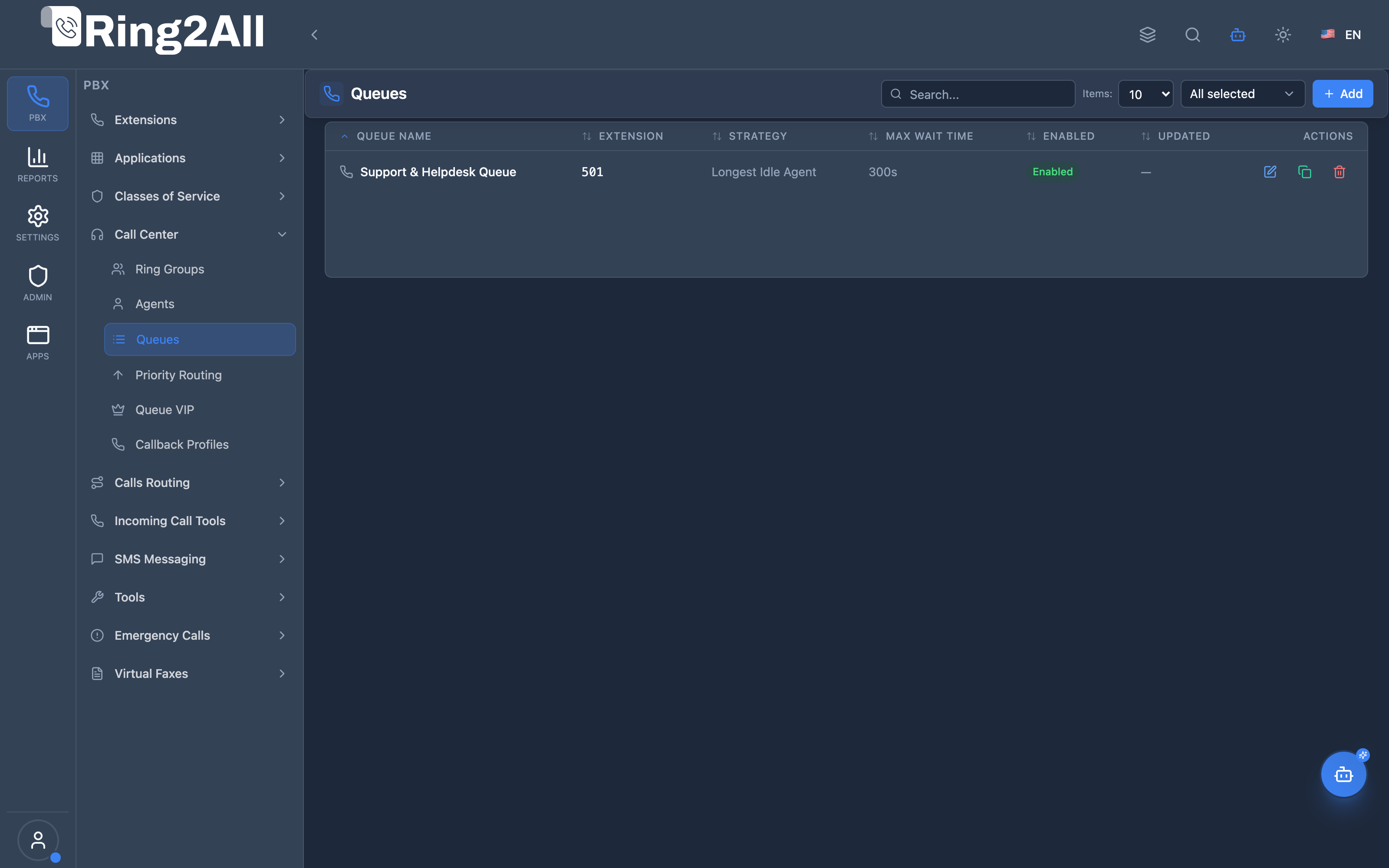
Section titled “Navigation”- Navigate to PBX Engine → Call Center → Queues in the main navigation menu.
- The list view displays all configured Queues with Queue Name, Extension, Strategy, Max Wait Time, Tiers/Agents count, and Enabled status.
- Click the + Add button in the top toolbar to configure a new call center queue.
- Click any queue row or edit action to configure the 4 tabs: General, Announcements, Advanced, and Tiers.
Administrator Workflow
Section titled “Administrator Workflow”┌─────────────────────────────────────────────────────────────────┐│ Creating a Queue │├─────────────────────────────────────────────────────────────────┤│ ││ Tab 1: General ││ ├─ Queue Name: "Support & Helpdesk Queue" ││ ├─ Extension: 501 ││ ├─ Strategy: Longest Idle Agent ││ ├─ Max Wait Time: 300 sec ││ ├─ Wrap-up Time: 10 sec ││ ├─ Timeout Destination: Extension → 2000 ││ └─ Enabled: ✓ ││ ││ Tab 2: Announcements ││ ├─ Greeting: support_greeting.wav ││ ├─ Music on Hold: local_stream://default ││ ├─ Announce Position: ✓ ││ ├─ Announce Frequency: 45 sec ││ └─ Agent Connect Sound: queue_connect.wav ││ ││ Tab 3: Advanced ││ ├─ Time Base Score: Queue ││ ├─ Wrap-Up Time: 10 sec ││ ├─ Exit Key: * ││ └─ Max Queue Size: 50 ││ ││ Tab 4: Agents and Tiers ││ ┌───────────────────────────────────────────────────────────┐ ││ │ Alice Morgan (2000) | Tier Level: 1 | Position: 1 │ ││ │ Bob Jenkins (2001) | Tier Level: 1 | Position: 2 │ ││ │ Carol White (2002) | Tier Level: 2 | Position: 1 │ ││ └───────────────────────────────────────────────────────────┘ ││ │└─────────────────────────────────────────────────────────────────┘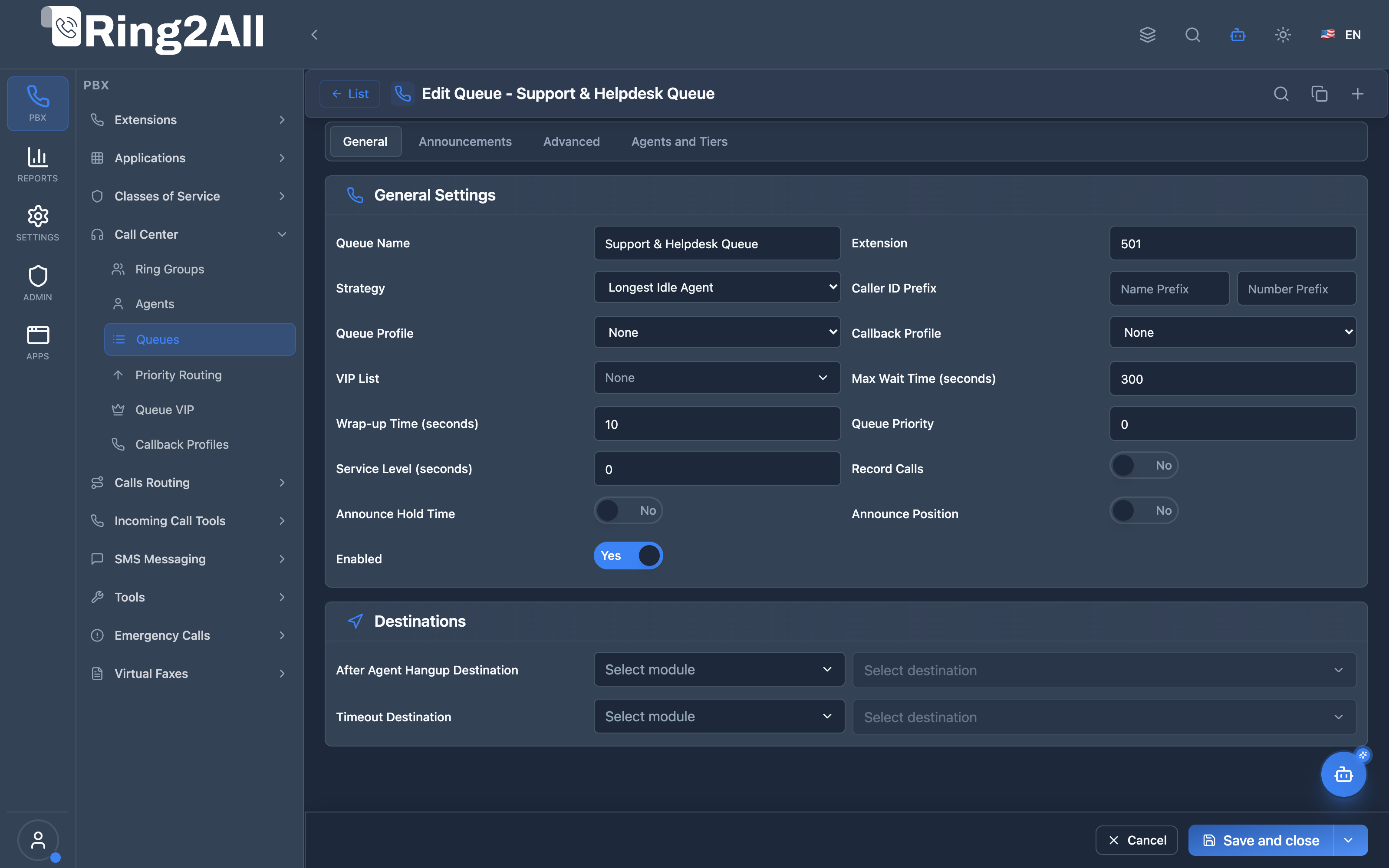
Quick Tips
Section titled “Quick Tips”[!TIP] Strategy Choice: Use “Longest Idle Agent” for fair distribution across available staff.
[!TIP] Announce Position: Informing callers of their queue position significantly reduces abandonment rates.
[!CAUTION] No Agents Overflow: Always specify a Final Destination (Timeout Destination) so callers are never stranded if no agents are logged in.
4. Configuration Fields Reference
Section titled “4. Configuration Fields Reference”Tab 1: General Settings
Section titled “Tab 1: General Settings”| Field | Description | Type / Options | Default | Required |
|---|---|---|---|---|
| Queue Name | Descriptive name identifying the call queue | Text | None | Yes |
| Extension | Dialable telephony extension assigned to the queue | Text / Extension | None | No |
| Strategy | Agent ring distribution algorithm | ring-all, longest-idle-agent, round-robin, top-down, agent-with-least-talk-time, agent-with-fewest-calls, sequentially-by-agent-order, random, ring-progressively |
longest-idle-agent |
Yes |
| Caller ID Prefix | Prefix prepended to caller Name and Number for agent display | Text (Name and Number inputs) | None | No |
| Queue Profile | Reusable profile with shared queue parameters | Select Dropdown | None | No |
| Callback Profile | Queue callback policy allowing callers to retain position without waiting on hold | Select Dropdown | None | No |
| VIP List | Priority caller list for automatic scoring adjustments | Select Dropdown | None | No |
| Max Wait Time | Maximum duration in seconds a caller may wait before timeout overflow | Number (seconds) | 0 (unlimited) |
No |
| Wrap-up Time | Post-call grace period in seconds before an agent is offered the next call | Number (seconds) | 0 |
No |
| Queue Priority | Base priority score (0-10) for this queue relative to other queues | Number (0-10) | 0 |
No |
| Service Level | Target response time in seconds for SLA reporting | Number (seconds) | 0 |
No |
| Record Calls | Master toggle to record all interactions in this queue | Toggle (Boolean) | Off | No |
| Announce Hold Time | Play estimated hold time updates to waiting callers | Toggle (Boolean) | Off | No |
| Announce Position | Play current queue position updates to waiting callers | Toggle (Boolean) | Off | No |
| Enabled | Enables or disables the queue | Toggle (Boolean) | On | Yes |
| After Agent Hangup Destination | Destination where caller is routed after the agent ends the call (e.g. CSAT survey) | Module Destination Selector | None | No |
| Final Destination | Fallback destination when max wait time or capacity limits are reached | Module Destination Selector | None | No |
Tab 2: Announcements
Section titled “Tab 2: Announcements”| Field | Description | Type / Options | Default | Required |
|---|---|---|---|---|
| Greeting | Audio prompt played immediately when the caller enters the queue | Audio Recording Selector | None | No |
| Language | Audio voice language code for system announcements | Language Selector | Tenant Default | No |
| Welcome Sound | Secondary welcome announcement after greeting | Audio Recording Selector | None | No |
| Exit Sound | Audio played when a caller leaves the queue via exit key or timeout | Audio Recording Selector | None | No |
| Agent Connect Sound | Audio whispered to the answering agent right before connecting to caller | Audio Recording Selector | None | No |
| Music on Hold | Music class played while callers are waiting in queue | MOH Stream Selector | local_stream://default |
No |
| Periodic Announcement Sound | Periodic message played to callers during waiting | Audio Recording Selector | None | No |
| Periodic Announcement Frequency | Interval in seconds between periodic announcement playbacks | Number (seconds) | 0 |
No |
| Announce Estimated Hold Time | Speak calculated estimated wait time along with periodic announcements | Toggle (Boolean) | Off | No |
Tab 3: Advanced Settings
Section titled “Tab 3: Advanced Settings”| Field | Description | Type / Options | Default | Required |
|---|---|---|---|---|
| Time Base Score | Calculation basis for caller wait score priority in mod_callcenter | queue, system |
queue |
Yes |
| Max Wait Time with No Agent | Timeout in seconds if all agents are logged out or unavailable | Number (seconds) | 0 |
No |
| Max Wait Time with No Agent Time Reached | Target wait interval when no-agent timeout expires | Number (seconds) | 0 |
No |
| Discard Abandoned After | Seconds after which abandoned caller data and position are discarded | Number (seconds) | 60 |
No |
| Abandoned Resume Allowed | Allow a caller who hung up and redialed within window to regain queue position | Toggle (Boolean) | Off | No |
| Exit Key | Single DTMF digit allowed for caller to self-exit queue to fallback destination | DTMF Digit (*, #, 0-9) |
None | No |
Tier Progression Rules (mod_callcenter)
Section titled “Tier Progression Rules (mod_callcenter)”| Field | Description | Type / Options | Default | Required |
|---|---|---|---|---|
| Tier Rules Apply | Enable tier-based agent escalation (tier-rules-apply) |
Toggle (Boolean) | Off | No |
| Tier Rule Wait | Seconds a caller waits in the current tier before offering to next tier (tier-rule-wait-second) |
Number (seconds) | 300 |
No |
| Multiply Wait by Tier Level | Multiplies wait seconds by the tier level: level 2 wait = 2 × tier_rule_wait (tier-rule-wait-multiply-level) |
Toggle (Boolean) | On | No |
| No Wait If No Agent | Skip tiers that have no available agents instead of waiting (tier-rule-no-agent-no-wait) |
Toggle (Boolean) | Off | No |
Tab 4: Tiers (Agent Membership)
Section titled “Tab 4: Tiers (Agent Membership)”| Field | Description | Type / Options | Default | Required |
|---|---|---|---|---|
| Agent | Call center agent assigned to this queue tier | Agent Selector | None | Yes |
| Tier Level | Tier level (1 = primary tier, 2 = escalation/overflow tier) | Number (1-10) | 1 |
Yes |
| Position | Agent order within the specified tier level | Number (1-10) | 1 |
Yes |
| Wait Penalty | Seconds penalty delay before offering calls to this tier position | Number (seconds) | 0 |
No |
5. Queue Strategies
Section titled “5. Queue Strategies”Strategy Comparison
Section titled “Strategy Comparison”| Strategy | Description | Best For |
|---|---|---|
| Ring All | Ring all available agents | Small teams |
| Longest Idle Agent | Agent idle longest | Even distribution |
| Round Robin | Rotate through agents | Fair rotation |
| Top Down | Always start at first | Priority agents |
| Least Talk Time | Agent with least talk | Balance workload |
| Least Calls | Agent with fewest calls | Balance call count |
| Sequentially by Agent Order | Fixed sequence | Specific order |
| Sequentially by Next Agent Order | Continue sequence | Continuous rotation |
| Random | Random selection | Load balancing |
Strategy Diagrams
Section titled “Strategy Diagrams”Longest Idle Agent:─────────────────────────────────Call comes in → Find agent idle longest → Ring that agent
Round Robin:─────────────────────────────────Call 1 → Agent 1Call 2 → Agent 2Call 3 → Agent 3Call 4 → Agent 1 (restart)
Top Down:─────────────────────────────────Always try Agent 1 firstIf busy → Agent 2If busy → Agent 36. Tiers and Agents
Section titled “6. Tiers and Agents”Tier System
Section titled “Tier System”Tiers define which agents handle which queues with priority:
- Level: Priority tier (1 = highest priority, 2 = next, etc.)
- Position: Order within the same level
Queue: Support├─ Tier Level 1 (Primary Agents)│ ├─ Position 1: Alice (101)│ └─ Position 2: Bob (102)├─ Tier Level 2 (Secondary Agents)│ └─ Position 1: Carol (103)└─ Tier Level 3 (Overflow) └─ Position 1: Dave (104)Tier Rules
Section titled “Tier Rules”| Setting | Description |
|---|---|
| Tier Rules Apply | Enable tier escalation |
| Tier Rule Wait | Seconds before tier escalation |
| Tier Rule Multiply Level | Multiply wait by level |
| Tier Rule No Agent No Wait | Skip wait if no agents at tier |
7. Announcements & Caller Experience
Section titled “7. Announcements & Caller Experience”Announcement Flow
Section titled “Announcement Flow”┌─────────────────────────────────────────────────────────────────┐│ Caller Experience │├─────────────────────────────────────────────────────────────────┤│ ││ 1. Greeting (once, on entry) ││ "Thank you for calling support..." ││ ││ 2. Position Announcement (if enabled) ││ "You are caller number 3 in the queue" ││ ││ 3. Wait Time Announcement (if enabled) ││ "Your estimated wait time is 5 minutes" ││ ││ 4. Music on Hold ││ ♪♪♪ [background music plays] ♪♪♪ ││ ││ 5. Periodic Announcement (every X seconds) ││ "Please continue to hold, your call is important..." ││ ││ 6. Agent Connect Sound (to agent) ││ "Call from Support queue" ││ │└─────────────────────────────────────────────────────────────────┘Callback Option
Section titled “Callback Option”When enabled via a Callback Profile:
- Caller hears: “Press 1 to receive a callback”
- Caller presses 1
- System captures caller’s number
- Caller hangs up
- When agent available, system calls back
8. Common Scenarios & Examples
Section titled “8. Common Scenarios & Examples”Scenario 1: Basic Support Queue
Section titled “Scenario 1: Basic Support Queue”Configuration:
- Extension: 6000
- Strategy: Longest Idle Agent
- Max Wait: 300 sec
- Timeout: Voicemail 101
Agents (Tiers):
| Agent | Level | Position |
|---|---|---|
| 101 | 1 | 1 |
| 102 | 1 | 2 |
| 103 | 1 | 3 |
Scenario 2: Tiered Escalation
Section titled “Scenario 2: Tiered Escalation”Configuration:
- Extension: 7000
- Strategy: Top Down
- Tier Rule Wait: 30 sec
Agents (Tiers):
| Agent | Level | Position | Role |
|---|---|---|---|
| 201 | 1 | 1 | Junior Support |
| 202 | 1 | 2 | Junior Support |
| 203 | 2 | 1 | Senior Support |
| 204 | 3 | 1 | Supervisor |
Behavior: Tries Level 1 for 30s, then Level 2 for 30s, then Level 3.
Scenario 3: VIP Priority Queue
Section titled “Scenario 3: VIP Priority Queue”Configuration:
- Extension: 8000
- VIP List: “Premium Customers”
- Strategy: Longest Idle Agent
VIP Behavior: Callers on VIP list get higher queue position score.
9. Model Context Protocol (MCP) AI Integration
Section titled “9. Model Context Protocol (MCP) AI Integration”Ring2All exposes native Model Context Protocol (MCP) tools for Call Center Queues, allowing AI supervisors, ACD auto-scalers, and contact center copilots to inspect queue depths, adjust distribution algorithms (ring-all, longest-idle-agent, round-robin, top-down), manage agent tier memberships, and configure queues dynamically with strict domain numbering isolation and deletion safeguards.
Available MCP Tools
Section titled “Available MCP Tools”| Tool Name | Description | Key Parameters |
|---|---|---|
list_queues |
Lists all ACD call queues configured in the domain, displaying strategy, max wait time, active agent count, and recording status. | search (optional string) |
get_queue_status |
Retrieves complete queue parameters, assigned agents with tier levels and positions, attached VIP lists, and callback profile bindings. | identifier (name or extension, required) |
create_queue |
Provisions a new ACD call queue with dispatch strategy, virtual extension, max wait time, and call recording. Validates domain numbering uniqueness across all telephony modules. | name, extension (required); strategy, maxWaitTime, recordCalls |
update_queue |
Updates queue parameters, agent dispatch strategy, recording behavior, or virtual extension with atomic collision validation. | identifier (required); newName, strategy, maxWaitTime, recordCalls |
assign_agent_to_queue |
Binds an agent to a queue with specific tier level and position for hierarchical skill-based routing. | queueIdentifier, agentExtension (required); level, position |
remove_agent_from_queue |
Removes an agent from a queue tier. | queueIdentifier, agentExtension (required) |
diagnose_queue |
Performs deep operational diagnostic on an ACD Call Queue: inspects tier hierarchies and distribution strategy, verifies MOH audio files and call recording storage directories on disk, queries live telephony engine (mod_callcenter) agent states (Available, Logged Out, On Break, In a call), and scans logs for call drops and abandonments. |
identifier (queue name or extension, required) |
delete_queue |
Safely removes an ACD queue after validating that no active calls are queued and that it is not a failover destination via assertCanDeleteQueue. |
identifier (required) |
Anti-Collision & Domain Numbering Integrity
Section titled “Anti-Collision & Domain Numbering Integrity”Every ACD queue virtual extension is validated across dialplan_registry, public.ring_groups, public.sip_extensions, public.conference_rooms, and all application routing tables. Duplicate numbering within the same tenant domain is strictly blocked at the service level.
AI Agent Operational Examples
Section titled “AI Agent Operational Examples”Querying Queue Details and Assigned Tiers
Section titled “Querying Queue Details and Assigned Tiers”{ "tool": "get_queue_status", "arguments": { "identifier": "Customer Support" }}Provisioning an ACD Queue with Longest Idle Strategy
Section titled “Provisioning an ACD Queue with Longest Idle Strategy”{ "tool": "create_queue", "arguments": { "name": "Billing Support", "extension": "800", "strategy": "longest-idle-agent", "maxWaitTime": 300, "recordCalls": true }}Assigning an Agent to Tier 1 Position 1
Section titled “Assigning an Agent to Tier 1 Position 1”{ "tool": "assign_agent_to_queue", "arguments": { "queueIdentifier": "Billing Support", "agentExtension": "2001", "level": 1, "position": 1 }}Diagnosing Queue Runtime Health & Agent Availability
Section titled “Diagnosing Queue Runtime Health & Agent Availability”{ "tool": "diagnose_queue", "arguments": { "identifier": "Billing Support" }}Recommended Natural Language Prompts
Section titled “Recommended Natural Language Prompts”- “List all call center queues and the number of agents currently assigned to each.”
- “Create an ACD queue named ‘VIP Concierge’ at extension 850 using longest-idle-agent strategy.”
- “Assign agent 2002 to the Support queue at Level 2, Position 1.”
10. Limitations & Important Notes
Section titled “10. Limitations & Important Notes”Technical Limitations
Section titled “Technical Limitations”[!WARNING] mod_callcenter Sync: Configuration changes need queue reload.
[!WARNING] Queue Name Unique: Queue names must be unique per domain.
Best Practices
Section titled “Best Practices”- Set Max Wait: Prevent infinite hold times
- Configure Timeout: Route unanswered calls somewhere
- Use Announcements: Keep callers informed
- Monitor SLA: Track service level metrics
- Enable Callback: Reduce abandonment
11. Troubleshooting Tips
Section titled “11. Troubleshooting Tips”Common Issues
Section titled “Common Issues”| Symptom | Possible Cause | Solution |
|---|---|---|
| Calls not answered | No available agents | Check agent status |
| Immediate timeout | Max wait = 0 | Set max wait time |
| No announcements | Missing audio files | Check greeting paths |
| Agents not getting calls | Tier misconfigured | Verify level/position |
| Queue full | Max size reached | Increase max queue size |
Diagnostic SQL
Section titled “Diagnostic SQL”List queues:
SELECT id, name, extension, strategy, enabledFROM public.call_center_queuesWHERE domain_id = [domain_id];Check queue tiers:
SELECT a.name as agent, q.name as queue, t.level, t.positionFROM public.call_center_tiers tJOIN public.call_center_agents a ON t.agent_id = a.idJOIN public.call_center_queues q ON t.queue_id = q.idWHERE q.domain_id = [domain_id]ORDER BY q.name, t.level, t.position;Telephony Server API Commands
Section titled “Telephony Server API Commands”# List all queuescallcenter_config queue list
# List agents in queuecallcenter_config queue list agents Support@domain.com
# List callers in queuecallcenter_config queue list members Support@domain.com12. Glossary
Section titled “12. Glossary”| Term | Definition |
|---|---|
| Queue | Call holding point for agent distribution |
| Strategy | Algorithm for selecting agents |
| Tier | Agent-Queue assignment with level/position |
| Level | Priority tier (1 = highest priority) |
| Position | Order within a tier |
| SLA | Service Level Agreement (target answer time) |
| Abandonment | Call that hangs up before answer |
| Callback | System calls back when agent available |
| VIP List | Priority callers list |
Documentation last updated: January 2026