

System Vars Module Documentation
Table of Contents
Section titled “Table of Contents”- Navigation & Access
- Screenshots & Visual Interface
- Module Overview (Technical)
- Module Overview (Commercial/Business)
- Module Overview (End User/Administrator)
- User Roles & Key Capabilities
- Configuration Categories
- Settings Reference
- Common Scenarios & Examples
- Limitations & Important Notes
- Troubleshooting Tips
- Glossary
- Model Context Protocol (MCP) AI Integration
Navigation & Access
Section titled “Navigation & Access”To access the System Vars configuration module:
- Log in to the Ring2All Web Portal (
https://<domain-or-ip>/login). - In the left navigation sidebar, expand Settings.
- Under PBX, click System Vars (
/settings/pbx/system-vars). - Select variable categories using the tabbed navigation, review live XML previews, and click Save Changes or Preview XML to inspect the generated
vars.xml.
Screenshots & Visual Interface
Section titled “Screenshots & Visual Interface”Telephony Server System Variables Configuration Interface
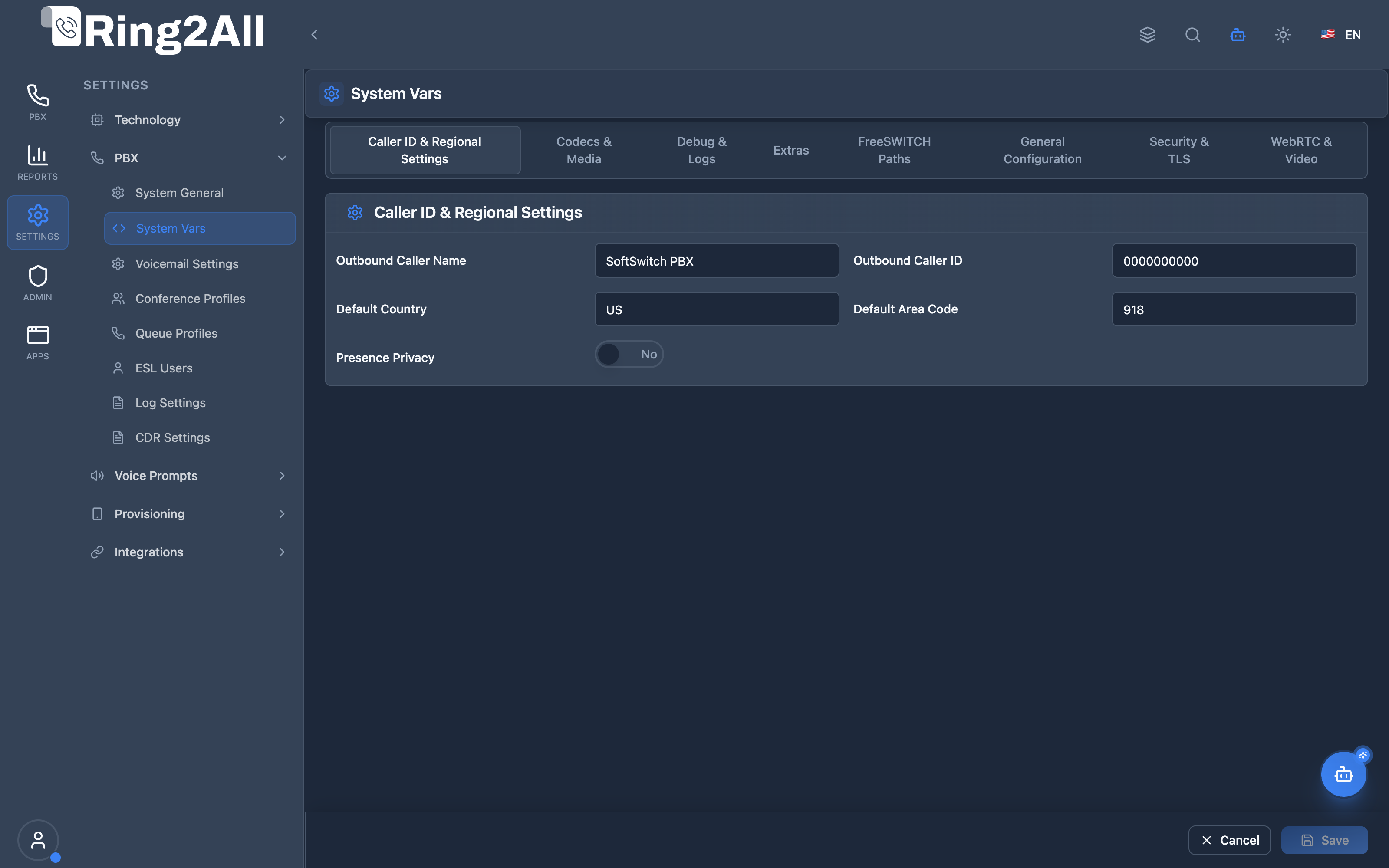
Section titled “Telephony Server System Variables Configuration Interface”Comprehensive administrative interface mapping directly to Telephony Server vars.xml, categorized into General Configuration, SIP & Transport, Codecs, Paths, Sound Files, and WebRTC parameters with instant reset markers and live XML previewing.
1. Module Overview (Technical)
Section titled “1. Module Overview (Technical)”What Is System Vars?
Section titled “What Is System Vars?”System Vars is a Telephony Server global configuration module that manages the vars.xml file. These are system-wide variables that control core Telephony Server behavior including codecs, security, paths, debugging, and WebRTC settings.
Architecture
Section titled “Architecture”┌─────────────────────────────────────────────────────────────────┐│ System Vars Architecture │├─────────────────────────────────────────────────────────────────┤│ ││ Admin Panel ││ ┌──────────────────────────────────────────────────────────┐ ││ │ System Vars │ ││ │ │ ││ │ Categories: │ ││ │ ├─ General Configuration │ ││ │ ├─ Codecs & Media │ ││ │ ├─ Caller ID & Regional │ ││ │ ├─ Security & TLS │ ││ │ ├─ WebRTC & Video │ ││ │ ├─ Debug & Logs │ ││ │ └─ Telephony Server Paths │ ││ │ │ ││ └──────────────────────────────────────────────────────────┘ ││ │ ││ ▼ Generates XML ││ ┌──────────────────────────────────────────────────────────┐ ││ │ vars.xml │ ││ │ │ ││ │ <X-PRE-PROCESS cmd="set" data="var=value"/> │ ││ │ │ ││ └──────────────────────────────────────────────────────────┘ ││ │ ││ ▼ Loaded by Telephony Server ││ ┌──────────────────────────────────────────────────────────┐ ││ │ Telephony Core │ ││ │ │ ││ │ Global variables available: │ ││ │ ${global_codec_prefs} │ ││ │ ${hold_music} │ ││ │ ${recordings_dir} │ ││ │ ... │ ││ │ │ ││ └──────────────────────────────────────────────────────────┘ ││ │└─────────────────────────────────────────────────────────────────┘2. Module Overview (Commercial/Business)
Section titled “2. Module Overview (Commercial/Business)”Business Value
Section titled “Business Value”System Vars provides centralized Telephony Server configuration:
| Without System Vars | With System Vars |
|---|---|
| Edit XML files | Web interface |
| SSH to server | Browser-based |
| Error-prone | Validated |
| Expert only | Admin-friendly |
Use Cases
Section titled “Use Cases”-
Codec Configuration
- Set global codec preferences
- Configure SRTP settings
-
Path Management
- Configure recording locations
- Set voicemail directories
-
Security Settings
- TLS version/ciphers
- SRTP encryption
-
WebRTC/Video
- ICE servers
- Video bandwidth
Feature Highlights
Section titled “Feature Highlights”| Feature | Benefit |
|---|---|
| Web Interface | No SSH needed |
| Categories | Organized settings |
| XML Preview | See before applying |
| Reset Option | Restore defaults |
| Validation | Prevent errors |
| Documentation | Tooltips explain each |
3. Module Overview (End User/Administrator)
Section titled “3. Module Overview (End User/Administrator)”What Can You Do?
Section titled “What Can You Do?”- Configure global codec preferences
- Set default caller ID
- Configure TLS/security settings
- Set WebRTC ICE servers
- Define system paths
- Enable debugging
- Preview generated XML
System Vars Interface
Section titled “System Vars Interface”┌─────────────────────────────────────────────────────────────────┐│ System Vars │├─────────────────────────────────────────────────────────────────┤│ ││ Configure Telephony Server system variables ││ ││ [Preview XML] [Download XML] [Reset All] [Save] ││ ││ ▼ General Configuration ││ ├─ Language Sound Path: [/usr/share/freeswitch/sounds/en] ││ ├─ Hold Music: [local_stream://moh ] ││ ├─ Use SIP Profile: [internal ▼] ││ └─ Enable Cache: ✓ ││ ││ ▼ Codecs & Media ││ ├─ Global Codec Prefs: [OPUS,PCMU,PCMA,G722 ] ││ ├─ Outbound Codec Prefs: [PCMU,PCMA,G722 ] ││ ├─ Secure RTP Mode: [optional ▼] ││ ├─ RTP Timeout: [300 ] ││ └─ RTP Hold Timeout: [1800 ] ││ ││ ▶ Caller ID & Regional Settings ││ ▶ Security & TLS ││ ▶ WebRTC & Video ││ ▶ Debug & Logs ││ ▶ Telephony Server Paths ││ │└─────────────────────────────────────────────────────────────────┘XML Preview
Section titled “XML Preview”┌─────────────────────────────────────────────────────────────────┐│ XML Preview │├─────────────────────────────────────────────────────────────────┤│ ││ Generated vars.xml configuration for Telephony Server ││ ││ <include> ││ <X-PRE-PROCESS cmd="set" data="hold_music=local_stream://moh"/>││ <X-PRE-PROCESS cmd="set" data="global_codec_prefs=OPUS,PCMU"/>││ <X-PRE-PROCESS cmd="set" data="recordings_dir=/var/recordings"/>││ ... ││ </include> ││ ││ [Download XML] [Close] ││ │└─────────────────────────────────────────────────────────────────┘Quick Tips
Section titled “Quick Tips”[!TIP] Preview First: Use XML Preview before saving.
[!TIP] Modified Indicator: Yellow dot shows changed values.
[!CAUTION] Restart Required: Changes require Telephony Server restart.
🎯 User Roles & Key Capabilities
Section titled “🎯 User Roles & Key Capabilities”| Role | Permissions | Key Capabilities |
|---|---|---|
| Super Administrator | Full Access (read, write, generate_xml, reset) |
Manage Telephony Server vars.xml, global sound paths, system codec hierarchies, storage paths, and trigger safe XML regeneration. |
| PBX / Core VoIP Engineer | Operational Management (read, write) |
Configure regional sound directories, adjust WebRTC STUN/TURN variables, and fine-tune global RTP timeout timers. |
| System Auditor | Read & Inspection (read, preview) |
Inspect system variables by category, preview raw generated XML, and audit configuration deviations from factory defaults. |
| Tenant Administrator | No Direct Access | System Vars control core operating system and Ring2All Telephony Engine parameters; access is strictly restricted to system-level administrators. |
4. Configuration Categories
Section titled “4. Configuration Categories”General Configuration
Section titled “General Configuration”| Setting | Description |
|---|---|
| Language Sound Path | Audio prompts location |
| Hold Music | Default MOH stream |
| Use SIP Profile | Default SIP profile |
| Enable Cache | Cache global vars |
Codecs & Media
Section titled “Codecs & Media”| Setting | Description |
|---|---|
| Global Codec Prefs | Inbound codec order |
| Outbound Codec Prefs | Outbound codec order |
| Secure RTP Mode | SRTP enforcement |
| RTP Timeout | Inactivity timeout |
| RTP Hold Timeout | Hold timeout |
| RTP Liberal DTMF | Allow both DTMF methods |
Caller ID & Regional
Section titled “Caller ID & Regional”| Setting | Description |
|---|---|
| Caller ID Name | Default outbound name |
| Caller ID Number | Default outbound number |
| Country Code | Dialing country code |
| Default Country | Dialplan country |
| Default Area Code | Local area code |
Security & TLS
Section titled “Security & TLS”| Setting | Description |
|---|---|
| SIP TLS Version | Allowed TLS versions |
| SIP TLS Ciphers | Cipher list |
| RTP Secure Media Suites | SRTP ciphers |
| RTP SDES Suites | SDES ciphers |
WebRTC & Video
Section titled “WebRTC & Video”| Setting | Description |
|---|---|
| WebRTC ICE Servers | STUN/TURN servers |
| WebRTC ICE Timeout | ICE gathering timeout |
| Suppress Comfort Noise | CNG for WebRTC |
| Max Video Bandwidth In | Inbound video limit |
| Max Video Bandwidth Out | Outbound video limit |
| Video Mute Image | Muted video PNG |
| No Avatar Image | Missing avatar PNG |
Debug & Logs
Section titled “Debug & Logs”| Setting | Description |
|---|---|
| Console Log Level | Log verbosity |
| Call Debug | Verbose call debug |
Telephony Server Paths
Section titled “Telephony Server Paths”| Setting | Description |
|---|---|
| Base Directory | FS installation root |
| Configuration Directory | XML configs |
| Logs Directory | Log files |
| Recordings Directory | Call recordings |
| Storage Directory | General storage |
| Voicemail Directory | Voicemail files |
| Scripts Directory | Lua scripts |
| Sounds Base | Audio prompts |
| Certificates Directory | TLS certs |
5. Settings Reference
Section titled “5. Settings Reference”Common Global Variables
Section titled “Common Global Variables”| Variable | Example | Purpose |
|---|---|---|
global_codec_prefs |
OPUS,PCMU,PCMA | Inbound codecs |
outbound_codec_prefs |
PCMU,PCMA | Outbound codecs |
hold_music |
local_stream://moh | Default MOH |
recordings_dir |
/var/lib/freeswitch/recordings | Global base recordings storage path |
recording_filename_template |
${datetime}-${domain_id}-${extension}-${destination_number}-${direction} |
Global recording filename template |
recording_format |
wav | Global recording audio format (wav, mp3, ogg) |
rtp_secure_media |
optional | SRTP mode |
media_timeout |
300 | RTP timeout |
SRTP Modes
Section titled “SRTP Modes”| Mode | Behavior |
|---|---|
| true | Always require SRTP |
| optional | Use if available |
| false | Never use SRTP |
Log Levels
Section titled “Log Levels”| Level | Description |
|---|---|
| 0 | Console only |
| 1 | Alert |
| 2 | Critical |
| 3 | Error |
| 4 | Warning |
| 5 | Notice |
| 6 | Info |
| 7 | Debug |
6. Common Scenarios & Examples
Section titled “6. Common Scenarios & Examples”Scenario 1: Configure Codecs
Section titled “Scenario 1: Configure Codecs”- Expand “Codecs & Media”
- Set Global Codec Prefs = OPUS,PCMU,PCMA,G722
- Set Outbound Codec Prefs = PCMU,PCMA
- Save and restart FS
Scenario 2: Enable SRTP
Section titled “Scenario 2: Enable SRTP”- Expand “Codecs & Media”
- Set Secure RTP Mode = true
- Expand “Security & TLS”
- Set RTP Secure Media Suites
- Save and restart
Scenario 3: WebRTC Setup
Section titled “Scenario 3: WebRTC Setup”- Expand “WebRTC & Video”
- Set WebRTC ICE Servers = stun:stun.l.google.com:19302
- Set ICE Timeout = 5000
- Enable Suppress Comfort Noise
- Save and restart
[!NOTE] WebRTC TLS termination is handled by Nginx on port 443 (
wss://domain/ws). These ICE/STUN settings affect media negotiation only.
Scenario 4: Enable Debug
Section titled “Scenario 4: Enable Debug”- Expand “Debug & Logs”
- Set Console Log Level = 7 (Debug)
- Enable Call Debug
- Save and restart
- Check logs
7. Limitations & Important Notes
Section titled “7. Limitations & Important Notes”Technical Notes
Section titled “Technical Notes”[!NOTE] vars.xml: This generates the Telephony Server vars.xml file.
[!NOTE] Global Scope: These are system-wide variables.
[!WARNING] Restart Required: Most changes require Telephony Server restart.
Best Practices
Section titled “Best Practices”- Preview First: Always preview XML before saving
- Backup: Download XML before major changes
- Test Changes: Verify after restart
- Document Changes: Note what you changed
- Minimal Changes: Only change what you need
Path Variables
Section titled “Path Variables”[!IMPORTANT] Path variables must point to valid directories. Invalid paths can prevent Telephony Server from starting.
8. Troubleshooting Tips
Section titled “8. Troubleshooting Tips”Common Issues
Section titled “Common Issues”| Symptom | Possible Cause | Solution |
|---|---|---|
| FS won’t start | Invalid path | Check path variables |
| Codec issues | Wrong prefs | Verify codec list |
| No SRTP | Mode = false | Set rtp_secure_media |
| WebRTC fails | No ICE servers | Configure ICE servers |
| No audio | Wrong codecs | Check codec compatibility |
Validate Configuration
Section titled “Validate Configuration”# Check vars.xml syntaxfs_cli -x "global_getvar all"
# Verify specific variablefs_cli -x "global_getvar global_codec_prefs"
# Reload XMLfs_cli -x "reloadxml"Check Paths
Section titled “Check Paths”# Verify directories existls -la ${recordings_dir}ls -la ${voicemail_dir}ls -la ${sounds_base}9. Glossary
Section titled “9. Glossary”| Term | Definition |
|---|---|
| vars.xml | Telephony Server global variables file |
| Global Variable | System-wide configuration value |
| Codec Prefs | Ordered codec preference list |
| SRTP | Secure Real-time Transport Protocol |
| ICE | Interactive Connectivity Establishment |
| SDES | Session Description Protocol Security |
| X-PRE-PROCESS | Telephony Server preprocessor directive |
Model Context Protocol (MCP) AI Integration
Section titled “Model Context Protocol (MCP) AI Integration”The Ring2All PBX platform integrates deep AI assistance via the Model Context Protocol (MCP). The System Vars module allows the PBX AI Copilot to safely query Telephony Server global dialplan variables, inspect audio storage paths, and check codec negotiation defaults without direct terminal access.
Available MCP Tools
Section titled “Available MCP Tools”| Tool Name | Operation Type | RBAC Risk Level | Description |
|---|---|---|---|
list_system_vars |
Read / Query | low |
Lists Telephony Server global system variables (vars.xml variables, sound paths, default codecs, domain settings) grouped by category. |
Tool Input Schemas & Parameters
Section titled “Tool Input Schemas & Parameters”1. list_system_vars
Section titled “1. list_system_vars”{ "name": "list_system_vars", "description": "List Telephony Server global system variables (vars.xml dialplan variables, sound paths, default codecs, domain settings).", "inputSchema": { "type": "object", "properties": { "category": { "type": "string", "description": "Optional category filter (e.g. 'Codecs', 'Directories', 'Defaults', 'Media', 'SIP')." } } }}Natural Language Prompts
Section titled “Natural Language Prompts”| User Request | Invoked MCP Tool | Expected AI Response |
|---|---|---|
| “Show me all Telephony Server system variables for codecs and media.” | list_system_vars({ category: "Codecs" }) |
Returns global codec preferences, SRTP enforcement mode, and RTP timeout values. |
| “Where are recordings and voicemails stored according to system vars?” | list_system_vars({ category: "Directories" }) |
Details recordings_dir, sounds_dir, and storage_dir system path configurations. |
| “List all categories of system variables available in vars.xml.” | list_system_vars |
Lists available categories (General, Codecs, Directories, Media, SIP) with item counts. |
Multi-Tenant & Security Safeguards
Section titled “Multi-Tenant & Security Safeguards”- Super Admin Privilege Boundary: Access to system-wide Telephony Server variables is guarded by MCP Tool Roles; only authorized administrators can query core system variables.
- Safe Read-Only Dispatch: MCP exposure for
system-varsis restricted to query operations; mutatingvars.xmlrequires explicit portal authorization to prevent engine disruption. - Path Sanitization: Directory paths returned to AI clients are normalized to prevent directory traversal disclosure.
- Audit Logging: Every query against core system variables is registered in the security audit database.
Documentation last updated: January 2026