

Call Detail Records (CDR) Module Documentation
Table of Contents
Section titled “Table of Contents”- Navigation & Access
- Screenshots & Visual Interface
- Module Overview (Technical)
- Module Overview (Commercial/Business)
- Module Overview (End User/Administrator)
- CDR Fields Reference
- Filtering Options
- Common Scenarios & Examples
- Limitations & Important Notes
- Troubleshooting Tips
- Glossary
- Model Context Protocol (MCP) AI Integration
Navigation & Access
Section titled “Navigation & Access”To access the Call Detail Records reporting interface:
- Log in to the Ring2All Web Portal (
https://<domain-or-ip>/login). - In the left navigation sidebar, expand Reports.
- Under CDR Reports, click Call Detail Records (
/reports/cdr/cdr). - Browse call sessions, apply date and extension filters, export CSV logs, stream embedded recordings, or request on-demand Post-Call AI summaries.
Screenshots & Visual Interface
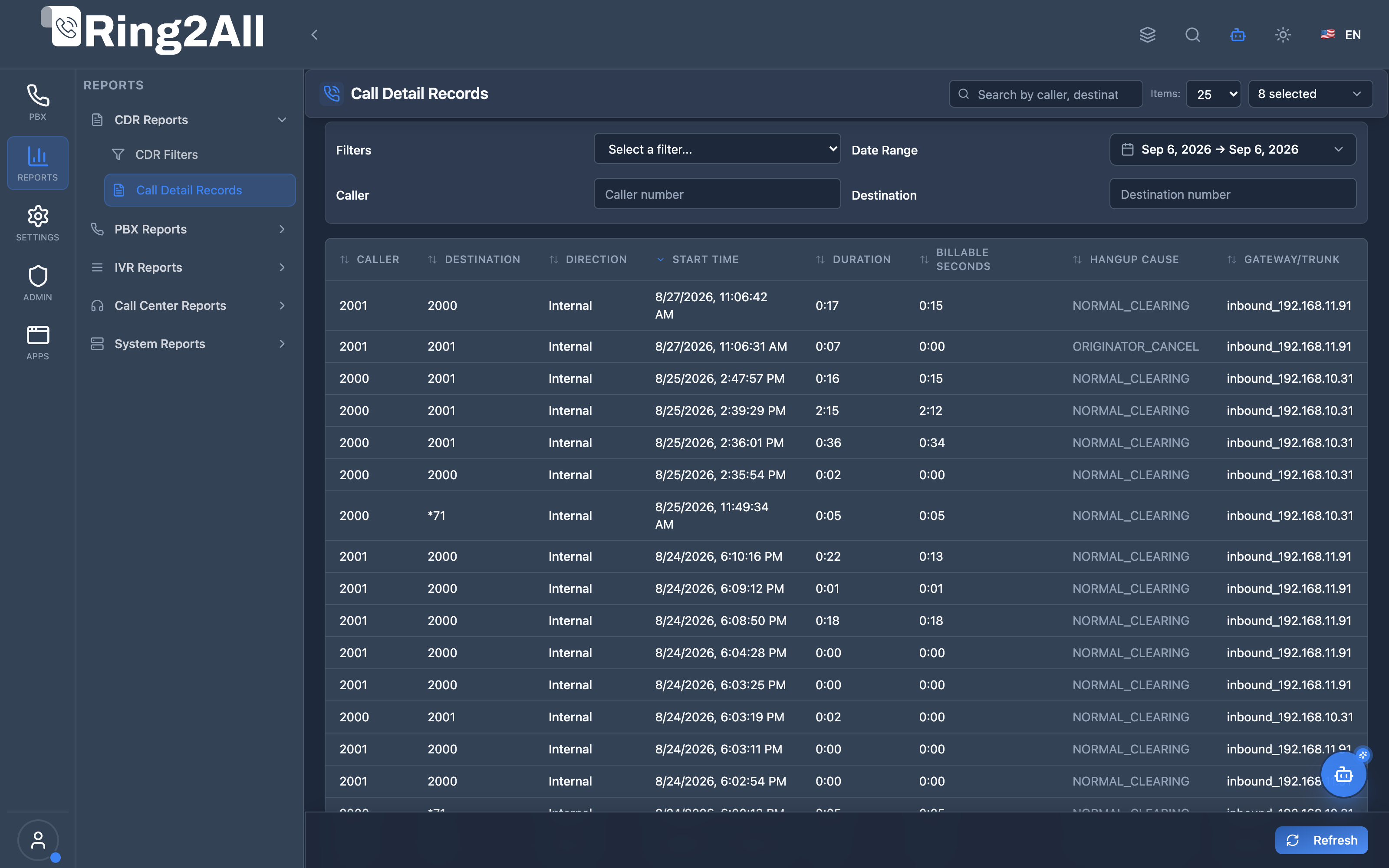
Section titled “Screenshots & Visual Interface”Call Detail Records (CDR) Analytics Ledger
Section titled “Call Detail Records (CDR) Analytics Ledger”High-performance call history table showcasing inbound/outbound session timestamps, caller identification, destination routes, call durations, billable talk times, MOS quality ratings, and integrated audio playback actions.
1. Module Overview (Technical)
Section titled “1. Module Overview (Technical)”What Are Call Detail Records?
Section titled “What Are Call Detail Records?”Call Detail Records (CDR) is a call logging and reporting system that captures comprehensive information about every call processed by the PBX. It includes caller/destination info, timestamps, duration, quality metrics, and recording access.
Architecture
Section titled “Architecture”┌─────────────────────────────────────────────────────────────────┐│ CDR System Architecture │├─────────────────────────────────────────────────────────────────┤│ ││ Telephony Server ││ ┌──────────────────────────────────────────────────────────┐ ││ │ Call Processing │ ││ │ │ ││ │ Call Start → Processing → Answer → End │ ││ │ │ ││ └──────────────────────────────────────────────────────────┘ ││ │ ││ ▼ mod_cdr_pg (PostgreSQL CDR module) ││ ┌──────────────────────────────────────────────────────────┐ ││ │ cdr Database │ ││ │ │ ││ │ Tables: │ ││ │ ├─ public.cdr (call records) │ ││ │ ├─ public.cdr_leg_a (A-leg details) │ ││ │ └─ public.cdr_leg_b (B-leg details) │ ││ │ │ ││ └──────────────────────────────────────────────────────────┘ ││ │ ││ ▼ Backend API ││ ┌──────────────────────────────────────────────────────────┐ ││ │ CdrRecordsPage.tsx │ ││ │ │ ││ │ ┌─────────────────────────────────────────────────────┐ │ ││ │ │ Filters: │ │ ││ │ │ [Date Range] [Call Type] [Caller] [Destination] │ │ ││ │ └─────────────────────────────────────────────────────┘ │ ││ │ │ ││ │ ┌─────────────────────────────────────────────────────┐ │ ││ │ │ Caller │ Dest │ Duration │ Status │ Recording │ │ ││ │ ├──────────┼─────────┼──────────┼────────┼───────────┤ │ ││ │ │ 1001 │ +1555.. │ 0:05:23 │ ✓ │ ▶️ 📥 │ │ ││ │ └─────────────────────────────────────────────────────┘ │ ││ │ │ ││ └──────────────────────────────────────────────────────────┘ ││ │└─────────────────────────────────────────────────────────────────┘2. Module Overview (Commercial/Business)
Section titled “2. Module Overview (Commercial/Business)”Business Value
Section titled “Business Value”CDR provides complete call visibility:
| Without CDR | With CDR |
|---|---|
| No call history | Full audit trail |
| Unknown call quality | QoS metrics |
| Manual billing | Automatic logging |
| No recordings | Integrated playback |
Use Cases
Section titled “Use Cases”-
Billing & Accounting
- Track billable seconds
- Account code reporting
-
Troubleshooting
- Identify failed calls
- Analyze call quality
-
Compliance
- Call recording access
- Audit trail
-
Analytics
- Call volume trends
- Peak hour analysis
Feature Highlights
Section titled “Feature Highlights”| Feature | Benefit |
|---|---|
| Date Filters | Historical queries |
| Call Type Filter | In/Out/Internal |
| Search | Find specific calls |
| QoS Metrics | MOS, jitter, packet loss |
| Recording Access | Play/download recordings |
| Export | Generate reports |
3. Module Overview (End User/Administrator)
Section titled “3. Module Overview (End User/Administrator)”What Can You Do?
Section titled “What Can You Do?”- View all call records
- Filter by date range
- Filter by call type
- Search by caller/destination
- Play call recordings
- Download recordings
- Analyze call quality
CDR Interface
Section titled “CDR Interface”┌─────────────────────────────────────────────────────────────────┐│ Call Detail Records │├─────────────────────────────────────────────────────────────────┤│ ││ Filters: ││ ├─ Range: [Today ▼] [01/16/2026] to [01/16/2026] ││ ├─ Call Type: [All ▼] ││ ├─ Caller: [ ] ││ ├─ Destination: [ ] ││ └─ [Apply Filters] [Refresh] [Clear] ││ ││ 🔍 [Search by caller, destination, or domain... ] ││ ││ ┌───────────────────────────────────────────────────────────┐ ││ │ Time │ Caller │ Dest │ Dir │ Dur │ Status │🎵│ ││ ├──────────┼──────────┼───────────┼──────┼──────┼────────┼──┤ ││ │ 10:30:45 │ 1001 │+1555123.. │ OUT │ 5:23 │ ✓ │▶️│ ││ │ 10:28:12 │+1555456..│ 1002 │ IN │ 2:45 │ ✓ │▶️│ ││ │ 10:25:00 │ 1003 │ 1004 │ INT │ 0:30 │ ✓ │ │ ││ │ 10:20:15 │ 1001 │+1555789..│ OUT │ 0:00 │ ✗ │ │ ││ └───────────────────────────────────────────────────────────┘ ││ ││ Showing 1-25 of 1,234 records ││ [< Previous] [Next >] ││ │└─────────────────────────────────────────────────────────────────┘Quick Tips
Section titled “Quick Tips”[!TIP] Quick Date Ranges: Use dropdown for Today, 7 Days, 15 Days, 30 Days.
[!TIP] Recording Playback: Click the play icon to hear call recordings.
[!CAUTION] Large Date Ranges: Limit to 30 days for performance.
4. CDR Fields Reference
Section titled “4. CDR Fields Reference”Call Information
Section titled “Call Information”| Field | Description |
|---|---|
| UUID | Unique call identifier |
| Caller Name | Caller ID name |
| Caller Number | Caller phone/extension |
| Destination | Called number |
| Direction | Inbound/Outbound/Internal |
| Context | Telephony Server context |
Timestamps
Section titled “Timestamps”| Field | Description |
|---|---|
| Start Time | Call initiated |
| Answer Time | Call answered |
| End Time | Call ended |
| Duration | Total duration (seconds) |
| Billable Seconds | Answered duration |
Technical Details
Section titled “Technical Details”| Field | Description |
|---|---|
| Hangup Cause | Call termination reason |
| SIP Disposition | SIP status |
| Gateway/Trunk | Gateway used |
| Account Code | Billing code |
| Authorization Code | Auth code used |
| Read/Write Codec | Audio codecs |
Quality Metrics
Section titled “Quality Metrics”| Field | Description |
|---|---|
| MOS Score | Mean Opinion Score (1-5) |
| Packet Loss (%) | Audio packet loss |
| Jitter (ms) | Audio jitter |
| Max Delay (ms) | Maximum delay |
| PDD (ms) | Post-dial delay |
Recording & Storage Tracking
Section titled “Recording & Storage Tracking”| Field | Description |
|---|---|
| Recording File | Relative path to recording on disk (/var/lib/freeswitch/recordings/...). |
| Recording Size | Exact audio file size on disk in bytes (recording_size_bytes). Displayed dynamically in MB/KB. |
| Play | In-browser inline playback with waveform controls. |
| Download | Secure download of the recording audio file. |
Exact Per-Call Storage Accounting
Section titled “Exact Per-Call Storage Accounting”Every completed call with an active recording triggers the Telephony Server post-processing hook update_recording_storage.lua:
- The exact file size is recorded directly on the CDR in
public.cdr.recording_size_bytes. - A dedicated partial index (
idx_cdr_recording_size ON public.cdr (domain_id, recording_size_bytes) WHERE recording_file IS NOT NULL) enables instant domain-wide usage aggregation without costly full table scans. - When an individual recording is purged or deleted via the UI or automated retention rules, the exact
recording_size_bytesvalue is subtracted from the domain’srecording_storage_bytescounter inpublic.domains, keeping the domain quota accurate in real time. - Registered as an active field in the CDR Settings module (
public.cdr_fields, sort order 34).
5. Filtering Options
Section titled “5. Filtering Options”Date Range
Section titled “Date Range”| Option | Description |
|---|---|
| Today | Current day |
| 7 Days | Last week |
| 15 Days | Last 2 weeks |
| 30 Days | Last month |
| Custom | Select dates |
Call Type
Section titled “Call Type”| Type | Description |
|---|---|
| All | All calls |
| Inbound | Incoming calls |
| Outbound | Outgoing calls |
| Internal | Extension to extension |
| Transit | Pass-through |
Search Fields
Section titled “Search Fields”| Field | Description |
|---|---|
| Caller | Partial match on caller |
| Destination | Partial match on destination |
| Saved Filters | Apply CDR Filter templates |
6. Common Scenarios & Examples
Section titled “6. Common Scenarios & Examples”Scenario 1: View Today’s Calls
Section titled “Scenario 1: View Today’s Calls”- Select Today from range dropdown
- Click Apply Filters
- Browse results
Scenario 2: Find Failed Outbound
Section titled “Scenario 2: Find Failed Outbound”- Set Call Type to Outbound
- Look for calls with duration = 0
- Check hangup cause
Scenario 3: Listen to Recording
Section titled “Scenario 3: Listen to Recording”- Find call in list
- Click ▶️ play icon
- Recording plays in browser
Scenario 4: Analyze Call Quality
Section titled “Scenario 4: Analyze Call Quality”- View MOS Score column
- Check Packet Loss %
- Review Jitter values
Scenario 5: Export for Billing
Section titled “Scenario 5: Export for Billing”- Set date range
- Apply filters
- Export to CSV
7. Limitations & Important Notes
Section titled “7. Limitations & Important Notes”Technical Notes
Section titled “Technical Notes”[!NOTE] Real-time: CDR records appear after call ends.
[!NOTE] Recording Depends: Recording must be enabled for call.
[!WARNING] Performance: Large date ranges may be slow.
Data Retention
Section titled “Data Retention”| Setting | Description |
|---|---|
| CDR Retention | Configured per system |
| Recording Retention | Separate storage policy |
Best Practices
Section titled “Best Practices”- Limit Date Range: Use shortest needed range
- Use Filters: Narrow results before searching
- Save Filters: Create CDR Filters for common queries
- Regular Export: Archive important records
- Monitor Quality: Review MOS scores regularly
8. Troubleshooting Tips
Section titled “8. Troubleshooting Tips”Common Issues
Section titled “Common Issues”| Symptom | Possible Cause | Solution |
|---|---|---|
| No records | Wrong date range | Adjust dates |
| Missing calls | Filter too restrictive | Clear filters |
| Recording won’t play | File deleted | Check retention |
| Slow loading | Large date range | Reduce range |
| Quality metrics N/A | Codec issue | Check RTP settings |
Diagnostic SQL
Section titled “Diagnostic SQL”Recent CDR records:
SELECT start_stamp, caller_id_number, destination_number, direction, duration, billsec, hangup_causeFROM public.cdrWHERE domain_id = [domain_id]ORDER BY start_stamp DESCLIMIT 20;Call quality summary:
SELECT AVG(rtp_audio_in_mos) as avg_mos, AVG(rtp_audio_in_packet_loss_percent) as avg_loss, AVG(rtp_audio_in_jitter_mean) as avg_jitterFROM public.cdrWHERE domain_id = [domain_id] AND start_stamp >= NOW() - INTERVAL '24 hours';9. Glossary
Section titled “9. Glossary”| Term | Definition |
|---|---|
| CDR | Call Detail Record |
| MOS | Mean Opinion Score (quality 1-5) |
| Jitter | Variation in packet arrival time |
| PDD | Post-Dial Delay |
| Billsec | Billable seconds (answered time) |
| Hangup Cause | Reason call ended |
| A-Leg | Originating party |
| B-Leg | Destination party |
10. Model Context Protocol (MCP) AI Integration
Section titled “10. Model Context Protocol (MCP) AI Integration”The Ring2All Platform Copilot integrates directly with the Call Detail Records subsystem through the Model Context Protocol (MCP). Administrators, telecom engineers, and supervisors can conduct natural language call investigations, summarize daily traffic volume, inspect failed calls, and isolate audio quality degradation without manual SQL querying.
Exposed MCP Tools
Section titled “Exposed MCP Tools”| Tool Name | Operation | Primary Parameters | Description |
|---|---|---|---|
query_cdrs |
CDR Search & Audit | search (string, optional), status (ANSWERED, MISSED, BUSY, FAILED), direction (inbound, outbound, local), limit (number) |
Retrieves recent call records matching filters with timestamps, durations, and leg destinations. |
get_cdr_summary |
Traffic & QoS Summary | period (“24h”, “7d”, “30d”) |
Computes high-level telephony metrics: total call volume, answer rate, billable talk time, and mean MOS score. |
get_cdr_details |
In-Depth Session Diagnostic | callUuid (string) |
Fetches complete diagnostic data for a specific call session, including SIP call ID, Telephony Server hangup cause, RTP jitter, and packet loss. |
diagnose_call_failure |
Forensic Failure RCA | uuid, dialedNumber, extension, limit |
Performs deep forensic investigation on failed or dropped calls: parses SIP hangup causes (USER_BUSY, NO_ROUTE_DESTINATION, CALL_REJECTED), detects early media drops and 32-second NAT ACK drops, analyzes MOS packet loss, and matches engine error traces. |
Operational Safeguards & Multi-Tenant Isolation
Section titled “Operational Safeguards & Multi-Tenant Isolation”- Domain Scoping: All queries automatically filter against the authenticated user’s
domain_id. Cross-tenant call record visibility is blocked at the database query layer. - Read-Only Operations: CDR diagnostic tools execute read-only queries against
ss_cdr.cdrand cannot mutate or purge historic call data. - Data Protection: Audio recording URLs and sensitive caller IDs adhere to RBAC profile restrictions defined in
admin_admin_user_profiles.
Example MCP Payloads
Section titled “Example MCP Payloads”1. Summarizing Today’s Call Activity (get_cdr_summary)
Section titled “1. Summarizing Today’s Call Activity (get_cdr_summary)”{ "period": "24h"}Response:
{ "success": true, "data": { "period": "24h", "totalCalls": 1420, "answeredCalls": 1285, "missedCalls": 135, "answerRatePercent": 90.5, "totalBillableMinutes": 4820, "averageMosScore": 4.38 }}2. Investigating a Dropped Call (get_cdr_details)
Section titled “2. Investigating a Dropped Call (get_cdr_details)”{ "callUuid": "c8e41bf2-8812-4c22-9014-ef6a9281a033"}Response:
{ "success": true, "data": { "uuid": "c8e41bf2-8812-4c22-9014-ef6a9281a033", "callerNumber": "+13055550144", "destinationNumber": "1002", "direction": "inbound", "hangupCause": "NORMAL_CLEARING", "billsec": 145, "rtpMetrics": { "audioInMos": 4.41, "audioInJitterMs": 2.1, "packetLossPercent": 0.0 } }}3. Investigating Call Failures & Hangup Root Causes (diagnose_call_failure)
Section titled “3. Investigating Call Failures & Hangup Root Causes (diagnose_call_failure)”{ "dialedNumber": "+13055550199", "limit": 5}Copilot Natural Language Prompts
Section titled “Copilot Natural Language Prompts”- “Give me a summary of all call traffic over the last 24 hours.”
- “Show me the last 10 missed calls on extension 1001.”
- “Why did the incoming call from +13055550144 fail this morning?”
- “Are there any outbound calls with an RTP MOS score below 3.5 in the past 7 days?”
Documentation last updated: January 2026