

Custom Tasks Module Documentation
Table of Contents
Section titled “Table of Contents”- Navigation & Access
- Screenshots & Visual Interface
- 🎯 User Roles & Key Capabilities
- Module Overview (Technical)
- Module Overview (Commercial/Business)
- Module Overview (End User/Administrator)
- Configuration Sections
- Settings Reference
- Model Context Protocol (MCP) AI Integration
- Common Scenarios & Examples
- Limitations & Important Notes
- Troubleshooting Tips
- Glossary
Navigation & Access
Section titled “Navigation & Access”To access the Custom Tasks module:
- Log in to the Ring2All Web Portal (
https://<domain-or-ip>/login). - In the left navigation sidebar, expand Administration.
- Under Maintenance, click Custom Tasks (
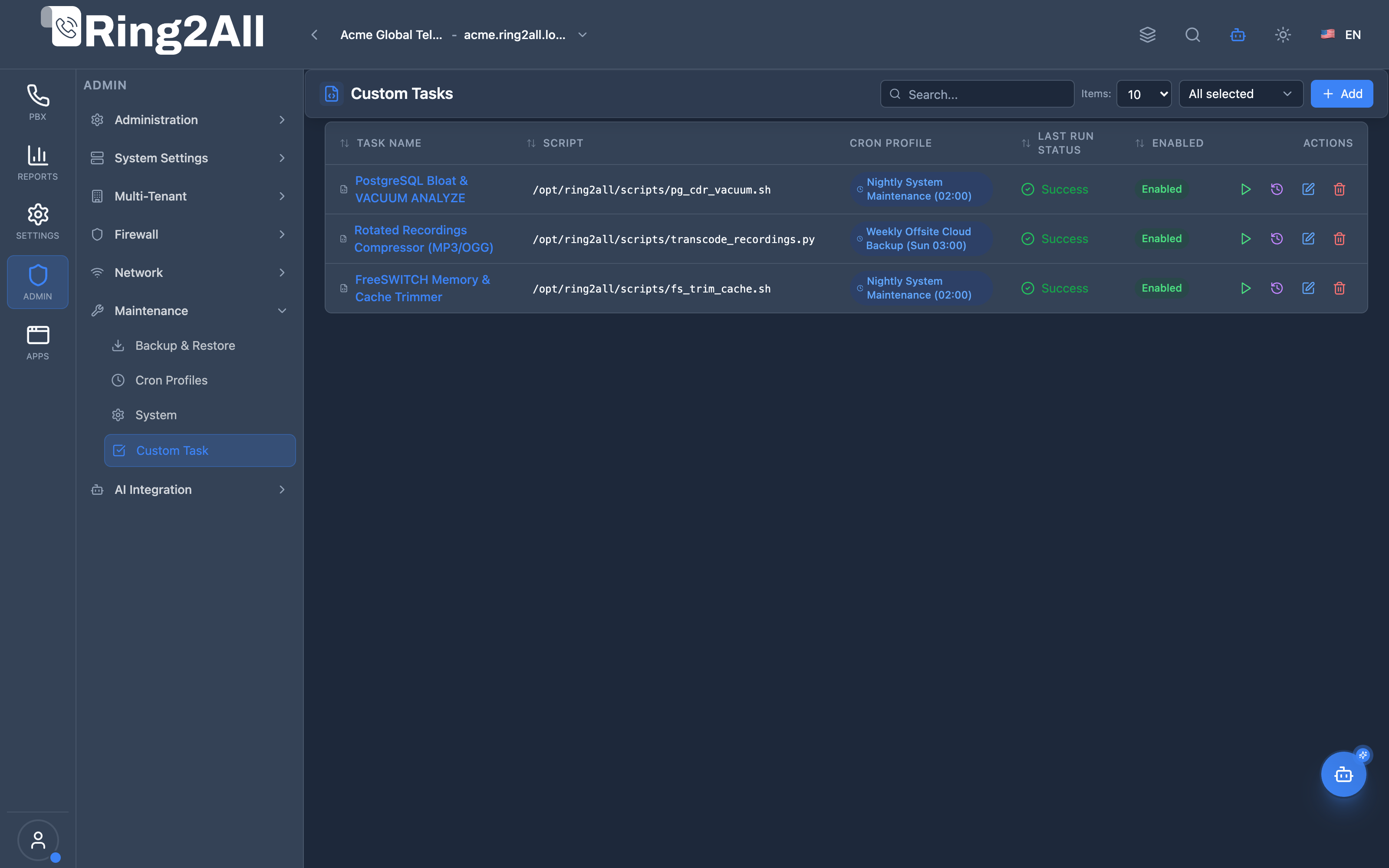
/admin/maintenance/tasks). - Review configured automation scripts, assigned cron profiles, timeout limits, execution users, and run state history.
- Click + Add to register a new automated or on-demand task script (
/admin/maintenance/tasks/new), click the Play button on any task row to trigger an immediate ad-hoc execution, or inspect execution logs and exit codes.
Screenshots & Visual Interface
Section titled “Screenshots & Visual Interface”Custom Tasks Automation Registry
Section titled “Custom Tasks Automation Registry”Central script automation directory displaying registered system maintenance jobs, assigned executable paths (/opt/r2a/scripts/custom/), cron profile links, timeout limits, target system user accounts, and status toggles.
Custom Task Definition & Execution Parameters Form
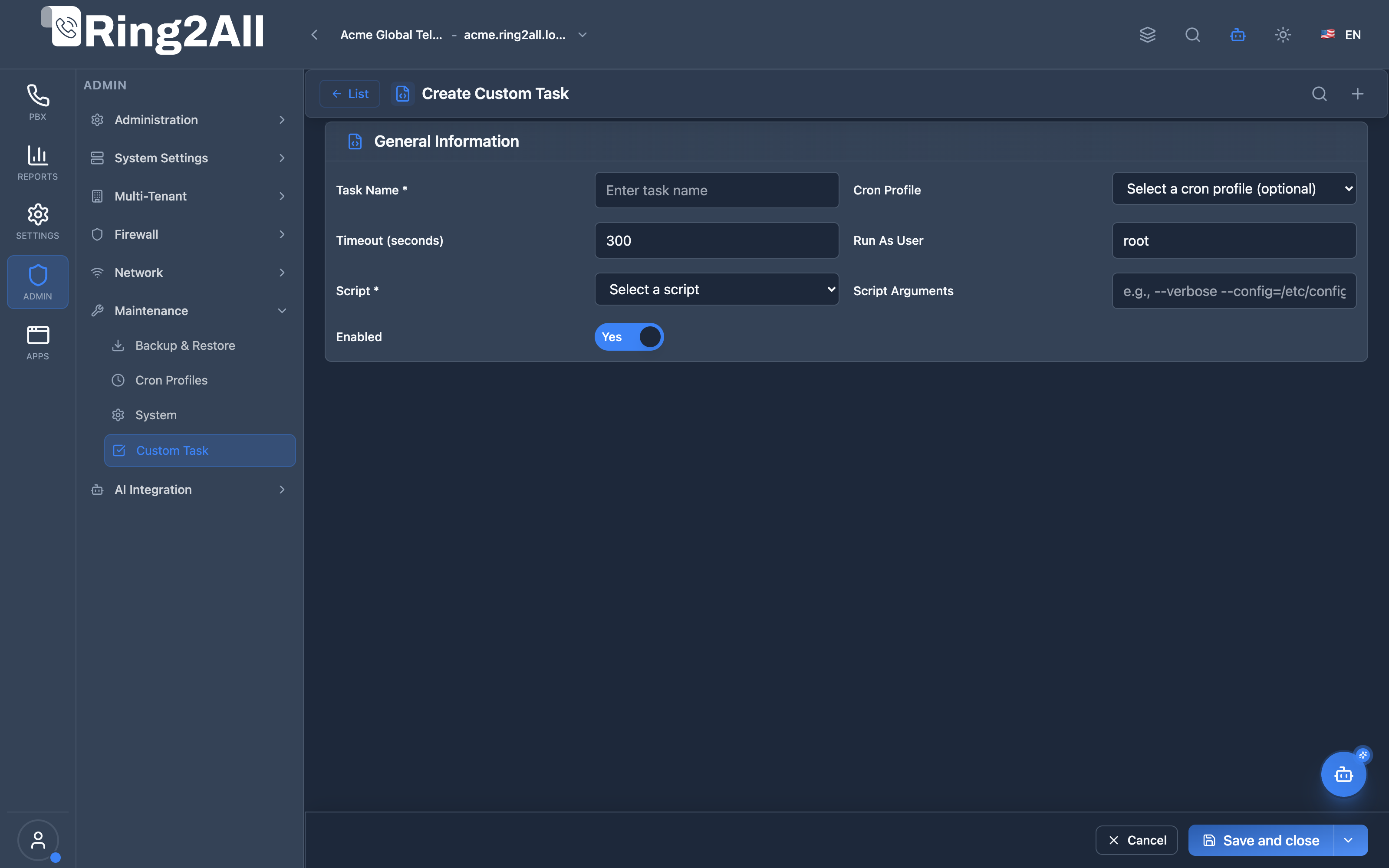
Section titled “Custom Task Definition & Execution Parameters Form”Task configuration editor for naming the task, specifying target script paths, supplying optional runtime arguments, binding recurring cron execution profiles, configuring execution timeout caps (seconds), and assigning the target Linux user context.
🎯 User Roles & Key Capabilities
Section titled “🎯 User Roles & Key Capabilities”| Role | Access Level | Responsibilities & Capabilities |
|---|---|---|
| PBX Super Administrator | Full Access (RW) |
Register custom maintenance scripts (/opt/r2a/scripts/custom/), configure timeouts, assign execution Linux users, and trigger manual task runs. |
| DevOps & Automation Engineer | Script & Pipeline (RW) |
Deploy bash, Python, PHP, or Lua automation scripts, link recurring cron profiles, and verify process exit codes. |
| Platform Monitoring Lead | Audit & Logs (RO) |
Inspect task execution durations, review standard output/stderr traces, and detect hung or timed-out worker scripts. |
| AI Platform Copilot / MCP Agent | Programmatic Audit (RO) |
Execute list_custom_tasks to check registered maintenance routines, last exit statuses, and run counts. |
1. Module Overview (Technical)
Section titled “1. Module Overview (Technical)”What Are Custom Tasks?
Section titled “What Are Custom Tasks?”Custom Tasks is a task scheduler module that manages execution of custom scripts. It allows scheduling scripts with cron profiles, setting execution parameters, tracking run history, and triggering manual execution.
Architecture
Section titled “Architecture”┌─────────────────────────────────────────────────────────────────┐│ Custom Tasks Architecture │├─────────────────────────────────────────────────────────────────┤│ ││ Custom Scripts ││ ┌──────────────────────────────────────────────────────────┐ ││ │ /opt/r2a/scripts/custom/ │ ││ │ │ ││ │ ├── daily-report.sh │ ││ │ ├── sync-contacts.py │ ││ │ ├── cleanup-temp.sh │ ││ │ └── export-data.sh │ ││ └──────────────────────────────────────────────────────────┘ ││ │ ││ ▼ Referenced by tasks ││ ┌──────────────────────────────────────────────────────────┐ ││ │ Custom Tasks │ ││ │ │ ││ │ Task: Daily Report │ ││ │ ┌────────────────────────────────────────────────────┐ │ ││ │ │ Script: daily-report.sh │ │ ││ │ │ Args: --format=pdf --email=admin@company.com │ │ ││ │ │ Cron Profile: Daily Midnight │ │ ││ │ │ Timeout: 300 seconds │ │ ││ │ │ Run As: root │ │ ││ │ │ Status: ● Enabled │ │ ││ │ └────────────────────────────────────────────────────┘ │ ││ │ │ ││ │ Task: Contact Sync │ ││ │ ┌────────────────────────────────────────────────────┐ │ ││ │ │ Script: sync-contacts.py │ │ ││ │ │ Cron Profile: Every 15 Min │ │ ││ │ │ Status: ● Enabled │ │ ││ │ └────────────────────────────────────────────────────┘ │ ││ │ │ ││ └──────────────────────────────────────────────────────────┘ ││ │ ││ ▼ Execution results ││ ┌──────────────────────────────────────────────────────────┐ ││ │ Execution History │ ││ │ │ ││ │ Run 1: Jan 16 00:00 | Success | 12s | Exit: 0 │ ││ │ Run 2: Jan 15 00:00 | Success | 14s | Exit: 0 │ ││ │ Run 3: Jan 14 00:00 | Failed | 300s| Exit: 1 │ ││ │ │ ││ └──────────────────────────────────────────────────────────┘ ││ │└─────────────────────────────────────────────────────────────────┘2. Module Overview (Commercial/Business)
Section titled “2. Module Overview (Commercial/Business)”Business Value
Section titled “Business Value”Custom Tasks provides automated script management:
| Without Module | With Module |
|---|---|
| Manual cron | Web interface |
| No visibility | Execution tracking |
| CLI only | GUI management |
| No history | Run history |
Use Cases
Section titled “Use Cases”-
Automation
- Report generation
- Data synchronization
-
Maintenance
- Cleanup scripts
- Health checks
-
Integration
- API calls
- Data exports
-
Monitoring
- Status checks
- Alert scripts
Feature Highlights
Section titled “Feature Highlights”| Feature | Benefit |
|---|---|
| Script Selection | Dropdown from folder |
| Cron Integration | Use Cron Profiles |
| Arguments | Pass script params |
| Timeout | Prevent runaway |
| Run As User | Security control |
| Execute Now | Manual trigger |
| History | View past runs |
3. Module Overview (End User/Administrator)
Section titled “3. Module Overview (End User/Administrator)”What Can You Do?
Section titled “What Can You Do?”- Create scheduled tasks
- Select scripts to run
- Set execution schedule
- Configure arguments
- Set timeout limits
- View execution history
- Run tasks manually
- Track success/failure
Custom Tasks - List View
Section titled “Custom Tasks - List View”┌─────────────────────────────────────────────────────────────────┐│ Custom Tasks │├─────────────────────────────────────────────────────────────────┤│ ││ Manage scheduled custom script executions ││ ││ [+ Create Task] ││ ││ [🔍 Search tasks...] ││ ││ ┌───────────────────────────────────────────────────────────┐ ││ │ Name │ Script │ Schedule │ Last Run│ St │ ││ ├──────────────┼──────────────┼─────────────┼─────────┼────┤ ││ │ Daily Report │ daily-report │ Daily │ Today │ ✓ │ ││ │ Contact Sync │ sync-contacts│ Every 15min │ 10 min │ ✓ │ ││ │ Cleanup Temp │ cleanup-temp │ Weekly │ Jan 14 │ ✓ │ ││ │ Manual Task │ export-data │ Manual │ Never │ ● │ ││ └───────────────────────────────────────────────────────────┘ ││ ││ Actions: [▶ Execute] [📋 History] [✏️ Edit] [🗑️ Delete] ││ │└─────────────────────────────────────────────────────────────────┘Create/Edit Task
Section titled “Create/Edit Task”┌─────────────────────────────────────────────────────────────────┐│ Create Custom Task │├─────────────────────────────────────────────────────────────────┤│ ││ [General] [Execution] ││ ││ ▼ General Information ││ ││ ┌─────────────────────────────────────────────────────────────┐││ │ │││ │ Task Name: [Daily Report ] │││ │ │││ │ Description: [Generate and email daily stats ] │││ │ │││ │ Enabled: ✓ │││ │ │││ └─────────────────────────────────────────────────────────────┘││ ││ ▼ Script Configuration ││ ││ ┌─────────────────────────────────────────────────────────────┐││ │ │││ │ Script: [daily-report.sh ▼] │││ │ Scripts are located in /opt/r2a/scripts/custom/ │││ │ │││ │ Script Arguments: [--format=pdf --email=admin@co.com] │││ │ Optional arguments to pass to the script │││ │ │││ └─────────────────────────────────────────────────────────────┘││ ││ ▼ Schedule ││ ││ ┌─────────────────────────────────────────────────────────────┐││ │ │││ │ Cron Profile: [Daily Midnight ▼] │││ │ Leave empty for manual execution only │││ │ │││ └─────────────────────────────────────────────────────────────┘││ ││ ▼ Execution Settings ││ ││ ┌─────────────────────────────────────────────────────────────┐││ │ │││ │ Timeout (seconds): [300 ] │││ │ Maximum execution time (1-86400 seconds) │││ │ │││ │ Run As User: [root ] │││ │ System user to run the script as │││ │ │││ └─────────────────────────────────────────────────────────────┘││ ││ [Save] [Cancel] ││ │└─────────────────────────────────────────────────────────────────┘Execution History
Section titled “Execution History”┌─────────────────────────────────────────────────────────────────┐│ Execution History - Daily Report │├─────────────────────────────────────────────────────────────────┤│ ││ ┌───────────────────────────────────────────────────────────┐ ││ │ Date/Time │ Trigger │ Duration│ Exit Code│ Status │ ││ ├──────────────────┼─────────┼─────────┼──────────┼────────┤ ││ │ Jan 16 00:00:15 │ Cron │ 12s │ 0 │ ✓ Success│ ││ │ Jan 15 00:00:12 │ Cron │ 14s │ 0 │ ✓ Success│ ││ │ Jan 15 14:30:00 │ Manual │ 8s │ 0 │ ✓ Success│ ││ │ Jan 14 00:00:10 │ Cron │ 300s │ 1 │ ✗ Failed │ ││ │ Jan 13 00:00:14 │ Cron │ 11s │ 0 │ ✓ Success│ ││ └───────────────────────────────────────────────────────────┘ ││ ││ Click row to view output ││ ││ [Close] ││ │└─────────────────────────────────────────────────────────────────┘Quick Tips
Section titled “Quick Tips”[!TIP] Script Location: Place scripts in
/opt/r2a/scripts/custom/
[!TIP] Manual Only: Leave Cron Profile empty for on-demand tasks.
[!WARNING] Timeout: Set appropriate timeout to prevent runaway scripts.
4. Configuration Sections
Section titled “4. Configuration Sections”General Information
Section titled “General Information”| Field | Description |
|---|---|
| Task Name | Task identifier |
| Description | Task purpose |
| Enabled | Active/Inactive |
Script Configuration
Section titled “Script Configuration”| Field | Description |
|---|---|
| Script | Script file to execute |
| Script Arguments | Command line args |
Schedule
Section titled “Schedule”| Field | Description |
|---|---|
| Cron Profile | Schedule (or empty = manual) |
Execution Settings
Section titled “Execution Settings”| Field | Description |
|---|---|
| Timeout | Max run time (seconds) |
| Run As User | Execution user |
5. Settings Reference
Section titled “5. Settings Reference”Execution Status
Section titled “Execution Status”| Status | Description |
|---|---|
| Success | Exit code 0 |
| Failed | Non-zero exit code |
| Running | Currently executing |
| Timeout | Exceeded time limit |
| Killed | Manually stopped |
| Never Run | Not yet executed |
Trigger Types
Section titled “Trigger Types”| Trigger | Description |
|---|---|
| Scheduled | Cron profile triggered |
| Manual | Execute Now button |
| API | API call triggered |
Timeout Values
Section titled “Timeout Values”| Value | Use Case |
|---|---|
| 60 | Quick scripts |
| 300 | Standard (5 min) |
| 3600 | Long-running (1 hr) |
| 86400 | Very long (24 hr max) |
Common Script Types
Section titled “Common Script Types”| Type | Extension | Description |
|---|---|---|
| Bash | .sh | Shell scripts |
| Python | .py | Python scripts |
| Perl | .pl | Perl scripts |
| Node | .js | Node.js scripts |
Model Context Protocol (MCP) AI Integration
Section titled “Model Context Protocol (MCP) AI Integration”The Custom Tasks module connects to the Model Context Protocol (MCP), allowing the Platform Copilot to audit registered administrative batch tasks, execution parameters, and historical exit codes.
Available MCP Tools
Section titled “Available MCP Tools”| Tool Name | Scope | Description |
|---|---|---|
list_custom_tasks |
Task Registry (RO) |
Lists custom maintenance scripts and batch tasks, showing execution intervals, run as user, timeout thresholds, and last exit status. |
Tool Schemas & Payloads
Section titled “Tool Schemas & Payloads”list_custom_tasks
Section titled “list_custom_tasks”{ "name": "list_custom_tasks", "description": "Lists custom maintenance scripts and batch tasks, showing execution intervals, run as user, timeout thresholds, and last exit status.", "parameters": { "type": "object", "properties": { "search": { "type": "string", "description": "Filter by task name or script path." }, "enabled": { "type": "boolean", "description": "Filter by active/enabled status." } } }}Realistic Execution Response:
{ "success": true, "data": { "total": 2, "tasks": [ { "id": 1, "name": "Nightly CDR Partition Sync", "description": "Aggregates and syncs daily CDR partition tables to the reporting archive", "scriptPath": "/opt/r2a/scripts/custom/sync_cdr_partitions.sh", "scriptArgs": "--compress --verbose", "runAsUser": "softswitch", "timeoutSeconds": 300, "enabled": true, "cronProfile": "Nightly Database Backup (0 2 * * *)", "lastRun": "2026-09-08T02:00:01Z", "lastStatus": "success", "lastExitCode": 0, "runCount": 142 }, { "id": 2, "name": "Temporary Audio Files Purge", "description": "Scans and removes stale TTS cache files older than 48 hours", "scriptPath": "/opt/r2a/scripts/custom/purge_tts_cache.py", "scriptArgs": null, "runAsUser": "softswitch", "timeoutSeconds": 120, "enabled": true, "cronProfile": "Weekly Cleanup Routine (0 3 * * 0)", "lastRun": "2026-09-06T03:00:00Z", "lastStatus": "success", "lastExitCode": 0, "runCount": 24 } ] }}Bilingual Natural Language Prompt Examples
Section titled “Bilingual Natural Language Prompt Examples”English Prompts
Section titled “English Prompts”- “Copilot, list all configured custom maintenance tasks and their current execution status.”
- “Did the nightly CDR partition sync script exit with code 0 on its last run?”
- “Show me any custom tasks that are currently disabled or failed on their last execution.”
Spanish Prompts
Section titled “Spanish Prompts”- “Copilot, lista todas las tareas personalizadas configuradas y su último estado de ejecución.”
- “¿Cuál fue el código de salida (exit code) del script de sincronización de CDRs?”
- “Verifica qué scripts de mantenimiento están habilitados y bajo qué usuario se ejecutan.”
Enterprise Safeguards & Execution Boundaries
Section titled “Enterprise Safeguards & Execution Boundaries”- Restricted Script Path Sandbox: Scripts must reside within authorized directories (
/opt/r2a/scripts/custom/or/var/www/softswitch/scripts/custom/) and match allowed extensions (.sh,.py,.php,.lua). Arbitrary system binary execution is strictly prevented. - Tenant Boundary Isolation: Custom tasks are isolated by
tenant_id. Sub-tenants cannot inspect or execute tasks configured by the main platform tenant. - Execution Timeout Caps: Every task enforces a mandatory timeout limit (maximum 86400 seconds) to terminate hanging processes and prevent thread pool starvation.
6. Common Scenarios & Examples
Section titled “6. Common Scenarios & Examples”Scenario 1: Create Daily Report Task
Section titled “Scenario 1: Create Daily Report Task”- Click Create Task
- Name = “Daily Report”
- Script = daily-report.sh
- Args = “–format=pdf –email=admin@company.com”
- Cron Profile = Daily Midnight
- Timeout = 300
- Run As User = root
- Save
Scenario 2: Manual-Only Task
Section titled “Scenario 2: Manual-Only Task”- Create Task
- Name = “Export Data”
- Script = export-data.sh
- Cron Profile = (leave empty)
- Save
- Execute Now when needed
Scenario 3: High-Frequency Sync
Section titled “Scenario 3: High-Frequency Sync”- Create Task
- Name = “CRM Sync”
- Script = sync-crm.py
- Cron Profile = Every 5 Minutes
- Timeout = 240 (allow time before next)
- Save
Scenario 4: Debug Failed Task
Section titled “Scenario 4: Debug Failed Task”- Go to task list
- Click failed task
- Click View History
- Click failed execution
- View output and exit code
- Fix script issue
- Execute Now to verify
7. Limitations & Important Notes
Section titled “7. Limitations & Important Notes”Technical Notes
Section titled “Technical Notes”[!NOTE] Script Location: Scripts must be in
/opt/r2a/scripts/custom/
[!NOTE] Executable: Scripts must be executable (
chmod +x)
[!WARNING] Security: Run As User controls script permissions.
Best Practices
Section titled “Best Practices”- Test Scripts: Test locally before adding
- Set Timeout: Prevent runaway processes
- Log Output: Scripts should output status
- Exit Codes: Use 0 for success, non-zero for failure
- Descriptive Names: Clear task naming
Script Requirements
Section titled “Script Requirements”| Requirement | Details |
|---|---|
| Location | /opt/r2a/scripts/custom/ |
| Permissions | Executable (chmod +x) |
| Shebang | Include #!/bin/bash or similar |
| Exit Code | Return 0 for success |
| Output | Stdout captured in history |
Example Script Template
Section titled “Example Script Template”#!/bin/bash# Description: Generate daily report
set -e # Exit on error
echo "Starting daily report generation..."
# Your logic here
echo "Report generated successfully"exit 08. Troubleshooting Tips
Section titled “8. Troubleshooting Tips”Common Issues
Section titled “Common Issues”| Symptom | Possible Cause | Solution |
|---|---|---|
| Script not listed | Not in folder | Move to custom folder |
| Permission denied | Not executable | chmod +x script.sh |
| Timeout | Script too slow | Increase timeout |
| Failed status | Script error | Check output/exit code |
Check Script Status
Section titled “Check Script Status”# List available scriptsls -la /opt/r2a/scripts/custom/
# Test script manuallysudo /opt/r2a/scripts/custom/daily-report.sh --arg
# Check permissionsls -la /opt/r2a/scripts/custom/daily-report.shDebug Script
Section titled “Debug Script”# Run with debug outputbash -x /opt/r2a/scripts/custom/script.sh
# Check exit code/opt/r2a/scripts/custom/script.shecho $?9. Glossary
Section titled “9. Glossary”| Term | Definition |
|---|---|
| Task | Scheduled script execution |
| Script | Executable file |
| Cron Profile | Schedule template |
| Timeout | Max execution time |
| Exit Code | Script return value |
| Execution | Single run of task |
Documentation last updated: January 2026