

Recording Management Module Documentation
Table of Contents
Section titled “Table of Contents”- Navigation & Access
- Screenshots & Visual Interface
- Module Overview (Technical)
- Module Overview (Commercial/Business)
- Module Overview (End User/Administrator)
- User Roles & Key Capabilities
- Configuration Sections
- Settings Reference
- Model Context Protocol (MCP) AI Integration
- Common Scenarios & Examples
- Limitations & Important Notes
- Troubleshooting Tips
- Glossary
Navigation & Access
Section titled “Navigation & Access”To access the Recording Management configuration module:
- Log in to the Ring2All Web Portal (
https://<domain-or-ip>/login). - In the left navigation sidebar, expand Settings.
- Under Voice Prompts, click Recording Management (
/settings/voice-prompts/recording). - To upload a new audio prompt or generate an AI voice recording with text-to-speech, click + Add Recording (
/settings/voice-prompts/recording/new). To listen to or edit an existing recording, click on the row or the Edit action button.
Screenshots & Visual Interface
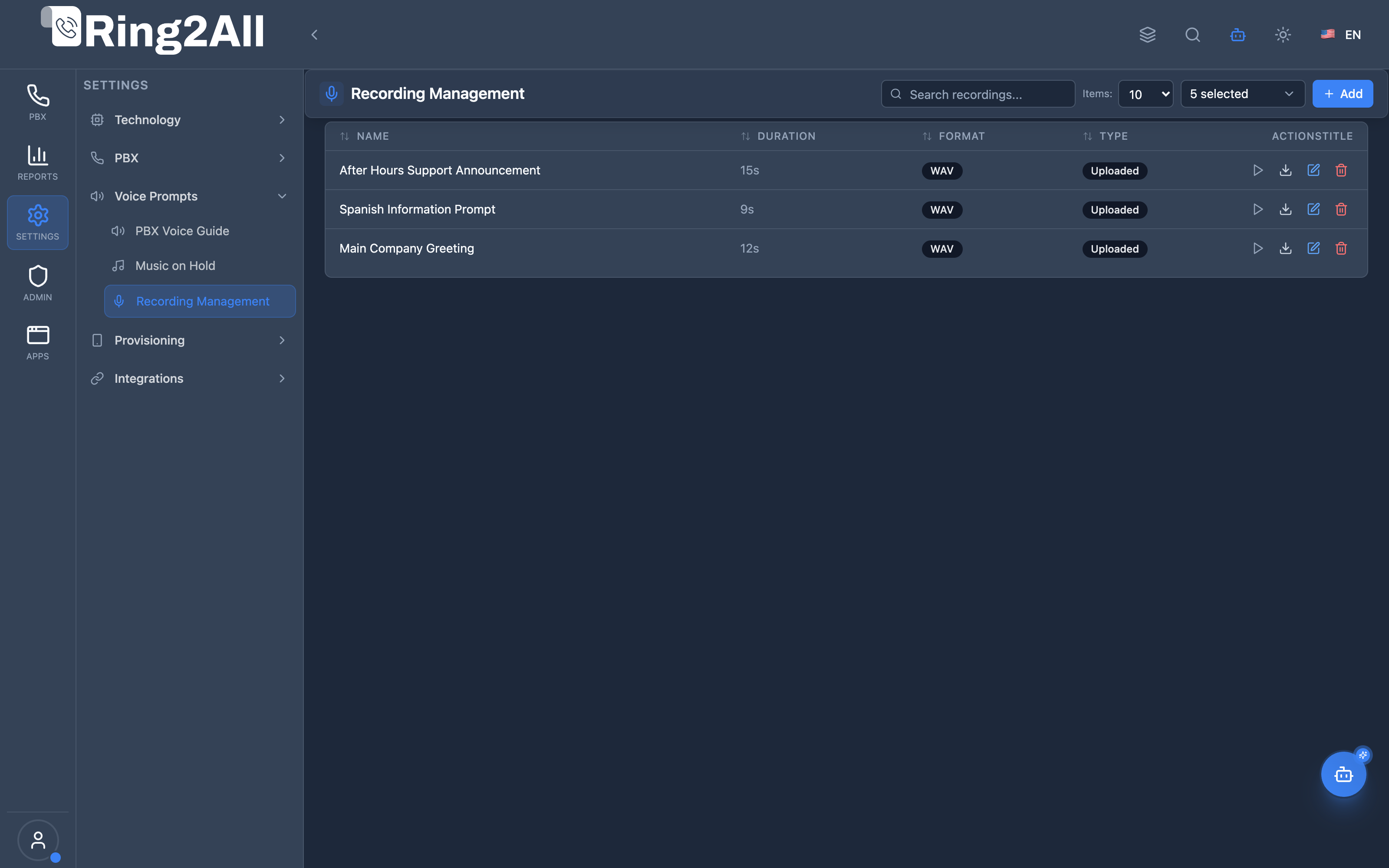
Section titled “Screenshots & Visual Interface”Recording Management Library
Section titled “Recording Management Library”Audio recording repository displaying prompt title, audio filename, category (IVR, Announcement, Voicemail), language, duration, and playback controls.
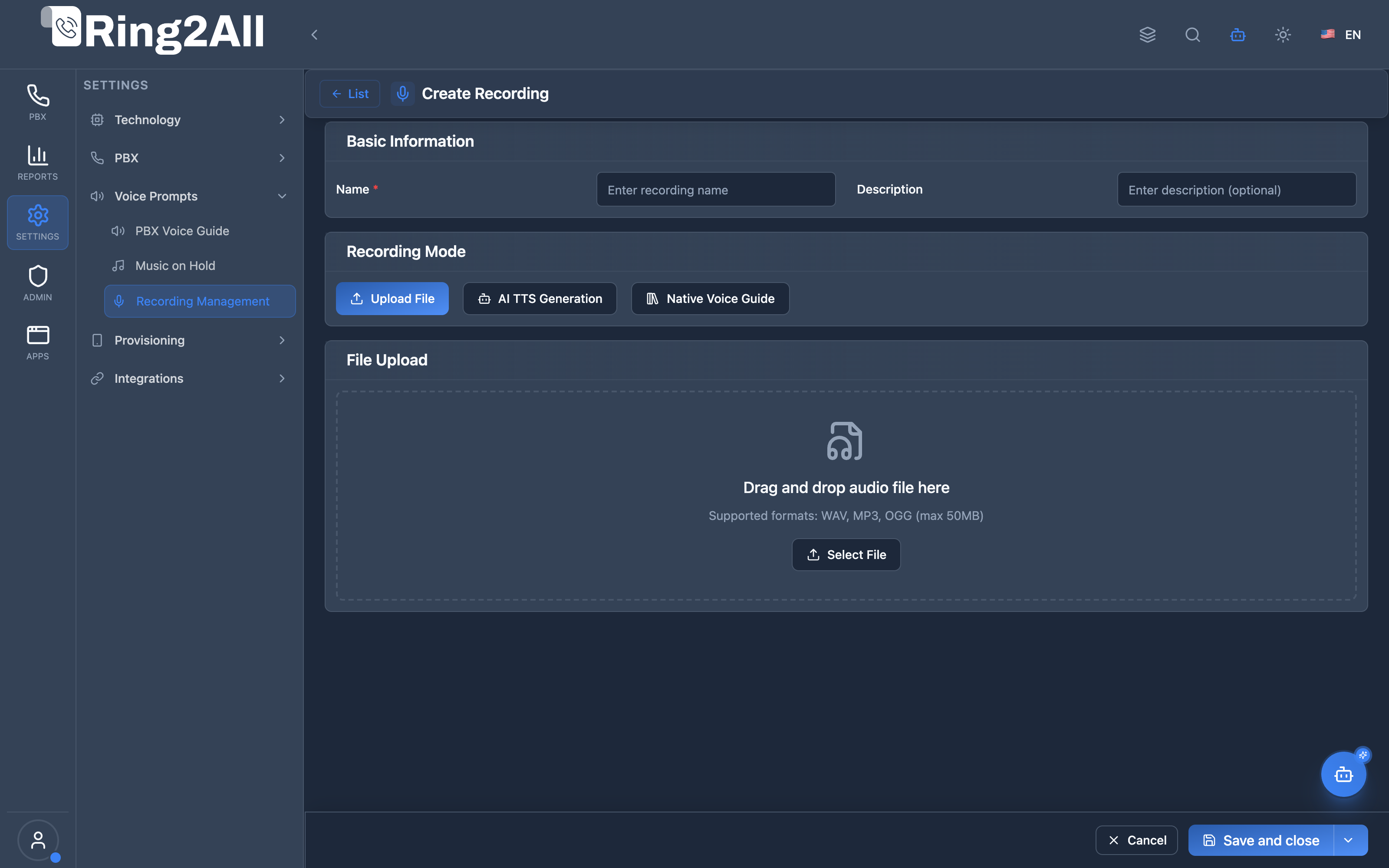
Voice Recording Provisioning Form
Section titled “Voice Recording Provisioning Form”Dual-mode recording interface supporting direct audio file upload (WAV/MP3/OGG) or automated AI neural Text-to-Speech synthesis with adjustable speed, pitch, silence padding, and language tagging.
1. Module Overview (Technical)
Section titled “1. Module Overview (Technical)”What Is Recording Management?
Section titled “What Is Recording Management?”Recording Management is a voice recording library module that manages audio prompts and announcements. It supports both file uploads and AI Text-to-Speech (TTS) generation for creating professional audio content.
Architecture
Section titled “Architecture”┌─────────────────────────────────────────────────────────────────┐│ Recording Management Architecture │├─────────────────────────────────────────────────────────────────┤│ ││ Admin Panel ││ ┌──────────────────────────────────────────────────────────┐ ││ │ Recording Management │ ││ │ │ ││ │ Recording Modes: │ ││ │ ├─ Upload File: WAV, MP3, OGG (max 50MB) │ ││ │ └─ AI TTS: Text converted to speech │ ││ │ │ ││ │ TTS Providers (via AI Profiles): │ ││ │ ├─ OpenAI TTS (Alloy, Nova, Shimmer...) │ ││ │ ├─ Azure Speech Services │ ││ │ └─ Google TTS (300+ voices, emotion styles) │ ││ │ │ ││ │ Categories: │ ││ │ ├─ Announcement │ ││ │ ├─ IVR │ ││ │ ├─ Voicemail │ ││ │ ├─ Feature Code │ ││ │ └─ Custom │ ││ │ │ ││ └──────────────────────────────────────────────────────────┘ ││ │ ││ ▼ Stored per domain ││ ┌──────────────────────────────────────────────────────────┐ ││ │ Recording Storage │ ││ │ │ ││ │ /var/lib/freeswitch/storage/domains/{domain}/recordings/│ ││ │ ├─ welcome_message.wav │ ││ │ ├─ after_hours.mp3 │ ││ │ └─ ai_generated_001.wav │ ││ │ │ ││ └──────────────────────────────────────────────────────────┘ ││ │ ││ ▼ Used by PBX modules ││ ┌──────────────────────────────────────────────────────────┐ ││ │ IVR, Announcements, Voicemail │ ││ │ │ ││ │ IVR Menu → Welcome Recording → Play audio │ ││ │ Announcement → After Hours → Play audio │ ││ │ Feature Code → Confirmation → Play audio │ ││ │ │ ││ └──────────────────────────────────────────────────────────┘ ││ │└─────────────────────────────────────────────────────────────────┘2. Module Overview (Commercial/Business)
Section titled “2. Module Overview (Commercial/Business)”Business Value
Section titled “Business Value”Recording Management provides professional audio content:
| Without Recording Management | With Recording Management |
|---|---|
| SSH to upload files | Web interface |
| No TTS option | AI-generated audio |
| Manual organization | Categorized library |
| No preview | In-browser playback |
Use Cases
Section titled “Use Cases”-
Professional Greetings
- Upload studio recordings
- AI-generate placeholders
-
IVR Prompts
- Menu options
- Navigation instructions
-
Announcements
- After hours messages
- Holiday greetings
-
Multi-language Support
- Recordings per language
- TTS in multiple languages
Feature Highlights
Section titled “Feature Highlights”| Feature | Benefit |
|---|---|
| File Upload | Custom audio files |
| AI TTS | Instant generation |
| Categories | Organized library |
| Multi-language | EN, ES, FR, DE, PT |
| Preview | In-browser playback |
| Download | Export recordings |
3. Module Overview (End User/Administrator)
Section titled “3. Module Overview (End User/Administrator)”What Can You Do?
Section titled “What Can You Do?”- Upload audio files (WAV, MP3, OGG)
- Generate audio from text using AI TTS
- Organize recordings by category
- Set recording language
- Preview audio in browser
- Download recordings
- Enable/disable recordings
Recording Management Interface
Section titled “Recording Management Interface”┌─────────────────────────────────────────────────────────────────┐│ Recording Management │├─────────────────────────────────────────────────────────────────┤│ ││ Manage voice recordings and AI-generated audio for your domain││ ││ [+ Add] ││ ││ [🔍 Search recordings...] ││ ││ ┌───────────────────────────────────────────────────────────┐ ││ │ Name │ Category │ Type │ Duration │ ▶ │ ││ ├───────────────────┼─────────────┼─────────┼──────────┼───┤ ││ │ Welcome Message │ IVR │ Uploaded│ 0:15 │ ▶ │ ││ │ After Hours │ Announcement│ AI Gen │ 0:22 │ ▶ │ ││ │ Menu Options │ IVR │ Uploaded│ 0:45 │ ▶ │ ││ │ Holiday Greeting │ Announcement│ AI Gen │ 0:18 │ ▶ │ ││ │ Voicemail Prompt │ Voicemail │ Uploaded│ 0:08 │ ▶ │ ││ └───────────────────────────────────────────────────────────┘ ││ │└─────────────────────────────────────────────────────────────────┘Create Recording - Upload Mode
Section titled “Create Recording - Upload Mode”┌─────────────────────────────────────────────────────────────────┐│ Create Recording │├─────────────────────────────────────────────────────────────────┤│ ││ ▼ Basic Information ││ ││ Name: [Welcome Message ] ││ Description: [Main IVR welcome prompt] ││ Category: [IVR ▼] ││ Language: [English ▼] ││ Status: [Active ▼] ││ ││ ▼ Recording Mode ││ ││ ○ Upload File ● AI TTS Generation ││ ││ ▼ File Upload ││ ││ ┌─────────────────────────────────────────────────────────────┐││ │ │││ │ Drag and drop audio file here │││ │ │││ │ Supported formats: WAV, MP3, OGG (max 50MB) │││ │ │││ │ [Select File] │││ │ │││ └─────────────────────────────────────────────────────────────┘││ ││ ▼ Audio Preview ││ ││ [▶ Play] ━━━━━━━━━━━━━━━━━━━━ 0:00 / 0:15 ││ ││ [Save] [Cancel] ││ │└─────────────────────────────────────────────────────────────────┘Create Recording - AI TTS Mode
Section titled “Create Recording - AI TTS Mode”┌─────────────────────────────────────────────────────────────────┐│ Create Recording │├─────────────────────────────────────────────────────────────────┤│ ││ ▼ Basic Information ││ ││ Name: [After Hours Message ] ││ Description: [Plays outside business hours] ││ Category: [Announcement ▼] ││ Language: [English ▼] ││ Status: [Active ▼] ││ ││ ▼ Recording Mode ││ ││ ○ Upload File ● AI TTS Generation ││ ││ ▼ AI Text-to-Speech ││ ││ AI Profile: [Joanna (English US) ▼] ││ ││ Text to Convert: ││ ┌─────────────────────────────────────────────────────────────┐││ │ Thank you for calling ABC Company. Our offices are │││ │ currently closed. Our business hours are Monday through │││ │ Friday, 8 AM to 5 PM. Please leave a message after the │││ │ tone and we will return your call on the next business day.│││ └─────────────────────────────────────────────────────────────┘││ ││ [Generate TTS] ││ ││ ▼ Audio Preview ││ ││ [▶ Play] ━━━━━━━━━━━━━━━━━━━━ 0:00 / 0:22 ││ ││ [Save] [Cancel] ││ │└─────────────────────────────────────────────────────────────────┘Quick Tips
Section titled “Quick Tips”[!TIP] AI TTS: Great for quick drafts, then replace with professional recordings.
[!TIP] Categories: Use categories to organize and find recordings.
[!NOTE] Preview: Always preview before saving.
🎯 User Roles & Key Capabilities
Section titled “🎯 User Roles & Key Capabilities”| Role | Key Capabilities & Permissions | Operational Scope |
|---|---|---|
| PBX Super Administrator | • Global audio storage policy enforcement and disk quota limits • Core audio conversion pipeline (sox/ffmpeg) configuration • System-wide TTS provider profiles and API key credential management • Global recording inventory audit and audit logging |
Full Platform Scope |
| Tenant Administrator | • Custom domain voice prompt upload (WAV, MP3, OGG) • Neural Text-to-Speech synthesis with custom scripts, speed, and pitch • Category assignment (IVR, Announcement, Queue, Voicemail) and language tagging • Binding recordings to IVR menus, Time Conditions, and Ring Groups |
Domain Scope |
| Call Center Supervisor | • Read-only review and browser playback of active prompt recordings • Audio clarity inspection for compliance and brand consistency • Creation requests for seasonal queue announcements and emergency audio notices |
Supervised Queues |
| AI Copilot / MCP Agent | • Voice recording inventory discovery (list_recordings)• Diagnostic inspection of audio metadata and duration ( get_recording_status)• Automated synthesis of IVR greetings via AI voice models ( create_tts_recording)• Safe pruning of obsolete custom recordings ( delete_recording) |
Autonomous Assistant |
4. Configuration Sections
Section titled “4. Configuration Sections”Basic Information
Section titled “Basic Information”| Field | Description |
|---|---|
| Name | Recording identifier |
| Description | Purpose notes |
| Category | Organizational category |
| Language | Recording language |
| Status | Active/Inactive/Processing |
Recording Modes
Section titled “Recording Modes”| Mode | Description |
|---|---|
| Upload File | Upload WAV, MP3, or OGG |
| AI TTS | Generate from text |
Categories
Section titled “Categories”| Category | Use Case |
|---|---|
| Announcement | General announcements |
| IVR | Menu prompts |
| Voicemail | Voicemail greetings |
| Feature Code | Feature confirmations |
| Custom | Other purposes |
5. Settings Reference
Section titled “5. Settings Reference”Supported Languages
Section titled “Supported Languages”| Code | Language |
|---|---|
| en | English |
| es | Spanish |
| fr | French |
| de | German |
| pt | Portuguese |
File Formats
Section titled “File Formats”| Format | Extension | Max Size |
|---|---|---|
| WAV | .wav | 50MB |
| MP3 | .mp3 | 50MB |
| OGG | .ogg | 50MB |
Status Values
Section titled “Status Values”| Status | Description |
|---|---|
| Active | Available for use |
| Inactive | Disabled |
| Processing | TTS generation in progress |
Model Context Protocol (MCP) AI Integration
Section titled “Model Context Protocol (MCP) AI Integration”The Recording Management module features enterprise Model Context Protocol (MCP) tools that enable AI Copilots and telephony bots to query existing prompt libraries, inspect audio properties, and synthesize professional new recordings on demand using Text-to-Speech (TTS).
Available MCP Telephony Tools
Section titled “Available MCP Telephony Tools”| Tool Name | Action Type | Access Level | Description |
|---|---|---|---|
list_recordings |
READ |
Read-Only |
Lists all custom voice recordings and IVR prompts in the PBX domain with category and language metadata. |
get_recording_status |
READ |
Read-Only |
Retrieves detailed metadata, file path, audio duration, and AI synthesis origin of a specific voice recording. |
create_tts_recording |
WRITE |
Admin |
Synthesizes an audio prompt from text using neural AI voice models and stores it in the PBX audio library. |
delete_recording |
DESTRUCTIVE |
Admin |
Deletes an unassigned custom recording from the PBX audio repository. |
Tool Schemas & Input Parameters
Section titled “Tool Schemas & Input Parameters”list_recordings
Section titled “list_recordings”{ "name": "list_recordings", "description": "List all custom voice recordings and IVR prompts in the PBX (shows name, filename, category, duration in seconds, language, and AI generation origin).", "inputSchema": { "type": "object", "properties": { "search": { "type": "string", "description": "Filter by recording name or description." }, "category": { "type": "string", "description": "Filter by category (e.g. 'ivr', 'announcement', 'queue', 'general')." } } }}get_recording_status
Section titled “get_recording_status”{ "name": "get_recording_status", "description": "Get metadata and audio file details of a specific voice recording.", "inputSchema": { "type": "object", "properties": { "name": { "type": "string", "description": "Name of the recording (e.g. 'Welcome Greeting' or 'Holiday Notice')." } }, "required": ["name"] }}create_tts_recording
Section titled “create_tts_recording”{ "name": "create_tts_recording", "description": "Synthesize speech from text (Text-to-Speech) using AI voice models and save it as a PBX system voice recording.", "inputSchema": { "type": "object", "properties": { "name": { "type": "string", "description": "Name of the new voice recording (e.g. 'IVR Bienvenida IA')." }, "text": { "type": "string", "description": "The script / text for the AI voice to speak." }, "language": { "type": "string", "description": "Language code (e.g. 'es-MX', 'es-ES', 'en-US'). Default: 'es-MX'." }, "category": { "type": "string", "description": "Category for the prompt (e.g. 'ivr', 'announcement', 'queue'). Default: 'ivr'." }, "description": { "type": "string", "description": "Optional description of the audio purpose." } }, "required": ["name", "text"] }}Natural Language AI Copilot Prompts
Section titled “Natural Language AI Copilot Prompts”English Prompts
Section titled “English Prompts”- “List all IVR recordings available in the PBX and their durations.”
- “Synthesize a new IVR greeting named ‘Holiday Closure 2026’ with text: ‘Thank you for calling. Our offices are currently closed for the holiday season.’ using English US.”
- “Check the file details and duration of the recording named ‘Welcome Message’.”
- “Find all recordings under category ‘queue’ and check if any are missing.”
Spanish Prompts
Section titled “Spanish Prompts”- “Lista todas las grabaciones del PBX que pertenezcan a la categoría ‘ivr’.”
- “Crea una nueva locución con IA llamada ‘Bienvenida Ventas’ que diga: ‘Gracias por comunicarse con Ring2All. Para ventas marque uno, para soporte marque dos.’ en español de México.”
- “Muestra los metadatos y la duración del audio ‘Mensaje Fuera de Horario’.”
- “Elimina la grabación obsoleta ‘Aviso Temporal Mantenimiento’.”
Enterprise Safeguards & Multi-Tenant Isolation
Section titled “Enterprise Safeguards & Multi-Tenant Isolation”- Domain Scoping: All queries and file saves are strictly constrained to
/var/lib/freeswitch/storage/domains/{domain_name}/recordings/, eliminating tenant cross-contamination. - Format Normalization: Generated TTS audio is converted and downsampled to standard telephony 8kHz or 16kHz mono WAV files to ensure compatibility with legacy SIP endpoints.
- Usage Validation: Before deletion, recordings are checked against active IVR menus, Time Conditions, and Queues to prevent breaking live inbound call routes.
6. Common Scenarios & Examples
Section titled “6. Common Scenarios & Examples”Scenario 1: Upload IVR Greeting
Section titled “Scenario 1: Upload IVR Greeting”- Click “Add”
- Name = “Main IVR Welcome”
- Category = IVR
- Mode = Upload File
- Drag audio file
- Preview and save
Scenario 2: AI-Generated Announcement
Section titled “Scenario 2: AI-Generated Announcement”- Click “Add”
- Name = “After Hours”
- Category = Announcement
- Mode = AI TTS Generation
- Select AI Profile
- Enter text
- Click “Generate TTS”
- Preview and save
Scenario 3: Multi-language Recordings
Section titled “Scenario 3: Multi-language Recordings”- Create English version
- Duplicate and edit
- Set Language = Spanish
- Generate Spanish TTS
- Repeat for other languages
Scenario 4: Replace Recording
Section titled “Scenario 4: Replace Recording”- Find existing recording
- Click Edit
- Upload new file or regenerate TTS
- Preview and save
Scenario 5: Google TTS with Emotion Style
Section titled “Scenario 5: Google TTS with Emotion Style”- Click “Add”
- Name = “Friendly Welcome”
- Category = IVR
- Mode = AI TTS Generation
- Select AI Profile with Google TTS configured:
- Language = Spanish
- Accent = Mexico
- Voice = Enceladus
- Style = Alegre (friendly tone)
- Enter text with warm greeting
- Click “Generate TTS”
- Preview and adjust prosody (Speed, Pitch, Volume) if needed
- Save
7. Limitations & Important Notes
Section titled “7. Limitations & Important Notes”Technical Notes
Section titled “Technical Notes”[!NOTE] AI TTS: Requires configured AI profile. Supported providers: OpenAI TTS, Azure Speech, Google TTS.
[!NOTE] File Size: Maximum 50MB per file.
[!NOTE] Google TTS: Supports 300+ voices with Language → Accent → Voice → Style selection and emotion styles (Alegre, Triste, Susurrar).
[!WARNING] Processing Time: TTS generation may take a few seconds.
Supported TTS Providers
Section titled “Supported TTS Providers”| Provider | Voices | Features |
|---|---|---|
| OpenAI TTS | 6 voices | High quality, fast generation |
| Azure Speech | 400+ voices | Neural voices, multiple languages |
| Google TTS | 300+ voices | Cascading selection, emotion styles, prosody controls |
Best Practices
Section titled “Best Practices”- Naming Convention: Use descriptive names
- Categorize: Proper category for organization
- Preview: Always preview before deploying
- Backup: Download important recordings
- Language Match: Ensure language matches content
- Use Google TTS Styles: For professional recordings, use emotion styles like “Natural” or “Alegre”
AI TTS Tips
Section titled “AI TTS Tips”| Tip | Description |
|---|---|
| Punctuation | Use periods for pauses |
| Numbers | Write out or use digits |
| Abbreviations | Spell out for clarity |
| Emphasis | Use CAPS sparingly |
| Google Styles | Use “Alegre” for friendly, “Triste” for empathetic |
8. Troubleshooting Tips
Section titled “8. Troubleshooting Tips”Common Issues
Section titled “Common Issues”| Symptom | Possible Cause | Solution |
|---|---|---|
| Upload fails | File too large | Compress or trim audio |
| TTS fails | No AI profile | Configure AI profile |
| No playback | Invalid format | Convert to WAV/MP3 |
| Processing stuck | TTS error | Check AI service |
| Can’t find recording | Wrong category | Check all categories |
Check Recording Files
Section titled “Check Recording Files”# List recordings for domainls -la /var/lib/freeswitch/storage/domains/{domain}/recordings/
# Play audio fileaplay /path/to/recording.wav
# Check file formatfile /path/to/recording.wavConvert Audio Format
Section titled “Convert Audio Format”# Convert MP3 to WAV (8kHz mono)ffmpeg -i input.mp3 -ar 8000 -ac 1 output.wav9. Glossary
Section titled “9. Glossary”| Term | Definition |
|---|---|
| TTS | Text-to-Speech |
| AI Profile | TTS voice configuration |
| WAV | Waveform audio format |
| MP3 | Compressed audio format |
| OGG | Open audio format |
| IVR | Interactive Voice Response |
Documentation last updated: January 2026