

User Profile & Account Settings
Table of Contents
Section titled “Table of Contents”- Overview
- Security & Administrative Significance
- 🎯 User Roles & Key Capabilities
- Visual Interface & Form Layout
- Field & Configuration Reference
- Security Best Practices
- Troubleshooting & Verification
- Glossary
1. Overview
Section titled “1. Overview”The User Profile & Account Settings module in Ring2All SBC enables authenticated users and administrative operators to manage personal profile identity, UI localization preferences, startup routing destinations, custom avatars, and cryptographic authentication credentials.
Operating as a foundational security boundary within the SBC administrative layer, changes made in this module synchronize directly with the underlying PostgreSQL credential store while respecting Role-Based Access Control (RBAC) boundaries.
2. Security & Administrative Significance
Section titled “2. Security & Administrative Significance”- Cryptographic Identity Protection: Facilitates password rotations with Argon2id-compatible hashing, safeguarding SBC management interfaces against credential stuffing and brute-force access attempts.
- Personalized Operator Workspace: Operators can configure their preferred UI language, geographical timezone for timestamp alignment against CDR logs, and default landing views.
- Audit Trail Integrity: Accurate operator names and email addresses ensure that SBC configuration change logs and administrative audit entries (
audit_logs) attribute telecom modifications to verified personnel.
3. 🎯 User Roles & Key Capabilities
Section titled “3. 🎯 User Roles & Key Capabilities”| Role | Key Capabilities |
|---|---|
| SBC Administrator | Update personal credentials, contact details, regional timezones, and change password; review assigned administrative role privileges. |
| NOC Operator | Manage user preferences, language selection, startup dashboard view, and personal authentication credentials. |
| Read-Only Auditor | Adjust personal display preferences (timezone and language) without permission to modify global system security policies. |
4. Visual Interface & Form Layout
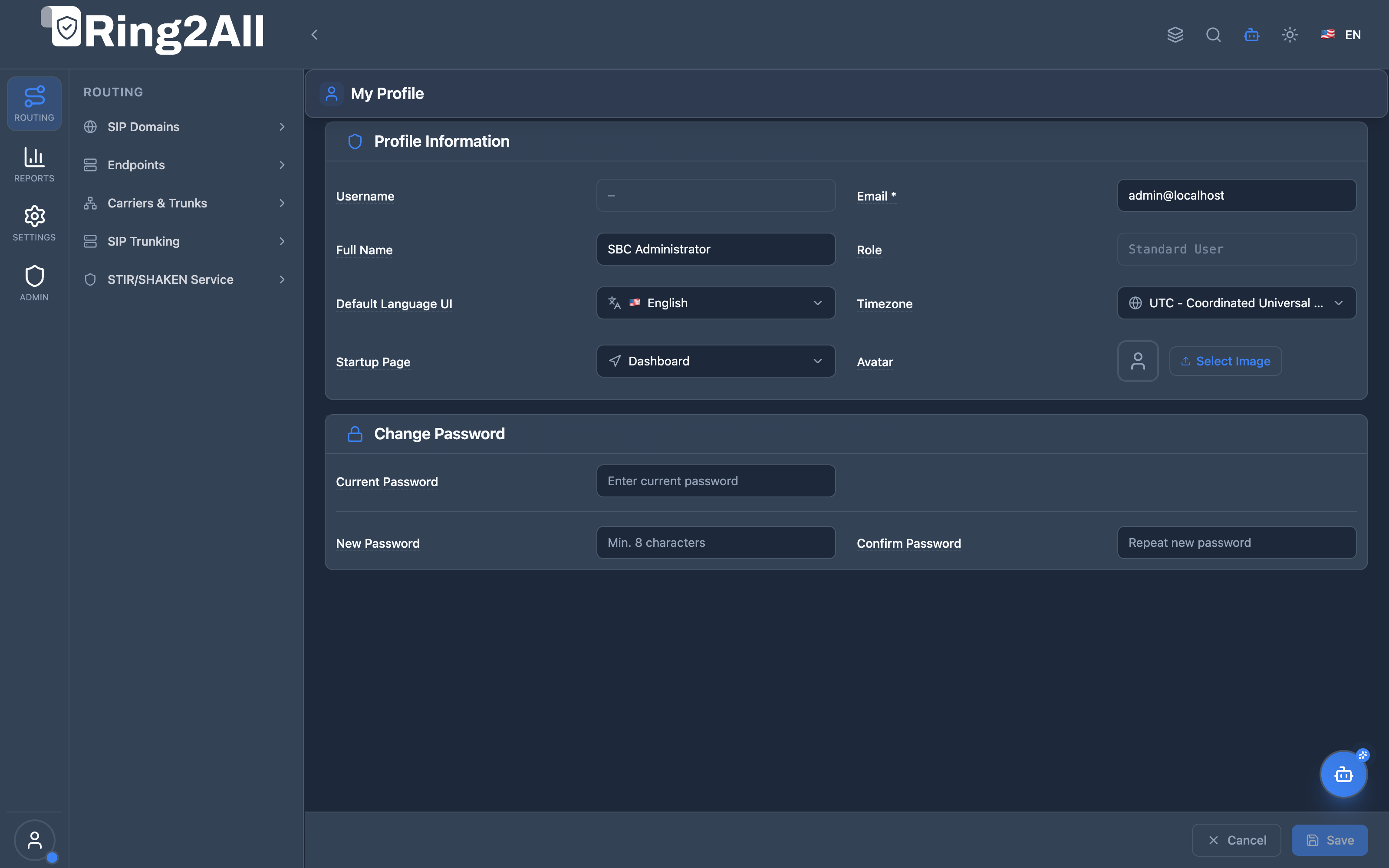
Section titled “4. Visual Interface & Form Layout”The profile interface is organized into two primary structured sections: Profile Information and Change Password, anchored by a fixed bottom action bar.
5. Field & Configuration Reference
Section titled “5. Field & Configuration Reference”Section 1: Profile Information
Section titled “Section 1: Profile Information”| Field | Type | Constraints / Format | Description |
|---|---|---|---|
| Username | Text (Disabled) | Immutable string | Displays the unique administrative username utilized during system authentication. |
| Email * | Email (Required) | Valid RFC 5322 email | Primary contact address used for system notifications, security alerts, and administrative correspondence. |
| Full Name | Text | Max 120 characters | The real-world display name of the operator, shown across headers and audit logs. |
| Role | Text (Disabled) | System RBAC role | Displays the assigned authorization level (e.g., Standard User, Administrator). |
| Default Language UI | Dropdown | English (en), Español (es) |
Configures the primary localization and translation catalog loaded upon login. |
| Timezone | Dropdown | IANA Timezone string | Defines the local timezone offset applied when rendering call records, traces, and system timestamps. |
| Startup Page | Dropdown | Predefined system routes | Specifies the default landing module displayed immediately after completing authentication (e.g., Dashboard, SIP Domains). |
| Avatar | File / Image | JPG, PNG, WEBP (< 2 MB) | Profile picture displayed in the lower-left sidebar user widget. |
Section 2: Change Password
Section titled “Section 2: Change Password”| Field | Type | Validation Rules | Description |
|---|---|---|---|
| Current Password | Password Input | Required if changing password | The active operator password required to verify identity before committing credential updates. |
| New Password | Password Input | Minimum 8 characters | The new secure credential. Recommended to include uppercase, lowercase, numbers, and symbols. |
| Confirm Password | Password Input | Must match New Password |
Verification input ensuring no typographical errors in the new credential string. |
Action Controls
Section titled “Action Controls”- Cancel: Clears any pending edits in the profile form and restores active saved values without navigating away.
- Save: Validates fields, hashes updated credentials, updates the backend database, and updates the active session state.
6. Security Best Practices
Section titled “6. Security Best Practices”- Mandate Strong Credentials: Enforce complex passwords containing a combination of alphanumeric characters and special symbols to protect root-level SBC management access.
- Align Operator Timezones: Ensure all NOC engineers configure their individual timezones correctly so that real-time SIP packet traces and CDRs correspond accurately to local operational incidents.
- Prompt Credential Rotation: Rotate passwords periodically and immediately following any offboarding or security review within telecom operations.
7. Troubleshooting & Verification
Section titled “7. Troubleshooting & Verification”| Issue / Symptom | Root Cause | Resolution |
|---|---|---|
| Error: “Current password does not match” | Typographical error in existing password field | Re-enter the exact current password or request an administrator password reset via CLI (sbc-admin reset-password). |
| Profile picture fails to upload | File exceeds 2MB or invalid format | Use a compressed PNG, JPG, or SVG image under the 2MB threshold. |
| Timezone not reflected in CDRs | Session cached old offset | Click Save, log out, and log back in to reload session timezone environment settings. |
8. Glossary
Section titled “8. Glossary”- Argon2id: Industry-standard cryptographic password hashing algorithm resistant to GPU cracking and side-channel attacks.
- IANA Timezone: Standardized timezone database string (e.g.,
UTC,America/New_York) providing precise UTC offset calculations. - RBAC: Role-Based Access Control system governing privilege levels across the SBC management layer.