

Portal Call History
📖 Introduction
Section titled “📖 Introduction”The Call History module gives subscribers full visibility into every inbound, outbound, and internal telephony interaction conducted on their extension. Powered by real-time records from Telephony Server and the PostgreSQL CDR database, users can investigate call timestamps, talk duration, billable seconds, and call termination reasons.
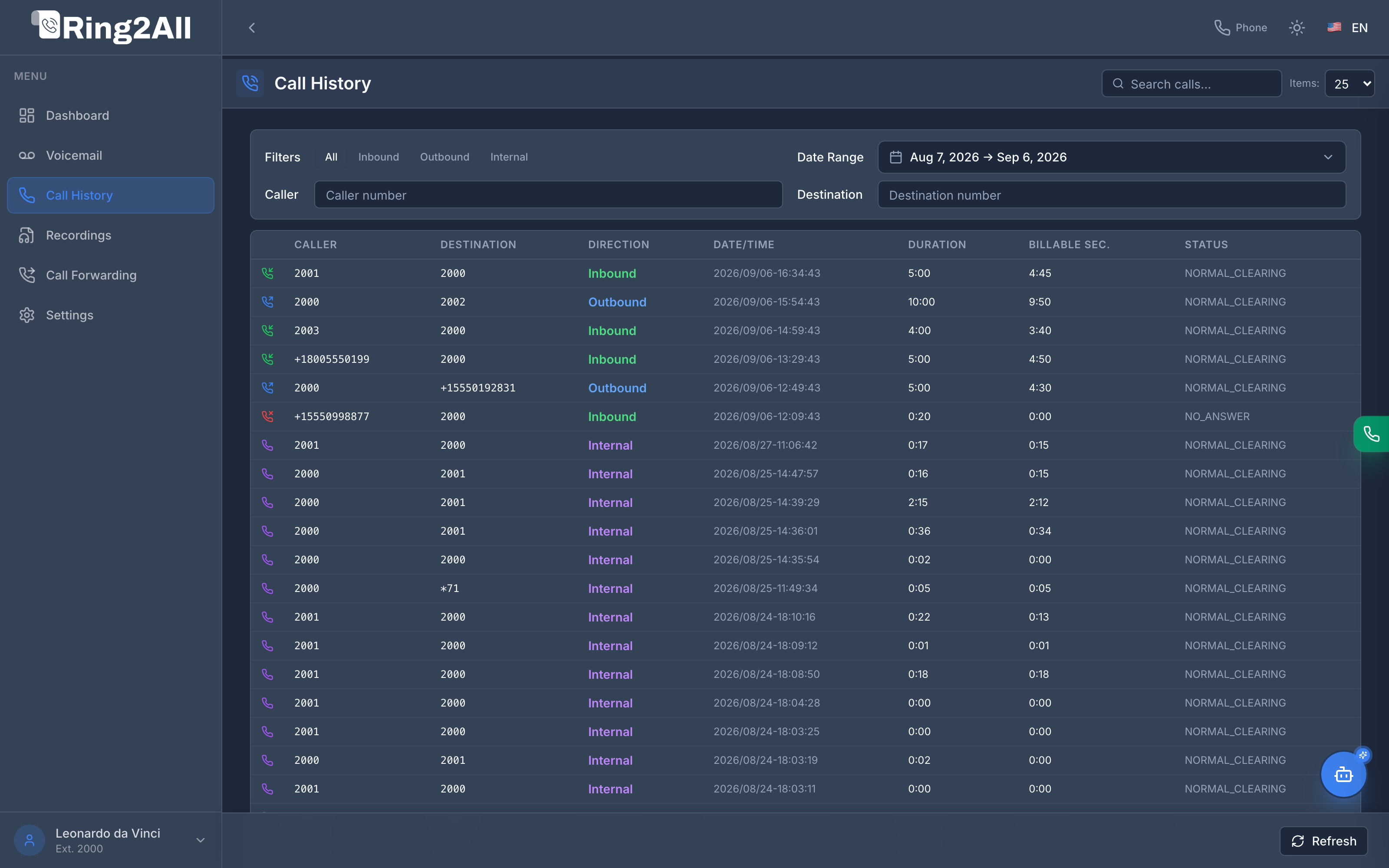
📋 Call Log Data Grid
Section titled “📋 Call Log Data Grid”The interface organizes personal call data with standardized column metrics:
| Column | Data Represented | Operational Meaning |
|---|---|---|
| Direction Icon | Color-coded icon | 🟢 Inbound (green), 🔵 Outbound (blue), 🔴 Missed / No Answer (red), 🟣 Internal (purple). |
| Caller | Calling party | Originating extension (e.g., 2001) or external CLI / Caller ID number. |
| Destination | Called party | The targeted telephone number, DID, ring group, or internal extension. |
| Direction | Text classification | Explicit badge: Inbound, Outbound, or Internal. |
| Date / Time | Timestamp | Start timestamp of the telephony session (YYYY/MM/DD-HH:MM:SS). |
| Duration | Total Session Time | Full ring-to-hangup length of the call session (e.g., 5:00, 10:00). |
| Billable Sec. | Connected Audio Time | Exact duration during which media flowed between endpoints (e.g., 4:45, 9:50). |
| Status | Q.850 / SIP Disposition | Telephony Server termination code (NORMAL_CLEARING, NO_ANSWER, USER_BUSY, CALL_REJECTED). |
🔍 Granular Filters & Search
Section titled “🔍 Granular Filters & Search”To quickly locate specific conversations among hundreds of records, the Call History toolbar provides multi-parameter filtering:
- Direction Filters:
- All: Unfiltered view of all telephony interactions.
- Inbound: Calls received from external numbers or colleagues.
- Outbound: Calls initiated by the subscriber.
- Internal: Extension-to-extension peer calls within the same PBX tenant domain.
- Date Range Picker: Select standard quick periods (
Today,Last 7 Days,Current Month) or a custom date range. - Caller Search: Filter instantly by originating telephone number.
- Destination Search: Filter records by dialed digits or recipient extension.
- Page Size Selector: Switch between 25, 50, and 100 rows per page.
💡 Operational Tips
Section titled “💡 Operational Tips”[!TIP] Check Billable Seconds: If a customer reports a dropped call, compare Duration against Billable Sec. to verify whether audio was successfully established before termination.
[!TIP] Follow Up on Missed Calls: Filter by
Inboundand scan forNO_ANSWERstatus to quickly identify missed caller opportunities and initiate return calls.