

Email Templates Module Documentation
Table of Contents
Section titled “Table of Contents”- Navigation & Access
- Screenshots & Visual Interface
- 🎯 User Roles & Key Capabilities
- Module Overview (Technical)
- Module Overview (Commercial/Business)
- Module Overview (End User/Administrator)
- Configuration Sections
- Settings Reference
- Common Scenarios & Examples
- Model Context Protocol (MCP) AI Integration
- Limitations & Important Notes
- Troubleshooting Tips
- Glossary
Navigation & Access
Section titled “Navigation & Access”To access the Email Templates module:
- Log in to the Ring2All Web Portal (
https://<domain-or-ip>/login). - In the left navigation sidebar, expand Admin.
- Under System Settings, click Email Template (
/admin/system-settings/email-template). - To modify an existing notification template, click on the template row or the edit action icon in the table (
/admin/system-settings/email-template/:id).
Screenshots & Visual Interface
Section titled “Screenshots & Visual Interface”Email Templates List View
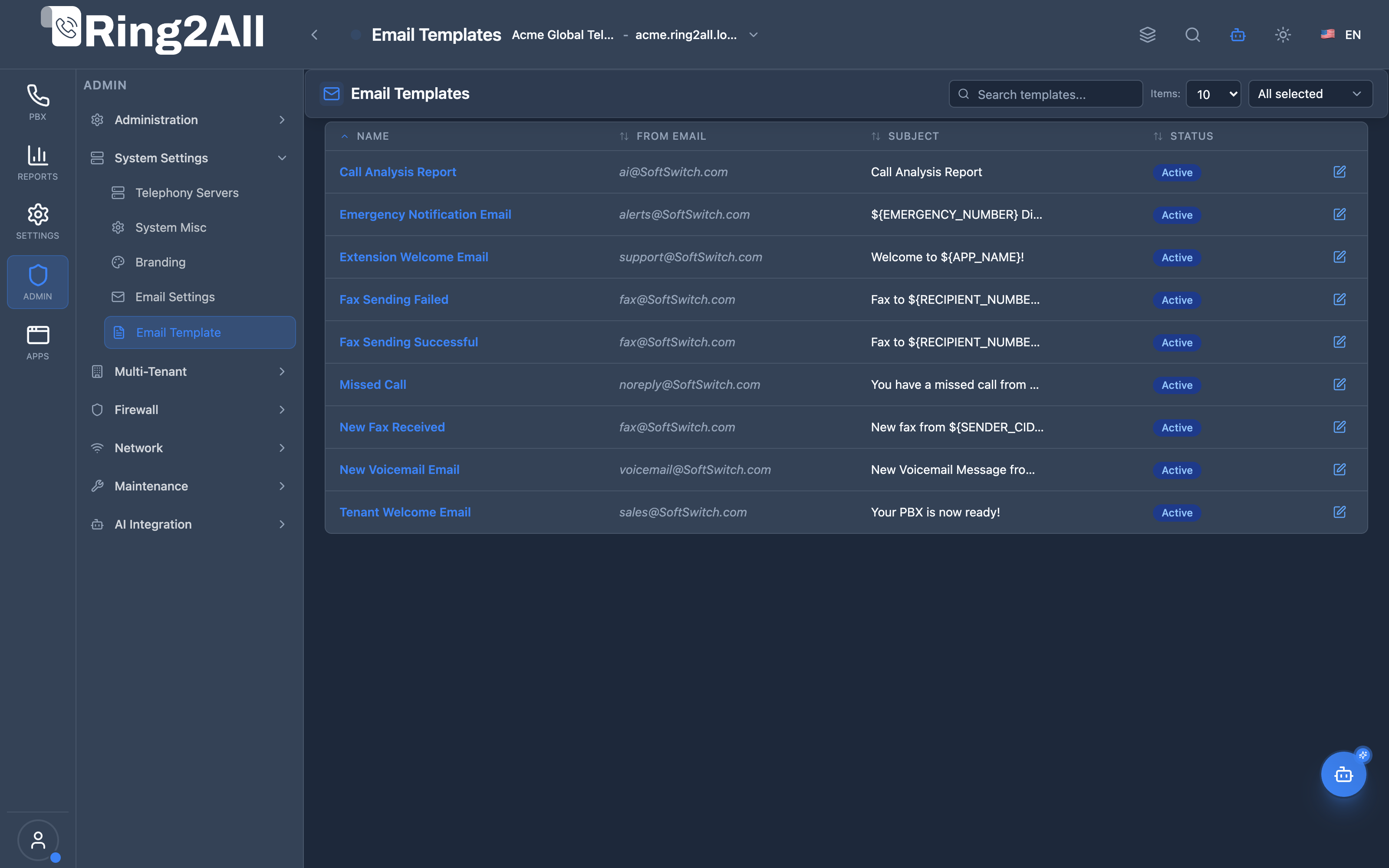
Section titled “Email Templates List View”The Email Templates catalog lists all system notification types (New Voicemail, Extension Welcome, Emergency Notification, Tenant Welcome, Missed Call, Fax Delivery, Call Analysis) with their slug keys, subject lines, active states, and editing controls.
Email Template Configuration Form
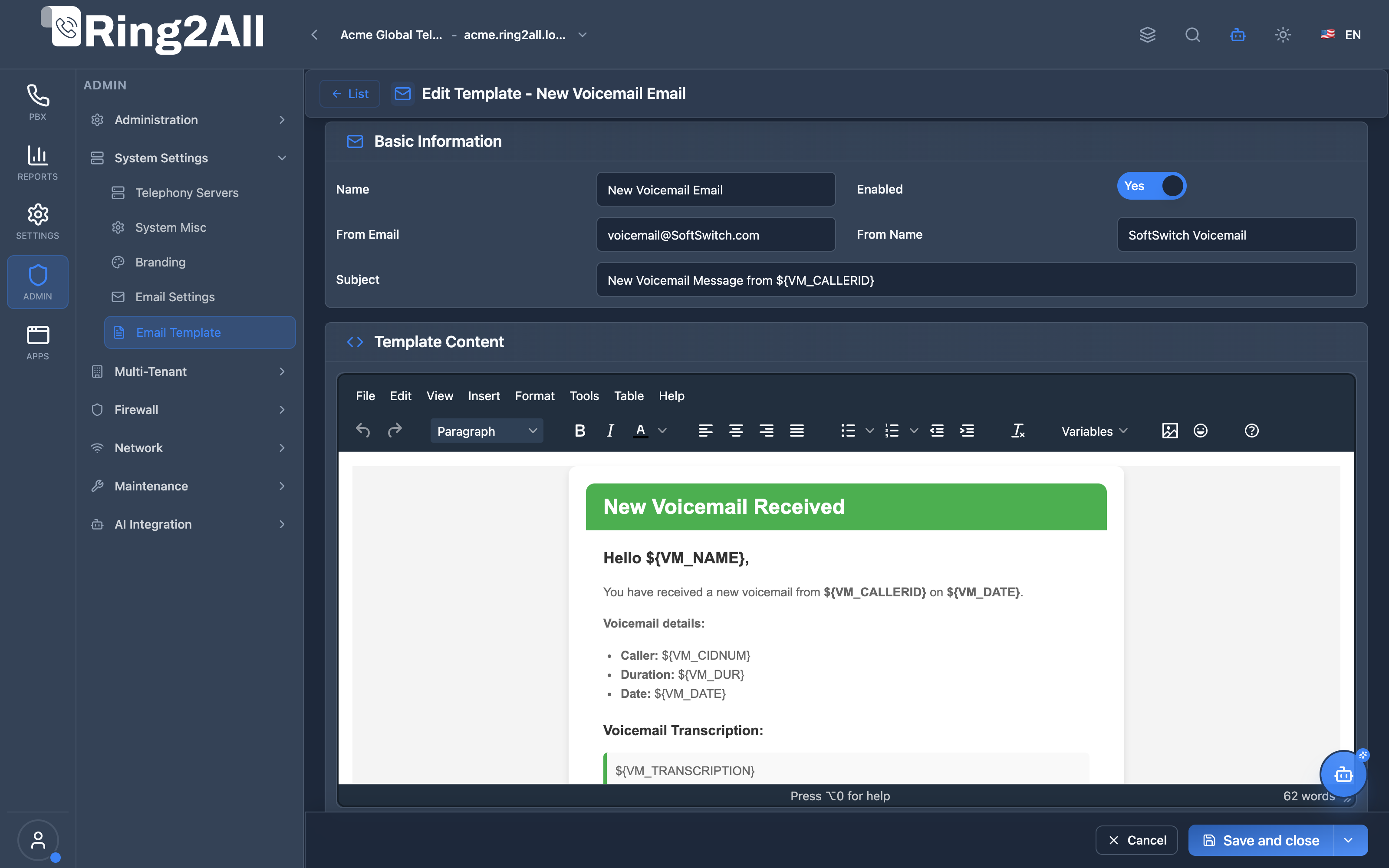
Section titled “Email Template Configuration Form”The email template editor enables customization of email subjects, dynamic placeholders (e.g. {{caller_id}}, {{extension}}, {{duration}}, {{vm_link}}), HTML body markup, and plain-text fallback content.
🎯 User Roles & Key Capabilities
Section titled “🎯 User Roles & Key Capabilities”The Email Templates module standardizes and styles automated outbound email notifications across the PBX platform:
| Role | Key Capabilities & Operational Scope |
|---|---|
| Super Administrator | Creates and manages baseline global notification templates (Voicemail Alerts, Fax Receipts, Password Resets, Emergency Calls). |
| Tenant Administrator | Tailors email subject lines, customizes HTML layouts with company logos, and adjusts dynamic placeholders for organizational branding. |
| Support Lead / Customer Success | Tests template rendering across desktop and mobile email clients and reviews placeholder variables to ensure clear messaging. |
| Telephony Auditor (Read-Only) | Examines active email template contents, sender addresses, and dynamic interpolation parameters without modification privileges. |
1. Module Overview (Technical)
Section titled “1. Module Overview (Technical)”What Are Email Templates?
Section titled “What Are Email Templates?”Email Templates is a notification template module that manages customizable email layouts for system notifications. Templates support HTML and plain text content with variable substitution for dynamic data.
Architecture
Section titled “Architecture”┌─────────────────────────────────────────────────────────────────┐│ Email Templates Architecture │├─────────────────────────────────────────────────────────────────┤│ ││ Email Template Definition ││ ┌──────────────────────────────────────────────────────────┐ ││ │ Template: New Voicemail │ ││ │ │ ││ │ Basic Info: │ ││ │ ├─ Name: New Voicemail Notification │ ││ │ ├─ Slug: new-voicemail │ ││ │ ├─ Subject: New voicemail from {{caller_name}} │ ││ │ ├─ From: voicemail@company.com │ ││ │ └─ Status: Active │ ││ │ │ ││ │ Content: │ ││ │ ├─ HTML: <html>... {{caller_name}} ...</html> │ ││ │ └─ Plain Text: You have a new voicemail... │ ││ │ │ ││ │ Variables: {{caller_name}}, {{duration}}, {{date}} │ ││ │ │ ││ └──────────────────────────────────────────────────────────┘ ││ │ ││ ▼ Used by notification system ││ ┌──────────────────────────────────────────────────────────┐ ││ │ Email Sender │ ││ │ │ ││ │ 1. Receive notification request │ ││ │ 2. Find template by slug │ ││ │ 3. Replace variables with actual values │ ││ │ 4. Send via SMTP (Email Settings) │ ││ │ │ ││ └──────────────────────────────────────────────────────────┘ ││ │└─────────────────────────────────────────────────────────────────┘2. Module Overview (Commercial/Business)
Section titled “2. Module Overview (Commercial/Business)”Business Value
Section titled “Business Value”Email Templates provides branded communications:
| Without Email Templates | With Email Templates |
|---|---|
| Generic emails | Branded design |
| Fixed content | Customizable |
| No variables | Dynamic data |
| One format | HTML + Plain text |
Use Cases
Section titled “Use Cases”-
Voicemail Notifications
- Customize voicemail email layout
- Include caller info dynamically
-
System Alerts
- Branded alert design
- Consistent formatting
-
User Notifications
- Password reset emails
- Account notifications
-
Fax Notifications
- Fax receipt emails
- Custom branding
Feature Highlights
Section titled “Feature Highlights”| Feature | Benefit |
|---|---|
| Slug Identifier | System lookup |
| HTML Content | Rich formatting |
| Plain Text | Fallback support |
| Variables | Dynamic content |
| Sender Override | Per-template sender |
| Active/Inactive | Enable/disable |
3. Module Overview (End User/Administrator)
Section titled “3. Module Overview (End User/Administrator)”What Can You Do?
Section titled “What Can You Do?”- Create email templates
- Customize HTML and plain text content
- Use variables for dynamic data
- Override sender information
- Enable/disable templates
- Duplicate existing templates
Email Templates Interface
Section titled “Email Templates Interface”┌─────────────────────────────────────────────────────────────────┐│ Email Templates │├─────────────────────────────────────────────────────────────────┤│ ││ Manage system email templates for notifications and alerts ││ ││ [+ New Template] ││ ││ [🔍 Search templates...] ││ ││ ┌───────────────────────────────────────────────────────────┐ ││ │ Name │ Slug │ Subject │ Status │ ││ ├────────────────┼────────────────┼───────────────┼────────┤ ││ │ New Voicemail │ new-voicemail │ New voicemail │ Active │ ││ │ Fax Received │ fax-received │ Fax from... │ Active │ ││ │ Password Reset │ password-reset │ Reset your... │ Active │ ││ │ System Alert │ system-alert │ Alert: ... │ Active │ ││ └───────────────────────────────────────────────────────────┘ ││ │└─────────────────────────────────────────────────────────────────┘Create/Edit Template
Section titled “Create/Edit Template”┌─────────────────────────────────────────────────────────────────┐│ Edit Template: New Voicemail │├─────────────────────────────────────────────────────────────────┤│ ││ ▼ Basic Information ││ ││ Name: [New Voicemail Notification ] ││ Personalized name for the template ││ ││ Slug (Identifier): [new-voicemail ] ││ Unique identifier used by the system ││ ││ Subject: [New voicemail from {{caller_name}}] ││ The subject line that recipients will see ││ ││ From Email: [voicemail@company.com ] ││ Override the default sender email ││ ││ From Name: [Company Voicemail ] ││ Override the default sender name ││ ││ ──────────────────────────────────────────────────────────────││ ││ ▼ Template Content ││ ││ HTML Content: ││ ┌─────────────────────────────────────────────────────────────┐││ │ <!DOCTYPE html> │││ │ <html> │││ │ <body style="font-family: Arial, sans-serif;"> │││ │ <h2>New Voicemail</h2> │││ │ <p>You have a new voicemail from <b>{{caller_name}}</b> │││ │ ({{caller_number}}).</p> │││ │ <p>Duration: {{duration}}</p> │││ │ <p>Received: {{date}}</p> │││ │ </body> │││ │ </html> │││ └─────────────────────────────────────────────────────────────┘││ ││ Plain Text Content: ││ ┌─────────────────────────────────────────────────────────────┐││ │ New Voicemail │││ │ │││ │ You have a new voicemail from {{caller_name}} │││ │ ({{caller_number}}). │││ │ Duration: {{duration}} │││ │ Received: {{date}} │││ └─────────────────────────────────────────────────────────────┘││ ││ ──────────────────────────────────────────────────────────────││ ││ ▼ Available Variables ││ ││ Click on a variable to insert it into the editor ││ ││ [{{caller_name}}] [{{caller_number}}] [{{duration}}] ││ [{{date}}] [{{time}}] [{{extension}}] [{{mailbox}}] ││ ││ ──────────────────────────────────────────────────────────────││ ││ ▼ Status ││ ││ Active: ✓ ││ Enable or disable this template ││ ││ [Save Template] [Cancel] ││ │└─────────────────────────────────────────────────────────────────┘Quick Tips
Section titled “Quick Tips”[!TIP] Click to Insert: Click variables to insert at cursor position.
[!TIP] Both Formats: Always provide HTML and plain text versions.
[!NOTE] Slug Unique: Each template needs a unique slug identifier.
4. Configuration Sections
Section titled “4. Configuration Sections”Basic Information
Section titled “Basic Information”| Field | Description |
|---|---|
| Name | Display name |
| Slug | System identifier |
| Subject | Email subject line |
| From Email | Sender email override |
| From Name | Sender name override |
Template Content
Section titled “Template Content”| Field | Description |
|---|---|
| HTML Content | Rich text version |
| Plain Text | Fallback version |
Available Variables
Section titled “Available Variables”| Field | Description |
|---|---|
| Variables | Click to insert |
Status
Section titled “Status”| Field | Description |
|---|---|
| Active | Enable/disable template |
5. Settings Reference
Section titled “5. Settings Reference”Common Template Slugs
Section titled “Common Template Slugs”| Slug | Purpose |
|---|---|
new-voicemail |
Voicemail notification |
fax-received |
Fax receipt notification |
password-reset |
Password reset request |
system-alert |
System alerts |
missed-call |
Missed call notification |
account-welcome |
New account welcome |
Common Variables
Section titled “Common Variables”| Variable | Description |
|---|---|
{{caller_name}} |
Caller’s name |
{{caller_number}} |
Caller’s phone number |
{{extension}} |
Extension number |
{{mailbox}} |
Voicemail mailbox |
{{duration}} |
Call/message duration |
{{date}} |
Date of event |
{{time}} |
Time of event |
{{company_name}} |
Company name |
{{user_name}} |
Recipient name |
HTML Best Practices
Section titled “HTML Best Practices”| Practice | Recommendation |
|---|---|
| Inline CSS | Use inline styles |
| Simple Layout | Table-based layout |
| Fallback Fonts | System font stack |
| Alt Text | For all images |
| Width | Max 600px |
6. Common Scenarios & Examples
Section titled “6. Common Scenarios & Examples”Scenario 1: Customize Voicemail Email
Section titled “Scenario 1: Customize Voicemail Email”- Find template “new-voicemail”
- Edit HTML content
- Add company logo
- Customize styling
- Update plain text
- Save
Scenario 2: Create New Template
Section titled “Scenario 2: Create New Template”- Click New Template
- Enter name and slug
- Write subject with variables
- Create HTML content
- Create plain text fallback
- Enable and save
Scenario 3: Add Company Branding
Section titled “Scenario 3: Add Company Branding”<!DOCTYPE html><html><body style="font-family: Arial; background: #f5f5f5; padding: 20px;"> <div style="max-width: 600px; margin: 0 auto; background: white; padding: 20px;"> <img src="https://company.com/logo.png" alt="Company" style="max-width: 150px;"> <h2 style="color: #333;">{{subject}}</h2> <p>{{content}}</p> <hr style="border: 1px solid #eee;"> <p style="color: #666; font-size: 12px;">© 2025 Company Name</p> </div></body></html>Scenario 4: Variable Usage
Section titled “Scenario 4: Variable Usage”Subject:
New voicemail from {{caller_name}} ({{caller_number}})Result:
New voicemail from John Smith (+1-555-123-4567)Model Context Protocol (MCP) AI Integration
Section titled “Model Context Protocol (MCP) AI Integration”The Ring2All PBX platform provides Model Context Protocol (MCP) tools for inspecting system email notification templates and available dynamic placeholders.
MCP Tools Reference
Section titled “MCP Tools Reference”| Tool Name | Operation | Description | Risk Level |
|---|---|---|---|
list_email_templates |
Read | Lists all system email notification templates (voicemail, password resets, welcome emails). | Low |
get_email_template_status |
Read | Retrieves subject line, sender details, HTML/text body structure, and interpolation variables. | Low |
JSON Schema Definitions
Section titled “JSON Schema Definitions”list_email_templates
Section titled “list_email_templates”{ "name": "list_email_templates", "description": "Lists all system email notification templates.", "parameters": { "type": "object", "properties": { "search": { "type": "string", "description": "Filter by template name or slug" } } }}get_email_template_status
Section titled “get_email_template_status”{ "name": "get_email_template_status", "description": "Retrieves configuration and available interpolation variables for an email template.", "parameters": { "type": "object", "properties": { "template_id": { "type": "number", "description": "Internal numeric email template identifier" }, "slug": { "type": "string", "description": "Template slug identifier (e.g. 'voicemail_notification', 'password_reset')" } } }}Natural Language Prompt Examples
Section titled “Natural Language Prompt Examples”English
Section titled “English”- “List all configured email templates and their active statuses.”
- “Show the subject line and dynamic variables available for the ‘New Voicemail’ email template.”
- “Check the HTML body template for user password reset notifications.”
Spanish
Section titled “Spanish”- “Muestra todas las plantillas de correo electrónico configuradas en el sistema.”
- “Consulta el asunto y las variables disponibles para la plantilla de ‘Notificación de Correo de Voz’.”
- “Verifica el contenido de la plantilla de bienvenida para nuevas extensiones.”
Enterprise Safeguards & Guardrails
Section titled “Enterprise Safeguards & Guardrails”- Slug Immutability: System template slugs (e.g.
voicemail_notification) are immutable to ensure background notification services can always reliably resolve them. - Dual-Format Requirement: Inspection tools verify that both HTML and plain-text versions exist for maximum email client compatibility.
7. Limitations & Important Notes
Section titled “7. Limitations & Important Notes”Technical Notes
Section titled “Technical Notes”[!NOTE] Slug Immutable: Don’t change slug of system templates.
[!NOTE] Plain Text Required: Some clients don’t support HTML.
[!WARNING] Test Templates: Verify rendering in different clients.
Best Practices
Section titled “Best Practices”- Both Formats: Always provide HTML + plain text
- Inline CSS: External styles don’t work in email
- Test Widely: Check Gmail, Outlook, Apple Mail
- Keep Simple: Complex layouts may break
- Use Variables: Make content dynamic
Email Client Compatibility
Section titled “Email Client Compatibility”| Client | HTML Support | Notes |
|---|---|---|
| Gmail | Good | Strips some CSS |
| Outlook | Limited | Use tables |
| Apple Mail | Good | Full support |
| Mobile | Variable | Keep simple |
8. Troubleshooting Tips
Section titled “8. Troubleshooting Tips”Common Issues
Section titled “Common Issues”| Symptom | Possible Cause | Solution |
|---|---|---|
| Variables not replaced | Wrong syntax | Use {{variable}} |
| HTML broken | External CSS | Use inline styles |
| Email not sent | Template inactive | Enable template |
| Blank email | Missing content | Add HTML content |
Test Template
Section titled “Test Template”- Edit template
- Save changes
- Trigger notification event
- Check recipient inbox
- Verify formatting
Check Template
Section titled “Check Template”SELECT name, slug, subject, is_active, html_contentFROM public.email_templatesWHERE slug = 'new-voicemail';9. Glossary
Section titled “9. Glossary”| Term | Definition |
|---|---|
| Template | Reusable email layout |
| Slug | Unique identifier |
| Variable | Dynamic placeholder |
| HTML Content | Rich text version |
| Plain Text | Fallback text |
| Override | Replace default |
Documentation last updated: January 2026