

Security Logs Module Documentation
Table of Contents
Section titled “Table of Contents”- Navigation & Access
- Screenshots & Visual Interface
- Module Overview (Technical)
- Module Overview (Commercial/Business)
- Module Overview (End User/Administrator)
- Security Event Reference
- Common Scenarios & Examples
- Limitations & Important Notes
- Troubleshooting Tips
- Glossary
- Model Context Protocol (MCP) AI Integration
Navigation & Access
Section titled “Navigation & Access”To access the Security Logs surveillance ledger:
- Log in to the Ring2All Web Portal (
https://<domain-or-ip>/login). - In the left navigation sidebar, expand Reports.
- Under System Reports, click Security Logs (
/reports/system/security). - Review authentication trials, failed login alerts, password alterations, and access violations.
Screenshots & Visual Interface
Section titled “Screenshots & Visual Interface”System Security & Authentication Audit Trail
Section titled “System Security & Authentication Audit Trail”Focused security event stream tracking login triumphs, authentication rejections, MFA challenges, credential refreshes, source IP locations, and security alert severity levels.
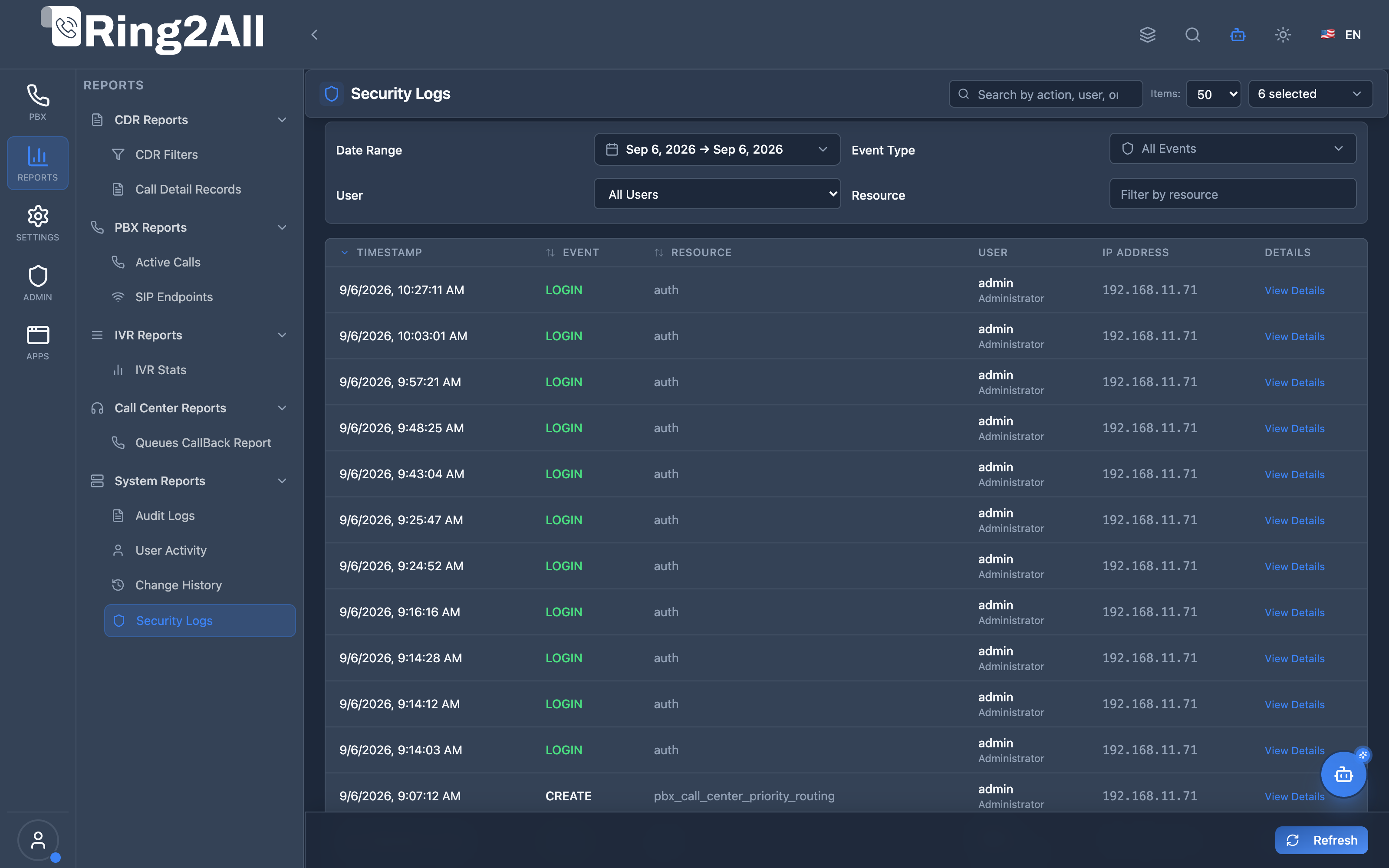
1. Module Overview (Technical)
Section titled “1. Module Overview (Technical)”What Are Security Logs?
Section titled “What Are Security Logs?”Security Logs is a security monitoring module that tracks authentication and access control events. Unlike general Audit Logs, Security Logs focuses specifically on security-relevant events: logins, logout, failed login attempts, password changes, MFA configuration, and permission modifications.
Architecture
Section titled “Architecture”┌─────────────────────────────────────────────────────────────────┐│ Security Logs Architecture │├─────────────────────────────────────────────────────────────────┤│ ││ Security Events ││ ┌──────────────────────────────────────────────────────────┐ ││ │ Authentication System │ ││ │ │ ││ │ ├─ User logs in → LOGIN │ ││ │ ├─ Wrong password → LOGIN_FAILED │ ││ │ ├─ User logs out → LOGOUT │ ││ │ ├─ Password changed → PASSWORD_CHANGE │ ││ │ ├─ Password reset → PASSWORD_RESET │ ││ │ ├─ MFA enabled → MFA_ENABLED │ ││ │ ├─ MFA disabled → MFA_DISABLED │ ││ │ └─ Role/permission change → PERMISSION_CHANGE │ ││ │ │ ││ └──────────────────────────────────────────────────────────┘ ││ │ ││ ▼ Logged with context ││ ┌──────────────────────────────────────────────────────────┐ ││ │ public.security_logs │ ││ │ │ ││ │ | event | user | ip_address | user_agent | timestamp | │ ││ │ │ ││ └──────────────────────────────────────────────────────────┘ ││ │ ││ ▼ Displayed in Viewer ││ ┌──────────────────────────────────────────────────────────┐ ││ │ Security Logs Page │ ││ │ │ ││ │ ┌─────────────────────────────────────────────────────┐ │ ││ │ │Time │Event │User │IP Address │Details │ │ ││ │ ├───────┼────────────┼──────┼───────────┼───────────┤ │ ││ │ │10:30 │Login │admin │192.168.1.1│ [👁️] │ │ ││ │ │10:28 │Login Failed│john │10.0.0.5 │ [👁️] │ │ ││ │ │10:25 │MFA Enabled │admin │192.168.1.1│ [👁️] │ │ ││ │ └─────────────────────────────────────────────────────┘ │ ││ │ │ ││ └──────────────────────────────────────────────────────────┘ ││ │└─────────────────────────────────────────────────────────────────┘2. Module Overview (Commercial/Business)
Section titled “2. Module Overview (Commercial/Business)”Business Value
Section titled “Business Value”Security Logs provides security visibility:
| Without Security Logs | With Security Logs |
|---|---|
| Unknown access | Login tracking |
| Hidden attacks | Failed login alerts |
| No MFA tracking | MFA event history |
| Permission blind | Permission change log |
Use Cases
Section titled “Use Cases”-
Intrusion Detection
- Track failed logins
- Identify brute force attacks
-
Access Auditing
- View login history
- Track session patterns
-
Compliance
- SOC 2 requirements
- Security audit trail
-
Incident Response
- Investigate breaches
- Forensic analysis
Feature Highlights
Section titled “Feature Highlights”| Feature | Benefit |
|---|---|
| Login Tracking | Who accessed system |
| Failed Logins | Attack detection |
| Password Events | Credential changes |
| MFA Events | 2FA configuration |
| Permission Changes | Access control audit |
| IP Tracking | Location awareness |
3. Module Overview (End User/Administrator)
Section titled “3. Module Overview (End User/Administrator)”What Can You Do?
Section titled “What Can You Do?”- View all security events
- Track login/logout activity
- Monitor failed login attempts
- Review password changes
- Track MFA configuration
- Monitor permission changes
- Filter by event type and user
Security Logs Interface
Section titled “Security Logs Interface”┌─────────────────────────────────────────────────────────────────┐│ Security Logs │├─────────────────────────────────────────────────────────────────┤│ ││ Filters: ││ ├─ Range: [7 Days ▼] ││ ├─ Event Type: [All Events ▼] ││ ├─ User: [All Users ▼] ││ └─ [🔄 Refresh] [Clear Filters] ││ ││ 🔍 [Search by action, user, or IP address... ] ││ ││ ┌───────────────────────────────────────────────────────────┐ ││ │ Timestamp │ Event │ User │ IP Address │👁️│ ││ ├──────────────┼────────────────┼────────┼─────────────┼──┤ ││ │ 01/16 10:30 │ 🟢 Login │ admin │ 192.168.1.1 │👁️│ ││ │ 01/16 10:28 │ 🔴 Login Failed│ john │ 10.0.0.5 │👁️│ ││ │ 01/16 10:27 │ 🔴 Login Failed│ john │ 10.0.0.5 │👁️│ ││ │ 01/16 10:26 │ 🔴 Login Failed│ john │ 10.0.0.5 │👁️│ ││ │ 01/16 10:00 │ 🔒 MFA Enabled │ admin │ 192.168.1.1 │👁️│ ││ │ 01/15 18:30 │ 🚪 Logout │ admin │ 192.168.1.1 │👁️│ ││ │ 01/15 17:00 │ 🔑 Pass Change │ jane │ 192.168.1.2 │👁️│ ││ └───────────────────────────────────────────────────────────┘ ││ ││ ⚠️ Alert: 3 failed login attempts for 'john' in last hour ││ │└─────────────────────────────────────────────────────────────────┘Quick Tips
Section titled “Quick Tips”[!TIP] Failed Logins: Multiple failed attempts may indicate an attack.
[!TIP] Unusual IPs: Watch for logins from unexpected locations.
[!CAUTION] MFA Disabled: Review any MFA disable events immediately.
4. Security Event Reference
Section titled “4. Security Event Reference”Event Types
Section titled “Event Types”| Event | Icon | Description |
|---|---|---|
| Login | 🟢 | Successful authentication |
| Logout | 🚪 | User session ended |
| Login Failed | 🔴 | Failed authentication attempt |
| Password Change | 🔑 | User changed password |
| Password Reset | 🔄 | Password was reset |
| MFA Enabled | 🔒 | Two-factor authentication enabled |
| MFA Disabled | 🔓 | Two-factor authentication disabled |
| Permission Change | 👥 | User role/permissions modified |
Event Details
Section titled “Event Details”| Field | Description |
|---|---|
| Timestamp | When event occurred |
| User | Affected user account |
| IP Address | Source IP address |
| User Agent | Browser/client info |
| Resource | Related resource type |
| Metadata | Additional context |
Severity Levels
Section titled “Severity Levels”| Event | Severity | Action Needed |
|---|---|---|
| Login | Info | Normal activity |
| Logout | Info | Normal activity |
| Login Failed | Warning | Monitor for patterns |
| Password Change | Info | Expected activity |
| Password Reset | Medium | Verify authorization |
| MFA Enabled | Info | Security improvement |
| MFA Disabled | High | Investigate immediately |
| Permission Change | Medium | Verify authorization |
5. Common Scenarios & Examples
Section titled “5. Common Scenarios & Examples”Scenario 1: Detect Brute Force Attack
Section titled “Scenario 1: Detect Brute Force Attack”- Filter by “Login Failed”
- Look for same user/IP with multiple failures
- Check timestamp clustering
- Block IP if attack confirmed
Scenario 2: Audit Login History
Section titled “Scenario 2: Audit Login History”- Set date range for period
- Filter by specific user
- Review all login events
- Check for unusual IPs
Scenario 3: Investigate MFA Change
Section titled “Scenario 3: Investigate MFA Change”- Filter by “MFA Disabled”
- Identify who disabled MFA
- Check if authorized
- Re-enable if needed
Scenario 4: Permission Audit
Section titled “Scenario 4: Permission Audit”- Filter by “Permission Change”
- Review who made changes
- Verify proper authorization
- Document for compliance
6. Limitations & Important Notes
Section titled “6. Limitations & Important Notes”Technical Notes
Section titled “Technical Notes”[!NOTE] Security Focus: Only security events, not data changes.
[!NOTE] Real-time: Events logged immediately.
[!WARNING] Failed Logins: May contain attempted usernames (could be typos).
Best Practices
Section titled “Best Practices”- Daily Review: Check failed logins daily
- Alert Setup: Configure alerts for patterns
- IP Monitoring: Watch for unusual locations
- MFA Enforcement: Monitor MFA disable events
- Permission Reviews: Audit permission changes regularly
Common Attack Patterns
Section titled “Common Attack Patterns”| Pattern | Indicator | Response |
|---|---|---|
| Brute Force | Many failures, same user | Lock account, block IP |
| Credential Stuffing | Many users, same IP | Block IP range |
| Insider Threat | Off-hours access | Investigate user |
| Account Takeover | Password changed + MFA disabled | Lock account immediately |
7. Troubleshooting Tips
Section titled “7. Troubleshooting Tips”Common Issues
Section titled “Common Issues”| Symptom | Possible Cause | Solution |
|---|---|---|
| No records | Too restrictive filter | Clear filters |
| Missing logins | Events not logged | Check logging configuration |
| Unknown IP | VPN or proxy | Check user’s network |
| Many failures | Attack or typos | Investigate pattern |
| Slow loading | Large date range | Reduce date range |
Diagnostic SQL
Section titled “Diagnostic SQL”Recent security events:
SELECT timestamp, event, user_email, ip_address, user_agentFROM public.security_logsORDER BY timestamp DESCLIMIT 50;Failed login summary:
SELECT user_email, ip_address, COUNT(*) as failed_attemptsFROM public.security_logsWHERE event = 'LOGIN_FAILED' AND timestamp >= NOW() - INTERVAL '24 hours'GROUP BY user_email, ip_addressORDER BY failed_attempts DESC;Login locations:
SELECT user_email, ip_address, COUNT(*) as logins, MAX(timestamp) as last_loginFROM public.security_logsWHERE event = 'LOGIN'GROUP BY user_email, ip_addressORDER BY last_login DESC;8. Glossary
Section titled “8. Glossary”| Term | Definition |
|---|---|
| MFA | Multi-Factor Authentication |
| Brute Force | Repeated login attempts |
| Credential Stuffing | Testing stolen credentials |
| Session | Authenticated user period |
| User Agent | Browser/client identification |
| Failed Login | Incorrect credentials |
9. Model Context Protocol (MCP) AI Integration
Section titled “9. Model Context Protocol (MCP) AI Integration”The Ring2All Platform Copilot connects directly with authentication event records and security incident logs in ss_logs.audit_logs via the Model Context Protocol (MCP). Information security officers, system operators, and fraud analysts can audit authentication attempts, track brute-force attacks, and identify unauthorized access attempts conversationally.
Exposed MCP Tools
Section titled “Exposed MCP Tools”| Tool Name | Operation | Primary Parameters | Description |
|---|---|---|---|
get_security_logs |
Security Event Ledger | action (“LOGIN”, “LOGIN_FAILED”, “PASSWORD_CHANGE”, “ACCESS_DENIED”), ipAddress (string, optional), limit (number, default: 25) |
Retrieves security events, failed authentication challenges, password modifications, and blocked IP alerts. |
query_audit_logs |
General Audit Search | search (string, optional), resource (string, optional), limit (number) |
Searches system-wide audit records to correlate security alerts against administrative resource operations. |
Operational Safeguards & Access Security
Section titled “Operational Safeguards & Access Security”- Tenant Isolation: Security logs queries enforce strict
tenant_idpartitioning (WHERE tenant_id = :tenant_id). Tenant administrators cannot inspect login patterns or user accounts of other tenants. - Credential Protection: Passwords (plain or hashed) are never stored in log metadata or returned across MCP payloads. Authentication payloads only record success/failure statuses and client metadata.
- SOC Integration: High-frequency failure events can be queried by SIEM/SOAR platforms leveraging the Ring2All MCP server endpoint.
Example MCP Payloads
Section titled “Example MCP Payloads”1. Checking Failed Login Attempts (get_security_logs)
Section titled “1. Checking Failed Login Attempts (get_security_logs)”{ "action": "LOGIN_FAILED", "limit": 10}Response:
{ "success": true, "data": { "total": 2, "securityEvents": [ { "id": "fe183921-9922-4e01-9a1b-123456789abc", "action": "LOGIN_FAILED", "resource": "auth", "resourceId": "admin", "user": "admin", "ipAddress": "198.51.100.44", "details": { "reason": "invalid_credentials", "attempt": 3 }, "timestamp": "2026-09-08T06:14:22.000Z" }, { "id": "ae112233-4455-6677-8899-aabbccddeeff", "action": "LOGIN_FAILED", "resource": "auth", "resourceId": "admin", "user": "admin", "ipAddress": "198.51.100.44", "details": { "reason": "invalid_credentials", "attempt": 2 }, "timestamp": "2026-09-08T06:14:10.000Z" } ] }}2. Investigating Security Activity for a Remote IP Address (get_security_logs)
Section titled “2. Investigating Security Activity for a Remote IP Address (get_security_logs)”{ "ipAddress": "198.51.100.44"}Copilot Natural Language Prompts
Section titled “Copilot Natural Language Prompts”- “Show me all failed login attempts recorded in the last 24 hours.”
- “Are there any suspicious IP addresses with multiple authentication failures today?”
- “When was the last password change performed on the admin account?”
- “Were there any access denied or permission rejection events logged this week?”
Documentation last updated: January 2026