

IVR (Interactive Voice Response) Module Documentation
Table of Contents
Section titled “Table of Contents”- Navigation & Access
- Screenshots & Visual Interface
- Module Overview (Technical)
- Module Overview (Commercial/Business)
- Module Overview (End User/Administrator)
- Configuration Fields Reference
- IVR Options
- Destination Types
- Common Scenarios & Examples
- Model Context Protocol (MCP) AI Integration
- Limitations & Important Notes
- Troubleshooting Tips
- Glossary
Navigation & Access
Section titled “Navigation & Access”To access the IVR (Interactive Voice Response) module:
- Log in to the Ring2All Web Portal.
- In the left navigation sidebar, expand PBX Engine.
- Under Incoming Call Tools, click IVR (
/pbx/incoming-tools/ivr).
Screenshots & Visual Interface
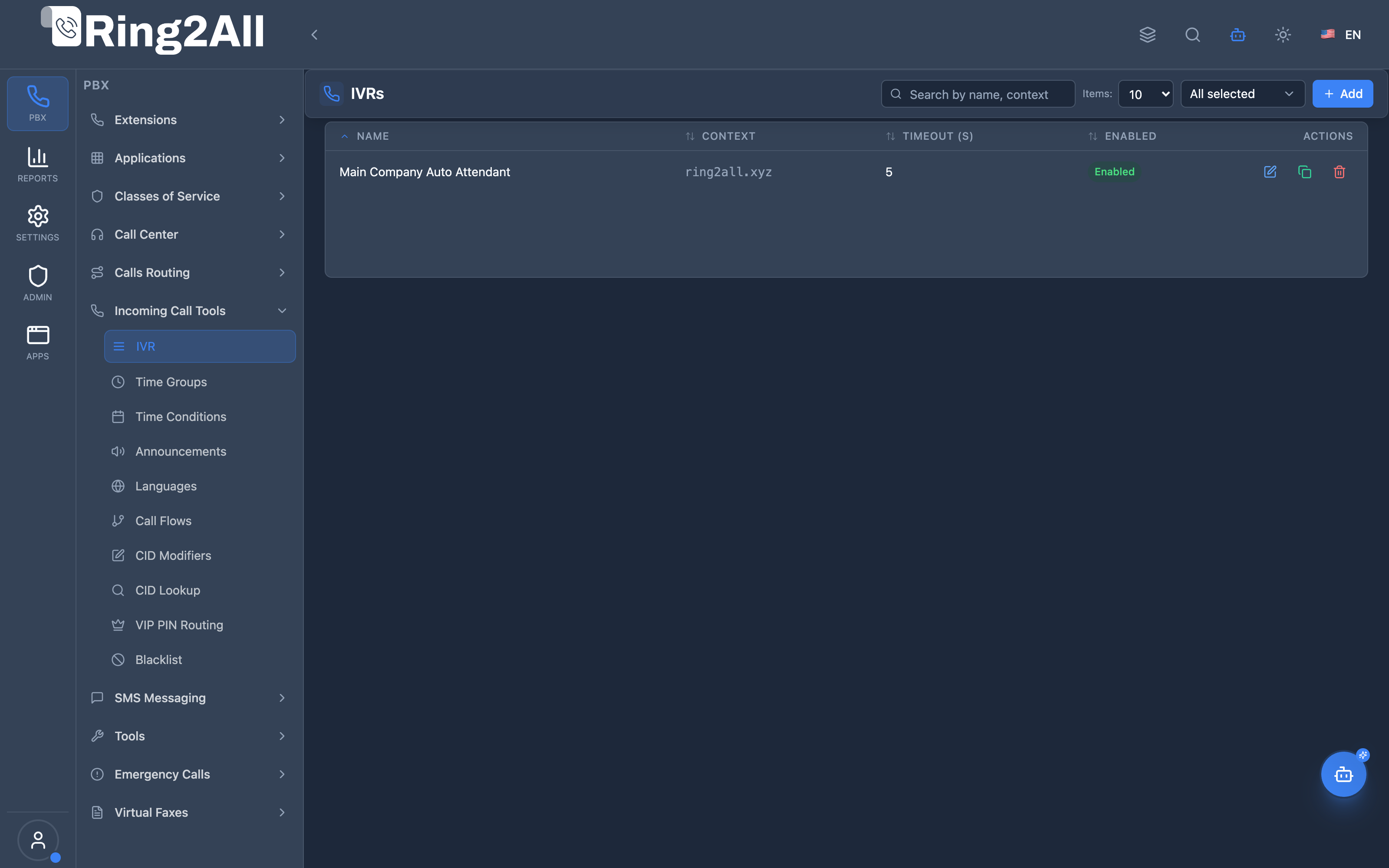
Section titled “Screenshots & Visual Interface”IVR List View
Section titled “IVR List View”Displays all configured automated attendant menus, timeout parameters, direct dial permissions, and management shortcuts.
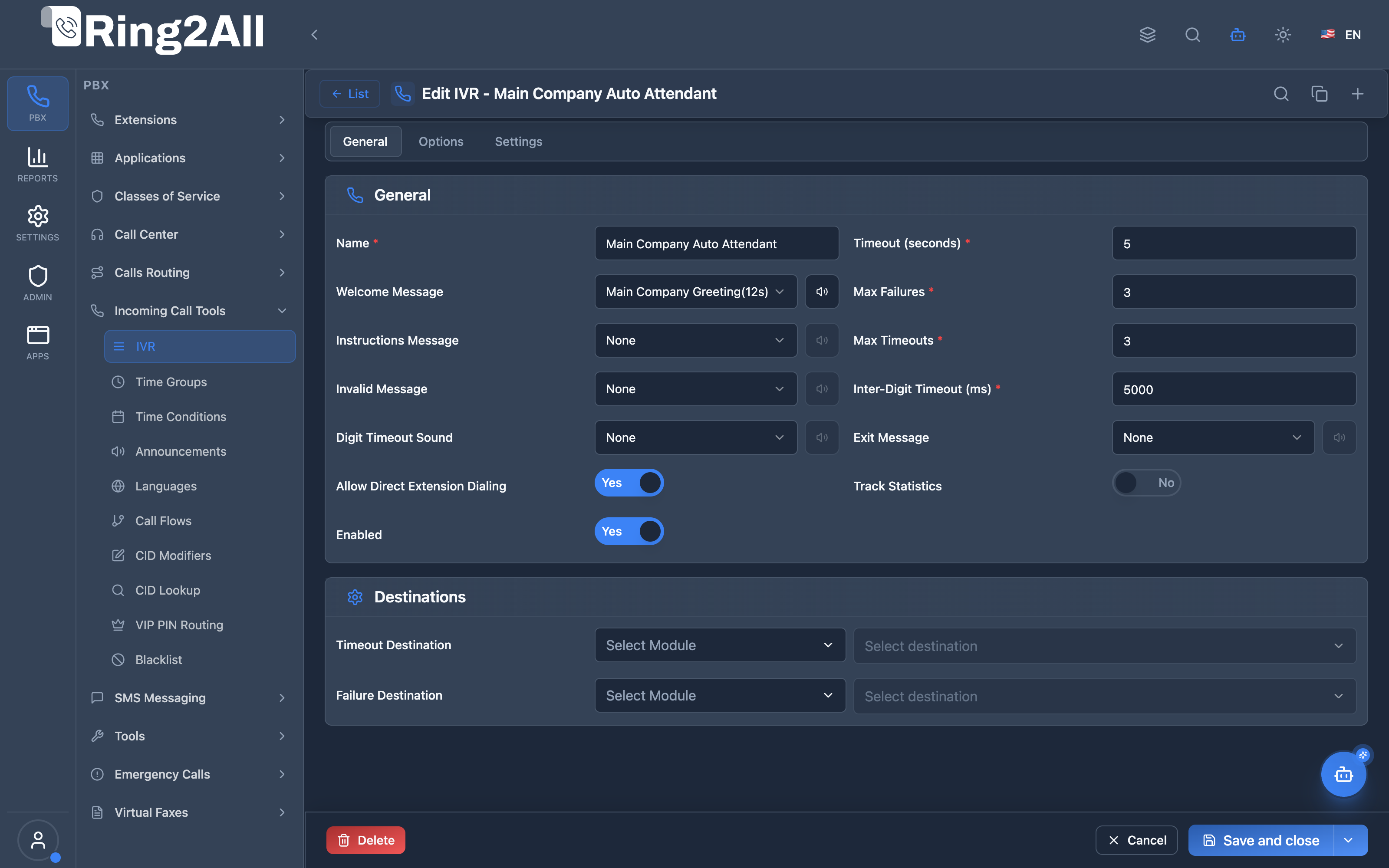
IVR Configuration Form (General Tab)
Section titled “IVR Configuration Form (General Tab)”Configures welcome audio prompt, instructions, max timeout/failure limits, direct extension dialing, and exit behaviors.
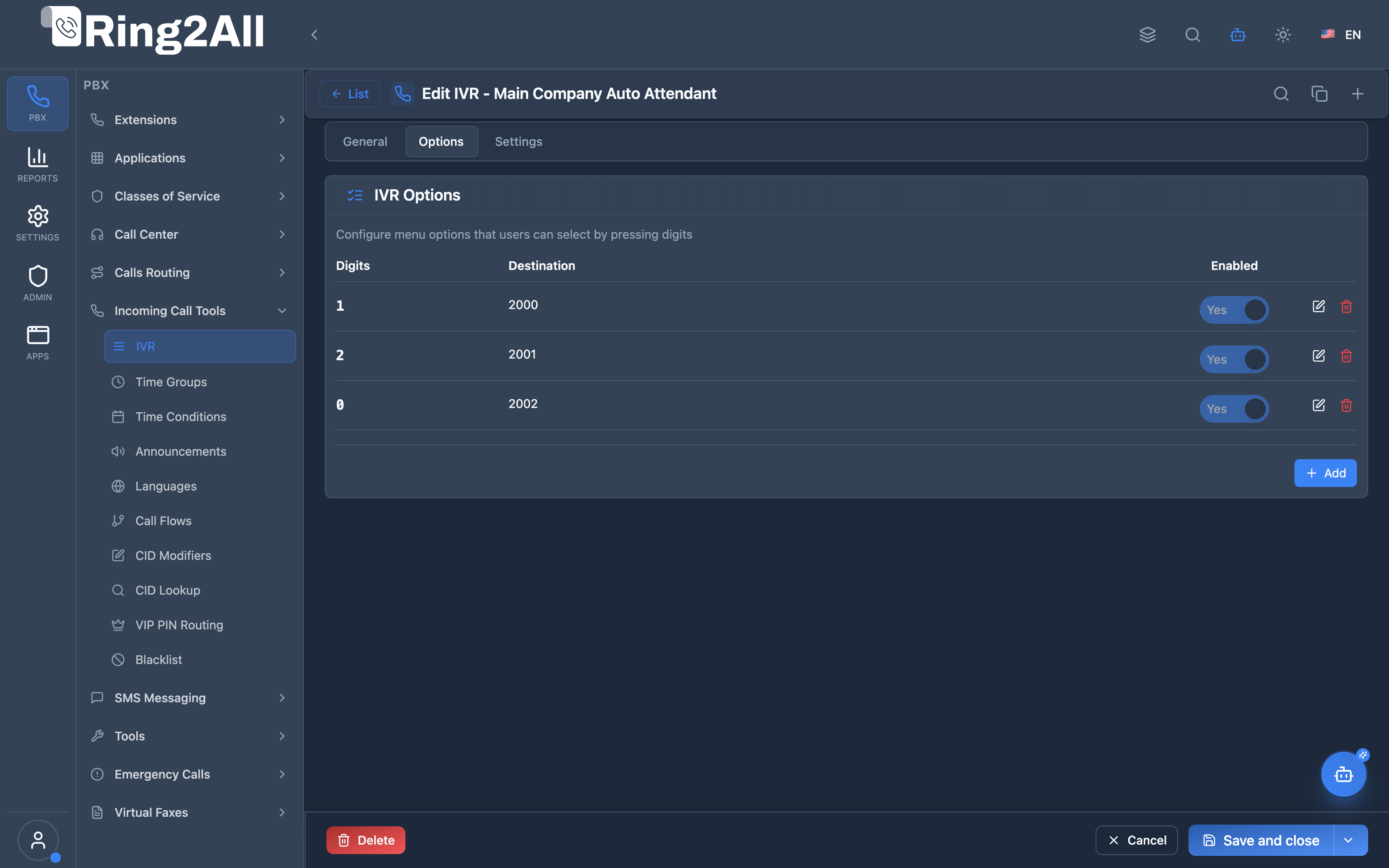
IVR Options & DTMF Mapping Tab
Section titled “IVR Options & DTMF Mapping Tab”Configures interactive keypad selections (digits 0-9, *, #) mapped to destinations (extensions, queues, voicemails, external numbers).
1. Module Overview (Technical)
Section titled “1. Module Overview (Technical)”What Is an IVR?
Section titled “What Is an IVR?”An IVR (Interactive Voice Response) is an automated phone menu that plays audio prompts and routes callers based on DTMF key presses. Callers hear options like “Press 1 for Sales, Press 2 for Support” and are routed accordingly.
Architecture
Section titled “Architecture”┌─────────────────────────────────────────────────────────────────┐│ IVR System │├─────────────────────────────────────────────────────────────────┤│ ││ Caller enters IVR (via inbound route or transfer) ││ │ ││ ▼ ││ ┌──────────────────────────────────────────────────────────┐ ││ │ ivr.lua │ ││ │ │ ││ │ 1. Answer call │ ││ │ 2. Play welcome message (ivr-welcome.wav) │ ││ │ 3. Play instructions (ivr-instructions.wav) │ ││ │ 4. Wait for DTMF (digit 0-9, *, #) │ ││ │ │ ││ └──────────────────────────────────────────────────────────┘ ││ │ ││ ▼ ││ ┌──────────────────────────────────────────────────────────┐ ││ │ User presses "1" │ ││ │ │ ││ │ 1. Query public.ivrs_options WHERE digit = '1' │ ││ │ 2. Match found! action=transfer, destination=Sales │ ││ │ 3. Log statistics (if enabled) │ ││ │ 4. Transfer to Sales Queue │ ││ │ │ ││ └──────────────────────────────────────────────────────────┘ ││ │ ││ ▼ ││ ┌──────────────────────────────────────────────────────────┐ ││ │ No match or timeout? │ ││ │ │ ││ │ 1. Play invalid message │ ││ │ 2. Increment retry counter │ ││ │ 3. If < max_failures: repeat menu │ ││ │ 4. If >= max_failures: play exit message, hangup │ ││ │ │ ││ └──────────────────────────────────────────────────────────┘ ││ │└─────────────────────────────────────────────────────────────────┘2. Module Overview (Commercial/Business)
Section titled “2. Module Overview (Commercial/Business)”Business Value
Section titled “Business Value”IVRs provide automated call routing:
| Without IVR | With IVR |
|---|---|
| Receptionist answers every call | Automated menu routing |
| Manual transfers | Self-service navigation |
| Limited hours | 24/7 availability |
| Inconsistent experience | Professional greeting |
Use Cases
Section titled “Use Cases”-
Main Auto-Attendant
- Welcome callers
- Route to departments
-
After-Hours Greeting
- Inform of business hours
- Offer voicemail
-
Multi-Level Menus
- Sales → Products/Services
- Support → Billing/Technical
-
Language Selection
- English, Spanish, etc.
- Route to language-specific queues
Feature Highlights
Section titled “Feature Highlights”| Feature | Benefit |
|---|---|
| Custom Prompts | Branded audio messages |
| Multiple Options | 0-9, *, # for routing |
| Nested IVRs | Multi-level menus |
| Direct Dial | Dial extensions from IVR |
| Timeout Handling | Default destination |
| Failure Handling | Max retries limit |
| Statistics | Track usage patterns |
3. Module Overview (End User/Administrator)
Section titled “3. Module Overview (End User/Administrator)”What Can You Do?
Section titled “What Can You Do?”- Create IVR menus with audio prompts
- Configure multiple DTMF options
- Set timeout and retry limits
- Route to extensions, queues, other IVRs
- Enable direct extension dialing
- Track IVR statistics
Administrator Workflow
Section titled “Administrator Workflow”┌─────────────────────────────────────────────────────────────────┐│ Creating an IVR Menu │├─────────────────────────────────────────────────────────────────┤│ ││ Tab: General ││ ├─ Name: "Main Menu" ││ ├─ Welcome Message: main-welcome.wav ││ ├─ Instructions: main-menu.wav ││ ├─ Invalid Message: invalid-selection.wav ││ ├─ Exit Message: goodbye.wav ││ ├─ Timeout: 5 seconds ││ ├─ Max Failures: 3 ││ └─ Enabled: ✓ ││ ││ Tab: Options ││ ┌───────────────────────────────────────────────────────────┐ ││ │ Digits │ Destination │ Enabled │ │ ││ ├────────┼────────────────────┼─────────┤ │ ││ │ 1 │ Sales Queue │ ✓ │ │ ││ │ 2 │ Support Queue │ ✓ │ │ ││ │ 3 │ Billing Extension │ ✓ │ │ ││ │ 0 │ Operator (1000) │ ✓ │ │ ││ │ * │ Repeat Menu │ ✓ │ │ ││ └───────────────────────────────────────────────────────────┘ ││ [+ Add Option] ││ ││ Tab: Settings ││ ├─ Allow Direct Dial: ✓ ││ ├─ Timeout Destination: Voicemail ││ ├─ Failure Destination: Operator ││ └─ Track Statistics: ✓ ││ │└─────────────────────────────────────────────────────────────────┘Quick Tips
Section titled “Quick Tips”[!TIP] Keep Menus Short: 3-5 options is ideal for caller retention.
[!TIP] Option 0 = Operator: Standard convention for reaching a human.
[!CAUTION] Audio File Quality: Use clear, professional recordings.
4. Configuration Fields Reference
Section titled “4. Configuration Fields Reference”General Settings
Section titled “General Settings”| Field | Description | Default |
|---|---|---|
| Name | IVR identifier | Required |
| Welcome Message | First audio played | ivr-welcome.wav |
| Instructions | Menu options audio | ivr-instructions.wav |
| Invalid Message | For wrong input | ivr-invalid.wav |
| Exit Message | When exiting IVR | ivr-goodbye.wav |
| Timeout (seconds) | Wait for input | 5 |
| Max Failures | Invalid attempts | 3 |
| Max Timeouts | Timeout attempts | 3 |
| Enabled | IVR active | On |
Advanced Settings
Section titled “Advanced Settings”| Field | Description | Default |
|---|---|---|
| Background Music | Music on Hold class played in IVR session | None |
| Min Digits | Minimum DTMF digits to collect | 1 |
| Max Digits | Maximum DTMF digits to collect (supports extension dialing) | 1 |
| Inter-Digit Timeout | Milliseconds to wait between key presses | 5000 |
| Digit Timeout Sound | Audio prompt played when inter-digit timeout expires | None |
| Allow Direct Dial | Enable direct extension dialing from IVR menu | Off |
| Track Statistics | Log DTMF selections and duration metrics to ivr_stats |
Off |
Destination Settings
Section titled “Destination Settings”| Field | Description | Default |
|---|---|---|
| Timeout Destination | Target destination when caller times out without input | Exit Message / Hangup |
| Failure Destination | Target destination when caller exceeds max invalid retries | Exit Message / Hangup |
5. IVR Options
Section titled “5. IVR Options”Option Configuration
Section titled “Option Configuration”Each IVR can have multiple options:
| Field | Description | Example |
|---|---|---|
| Digits | DTMF trigger | 1, 2, *, # |
| Destination | Where to route | Sales Queue |
| Enabled | Option active | On/Off |
| Priority | Evaluation order | 1, 2, 3 |
Common Digit Mappings
Section titled “Common Digit Mappings”| Digit | Typical Use |
|---|---|
| 1 | Sales / First option |
| 2 | Support / Second option |
| 3 | Billing / Third option |
| 0 | Operator / Live person |
| ***** | Repeat menu |
| # | Exit / Main menu |
| 9 | Directory / Dial by name |
Example Option Set
Section titled “Example Option Set”IVR: "Main Menu"├─ 1 → Sales Queue├─ 2 → Support Queue├─ 3 → Billing IVR (sub-menu)├─ 0 → Operator Extension 1000├─ * → Repeat (this IVR)└─ # → Exit6. Destination Types
Section titled “6. Destination Types”Available Destinations
Section titled “Available Destinations”| Type | Description | Example |
|---|---|---|
| Extension | Route to extension | 1001 |
| Queue | Route to call center queue | Sales Queue |
| IVR | Route to another IVR | Billing Menu |
| Ring Group | Route to ring group | Support Team |
| Conference | Route to conference | Meeting Room |
| Voicemail | Route to voicemail | General Mailbox |
| Direct Route | External number | +15055551234 |
| Announcement | Play audio, hangup | After-hours |
| Feature Code | Execute feature | *70 (echo test) |
Transfer Actions
Section titled “Transfer Actions”When an option is selected, the IVR can:
- Transfer - Route to destination
- IVR - Enter nested IVR menu
- Repeat - Replay current menu
7. Common Scenarios & Examples
Section titled “7. Common Scenarios & Examples”Scenario 1: Simple Auto-Attendant
Section titled “Scenario 1: Simple Auto-Attendant”IVR: “Main Menu”
| Setting | Value |
|---|---|
| Welcome | “Thank you for calling ABC Company” |
| Instructions | “For Sales press 1, Support press 2, Operator press 0” |
| Timeout | 5 seconds |
| Max Failures | 3 |
Options:
| Digit | Destination |
|---|---|
| 1 | Sales Queue |
| 2 | Support Queue |
| 0 | Extension 1000 |
Scenario 2: Multi-Level Menu
Section titled “Scenario 2: Multi-Level Menu”IVR: “Main Menu”
| Digit | Destination |
|---|---|
| 1 | Sales IVR |
| 2 | Support IVR |
IVR: “Sales IVR”
| Digit | Destination |
|---|---|
| 1 | New Customers Queue |
| 2 | Existing Customers Queue |
| * | Main Menu (parent) |
Scenario 3: After-Hours IVR
Section titled “Scenario 3: After-Hours IVR”IVR: “After Hours”
| Setting | Value |
|---|---|
| Welcome | “Thank you for calling. Our office is closed.” |
| Instructions | “Leave a message after the tone, press 0 for emergency” |
| Timeout Destination | General Voicemail |
Options:
| Digit | Destination |
|---|---|
| 0 | On-Call Extension |
8. Model Context Protocol (MCP) AI Integration
Section titled “8. Model Context Protocol (MCP) AI Integration”Ring2All exposes native Model Context Protocol (MCP) tools for Interactive Voice Response (IVR / Auto-Attendant), enabling AI assistants, Copilots, and contact center provisioning engines to inspect multi-level menu structures, configure DTMF key branches, audit direct dial permissions, and safely provision or modify automated receptionists programmatically with domain-level isolation and dependency protection.
Available MCP Tools
Section titled “Available MCP Tools”| Tool Name | Description | Key Parameters |
|---|---|---|
list_ivrs |
Lists all IVR auto-attendants configured in the domain, displaying menu name, context, timeout, direct extension dial permissions, and enabled status. | search (optional string) |
get_ivr_status |
Retrieves complete configuration and interactive DTMF digit branches (e.g. Press 1 for Sales, Press 2 for Support) for a specific IVR menu. | name (required string) |
create_ivr |
Provisions a new IVR auto-attendant menu with customizable greeting prompts, inter-digit timeouts, direct dial settings, and structured DTMF options. Strictly enforces menu name uniqueness per domain. | name, options (array of objects with digits, action, destination), timeout, directDial, description |
update_ivr |
Updates an existing IVR menu’s name, timeout, direct extension dialing permission, or enabled status. | name, newName, timeout, directDial, enabled |
diagnose_ivr_menu |
Performs deep operational diagnostic on an IVR Auto-Attendant menu: verifies DB configuration, checks audio prompt sound file existence and permissions on disk, validates DTMF destination integrity (detecting orphaned extension, queue, or ring group targets), checks inter-digit timeouts and max failures, and scans recent input failure logs. | identifier (name or numeric ID, required) |
delete_ivr |
Safely removes an IVR menu after verifying via assertCanDeleteIvr that no active Inbound Routes or nested IVRs route to it. |
name (required string) |
Protection Guards & Integrity
Section titled “Protection Guards & Integrity”- Name & Context Uniqueness: Every IVR must have a unique name within its tenant domain (
domain_id). Contexts are validated to prevent cross-tenant dialplan collision. - Dependency Guard (
assertCanDeleteIvr): Before removing an IVR menu, Ring2All verifies whether any Inbound Routes or other IVR option branches route to this menu. Deletion is blocked with a detailed list of dependent inbound endpoints if references exist. - Dialplan Hot-Reload: Changes execute Telephony Server XML cache invalidation (
reloadxml) so menu adjustments take effect immediately without disconnecting live callers.
AI Agent Operational Examples
Section titled “AI Agent Operational Examples”Querying IVR Menu Options and Destinations
Section titled “Querying IVR Menu Options and Destinations”{ "tool": "get_ivr_status", "arguments": { "name": "Main Office Receptionist" }}Provisioning an Automated Menu with Multi-Department Routing
Section titled “Provisioning an Automated Menu with Multi-Department Routing”{ "tool": "create_ivr", "arguments": { "name": "Customer Care Menu", "timeout": 5, "directDial": true, "options": [ { "digits": "1", "action": "transfer", "destination": "600" }, { "digits": "2", "action": "transfer", "destination": "800" }, { "digits": "0", "action": "transfer", "destination": "1000" } ], "description": "Main customer self-service routing gate" }}Diagnosing IVR Menus & Audio Prompt Integrity
Section titled “Diagnosing IVR Menus & Audio Prompt Integrity”{ "tool": "diagnose_ivr_menu", "arguments": { "identifier": "Main Office Receptionist" }}Recommended Natural Language Prompts
Section titled “Recommended Natural Language Prompts”- “Show me all IVR menus configured on this PBX and their DTMF options.”
- “Create an IVR menu named ‘Support Gate’ where Option 1 transfers to Queue 800 and Option 2 to Voicemail 2001.”
- “Can I delete the ‘Sales IVR’? Check if any inbound DIDs depend on it first.”
- “Increase the timeout on ‘Main Office Receptionist’ to 7 seconds.”
9. Limitations & Important Notes
Section titled “9. Limitations & Important Notes”Technical Notes
Section titled “Technical Notes”[!NOTE] DTMF Interruption: Callers can press a digit during prompt playback.
[!WARNING] Audio File Paths: Ensure audio files exist in the language directory.
[!WARNING] Context Registration: IVR context must be in dialplan_registry.
Best Practices
Section titled “Best Practices”- Professional Audio: Use quality recordings
- Short Menus: 3-5 options maximum
- Consistent Layout: Option 0 = Operator
- Timeout Handling: Always set default destination
- Test Thoroughly: Verify all paths work
- Track Statistics: Enable for optimization
10. Troubleshooting Tips
Section titled “10. Troubleshooting Tips”Common Issues
Section titled “Common Issues”| Symptom | Possible Cause | Solution |
|---|---|---|
| No audio | Wrong path | Check audio file exists |
| DTMF ignored | Timing issue | Increase timeout |
| Wrong destination | Option misconfigured | Check option mapping |
| Loops | Circular IVR reference | Review IVR destinations |
| No answer | IVR not enabled | Enable IVR |
Diagnostic SQL
Section titled “Diagnostic SQL”List IVRs:
SELECT id, name, context, timeout, max_failures, enabledFROM public.ivrsWHERE domain_id = [domain_id];Check IVR options:
SELECT o.digits, o.action, o.destination, o.enabledFROM public.ivrs_options oJOIN public.ivrs i ON o.ivr_id = i.idWHERE i.domain_id = [domain_id] AND i.name = 'Main Menu'ORDER BY o.priority;Check IVR statistics:
SELECT event_type, digit_pressed, destination, COUNT(*)FROM public.ivr_statsWHERE ivr_id = [ivr_id]GROUP BY event_type, digit_pressed, destinationORDER BY COUNT(*) DESC;Telephony Server Logs
Section titled “Telephony Server Logs”# Check IVR executiongrep "IVR" /var/log/freeswitch/freeswitch.loggrep "ivr.lua" /var/log/freeswitch/freeswitch.log11. Glossary
Section titled “11. Glossary”| Term | Definition |
|---|---|
| IVR | Interactive Voice Response - automated phone menu |
| DTMF | Dual-Tone Multi-Frequency - key press tones |
| Context | IVR identifier for routing |
| Option | DTMF digit + destination mapping |
| Nested IVR | IVR within IVR (sub-menu) |
| Timeout | No input wait time |
| Max Failures | Invalid input limit |
Documentation last updated: January 2026