

Time Conditions Module Documentation
Table of Contents
Section titled “Table of Contents”- Navigation & Access
- Screenshots & Visual Interface
- Module Overview (Technical)
- Module Overview (Commercial/Business)
- Module Overview (End User/Administrator)
- Configuration Fields Reference
- Status Modes
- Common Scenarios & Examples
- Model Context Protocol (MCP) AI Integration
- Limitations & Important Notes
- Troubleshooting Tips
- Glossary
Navigation & Access
Section titled “Navigation & Access”To access the Time Conditions module:
- Log in to the Ring2All Web Portal.
- In the left navigation sidebar, expand PBX Engine.
- Under Incoming Call Tools, click Time Conditions (
/pbx/incoming-tools/time-conditions).
Screenshots & Visual Interface
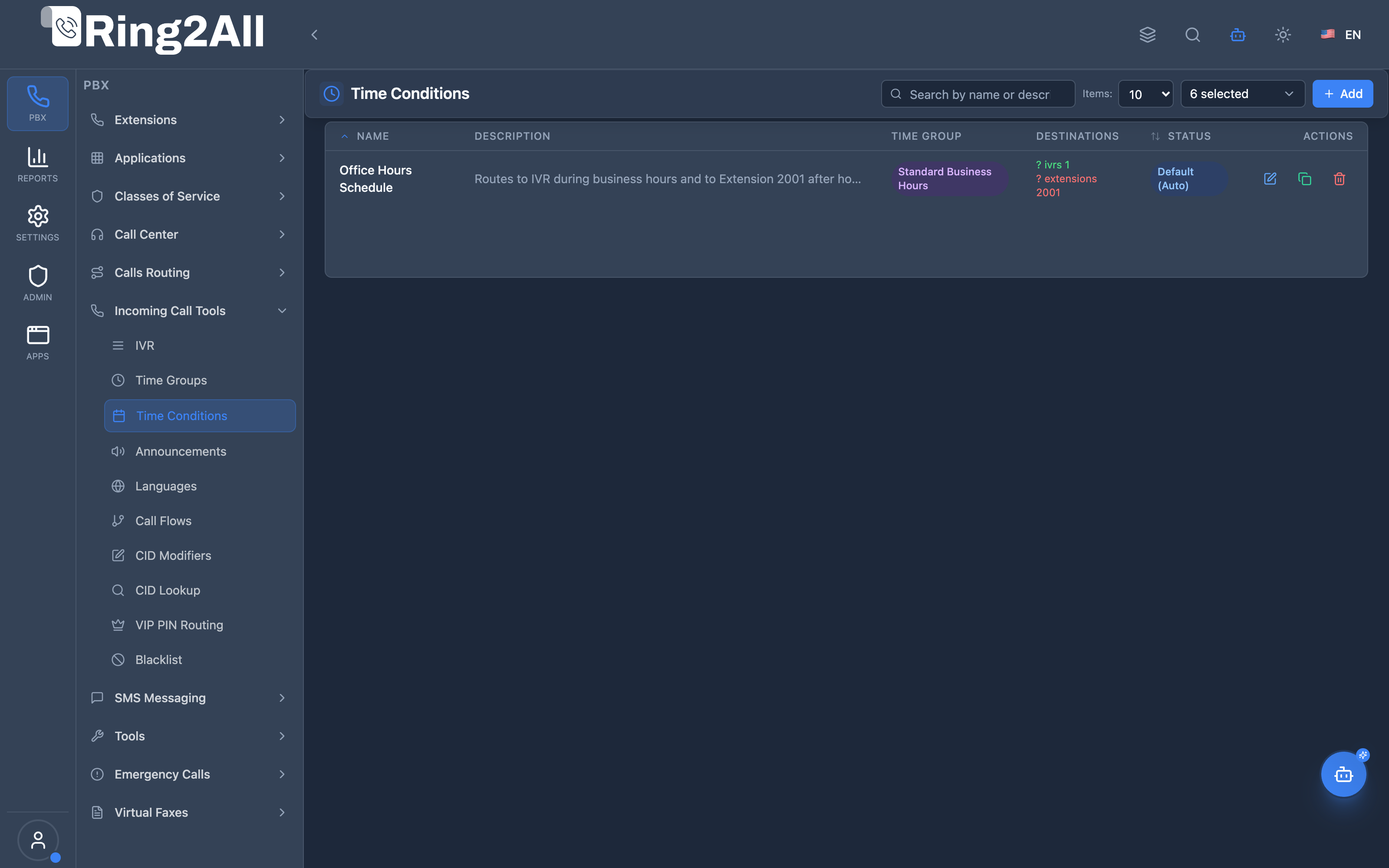
Section titled “Screenshots & Visual Interface”Time Conditions Overview
Section titled “Time Conditions Overview”Displays all time condition policies, associated time groups, current active status, toggle feature codes, and action controls.
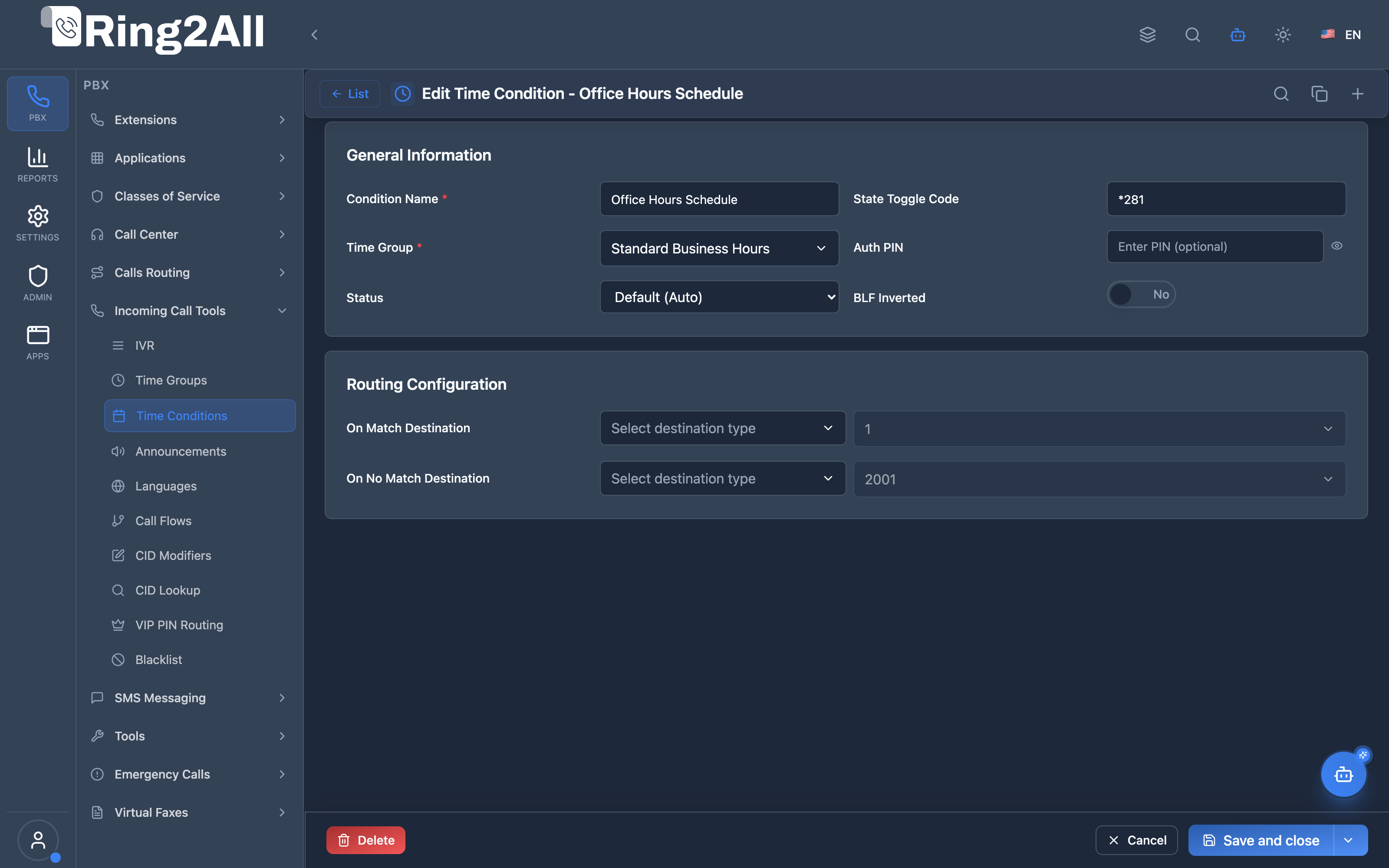
Time Condition Configuration Form
Section titled “Time Condition Configuration Form”Configures condition name, time group association, match destination (e.g. IVR), no-match destination (e.g. voicemail/extension), and BLF toggle override code.
1. Module Overview (Technical)
Section titled “1. Module Overview (Technical)”What Are Time Conditions?
Section titled “What Are Time Conditions?”Time Conditions are routing rules that evaluate whether the current time matches a Time Group’s schedule. Based on the result, calls are routed to either a “match” destination or a “no-match” destination.
Architecture
Section titled “Architecture”┌─────────────────────────────────────────────────────────────────┐│ Time Condition Flow │├─────────────────────────────────────────────────────────────────┤│ ││ Inbound Route → Time Condition: "Business Hours Check" ││ │ ││ ▼ ││ ┌──────────────────────────────────────────────────────────┐ ││ │ time_condition.lua │ ││ │ │ ││ │ 1. Load condition from public.time_conditions │ ││ │ 2. Check status (default, forced-match, forced-nomatch) │ ││ │ 3. If default: evaluate Time Group schedules │ ││ │ 4. If forced: use override status │ ││ │ │ ││ └──────────────────────────────────────────────────────────┘ ││ │ ││ ├── MATCH ──────────────────────────────────────────────► ││ │ Route to: Main IVR ││ │ ││ └── NO MATCH ───────────────────────────────────────────► ││ Route to: After-Hours Voicemail ││ │└─────────────────────────────────────────────────────────────────┘Relationship with Time Groups
Section titled “Relationship with Time Groups”┌─────────────────────┐ ┌─────────────────────┐│ Time Group │ │ Time Condition ││ "Business Hours" │◄────│ "Main Line Hours" ││ │ │ ││ Mon-Fri 9:00-17:00 │ │ Match → Main IVR ││ Sat 10:00-14:00 │ │ No Match → VM │└─────────────────────┘ │ Toggle: *81 │ └─────────────────────┘2. Module Overview (Commercial/Business)
Section titled “2. Module Overview (Commercial/Business)”Business Value
Section titled “Business Value”Time Conditions enable smart time-based routing:
| Without Time Conditions | With Time Conditions |
|---|---|
| Manual route switching | Automatic time routing |
| 24/7 same experience | Business/after-hours |
| Staff always needed | Self-service after hours |
| No holiday handling | Automatic holiday routing |
Use Cases
Section titled “Use Cases”-
Business/After-Hours
- Business hours → Main menu
- After hours → Voicemail
-
Holiday Routing
- Holiday → Closed message
- Normal days → Standard routing
-
Lunch Break
- Lunch hour → Reduced staffing queue
- Normal hours → All agents
-
Weekend Support
- Weekdays → Full support
- Weekends → On-call only
Feature Highlights
Section titled “Feature Highlights”| Feature | Benefit |
|---|---|
| Time Group Reference | Reusable schedules |
| Match/No-Match Routing | Dual destination |
| Toggle Override | Manual control (*code) |
| BLF Integration | Visual status on phones |
| Auth PIN | Protected toggle |
| Multiple Destination Types | Extension, IVR, Queue, etc. |
3. Module Overview (End User/Administrator)
Section titled “3. Module Overview (End User/Administrator)”What Can You Do?
Section titled “What Can You Do?”- Create time conditions
- Link to Time Groups
- Set match destination (during scheduled time)
- Set no-match destination (outside scheduled time)
- Configure toggle feature code
- Set override status
- Enable BLF indication
Administrator Workflow
Section titled “Administrator Workflow”┌─────────────────────────────────────────────────────────────────┐│ Creating a Time Condition │├─────────────────────────────────────────────────────────────────┤│ ││ Section: General Information ││ ├─ Condition Name: "Business Hours Check" ││ ├─ Description: "Routes based on business hours" ││ ├─ Time Group: Business Hours ││ ├─ Context: tc_business_hours (auto-generated) ││ └─ Enabled: ✓ ││ ││ Section: Routing Configuration ││ ┌───────────────────────────────────────────────────────────┐ ││ │ On Match Destination (During Schedule): │ ││ │ ├─ Type: IVR │ ││ │ └─ Value: Main Menu │ ││ └───────────────────────────────────────────────────────────┘ ││ ┌───────────────────────────────────────────────────────────┐ ││ │ On No Match Destination (Outside Schedule): │ ││ │ ├─ Type: Voicemail │ ││ │ └─ Value: General Mailbox │ ││ └───────────────────────────────────────────────────────────┘ ││ ││ Section: Override Settings ││ ├─ Toggle Code: *81 ││ ├─ Auth PIN: 1234 (optional) ││ ├─ Status: Default (Auto) ││ └─ BLF Inverted: Off ││ │└─────────────────────────────────────────────────────────────────┘Quick Tips
Section titled “Quick Tips”[!TIP] Use Descriptive Names: “Business Hours Check” is clearer than “TC1”.
[!TIP] Toggle Code Convention: Use *81, *82, etc. for easy reference.
[!CAUTION] Always Set Both Destinations: Ensure match AND no-match are configured.
4. Configuration Fields Reference
Section titled “4. Configuration Fields Reference”General Fields
Section titled “General Fields”| Field | Description | Example |
|---|---|---|
| Condition Name | Unique identifier | Business Hours Check |
| Description | Optional notes | Routes during work hours |
| Time Group | Schedule to evaluate | Business Hours |
| Context | Dialplan context | tc_business_hours |
Routing Fields
Section titled “Routing Fields”| Field | Description |
|---|---|
| On Match Module | Destination type when matched |
| On Match Value | Specific destination |
| On No Match Module | Destination type when not matched |
| On No Match Value | Specific destination |
Destination Types
Section titled “Destination Types”| Type | Description |
|---|---|
| Extension | Route to extension |
| IVR | Route to IVR menu |
| Ring Group | Route to ring group |
| Queue | Route to call queue |
| Voicemail | Route to voicemail |
| Hangup | Terminate call |
Override Fields
Section titled “Override Fields”| Field | Description | Default |
|---|---|---|
| Toggle Code | Feature code to toggle | None |
| Auth PIN | PIN for toggle protection | None |
| Status | Current override status | Default |
| BLF Inverted | Invert BLF indication | Off |
5. Status Modes
Section titled “5. Status Modes”Status Options
Section titled “Status Options”| Status | Behavior |
|---|---|
| Default (Auto) | Evaluate Time Group schedules |
| Forced Match | Always route to match destination |
| Forced No Match | Always route to no-match destination |
Toggle Flow
Section titled “Toggle Flow”Status: Default (Auto) ──[Dial *81]──► Forced Match │ [Dial *81] │ ▼ Forced No Match │ [Dial *81] │ ▼ Default (Auto)BLF Integration
Section titled “BLF Integration”| Status | BLF State | BLF Inverted |
|---|---|---|
| Default | Off | On |
| Forced Match | On | Off |
| Forced No Match | On | Off |
6. Common Scenarios & Examples
Section titled “6. Common Scenarios & Examples”Scenario 1: Business Hours Routing
Section titled “Scenario 1: Business Hours Routing”Time Condition: “Main Line Hours”
| Field | Value |
|---|---|
| Time Group | Business Hours (Mon-Fri 9-5) |
| Match Destination | Main IVR |
| No-Match Destination | After-Hours Voicemail |
| Toggle Code | *81 |
Result:
- 9am-5pm weekdays → Main IVR
- After hours → After-Hours Voicemail
- User dials *81 → Override toggle
Scenario 2: Holiday Closure
Section titled “Scenario 2: Holiday Closure”Time Condition: “Holiday Check”
| Field | Value |
|---|---|
| Time Group | Holidays 2026 |
| Match Destination | Holiday Announcement |
| No-Match Destination | (continue to next TC) |
Scenario 3: Emergency Override
Section titled “Scenario 3: Emergency Override”Time Condition: “Emergency Open”
| Field | Value |
|---|---|
| Time Group | Always Closed |
| Match Destination | Hangup |
| No-Match Destination | Emergency Queue |
| Toggle Code | *99 |
| Auth PIN | 5678 |
Use case: Toggle *99 to force-open during emergencies.
7. Model Context Protocol (MCP) AI Integration
Section titled “7. Model Context Protocol (MCP) AI Integration”Ring2All exposes native Model Context Protocol (MCP) tools for Time Conditions, allowing AI agents and PBX Copilots to inspect active business schedule routing, query override states (default vs forced open/closed), adjust day/night branch destinations, and provision or toggle time condition rules programmatically with domain-level isolation and numbering collision protection.
Available MCP Tools
Section titled “Available MCP Tools”| Tool Name | Description | Key Parameters |
|---|---|---|
list_time_conditions |
Lists all Time Conditions in the domain, displaying linked Time Group, match/no-match destinations, toggle code, and current override status (default, forced-match, forced-nomatch). |
search (optional string) |
get_time_condition_status |
Retrieves full configuration and current live schedule routing decision (open vs closed destination targets) of a specific Time Condition. | name (required string) |
create_time_condition |
Provisions a new Time Condition linking an existing Time Group to match and no-match destinations. Strictly validates name uniqueness and enforces cross-module numbering anti-collision on toggleCode. |
name, timeGroupName, destinationMatchModule, destinationMatchValue, destinationNomatchModule, destinationNomatchValue, toggleCode, description |
update_time_condition |
Updates routing destinations, linked Time Group schedule, BLF toggle code, or manual status override. | name, newName, timeGroupName, destinationMatchModule, destinationMatchValue, destinationNomatchModule, destinationNomatchValue, toggleCode, status, enabled |
diagnose_time_condition |
Performs deep operational diagnostic on a Time Condition: evaluates server time, timezone offset, and Time Group schedule intervals, inspects manual override states (forced open vs forced closed), verifies match and non-match destination targets exist, and analyzes recent incoming schedule routing decisions. | name (required string) |
delete_time_condition |
Safely removes a Time Condition after verifying via assertCanDeleteTimeCondition that no active Inbound Routes or IVR options route to it. |
name (required string) |
Protection Guards & Anti-Collision Integrity
Section titled “Protection Guards & Anti-Collision Integrity”- Toggle Code Numbering Anti-Collision: When assigning an optional feature toggle code (e.g.
*271), Ring2All executesvalidateNumberUniquenessacross the entire tenant domain. Toggle codes cannot collide with existing SIP extensions, ring groups, call queues, conferences, or call flows. - Dependency Guard (
assertCanDeleteTimeCondition): A Time Condition cannot be deleted if any inbound DID route points to it as primary destination or failover. - Atomic Telephony Server Synchronization: Schedule updates immediately invalidate dialplan XML cache (
reloadxml), ensuring instant activation on subsequent call arrivals.
AI Agent Operational Examples
Section titled “AI Agent Operational Examples”Auditing Time Condition Status & Overrides
Section titled “Auditing Time Condition Status & Overrides”{ "tool": "get_time_condition_status", "arguments": { "name": "Main Office Business Hours" }}Diagnosing Schedule Matching & Destination Readiness
Section titled “Diagnosing Schedule Matching & Destination Readiness”{ "tool": "diagnose_time_condition", "arguments": { "name": "Main Office Business Hours" }}Provisioning an After-Hours Routing Condition
Section titled “Provisioning an After-Hours Routing Condition”{ "tool": "create_time_condition", "arguments": { "name": "Emergency Night Routing", "timeGroupName": "Standard Business Hours", "destinationMatchModule": "ring-group", "destinationMatchValue": "600", "destinationNomatchModule": "voicemail", "destinationNomatchValue": "1001", "toggleCode": "*272" }}Recommended Natural Language Prompts
Section titled “Recommended Natural Language Prompts”- “What is the current status and destination of the ‘Main Office Business Hours’ Time Condition?”
- “Force open the office phone lines by setting status to ‘forced-match’ on ‘Business Hours Check’.”
- *“Check if feature code ‘271’ is available to use as a toggle code or if it collides with another number.”
- “Update the no-match destination of ‘Support Hours’ to transfer callers to Queue 800.”
8. Limitations & Important Notes
Section titled “8. Limitations & Important Notes”Technical Notes
Section titled “Technical Notes”[!NOTE] Timezone: Evaluation uses server timezone.
[!WARNING] Context Conflict: Ensure context names are unique.
[!WARNING] Missing Time Group: Condition fails if group is deleted.
Best Practices
Section titled “Best Practices”- Name Clearly: Use descriptive condition names
- Set Both Destinations: Always configure match AND no-match
- Use Toggle Codes: Enable quick override access
- Protect with PIN: Secure important toggles
- Test Thoroughly: Verify routing at different times
- Document Overrides: Track who has toggle access
9. Troubleshooting Tips
Section titled “9. Troubleshooting Tips”Common Issues
Section titled “Common Issues”| Symptom | Possible Cause | Solution |
|---|---|---|
| Always same route | Forced status active | Check status setting |
| Time not matching | Wrong time group | Verify time group schedules |
| Toggle not working | Wrong toggle code | Check toggle code format |
| PIN rejected | Wrong PIN | Verify auth PIN |
| Condition not found | Context mismatch | Check context registration |
Diagnostic SQL
Section titled “Diagnostic SQL”List time conditions:
SELECT id, name, status, destination_match_module, destination_match_value, destination_nomatch_module, destination_nomatch_valueFROM public.time_conditionsWHERE domain_id = [domain_id];Check condition with time group:
SELECT tc.name as condition, tg.name as time_group, tc.statusFROM public.time_conditions tcLEFT JOIN public.time_groups tg ON tc.group_id = tg.idWHERE tc.domain_id = [domain_id];Telephony Server Logs
Section titled “Telephony Server Logs”# Check time condition evaluationgrep "Time Condition" /var/log/freeswitch/freeswitch.loggrep "time_condition.lua" /var/log/freeswitch/freeswitch.log10. Glossary
Section titled “10. Glossary”| Term | Definition |
|---|---|
| Time Condition | Routing rule evaluating time groups |
| Match | Current time within schedule |
| No-Match | Current time outside schedule |
| Toggle Code | Feature code to override status |
| Forced Status | Manual override (match/no-match) |
| BLF | Busy Lamp Field - phone status light |
| Context | Dialplan identifier |
Documentation last updated: January 2026