

SMS Messages Module Documentation
Table of Contents
Section titled “Table of Contents”- Navigation & Access
- Screenshots & Visual Interface
- Module Overview (Technical)
- Module Overview (Commercial / Business)
- Module Overview (End User / Administrator)
- Message Log Columns Reference
- Message Status Lifecycle
- Character Encodings (GSM-7 vs UCS-2) & Segments
- Quick Send SMS Modal
- Model Context Protocol (MCP) AI Integration
- Troubleshooting Tips
- Database Schema
- Glossary
Navigation & Access
Section titled “Navigation & Access”To access the SMS Messages log and sending tool:
- Log in to the Ring2All Web Portal (
https://<domain-or-ip>/login). - In the left navigation sidebar, expand PBX Engine.
- Under SMS Messaging, click Messages (
/pbx/sms/messages). - To compose and send an instant outbound text message, click the Send SMS button at the top of the view.
Screenshots & Visual Interface
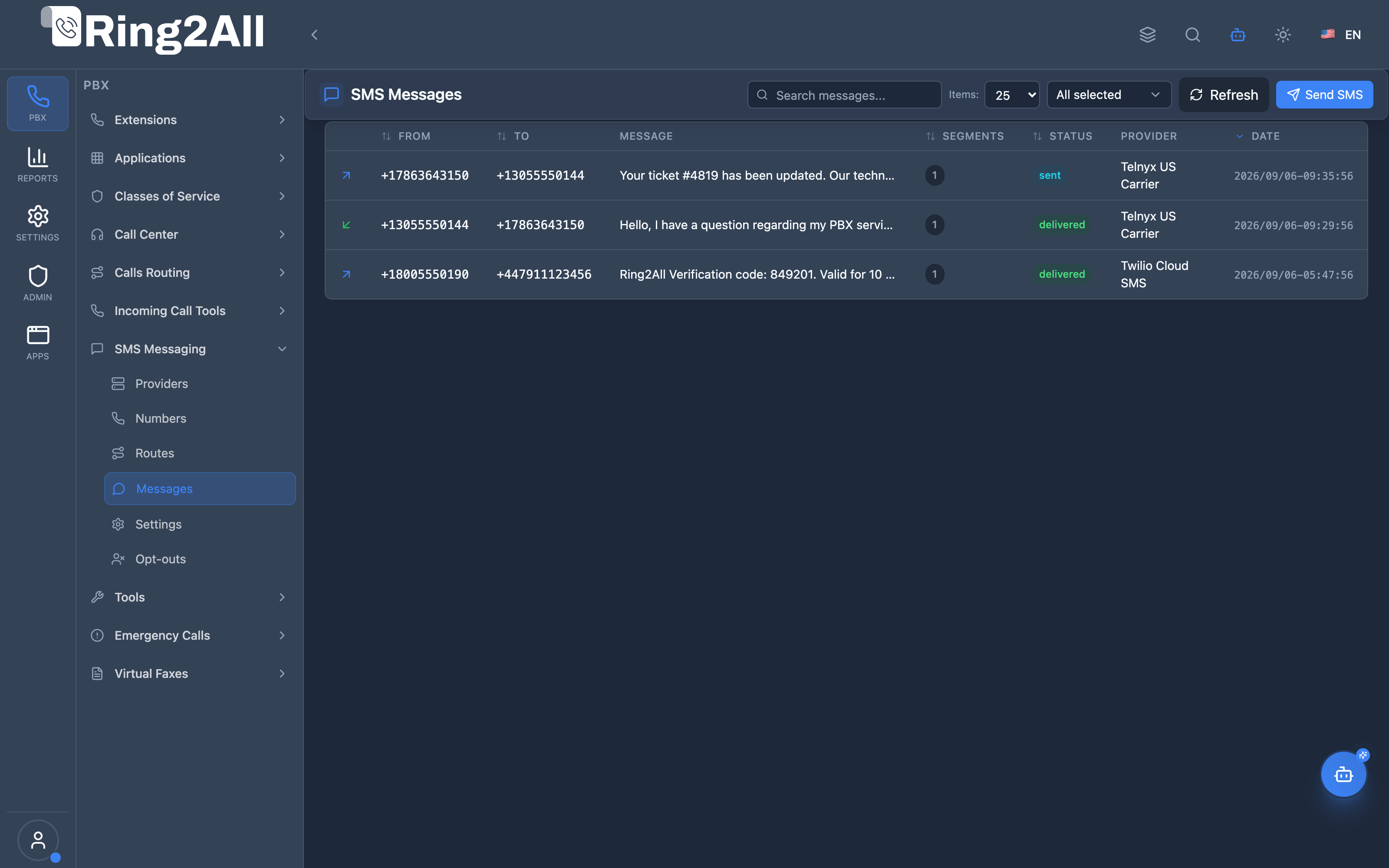
Section titled “Screenshots & Visual Interface”SMS Messages Overview
Section titled “SMS Messages Overview”Comprehensive log view displaying inbound and outbound message records, source/destination numbers, associated extension, carrier delivery status, timestamp, and message body snippet.
Quick Send SMS Modal
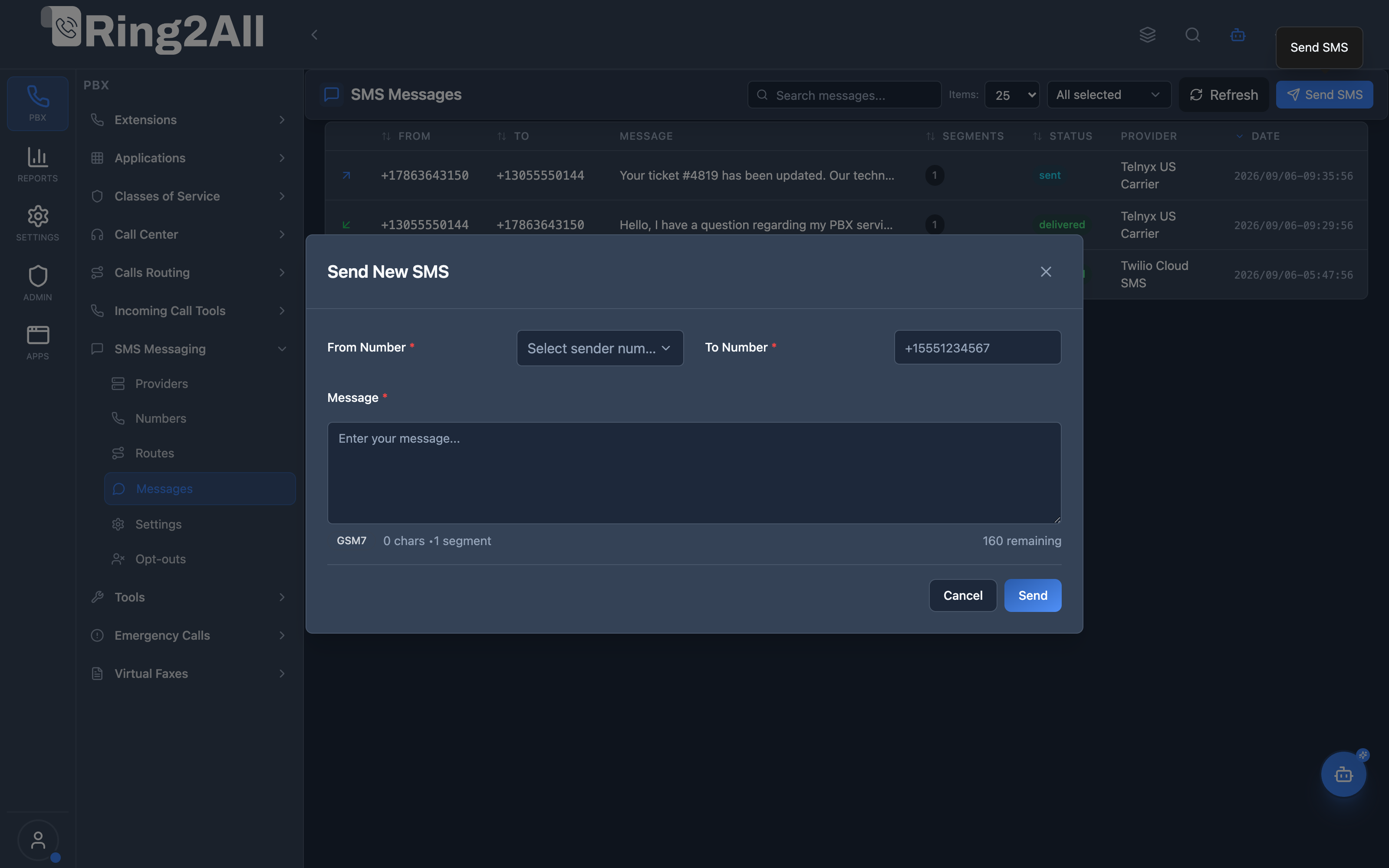
Section titled “Quick Send SMS Modal”Interactive modal allowing administrators and authorized users to send outbound text messages, selecting source DID, recipient number, and composing the message body.
1. Module Overview (Technical)
Section titled “1. Module Overview (Technical)”What is the SMS Messages Module?
Section titled “What is the SMS Messages Module?”The SMS Messages module is the central messaging Call Detail Record (CDR) and auditing system for the Ring2All platform. It captures, stores, and monitors all inbound and outbound SMS transactions across all tenant domains, providing real-time visibility into message lifecycle, carrier handoffs, encoding segments, and delivery receipts (DLR).
Technical Architecture
Section titled “Technical Architecture”- Message records reside in the dedicated CDR database (
ss_cdr.sms_messages), completely segregated from telephony configuration tables inss_telephony. - Outbound messages are queued using an asynchronous BullMQ/Redis pipeline to regulate carrier rate limits.
- Delivery confirmation webhooks from telecom providers correlate with the internal
message_uuidorprovider_message_idto update status fromsenttodeliveredorfailed. - Detailed cost tracking records estimates (
cost_estimate) and final carrier billing charges (cost_final).
2. Module Overview (Commercial / Business)
Section titled “2. Module Overview (Commercial / Business)”Business Value & Compliance
Section titled “Business Value & Compliance”- Audit Trail & Legal Compliance: Maintain tamper-proof historical records of all text interactions for TCPA, healthcare (HIPAA), and financial regulations.
- Delivery Visibility: Monitor carrier deliverability rates in real time to immediately detect carrier spam filtering or campaign blocks.
- Billing Transparency: Track exact wholesale cost per message and per segment for customer rebilling or internal cost center accounting.
- Operational Efficiency: Resolve customer disputes quickly with definitive timestamps for delivery receipts.
3. Module Overview (End User / Administrator)
Section titled “3. Module Overview (End User / Administrator)”Administrator Experience
Section titled “Administrator Experience”Administrators use the message log to:
- Filter messages by direction (
inboundvs.outbound), status, date range, or specific phone number. - Investigate delivery failures with exact error codes returned by the carrier.
- Send administrative testing messages using the built-in Send SMS modal.
End User Experience
Section titled “End User Experience”In the User Portal, agents view their personal conversational history filtered automatically to their assigned DID and extension, allowing two-way communication with customers.
4. Message Log Columns Reference
Section titled “4. Message Log Columns Reference”| Column Name | Technical Description | User-Friendly Tooltip | Example | Notes |
|---|---|---|---|---|
| Direction | Inbound / Outbound indicator in direction. |
Visual arrow showing message traffic direction. | Inbound (↙) / Outbound (↗) |
Distinguishes customer inquiries from agent replies. |
| From Number | Sender in from_number. |
E.164 phone number that dispatched the message. | +13055550144 |
External client for inbound; company DID for outbound. |
| To Number | Recipient in to_number. |
E.164 destination telephone number. | +17863643150 |
Company DID for inbound; external client for outbound. |
| Extension | Extension number in extension. |
Internal PBX extension tied to the message. | 2000 |
Populated when linked to a user extension. |
| Message Body | Text string in body. |
Content of the text message. | Hello, I have a question regarding ticket #4819. |
Truncated in grid; expandable on hover. |
| Status | Delivery state in status. |
Current status of the message in the carrier network. | delivered |
Color-coded badge (e.g., green for delivered). |
| Provider | Carrier gateway in provider_name. |
Name of the carrier that processed the message. | Telnyx US Carrier |
Useful for auditing carrier performance. |
| Segments | Segment count in segments. |
Number of billable SMS parts (chunks). | 1 |
Based on character count and encoding. |
| Cost | Numeric currency in cost_final. |
Billed wholesale cost for the message. | $0.0040 |
Sum of all segments billed by carrier. |
| Date & Time | Timestamp in created_at. |
Date and time the message was recorded. | Sep 6, 2026, 09:30 AM |
Formatted per user’s local timezone. |
5. Message Status Lifecycle
Section titled “5. Message Status Lifecycle”┌─────────────────────────────────────────────────────────────┐│ SMS Status Lifecycle │├─────────────────────────────────────────────────────────────┤│ ││ [queued] ──► Waiting in local BullMQ dispatch queue ││ │ ││ ▼ ││ [pending] ──► Dispatched to carrier HTTP REST API ││ │ ││ ▼ ││ [sent] ──► Acknowledged by carrier, traversing MNO ││ │ ││ ├──────────────────────────┐ ││ ▼ ▼ ││ [delivered] [failed] ││ Handset confirmed DLR Carrier rejected (e.g. invalid) ││ ││ [rejected] ──► Blocked locally by Opt-out list or filters │└─────────────────────────────────────────────────────────────┘| Status | Badge Color | Description | Final State? |
|---|---|---|---|
queued |
🟡 Yellow | Enqueued locally, awaiting transmission queue worker. | No |
pending |
🔵 Blue | Transmitting to carrier API gateway. | No |
sent |
🔷 Cyan | Accepted by carrier; awaiting handset delivery confirmation. | No |
delivered |
🟢 Green | Handset received message; DLR receipt validated. | Yes |
failed |
🔴 Red | Carrier error, unreachable handset, or invalid number. | Yes |
rejected |
⚫ Gray | Blocked by opt-out keyword (STOP) or domain country blacklist. | Yes |
6. Character Encodings (GSM-7 vs UCS-2) & Segments
Section titled “6. Character Encodings (GSM-7 vs UCS-2) & Segments”Carrier networks divide long text messages into standard segments (concatenated SMS / UDH):
GSM-7 Encoding
Section titled “GSM-7 Encoding”- Standard Latin alphabet, numbers, and basic punctuation.
- Single message limit: Up to 160 characters.
- Multipart message limit: 153 characters per segment (7 characters reserved for concatenation headers).
UCS-2 (Unicode) Encoding
Section titled “UCS-2 (Unicode) Encoding”- Activated automatically if the message contains emojis (😀), accents (á, ñ), Arabic, Cyrillic, or Asian characters.
- Single message limit: Up to 70 characters.
- Multipart message limit: 67 characters per segment.
💡 Cost Optimization Tip: A message with 161 GSM-7 characters is billed as 2 segments. A message containing a single emoji becomes UCS-2, meaning 71 characters is billed as 2 segments.
7. Quick Send SMS Modal
Section titled “7. Quick Send SMS Modal”The Send SMS button opens a quick-composition modal:
- From Number: Dropdown containing active SMS numbers provisioned on the tenant domain.
- To Number: Recipient telephone number in international E.164 format.
- Message Body: Text area with a live segment and character counter calculating GSM-7 vs. UCS-2 encoding dynamically.
- Send Action: Dispatches immediately via the optimal route, adding the record to the table upon submission.
8. Model Context Protocol (MCP) AI Integration
Section titled “8. Model Context Protocol (MCP) AI Integration”The Ring2All Model Context Protocol (MCP) server provides tools for inspecting SMS CDR message logs, querying conversation threads, analyzing character encodings, and dispatching regulatory-compliant outbound text messages via AI Copilots.
Available MCP Tools
Section titled “Available MCP Tools”| Tool Name | Operation | Description | Target Entity |
|---|---|---|---|
send_sms_message |
Execute | Dispatches an outbound SMS text message with encoding analysis, opt-out suppression check, and queue enqueue | Outbound Text |
query_sms_history |
Read | Searches historical SMS CDR records with phone number, direction, and status filters | Message Logs |
get_sms_message_details |
Read | Retrieves complete CDR metadata, segment counts, encoding, carrier reference ID, and DLR timestamp | Single Message |
Protection & Validation Guards
Section titled “Protection & Validation Guards”- Automatic Opt-out Suppression: Prior to enqueueing any outbound message,
send_sms_messagequeriespublic.sms_optouts. If the destination number has opted out, the request is immediately aborted with a protective error, preventing statutory fines under TCPA. - Automated Sender DID Fallback: If a sender number (
from) is omitted, the tool automatically queries active numbers inpublic.sms_numbersand selects the domain’s primary default DID. - Dynamic Character Analysis: Messages are analyzed using GSM-7 vs. UCS-2 encoding algorithms, automatically determining segment boundaries and warning if emojis or special characters will cause multi-segment billing.
- Asynchronous Queue Dispatch: Outbound messages are stored with
queuedstatus and submitted to BullMQ workers for paced delivery adhering to carrier MPS throttles.
Example MCP Payloads
Section titled “Example MCP Payloads”1. Dispatching an Outbound SMS Text (send_sms_message)
Section titled “1. Dispatching an Outbound SMS Text (send_sms_message)”{ "to": "+13055550199", "message": "Your Ring2All support ticket #8492 is now resolved. Reply HELP for assistance or STOP to cancel.", "from": "+17863643150"}Response:
{ "success": true, "data": { "message": "SMS message queued for transmission to +13055550199!", "messageId": 1289, "from": "+17863643150", "to": "+13055550199", "segments": 1, "encoding": "GSM-7", "status": "queued" }}2. Querying Historical SMS Logs (query_sms_history)
Section titled “2. Querying Historical SMS Logs (query_sms_history)”{ "phoneNumber": "+13055550199", "direction": "outbound", "limit": 5}Copilot Natural Language Prompts
Section titled “Copilot Natural Language Prompts”- “Send an SMS to customer +13055550199 notifying them that their order has shipped.”
- “Check the last 10 SMS messages sent or received by +13055550199 and show delivery statuses.”
- “Retrieve full CDR delivery details for message ID 1289.”
- “Verify if recipient +13055550199 is blocked by the opt-out list before attempting to send a reminder.”
9. Troubleshooting Tips
Section titled “9. Troubleshooting Tips”| Symptom | Probable Cause | Corrective Action |
|---|---|---|
| Status remains “sent” | Handset powered off or carrier DLR delayed | Normal for some international destinations where MNOs do not return DLRs. |
| Status is “rejected” | Recipient is in the SMS Opt-out list | Check the Opt-outs module (/pbx/sms/optouts) and verify STOP history. |
| Message failed with code 30008 | Unknown destination error / invalid number | Verify recipient phone number format and active mobile subscription. |
| High billing cost per message | Accidental Unicode characters | Check for invisible non-GSM characters or emojis that split the SMS into UCS-2 segments. |
10. Database Schema
Section titled “10. Database Schema”SMS message records are stored in table sms_messages within ss_cdr:
CREATE TABLE public.sms_messages ( id BIGSERIAL PRIMARY KEY, message_uuid UUID DEFAULT gen_random_uuid(), domain_id INTEGER NOT NULL, domain_name VARCHAR(100), provider_name VARCHAR(100), route_name VARCHAR(100), direction VARCHAR(10) NOT NULL, from_number VARCHAR(20) NOT NULL, to_number VARCHAR(20) NOT NULL, extension VARCHAR(20), user_id INTEGER, body TEXT NOT NULL, encoding VARCHAR(10) DEFAULT 'GSM7', segments INTEGER DEFAULT 1, status VARCHAR(20) DEFAULT 'queued', provider_message_id VARCHAR(100), error_code VARCHAR(20), error_message TEXT, cost_estimate NUMERIC(10,4), cost_final NUMERIC(10,4), queued_at TIMESTAMPTZ DEFAULT now(), sent_at TIMESTAMPTZ, delivered_at TIMESTAMPTZ, failed_at TIMESTAMPTZ, created_at TIMESTAMPTZ NOT NULL DEFAULT now(), CONSTRAINT chk_sms_messages_direction CHECK (direction IN ('inbound', 'outbound')), CONSTRAINT chk_sms_messages_encoding CHECK (encoding IN ('GSM7', 'UCS2')), CONSTRAINT chk_sms_messages_status CHECK (status IN ('queued', 'pending', 'sent', 'delivered', 'failed', 'rejected')));11. Glossary
Section titled “11. Glossary”- CDR (Call/Communication Detail Record): Data record containing operational and billing details of a communication event.
- DLR (Delivery Receipt): Carrier confirmation packet verifying that a handset received the text.
- GSM-7: 7-bit character encoding optimized for standard text messaging.
- UCS-2: 16-bit Unicode encoding used when messages contain non-Latin characters or emojis.
- Concatenation (UDH): User Data Header technology allowing phones to reassemble multiple SMS segments into a single message.