

Languages Module Documentation
Table of Contents
Section titled “Table of Contents”- Navigation & Access
- Screenshots & Visual Interface
- Module Overview (Technical)
- Module Overview (Commercial/Business)
- Module Overview (End User/Administrator)
- Configuration Fields Reference
- Voice Guides
- Common Scenarios & Examples
- Model Context Protocol (MCP) AI Integration
- Limitations & Important Notes
- Troubleshooting Tips
- Glossary
Navigation & Access
Section titled “Navigation & Access”To access the Languages module:
- Log in to the Ring2All Web Portal.
- In the left navigation sidebar, expand PBX Engine.
- Under Incoming Call Tools, click Languages (
/pbx/incoming-tools/languages).
Screenshots & Visual Interface
Section titled “Screenshots & Visual Interface”Languages Overview
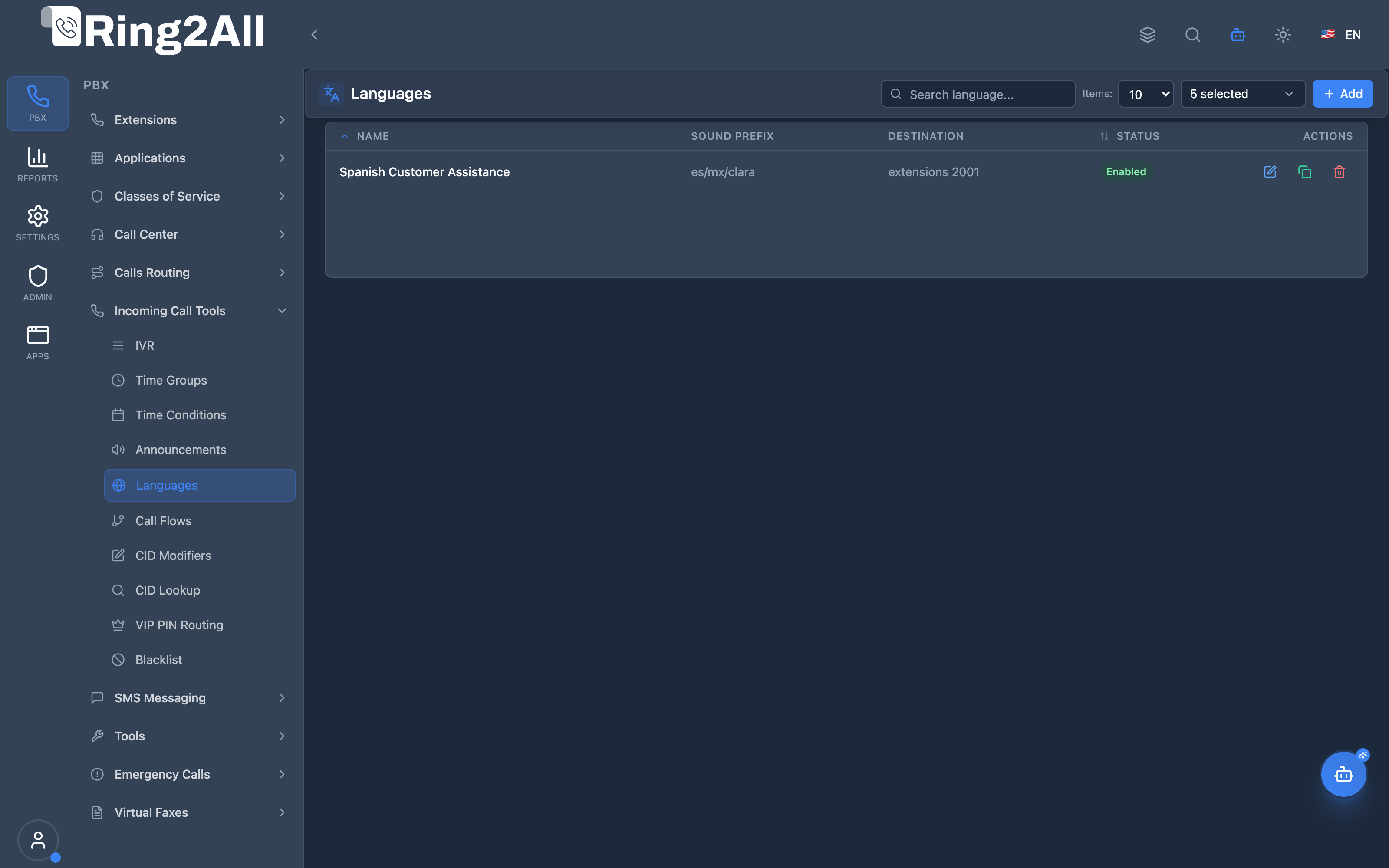
Section titled “Languages Overview”Displays all language override policies, active voice guides, target destinations, and status toggles.
Language Configuration Form
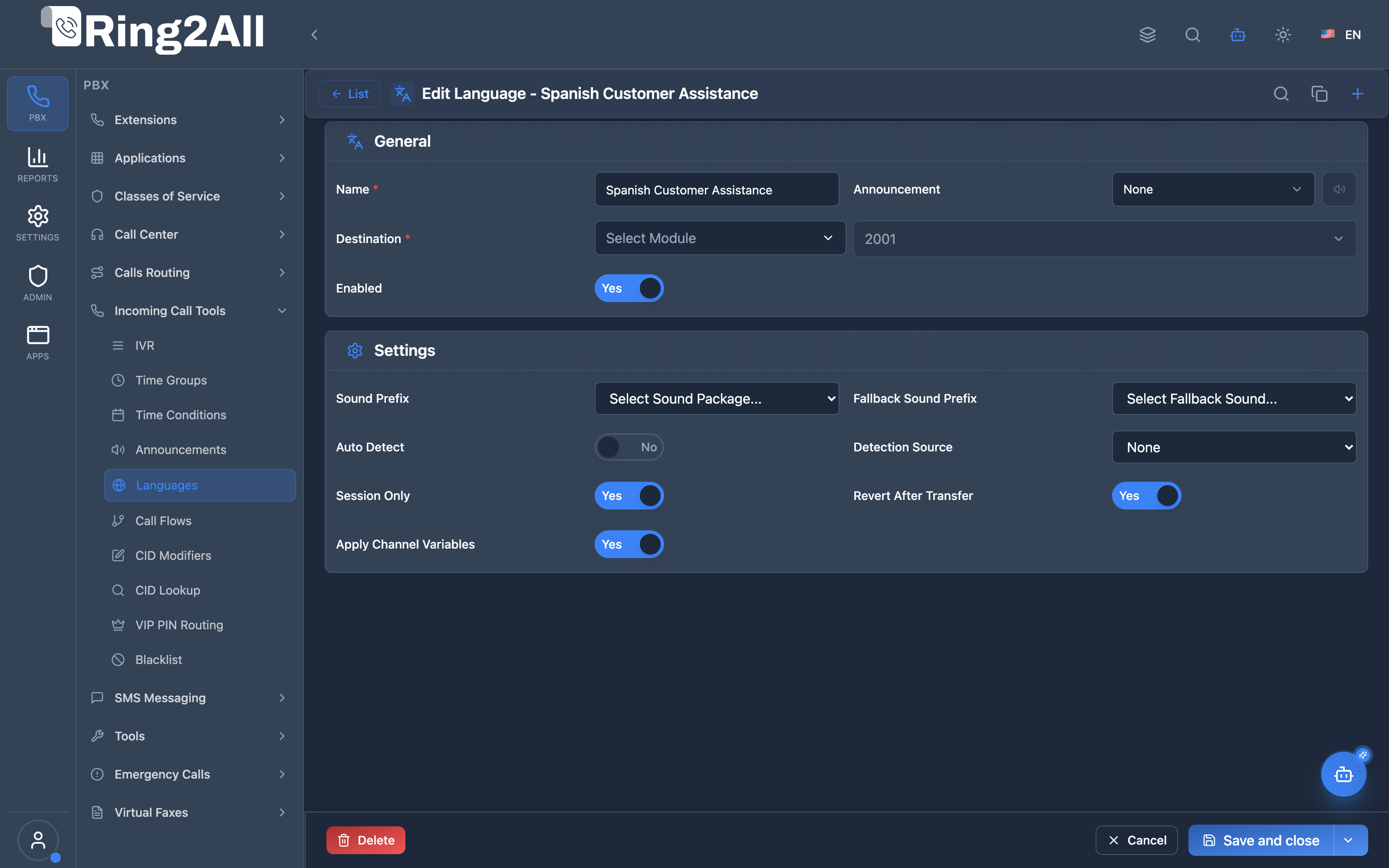
Section titled “Language Configuration Form”Configures language profile name, selected voice guide/sound prompt prefix, and downstream destination (extension, IVR, queue).
1. Module Overview (Technical)
Section titled “1. Module Overview (Technical)”What Are Languages?
Section titled “What Are Languages?”Languages (Language Overrides) allow you to set the audio prompt language for a call and route to a destination. This controls which Telephony Server sound files are used for prompts, IVRs, and system messages.
Architecture
Section titled “Architecture”┌─────────────────────────────────────────────────────────────────┐│ Language Routing Flow │├─────────────────────────────────────────────────────────────────┤│ ││ Call enters (via IVR, inbound route, etc.) ││ │ ││ ▼ ││ ┌──────────────────────────────────────────────────────────┐ ││ │ language.lua │ ││ │ │ ││ │ 1. Lookup voice guide in public.voice_guides │ ││ │ 2. Set session language variables: │ ││ │ - language = "en-us-emma" │ ││ │ - sounds_language = "/usr/share/freeswitch/sounds/ │ ││ │ en/us/emma/" │ ││ │ 3. Look up destination in public.language_overrides │ ││ │ 4. Play optional language change prompt │ ││ │ 5. Route to destination │ ││ │ │ ││ └──────────────────────────────────────────────────────────┘ ││ │ ││ ▼ ││ ┌──────────────────────────────────────────────────────────┐ ││ │ All subsequent prompts use the selected language │ ││ │ │ ││ │ - Welcome messages │ ││ │ - IVR prompts │ ││ │ - System messages (busy, unavailable, etc.) │ ││ │ │ ││ └──────────────────────────────────────────────────────────┘ ││ │└─────────────────────────────────────────────────────────────────┘2. Module Overview (Commercial/Business)
Section titled “2. Module Overview (Commercial/Business)”Business Value
Section titled “Business Value”Languages enable multi-language call experiences:
| Without Languages | With Languages |
|---|---|
| Single language | Multiple languages |
| US English only | Spanish, French, etc. |
| No voice selection | Choose voice persona |
| Static experience | Dynamic per-caller |
Use Cases
Section titled “Use Cases”-
Language Selection IVR
- “Press 1 for English, 2 for Spanish”
- Set language before main IVR
-
Multi-Region Support
- Route based on caller region
- Auto-detect from SIP headers
-
Voice Branding
- Different voice personas (Emma, Callie, Paloma)
- Consistent brand experience
-
Department-Specific Language
- Spanish Support department
- French Sales department
Feature Highlights
Section titled “Feature Highlights”| Feature | Benefit |
|---|---|
| Voice Guides | Multiple voice personas |
| Auto-Detection | Language from SIP/GeoIP |
| Sound Path Override | Custom prompt paths |
| Session-Only Option | Temporary changes |
| Announcement Prompt | Notify language change |
| Channel Variables | Export for sub-modules |
3. Module Overview (End User/Administrator)
Section titled “3. Module Overview (End User/Administrator)”What Can You Do?
Section titled “What Can You Do?”- Create language overrides
- Select voice guide (language/dialect/voice)
- Configure destination after language change
- Set optional language change prompt
- Enable auto-detection settings
- Configure session-only behavior
Administrator Workflow
Section titled “Administrator Workflow”┌─────────────────────────────────────────────────────────────────┐│ Creating a Language Override │├─────────────────────────────────────────────────────────────────┤│ ││ Tab: General ││ ├─ Name: "Spanish Support" ││ ├─ Context: lang_spanish (auto-generated) ││ ├─ Sound Path Prefix: es/es/paloma ││ ├─ Destination Type: IVR ││ ├─ Destination: Spanish Main Menu ││ └─ Enabled: ✓ ││ ││ Tab: Language Settings ││ ├─ Fallback Sound Path: en/us/callie ││ ├─ Description: "Spanish prompts for support" ││ ├─ Play Language Change Prompt: [Select] ││ ├─ Auto Detect Language: Off ││ ├─ Detection Source: None ││ ├─ Temporary Change Only: Off ││ ├─ Revert After Transfer: Off ││ └─ Apply to Channel Variables: ✓ ││ │└─────────────────────────────────────────────────────────────────┘Quick Tips
Section titled “Quick Tips”[!TIP] Standard Paths: Use format
language/dialect/voice(e.g., en/us/emma).
[!TIP] Apply to Channel Vars: Enable to ensure IVRs use the correct prompts.
[!CAUTION] Fallback Path: Always set a fallback for missing audio files.
4. Configuration Fields Reference
Section titled “4. Configuration Fields Reference”General Fields
Section titled “General Fields”| Field | Description | Example |
|---|---|---|
| Name | Unique identifier | Spanish Support |
| Context | Dialplan context | lang_spanish |
| Sound Path Prefix | Voice guide path | es/es/paloma |
| Destination Type | Module to route to | IVR |
| Destination | Specific target | Spanish Menu |
| Enabled | Override active | On/Off |
Language Settings
Section titled “Language Settings”| Field | Description | Default |
|---|---|---|
| Fallback Sound Path | Backup path if primary fails | en/us/callie |
| Description | Optional notes | - |
| Language Change Prompt | Audio to play on change | None |
| Auto Detect Language | Auto-detect from SIP | Off |
| Detection Source | Detection method | None |
| Temporary Change Only | Session-only | Off |
| Revert After Transfer | Restore original | Off |
| Apply to Channel Vars | Export variables | On |
| Event Webhook | Notification URL | None |
Detection Sources
Section titled “Detection Sources”| Source | Description |
|---|---|
| None | No auto-detection |
| SIP Accept-Language | From SIP INVITE header |
| Caller ID | From phone number prefix |
| GeoIP | From IP geographic location |
5. Voice Guides
Section titled “5. Voice Guides”What Are Voice Guides?
Section titled “What Are Voice Guides?”Voice Guides define the audio prompt source for a language:
- Language code (en, es, fr, etc.)
- Dialect code (us, mx, es, etc.)
- Voice name (emma, callie, paloma, etc.)
Available Voice Guides
Section titled “Available Voice Guides”| Language | Dialect | Voice | Path |
|---|---|---|---|
| English | US | Emma | en/us/emma |
| English | US | Callie | en/us/callie |
| Spanish | MX | Paloma | es/mx/paloma |
| Spanish | ES | Pilar | es/es/pilar |
| French | FR | Floriane | fr/fr/floriane |
| German | DE | Hans | de/de/hans |
Session Variables Set
Section titled “Session Variables Set”| Variable | Example Value |
|---|---|
language |
en-us-emma |
sounds_language |
/usr/share/freeswitch/sounds/en/us/emma/ |
audio_path_primary |
/usr/share/freeswitch/sounds/en/us/emma/ |
6. Common Scenarios & Examples
Section titled “6. Common Scenarios & Examples”Scenario 1: Language Selection IVR
Section titled “Scenario 1: Language Selection IVR”IVR: “Language Select”
| Digit | Destination |
|---|---|
| 1 | lang_english |
| 2 | lang_spanish |
| 3 | lang_french |
Language Override: “English”
| Setting | Value |
|---|---|
| Sound Path | en/us/emma |
| Destination | Main IVR |
Scenario 2: Spanish Support Line
Section titled “Scenario 2: Spanish Support Line”Language Override: “Spanish Support”
| Setting | Value |
|---|---|
| Sound Path | es/mx/paloma |
| Destination Type | Queue |
| Destination | Spanish Support Queue |
| Apply to Channel Vars | ✓ |
Scenario 3: Auto-Detect Language
Section titled “Scenario 3: Auto-Detect Language”Language Override: “Auto Language”
| Setting | Value |
|---|---|
| Auto Detect | ✓ |
| Detection Source | SIP Accept-Language |
| Fallback | en/us/callie |
| Destination | Main IVR |
7. Model Context Protocol (MCP) AI Integration
Section titled “7. Model Context Protocol (MCP) AI Integration”Ring2All exposes native Model Context Protocol (MCP) tools for Languages (Multi-Lingual Audio Prompt Overrides), allowing AI Copilots, multilingual contact center bots, and administrators to configure sound prompt directories (e.g. Spanish es/mx/maria, English en/us/callie), chain audio language contexts to downstream routing destinations, and provision or adjust language profiles programmatically with domain-level isolation.
Available MCP Tools
Section titled “Available MCP Tools”| Tool Name | Description | Key Parameters |
|---|---|---|
list_languages |
Lists all Multi-Language routing entries configured in the domain, displaying sound prefix, chained destination, and enabled status. | search (optional string) |
get_language_status |
Retrieves full configuration, Telephony Server sound prefix, and downstream destination module and target value of a specific Language entry. | name (required string) |
create_language |
Provisions a new language routing node applying a specific sound prompt prefix (soundPrefix) before routing to an extension, queue, or IVR. Strictly enforces name uniqueness per domain. |
name, soundPrefix (e.g. “es/mx/maria”, “en/us/callie”, “fr/ca/june”), destinationModule (ivr, ring-group, queue, extension, voicemail, hangup), destinationData |
update_language |
Updates an existing Language entry’s sound prefix, downstream destination, or enabled status. | name, newName, soundPrefix, destinationModule, destinationData, enabled |
delete_language |
Safely removes a Language routing profile after verifying via assertCanDeleteLanguage that no Inbound Routes or IVR options route through it. |
name (required string) |
Protection Guards & Integrity
Section titled “Protection Guards & Integrity”- Name & Context Uniqueness: Every language override name must be unique within its tenant domain.
- Relational Integrity (
assertCanDeleteLanguage): A language profile cannot be deleted if active Inbound Routes or IVR menu branches use it as an intermediate routing step. - Immediate Channel Variable Injection: When calls transit a language override node, Telephony Server variables
default_language,default_dialect, anddefault_voiceare instantly stamped onto the call channel, ensuring all downstream voicemail and IVR prompts play in the selected language.
AI Agent Operational Examples
Section titled “AI Agent Operational Examples”Querying Language Node Configuration
Section titled “Querying Language Node Configuration”{ "tool": "get_language_status", "arguments": { "name": "Spanish Audio Routing" }}Provisioning a Spanish Language Node Routing to Main IVR
Section titled “Provisioning a Spanish Language Node Routing to Main IVR”{ "tool": "create_language", "arguments": { "name": "Spanish Menu", "soundPrefix": "es/mx/maria", "destinationModule": "ivr", "destinationData": "Main Spanish IVR" }}Recommended Natural Language Prompts
Section titled “Recommended Natural Language Prompts”- “List all configured multi-language routing profiles.”
- “Create a language override named ‘French Support’ using ‘fr/ca/june’ sounds and route it to Queue 802.”
- “Check if any Inbound Routes depend on ‘Spanish Routing’ before I delete it.”
- “Update the sound prefix for ‘English Routing’ to use ‘en/us/callie’.”
8. Limitations & Important Notes
Section titled “8. Limitations & Important Notes”Technical Notes
Section titled “Technical Notes”[!NOTE] Path Format: Use
language/dialect/voiceformat (lowercase).
[!WARNING] Missing Audio: Ensure audio files exist for the language path.
[!WARNING] Channel Variables: Enable “Apply to Channel Vars” for IVR integration.
Best Practices
Section titled “Best Practices”- Set Fallback: Always configure a fallback path
- Test All Languages: Verify audio plays correctly
- Use Standard Paths: Follow Telephony Server naming conventions
- Enable Channel Vars: Ensure sub-modules inherit language
- Prompt Before Change: Play announcement to inform caller
9. Troubleshooting Tips
Section titled “9. Troubleshooting Tips”Common Issues
Section titled “Common Issues”| Symptom | Possible Cause | Solution |
|---|---|---|
| Wrong prompts | Path misconfigured | Check sound_path |
| No audio | Missing files | Verify audio exists |
| IVR not using language | Channel vars not set | Enable Apply to Channel Vars |
| Auto-detect fails | No SIP header | Check detection source |
| Fallback not working | Fallback path empty | Set fallback sound path |
Diagnostic SQL
Section titled “Diagnostic SQL”List language overrides:
SELECT id, name, context, destination_module, destination_data, enabledFROM public.language_overridesWHERE domain_id = [domain_id];List voice guides:
SELECT name, language_code, dialect_code, voice_name, sound_path, enabledFROM public.voice_guidesWHERE enabled = TRUE;Telephony Server Logs
Section titled “Telephony Server Logs”# Check language routinggrep "language.lua" /var/log/freeswitch/freeswitch.loggrep "sounds_language" /var/log/freeswitch/freeswitch.log10. Glossary
Section titled “10. Glossary”| Term | Definition |
|---|---|
| Language Override | Configuration to set call language |
| Voice Guide | Language/dialect/voice definition |
| Sound Path | Directory for audio prompts |
| Auto-Detection | Automatic language selection |
| Channel Variables | Telephony Server session variables |
| Fallback | Backup language path |
Documentation last updated: January 2026