

Authorization Codes Module Documentation
Table of Contents
Section titled “Table of Contents”- Module Overview (Technical)
- Module Overview (Commercial/Business)
- Module Overview (End User/Administrator)
- Configuration Fields Reference
- Call Flow / Logic Explanation
- Import/Export Feature
- Common Scenarios & Examples
- Model Context Protocol (MCP) AI Integration
- Limitations & Important Notes
- Troubleshooting Tips
- Glossary
1. Module Overview (Technical)
Section titled “1. Module Overview (Technical)”What Are Authorization Codes?
Section titled “What Are Authorization Codes?”Authorization Codes allow users to temporarily elevate their Class of Service (CoS) for a single call. By entering a valid authorization code, users gain access to dial destinations normally restricted by their assigned CoS.
Architecture
Section titled “Architecture”┌─────────────────────────────────────────────────────────────────┐│ Authorization Code System │├─────────────────────────────────────────────────────────────────┤│ ││ User dials feature code *79 (Authorization Code) ││ │ ││ ▼ ││ ┌──────────────────────────────────────────────────────────┐ ││ │ Feature Code Validation │ ││ │ Check: Is user's CoS allowed to use *79? │ ││ │ ├─ NO → "Feature not allowed" → Hangup │ ││ │ └─ YES → Continue │ ││ └──────────────────────────────────────────────────────────┘ ││ │ ││ ▼ ││ ┌──────────────────────────────────────────────────────────┐ ││ │ Code Entry │ ││ │ Play: "Enter your authorization code" │ ││ │ User enters: 5678# │ ││ └──────────────────────────────────────────────────────────┘ ││ │ ││ ▼ ││ ┌──────────────────────────────────────────────────────────┐ ││ │ Validation │ ││ │ SELECT cos_id FROM public.authorization_codes │ ││ │ WHERE code = '5678' AND active = TRUE │ ││ │ │ ││ │ ├─ Found → Apply CoS override │ ││ │ └─ Not found → "Invalid code" → Hangup │ ││ └──────────────────────────────────────────────────────────┘ ││ │ ││ ▼ ││ Set channel variable: override_cos_id = [elevated CoS ID] ││ Play: "Authorization successful" ││ Return dial tone for outbound call ││ │└─────────────────────────────────────────────────────────────────┘🎯 User Roles & Key Capabilities
Section titled “🎯 User Roles & Key Capabilities”| Role | Key Capabilities & Permissions |
|---|---|
| Super Admin | System-wide policy governance; configure authentication thresholds and audit authorization code generation across all PBX tenants. |
| Tenant Admin | Provision, import, export, and manage Authorization Codes; link codes to elevated Class of Service tiers and assign privacy aliases for CDR reports. |
| PBX Operator | Monitor code usage, verify active PIN authorizations, and track CDR events mapped to specific authorization code aliases. |
| End User | Dials the feature code (*79), enters their assigned Authorization Code followed by #, and unlocks elevated calling destinations for their active session. |
2. Module Overview (Commercial/Business)
Section titled “2. Module Overview (Commercial/Business)”Business Value
Section titled “Business Value”Authorization Codes enable controlled access to restricted destinations:
| Without Auth Codes | With Auth Codes |
|---|---|
| Permanent CoS changes | Temporary elevation |
| IT involvement needed | User self-service |
| No accountability | Code-based tracking |
| All or nothing access | Per-call authorization |
Use Cases
Section titled “Use Cases”-
International Calling
- Normal users have domestic-only CoS
- Managers have international auth codes
- One-time international calls without CoS change
-
Toll-Free/Premium Bypass
- Default CoS blocks premium numbers
- Auth codes allow approved calls
-
Guest/Temporary Access
- Contractors with limited CoS
- Auth codes for specific project needs
-
Audit Trail
- Track who used which code
- CDR includes alias for billing
Feature Highlights
Section titled “Feature Highlights”| Feature | Benefit |
|---|---|
| Per-Code CoS | Different codes = different permissions |
| Alias in CDR | Replaces code in call records |
| Import/Export | Bulk management via CSV |
| Active Toggle | Enable/disable without deletion |
| Multi-tenant | Separate codes per domain |
3. Module Overview (End User/Administrator)
Section titled “3. Module Overview (End User/Administrator)”What Can You Do?
Section titled “What Can You Do?”- Create authorization codes with CoS assignments
- Set aliases for CDR identification and PIN masking
- Import/export codes via CSV
- Enable/disable codes without deletion
Navigation
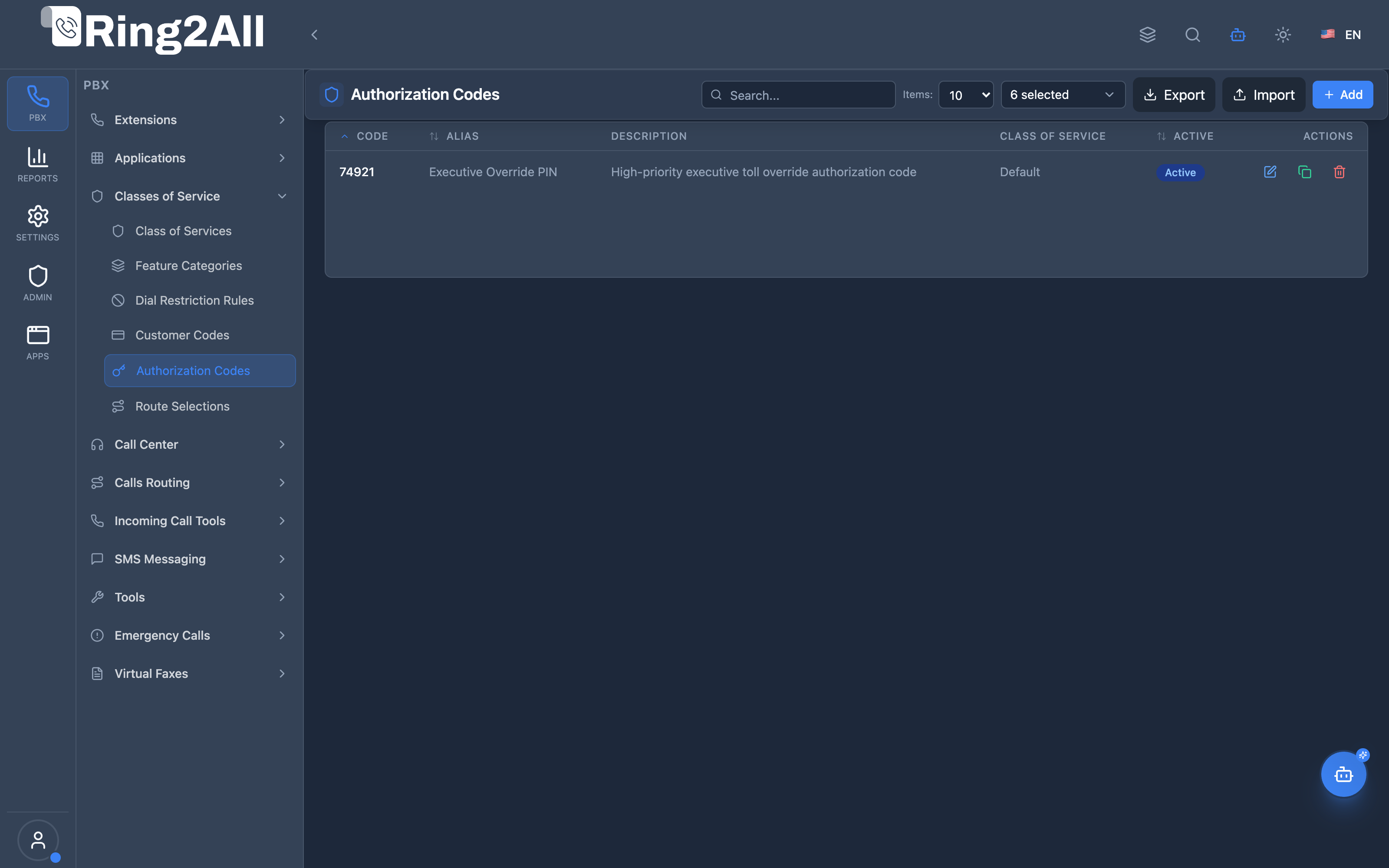
Section titled “Navigation”- Navigate to PBX Engine → Class of Services → Authorization Codes in the main navigation menu.
- The list view displays all configured authorization codes with Code, Alias, Description, assigned Class of Service, and active status.
- Click the + Add button in the top toolbar to create a new authorization code profile.
- Click any code row or edit action to adjust PIN digits, alias, description, or target Class of Service.
Administrator Workflow
Section titled “Administrator Workflow”┌─────────────────────────────────────────────────────────────────┐│ Creating an Authorization Code │├─────────────────────────────────────────────────────────────────┤│ ││ Step 1: Code Information ││ ├─ Authorization Code: 74921 ││ ├─ Alias: "Executive Override PIN" (appears in CDR) ││ └─ Description: "Temporary VIP privilege elevation" ││ ││ Step 2: Class of Service ││ └─ Select: "Default" (or Executive CoS) ││ ││ Step 3: Enable and Save ││ ││ Result: Users entering 74921 get target CoS permissions ││ for that call only ││ │└─────────────────────────────────────────────────────────────────┘User Workflow (Using Auth Code)
Section titled “User Workflow (Using Auth Code)”1. User dials *79 (Authorization Code feature)2. System: "Enter your authorization code"3. User enters: 74921#4. System: "Authorization successful"5. User dials destination number6. Call connects with elevated CoS permissionsQuick Tips
Section titled “Quick Tips”[!TIP] Use Aliases: Set meaningful aliases for CDR tracking (e.g., “Executive Override PIN”, “SalesMgr”). The alias protects the secret PIN from exposure in billing reports.
[!TIP] Code Complexity: Use at least 4 to 6 numeric digits to prevent brute-force guesswork.
[!CAUTION] Code Sharing: Shared codes diminish auditability and individual accountability. Rotate codes periodically.
4. Configuration Fields Reference
Section titled “4. Configuration Fields Reference”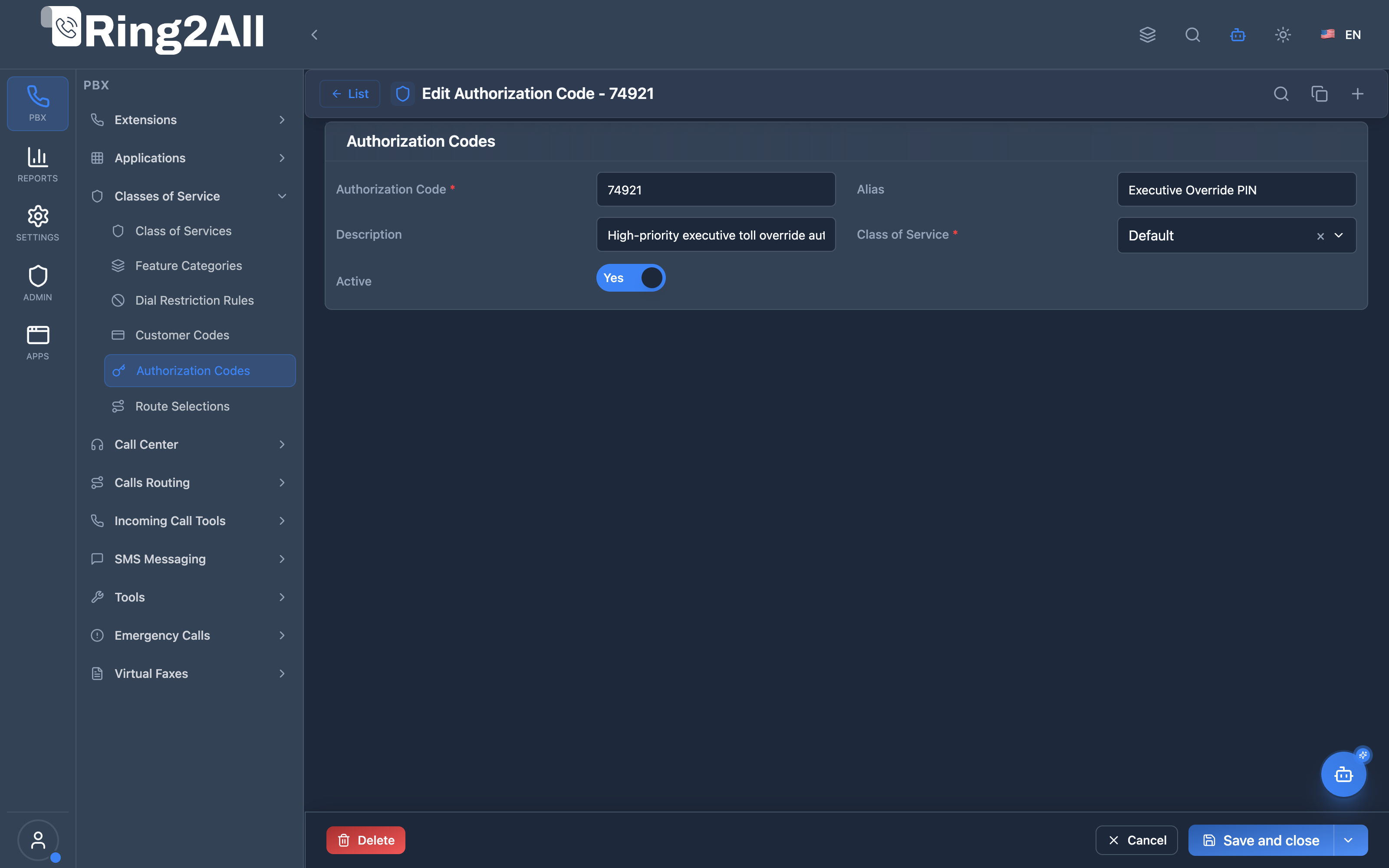
Basic Information Fields
Section titled “Basic Information Fields”| Field | Description | User-Friendly Tooltip | Example | Notes |
|---|---|---|---|---|
| Code * | Numeric authorization PIN or password | Secret numeric code entered by callers to elevate permissions | 74921, 5678 |
Required. Unique per domain. |
| Alias | Safe identifier recorded in Call Detail Records (CDR) | Human-readable alias logged in CDRs to mask the secret PIN | Executive Override PIN |
Highly recommended. Prevents PIN exposure in billing records. |
| Description | Contextual notes and operational scope | Purpose or user group authorized to use this PIN | Temporary VIP privilege elevation for field staff |
Optional. |
| Class of Service * | Elevated permission profile applied upon verification | Class of Service granted for the duration of the call | Executive, Default |
Required. Controls ARS routes, dial restrictions, and feature permissions. |
| Active * | Operational status of the authorization code | Toggle whether this authorization code is currently valid | Toggle (On/Off) |
Required. Inactive codes are rejected by the telephony IVR. |
CDR Behavior
Section titled “CDR Behavior”When a call uses an authorization code:
- Without Alias: CDR displays the raw code (
74921). - With Alias: CDR displays the masked alias text (
Executive Override PIN).
5. Call Flow / Logic Explanation
Section titled “5. Call Flow / Logic Explanation”Authorization Code Flow
Section titled “Authorization Code Flow”┌─────────────────────────────────────────────────────────────────┐│ Authorization Code Flow │├─────────────────────────────────────────────────────────────────┤│ ││ 1. User dials *79 ││ │ ││ ▼ ││ 2. Check if *79 is allowed for user's CoS ││ ├─ Allowed → Continue ││ └─ Not allowed → "Feature not allowed" → Hangup ││ │ ││ ▼ ││ 3. Prompt for authorization code ││ │ ││ ▼ ││ 4. User enters code (e.g., 5678#) ││ │ ││ ▼ ││ 5. Validate code against database ││ SELECT cos_id FROM public.authorization_codes ││ WHERE code = '5678' AND active = TRUE ││ │ ││ ├─ Found → Continue ││ └─ Not found → "Invalid code" → Hangup ││ │ ││ ▼ ││ 6. Set channel variable: override_cos_id ││ │ ││ ▼ ││ 7. Play success confirmation ││ │ ││ ▼ ││ 8. User dials destination number ││ │ ││ ▼ ││ 9. Outbound routing uses override_cos_id ││ (elevated permissions for this call only) ││ │└─────────────────────────────────────────────────────────────────┘Channel Variables
Section titled “Channel Variables”| Variable | Description |
|---|---|
override_cos_id |
Temporary CoS ID applied to call |
6. Import/Export Feature
Section titled “6. Import/Export Feature”CSV Export
Section titled “CSV Export”Purpose: Backup codes or migrate to another system.
Format:
code,alias,description,classOfService,active5678,SalesMgr,For sales international calls,International Access,true1234,Guest,Guest access code,Standard,true9012,Emergency,Emergency bypass,Full Access,trueCSV Import
Section titled “CSV Import”Import Modes:
| Mode | Behavior |
|---|---|
| Skip existing | Keep current codes, skip duplicates |
| Update existing | Update alias/description/active if code exists |
| Replace all | Delete all and import fresh |
Required Columns:
code- The authorization codealias- CDR replacement textdescription- Admin notesclassOfService- CoS name (must exist)active- true/false
7. Common Scenarios & Examples
Section titled “7. Common Scenarios & Examples”Scenario 1: International Access for Managers
Section titled “Scenario 1: International Access for Managers”Setup:
| Code | Alias | CoS |
|---|---|---|
| 8888 | MgrIntl | International Access |
Usage: Manager dials *79 → enters 8888 → dials +44…
Scenario 2: Project-Based Codes
Section titled “Scenario 2: Project-Based Codes”Setup:
| Code | Alias | CoS | Description |
|---|---|---|---|
| 1001 | ProjectAlpha | Long Distance | Alpha team |
| 1002 | ProjectBeta | Long Distance | Beta team |
Tracking: CDR shows “ProjectAlpha” or “ProjectBeta” for billing.
Scenario 3: Emergency Override
Section titled “Scenario 3: Emergency Override”Setup:
| Code | Alias | CoS |
|---|---|---|
| 9999 | EmergencyOverride | Full Access |
Usage: In emergencies, users can dial any number.
8. Model Context Protocol (MCP) AI Integration
Section titled “8. Model Context Protocol (MCP) AI Integration”Ring2All exposes native Model Context Protocol (MCP) tools for Authorization Codes, allowing autonomous AI agents and Copilots to query authorization PIN privileges, inspect unlocked Class of Service profiles, and provision or update override codes with domain-level isolation and uniqueness enforcement.
Available MCP Tools
Section titled “Available MCP Tools”| Tool Name | Description | Key Parameters |
|---|---|---|
list_authorization_codes |
Lists all authorization codes configured in the domain, including PIN values, friendly aliases, linked Class of Service profiles, and active status. | search (optional string) |
get_authorization_code_status |
Retrieves full configuration, alias, and unlocked Class of Service for a specific authorization code. | code (required) |
create_authorization_code |
Provisions a new authorization code PIN that unlocks an elevated Class of Service profile. | code, classOfServiceName, alias, description, active |
update_authorization_code |
Modifies an existing authorization code PIN, target Class of Service, alias, or active status. | code, newCode, classOfServiceName, alias, description, active |
delete_authorization_code |
Deletes an authorization code from the domain. | code (required) |
Strict Domain Uniqueness & Safeguards
Section titled “Strict Domain Uniqueness & Safeguards”Whenever create_authorization_code or update_authorization_code is executed, Ring2All verifies that the authorization code value is strictly unique within the domain (public.authorization_codes). An authorization code cannot be duplicated across users or departments in the same tenant.
AI Agent Operational Examples
Section titled “AI Agent Operational Examples”Querying Authorization Codes
Section titled “Querying Authorization Codes”{ "tool": "list_authorization_codes", "arguments": { "search": "Executive" }}Provisioning an Emergency Privilege Override Code
Section titled “Provisioning an Emergency Privilege Override Code”{ "tool": "create_authorization_code", "arguments": { "code": "8492", "classOfServiceName": "Executive Full Access", "alias": "Director Roaming Override", "description": "Allows directors to bypass outbound restrictions on lobby phones", "active": true }}Recommended Natural Language Prompts
Section titled “Recommended Natural Language Prompts”- “List all authorization codes and which Class of Service each code unlocks.”
- “Create an authorization code ‘7744’ linked to the ‘International Access’ Class of Service with alias ‘Marketing VP’.”
- “Deactivate authorization code ‘8492’ without deleting it.”
9. Limitations & Important Notes
Section titled “9. Limitations & Important Notes”Technical Limitations
Section titled “Technical Limitations”[!WARNING] Single Call Only: Authorization applies to the next call only, not permanent.
[!WARNING] Feature Code Required: Users must dial *79 first—cannot be automatic.
Best Practices
Section titled “Best Practices”- Unique Codes: Assign unique codes per user/purpose
- Meaningful Aliases: Use aliases for CDR clarity
- Regular Audits: Review code usage periodically
- Strong Codes: Use 4+ digits, avoid patterns
- Disable vs. Delete: Disable for temporary revocation
Security Considerations
Section titled “Security Considerations”[!CAUTION] Code Secrecy: Treat authorization codes like passwords.
10. Troubleshooting Tips
Section titled “10. Troubleshooting Tips”Common Issues
Section titled “Common Issues”| Symptom | Possible Cause | Solution |
|---|---|---|
| “Feature not allowed” | *79 not in user’s CoS | Enable *79 in feature codes |
| “Invalid code” | Code not found/disabled | Check code exists and is active |
| Still restricted | override_cos_id not honored | Check routing respects override |
| No prompt heard | Audio file missing | Check enter_auth_code.wav |
Diagnostic SQL
Section titled “Diagnostic SQL”List authorization codes:
SELECT ac.code, ac.alias, ac.active, cos.name as class_of_serviceFROM public.authorization_codes acJOIN public.class_of_services cos ON ac.cos_id = cos.idWHERE ac.domain_id = [domain_id];Check code usage (if logged):
-- Check CDR for authorization code usageSELECT * FROM public.cdrWHERE authorization_code IS NOT NULLORDER BY call_start DESCLIMIT 50;11. Glossary
Section titled “11. Glossary”| Term | Definition |
|---|---|
| Authorization Code | Numeric code that temporarily elevates CoS |
| CoS Elevation | Temporarily granting higher permissions |
| override_cos_id | Channel variable with elevated CoS ID |
| Alias | Text that replaces code in CDR |
| Feature Code | *79 - the dialpad code to invoke authorization |
Documentation last updated: January 2026