

Log Profiles Module Documentation
Table of Contents
Section titled “Table of Contents”- Navigation & Access
- Screenshots & Visual Interface
- 🎯 User Roles & Key Capabilities
- Module Overview (Technical)
- Module Overview (Commercial/Business)
- Module Overview (End User/Administrator)
- Configuration Sections
- Settings Reference
- Common Scenarios & Examples
- Model Context Protocol (MCP) AI Integration
- Limitations & Important Notes
- Troubleshooting Tips
- Glossary
Navigation & Access
Section titled “Navigation & Access”To access the Log Profiles module:
- Log in to the Ring2All Web Portal (
https://<domain-or-ip>/login). - In the left navigation sidebar, expand Admin.
- Under Administration, click Log Profiles (
/log-profiles). - To create a new log profile, click the + Add Log Profile button (
/log-profiles/new). - To view, edit, or clone an existing log profile, click on the profile row or the action icons in the table (
/log-profiles/:id).
Screenshots & Visual Interface
Section titled “Screenshots & Visual Interface”Log Profiles List View
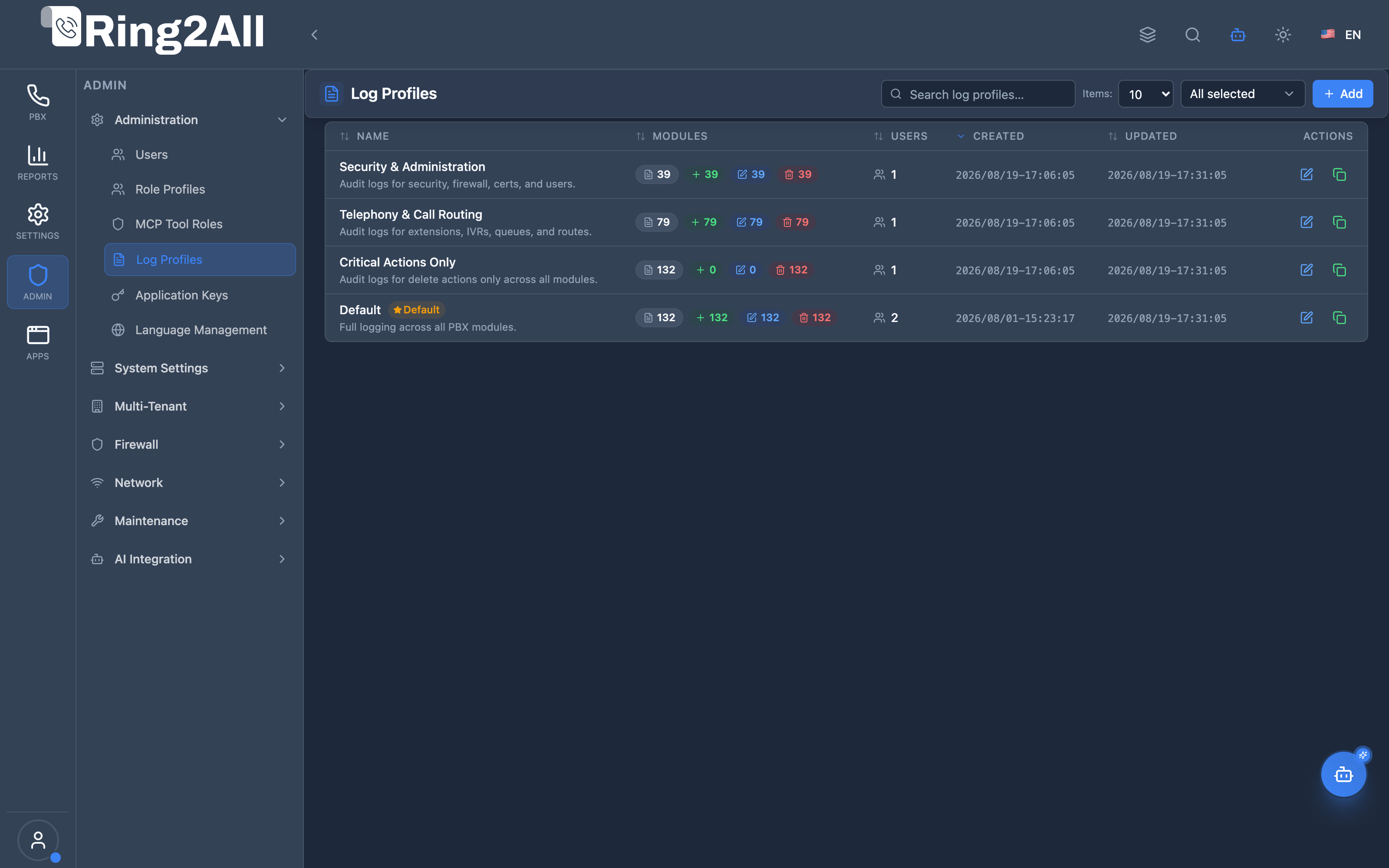
Section titled “Log Profiles List View”The Log Profiles list view displays all predefined audit logging profiles (Default, Security & Administration, Telephony & Call Routing, Critical Actions Only) and custom profiles with their activity flags, notification matrices, and default indicators.
Log Profile Configuration Form & Audit Matrix
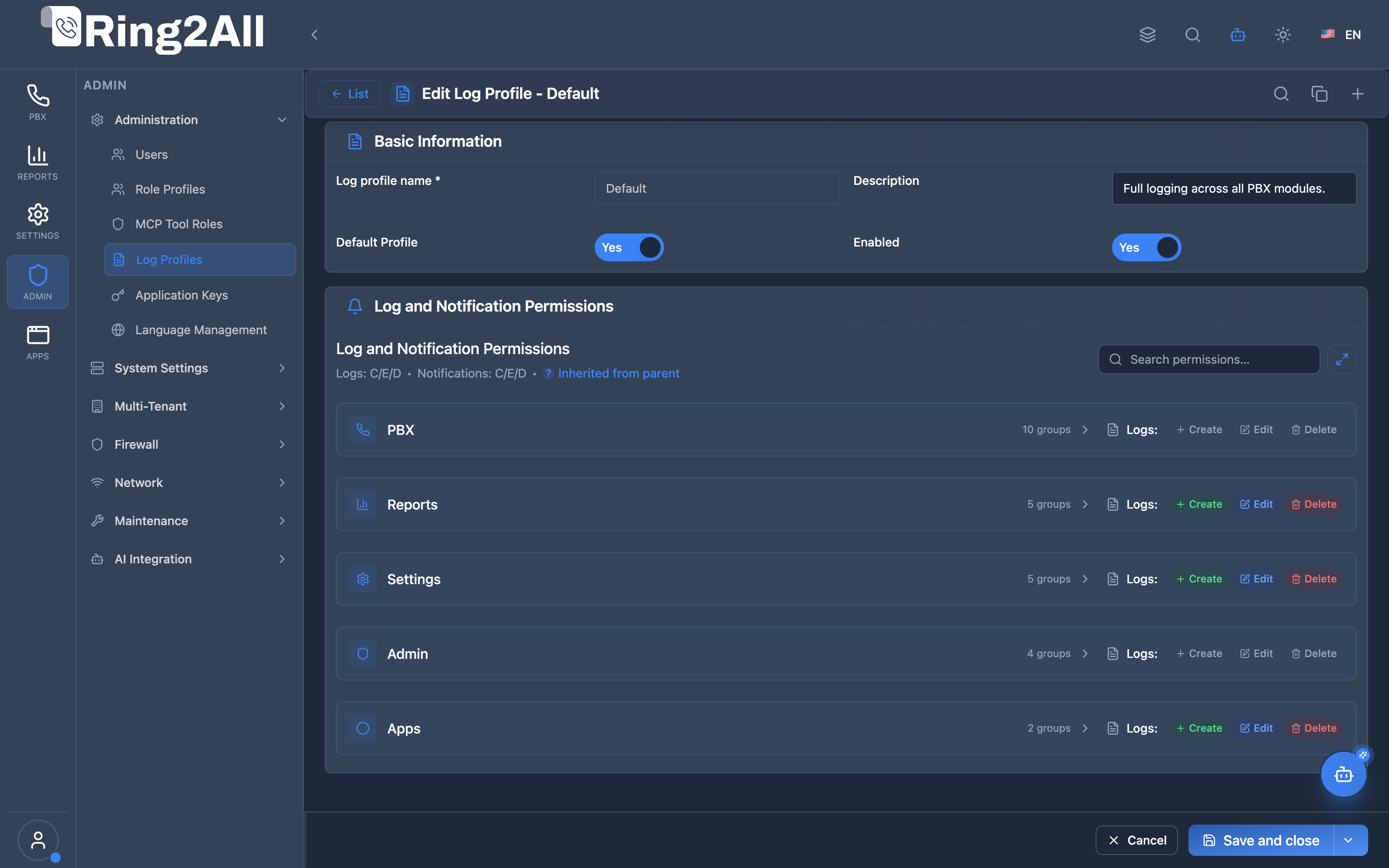
Section titled “Log Profile Configuration Form & Audit Matrix”The log profile editor provides fine-grained controls to toggle database audit logging (Create, Edit, Delete) and real-time alert notifications across every functional module in the PBX.
🎯 User Roles & Key Capabilities
Section titled “🎯 User Roles & Key Capabilities”Log Profiles configure compliance tracking, accountability, and real-time security alerting across the organization:
| Role | Key Capabilities & Operational Scope |
|---|---|
| Super Administrator | Configures global audit profiles, manages notification dispatch settings, and dictates mandatory logging rules for high-risk modules (System, Security, Auth). |
| Security & Compliance Officer | Audits logging matrices, ensures all administrative creations, modifications, and deletions generate permanent audit trails for compliance reporting. |
| Tenant Administrator | Establishes tenant-specific audit levels (e.g. logging all call center modifications or user credential resets) and configures alert recipient email lists. |
| Telephony Auditor (Read-Only) | Inspects configured audit profiles, verifies whether critical telephony actions (e.g. gateway deletion, route manipulation) trigger active notifications. |
1. Module Overview (Technical)
Section titled “1. Module Overview (Technical)”What Are Log Profiles?
Section titled “What Are Log Profiles?”Log Profiles is an audit configuration module that defines which user actions generate log entries and trigger system notifications. Each profile contains a matrix of modules with logging and notification settings for Create, Edit, and Delete operations.
Architecture
Section titled “Architecture”┌─────────────────────────────────────────────────────────────────┐│ Log Profiles Architecture │├─────────────────────────────────────────────────────────────────┤│ ││ Log Profile Definition ││ ┌──────────────────────────────────────────────────────────┐ ││ │ Log Profile: Standard Audit │ ││ │ │ ││ │ Per-Module Settings: │ ││ │ │ ││ │ Module │ Logs │ Notifications │ ││ │ ─────────────────────────────────────────────────────── │ ││ │ Extensions │ C E D │ - - D │ ││ │ Ring Groups │ C E D │ - - - │ ││ │ Queues │ C E D │ C - D │ ││ │ System Settings │ C E - │ C E - │ ││ │ Users │ C E D │ C E D │ ││ │ │ ││ │ C=Create, E=Edit, D=Delete │ ││ │ │ ││ └──────────────────────────────────────────────────────────┘ ││ │ ││ ▼ Assigned to users ││ ┌──────────────────────────────────────────────────────────┐ ││ │ Users │ ││ │ │ ││ │ User: jsmith → Log Profile: Standard Audit │ ││ │ │ ││ └──────────────────────────────────────────────────────────┘ ││ │ ││ ▼ Actions trigger ││ ┌──────────────────────────────────────────────────────────┐ ││ │ Audit System │ ││ │ │ ││ │ ├─ Log entries → Audit Logs │ ││ │ └─ Notifications → Email/Webhook │ ││ │ │ ││ └──────────────────────────────────────────────────────────┘ ││ │└─────────────────────────────────────────────────────────────────┘2. Module Overview (Commercial/Business)
Section titled “2. Module Overview (Commercial/Business)”Business Value
Section titled “Business Value”Log Profiles provides audit control:
| Without Log Profiles | With Log Profiles |
|---|---|
| Log everything | Selective logging |
| No notifications | Action alerts |
| Storage bloat | Efficient audit |
| Noise | Relevant records |
Use Cases
Section titled “Use Cases”-
Compliance Auditing
- Log all critical changes
- Meet regulatory requirements
-
Change Notifications
- Alert on user changes
- Alert on security events
-
Selective Logging
- Log only important actions
- Reduce storage usage
-
Per-User Audit
- Different logging levels
- Sensitive user tracking
Feature Highlights
Section titled “Feature Highlights”| Feature | Benefit |
|---|---|
| Per-Module Control | Granular logging |
| Action Types | Create, Edit, Delete |
| Log Toggle | Enable/disable logging |
| Notify Toggle | Enable/disable alerts |
| User Assignment | Per-user profiles |
| Inheritance | Parent module settings |
3. Module Overview (End User/Administrator)
Section titled “3. Module Overview (End User/Administrator)”What Can You Do?
Section titled “What Can You Do?”- Create custom log profiles
- Set logging per module/action
- Set notifications per module/action
- Assign profiles to users
- Duplicate existing profiles
- Search modules in matrix
Log Profiles Interface
Section titled “Log Profiles Interface”┌─────────────────────────────────────────────────────────────────┐│ Log Profiles │├─────────────────────────────────────────────────────────────────┤│ ││ [+ Create Profile] ││ ││ [🔍 Search log profiles...] ││ ││ ┌───────────────────────────────────────────────────────────┐ ││ │ Name │ Description │ Modules │ Users │ ││ ├─────────────────┼────────────────────┼─────────┼─────────┤ ││ │ Full Audit │ Log everything │ 45 │ 2 │ ││ │ Standard Audit │ Log critical only │ 20 │ 5 │ ││ │ Minimal Audit │ Security changes │ 8 │ 3 │ ││ │ Notifications │ Alert on changes │ 15 │ 1 │ ││ └───────────────────────────────────────────────────────────┘ ││ │└─────────────────────────────────────────────────────────────────┘Create/Edit Log Profile
Section titled “Create/Edit Log Profile”┌─────────────────────────────────────────────────────────────────┐│ Edit Log Profile │├─────────────────────────────────────────────────────────────────┤│ ││ ▼ Basic Information ││ ││ Log Profile Name: [Standard Audit ] ││ Unique name for this logging profile ││ ││ Description: [Log critical changes only ] ││ Optional description ││ ││ ──────────────────────────────────────────────────────────────││ ││ ▼ Log and Notification Permissions ││ ││ Define which actions generate log entries or trigger ││ system notifications. ││ ││ [🔍 Search permissions...] ││ ││ ┌─────────────────────────────────────────────────────────────┐││ │ Module │ Logs: │ Notifications: │││ │ │ C E D │ C E D │││ ├──────────────────────┼──────────────┼──────────────────────┤││ │ ▼ Dashboard │ ☐ ☐ ☐ │ ☐ ☐ ☐ │││ │ ▼ Telephony │ │ │││ │ ├─ Extensions │ ✓ ✓ ✓ │ ☐ ☐ ✓ │││ │ ├─ Ring Groups │ ✓ ✓ ✓ │ ☐ ☐ ☐ │││ │ ├─ Queues │ ✓ ✓ ✓ │ ✓ ☐ ✓ │││ │ └─ Conferences │ ✓ ☐ ✓ │ ☐ ☐ ☐ │││ │ ▼ System │ │ │││ │ ├─ System Settings │ ✓ ✓ ☐ │ ✓ ✓ ☐ │││ │ ├─ Users │ ✓ ✓ ✓ │ ✓ ✓ ✓ │││ │ └─ Role Profiles │ ✓ ✓ ✓ │ ✓ ✓ ✓ │││ └─────────────────────────────────────────────────────────────┘││ ││ C = Create | E = Edit | D = Delete ││ ││ [Save] [Cancel] ││ │└─────────────────────────────────────────────────────────────────┘Quick Tips
Section titled “Quick Tips”[!TIP] Notifications: Use sparingly to avoid alert fatigue.
[!TIP] Security Focus: Always log Users and Role Profile changes.
[!NOTE] Inheritance: Blue dots indicate inherited settings.
4. Configuration Sections
Section titled “4. Configuration Sections”Basic Information
Section titled “Basic Information”| Field | Description |
|---|---|
| Log Profile Name | Unique identifier |
| Description | Purpose explanation |
Log and Notification Permissions
Section titled “Log and Notification Permissions”| Column | Description |
|---|---|
| Module | System module/feature |
| Logs: C E D | Create, Edit, Delete logging |
| Notifications: C E D | Create, Edit, Delete alerts |
5. Settings Reference
Section titled “5. Settings Reference”Action Types
Section titled “Action Types”| Action | Code | Description |
|---|---|---|
| Create | C | New record created |
| Edit | E | Record modified |
| Delete | D | Record removed |
Toggle States
Section titled “Toggle States”| State | Meaning |
|---|---|
| ✓ | Enabled |
| ☐ | Disabled |
| 🔵 | Inherited from parent |
Notification Channels
Section titled “Notification Channels”| Channel | Purpose |
|---|---|
| Admin email alerts | |
| Webhook | External integrations |
| In-App | Dashboard notifications |
6. Common Scenarios & Examples
Section titled “6. Common Scenarios & Examples”Scenario 1: Full Audit Profile
Section titled “Scenario 1: Full Audit Profile”- Click “Create Profile”
- Name = “Full Audit”
- Enable ALL logging checkboxes
- Disable most notifications
- Save
Scenario 2: Security Alert Profile
Section titled “Scenario 2: Security Alert Profile”- Click “Create Profile”
- Name = “Security Alerts”
- Focus on Users, Role Profiles
- Enable all logs: C E D
- Enable all notifications: C E D
- Save
Scenario 3: Minimal Logging
Section titled “Scenario 3: Minimal Logging”- Click “Create Profile”
- Name = “Minimal Audit”
- Only enable Delete logging
- Only critical modules
- Save
Scenario 4: Change Notifications
Section titled “Scenario 4: Change Notifications”- Create new profile
- Name = “Change Alerts”
- Disable all logs (handled elsewhere)
- Enable Edit notifications on critical modules
- Save
Model Context Protocol (MCP) AI Integration
Section titled “Model Context Protocol (MCP) AI Integration”The Ring2All PBX platform provides Model Context Protocol (MCP) tools for inspecting Log Profiles and verifying system audit policies.
MCP Tools Reference
Section titled “MCP Tools Reference”| Tool Name | Operation | Description | Risk Level |
|---|---|---|---|
list_log_profiles |
Read | Lists all Audit Log Profiles configured for the tenant, detailing notification flags and active status. | Low |
get_log_profile_status |
Read | Retrieves detailed module-by-module audit logging and notification rules for a specific profile. | Low |
JSON Schema Definitions
Section titled “JSON Schema Definitions”list_log_profiles
Section titled “list_log_profiles”{ "name": "list_log_profiles", "description": "Lists all Audit Log Profiles configured for the tenant.", "parameters": { "type": "object", "properties": { "search": { "type": "string", "description": "Filter by log profile name" } } }}get_log_profile_status
Section titled “get_log_profile_status”{ "name": "get_log_profile_status", "description": "Retrieves audit logging rules and module event configurations of a Log Profile.", "parameters": { "type": "object", "properties": { "profile_id": { "type": "number", "description": "Internal numeric log profile identifier" }, "name": { "type": "string", "description": "Log Profile name" } } }}Natural Language Prompt Examples
Section titled “Natural Language Prompt Examples”English
Section titled “English”- “List all configured Log Profiles and show which one is set as default.”
- “Check if deletion of SIP Gateways triggers a notification under the ‘Security & Administration’ log profile.”
- “Show the audit configuration rules for the ‘Default Audit’ profile.”
Spanish
Section titled “Spanish”- “Muestra todos los perfiles de log y cuál está configurado por defecto.”
- “Verifica si las eliminaciones de extensiones se registran en el perfil de log activo.”
- “Consulta las reglas de auditoría y notificaciones para el perfil ‘Auditoría Crítica’.”
Enterprise Safeguards & Guardrails
Section titled “Enterprise Safeguards & Guardrails”- Unassigned Deletion Requirement: A log profile cannot be deleted while assigned to any active user.
- Immutable System Defaults: The default log profile cannot be deleted or disabled.
- Tenant Boundary Enforcement: Queries are isolated strictly to the requesting tenant partition.
7. Limitations & Important Notes
Section titled “7. Limitations & Important Notes”Technical Notes
Section titled “Technical Notes”[!NOTE] User Assignment: Profile must be unassigned before deletion.
[!NOTE] Log Storage: Logs consume database space.
[!WARNING] Notification Volume: Too many alerts reduces effectiveness.
Best Practices
Section titled “Best Practices”- Log Critical Changes: Users, Roles, System Settings
- Selective Notifications: Only true emergencies
- Review Regularly: Audit log profile effectiveness
- Storage Management: Archive old logs
- Test Notifications: Verify delivery
Recommended Logging
Section titled “Recommended Logging”| Module | Log | Notify |
|---|---|---|
| Users | C E D | C E D |
| Role Profiles | C E D | C E D |
| System Settings | C E | C E |
| Extensions | C E D | - - D |
| Gateways | C E D | C E D |
8. Troubleshooting Tips
Section titled “8. Troubleshooting Tips”Common Issues
Section titled “Common Issues”| Symptom | Possible Cause | Solution |
|---|---|---|
| No logs appearing | Profile not assigned | Assign to user |
| Too many notifications | Over-configured | Reduce notify toggles |
| Can’t delete profile | Users assigned | Reassign users first |
| Inheritance unclear | Parent setting | Check module hierarchy |
Check Profile Assignment
Section titled “Check Profile Assignment”SELECT u.username, l.name AS log_profileFROM public.users uLEFT JOIN public.log_profiles l ON l.id = u.log_profile_idORDER BY l.name;Verify Logging
Section titled “Verify Logging”- Assign profile to test user
- Perform logged action
- Check Audit Logs module
- Verify entry appears
9. Glossary
Section titled “9. Glossary”| Term | Definition |
|---|---|
| Log Profile | Audit configuration set |
| Audit Log | Record of user action |
| Notification | Alert on action |
| Create (C) | New record action |
| Edit (E) | Modify action |
| Delete (D) | Remove action |
Documentation last updated: January 2026