

Access Control Module Documentation
Table of Contents
Section titled “Table of Contents”- Module Overview (Technical)
- Module Overview (Commercial & Business Value)
- 🎯 User Roles & Key Capabilities
- Visual Interface & Form Structure
- Architectural Flow & Security Governance
- Common Scenarios & Operational Playbooks
- Troubleshooting & Diagnostic Commands
- Model Context Protocol (MCP) AI Integration
- Glossary
1. Module Overview (Technical)
Section titled “1. Module Overview (Technical)”The Access Control module (public.firewall_access_control, public.firewall_ip_bans) manages granular IP-level and CIDR subnet authorization lists (Access Control Lists / ACL) for Ring2All Billing. While global firewall settings define the overarching state of host packet filtering, Access Control determines which discrete network endpoints are explicitly permitted (whitelisted) or prohibited (blacklisted) from interacting with the billing portal, API listeners, and telecommunications signaling hooks.
Access Control records can be permanent or time-bounded (with automated expiration), support specific protocols (TCP, UDP, ICMP, or All), directionality (Input, Output, Forward), priority sequencing, and interface binding (e.g., eth0, wg0, tun0).
Data Model & System Linkage
Section titled “Data Model & System Linkage” ┌────────────────────────────────────────────────────────────────────────┐ │ Access Control Entry (public.firewall_access_control) │ │ • id: bigint (Primary Key) │ │ • name: VARCHAR(100) (Descriptive Identifier) │ │ • description: text │ │ • list_type: 'whitelist' | 'blacklist' │ │ • ip_address: VARCHAR(45) (IPv4/IPv6 or CIDR Range) │ │ • protocol: 'all' | 'tcp' | 'udp' | 'icmp' │ │ • direction: 'in' | 'out' | 'forward' │ │ • priority: integer (Execution Evaluation Order, e.g. 50) │ │ • source_port: VARCHAR(50) │ │ • destination_port: VARCHAR(50) │ │ • interface: VARCHAR(50) (Network Interface Binding) │ │ • expires_at: timestamptz (Nullable for Permanent Entries) │ │ • enabled: boolean │ └───────────────────────────────────┬────────────────────────────────────┘ │ ┌─────────────────────────┴─────────────────────────┐ ▼ ▼ ┌───────────────────────────────────┐ ┌───────────────────────────────────┐ │ nftables / iptables │ │ Fail2Ban Synchronization │ │ • Whitelist: Fast-path bypass │ │ • Pushes manual blacklists to │ │ • Blacklist: Kernel drop at PREROUTING│ │ Fail2Ban jails │ └───────────────────────────────────┘ └───────────────────────────────────┘PostgreSQL Schema Architecture
Section titled “PostgreSQL Schema Architecture”public.firewall_access_control:id: Numeric primary key (bigserial).name: Human-readable label for the ACL rule.list_type: Determines policy enforcement:whitelist: Grants immediate ingress pass-through, overriding automated rate limiters.blacklist: Drops packets at the kernel level without responding.
ip_address: Single IP address (e.g.,192.168.1.50) or network subnet in CIDR notation (e.g.,10.10.0.0/16).priority: Rule ranking; rules with lower numbers are evaluated first in the kernel packet chain.interface: Specific hardware or virtual interface (e.g.,eth0,tun0,wg0) where the rule applies.expires_at: Optional timestamp for temporary bans or guest administrative maintenance windows.enabled: Master activation switch for the individual rule.
2. Module Overview (Commercial & Business Value)
Section titled “2. Module Overview (Commercial & Business Value)”- Trusted Partner & Wholesale Carrier Isolation: Enforces strict IP whitelisting for wholesale carrier interconnects and external CRM/ERP webhook endpoints, preventing unauthorized third parties from spoofing billing transactions.
- Rapid Threat Quarantine: Enables network security personnel to isolate an attacking subnet with a single click, instantly cutting off active DDoS or credential stuffing campaigns.
- Temporary Maintenance Windows: Supports time-expiring whitelists, allowing external contractors or auditing teams to access the platform during maintenance without leaving persistent security holes.
3. 🎯 User Roles & Key Capabilities
Section titled “3. 🎯 User Roles & Key Capabilities”| User Role | Key Permissions | Core Responsibilities & Workflows |
|---|---|---|
| Super Administrator | Full Control (CRUD on ACL Entries & Rules) |
Whitelists NOC management subnets, provisions permanent carrier interconnect rules, and flushes expired entries. |
| Security Officer / SecOps | Ban Management & Fail2Ban Sync | Enforces manual IP blacklists, synchronizes active jails with Fail2Ban, and audits whitelist exceptions against security policies. |
| Billing Engineer | Read & Create (Carrier Whitelists) | Verifies that carrier gateways and payment processor notification IPs (e.g., Stripe webhooks) are correctly whitelisted in access control. |
4. Visual Interface & Form Structure
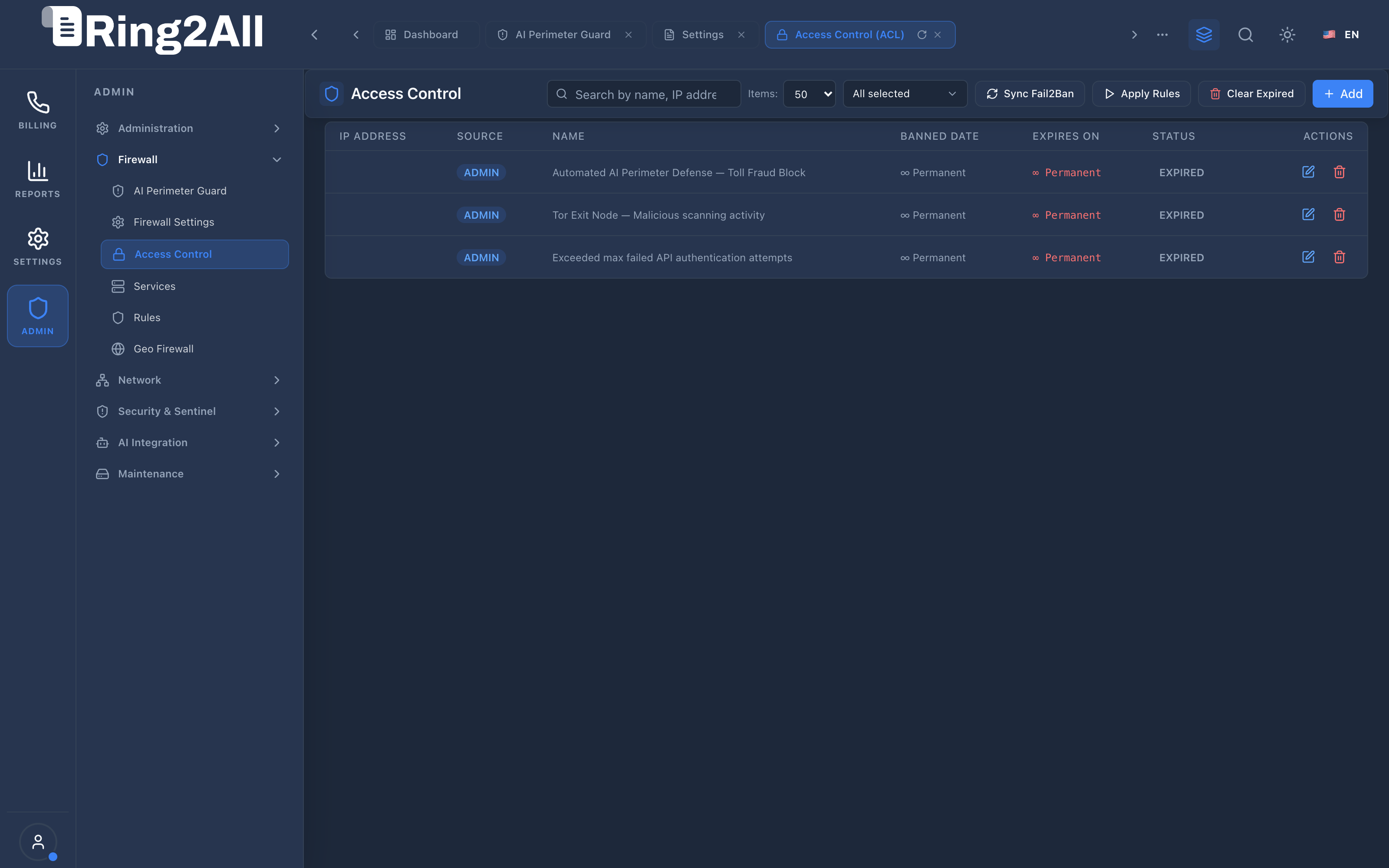
Section titled “4. Visual Interface & Form Structure”Level 1 — Access Control List View
Section titled “Level 1 — Access Control List View”The access control catalog displays all active and expired rules, categorized by list type (Whitelist/Blacklist), IP address/CIDR, protocol, expiration status, and action controls.
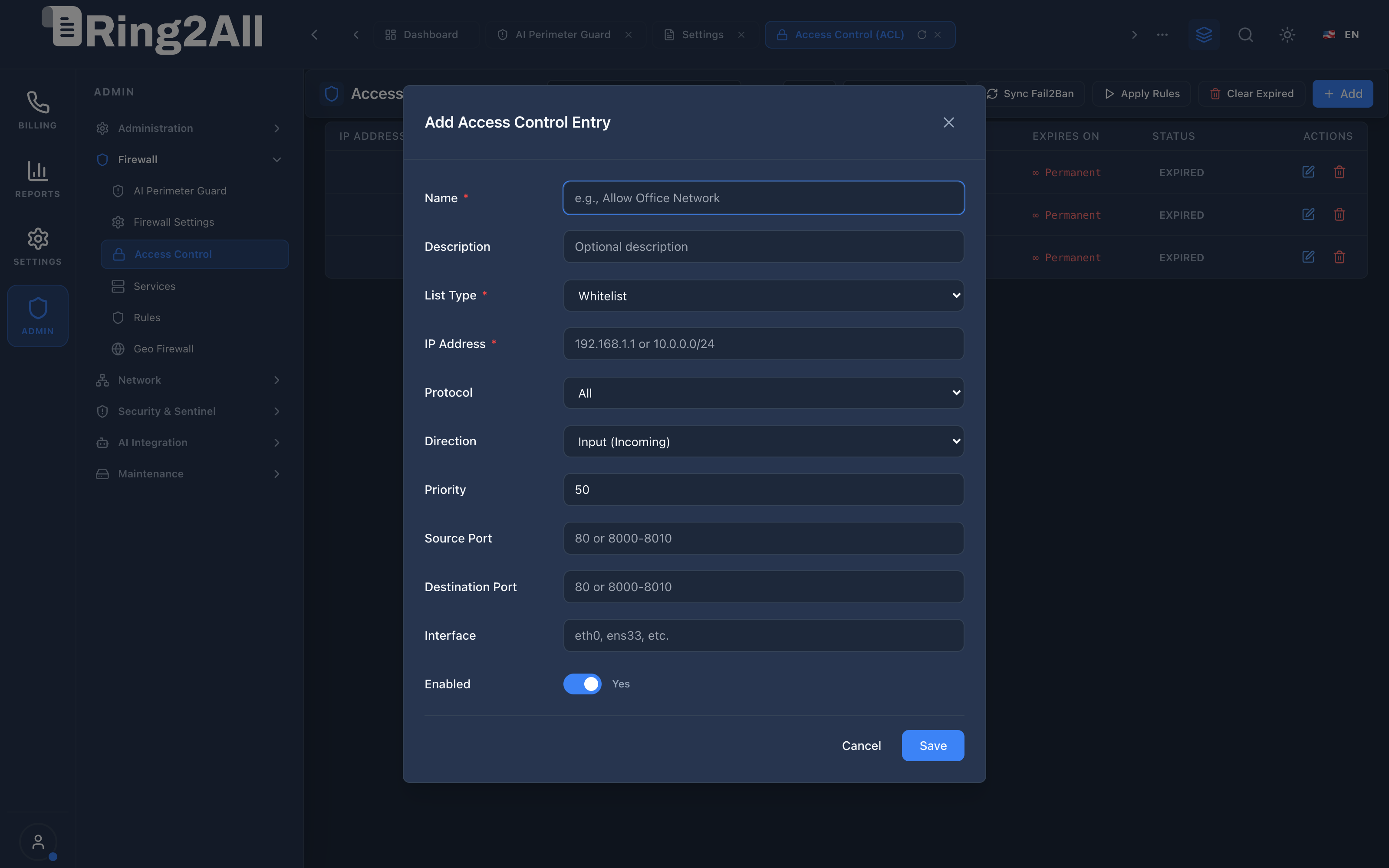
Level 2 — Add Access Control Entry Modal
Section titled “Level 2 — Add Access Control Entry Modal”The modal dialog enables rapid provisioning of IP and CIDR rules with protocol, interface, and port constraints.
Fields & Parameters Reference
Section titled “Fields & Parameters Reference”- Name: Descriptive identifier (e.g., “Corporate Head Office Gateway”).
- Description: Optional administrative notes detailing the purpose or ticket number.
- List Type: Selects between Whitelist (Accept) or Blacklist (Drop).
- IP Address: Target IPv4, IPv6, or CIDR network range (e.g.,
198.51.100.0/24). - Protocol: Protocol filtering (
All,TCP,UDP,ICMP). - Direction: Traffic flow (
Input (Incoming),Output (Outgoing),Forward). - Priority: Execution order priority (default
50; lower numeric values evaluate first). - Source Port / Destination Port: Optional port constraints or ranges (e.g.,
8000-8010). - Interface: Target network interface (e.g.,
eth0,tun0). Leave blank for all interfaces. - Enabled: Operational toggle to activate or deactivate the rule.
5. Architectural Flow & Security Governance
Section titled “5. Architectural Flow & Security Governance” ┌──────────────┐ 1. POST /api/firewall/access-control ┌────────────────────────┐ │ Administrator├───────────────────────────────────────────────►│ Fastify 5 API Guard │ └──────────────┘ └───────────┬────────────┘ │ 2. Insert ACL Record into ss_billing ▼ ┌──────────────┐ 4. Atomic nftables / iptables Commit ┌────────────────────────┐ │ Linux Kernel ◄────────────────────────────────────────────────┤ Firewall Synchronizer │ │ netfilter │ └────────────────────────┘ └──────────────┘ │ 3. Trigger Sync Event via Redis Pub/Sub- Rule Creation: The administrator configures an ACL entry in the modal and submits the form.
- Database Persistence: The Fastify backend validates IP formatting and CIDR boundaries, storing the record in
public.firewall_access_control. - Firewall Sync: Clicking Apply Rules triggers the firewall synchronizer daemon.
- Kernel Application: Rules are translated into
nftablesoriptablessyntax and injected directly into the appropriate kernel chain without dropping existing active connections.
6. Common Scenarios & Operational Playbooks
Section titled “6. Common Scenarios & Operational Playbooks”Playbook 1: Whitelisting a Wholesale Carrier Signaling Gateway
Section titled “Playbook 1: Whitelisting a Wholesale Carrier Signaling Gateway”- Navigate to ADMIN > Firewall > Access Control.
- Click + Add in the top-right toolbar.
- Enter Name:
Carrier Interconnect - Alpha Trunk. - Set List Type:
Whitelist. - Enter the carrier’s signaling IP in IP Address:
203.0.113.50. - Set Protocol:
UDP, Destination Port:5060. - Set Priority:
10(high priority). - Toggle Enabled to
Yesand click Save. - Click Apply Rules in the toolbar to commit changes to the running Linux kernel firewall.
Playbook 2: Blacklisting a Persistent Credential Stuffing Subnet
Section titled “Playbook 2: Blacklisting a Persistent Credential Stuffing Subnet”- Navigate to ADMIN > Firewall > Access Control.
- Click + Add.
- Enter Name:
Malicious Botnet Subnet /24. - Set List Type:
Blacklist. - Enter IP Address:
198.51.100.0/24. - Set Protocol:
All, Direction:Input (Incoming). - Click Save, then click Apply Rules.
7. Troubleshooting & Diagnostic Commands
Section titled “7. Troubleshooting & Diagnostic Commands”Querying ACL Database Records
Section titled “Querying ACL Database Records”# List active access control rules ordered by prioritysudo -u postgres psql -d ss_billing -c \ "SELECT id, name, list_type, ip_address, protocol, direction, priority, enabled \ FROM firewall_access_control ORDER BY priority ASC;"Checking Kernel Rules
Section titled “Checking Kernel Rules”# View active nftables access control chainnft list chain inet filter access_control
# For iptables systems:iptables -L ACCESS_CONTROL -n -v --line-numbers8. Model Context Protocol (MCP) AI Integration
Section titled “8. Model Context Protocol (MCP) AI Integration”The Access Control module connects directly to the Ring2All BSS MCP Server, enabling security engineers and automated SOC agents to audit IP whitelist and blacklist policies.
Available MCP Tools
Section titled “Available MCP Tools”| Tool Name | Access Role | Description & Primary Function | Example Arguments |
|---|---|---|---|
list_firewall_access_control |
Super Administrator |
Lists firewall Access Control Entries (whitelist/blacklist, CIDR blocks, protocols, and priority). | {"listType": "whitelist"} |
Sample MCP Tool Execution: list_firewall_access_control
Section titled “Sample MCP Tool Execution: list_firewall_access_control”Request Payload
Section titled “Request Payload”{ "name": "list_firewall_access_control", "arguments": { "listType": "whitelist" }}Response Payload
Section titled “Response Payload”[ { "id": 1, "name": "Office Internal Subnet", "listType": "whitelist", "ipAddress": "192.168.10.0/24", "protocol": "all", "direction": "in", "priority": 10, "enabled": true }, { "id": 2, "name": "Primary SBC Transit", "listType": "whitelist", "ipAddress": "192.168.10.31", "protocol": "all", "direction": "in", "priority": 20, "enabled": true }]Conversational AI Prompts for Copilot
Section titled “Conversational AI Prompts for Copilot”- “List all active whitelist entries configured in the firewall ACL.”
- “Is the corporate IP subnet 192.168.10.0/24 currently whitelisted?”
- “Show all priority 1 blacklisted IP addresses.”
9. Glossary
Section titled “9. Glossary”- CIDR (Classless Inter-Domain Routing): A notation for specifying IP addresses and their associated routing prefix (e.g.,
192.168.1.0/24). - Whitelist: An explicit list of authorized entities permitted access while all other entities are denied.
- Blacklist: An explicit list of forbidden entities blocked from access while others are evaluated normally.
- Kernel Netfilter: The packet processing subsystem inside the Linux kernel responsible for filtering, NAT, and connection tracking.
- Model Context Protocol (MCP): Open protocol standard that enables secure, controlled integration between Large Language Models and external tools, databases, and telecom rating engines.