

Web Chatbots Module Documentation
Table of Contents
Section titled “Table of Contents”- Navigation & Access
- Screenshots & Visual Interface
- 🎯 User Roles & Key Capabilities
- Module Overview (Technical)
- Module Overview (Commercial/Business)
- Module Overview (End User/Administrator)
- Chatbot Persona & Behavioral Configuration
- Knowledge Base & Retrieval-Augmented Generation (RAG)
- Tool Profiles & Action Execution
- Human Agent Handoff & Escalation
- Settings Reference
- Common Scenarios & Best Practices
- Model Context Protocol (MCP) AI Integration
- Troubleshooting & Diagnostics
- Glossary
Navigation & Access
Section titled “Navigation & Access”To access the Web Chatbots module:
- Log in to the Ring2All Web Portal (
https://<domain-or-ip>/login). - In the left navigation sidebar, expand Administration.
- Under AI Integration, click Web Chatbots (
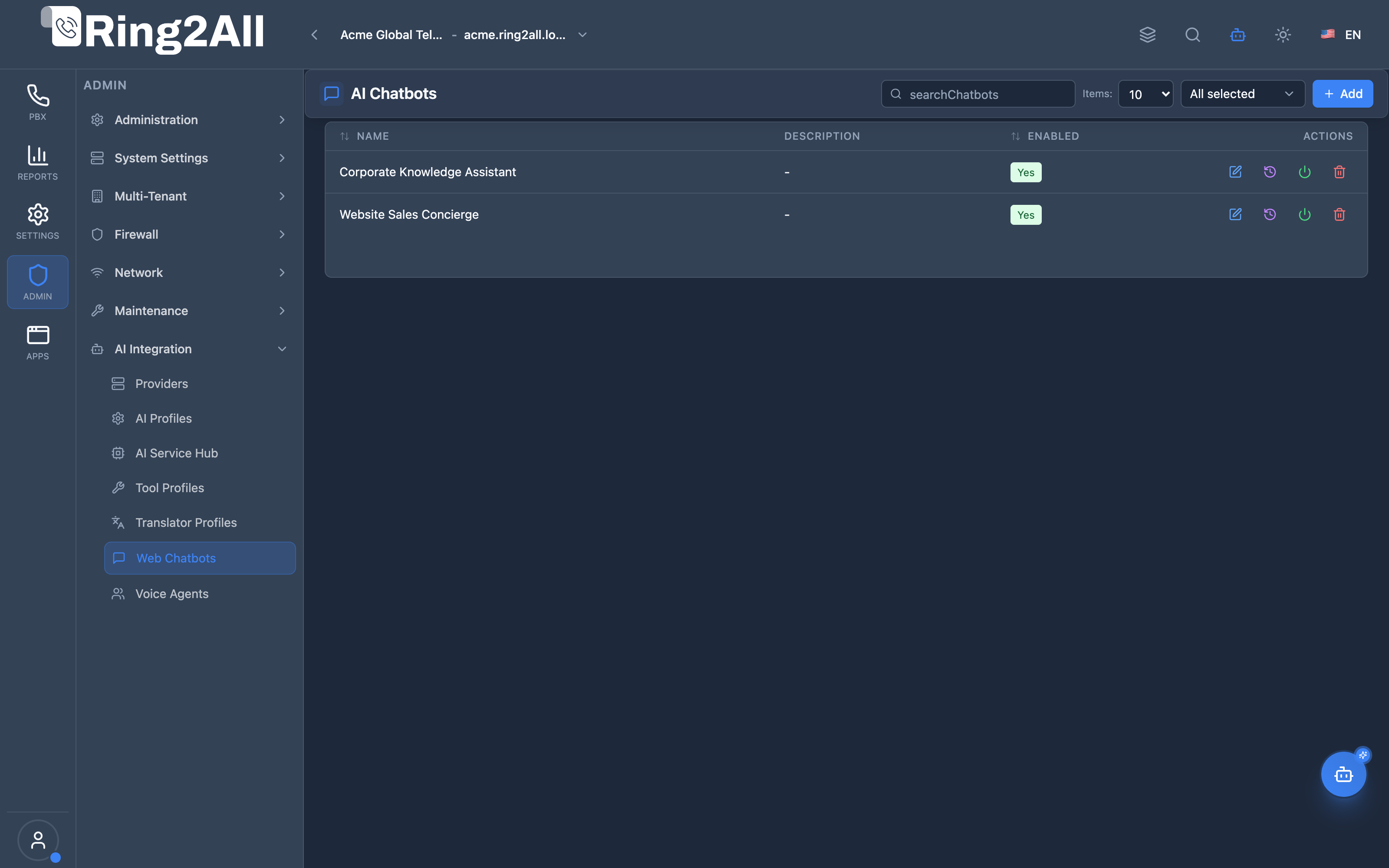
/admin/ai-integration/chatbots). - Review registered interactive web chatbots, default status badges, assigned LLM profiles, and activity telemetry.
- Click + Add to create a new conversational web chatbot (
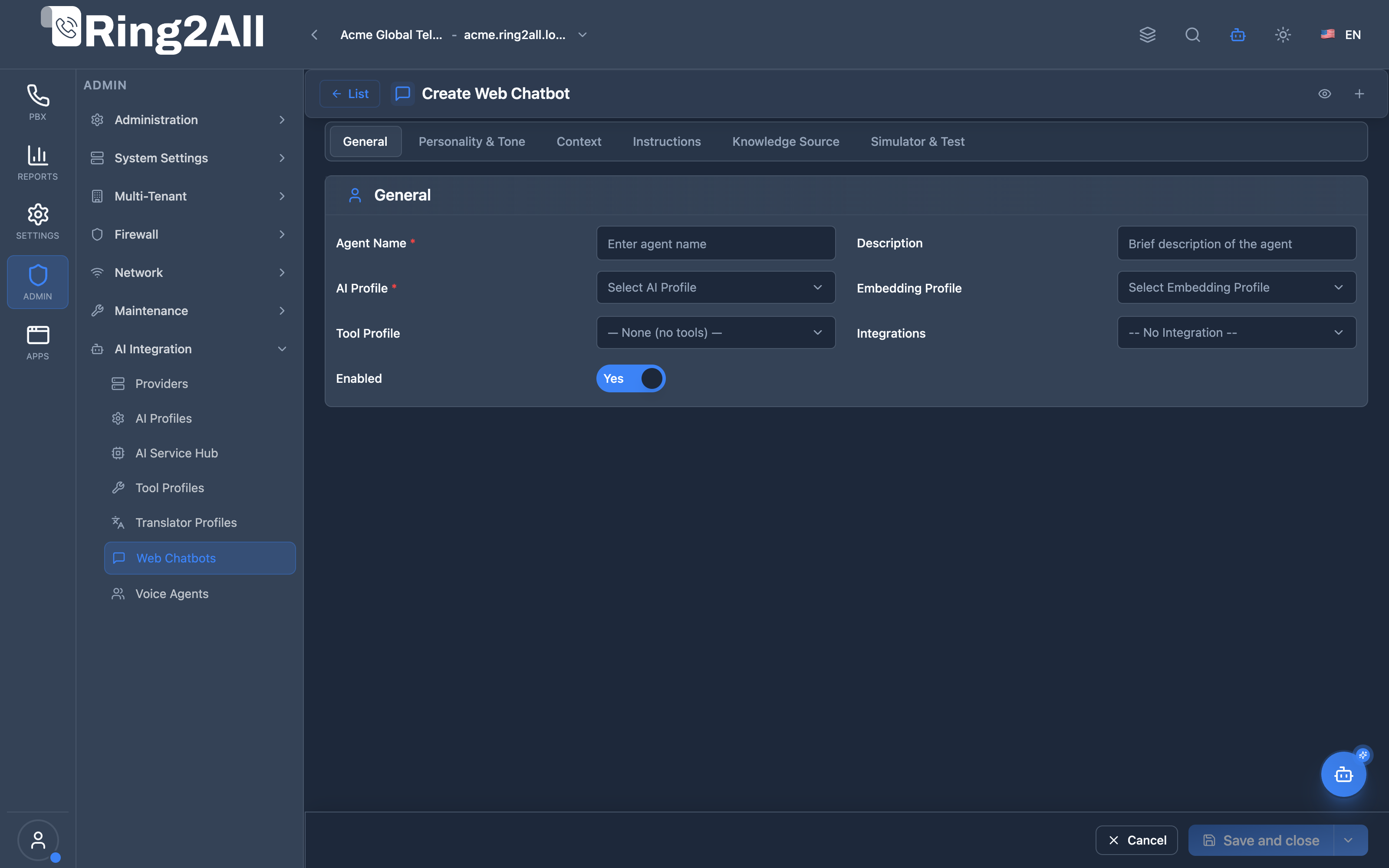
/admin/ai-integration/chatbots/new), or edit existing assistant personas and knowledge bases.
Screenshots & Visual Interface
Section titled “Screenshots & Visual Interface”Web Chatbots Directory
Section titled “Web Chatbots Directory”Central repository displaying active web chat assistants, linked AI profiles, default corporate bot badges, and quick actions for testing, prompt tuning, or session review.
Web Chatbot Persona & Knowledge Configuration Form
Section titled “Web Chatbot Persona & Knowledge Configuration Form”Multi-section configuration editor for naming the assistant, selecting foundation models, crafting system prompts, setting response styles, binding RAG knowledge bases, and attaching operational tool profiles.
🎯 User Roles & Key Capabilities
Section titled “🎯 User Roles & Key Capabilities”| Role | Access Level | Responsibilities & Capabilities |
|---|---|---|
| PBX Super Administrator | Full Access (RW) |
Provision and configure interactive web chatbots, assign foundation AI profiles and RAG vector indexes, and designate the default corporate copilot. |
| Customer Experience Manager | Persona & Prompt Design (RW) |
Author system prompts, calibrate conversational personas and tones, review chat session satisfaction ratings, and attach operational tool profiles. |
| Knowledge Base Specialist | RAG Management (RW) |
Ingest technical manuals, policy PDFs, and FAQs into vector storage (pgvector), optimizing chunk sizes and similarity thresholds. |
| AI Platform Copilot / MCP Agent | Diagnostic Inspection (RO) |
Execute get_ai_chatbot_status to evaluate active chatbot personas, system instructions, and user or extension copilot bindings. |
1. Module Overview (Technical)
Section titled “1. Module Overview (Technical)”What Are Web Chatbots?
Section titled “What Are Web Chatbots?”Web Chatbots are intelligent text-based conversational agents embedded directly within the Ring2All Web Portal, User Portal, and external website widgets. Powered by state-of-the-art LLMs (OpenAI GPT-4o, Anthropic Claude, or local Ollama/LM Studio models), chatbots deliver 24/7 automated tier-1 customer support, internal company knowledge retrieval, and automated workflow triggers.
Architecture
Section titled “Architecture”┌────────────────────────────────────────────────────────────────────────────────────────┐│ Web Chatbot Architecture & Workflow │├────────────────────────────────────────────────────────────────────────────────────────┤│ ││ User Chat Session (Web Portal / External Widget) ││ │ ││ ▼ WebSocket / REST API ││ ┌──────────────────────────────────────────────────────────────────────────────────┐ ││ │ Fastify Web Chat Engine (ring2all/api) │ ││ │ ├─ Session Context Manager (Redis / PostgreSQL) │ ││ │ ├─ System Persona & Boundary Injection │ ││ │ └─ Prompt Assembly Pipeline │ ││ └──────────────────────────────────────┬───────────────────────────────────────────┘ ││ │ ││ ┌─────────────────────────────────┼──────────────────────────────────┐ ││ ▼ ▼ ▼ ││ ┌─────────────────────────┐ ┌─────────────────────────┐ ┌───────────────────────┐ ││ │ Knowledge Base (RAG) │ │ Tool Profile Execution │ │ AI Provider & Profile │ ││ │ pgvector cosine match │ │ MCP Tool Dispatcher │ │ GPT-4o / Claude 3.5 │ ││ │ Internal manuals & PDFs │ │ CRM, Ticketing, Billing │ │ Streaming Token Feed │ ││ └─────────────────────────┘ └─────────────────────────┘ └───────────────────────┘ ││ │ │ │ ││ └─────────────────────────────────┼──────────────────────────────────┘ ││ ▼ ││ Interactive Response Delivered to Caller / Customer ││ │└────────────────────────────────────────────────────────────────────────────────────────┘2. Module Overview (Commercial/Business)
Section titled “2. Module Overview (Commercial/Business)”Business Value
Section titled “Business Value”- 24/7 Omnichannel First Response: Resolves up to 70% of routine inquiries without human intervention.
- Seamless Escalation to PBX: Enables callers to escalate from web chat directly into a SIP ring group or queue.
- White-Label Corporate Assistants: Customize tone, brand guidelines, and knowledge scope for each enterprise tenant.
3. Module Overview (End User/Administrator)
Section titled “3. Module Overview (End User/Administrator)”Administrators can:
- Create and manage multiple specialized chatbots (e.g. Sales Concierge, IT Helpdesk, Billing Inquiries).
- Designate one chatbot as the Default Corporate Assistant for user portals.
- Upload PDF documents, company handbooks, and FAQs to ground responses in verified facts.
- Review chat history to audit agent answers and identify knowledge gaps.
4. Chatbot Persona & Behavioral Configuration
Section titled “4. Chatbot Persona & Behavioral Configuration”- Agent Name & Display: Public-facing name and title shown in the chat window.
- Tone & Persona: Selection of communication styles (
professional,friendly,calm,enthusiastic). - System Prompt (Instruction Matrix): Guardrails defining what the bot can and cannot discuss.
- Response Length: Choose between
brief(quick answers) anddetailed(in-depth explanations).
5. Knowledge Base & Retrieval-Augmented Generation (RAG)
Section titled “5. Knowledge Base & Retrieval-Augmented Generation (RAG)”- Document Upload: Ingest company documentation in
.pdf,.docx,.md, or.txtformats. - Chunking & Vectorization: Automated document splitting and vector generation via the configured embedding profile.
- Semantic Retrieval: Queries retrieve top matching context chunks using cosine distance (
<=>) before generating responses, preventing hallucinations.
6. Tool Profiles & Action Execution
Section titled “6. Tool Profiles & Action Execution”Attach an AI Tool Profile to empower chatbots with functional execution:
- Look up customer records in CRM by email or phone.
- Create escalation tickets in Jira Service Management or Zendesk.
- Check shipping and order delivery statuses.
7. Human Agent Handoff & Escalation
Section titled “7. Human Agent Handoff & Escalation”When a customer’s query exceeds automated capabilities or sentiment detection indicates frustration:
- The chatbot can trigger an automated handoff event.
- A SIP call is initiated to a designated queue, or the session is routed to a human operator in the Switchboard interface.
8. Settings Reference
Section titled “8. Settings Reference”| Parameter | Type | Default | Description |
|---|---|---|---|
agent_name |
String(100) | Required | Friendly name of the chatbot assistant. |
agent_type |
String | 'chat' |
Differentiates web chatbots from voice agents. |
ai_profile_id |
Integer | Required | Foundation LLM model used for chat generation. |
is_default_chatbot |
Boolean | false |
Marks assistant as default for the domain’s user portal. |
personality |
Enum | 'professional' |
Tone: professional, friendly, calm, enthusiastic. |
tool_profile_id |
Integer | Nullable | References public.ai_tool_profiles(id). |
9. Common Scenarios & Best Practices
Section titled “9. Common Scenarios & Best Practices”- Public Website Lead Qualifier: Collects visitor contact information, verifies budget and timeline, and notifies sales reps via email/SMS.
- Internal Telecom Wiki Bot: Answers technician queries regarding PBX codes, dialplan routes, and SIP configurations.
Model Context Protocol (MCP) AI Integration
Section titled “Model Context Protocol (MCP) AI Integration”The Web Chatbots module integrates with the SoftSwitch Model Context Protocol (MCP) server, enabling platform assistants, supervisory copilots, and administrative diagnostics to inspect active conversational agent personas, system prompt instructions, and user bindings.
MCP Tools Catalog
Section titled “MCP Tools Catalog”| Tool Name | Type | Access | Description |
|---|---|---|---|
get_ai_chatbot_status |
Query | ai_system_admin / Read |
Queries active AI Chatbot configuration, assistant persona name, system prompts, greeting message, and model assignments. |
Tool Schemas & Execution Responses
Section titled “Tool Schemas & Execution Responses”get_ai_chatbot_status
Section titled “get_ai_chatbot_status”{ "name": "get_ai_chatbot_status", "description": "Queries active AI Chatbot configuration, assistant persona name, system prompts, greeting message, and model assignments.", "parameters": { "type": "object", "properties": { "user_id": { "type": "number", "description": "Optional admin user ID to inspect user-specific copilot profile." }, "extension_id": { "type": "number", "description": "Optional extension ID to inspect extension-specific assistant." } } }}Realistic Execution Response:
{ "success": true, "data": { "chatbot": { "hasChatbot": true, "agentName": "Corporate Support Concierge", "personaName": "Sofía AI Assistant", "greetingMessage": "Hello! Welcome to Ring2All Platform support. How may I assist you with your telephony or billing questions today?", "closingMessage": "Thank you for contacting us! If you need further assistance, our engineers are always available.", "userId": 1, "extensionId": 1001 } }}Bilingual Natural Language Prompt Examples
Section titled “Bilingual Natural Language Prompt Examples”English Prompts
Section titled “English Prompts”- “Copilot, check the active AI chatbot configuration for user ID 1.”
- “What is the opening greeting message configured for the default web assistant?”
- “Verify if an assistant persona is attached to extension 1001.”
Spanish Prompts
Section titled “Spanish Prompts”- “Copilot, consulta el estado de configuración del chatbot de IA para el usuario 1.”
- “¿Cuál es el mensaje de saludo inicial configurado para el asistente web por defecto?”
- “Verifica si la extensión 1001 tiene un chatbot o persona de asistente asignada.”
Enterprise Safeguards & Execution Boundaries
Section titled “Enterprise Safeguards & Execution Boundaries”- Multi-Tenant Domain Scoping: Chatbot lookup strictly enforces numeric
domain_idandtenant_idboundaries, preventing cross-tenant assistant exposure. - Context Window Protection: System prompts and RAG contexts are validated against model context limits to prevent unexpected token truncation during runtime conversation.
- No Unauthenticated Execution: Web chatbot endpoints require authenticated sessions or verified tenant tokens for external embedded widgets.
10. Troubleshooting & Diagnostics
Section titled “10. Troubleshooting & Diagnostics”- Chatbot Not Responding: Check that the linked AI Profile in AI Profiles has an active provider with valid API keys.
- Hallucinations: Ensure RAG context documents are uploaded and verify that system prompt instructions include explicit boundary rules (e.g., “Only answer based on provided context”).
11. Glossary
Section titled “11. Glossary”- Web Chatbot: Text-based conversational AI agent hosted in web portals or external embeds.
- RAG (Retrieval-Augmented Generation): Architecture supplementing LLM prompts with semantic context retrieved from external vector databases.
- Default Chatbot: System-designated assistant automatically made available to authenticated users.