

Switchboard Console
📖 Introduction
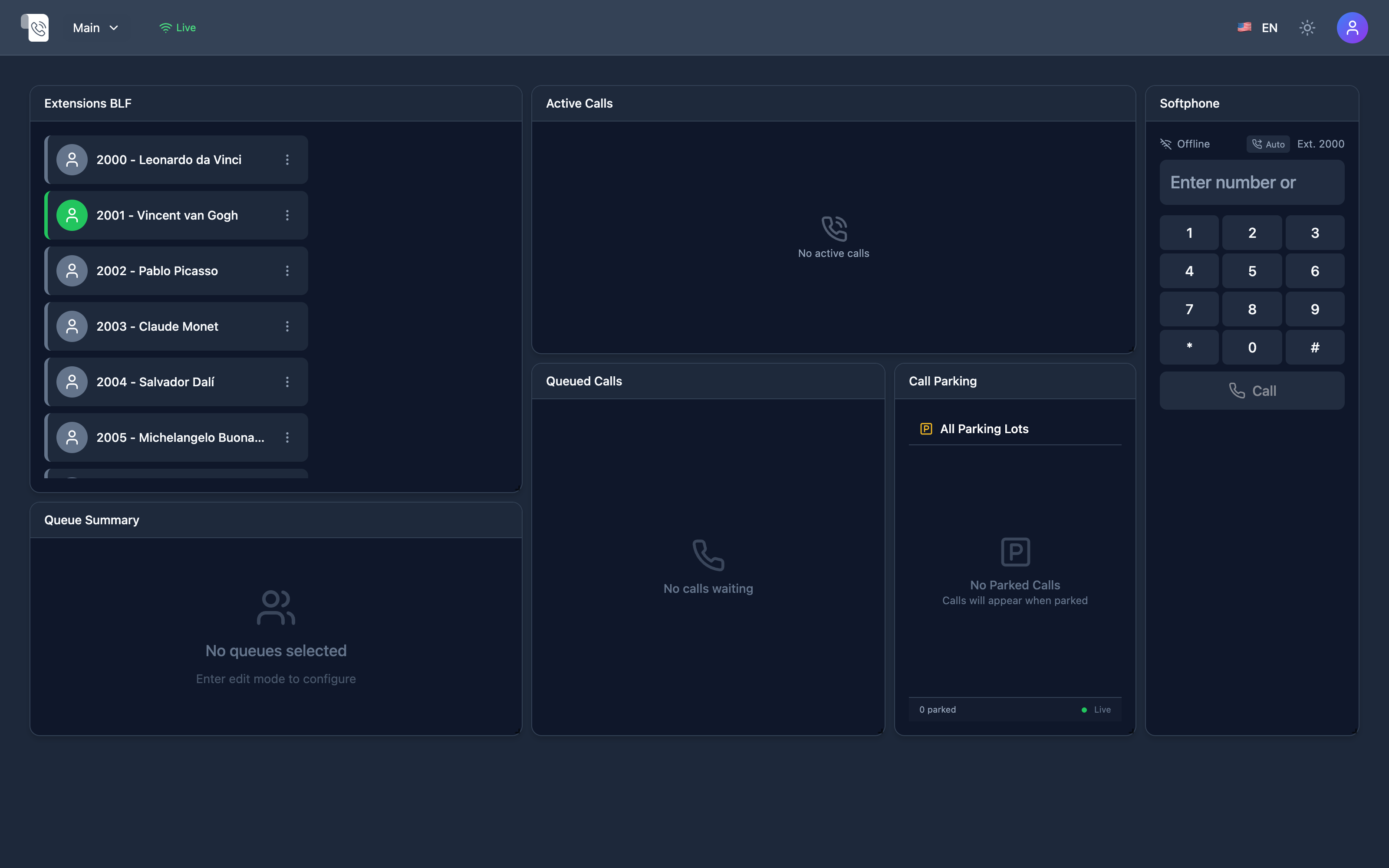
Section titled “📖 Introduction”The Switchboard Console is the primary real-time command cockpit for call center operators, receptionists, dispatchers, and supervisors. Built on top of high-performance WebSockets and Telephony Event Socket Layer (ESL) telemetry, it provides sub-second visibility into telephony state across the entire enterprise tenant.
Operators can monitor extension BLF (Busy Lamp Field) availability, answer incoming queues, execute attended or blind transfers via drag-and-drop, park calls into shared lots, and place calls using the built-in WebRTC softphone without leaving their single-pane workstation.
🖥️ Layout Architecture & Grid System
Section titled “🖥️ Layout Architecture & Grid System”The Switchboard Console employs a responsive, configurable 48-unit fluid grid system designed for ultra-wide displays, dual-monitor workstations, and high-density laptops:
| Widget Panel | Default Grid Width | Real-Time Telemetry Source | Operational Responsibility |
|---|---|---|---|
| Extensions BLF | 48 Units (Top Row) | Telephony Event Socket (ESL) Sofia Presence & SIP Registrations | Monitors user presence across all tenant extensions. Displays clean single-line labels with status rings and one-click actions. |
| Active Calls | 18 Units (Bottom Left) | Telephony Server Channel Events (CHANNEL_CREATE, CHANNEL_BRIDGE) |
Displays current connected calls, channel caller IDs, talk durations, and real-time supervisory action triggers. |
| Queued Calls | 18 Units (Bottom Center) | Call Center Queues (mod_callcenter ESL events) |
Real-time queue backlog monitoring, caller wait times, and priority call pick / routing capabilities. |
| Parking Lots | 12 Units (Bottom Right) | Telephony Server FIFO & Orbit Call Parking | Displays designated parking slots (701, 702, etc.), caller holding time, and one-click retrieval. |
| Integrated Softphone | Floating / Docked | Kamailio WebSockets & WebRTC Media Relay | In-browser SIP endpoint for placing, receiving, muting, holding, and transferring calls with DTMF dialpad. |
[!NOTE] Telemetry widgets refresh instantaneously via persistent WebSocket connections. If network connectivity is interrupted, the console displays an ambient reconnection banner and re-synchronizes channels upon re-establishment without requiring a page reload.
👥 Extensions BLF Widget
Section titled “👥 Extensions BLF Widget”The Extensions BLF panel presents all configured SIP extensions within the tenant domain in a clean, high-density matrix.
Visual State Indicators
Section titled “Visual State Indicators”To maintain visual clarity and avoid UI jitter, status is communicated through modern avatar ring indicators:
| Status Ring | Telephony State | Description |
|---|---|---|
| 🟢 Emerald Green | Available / Idle |
Extension is registered, online, and ready to receive calls. |
| 🔴 Crimson Red | On Call / Busy |
Extension is currently connected to an active inbound or outbound call. |
| 🟡 Amber Yellow | Ringing |
Extension is alerting with an incoming call ringing on their device. |
| ⚪ Neutral Gray | Offline / Unregistered |
Endpoint is not currently registered with the SIP registrar. |
| 🟣 Purple / Violet | DND / Paused |
Extension has enabled Do-Not-Disturb or is on an active pause cause code. |
Single-Line Extension Formatting
Section titled “Single-Line Extension Formatting”Extension badges enforce a single-line label format with automatic ellipsis truncation (truncate) for long employee names. This guarantees uniform card heights across high-density layouts regardless of name lengths:
[ Avatar Ring ] 1001 - Alexander Montgomery...Operator Interaction Workflows
Section titled “Operator Interaction Workflows”- One-Click Call: Clicking any extension tile instantly dials that user via the WebRTC softphone.
- Drag-and-Drop Blind Transfer: Drag an active call card directly onto an extension tile and release to execute an immediate blind transfer.
- Attended Transfer: Click the transfer action, select the extension to initiate a warm consultation, announce the caller, and bridge the channels.
- Context Action Menu: Right-clicking an extension tile opens supervisory actions (Listen / Spy, Whisper, Barge-In, Intercom Paging) subject to RBAC privileges.
📞 Active Calls Widget
Section titled “📞 Active Calls Widget”The Active Calls widget renders all calls currently traversing the PBX for the operator’s tenant.
| Field | Source Parameter | Description |
|---|---|---|
| Caller ID | Caller-Caller-ID-Number / Caller-Caller-ID-Name |
Numerical identifier and name of the calling party. |
| Destination | Caller-Destination-Number |
Dialed extension, DID, ring group, or external gateway route. |
| Direction | Call-Direction (inbound / outbound) |
Distinct visual badges denoting internal, inbound PSTN, or outbound trunk traffic. |
| Duration | Channel Timestamp (progress_media_stamp) |
Dynamic elapsed talk-time timer (MM:SS or HH:MM:SS). |
| Codec / Quality | Telephony Server Read/Write Codecs | Displays negotiated audio format (Opus, G.711u, G.711a, G.722). |
Supervisory & Call Control Actions
Section titled “Supervisory & Call Control Actions”Authorized operators and supervisors can execute immediate telephony controls:
- Hangup: Terminate the session immediately.
- Hold / Resume: Place the call on hold with tenant Music on Hold (MOH).
- Transfer: Open the targeted transfer dialog.
- Eavesdrop (Spy): Listen silently to the audio stream without alerting either party.
- Whisper (Coach): Speak directly to the internal agent while remaining inaudible to the external customer.
- Barge-In: Join the conversation into a three-way conference bridge.
⏳ Queued Calls & Call Parking
Section titled “⏳ Queued Calls & Call Parking”Queued Calls Panel
Section titled “Queued Calls Panel”Designed for contact center supervisors, this panel tracks customer calls waiting in inbound ACD queues:
- Queue Name: Target department (e.g.,
Support-Tier1,Sales-Inbound). - Wait Duration: Real-time counter highlighting SLA breaches with adaptive warning colors (Green < 60s, Amber 60-180s, Red > 180s).
- Direct Pickup: Allows the operator to manually intercept and answer a specific priority caller out of the queue.
Call Parking Lots
Section titled “Call Parking Lots”Shared parking spaces (e.g., 701 to 710) allow operators to place a caller on public hold and announce the slot number:
- Park Action: Drag any active call onto an available parking slot or click the Park button.
- Slot Status: Visual occupancy card showing the caller ID and duration on park.
- Unpark / Retrieve: Any extension across the organization can dial the parking slot number, or the operator can retrieve the caller with a single click.
⌨️ Global Keyboard Shortcuts
Section titled “⌨️ Global Keyboard Shortcuts”Accelerate call handling efficiency using zero-mouse keyboard shortcuts:
| Key Combination | Action | Operational Context |
|---|---|---|
Enter |
Answer / Accept Call | Answers the currently alerting inbound call. |
Space |
Toggle Mute | Mutes / unmutes the operator’s active microphone. |
H |
Hold / Resume Call | Toggles hold status on the active line. |
T |
Initiate Transfer | Triggers the transfer destination prompt. |
P |
Quick Park | Parks the active call into the next sequential empty slot. |
Esc |
End / Reject Call | Disconnects the active call session. |
Ctrl + / |
Open Extension Filter | Focuses search bar to instantly query extensions by name or number. |
🔗 Related Switchboard Modules
Section titled “🔗 Related Switchboard Modules”- My Settings — Personal sound preferences, custom ringtones, and remote phonebook directory.
- Role Profiles — RBAC permissions governing supervisory eavesdropping, layout editing, and call control.
- WebRTC Settings — ICE, STUN, and TURN relay parameters ensuring browser audio reliability.
- Appearance — Theme modes, high-contrast dark variants, and custom widget styling.