

Users Management Module Documentation
Table of Contents
Section titled “Table of Contents”- Module Overview (Technical)
- Module Overview (Commercial & Business Value)
- 🎯 User Roles & Key Capabilities
- Visual Interface & Form Structure
- Architectural Flow & Security Governance
- Common Scenarios & Operational Playbooks
- Troubleshooting & Diagnostic Commands
- Model Context Protocol (MCP) AI Integration
- Glossary
1. Module Overview (Technical)
Section titled “1. Module Overview (Technical)”The Users module (public.users) manages operator and administrative identity, credentials, role inheritance, audit verbosity, and AI assistant capabilities within Ring2All Billing. Unlike end-customer portal accounts, administrative users possess direct access to rating engines, customer wallets, invoices, carrier trunking configurations, and security firewall rules.
Data Model & System Linkage
Section titled “Data Model & System Linkage” ┌────────────────────────────────────────────────────────────────────────┐ │ User Entity (public.users) │ │ • id: bigint (Canonical Invariant Primary Key) │ │ • uuid: uuid (Public API & SSO Identifier) │ │ • username: VARCHAR(100) (Unique Login Handle) │ │ • email: VARCHAR(255) (Corporate Contact & MFA Notification Target) │ │ • password_hash: VARCHAR(255) (Argon2id Salted Cryptographic Hash) │ │ • role_profile_id: bigint (RBAC Permission Matrix FK) │ │ • log_profile_id: bigint (Audit & Retention Policy FK) │ │ • mcp_role_id: bigint (AI MCP Copilot Tool Execution Matrix FK) │ │ • ai_profile_id: bigint (LLM Model & Provider Association FK) │ │ • status: 'active' | 'inactive' | 'suspended' │ └───────────────────────────────────┬────────────────────────────────────┘ │ ┌─────────────────────────┼─────────────────────────┐ ▼ ▼ ▼ ┌───────────────────┐ ┌───────────────────┐ ┌───────────────────┐ │ role_profiles │ │ log_profiles │ │ mcp_roles │ │ • Module CRUD │ │ • Audit Verbosity │ │ • Rating Tools │ │ • Billing Scopes │ │ • Retention Days │ │ • Invoicing Tools │ │ • Security Matrix │ │ • Alert Webhooks │ │ • Risk Guardrails │ └───────────────────┘ └───────────────────┘ └───────────────────┘PostgreSQL Schema Architecture (public.users)
Section titled “PostgreSQL Schema Architecture (public.users)”- Primary Key:
id(bigserial) provides numeric immutability for foreign keys in audit trails and transaction records. - Cryptographic Security: Passwords are never stored in cleartext; they are hashed using
Argon2id(memory-hard, resistant to GPU/ASIC brute-force attacks). - Multi-Pillar Governance: Each user record concurrently references four governance pillars:
role_profile_id: RBAC permissions restricting UI navigation and API endpoints.log_profile_id: Granular audit logging rules dictating what administrative events are recorded.mcp_role_id: AI Copilot boundaries dictating which automated Model Context Protocol tools the user can invoke.ai_profile_id: Default Large Language Model provider and engine powering AI interactions.
- Primary Admin Protection: User ID 1 (
admin) is protected against deletion, status deactivation, and role downgrade to prevent administrative lockout.
2. Module Overview (Commercial & Business Value)
Section titled “2. Module Overview (Commercial & Business Value)”- Enterprise Separation of Duties (SoD): Enforces strict boundaries between financial accountants, NOC billing operators, telecommunications engineers, and platform superadministrators, mitigating internal fraud and accidental misconfigurations.
- Auditability & Regulatory Compliance: Links every customer tariff change, manual credit adjustment, invoice write-off, and carrier route modification directly to an authenticated user ID, meeting SOX, SOC 2, and telecom licensing compliance mandates.
- Streamlined Multi-Tier Operations: Allows carrier operators to delegate day-to-day rate card ingestion and payment tracking to lower-privileged staff without exposing mission-critical billing infrastructure or database credentials.
3. 🎯 User Roles & Key Capabilities
Section titled “3. 🎯 User Roles & Key Capabilities”| User Role | Key Permissions | Core Responsibilities & Workflows |
|---|---|---|
| Super Administrator | Full Control (CRUD on Users & Profiles) |
Provisions administrative personnel, assigns role profiles and audit profiles, configures AI Copilot access, resets credentials, and manages master system security. |
| Billing Manager | Read & Create (Standard Staff) | Enrolls junior billing operators, assigns predetermined operational profiles, and audits user activity across billing and financial reconciliation queues. |
| Security Officer / Auditor | Read-Only (User Catalog & Logs) | Inspects administrative user catalogs, verifies that former employees are promptly deactivated, and reviews session and login history against compliance standards. |
4. Visual Interface & Form Structure
Section titled “4. Visual Interface & Form Structure”Level 1 — Users List View
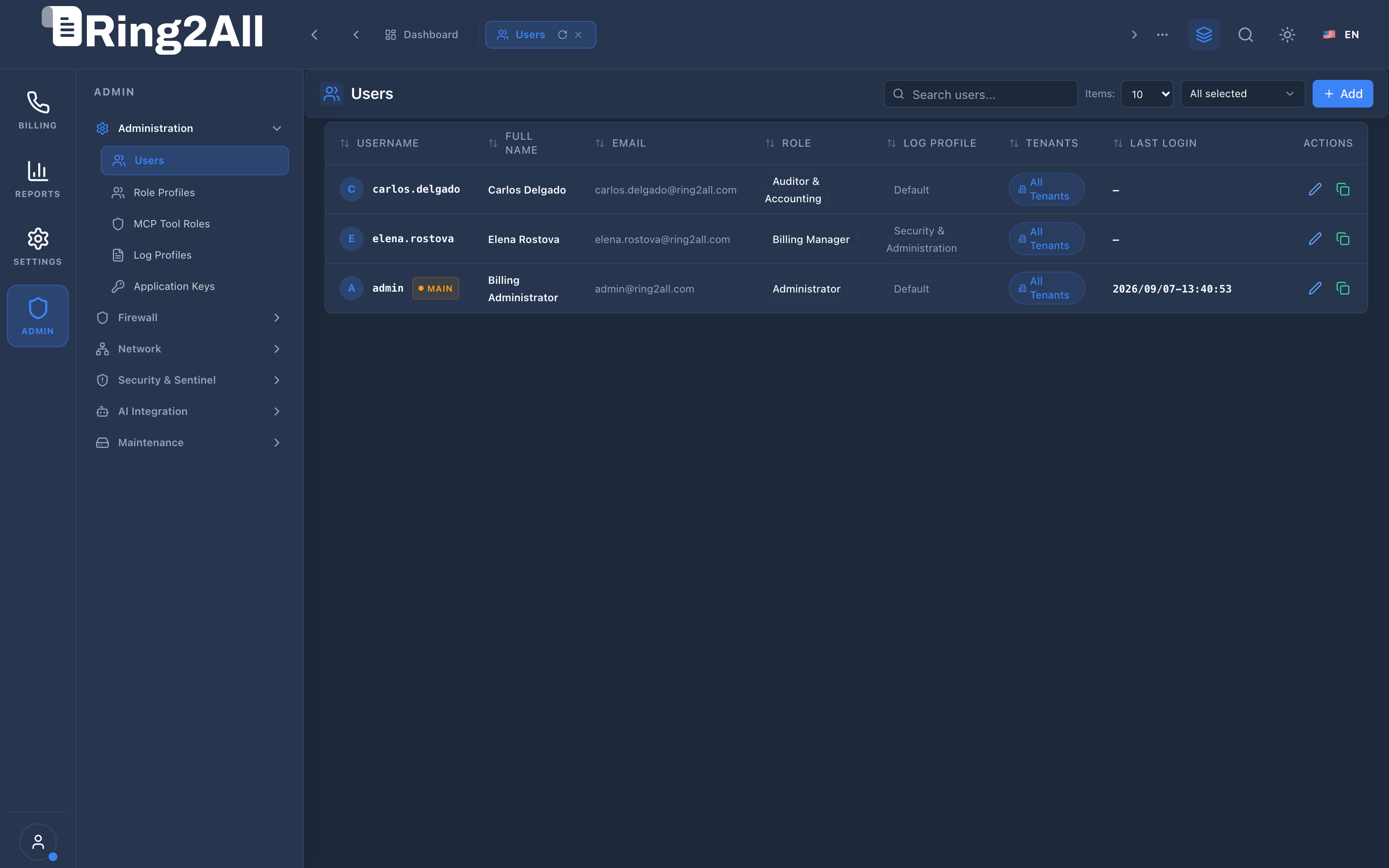
Section titled “Level 1 — Users List View”The administrative users catalog provides a comprehensive inventory of all system operators, their active roles, assigned audit profiles, multi-tenant scopes, and last login timestamps.
Level 2 — User Creation & Edit Form
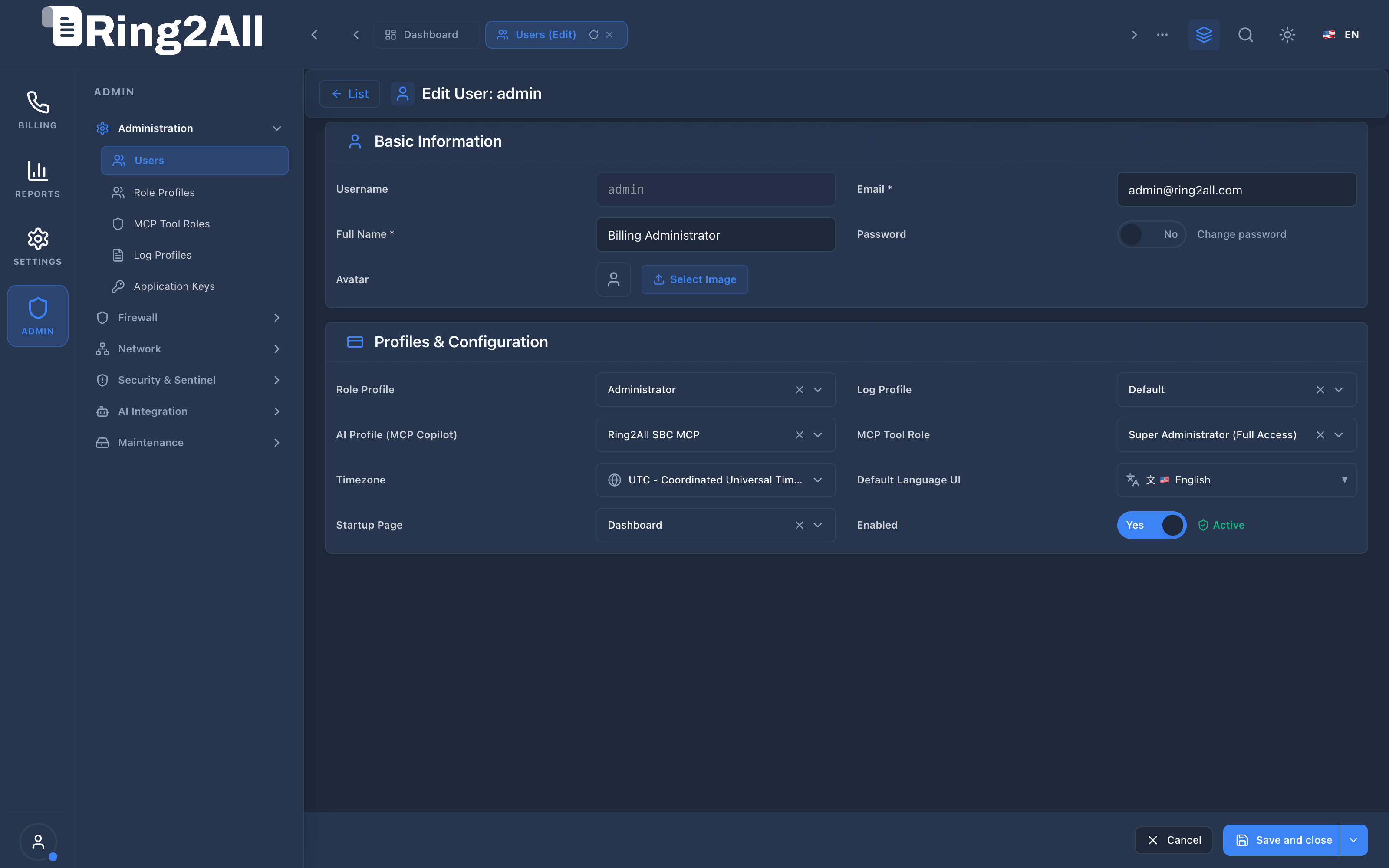
Section titled “Level 2 — User Creation & Edit Form”The user editor adheres to the standardized 4-column layout ([Label 1] [Control 1] [Label 2] [Control 2]), cleanly partitioned into Basic Information and Profiles & Configuration.
Fields & Parameters Reference
Section titled “Fields & Parameters Reference”- Username: Unique alphanumeric login handle used for session authentication.
- Email: Primary corporate email address for password recovery, billing notifications, and security alerts.
- Full Name: Formal human-readable name displayed across UI headers and system audit logs.
- Password: Secure passphrase; masked by default with an optional password reset toggle in edit mode.
- Role Profile: Dropdown selecting the RBAC permission profile governing UI and API privileges.
- Log Profile: Dropdown selecting the audit profile defining retention period and event capturing.
- AI Profile (MCP Copilot): Associates the user with a specific AI provider profile for conversational intelligence.
- MCP Tool Role: Selects the governance matrix defining which automated AI tools the user can execute.
- Timezone & Locale: Preferences for localized timestamp presentation and interface language.
- Startup Page: Landing module displayed immediately upon administrative login.
- Enabled: Operational toggle; disabling immediately invalidates existing JWT sessions and blocks login.
5. Architectural Flow & Security Governance
Section titled “5. Architectural Flow & Security Governance” ┌──────────────┐ 1. POST /api/v1/auth/login ┌────────────────────────┐ │ System Admin ├────────────────────────────────────────►│ Fastify 5 Auth Guard │ └──────────────┘ └───────────┬────────────┘ │ 2. Verify Argon2id │ 3. Fetch User, Roles, Hash & Status │ Audit, & MCP Roles ▼ ┌────────────────────────┐ │ PostgreSQL Engine │ │ (ss_billing database) │ └───────────┬────────────┘ │ 4. Issue Encrypted │ JWT with Scopes │ ▼ ┌──────────────┐ 5. Validated API Requests ┌────────────────────────┐ │ Admin Web UI ├────────────────────────────────────────►│ RBAC & Audit Intercept │ └──────────────┘ (Header: Authorization: Bearer ...) └────────────────────────┘- Authentication: The user submits credentials to
/api/v1/auth/login. - Cryptographic Validation: The backend verifies the password hash against
public.users.password_hashusing Argon2id. If the user status is notactive, authentication is rejected with HTTP 403. - Pillar Resolution: The server retrieves the user’s role profile, log profile, and MCP tool role in a single optimized query.
- Token Generation: An encrypted JWT access token is generated containing immutable numeric user ID (
uid), role profile ID (rid), and tenant access boundaries. - Auditing: Every subsequent HTTP mutation writes an immutable row to
public.audit_logsreferencinguser_id.
6. Common Scenarios & Operational Playbooks
Section titled “6. Common Scenarios & Operational Playbooks”Playbook 1: Enrolling a New Billing Operator
Section titled “Playbook 1: Enrolling a New Billing Operator”- Navigate to ADMIN > Administration > Users.
- Click + Add in the top-right toolbar.
- Enter
username,email, andfullName. - Define a secure initial password complying with complexity standards.
- Under Profiles & Configuration, select
Role Profile: Billing ManagerorBilling Operator. - Select
Log Profile: Security & Administrationto ensure all rate modifications are logged. - Select
MCP Tool Role: Billing Operator (Standard)to grant AI access to rating calculations and CDR queries. - Click Save and close.
Playbook 2: Deprovisioning Departing Staff
Section titled “Playbook 2: Deprovisioning Departing Staff”- Locate the departing operator in the users data grid.
- Click the edit icon to open the User Form.
- Toggle the Enabled switch to
Inactive. - Click Save and close.
- Result: The user’s JWT tokens are rejected on the next request, and all API access is immediately revoked while preserving historical audit trails.
7. Troubleshooting & Diagnostic Commands
Section titled “7. Troubleshooting & Diagnostic Commands”Inspecting User Accounts via CLI
Section titled “Inspecting User Accounts via CLI”# Connect to PostgreSQL billing databasesu - postgres -c "psql -d ss_billing -c 'SELECT u.id, u.username, u.email, u.status, r.name AS role, l.name AS log_profile, m.name AS mcp_roleFROM public.users uLEFT JOIN public.role_profiles r ON r.id = u.role_profile_idLEFT JOIN public.log_profiles l ON l.id = u.log_profile_idLEFT JOIN public.mcp_roles m ON m.id = u.mcp_role_idORDER BY u.id ASC;'"Unlocking or Resetting Admin Password
Section titled “Unlocking or Resetting Admin Password”# Reset administrator password to default hashsu - postgres -c "psql -d ss_billing -c \"UPDATE public.usersSET password_hash = '\\\$argon2id\\\$v=19\\\$m=65536,t=3,p=4\\\$...'WHERE id = 1;\""8. Model Context Protocol (MCP) AI Integration
Section titled “8. Model Context Protocol (MCP) AI Integration”The Users Management module connects directly to the Ring2All BSS MCP Server, enabling security auditors, administrators, and governance agents to query platform operators and verify role assignments programmatically.
Available MCP Tools
Section titled “Available MCP Tools”| Tool Name | Access Role | Description & Primary Function | Example Arguments |
|---|---|---|---|
list_admin_users |
Super Administrator |
Lists billing platform administrative users with assigned roles, statuses, and last login timestamps. | {"status": "active", "limit": 10} |
Sample MCP Tool Execution: list_admin_users
Section titled “Sample MCP Tool Execution: list_admin_users”Request Payload
Section titled “Request Payload”{ "name": "list_admin_users", "arguments": { "limit": 5 }}Response Payload
Section titled “Response Payload”[ { "id": 1, "username": "admin", "name": "System Administrator", "email": "admin@ring2all.com", "status": "active", "roleName": "Super Administrator", "mcpRoleName": "Super Administrator (Full MCP Access)", "lastLoginAt": "2026-09-09T05:10:00Z" }]Conversational AI Prompts for Copilot
Section titled “Conversational AI Prompts for Copilot”- “List all active platform users and their assigned RBAC and MCP roles.”
- “Are there any inactive or suspended administrative user accounts?”
- “Verify which users have Super Administrator privileges.”
9. Glossary
Section titled “9. Glossary”- Argon2id: The state-of-the-art hybrid memory-hard password hashing algorithm chosen by the Password Hashing Competition (PHC).
- Role Profile (RBAC): Role-Based Access Control matrix dictating granular view, create, edit, and delete permissions across platform modules.
- Log Profile: Configuration profile that controls retention windows and event verbosity for operational and security audit logging.
- MCP Tool Role: Governance policy restricting which automated Model Context Protocol tools an AI agent can execute on behalf of the user.
- Model Context Protocol (MCP): Open protocol standard that enables secure, controlled integration between Large Language Models and external tools, databases, and telecom rating engines.