

Firewall Settings Module Documentation
Table of Contents
Section titled “Table of Contents”- Navigation & Access
- Screenshots & Visual Interface
- Module Overview (Technical)
- Module Overview (Commercial/Business)
- Module Overview (End User/Administrator)
- User Roles & Key Capabilities
- Configuration Sections
- Settings Reference
- Common Scenarios & Examples
- Model Context Protocol (MCP) AI Integration
- Limitations & Important Notes
- Troubleshooting Tips
- Glossary
Navigation & Access
Section titled “Navigation & Access”To access the Firewall Settings module:
- Log in to the Ring2All Web Portal (
https://<domain-or-ip>/login) with administrative credentials. - In the left navigation sidebar, locate and expand Admin.
- Under the Firewall section, click Firewall Settings (
/admin/firewall/settings). - Configure the system firewall and intrusion detection parameters.
- Click Save in the bottom action bar to persist your changes to the database and apply runtime daemon configurations.
Screenshots & Visual Interface
Section titled “Screenshots & Visual Interface”Firewall Settings Configuration Form
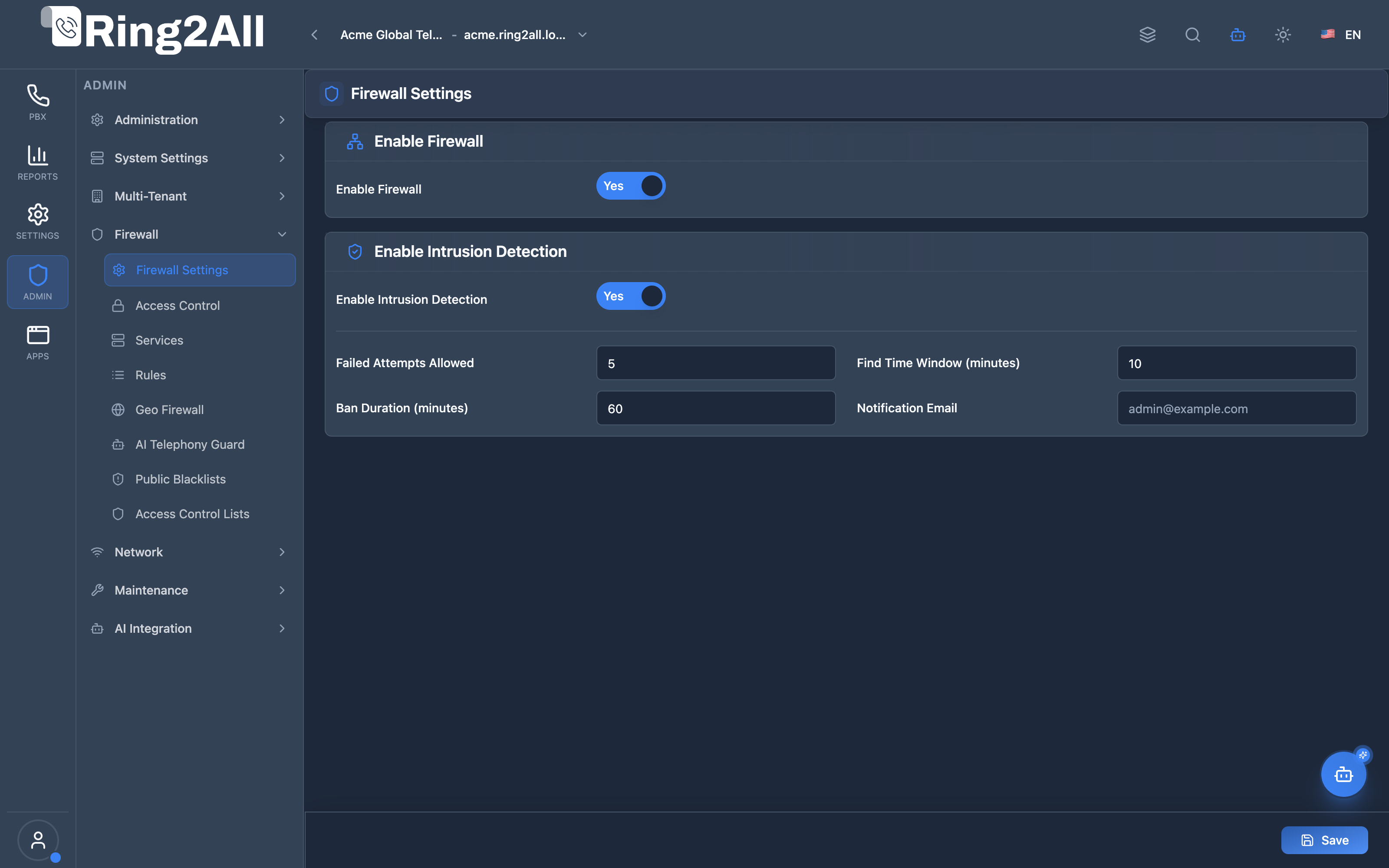
Section titled “Firewall Settings Configuration Form”The Firewall Settings form allows administrators to enable or disable the system firewall (nftables) globally, and configure intrusion detection (Fail2Ban) thresholds including allowed failed attempts, observation time windows, ban durations, and security notification email targets.
1. Module Overview (Technical)
Section titled “1. Module Overview (Technical)”What Are Firewall Settings?
Section titled “What Are Firewall Settings?”Firewall Settings is a security configuration module that manages the system firewall (nftables) and intrusion detection (Fail2Ban). This module works with related Firewall Services and Firewall Rules modules for complete traffic control.
Architecture
Section titled “Architecture”┌─────────────────────────────────────────────────────────────────┐│ Firewall System Architecture │├─────────────────────────────────────────────────────────────────┤│ ││ Firewall Settings ││ ┌──────────────────────────────────────────────────────────┐ ││ │ Global Configuration │ ││ │ │ ││ │ Firewall (nftables): │ ││ │ └─ Enable/Disable │ ││ │ │ ││ │ Intrusion Detection (Fail2Ban): │ ││ │ ├─ Enable/Disable │ ││ │ ├─ Failed Attempts: 5 │ ││ │ ├─ Find Time: 10 minutes │ ││ │ ├─ Ban Duration: 60 minutes │ ││ │ └─ Notification Email: admin@company.com │ ││ │ │ ││ └──────────────────────────────────────────────────────────┘ ││ │ ││ ▼ Works with ││ ┌──────────────────────────────────────────────────────────┐ ││ │ │ ││ │ Firewall Services Firewall Rules │ ││ │ ┌────────────────┐ ┌────────────────┐ │ ││ │ │ HTTP: TCP/80 │ │ Allow HTTP │ │ ││ │ │ HTTPS: TCP/443 │ → │ Block SSH │ │ ││ │ │ SIP: UDP/5060 │ │ Accept SIP LAN │ │ ││ │ │ SSH: TCP/22 │ │ Drop Others │ │ ││ │ └────────────────┘ └────────────────┘ │ ││ │ │ ││ └──────────────────────────────────────────────────────────┘ ││ │ ││ ▼ Applied to system ││ ┌──────────────────────────────────────────────────────────┐ ││ │ Linux Firewall │ ││ │ │ ││ │ nftables: │ ││ │ ├─ Input chain rules │ ││ │ ├─ Output chain rules │ ││ │ └─ Forward chain rules │ ││ │ │ ││ │ Fail2Ban: │ ││ │ ├─ SSH jail │ ││ │ ├─ SIP jail │ ││ │ └─ Web jail │ ││ │ │ ││ └──────────────────────────────────────────────────────────┘ ││ │└─────────────────────────────────────────────────────────────────┘2. Module Overview (Commercial/Business)
Section titled “2. Module Overview (Commercial/Business)”Business Value
Section titled “Business Value”Firewall Settings provides network security:
| Without Firewall | With Firewall |
|---|---|
| Open ports | Controlled access |
| No protection | Intrusion detection |
| Manual bans | Automatic bans |
| Unknown attacks | Email alerts |
Use Cases
Section titled “Use Cases”-
Network Protection
- Block unauthorized access
- Allow only needed ports
-
Intrusion Prevention
- Detect brute force
- Auto-ban attackers
-
SIP Security
- Protect SIP ports
- Ban SIP scanners
-
Compliance
- Audit trail
- Security controls
Feature Highlights
Section titled “Feature Highlights”| Feature | Benefit |
|---|---|
| nftables | Modern Linux firewall |
| Fail2Ban | Intrusion detection |
| Auto-Ban | Automatic blocking |
| Email Alerts | Attack notifications |
| Services | Reusable port definitions |
| Priority Rules | Ordered evaluation |
3. Module Overview (End User/Administrator)
Section titled “3. Module Overview (End User/Administrator)”What Can You Do?
Section titled “What Can You Do?”- Enable/disable system firewall
- Enable/disable intrusion detection
- Configure failed attempt limits
- Set ban duration
- Configure email alerts
- Define firewall services
- Create firewall rules
Firewall Settings Interface
Section titled “Firewall Settings Interface”┌─────────────────────────────────────────────────────────────────┐│ Firewall Settings │├─────────────────────────────────────────────────────────────────┤│ ││ Configure system firewall and intrusion detection ││ ││ ┌─────────────────────────────────────────────────────────────┐││ │ │││ │ Enable Firewall: ✓ │││ │ Enable or disable the system firewall (nftables) │││ │ When enabled, the firewall will enforce all rules │││ │ │││ └─────────────────────────────────────────────────────────────┘││ ││ ──────────────────────────────────────────────────────────────││ ││ ▼ Intrusion Detection (Fail2Ban) ││ ││ ┌─────────────────────────────────────────────────────────────┐││ │ │││ │ Enable Intrusion Detection: ✓ │││ │ Enable Fail2Ban to automatically ban IPs after │││ │ failed login attempts │││ │ │││ │ ────────────────────────────────────────────────────────── │││ │ │││ │ Failed Attempts Allowed: [5 ] │││ │ Number of failed attempts before ban (1-20) │││ │ │││ │ Find Time Window: [10 ] minutes │││ │ Time window to count failed attempts │││ │ │││ │ Ban Duration: [60 ] minutes │││ │ Duration that an IP will be banned │││ │ │││ │ Notification Email: [admin@company.com ] │││ │ Email address to receive ban notifications │││ │ │││ └─────────────────────────────────────────────────────────────┘││ ││ [Save Settings] ││ │└─────────────────────────────────────────────────────────────────┘Firewall Services Interface
Section titled “Firewall Services Interface”┌─────────────────────────────────────────────────────────────────┐│ Firewall Services │├─────────────────────────────────────────────────────────────────┤│ ││ Manage firewall services for nftables (Debian 13) ││ ││ [+ Add Service] ││ ││ [🔍 Search services...] ││ ││ ┌───────────────────────────────────────────────────────────┐ ││ │ Name │ Protocol │ Port │ Description │ Status│ ││ ├──────────┼──────────┼───────────┼────────────────┼───────┤ ││ │ HTTP │ TCP │ 80 │ Web traffic │ ● │ ││ │ HTTPS │ TCP │ 443 │ Secure web │ ● │ ││ │ SSH │ TCP │ 22 │ Secure shell │ ● │ ││ │ SIP │ UDP │ 5060 │ SIP signaling │ ● │ ││ │ RTP │ UDP │ 16384-32768│ Voice media │ ● │ ││ └───────────────────────────────────────────────────────────┘ ││ │└─────────────────────────────────────────────────────────────────┘Firewall Rules Interface
Section titled “Firewall Rules Interface”┌─────────────────────────────────────────────────────────────────┐│ Firewall Rules │├─────────────────────────────────────────────────────────────────┤│ ││ Manage firewall rules for nftables (Debian 13) ││ ││ [+ Add Rule] [Apply Rules] ││ ││ [🔍 Search rules...] ││ ││ ┌───────────────────────────────────────────────────────────┐ ││ │ Name │ Action │ Direction│ Service │ Priority│ St │ ││ ├──────────────┼────────┼──────────┼─────────┼─────────┼────┤ ││ │ Allow HTTP │ Accept │ Input │ HTTP │ 100 │ ● │ ││ │ Allow HTTPS │ Accept │ Input │ HTTPS │ 110 │ ● │ ││ │ Allow SIP │ Accept │ Input │ SIP │ 200 │ ● │ ││ │ Allow RTP │ Accept │ Input │ RTP │ 210 │ ● │ ││ │ Block SSH Ext│ Drop │ Input │ SSH │ 300 │ ● │ ││ └───────────────────────────────────────────────────────────┘ ││ │└─────────────────────────────────────────────────────────────────┘Add/Edit Rule Modal
Section titled “Add/Edit Rule Modal”┌─────────────────────────────────────────────────────────────────┐│ Add Firewall Rule │├─────────────────────────────────────────────────────────────────┤│ ││ Rule Name: [Allow SIP from LAN ] ││ Descriptive name for the rule ││ ││ Action: [Accept ▼] ││ Accept | Drop | Reject ││ ││ Direction: [Input ▼] ││ Input | Output | Forward ││ ││ Service: [SIP ▼] ││ Select service (required) ││ ││ Priority: [200 ] ││ Lower numbers evaluated first (0-9999) ││ ││ Source Address: [192.168.1.0/24 ] ││ Optional: IP or CIDR ││ ││ Destination Address: [ ] ││ Optional: IP or CIDR ││ ││ Interface: [eth0 ] ││ Optional: Network interface ││ ││ Enabled: ✓ ││ ││ [Save] [Cancel] ││ │└─────────────────────────────────────────────────────────────────┘Quick Tips
Section titled “Quick Tips”[!TIP] Apply Rules: Click “Apply Rules” after changes.
[!TIP] Priority: Lower numbers = higher priority.
[!WARNING] Don’t Lock Yourself Out: Always allow SSH from your IP first!
🎯 User Roles & Key Capabilities
Section titled “🎯 User Roles & Key Capabilities”The Firewall Settings module aligns system perimeter security and intrusion prevention authority across key administrative roles:
| User Role | Key Permissions & Responsibilities | Common Tasks & Workflows |
|---|---|---|
| Platform Security Officer / SuperAdmin | Master control over host packet filtering (nftables) and Fail2Ban intrusion detection services. |
Toggle global firewall state, adjust failed attempt thresholds, set ban and find time durations, establish root notification email addresses. |
| Tenant Administrator | Read-only inspection of active firewall state and intrusion detection parameters for organizational awareness. | Inspect system protection status, verify that security policies meet client contractual SLAs, review security incident escalations. |
| NOC / Security Operations Engineer | Real-time intrusion monitoring, jail status verification, and emergency unban execution. | Verify Fail2Ban jail states (fail2ban-client status), investigate anomalous IP lockouts, unban trusted IP addresses following password recovery, analyze attack telemetry. |
| Compliance & Security Auditor | Independent verification of intrusion prevention thresholds against regulatory standards (SOC 2, ISO 27001, PCI-DSS). | Audit failed authentication limits (max 5 attempts), confirm automated logging of ban actions, verify alert delivery to designated security mailboxes. |
4. Configuration Sections
Section titled “4. Configuration Sections”Firewall Settings
Section titled “Firewall Settings”| Field | Description |
|---|---|
| Enable Firewall | nftables on/off |
| Enable Intrusion Detection | Fail2Ban on/off |
| Failed Attempts | Max attempts (1-20) |
| Find Time | Count window (minutes) |
| Ban Duration | Ban time (minutes) |
| Notification Email | Alert recipient |
Firewall Services
Section titled “Firewall Services”| Field | Description |
|---|---|
| Name | Service identifier |
| Protocol | TCP, UDP, ICMP, All |
| Port | Port or range (e.g., 8000-8010) |
| Description | Optional notes |
| Enabled | Active/Inactive |
Firewall Rules
Section titled “Firewall Rules”| Field | Description |
|---|---|
| Name | Rule identifier |
| Action | Accept, Drop, Reject |
| Direction | Input, Output, Forward |
| Service | Associated service |
| Priority | Order (0-9999) |
| Source Address | Source IP/CIDR |
| Destination Address | Dest IP/CIDR |
| Interface | Network interface |
| Enabled | Active/Inactive |
5. Settings Reference
Section titled “5. Settings Reference”Rule Actions
Section titled “Rule Actions”| Action | Behavior | Use Case |
|---|---|---|
| Accept | Allow traffic | Legitimate traffic |
| Drop | Silent block | Stealth blocking |
| Reject | Block with response | Inform sender |
Rule Directions
Section titled “Rule Directions”| Direction | Description |
|---|---|
| Input | Traffic TO the server |
| Output | Traffic FROM the server |
| Forward | Routed traffic |
Common Protocols
Section titled “Common Protocols”| Protocol | Use |
|---|---|
| TCP | HTTP, HTTPS, SSH, SIP-TCP |
| UDP | SIP, RTP, DNS |
| ICMP | Ping |
| All | Any protocol |
Fail2Ban Recommendations
Section titled “Fail2Ban Recommendations”| Setting | Default | Aggressive | Permissive |
|---|---|---|---|
| Failed Attempts | 5 | 3 | 10 |
| Find Time | 10 min | 5 min | 30 min |
| Ban Duration | 60 min | 1440 min (24h) | 30 min |
6. Common Scenarios & Examples
Section titled “6. Common Scenarios & Examples”Scenario 1: Enable Firewall & Detection
Section titled “Scenario 1: Enable Firewall & Detection”- Enable Firewall = ✓
- Enable Intrusion Detection = ✓
- Failed Attempts = 5
- Find Time = 10 minutes
- Ban Duration = 60 minutes
- Email = admin@company.com
- Save
Scenario 2: Create SIP Service
Section titled “Scenario 2: Create SIP Service”- Add Service
- Name = “SIP”
- Protocol = UDP
- Port = 5060
- Description = “SIP signaling”
- Enable = ✓
- Save
Scenario 3: Allow SIP from LAN Only
Section titled “Scenario 3: Allow SIP from LAN Only”- Add Rule
- Name = “Allow SIP LAN”
- Action = Accept
- Direction = Input
- Service = SIP
- Priority = 200
- Source = 192.168.1.0/24
- Enable = ✓
- Save
- Apply Rules
Scenario 4: Block External SSH
Section titled “Scenario 4: Block External SSH”- First: Create “Allow SSH from Admin IP” rule (Priority 90)
- Add Rule
- Name = “Block SSH External”
- Action = Drop
- Direction = Input
- Service = SSH
- Priority = 100
- Enable = ✓
- Save
- Apply Rules
7. Limitations & Important Notes
Section titled “7. Limitations & Important Notes”Technical Notes
Section titled “Technical Notes”[!NOTE] Apply Required: Rules don’t take effect until applied.
[!NOTE] Priority Order: Lower number = evaluated first.
[!CAUTION] SSH Access: Always allow your IP before blocking!
Best Practices
Section titled “Best Practices”- SSH First: Always allow admin SSH
- Specific to General: Specific rules before broad rules
- Test Changes: Verify access after changes
- Enable Fail2Ban: Protect against brute force
- Monitor Bans: Check for false positives
Common Services to Allow
Section titled “Common Services to Allow”| Service | Port | Notes |
|---|---|---|
| HTTP | 80 | Web (redirect to HTTPS) |
| HTTPS | 443 | Secure web |
| SIP UDP | 5060 | SIP signaling |
| SIP TLS | 5061 | Secure SIP |
| RTP | 16384-32768 | Voice media |
| SSH | 22 | Remote admin (restrict!) |
Model Context Protocol (MCP) AI Integration
Section titled “Model Context Protocol (MCP) AI Integration”The Firewall Settings module integrates directly with the Ring2All Platform Copilot MCP Server, enabling automated perimeter status verification, intrusion threshold inspection, and operational diagnostics:
🛠️ Available MCP Tools
Section titled “🛠️ Available MCP Tools”| Tool Name | Operation | Access Level | Description | Key Parameters |
|---|---|---|---|---|
get_firewall_settings |
Read | SuperAdmin / Auditor | Retrieves system-wide PBX firewall state (nftables enabled/disabled), Fail2Ban intrusion detection configuration, failed attempt thresholds, find time, ban time, and alert notification email. | None |
list_firewall_rules |
Read | SuperAdmin / Auditor | Inspects active network packet filtering rules (port, protocol, disposition, source CIDR). | search (string, optional) |
get_voipbl_status |
Read | SuperAdmin / Auditor | Returns status of APIBAN/VoIPBL public blacklist threat intelligence feed. | None |
📋 JSON Tool Schemas & Sample Executions
Section titled “📋 JSON Tool Schemas & Sample Executions”get_firewall_settings
Section titled “get_firewall_settings”{ "name": "get_firewall_settings", "arguments": {}}Sample Successful Response:
{ "success": true, "data": { "firewallEnabled": true, "intrusionDetectionEnabled": true, "failedAttemptsAllowed": 5, "findTime": 600, "banTime": 3600, "notificationEmail": "security-alerts@carrier.com", "updatedAt": "2026-08-14T18:22:10Z" }}💬 Natural Language Prompt Examples
Section titled “💬 Natural Language Prompt Examples”English Prompts
Section titled “English Prompts”- “Check if the PBX firewall and intrusion detection systems are currently enabled.”
- “What are the current Fail2Ban thresholds for failed login attempts and ban duration?”
- “Verify which email address is receiving firewall security incident alerts.”
- “Show me the full security perimeter posture including firewall status and active rules.”
Ejemplos en Español (Spanish Prompts)
Section titled “Ejemplos en Español (Spanish Prompts)”- “Verifica si el firewall y el sistema de detección de intrusos (Fail2Ban) están activos en la centralita.”
- “¿Cuáles son los umbrales configurados para intentos fallidos y tiempo de bloqueo (ban time)?”
- “Comprueba qué correo electrónico tiene asignadas las alertas de seguridad del firewall.”
- “Muéstrame el estado general del perímetro de seguridad, incluyendo el firewall y las reglas activas.”
🛡️ Enterprise Safeguards & Best Practices
Section titled “🛡️ Enterprise Safeguards & Best Practices”- Administrative Lockout Safeguard: Changing firewall parameters via MCP requires explicit administrative credentials and validates that management ports (SSH 22, HTTPS 443) remain reachable.
- Exponential Backoff on Intrusion: Failed login attempts increment counters in Linux shared memory (
fail2ban), locking malicious origins across kernel packet tables. - Audit Trail Logging: All changes to firewall settings trigger instantaneous entries in the immutable system audit log (
public.audit_logs).
8. Troubleshooting Tips
Section titled “8. Troubleshooting Tips”Common Issues
Section titled “Common Issues”| Symptom | Possible Cause | Solution |
|---|---|---|
| Can’t connect | Blocked by firewall | Check rules |
| False bans | Fail2Ban too strict | Adjust settings |
| Rules not working | Not applied | Click Apply Rules |
| Locked out | SSH blocked | Console access |
Check Firewall Status
Section titled “Check Firewall Status”# Check nftablesnft list ruleset
# Check Fail2Ban statusfail2ban-client status
# Check specific jailfail2ban-client status sshd
# Unban an IPfail2ban-client set sshd unbanip 192.168.1.100Check Bans
Section titled “Check Bans”# View banned IPsfail2ban-client status sshd
# Check ban logtail -f /var/log/fail2ban.log
# View all bansiptables -L -n | grep -i ban9. Glossary
Section titled “9. Glossary”| Term | Definition |
|---|---|
| nftables | Linux firewall framework |
| Fail2Ban | Intrusion detection system |
| Jail | Fail2Ban protection scope |
| CIDR | IP range notation |
| Chain | Rule processing group |
| Input Chain | Incoming traffic rules |
Documentation last updated: January 2026