

Route Selections (ARS) Module Documentation
Table of Contents
Section titled “Table of Contents”- Module Overview (Technical)
- Module Overview (Commercial/Business)
- Module Overview (End User/Administrator)
- Configuration Fields Reference
- ARS Routing Logic
- Common Scenarios & Examples
- Model Context Protocol (MCP) AI Integration
- Limitations & Important Notes
- Troubleshooting Tips
- Glossary
1. Module Overview (Technical)
Section titled “1. Module Overview (Technical)”What Is ARS?
Section titled “What Is ARS?”ARS (Automatic Route Selection) enables time-based and priority-based outbound route selection. It creates profiles that link Outbound Routes with optional Time Groups, allowing the system to automatically select the best route based on time of day and priority.
Architecture
Section titled “Architecture”┌─────────────────────────────────────────────────────────────────┐│ ARS System Architecture │├─────────────────────────────────────────────────────────────────┤│ ││ Outbound call request ││ │ ││ ▼ ││ ┌──────────────────────────────────────────────────────────┐ ││ │ ARS Profile Lookup │ ││ │ (Assigned to Class of Service or Extension) │ ││ └──────────────────────────────────────────────────────────┘ ││ │ ││ ▼ ││ ┌──────────────────────────────────────────────────────────┐ ││ │ Evaluate Routes (by priority) │ ││ │ │ ││ │ Priority 1: Route A + Time Group "Business Hours" │ ││ │ └─ Check: Is current time within Business Hours? │ ││ │ ├─ YES → Use Route A │ ││ │ └─ NO → Check next route │ ││ │ │ ││ │ Priority 2: Route B + Time Group "After Hours" │ ││ │ └─ Check: Is current time within After Hours? │ ││ │ ├─ YES → Use Route B │ ││ │ └─ NO → Check next route │ ││ │ │ ││ │ Priority 3: Route C (No Time Group = Always) │ ││ │ └─ Use as fallback │ ││ │ │ ││ └──────────────────────────────────────────────────────────┘ ││ │ ││ ▼ ││ Route call through selected Outbound Route ││ │└─────────────────────────────────────────────────────────────────┘Integration Points
Section titled “Integration Points”ARS profiles are assigned via:
- Class of Service: All extensions with that CoS use the profile
- Extension-level override: Specific extension settings
2. Module Overview (Commercial/Business)
Section titled “2. Module Overview (Commercial/Business)”Business Value
Section titled “Business Value”ARS enables intelligent, time-aware routing:
| Without ARS | With ARS |
|---|---|
| Same route all day | Different routes by time |
| No cost optimization | Cheapest route by time |
| Manual route changes | Automatic selection |
| Single route fallback | Multiple route failover |
Use Cases
Section titled “Use Cases”-
Cost Optimization
- Use cheapest carrier during business hours
- Use alternative carrier after hours (better night rates)
-
Regional Routing
- Route US calls via US carrier
- Route international via international carrier
-
Holiday Routing
- Normal routes on workdays
- Emergency route on holidays
-
Failover Configuration
- Primary route (Priority 1)
- Backup route (Priority 2) if primary fails
-
Load Balancing
- Split traffic across multiple carriers
- Time-based distribution
Feature Highlights
Section titled “Feature Highlights”| Feature | Benefit |
|---|---|
| Multiple Routes | Chain routes with priorities |
| Time Groups | Time-based route activation |
| Priority Ordering | Control route evaluation order |
| Enable/Disable | Toggle routes without deletion |
| Profile Assignment | Apply to CoS or extensions |
3. Module Overview (End User/Administrator)
Section titled “3. Module Overview (End User/Administrator)”What Can You Do?
Section titled “What Can You Do?”- Create ARS profiles with multiple routes
- Assign Time Groups to routes for time-based selection
- Set priorities for route evaluation order
- Enable/disable individual routes within profiles
- Assign profiles to Class of Service or extensions
Navigation
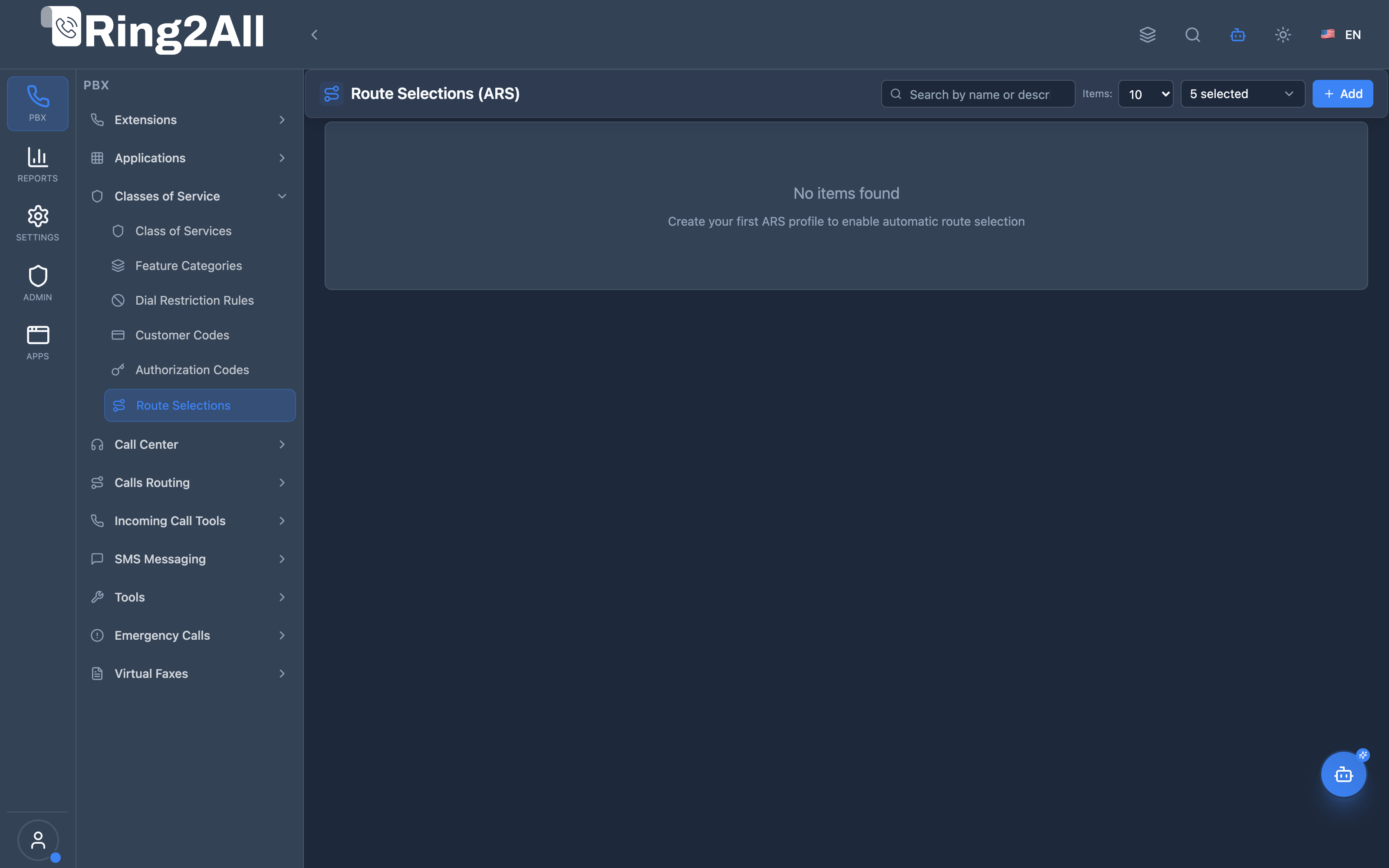
Section titled “Navigation”- Navigate to PBX Engine → Class of Services → Route Selections in the main navigation menu.
- The list view displays all configured ARS routing profiles, including Name, Description, and active status.
- Click the + Add button in the top toolbar to create a new Route Selection profile.
- Click any profile row or the edit action to manage chained carrier routes, time groups, and failover priorities.
Administrator Workflow
Section titled “Administrator Workflow”┌─────────────────────────────────────────────────────────────────┐│ Creating an ARS Profile │├─────────────────────────────────────────────────────────────────┤│ ││ Step 1: Profile Information ││ ├─ Name: "Standard Outbound" ││ ├─ Description: "Default routing with time-based selection" ││ └─ Enabled: ✓ ││ ││ Step 2: Add Routes ││ ││ ┌───────────────────────────────────────────────────────────┐ ││ │ Route 1 (Priority 1) │ ││ │ ├─ Outbound Route: Primary Carrier │ ││ │ ├─ Time Group: Business Hours (8am-6pm) │ ││ │ └─ Enabled: ✓ │ ││ └───────────────────────────────────────────────────────────┘ ││ ││ ┌───────────────────────────────────────────────────────────┐ ││ │ Route 2 (Priority 2) │ ││ │ ├─ Outbound Route: Night Carrier │ ││ │ ├─ Time Group: After Hours (6pm-8am) │ ││ │ └─ Enabled: ✓ │ ││ └───────────────────────────────────────────────────────────┘ ││ ││ ┌───────────────────────────────────────────────────────────┐ ││ │ Route 3 (Priority 3) - FALLBACK │ ││ │ ├─ Outbound Route: Backup Carrier │ ││ │ ├─ Time Group: (none - always available) │ ││ │ └─ Enabled: ✓ │ ││ └───────────────────────────────────────────────────────────┘ ││ ││ Step 3: Save Profile ││ ││ Step 4: Assign to Class of Service ││ └─ Edit CoS → Select ARS Profile: "Standard Outbound" ││ │└─────────────────────────────────────────────────────────────────┘Quick Tips
Section titled “Quick Tips”[!TIP] Priority Order: Lower numbers = higher priority (1 is evaluated first). Use the up/down arrow buttons to easily adjust carrier order.
[!TIP] Always Add Fallback: Include a route without a Time Group at the end of the list to act as a 24/7 universal fallback.
[!CAUTION] Time Group Coverage: Ensure Time Groups do not leave unhandled time windows without a matching active route.
4. Configuration Fields Reference
Section titled “4. Configuration Fields Reference”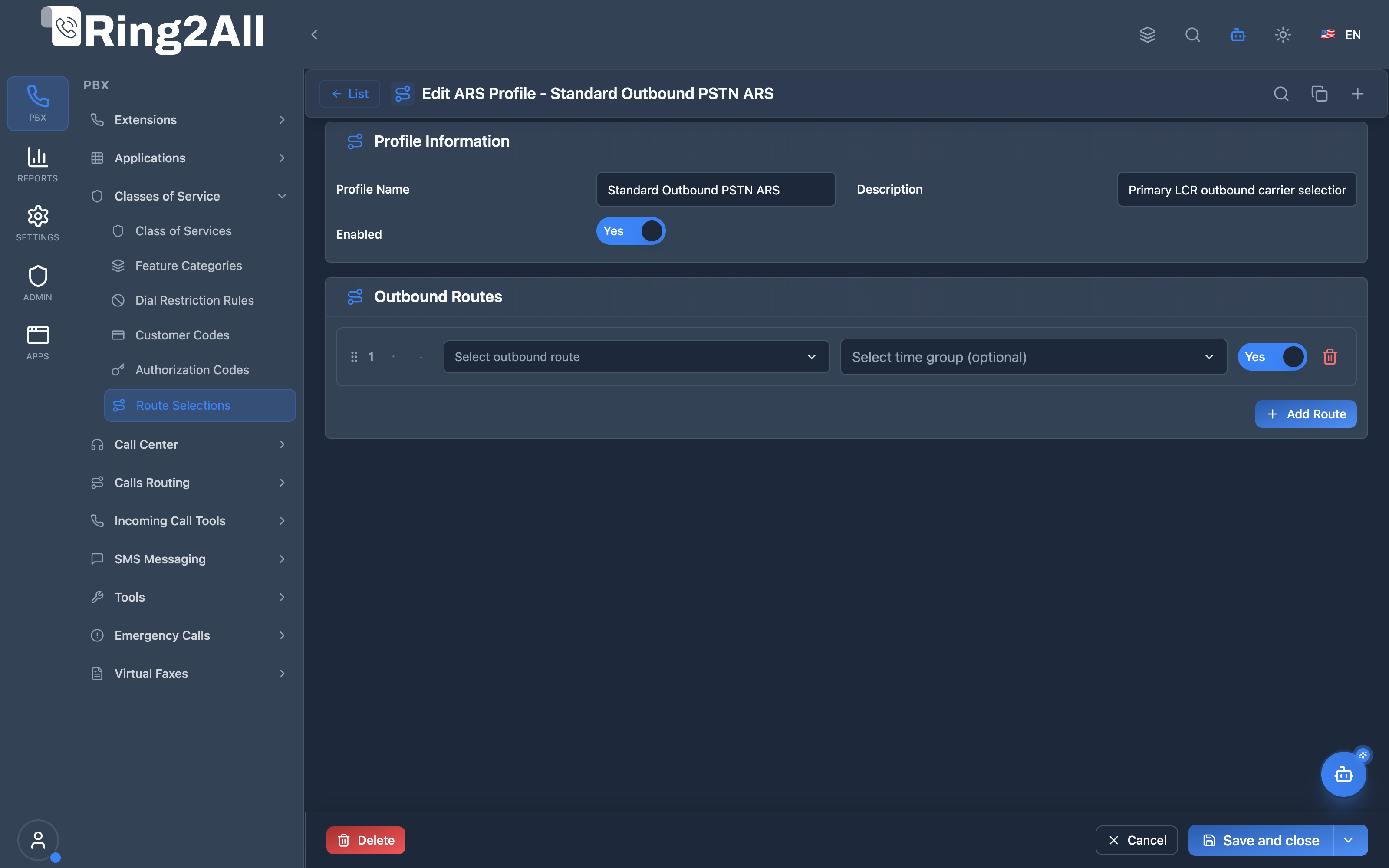
General Information Fields
Section titled “General Information Fields”| Field | Description | User-Friendly Tooltip | Example | Notes |
|---|---|---|---|---|
| Name * | Unique identifier for the ARS profile | A descriptive name for this ARS route profile | Standard Outbound PSTN ARS |
Required. Unique per domain. |
| Description | Contextual notes and operational scope | Detailed description of the routing logic | Primary carrier routing with secondary failover |
Optional. |
| Enabled * | Operational status of the ARS profile | Whether this ARS profile is currently active | Toggle (On/Off) |
Required. If disabled, calls fail or fallback to system default. |
Routes Table Fields
Section titled “Routes Table Fields”| Field | Description | Type / Control | Example | Notes |
|---|---|---|---|---|
| Order / Priority | Execution order of candidate routes | Up / Down arrows | 1, 2, 3... |
Evaluated sequentially until an eligible route connects. |
| Outbound Route * | Outbound trunk route to dispatch call | Dropdown | Primary VoIP Carrier |
Required for each route item. Links to configured Outbound Routes. |
| Time Group | Optional temporal condition filter | Dropdown | Business Hours (8am-5pm) |
If selected, route is only attempted during specified time frames. |
| Enabled | Operational status of this route entry | Toggle (On/Off) | Enabled |
Temporarily disable a carrier without deleting the configuration. |
| Actions | Remove entry | Trash button | Delete |
Deletes the route entry from the profile chain. |
| … | Continue down the list | |||
| Last (no Time Group) | Fallback if nothing else matches |
5. ARS Routing Logic
Section titled “5. ARS Routing Logic”Route Selection Algorithm
Section titled “Route Selection Algorithm”┌─────────────────────────────────────────────────────────────────┐│ ARS Route Selection │├─────────────────────────────────────────────────────────────────┤│ ││ 1. Get ARS Profile for caller (via CoS or extension) ││ │ ││ ▼ ││ 2. Load all enabled routes, sorted by priority ││ │ ││ ▼ ││ 3. For each route (in priority order): ││ │ ││ ├─ Has Time Group? ││ │ ├─ YES: Check if current time is within Time Group ││ │ │ ├─ Within time → SELECT THIS ROUTE ││ │ │ └─ Outside time → Continue to next route ││ │ │ ││ │ └─ NO: SELECT THIS ROUTE (always matches) ││ │ ││ ▼ ││ 4. If no route selected → Use system default route ││ │└─────────────────────────────────────────────────────────────────┘Time Group Matching
Section titled “Time Group Matching”Time Groups define when a route is active:
- Within Time Group: Route is available
- Outside Time Group: Route is skipped
- No Time Group: Route is always available (fallback)
6. Common Scenarios & Examples
Section titled “6. Common Scenarios & Examples”Scenario 1: Business Hours vs. After Hours
Section titled “Scenario 1: Business Hours vs. After Hours”Profile: “Time-Based Routing”
| Priority | Outbound Route | Time Group | Purpose |
|---|---|---|---|
| 1 | Primary Carrier | Business Hours (8am-6pm) | Cheapest daytime |
| 2 | Night Carrier | After Hours (6pm-8am) | Night rate savings |
| 3 | Backup Carrier | (none) | Fallback if both fail |
Scenario 2: Regional Carrier Selection
Section titled “Scenario 2: Regional Carrier Selection”Profile: “Geographic Routing”
| Priority | Outbound Route | Time Group | Purpose |
|---|---|---|---|
| 1 | US Carrier | (none) | Handles US numbers |
| 2 | International Carrier | (none) | Handles international |
Note: Route pattern matching happens at Outbound Route level
Scenario 3: Weekend/Holiday Routing
Section titled “Scenario 3: Weekend/Holiday Routing”Profile: “Holiday Aware”
| Priority | Outbound Route | Time Group | Purpose |
|---|---|---|---|
| 1 | Holiday Route | Holidays | Special holiday routing |
| 2 | Weekend Route | Weekends | Weekend carrier |
| 3 | Primary Carrier | Business Hours | Normal business |
| 4 | Backup Carrier | (none) | Fallback |
Scenario 4: Cost-Based Failover
Section titled “Scenario 4: Cost-Based Failover”Profile: “Primary + Backup”
| Priority | Outbound Route | Time Group | Purpose |
|---|---|---|---|
| 1 | Cheapest Carrier | (none) | Try cheapest first |
| 2 | Premium Carrier | (none) | If cheapest fails |
7. Model Context Protocol (MCP) AI Integration
Section titled “7. Model Context Protocol (MCP) AI Integration”Ring2All exposes dedicated Model Context Protocol (MCP) tools for Route Selections (ARS - Automatic Route Selection), allowing autonomous AI agents and Copilots to inspect outbound trunk priority chains, verify Time Group schedules, and provision or adjust carrier failover routing policies with domain-level isolation and dependency protection.
Available MCP Tools
Section titled “Available MCP Tools”| Tool Name | Description | Key Parameters |
|---|---|---|
list_route_selections |
Lists all Route Selection (ARS) profiles in the domain, including profile names, descriptions, and assigned route counts. | search (optional string) |
get_route_selection_status |
Retrieves full configuration, ordered outbound trunk routes, priority indices, and bound Time Groups for an ARS profile. | name (required) |
create_route_selection |
Provisions a new Route Selection (ARS) profile to group and prioritize outbound routes. | name, description, enabled |
update_route_selection |
Modifies an existing Route Selection profile name, description, or enabled state. | name, newName, description, enabled |
delete_route_selection |
Deletes an ARS profile after verifying it is not currently bound to an active Class of Service (assertCanDeleteRouteSelection). |
name (required) |
Protection Guards & Integrity
Section titled “Protection Guards & Integrity”When an AI agent executes delete_route_selection, Ring2All runs assertCanDeleteRouteSelection. The system verifies whether any Class of Service (public.class_of_services) is actively using this ARS profile. If linked, deletion is rejected with an explanatory message, preventing routing outages.
AI Agent Operational Examples
Section titled “AI Agent Operational Examples”Querying ARS Route Selection Chains
Section titled “Querying ARS Route Selection Chains”{ "tool": "get_route_selection_status", "arguments": { "name": "Default Outbound ARS" }}Provisioning an International Failover ARS Profile
Section titled “Provisioning an International Failover ARS Profile”{ "tool": "create_route_selection", "arguments": { "name": "International Premium ARS", "description": "Primary Tier-1 SIP trunk with automatic failover to secondary gateway", "enabled": true }}Recommended Natural Language Prompts
Section titled “Recommended Natural Language Prompts”- “List all ARS Route Selection profiles configured on this PBX and show their assigned outbound routes.”
- “Show me the priority carrier chain for the ‘Default Outbound ARS’ profile.”
- “Check if ‘International Premium ARS’ is assigned to any Class of Service before I modify it.”
8. Limitations & Important Notes
Section titled “8. Limitations & Important Notes”Technical Limitations
Section titled “Technical Limitations”[!WARNING] Time Group Gaps: If no Time Group matches current time and no fallback exists, calls may fail.
[!WARNING] Profile Required: Extensions/CoS must have ARS profile assigned to use time-based selection.
Best Practices
Section titled “Best Practices”- Always Add Fallback: Include route without Time Group
- No Time Gaps: Ensure Time Groups cover all hours
- Test Time Groups: Verify transitions at boundaries
- Priority Order: Most specific first, fallback last
- Monitor Failures: Track which routes are used
Route Selection Notes
Section titled “Route Selection Notes”[!IMPORTANT] Pattern Matching: Pattern matching (e.g., 011 for international) is handled at the Outbound Route level, not ARS.
9. Troubleshooting Tips
Section titled “9. Troubleshooting Tips”Common Issues
Section titled “Common Issues”| Symptom | Possible Cause | Solution |
|---|---|---|
| Wrong route selected | Priority order incorrect | Adjust priorities |
| Calls failing at certain times | Time Group gap | Add fallback route |
| ARS not being used | Profile not assigned | Check CoS/extension |
| Always uses fallback | Time Groups misconfigured | Verify time ranges |
Diagnostic SQL
Section titled “Diagnostic SQL”List ARS profiles:
SELECT p.id, p.name, p.enabled, (SELECT COUNT(*) FROM public.ars_routes WHERE ars_profile_id = p.id) as route_countFROM public.ars_profiles pWHERE p.domain_id = [domain_id];Check profile routes:
SELECT r.priority, r.enabled, o.name as outbound_route, t.name as time_groupFROM public.ars_routes rJOIN public.outbound_routes o ON r.outbound_route_id = o.idLEFT JOIN public.time_groups t ON r.time_group_id = t.idWHERE r.ars_profile_id = [profile_id]ORDER BY r.priority;10. Glossary
Section titled “10. Glossary”| Term | Definition |
|---|---|
| ARS | Automatic Route Selection—time/priority-based routing |
| ARS Profile | Collection of routes with priorities |
| Outbound Route | Carrier/trunk configuration for outbound calls |
| Time Group | Schedule defining when a route is active |
| Priority | Order in which routes are evaluated (lower = first) |
| Fallback Route | Route without Time Group (always available) |
| Class of Service | Permission group that can have ARS profile assigned |
Documentation last updated: January 2026