

Active Calls Module Documentation
Table of Contents
Section titled “Table of Contents”- Navigation & Access
- Screenshots & Visual Interface
- Module Overview (Technical)
- Module Overview (Commercial/Business)
- Module Overview (End User/Administrator)
- Call Fields Reference
- Call States
- Common Scenarios & Examples
- Limitations & Important Notes
- Troubleshooting Tips
- Glossary
- Model Context Protocol (MCP) AI Integration
Navigation & Access
Section titled “Navigation & Access”To access the Active Calls live monitor:
- Log in to the Ring2All Web Portal (
https://<domain-or-ip>/login). - In the left navigation sidebar, expand Reports.
- Under PBX Reports, click Active Calls (
/reports/pbx/active-calls). - Monitor active channels in real time, inspect codec utilization, verify bridging states, or use the Refresh button on the toolbar to update channel states.
Screenshots & Visual Interface
Section titled “Screenshots & Visual Interface”Active Calls Real-Time Monitor
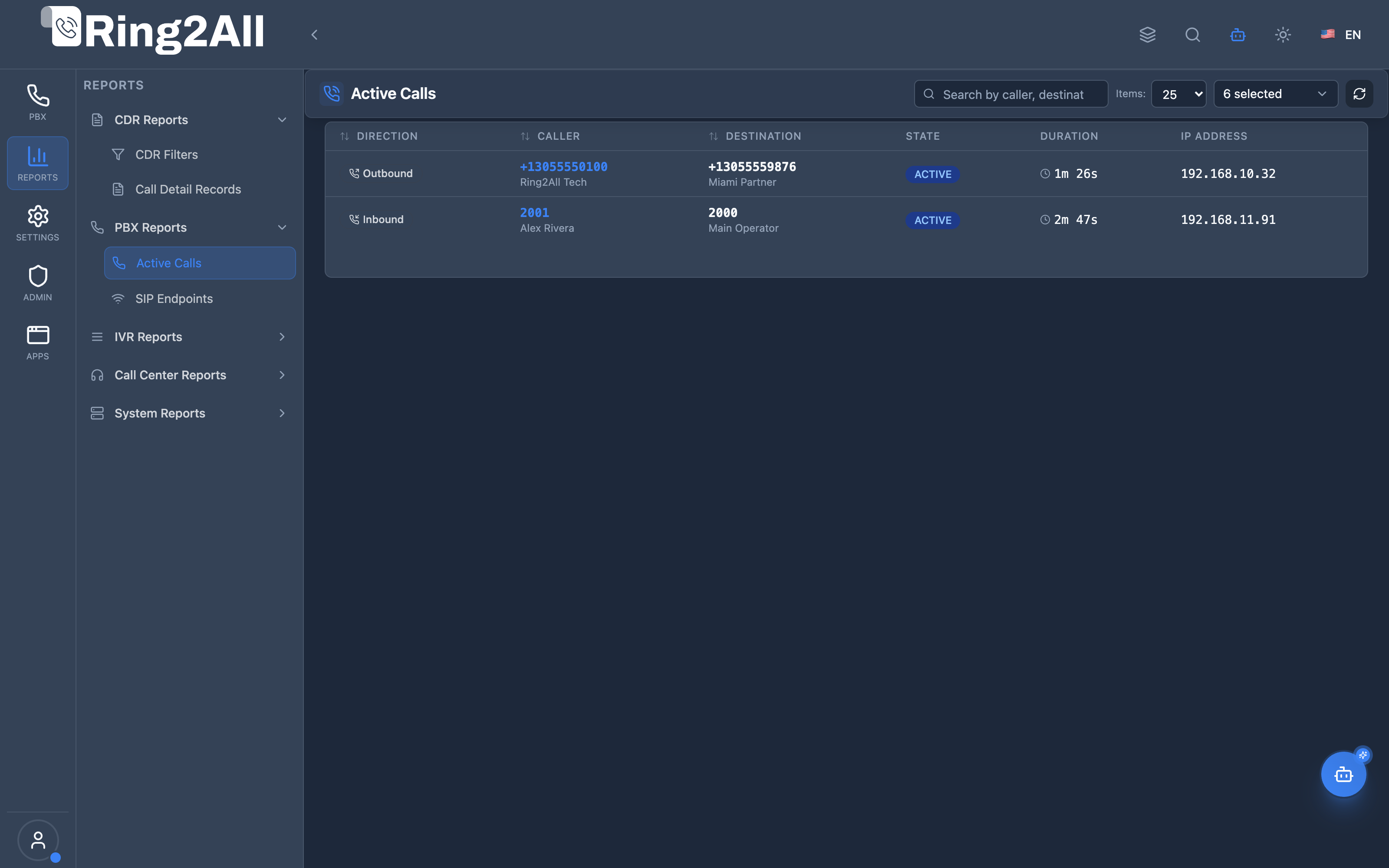
Section titled “Active Calls Real-Time Monitor”Live call supervision dashboard displaying originating legs, caller and destination names, IP addresses, duration timers, active media codecs (PCMU, G722), and channel execution status.
1. Module Overview (Technical)
Section titled “1. Module Overview (Technical)”What Are Active Calls?
Section titled “What Are Active Calls?”Active Calls is a real-time call monitoring interface that displays all currently active calls on the PBX. It queries Telephony Server’s live channel data to show callers, destinations, call states, duration, and technical details.
Architecture
Section titled “Architecture”┌─────────────────────────────────────────────────────────────────┐│ Active Calls Architecture │├─────────────────────────────────────────────────────────────────┤│ ││ Admin Panel ││ ┌──────────────────────────────────────────────────────────┐ ││ │ ActiveCallsPage.tsx │ ││ │ │ ││ │ [🔄 Refresh] 🔍 [Search... ] │ ││ │ │ ││ │ ┌─────────────────────────────────────────────────────┐ │ ││ │ │ Dir │ Caller │ Dest │ State │ Duration │ Codec │ │ ││ │ ├─────┼────────┼────────┼────────┼──────────┼────────┤ │ ││ │ │ OUT │ 1001 │ +1555..│ ACTIVE │ 00:05:23 │ G722 │ │ ││ │ │ IN │ +1555..│ 1002 │ RING │ 00:00:12 │ PCMU │ │ ││ │ │ INT │ 1003 │ 1004 │ HELD │ 00:02:45 │ OPUS │ │ ││ │ └─────────────────────────────────────────────────────┘ │ ││ │ │ ││ └──────────────────────────────────────────────────────────┘ ││ │ ││ ▼ API Query (Real-time) ││ ┌──────────────────────────────────────────────────────────┐ ││ │ Backend API │ ││ │ │ ││ │ fs_cli: show channels │ ││ │ │ ││ │ Returns: Live channel data from Telephony Server │ ││ │ │ ││ └──────────────────────────────────────────────────────────┘ ││ │ ││ ▼ ││ Telephony Server (mod_commands) ││ │└─────────────────────────────────────────────────────────────────┘2. Module Overview (Commercial/Business)
Section titled “2. Module Overview (Commercial/Business)”Business Value
Section titled “Business Value”Active Calls provides live call visibility:
| Without Active Calls | With Active Calls |
|---|---|
| Blind to current calls | Real-time view |
| No call monitoring | Live state tracking |
| Unknown capacity | Current load visible |
| Manual checking | Instant refresh |
Use Cases
Section titled “Use Cases”-
Capacity Monitoring
- See current call volume
- Identify peak times
-
Troubleshooting
- Debug call issues live
- See codec and IP info
-
Supervision
- Monitor call center
- Track long calls
-
Operations
- System health check
- Network visibility
Feature Highlights
Section titled “Feature Highlights”| Feature | Benefit |
|---|---|
| Real-time | Live call data |
| Search | Find specific calls |
| Call States | Ringing, Active, Held |
| Duration | Running call length |
| Technical Info | Codec, IP address |
| Refresh | Manual or auto update |
3. Module Overview (End User/Administrator)
Section titled “3. Module Overview (End User/Administrator)”What Can You Do?
Section titled “What Can You Do?”- View all active calls in real-time
- Search by caller, destination, or IP
- See call direction (In/Out/Internal)
- Monitor call states
- Track call duration
- View technical details
Active Calls Interface
Section titled “Active Calls Interface”┌─────────────────────────────────────────────────────────────────┐│ Active Calls │├─────────────────────────────────────────────────────────────────┤│ ││ [🔄 Refresh] 🔍 [Search by caller, destination, IP... ] ││ ││ 📊 Active Calls: 5 | 📥 Inbound: 2 | 📤 Outbound: 2 | 🔄 Int: 1││ ││ ┌───────────────────────────────────────────────────────────┐ ││ │ Dir │ Caller │ Destination │ State │ Duration│Codec│ ││ ├──────┼────────────┼─────────────┼────────┼─────────┼─────┤ ││ │ 📤 │ 1001 │+15551234567 │ ACTIVE │ 00:05:23│G722 │ ││ │ 📥 │+15559876543│ 1002 │ RINGING│ 00:00:12│PCMU │ ││ │ 🔄 │ 1003 │ 1004 │ ACTIVE │ 00:02:45│OPUS │ ││ │ 📤 │ 1005 │+15555551234 │ EARLY │ 00:00:05│G711 │ ││ │ 📥 │+15557771234│ 1010 │ HELD │ 00:08:32│PCMU │ ││ └───────────────────────────────────────────────────────────┘ ││ ││ Showing 5 active calls ││ │└─────────────────────────────────────────────────────────────────┘Quick Tips
Section titled “Quick Tips”[!TIP] Refresh: Click Refresh button to update call list.
[!TIP] Search: Search by any field - caller, destination, IP, codec.
[!NOTE] Real-time: Data is live but not auto-refreshing - manual refresh needed.
4. Call Fields Reference
Section titled “4. Call Fields Reference”Display Columns
Section titled “Display Columns”| Column | Description |
|---|---|
| Direction | Inbound/Outbound/Internal |
| Caller | Calling party number |
| Destination | Called party number |
| State | Current call state |
| Duration | Time since call started |
| Codec | Audio codec in use |
| IP Address | Remote endpoint IP |
| Context | Telephony Server context |
| Hostname | Telephony Server |
Direction Types
Section titled “Direction Types”| Direction | Icon | Description |
|---|---|---|
| Inbound | 📥 | Incoming from external |
| Outbound | 📤 | Outgoing to external |
| Internal | 🔄 | Extension to extension |
5. Call States
Section titled “5. Call States”State Types
Section titled “State Types”| State | Description | Color |
|---|---|---|
| ACTIVE | Call in progress | 🟢 Green |
| RINGING | Destination ringing | 🟡 Yellow |
| EARLY | Early media (ringback) | 🟡 Yellow |
| HELD | Call on hold | 🟠 Orange |
| HANGUP | Call ending | 🔴 Red |
State Flow
Section titled “State Flow”EARLY → RINGING → ACTIVE → HELD → ACTIVE → HANGUP │ │ ↑ │ └──────────────┘ └──── (ringback/progress) ────────┘6. Common Scenarios & Examples
Section titled “6. Common Scenarios & Examples”Scenario 1: Monitor Call Volume
Section titled “Scenario 1: Monitor Call Volume”- Open Active Calls
- View total count
- Watch during peak hours
Scenario 2: Find Specific Call
Section titled “Scenario 2: Find Specific Call”- Enter phone number in search
- Locate the call
- View details
Scenario 3: Debug Call Issue
Section titled “Scenario 3: Debug Call Issue”- Find affected call
- Check state (stuck in RINGING?)
- Note codec and IP
Scenario 4: Check Long Calls
Section titled “Scenario 4: Check Long Calls”- Sort by duration
- Identify unusually long calls
- Investigate if needed
7. Limitations & Important Notes
Section titled “7. Limitations & Important Notes”Technical Notes
Section titled “Technical Notes”[!NOTE] Snapshot: Data shows point-in-time snapshot.
[!NOTE] Manual Refresh: Auto-refresh not enabled by default.
[!WARNING] Gone Quickly: Short calls may not appear.
Best Practices
Section titled “Best Practices”- Regular Refresh: Update frequently during monitoring
- Use Search: Find specific calls quickly
- Check States: Understand what each state means
- Note IPs: Useful for network troubleshooting
- Watch Duration: Identify stuck or long calls
8. Troubleshooting Tips
Section titled “8. Troubleshooting Tips”Common Issues
Section titled “Common Issues”| Symptom | Possible Cause | Solution |
|---|---|---|
| No calls shown | No active calls | Normal if system idle |
| Stale data | Not refreshed | Click Refresh |
| Search no match | Wrong format | Try partial number |
| Call stuck | Telephony Server issue | Check FS logs |
| High count | Peak load | Normal during busy |
Diagnostic Commands
Section titled “Diagnostic Commands”Telephony Server CLI:
# Show all active channelsfs_cli -x "show channels"
# Show call countfs_cli -x "show calls count"
# Show channel by UUIDfs_cli -x "uuid_dump <uuid>"
9. Glossary
Section titled “9. Glossary”| Term | Definition |
|---|---|
| Active Call | Currently connected call |
| Channel | Telephony Server call leg |
| Codec | Audio encoding (G711, G722, Opus) |
| RINGING | Destination alerting |
| EARLY | Early media before answer |
| HELD | Call on hold |
| Context | Telephony dialplan context |
10. Model Context Protocol (MCP) AI Integration
Section titled “10. Model Context Protocol (MCP) AI Integration”The Ring2All Platform Copilot connects directly with Telephony Server’s Event Socket Layer (ESL) via the Model Context Protocol (MCP). Telecom administrators, call center supervisors, and NOC engineers can supervise active channels, detect hung calls, hang up stalled connections, or initiate live transfers using natural language commands.
Exposed MCP Tools
Section titled “Exposed MCP Tools”| Tool Name | Operation | Primary Parameters | Description |
|---|---|---|---|
query_active_calls |
Live Channel Monitor | search (string, optional) |
Queries Telephony Server in real time (show channels as json), displaying caller number, destination, duration, call state, and codec. |
hangup_call |
Terminate Channel | uuid (string) |
Terminates an active call session immediately using uuid_kill. |
transfer_call |
Live Call Transfer | uuid (string), destination (string) |
Transfers an active channel to an internal extension, queue, or IVR menu using uuid_transfer. |
originate_call |
Click-to-Call Outbound | extension (string), destination (string) |
Bridges an internal extension to an external destination phone number. |
Operational Safeguards & High-Impact Confirmation
Section titled “Operational Safeguards & High-Impact Confirmation”- Domain Scope Isolation: Channel queries automatically verify
contextordomain_nameto ensure administrators only observe and interact with calls inside their active domain. - High-Risk Action Guard: The
hangup_calltool carries ariskLevel: highrating. Call terminations must cite the valid Telephony Serveruuidto prevent accidental disruption of active conversations. - Audit Trails: Channel manipulations (hangup, transfer, originate) are recorded in the central audit database (
ss_logs.audit_logs) with user identification and timestamp.
Example MCP Payloads
Section titled “Example MCP Payloads”1. Checking Active Calls on the PBX (query_active_calls)
Section titled “1. Checking Active Calls on the PBX (query_active_calls)”{}Response:
{ "success": true, "data": { "totalCalls": 2, "calls": [ { "uuid": "43e2f5b8-9f12-4c28-98e1-d3091726a801", "callerNumber": "+13055550188", "callerName": "External Caller", "destinationNumber": "1001", "state": "CS_EXECUTE", "durationSeconds": 62, "readCodec": "PCMU", "writeCodec": "PCMU" }, { "uuid": "7a33dc91-1184-4b53-902e-c119852230ab", "callerNumber": "1004", "callerName": "Sales Desk", "destinationNumber": "+17865550122", "state": "CS_CONSUME_MEDIA", "durationSeconds": 18, "readCodec": "G722", "writeCodec": "G722" } ] }}2. Disconnecting a Stalled Call Session (hangup_call)
Section titled “2. Disconnecting a Stalled Call Session (hangup_call)”{ "uuid": "43e2f5b8-9f12-4c28-98e1-d3091726a801"}Response:
{ "success": true, "data": { "message": "Call 43e2f5b8-9f12-4c28-98e1-d3091726a801 was terminated successfully." }}Copilot Natural Language Prompts
Section titled “Copilot Natural Language Prompts”- “How many calls are currently active in our PBX?”
- “Is extension 1001 currently on a call?”
- “Show me all ongoing calls that have lasted longer than 15 minutes.”
- “Hang up the stuck call on channel UUID 43e2f5b8-9f12-4c28-98e1-d3091726a801.”
Documentation last updated: January 2026