

Call Flows Module Documentation
Table of Contents
Section titled “Table of Contents”- Navigation & Access
- Screenshots & Visual Interface
- Module Overview (Technical)
- Module Overview (Commercial/Business)
- Module Overview (End User/Administrator)
- Configuration Fields Reference
- Status Toggle
- Common Scenarios & Examples
- Model Context Protocol (MCP) AI Integration
- Limitations & Important Notes
- Troubleshooting Tips
- Glossary
Navigation & Access
Section titled “Navigation & Access”To access the Call Flows module:
- Log in to the Ring2All Web Portal.
- In the left navigation sidebar, expand PBX Engine.
- Under Incoming Call Tools, click Call Flows (
/pbx/incoming-tools/call-flows).
Screenshots & Visual Interface
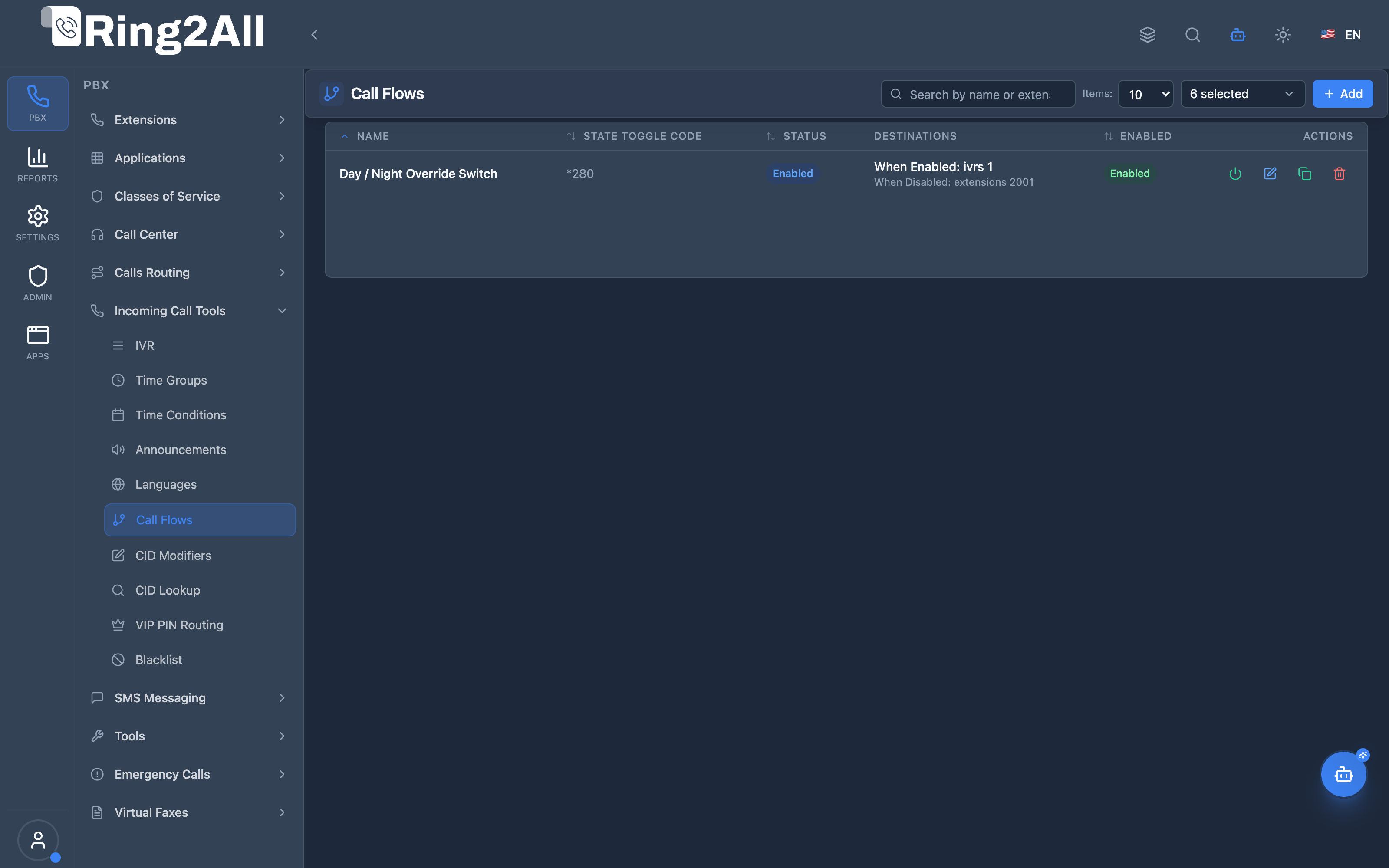
Section titled “Screenshots & Visual Interface”Call Flows Overview
Section titled “Call Flows Overview”Displays all manual call flow toggle switches, extension/feature code, current state (normal / override), and quick management tools.
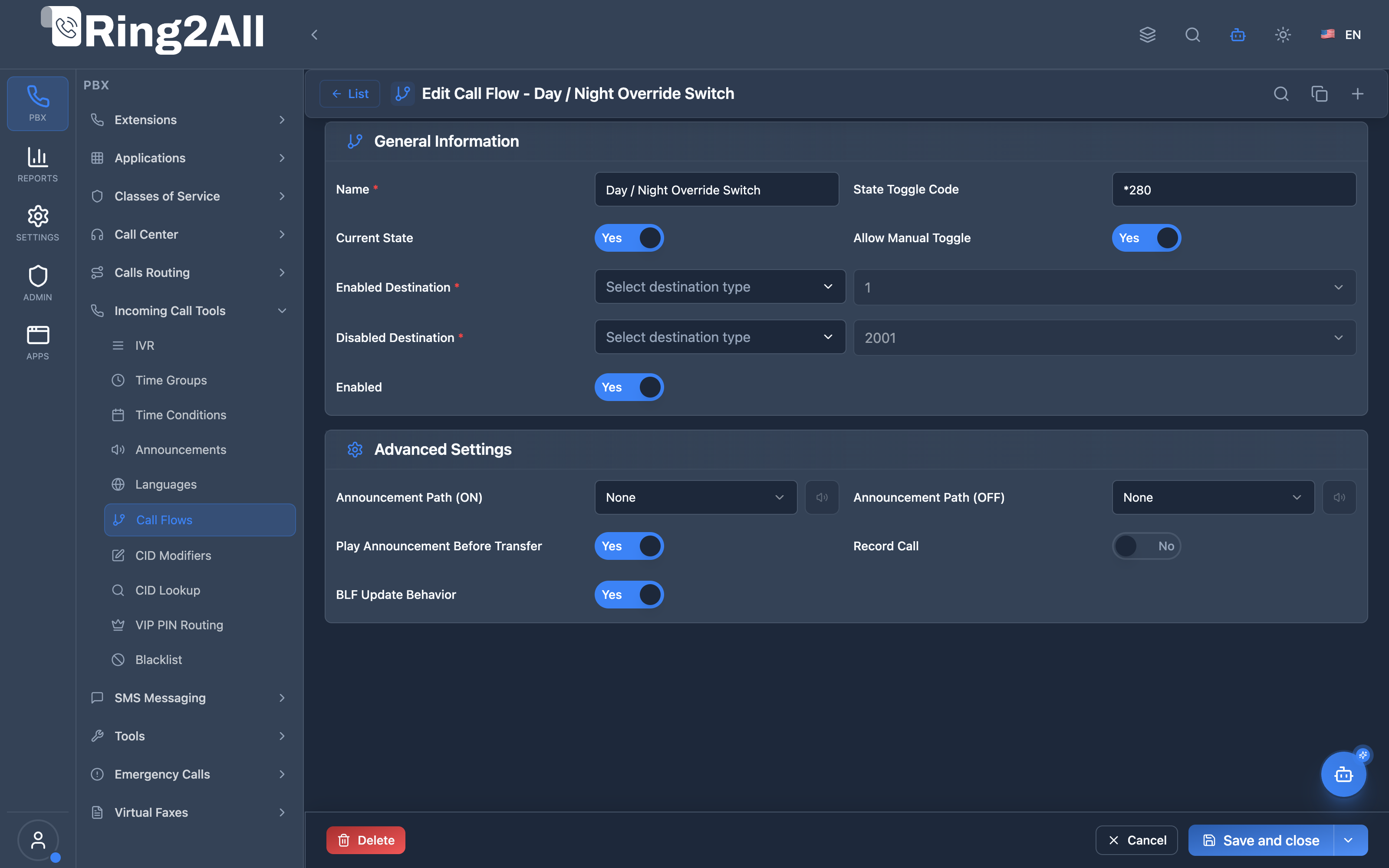
Call Flow Configuration Form
Section titled “Call Flow Configuration Form”Configures toggle extension code, normal active destination, override destination, and current state switch.
1. Module Overview (Technical)
Section titled “1. Module Overview (Technical)”What Are Call Flows?
Section titled “What Are Call Flows?”Call Flows are toggleable routing switches that route calls to different destinations based on a binary state (enabled/disabled). Users can toggle the state via feature codes or BLF buttons to control call routing.
Architecture
Section titled “Architecture”┌─────────────────────────────────────────────────────────────────┐│ Call Flow System │├─────────────────────────────────────────────────────────────────┤│ ││ Call Flow: "Night Mode" - Status: ENABLED ││ ┌────────────────────────────────────────────────────────────┐ ││ │ Toggle Code: *60 │ ││ │ │ ││ │ When ENABLED (current): │ ││ │ → Route to After-Hours Voicemail │ ││ │ │ ││ │ When DISABLED: │ ││ │ → Route to Main IVR │ ││ │ │ ││ └────────────────────────────────────────────────────────────┘ ││ ││ ┌────────────────────────────────────────────────────────────┐ ││ │ call_flow.lua │ ││ │ │ ││ │ Mode: Toggle (*60) │ ││ │ 1. User dials *60 │ ││ │ 2. Query public.call_flows by feature_code │ ││ │ 3. Flip status: enabled ↔ disabled │ ││ │ 4. Update BLF state │ ││ │ 5. Play confirmation audio │ ││ │ │ ││ │ Mode: Route (inbound call) │ ││ │ 1. Call arrives at call flow │ ││ │ 2. Check current status │ ││ │ 3. Route to enabled/disabled destination │ ││ │ │ ││ └────────────────────────────────────────────────────────────┘ ││ │└─────────────────────────────────────────────────────────────────┘2. Module Overview (Commercial/Business)
Section titled “2. Module Overview (Commercial/Business)”Business Value
Section titled “Business Value”Call Flows provide on-demand routing control:
| Without Call Flows | With Call Flows |
|---|---|
| Fixed routing | Dynamic switching |
| Admin-only changes | User toggle via phone |
| No quick override | Instant BLF toggle |
| Manual updates | One-button control |
Use Cases
Section titled “Use Cases”-
Night Mode
- Enable: Route to voicemail
- Disable: Route to normal IVR
-
Holiday Routing
- Enable: Route to holiday message
- Disable: Route to standard menu
-
Emergency Overflow
- Enable: Route to backup queue
- Disable: Route to primary queue
-
Do Not Disturb
- Enable: Route to voicemail
- Disable: Route to extension
Feature Highlights
Section titled “Feature Highlights”| Feature | Benefit |
|---|---|
| Two Destinations | Enabled/Disabled routing |
| Feature Code Toggle | Dial *60 to toggle |
| BLF Integration | Visual status on phones |
| *Toggle All (81) | Mass enable/disable |
| CoS Protection | Permission-based toggle |
| Auto-Schedule | Time-based switching |
3. Module Overview (End User/Administrator)
Section titled “3. Module Overview (End User/Administrator)”What Can You Do?
Section titled “What Can You Do?”- Create call flows with two destinations
- Set feature code for toggle (*60, *81, etc.)
- View and change current status
- Configure enabled/disabled destinations
- Set up auto-schedule
- Restrict toggle to specific extensions
Administrator Workflow
Section titled “Administrator Workflow”┌─────────────────────────────────────────────────────────────────┐│ Creating a Call Flow │├─────────────────────────────────────────────────────────────────┤│ ││ Tab: General ││ ├─ Name: "Night Mode" ││ ├─ Feature Code: *60 ││ ├─ Current Status: [Disabled] ← Toggle button ││ ├─ Allow Manual Toggle: ✓ ││ └─ Enabled: ✓ ││ ││ Section: Destinations ││ ┌───────────────────────────────────────────────────────────┐ ││ │ When Enabled: │ ││ │ ├─ Destination Type: Voicemail │ ││ │ └─ Destination: General Mailbox │ ││ └───────────────────────────────────────────────────────────┘ ││ ┌───────────────────────────────────────────────────────────┐ ││ │ When Disabled: │ ││ │ ├─ Destination Type: IVR │ ││ │ └─ Destination: Main Menu │ ││ └───────────────────────────────────────────────────────────┘ ││ ││ Tab: Advanced Settings ││ ├─ Announcement Path (ON): night-mode-enabled.wav ││ ├─ Announcement Path (OFF): night-mode-disabled.wav ││ ├─ Play Announcement Before Transfer: Off ││ ├─ Record Call: Off ││ └─ BLF Update Behavior: Sync ││ │└─────────────────────────────────────────────────────────────────┘Quick Tips
Section titled “Quick Tips”[!TIP] BLF Button: Assign *60 to a BLF button for one-touch toggling with visual feedback.
[!TIP] Toggle All (*81): Use to enable/disable all call flows at once.
[!CAUTION] Both Destinations Required: Configure both enabled and disabled destinations.
4. Configuration Fields Reference
Section titled “4. Configuration Fields Reference”General Fields
Section titled “General Fields”| Field | Description | Example |
|---|---|---|
| Name | Unique identifier | Night Mode |
| Feature Code | Toggle dial code | *60 |
| Current Status | Enabled/Disabled | Toggle button |
| Allow Manual Toggle | Permit user toggle | On/Off |
| Enabled | Call flow active | On/Off |
Destination Fields
Section titled “Destination Fields”| Field | Description |
|---|---|
| Enabled Destination Type | Module when status=enabled |
| Enabled Destination Value | Target when status=enabled |
| Disabled Destination Type | Module when status=disabled |
| Disabled Destination Value | Target when status=disabled |
Destination Types
Section titled “Destination Types”| Type | Description |
|---|---|
| Extension | Route to extension |
| Voicemail | Route to voicemail |
| IVR | Route to IVR menu |
| Conference | Route to conference |
| Queue | Route to call queue |
| Hangup | Terminate call |
| Announcement | Play announcement |
Advanced Settings
Section titled “Advanced Settings”| Field | Description | Default |
|---|---|---|
| Announcement Path (ON) | Audio file played when flow is enabled | None |
| Announcement Path (OFF) | Audio file played when flow is disabled | None |
| Play Announcement Before Transfer | Play announcement before routing call to destination | Off |
| Record Call | Record all calls routed through this call flow | Off |
| BLF Update Behavior | Sync/None BLF state update across phones | Sync |
5. Status Toggle
Section titled “5. Status Toggle”Toggle Methods
Section titled “Toggle Methods”| Method | Description |
|---|---|
| Feature Code | Dial *60 to toggle |
| BLF Button | Press button on phone |
| Admin Panel | Click toggle in UI |
| *Toggle All (81) | Toggle all flows |
Toggle Flow
Section titled “Toggle Flow”User dials *60 │ ▼┌─────────────────────────────┐│ call_flow.lua ││ ││ 1. Query call flow by *60 ││ 2. Current status: OFF ││ 3. Flip to: ON ││ 4. Update database ││ 5. Update BLF ││ 6. Play confirmation ││ │└─────────────────────────────┘ │ ▼Status: ONBLF Light: Red/LitAudio: "Call flow enabled"BLF Integration
Section titled “BLF Integration”| Status | BLF State | Visual |
|---|---|---|
| Enabled | On | Red/Lit |
| Disabled | Off | Green/Off |
6. Common Scenarios & Examples
Section titled “6. Common Scenarios & Examples”Scenario 1: Night Mode
Section titled “Scenario 1: Night Mode”Call Flow: “Night Mode”
| Setting | Value |
|---|---|
| Feature Code | *60 |
| Enabled Destination | Voicemail (General) |
| Disabled Destination | IVR (Main Menu) |
Usage:
- At close of business: Dial *60 → Night mode ON
- In morning: Dial *60 → Night mode OFF
Scenario 2: Holiday Routing
Section titled “Scenario 2: Holiday Routing”Call Flow: “Holiday”
| Setting | Value |
|---|---|
| Feature Code | *61 |
| Enabled Destination | Announcement (Holiday Message) |
| Disabled Destination | IVR (Main Menu) |
Scenario 3: Emergency Overflow
Section titled “Scenario 3: Emergency Overflow”Call Flow: “Overflow Mode”
| Setting | Value |
|---|---|
| Feature Code | *62 |
| Enabled Destination | Queue (Backup Support) |
| Disabled Destination | Queue (Primary Support) |
7. Model Context Protocol (MCP) AI Integration
Section titled “7. Model Context Protocol (MCP) AI Integration”The Ring2All Model Context Protocol (MCP) server provides native, granular AI tools for auditing, toggling, creating, and modifying Call Flow switches dynamically through natural language interaction. Autonomous agents and Copilots can query toggle states, perform day/night flips, adjust routing destinations, and provision new override codes while enforcing strict domain isolation and numbering collision prevention.
Available MCP Tools
Section titled “Available MCP Tools”| Tool Name | Operation | Description | Target Entity |
|---|---|---|---|
list_call_flows |
Read | Lists all Call Flows in the domain with feature extension code, current state, day/night destinations, and status | Call Flow switches |
get_call_flow_status |
Read | Retrieves detailed routing configuration and current active switch state (Normal/Day vs Override/Night) | Specific Call Flow |
create_call_flow |
Write | Provisions a new manual toggle switch with unique feature extension code and dual destinations | New Call Flow |
update_call_flow |
Write | Modifies toggle switch destinations, names, extension codes, or administrative status | Existing Call Flow |
toggle_call_flow |
Execute | Manually flips switch state (Normal/Day ↔ Override/Night) and broadcasts real-time BLF presence | Active switch state |
delete_call_flow |
Write | Permanently removes an unreferenced Call Flow switch | Inactive Call Flow |
Protection & Validation Guards
Section titled “Protection & Validation Guards”- Strict Cross-Module Numbering Collision Prevention: When provisioning (
create_call_flow) or modifying feature codes (update_call_flow), theextensionis validated against the globalvalidateNumberUniquenessutility. It cannot collide with any standard SIP extension, ring group, call center queue, conference room, paging group, voicemail access code, or time condition toggle code within the same domain. - Dependency & Deletion Protection (
assertCanDeleteCallFlow): MCP guards ensure a Call Flow switch cannot be deleted if active Inbound Routes (DIDs), IVR option keys, Time Conditions, or other Call Flows route into it as their destination. - State Synchronization & Real-time BLF Broadcast: State transitions triggered via
toggle_call_flowimmediately update the PostgreSQLstatusfield and push Sofia SIP presence events (fsCommand: presence in <ext>@<domain> ...), ensuring physical IP phone LED indicators and software console displays instantly reflect the new routing state. - Multi-Tenant Domain Scoping: All operations require a verified
tenant_idanddomain_idcontext in the MCP execution context.
Example MCP Payloads
Section titled “Example MCP Payloads”1. Toggling Call Flow State (toggle_call_flow)
Section titled “1. Toggling Call Flow State (toggle_call_flow)”{ "identifier": "*280", "status": false}Response:
{ "success": true, "data": { "id": 14, "name": "Main Office Mode", "extension": "*280", "previousStatus": true, "currentStatus": false, "mode": "Override / Night", "activeDestination": { "module": "voicemail", "data": "2001" }, "blfUpdated": true }, "message": "Call flow '*280' successfully switched to Override/Night mode."}2. Creating a Day/Night Call Flow Switch (create_call_flow)
Section titled “2. Creating a Day/Night Call Flow Switch (create_call_flow)”{ "name": "Emergency Weather Switch", "extension": "*285", "enabledDestinationModule": "ivr", "enabledDestinationData": "Main IVR", "disabledDestinationModule": "announcement", "disabledDestinationData": "Severe Weather Closure", "status": true}Copilot Natural Language Prompts
Section titled “Copilot Natural Language Prompts”- “Show all active call flow toggle switches and their current status (day vs night mode).”
- *“Check the current state of call flow switch 280 and tell me which destination calls are routing to.”
- *“Switch the ‘Main Office Mode’ call flow (280) to night mode immediately.”
- *“Create a call flow named ‘Support Snow Day’ on feature code 288 that routes to Ring Group 600 normally, and to Announcement ‘Weather Notice’ when toggled.”
- *“Update the night mode destination of call flow 280 to voicemail box 2002.”
8. Limitations & Important Notes
Section titled “8. Limitations & Important Notes”Technical Notes
Section titled “Technical Notes”[!NOTE] CoS Required: Toggle actions require Class of Service permission.
[!WARNING] Both Destinations: Always configure both enabled and disabled destinations.
[!WARNING] Feature Code Unique: Ensure feature codes don’t conflict.
Best Practices
Section titled “Best Practices”- Clear Names: Use descriptive names like “Night Mode”
- BLF Buttons: Assign to frequently toggled flows
- Confirm Audio: Enable toggle announcements
- Test Both States: Verify routing in both states
- Document Codes: Keep list of feature codes
9. Troubleshooting Tips
Section titled “9. Troubleshooting Tips”Common Issues
Section titled “Common Issues”| Symptom | Possible Cause | Solution |
|---|---|---|
| Toggle not working | CoS restriction | Check feature code permissions |
| Wrong destination | Status mismatch | Verify current status |
| BLF not updating | BLF behavior setting | Set to “Sync” |
| Feature code conflict | Duplicate code | Use unique code |
| No audio | Missing audio file | Check announcement path |
Diagnostic SQL
Section titled “Diagnostic SQL”List call flows:
SELECT id, name, feature_code, status, enabled_destination_module, enabled_destination_data, disabled_destination_module, disabled_destination_dataFROM public.call_flowsWHERE domain_id = [domain_id];Check call flow status:
SELECT name, status, toggle_enabled, enabledFROM public.call_flowsWHERE domain_id = [domain_id] AND feature_code = '*60';Telephony Server Logs
Section titled “Telephony Server Logs”# Check call flow togglegrep "CallFlow" /var/log/freeswitch/freeswitch.loggrep "call_flow.lua" /var/log/freeswitch/freeswitch.log10. Glossary
Section titled “10. Glossary”| Term | Definition |
|---|---|
| Call Flow | Toggleable routing switch |
| Status | Current state (enabled/disabled) |
| Feature Code | Dial code to toggle (*60) |
| Toggle | Switch between enabled/disabled |
| BLF | Busy Lamp Field - phone status light |
| Toggle All | Enable/disable all flows (*81) |
Documentation last updated: January 2026