

DISA (Direct Inward System Access) Module Documentation
Table of Contents
Section titled “Table of Contents”- Module Overview (Technical)
- Module Overview (Commercial/Business)
- Module Overview (End User/Administrator)
- Configuration Fields Reference
- Call Flow / Logic Explanation
- Common Scenarios & Examples
- Model Context Protocol (MCP) AI Integration
- Limitations & Important Notes
- Troubleshooting Tips
- Glossary
1. Module Overview (Technical)
Section titled “1. Module Overview (Technical)”What Is DISA?
Section titled “What Is DISA?”DISA (Direct Inward System Access) allows external callers to access the PBX dial tone after authenticating with a PIN. Once authenticated, callers can place outbound calls as if they were calling from within the organization.
Architecture
Section titled “Architecture”┌─────────────────────────────────────────────────────────────────┐│ DISA System Architecture │├─────────────────────────────────────────────────────────────────┤│ ││ External caller dials inbound DID → Routed to DISA code ││ │ ││ ▼ ││ ┌──────────────────────────────────────────────────────────┐ ││ │ DISA Entry Lookup │ ││ │ SELECT * FROM public.disa_entries │ ││ │ WHERE context = [code] AND enabled = TRUE │ ││ └──────────────────────────────────────────────────────────┘ ││ │ ││ ▼ ││ ┌──────────────────────────────────────────────────────────┐ ││ │ Authentication │ ││ │ │ ││ │ 1. Play: "Enter your access code" │ ││ │ 2. Caller enters PIN: ****# │ ││ │ 3. Validate against stored password │ ││ │ ├─ Correct → Continue │ ││ │ └─ Wrong → Play error, retry or hangup │ ││ │ │ ││ └──────────────────────────────────────────────────────────┘ ││ │ ││ ▼ ││ ┌──────────────────────────────────────────────────────────┐ ││ │ Dial Collection │ ││ │ │ ││ │ 1. Play: "Enter the number you wish to call" │ ││ │ 2. Caller enters: 15551234567# │ ││ │ 3. Apply dial prefix if configured │ ││ │ 4. Apply CoS restrictions │ ││ │ 5. Override caller ID if configured │ ││ │ │ ││ └──────────────────────────────────────────────────────────┘ ││ │ ││ ▼ ││ Bridge call to destination through internal context ││ │└─────────────────────────────────────────────────────────────────┘2. Module Overview (Commercial/Business)
Section titled “2. Module Overview (Commercial/Business)”Business Value
Section titled “Business Value”DISA provides remote PBX access for authorized users:
| Without DISA | With DISA |
|---|---|
| Must be in office to use company phones | Call from anywhere |
| Personal phone shows personal number | Company caller ID displayed |
| No access to internal extensions | Full PBX access after authentication |
| Expensive international from mobile | Use company rates |
Use Cases
Section titled “Use Cases”-
Remote Workers
- Call clients with company caller ID from home
- Access internal extensions while traveling
-
Sales Teams on the Road
- Present company number to prospects
- Use company trunk for lower international rates
-
After-Hours Support
- On-call staff can use PBX from mobile
- Consistent caller ID for customer callbacks
-
Executive Travel
- Maintain professional presence while abroad
- Access internal directory
Feature Highlights
Section titled “Feature Highlights”| Feature | Benefit |
|---|---|
| PIN Authentication | Secure access control |
| Caller ID Override | Present company number |
| CoS Restriction | Control call destinations |
| Call Recording | Compliance and training |
| Access Logging | Audit trail for security |
3. Module Overview (End User/Administrator)
Section titled “3. Module Overview (End User/Administrator)”What Can You Do?
Section titled “What Can You Do?”- Create DISA entries with unique PINs
- Configure caller ID overrides
- Restrict destinations by Class of Service
- Set timeouts and retry limits
- Enable call recording and access logging
- Receive notifications on successful access
Navigation
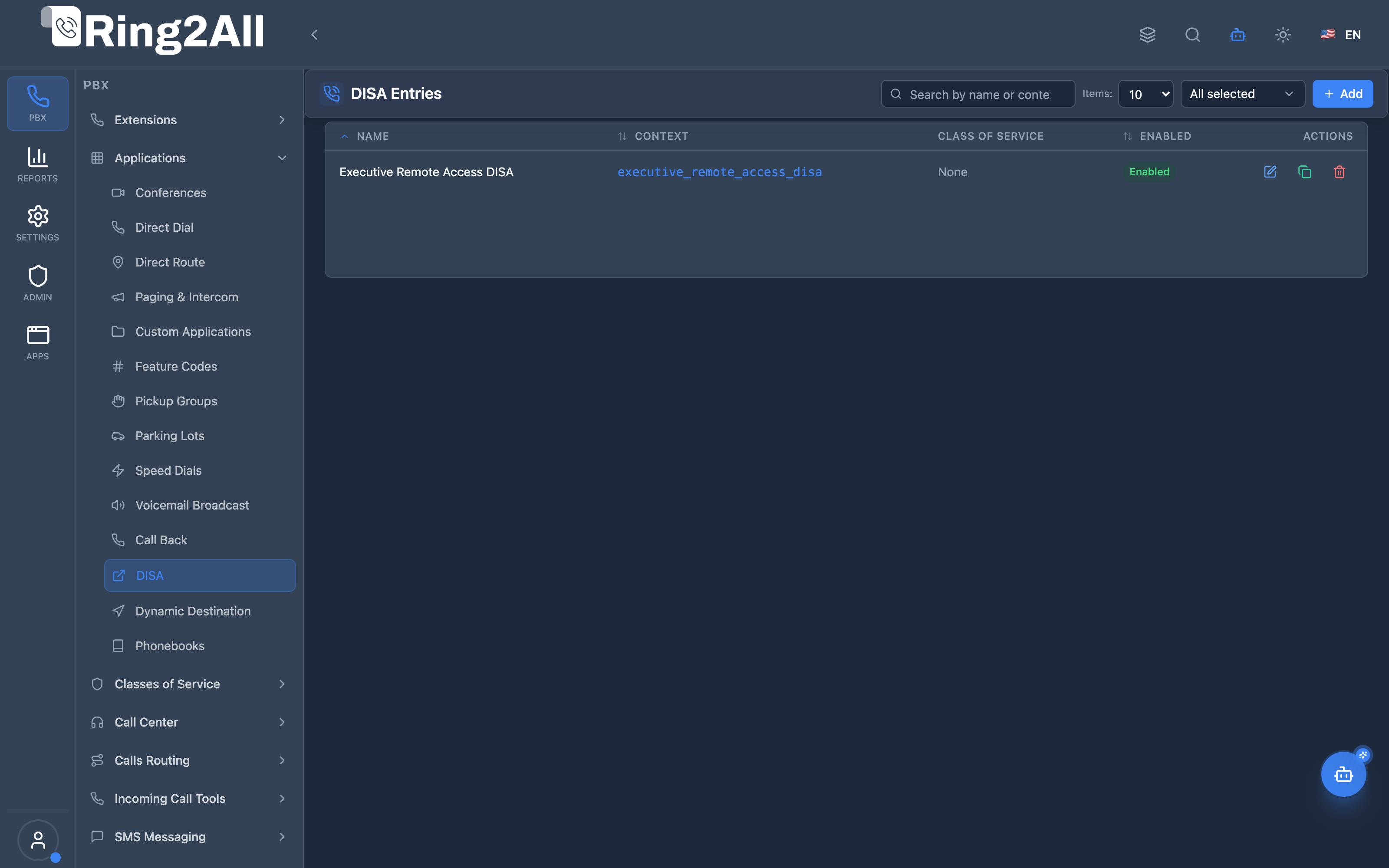
Section titled “Navigation”- Navigate to PBX Engine → Applications → DISA in the sidebar (or visit
/pbx/applications/disa). - The list view displays all configured DISA entries, displaying the Name, Dialing Context, Class of Service, and active Status (Enabled/Disabled).
- Click the + Add button in the top toolbar to configure a new DISA entry.
- Click any existing DISA entry row or edit icon to adjust PIN authentication, Caller ID masks, or dialing permissions.
Administrator Workflow
Section titled “Administrator Workflow”┌─────────────────────────────────────────────────────────────────┐│ Creating a DISA Entry │├─────────────────────────────────────────────────────────────────┤│ ││ Step 1: General Information ││ ├─ Name: "Executive Remote Access DISA" ││ ├─ Access PIN: **** (secure numeric password) ││ ├─ Class of Service: Executive Dialing Profile ││ └─ Enabled: Active ││ ││ Step 2: Caller ID & Trunk Masking ││ ├─ Inherit Caller ID: Disabled (presents corporate number) ││ ├─ Caller ID Name: "Ring2All HQ" ││ ├─ Caller ID Number: "+15551234567" ││ └─ Dial Prefix: 9 (outbound trunk routing code) ││ ││ Step 3: Audio Prompts & Security Policy ││ ├─ Greeting: Custom welcome prompt ("Enter your access code") ││ ├─ Max Attempts: 3 ││ ├─ Hangup on Fail: Enabled (drops line on brute force) ││ ├─ Record Call: Enabled ││ └─ Log Access: Enabled ││ ││ Step 4: Save and Assign Inbound Route ││ │└─────────────────────────────────────────────────────────────────┘User Workflow (Using DISA)
Section titled “User Workflow (Using DISA)”1. External user dials company DISA DID from mobile phone or hotel line.2. System answers and plays configured greeting: "Enter your access code".3. Caller enters PIN followed by '#': 4567#4. Upon authentication, PBX provides secondary internal dial tone or voice prompt: "Enter the number you wish to call".5. Caller dials destination number (e.g. 15559876543#).6. PBX originates the outbound leg using corporate trunks and displays company Caller ID.Quick Tips
Section titled “Quick Tips”[!TIP] Strong PINs: Always use at least 6 random digits for DISA PINs to protect against brute-force intrusion.
[!TIP] Inherit Caller ID: Leave disabled if you want external recipients to see your company office phone number instead of employees’ personal mobile numbers.
[!CAUTION] Toll Fraud Prevention: DISA provides direct access to outbound telephony trunks. Always assign a restrictive Class of Service (disallowing high-risk international destinations unless explicitly required) and keep
Hangup on Failenabled.
4. Configuration Fields Reference
Section titled “4. Configuration Fields Reference”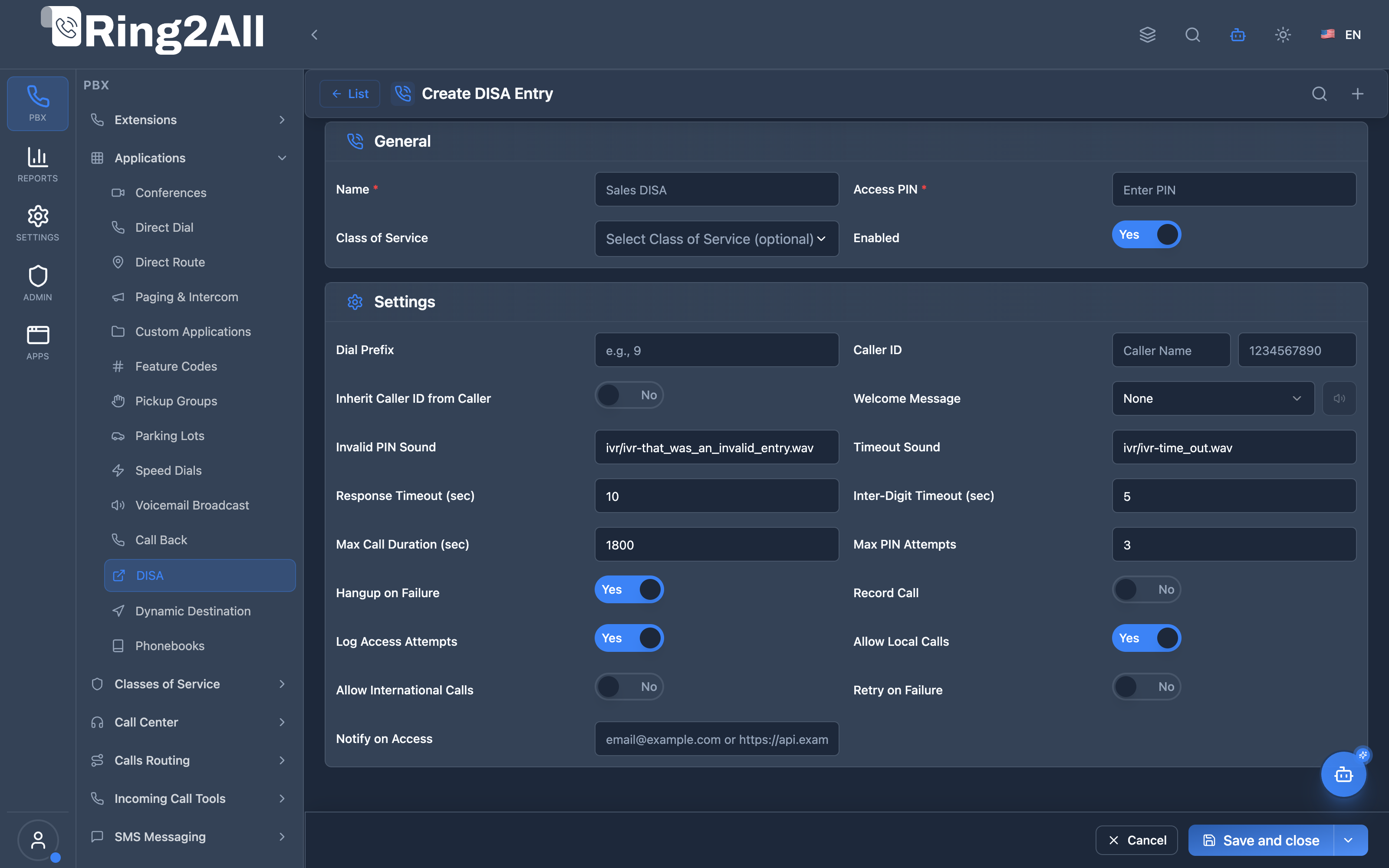
General Information Box
Section titled “General Information Box”| Field | Description | UI Tooltip | Example | Notes |
|---|---|---|---|---|
| Name * | Administrative display label | Friendly name identifying this DISA entry | Executive Remote Access DISA |
Required. |
| Password / PIN * | Access PIN code required by callers | Numeric PIN code required by callers to authenticate before receiving dial tone | 456789 |
Numeric PIN. Required. |
| Class of Service | Calling permissions profile | Class of Service profile governing which outbound destination zones may be dialed | Corporate Executive |
Dropdown selector. Restricts dialed prefixes. |
| Enabled | Master operational status | Master toggle to activate or deactivate this DISA entry | Enabled / Disabled |
Toggle. Default: Enabled. |
Settings Box
Section titled “Settings Box”| Field | Description | UI Tooltip | Default | Options / Range |
|---|---|---|---|---|
| Dial Prefix | Digits prepended to dialed destination | Prefix automatically prepended to the dialed number before outbound routing | None | String up to 16 digits (e.g., 9 or 011). |
| Caller ID | Custom caller ID name and number | Outbound caller ID name and number presented to the destination party | None | Composite input: Caller ID Name & Number. Disabled when Inherit Caller ID is on. |
| Inherit Caller ID | Retain caller’s original phone number | Retain the caller’s incoming external caller ID on outbound calls rather than overriding | Disabled |
Toggle. Default: Disabled. |
| Greeting | Audio prompt played upon initial connection | Voice recording played when the caller first connects to DISA | System Default | Dropdown selector from Audio Recordings library. |
| Invalid PIN Sound | Prompt played upon incorrect PIN | Audio prompt played when the caller inputs an incorrect PIN | ivr/ivr-that_was_an_invalid_entry.wav |
Audio prompt path. |
| Timeout Sound | Prompt played when input timer expires | Audio prompt played when inter-digit timeout expires without entry | ivr/ivr-time_out.wav |
Audio prompt path. |
| Response Timeout | Duration to wait for first digit | Number of seconds to wait for caller to begin entering their PIN or destination | 10 |
Integer: 1 to 60 seconds. |
| Digit Timeout | Inter-digit delay limit | Maximum seconds permitted between consecutive DTMF keypresses | 5 |
Integer: 1 to 10 seconds. |
| Max Call Duration | Hard ceiling on call length | Maximum allowable duration for DISA call sessions in seconds | 1800 |
Integer: 60 to 3600 seconds (30 minutes default). |
| Max Attempts | Allowed authentication retries | Maximum PIN entry attempts before the call is disconnected | 3 |
Integer: 1 to 5. |
| Hangup on Fail | Security disconnect behavior | Immediately hang up the channel if maximum PIN attempts are exceeded | Enabled |
Toggle. Highly recommended for anti-fraud security. |
| Record Call | Two-way session recording | Record the entire outbound call conversation conducted via DISA | Disabled |
Toggle. Default: Disabled. |
| Log Access | Security audit logging | Record all authentication attempts and dialed destinations in system audit log | Enabled |
Toggle. Default: Enabled. |
5. Call Flow / Logic Explanation
Section titled “5. Call Flow / Logic Explanation”DISA Authentication Flow
Section titled “DISA Authentication Flow”┌─────────────────────────────────────────────────────────────────┐│ DISA Call Flow │├─────────────────────────────────────────────────────────────────┤│ ││ 1. Inbound call arrives at DISA DID ││ │ ││ ▼ ││ 2. Look up DISA entry by context/code ││ ├─ Found & enabled → Continue ││ └─ Not found → "Feature not available" → Hangup ││ │ ││ ▼ ││ 3. Play greeting (if configured) ││ │ ││ ▼ ││ 4. Prompt for PIN (enter_password.wav) ││ │ ││ ▼ ││ 5. Validate PIN ││ ├─ Correct → Continue ││ └─ Wrong → Attempt counter ││ ├─ Attempts < max → Play invalid prompt, retry ││ └─ Attempts >= max → Hangup if hangup_on_fail ││ │ ││ ▼ ││ 6. Log successful access (if log_access enabled) ││ │ ││ ▼ ││ 7. Prompt for destination number (enter_destination_number) ││ │ ││ ▼ ││ 8. Apply settings: ││ ├─ Dial prefix: prepend to destination number ││ ├─ Caller ID: override name/number (if !inherit) ││ ├─ CoS: set class_of_services_id ││ ├─ Call duration limit: sched_hangup ││ └─ Recording: record_session if enabled ││ │ ││ ▼ ││ 9. Dispatch call to FreeSWITCH local dialplan context ││ (session:execute("transfer", target .. " XML local")) ││ │└─────────────────────────────────────────────────────────────────┘6. Common Scenarios & Examples
Section titled “6. Common Scenarios & Examples”Scenario 1: Sales Team DISA
Section titled “Scenario 1: Sales Team DISA”Setup:
| Setting | Value |
|---|---|
| Name | Sales Remote DISA |
| PIN | 789456 |
| Caller ID Name | Sales Team |
| Caller ID Number | +1-555-100-0000 |
| Class of Service | Outbound US & Canada |
| Max Call Duration | 3600 (1 hour) |
| Record Call | On |
Result: Sales team can place domestic outbound calls presenting corporate caller ID, with full Class of Service enforcement and call recording.
Scenario 2: Executive DISA
Section titled “Scenario 2: Executive DISA”Setup:
| Setting | Value |
|---|---|
| Name | Executive DISA |
| PIN | 829471 |
| Inherit Caller ID | Enabled |
| Class of Service | Global Executive (Full Access) |
| Max Attempts | 3 |
| Hangup on Fail | On |
| Log Access | On |
Result: Executives authenticate and dial external numbers using company trunks with unlimited routing profile.
Scenario 3: On-Call Support
Section titled “Scenario 3: On-Call Support”Setup:
| Setting | Value |
|---|---|
| Name | Support DISA |
| PIN | 369258 |
| Class of Service | Internal Extensions Only |
| Max Call Duration | 1800 (30 min) |
| Record Call | On |
Result: Support can access internal extensions, calls are recorded.
7. Model Context Protocol (MCP) AI Integration
Section titled “7. Model Context Protocol (MCP) AI Integration”Ring2All exposes dedicated Model Context Protocol (MCP) tools for DISA (Direct Inward System Access), enabling autonomous Copilots and AI administrators to list DISA configurations, review caller ID overrides, and safely provision or update DISA gateways with dependency checks and deletion guards.
Available MCP Tools
Section titled “Available MCP Tools”| Tool Name | Description | Key Parameters |
|---|---|---|
list_disa_entries |
Lists all DISA entries configured in the domain, including names, contexts, caller ID overrides, and active status. | search (optional string) |
get_disa_entry_status |
Retrieves full configuration, security PIN properties, and outbound rules for a specific DISA service. | name (required) |
create_disa_entry |
Provisions a new DISA entry with authentication PIN, context, and caller ID presentation. | name, password (PIN), callerIdNumber, callerIdName, context |
update_disa_entry |
Updates DISA service parameters such as name, password, caller ID, or enabled state. | name, newName, password, callerIdNumber, callerIdName, enabled |
delete_disa_entry |
Deletes a DISA entry with integrity protection (assertCanDeleteDisa), preventing deletion if referenced by inbound routes. |
name (required) |
Integrity Safeguards & Protection Guards
Section titled “Integrity Safeguards & Protection Guards”When an AI agent requests delete_disa_entry, the platform evaluates assertCanDeleteDisa. If any active Inbound Route (public.inbound_routes) has its destination set to the DISA entry, the deletion is rejected with an explanatory error, safeguarding phone system continuity.
AI Agent Operational Examples
Section titled “AI Agent Operational Examples”Querying Active DISA Services
Section titled “Querying Active DISA Services”{ "tool": "list_disa_entries", "arguments": { "search": "Management" }}Provisioning an Authenticated Executive DISA Entry
Section titled “Provisioning an Authenticated Executive DISA Entry”{ "tool": "create_disa_entry", "arguments": { "name": "Field Ops DISA", "password": "849201", "callerIdNumber": "+15551002000", "callerIdName": "Headquarters Field Ops" }}Recommended Natural Language Prompts
Section titled “Recommended Natural Language Prompts”- “List all DISA gateways configured on this tenant and show their caller ID overrides.”
- “Create a DISA profile named ‘Executives Roaming’ with PIN 948123 and outbound caller ID +15551234000.”
- “Check if any Inbound Routes point to the Sales DISA entry before I remove it.”
8. Limitations & Important Notes
Section titled “8. Limitations & Important Notes”Security Warnings
Section titled “Security Warnings”[!CAUTION] Toll Fraud Risk: DISA is a prime target for hackers. Weak PINs can lead to thousands in fraudulent calls.
[!CAUTION] PIN Complexity: Use at least 6-digit PINs with no obvious patterns (not 123456).
[!WARNING] Monitor Access Logs: Review DISA access logs regularly for suspicious activity.
Best Practices
Section titled “Best Practices”- Strong PINs: Minimum 6 digits, no patterns
- CoS Restriction: Always limit destinations
- Max Attempts: Keep low (3) to prevent brute force
- Hangup on Fail: Enable to stop attackers
- Notifications: Set up alerts for access
- Time Restrictions: Consider schedule windows
- Regular Audits: Review usage monthly
Technical Limitations
Section titled “Technical Limitations”[!IMPORTANT] Single PIN per Entry: Each DISA entry has one PIN. Create multiple entries for different users/groups.
9. Troubleshooting Tips
Section titled “9. Troubleshooting Tips”Common Issues
Section titled “Common Issues”| Symptom | Possible Cause | Solution |
|---|---|---|
| “Feature not available” | Entry not found/disabled | Check entry exists and is enabled |
| Wrong caller ID | Override not set | Configure caller_id fields |
| Call restricted | CoS blocking | Check Class of Service permissions |
| No dial tone after PIN | Timeout too short | Increase response_timeout |
| Immediate hangup | Max attempts exceeded | Check attempt counter, reset |
Diagnostic SQL
Section titled “Diagnostic SQL”List DISA entries:
SELECT name, context, password, class_of_services_id, enabledFROM public.disa_entriesWHERE domain_id = [domain_id];Check access logs:
SELECT * FROM public.disa_access_logsWHERE domain_id = [domain_id]ORDER BY created_at DESCLIMIT 50;10. Glossary
Section titled “10. Glossary”| Term | Definition |
|---|---|
| DISA | Direct Inward System Access—remote PBX dial tone access |
| PIN | Personal Identification Number for authentication |
| CoS | Class of Service—dial permission restrictions |
| Dial Prefix | Digits prepended before dialed number (e.g., 9 for outside line) |
| Response Timeout | Time to wait for first digit input |
| Inter-Digit Timeout | Time between keypress entries |
| Toll Fraud | Unauthorized use of phone system for expensive calls |
| Brute Force | Attempting many PINs to guess correct one |
Documentation last updated: January 2026