

Dial Rule Restrictions Module Documentation
Table of Contents
Section titled “Table of Contents”- Module Overview (Technical)
- Module Overview (Commercial/Business)
- Module Overview (End User/Administrator)
- Configuration Fields Reference
- Pattern Matching
- Common Scenarios & Examples
- Model Context Protocol (MCP) AI Integration
- Limitations & Important Notes
- Troubleshooting Tips
- Glossary
1. Module Overview (Technical)
Section titled “1. Module Overview (Technical)”What Are Dial Rule Restrictions?
Section titled “What Are Dial Rule Restrictions?”Dial Rule Restrictions provide pattern-based call control for both outbound and internal calls. Administrators can create restriction profiles with rules that allow or block calls based on dial patterns, optionally requiring passwords, limiting duration, or playing announcements.
Architecture
Section titled “Architecture”┌─────────────────────────────────────────────────────────────────┐│ Dial Rule Restrictions System │├─────────────────────────────────────────────────────────────────┤│ ││ Call initiated (outbound or internal) ││ │ ││ ▼ ││ ┌──────────────────────────────────────────────────────────┐ ││ │ Load Class of Service Restriction │ ││ │ (CoS has dial_rule_restriction_id assigned) │ ││ └──────────────────────────────────────────────────────────┘ ││ │ ││ ▼ ││ ┌──────────────────────────────────────────────────────────┐ ││ │ Evaluate Rules (by priority) │ ││ │ │ ││ │ Rule 1: Pattern 011* | Allowed: NO │ ││ │ └─ Match international → BLOCK │ ││ │ │ ││ │ Rule 2: Pattern 1900* | Allowed: NO + Announcement │ ││ │ └─ Match premium → BLOCK + Play message │ ││ │ │ ││ │ Rule 3: Pattern 1* | Allowed: YES | Max: 1800 sec │ ││ │ └─ Match long distance → ALLOW with 30 min limit │ ││ │ │ ││ │ Rule 4: Pattern _X. | Allowed: YES │ ││ │ └─ Fallback → ALLOW all others │ ││ │ │ ││ └──────────────────────────────────────────────────────────┘ ││ │ ││ ▼ ││ Apply result: ALLOW (with limits) or BLOCK (with message) ││ │└─────────────────────────────────────────────────────────────────┘2. Module Overview (Commercial/Business)
Section titled “2. Module Overview (Commercial/Business)”Business Value
Section titled “Business Value”Dial Rule Restrictions enable granular call control:
| Without Dial Rule Restrictions | With Dial Rule Restrictions |
|---|---|
| All-or-nothing CoS permissions | Pattern-specific control |
| No call duration limits | Enforce time limits |
| Silent blocking | Play announcements |
| No password protection | Require password for patterns |
Use Cases
Section titled “Use Cases”-
Block Premium/900 Numbers
- Block 1-900-* patterns
- Play “This number is restricted” message
-
International Call Control
- Block all international (011*)
- Allow specific countries with password
-
Call Duration Limits
- Allow long distance up to 30 minutes
- Play warning before timeout
-
Internal Extension Control
- Block certain internal ranges
- Restrict after-hours internal calls
Feature Highlights
Section titled “Feature Highlights”| Feature | Benefit |
|---|---|
| Pattern Matching | Telephony Server wildcards |
| Allow/Block | Permit or deny per pattern |
| Announcements | Custom audio for blocked calls |
| Duration Limits | Max call time per pattern |
| Password Requirement | PIN to bypass restriction |
| Priority Ordering | Control rule evaluation |
| Direction Type | Separate outbound vs internal |
3. Module Overview (End User/Administrator)
Section titled “3. Module Overview (End User/Administrator)”What Can You Do?
Section titled “What Can You Do?”- Create restriction profiles with multiple rules
- Allow or block specific dial patterns
- Set maximum call durations
- Require passwords for certain patterns
- Play custom announcements
- Assign profiles to Class of Service
Navigation
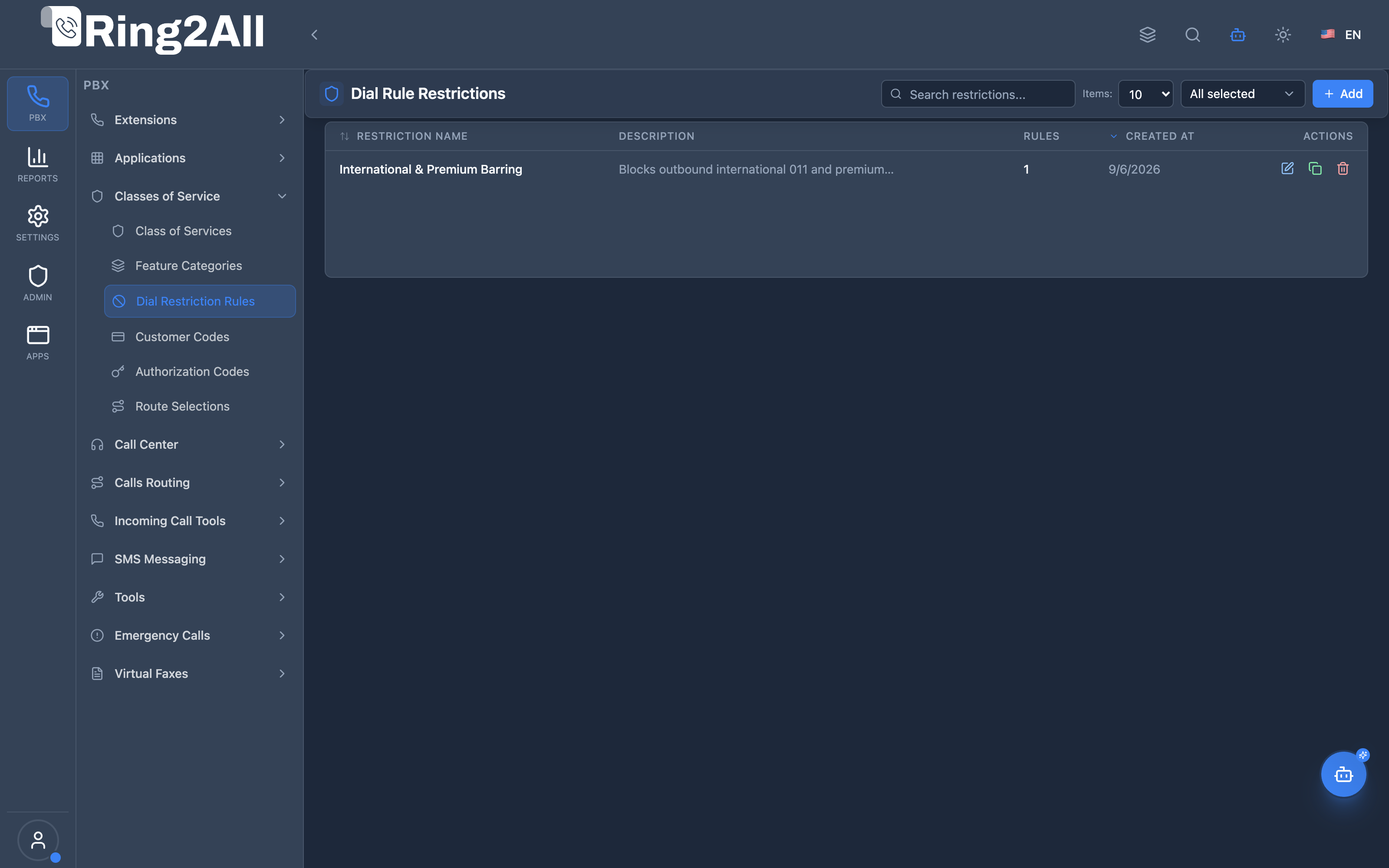
Section titled “Navigation”- Navigate to PBX Engine → Class of Services → Dial Restriction Rules in the main navigation menu.
- The list view displays all configured dial restriction profiles with Name, Description, and active status.
- Click the + Add button in the top toolbar to create a new dial restriction profile.
- Click any profile row or the edit action to manage profile metadata and define ordered dial pattern rules.
Administrator Workflow
Section titled “Administrator Workflow”┌─────────────────────────────────────────────────────────────────┐│ Creating a Dial Rule Restriction │├─────────────────────────────────────────────────────────────────┤│ ││ Step 1: Profile Information ││ ├─ Name: "Standard Restrictions" ││ ├─ Description: "Block premium, limit long distance" ││ └─ Enabled: ✓ ││ ││ Step 2: Add Rules ││ ││ ┌───────────────────────────────────────────────────────────┐ ││ │ Rule 1 (Priority 1) - Block Premium │ ││ │ ├─ Type: Outbound │ ││ │ ├─ Pattern: ^(1900)[0-9]+ │ ││ │ ├─ Allowed: ✗ (Denied) │ ││ │ └─ Announcement: premium_blocked.wav │ ││ └───────────────────────────────────────────────────────────┘ ││ ││ ┌───────────────────────────────────────────────────────────┐ ││ │ Rule 2 (Priority 2) - Block International │ ││ │ ├─ Type: Outbound │ ││ │ ├─ Pattern: ^(011)[0-9]+ │ ││ │ ├─ Allowed: ✗ (Denied) │ ││ │ └─ Announcement: international_blocked.wav │ ││ └───────────────────────────────────────────────────────────┘ ││ ││ ┌───────────────────────────────────────────────────────────┐ ││ │ Rule 3 (Priority 3) - Limit Long Distance │ ││ │ ├─ Type: Outbound │ ││ │ ├─ Pattern: ^(1)[0-9]{10} │ ││ │ ├─ Allowed: ✓ (Permitted) │ ││ │ ├─ Max Duration: 1800 seconds (30 min) │ ││ │ └─ Play Max Duration: ✓ │ ││ └───────────────────────────────────────────────────────────┘ ││ ││ Step 3: Save and Assign to Class of Service ││ │└─────────────────────────────────────────────────────────────────┘Quick Tips
Section titled “Quick Tips”[!TIP] Priority Order: Rules are evaluated top-to-bottom—place specific denial patterns before broad wildcards. Use drag-and-drop handles to reorder rules easily.
[!TIP] Announcements: Pair blocked patterns with custom audio recordings so callers understand why their call was rejected.
[!CAUTION] Pattern Overlap: A permissive catch-all rule evaluated before a restriction rule will allow unauthorized calls through. Keep catch-alls at the bottom.
4. Configuration Fields Reference
Section titled “4. Configuration Fields Reference”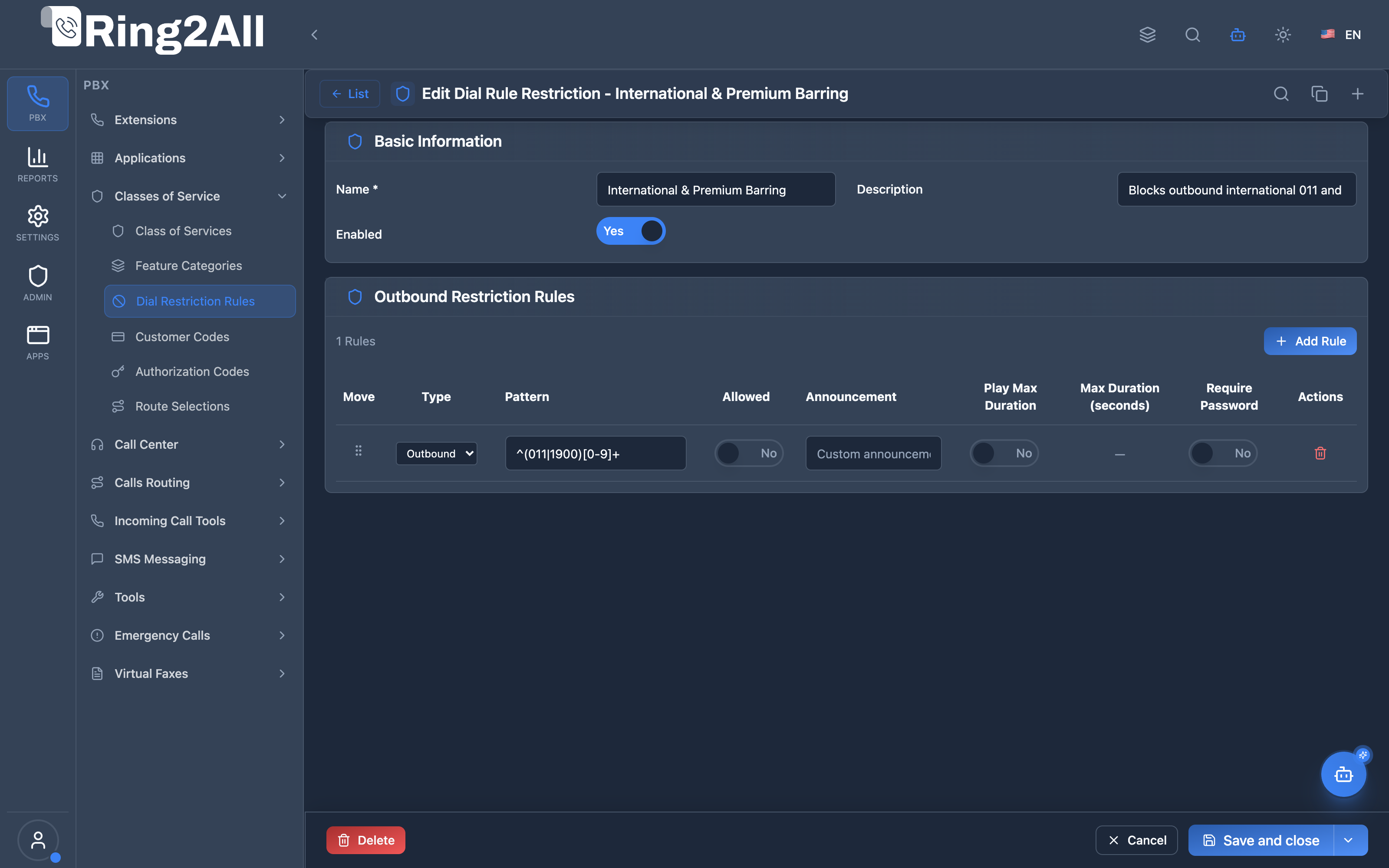
Basic Information Fields
Section titled “Basic Information Fields”| Field | Description | User-Friendly Tooltip | Example | Notes |
|---|---|---|---|---|
| Name * | Unique identifier for the restriction profile | A descriptive name for the dial rule restriction | International & Premium Barring |
Required. Unique per domain. |
| Description | Contextual notes and operational scope | Detailed description of what this profile restricts | Block 011 international and 1900 premium rate numbers |
Optional. |
| Enabled * | Operational status of the profile | Whether this dial rule restriction profile is currently active | Toggle (On/Off) |
Required. If disabled, calls bypass these rules. |
Outbound Rules Table Fields
Section titled “Outbound Rules Table Fields”| Field | Description | Type / Control | Example | Notes |
|---|---|---|---|---|
| Move | Drag-and-drop reordering handle | Grip handle | Vertical drag | Rules are evaluated sequentially from top to bottom. |
| Type | Direction or match type category | Dropdown | Outbound, Internal |
Specifies whether the pattern applies to external or internal destinations. |
| Pattern * | Regular expression or dial string match | Text input | ^(011|1900)[0-9]+ |
Evaluated against dialed destination string. |
| Allowed | Call action upon match | Toggle / Select | Permit / Deny |
When set to Denied, the call is blocked immediately. |
| Announcement | Audio file played to caller when matched/blocked | Audio select | restricted_call.wav |
Optional prompt informing caller of restriction. |
| Play Max Duration | Play audio warning when duration approaches limit | Toggle (On/Off) | Enabled |
Announces time limit before auto-disconnect. |
| Max Duration Seconds | Maximum allowed call duration in seconds | Number input | 1800 (30 min) |
Automatically disconnects call when threshold is reached. |
| Require Password | Require authorization PIN to override restriction | Toggle (On/Off) | Disabled |
When enabled, prompts caller for an authorization code. |
| Actions | Delete rule action | Trash button | Delete |
Removes individual rule row from table. |
5. Pattern Matching
Section titled “5. Pattern Matching”Telephony Server Pattern Syntax
Section titled “Telephony Server Pattern Syntax”| Pattern | Matches | Example |
|---|---|---|
* |
Zero or more characters | 1900* matches 1-900-xxx-xxxx |
_X. |
Any digit, one or more | Matches any number |
_X |
Any single digit | 0-9 |
_Z |
Digits 1-9 | Not 0 |
_N |
Digits 2-9 | Not 0 or 1 |
[list] |
Character set | [0-9] |
Common Patterns
Section titled “Common Patterns”| Purpose | Pattern |
|---|---|
| International (011) | 011* |
| Premium (1-900) | 1900* |
| Toll-free (1-800) | 1800*, 1888*, 1877* |
| Long distance (1+) | 1* |
| Local (7/10 digit) | _NXXXXXX, _NXXNXXXXXX |
| All calls | _X. |
| Internal 3-digit | _XXX |
| Internal 4-digit | _XXXX |
6. Common Scenarios & Examples
Section titled “6. Common Scenarios & Examples”Scenario 1: Block Premium and International
Section titled “Scenario 1: Block Premium and International”Profile: “Standard Employee”
| Priority | Pattern | Allowed | Description |
|---|---|---|---|
| 1 | 1900* |
No | Block premium |
| 2 | 1976* |
No | Block expensive |
| 3 | 011* |
No | Block international |
| 4 | _X. |
Yes | Allow all else |
Scenario 2: International with Password
Section titled “Scenario 2: International with Password”Profile: “International with Override”
| Priority | Pattern | Allowed | Password | Description |
|---|---|---|---|---|
| 1 | 1900* |
No | - | Block premium always |
| 2 | 011* |
Yes | ✓ | International with PIN |
| 3 | _X. |
Yes | - | Allow all else |
Scenario 3: Call Duration Limits
Section titled “Scenario 3: Call Duration Limits”Profile: “Time-Limited”
| Priority | Pattern | Allowed | Max Duration | Description |
|---|---|---|---|---|
| 1 | 1* |
Yes | 1800 sec | 30 min long distance |
| 2 | 011* |
Yes | 600 sec | 10 min international |
| 3 | _X. |
Yes | - | Unlimited local |
Scenario 4: Internal Extension Controls
Section titled “Scenario 4: Internal Extension Controls”Profile: “Lobby Phone”
| Priority | Type | Pattern | Allowed | Description |
|---|---|---|---|---|
| 1 | Internal | 1* |
Yes | Allow 1xx extensions |
| 2 | Internal | _X. |
No | Block other internal |
| 3 | Outbound | 911 |
Yes | Allow emergency |
| 4 | Outbound | _X. |
No | Block all external |
7. Model Context Protocol (MCP) AI Integration
Section titled “7. Model Context Protocol (MCP) AI Integration”Ring2All exposes dedicated Model Context Protocol (MCP) tools for Dial Rule Restrictions, allowing autonomous AI agents and Copilots to inspect outbound and internal pattern rules, verify call duration limits, and configure dialed digit filtering policies with domain-level isolation.
Available MCP Tools
Section titled “Available MCP Tools”| Tool Name | Description | Key Parameters |
|---|---|---|
list_dial_restrictions |
Lists all Dial Rule Restriction profiles defined in the domain, including names, descriptions, and rule counts. | search (optional string) |
get_dial_restriction_status |
Retrieves full pattern matching rules, allowed/blocked actions, duration limits, and PIN requirements for a profile. | name (required) |
create_dial_restriction |
Provisions a new Dial Rule Restriction profile. | name, description, enabled |
update_dial_restriction |
Modifies an existing restriction profile name, description, or enabled status. | name, newName, description, enabled |
delete_dial_restriction |
Deletes a restriction profile after verifying it is not referenced by an active Class of Service (assertCanDeleteDialRestriction). |
name (required) |
AI Agent Operational Examples
Section titled “AI Agent Operational Examples”Inspecting Dial Restriction Rules
Section titled “Inspecting Dial Restriction Rules”{ "tool": "get_dial_restriction_status", "arguments": { "name": "Block International" }}Provisioning a Local Only Restriction Profile
Section titled “Provisioning a Local Only Restriction Profile”{ "tool": "create_dial_restriction", "arguments": { "name": "Local Calls Only", "description": "Restricts outbound calls to local prefixes and emergency numbers only", "enabled": true }}Recommended Natural Language Prompts
Section titled “Recommended Natural Language Prompts”- “Show me which numbers or patterns are blocked in the ‘Block International’ profile.”
- “Create a dial restriction profile named ‘Lobby Restricted’ to prevent long-distance calls.”
- “Check if any Class of Service is currently using the ‘Emergency Only’ restriction profile before deleting it.”
8. Limitations & Important Notes
Section titled “8. Limitations & Important Notes”Technical Limitations
Section titled “Technical Limitations”[!WARNING] First Match Wins: Only the first matching rule is applied.
[!WARNING] Profile Assignment: Restrictions must be assigned to Class of Service.
Best Practices
Section titled “Best Practices”- Priority Order: Specific patterns first, wildcards last
- Fallback Rule: Always include catch-all at end
- Test Patterns: Verify pattern matching before production
- Document Rules: Use descriptions for clarity
- Announce Blocks: Play message instead of silent hangup
Rule Evaluation
Section titled “Rule Evaluation”[!IMPORTANT] Rules are evaluated by priority (1 = first). The first matching rule determines the action.
9. Troubleshooting Tips
Section titled “9. Troubleshooting Tips”Common Issues
Section titled “Common Issues”| Symptom | Possible Cause | Solution |
|---|---|---|
| Calls always blocked | Wrong priority order | Put allow rules before block wildcards |
| Calls not limited | Duration not enabled | Check Play Max Duration toggle |
| Wrong pattern matched | Pattern overlap | Adjust priorities |
| No announcement | Audio file missing | Verify file exists |
Diagnostic SQL
Section titled “Diagnostic SQL”List restrictions:
SELECT r.id, r.name, r.enabled, (SELECT COUNT(*) FROM public.dial_rule_restriction_rules WHERE dial_rule_restriction_id = r.id) as rule_countFROM public.dial_rule_restrictions rWHERE r.domain_id = [domain_id];Check rules:
SELECT direction, pattern, allowed, max_duration_seconds, require_password, priorityFROM public.dial_rule_restriction_rulesWHERE dial_rule_restriction_id = [restriction_id]ORDER BY priority;10. Glossary
Section titled “10. Glossary”| Term | Definition |
|---|---|
| Dial Rule Restriction | Profile containing pattern-based rules |
| Pattern | Dial string match using Telephony Server wildcards |
| Priority | Order in which rules are evaluated |
| Max Duration | Time limit for calls matching pattern |
| Announcement | Audio played when call is blocked |
| Password Requirement | PIN needed to bypass restriction |
| Direction | Outbound (external) or Internal |
Documentation last updated: January 2026