

SIP Endpoints Module Documentation
Table of Contents
Section titled “Table of Contents”- Navigation & Access
- Screenshots & Visual Interface
- Module Overview (Technical)
- Module Overview (Commercial/Business)
- Module Overview (End User/Administrator)
- Registration Fields Reference
- Common Scenarios & Examples
- Limitations & Important Notes
- Troubleshooting Tips
- Glossary
- Model Context Protocol (MCP) AI Integration
Navigation & Access
Section titled “Navigation & Access”To access the SIP Endpoints registration viewer:
- Log in to the Ring2All Web Portal (
https://<domain-or-ip>/login). - In the left navigation sidebar, expand Reports.
- Under PBX Reports, click SIP Endpoints (
/reports/pbx/sip-endpoints). - Inspect live registrations, verify IP and port bindings, check lease expiration intervals, or click Refresh on the toolbar to re-query Telephony Server Sofia registration caches.
Screenshots & Visual Interface
Section titled “Screenshots & Visual Interface”SIP Endpoints Real-Time Registration Ledger
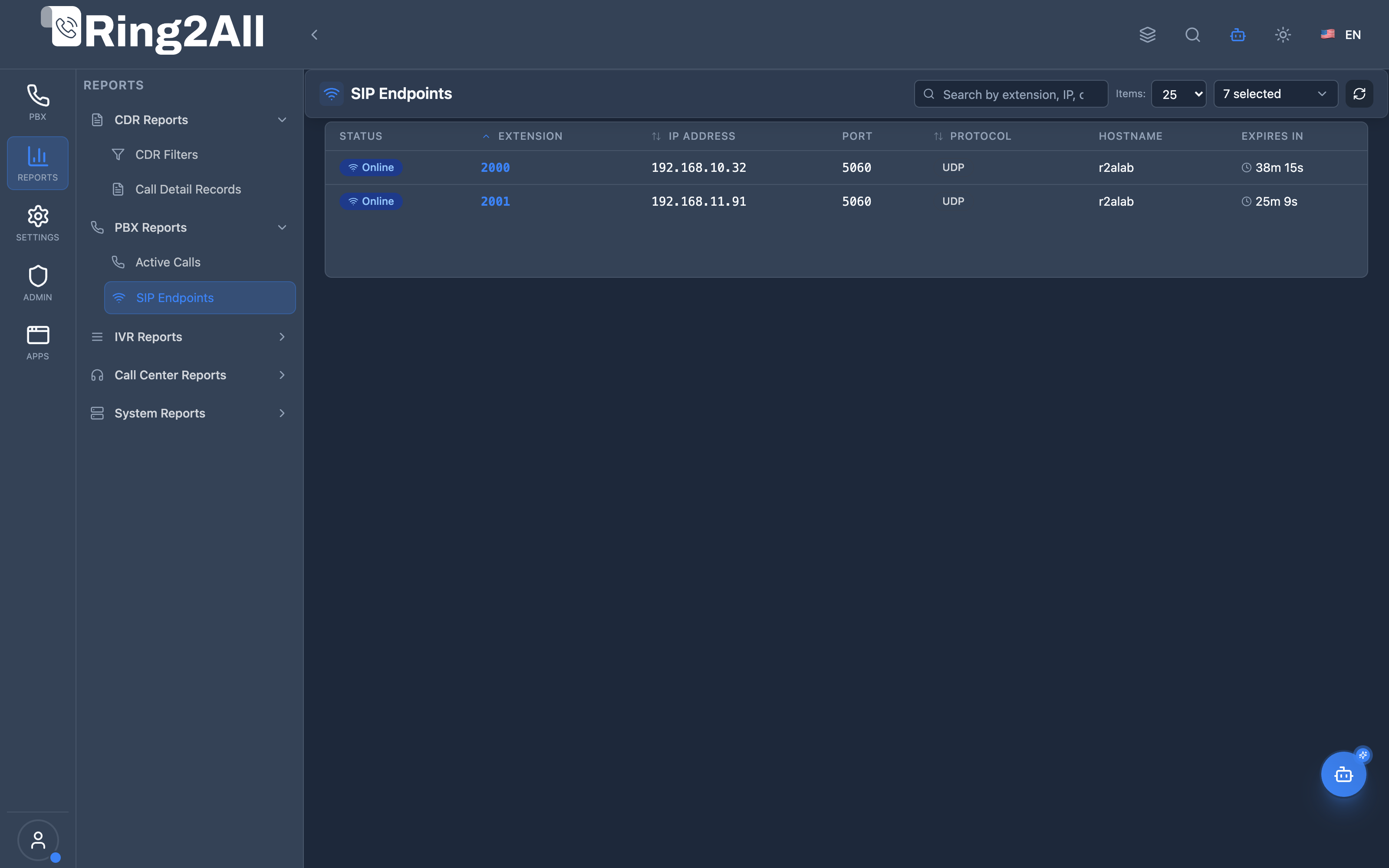
Section titled “SIP Endpoints Real-Time Registration Ledger”Comprehensive device registration directory detailing extension numbers, authentication realms, contact URIs, transport protocols (UDP/TCP/TLS/WSS), remote IP addresses, network ports, and expiration countdowns.
1. Module Overview (Technical)
Section titled “1. Module Overview (Technical)”What Are SIP Endpoints?
Section titled “What Are SIP Endpoints?”SIP Endpoints is a registration monitoring interface that displays all currently registered SIP devices (phones, softphones, ATAs). It queries Telephony Server’s registration database to show which devices are online, their IP addresses, protocols, and registration status.
Architecture
Section titled “Architecture”┌─────────────────────────────────────────────────────────────────┐│ SIP Endpoints Architecture │├─────────────────────────────────────────────────────────────────┤│ ││ SIP Devices Telephony Server ││ ┌──────────────┐ ┌─────────────────────────┐ ││ │ Yealink T46U │ │ mod_sofia │ ││ │ 192.168.1.10 │ ───REGISTER────► │ │ ││ │ ext: 1001 │ │ Registration DB │ ││ └──────────────┘ │ ├─ 1001: Online │ ││ │ ├─ 1002: Online │ ││ ┌──────────────┐ │ ├─ 1003: Offline │ ││ │ Zoiper │ ───REGISTER────► │ └─ 1004: Online │ ││ │ 192.168.1.15 │ │ │ ││ │ ext: 1002 │ └─────────────────────────┘ ││ └──────────────┘ │ ││ ▼ ││ ┌─────────────────────────┐ ││ │ Backend API │ ││ │ │ ││ │ show registrations │ ││ │ │ ││ └─────────────────────────┘ ││ │ ││ ▼ ││ Admin Panel ││ ┌──────────────────────────────────────────────────────────┐ ││ │ SIP Endpoints Page │ ││ │ │ ││ │ Stats: 45 Total | UDP: 30 | TCP: 10 | TLS: 5 │ ││ │ │ ││ │ ┌─────────────────────────────────────────────────────┐ │ ││ │ │ Status │ Ext │ IP │ Port │ Proto│Expires│ │ ││ │ ├────────┼──────┼──────────────┼───────┼──────┼───────┤ │ ││ │ │ 🟢 │ 1001 │ 192.168.1.10 │ 5060 │ UDP │ 2:45 │ │ ││ │ │ 🟢 │ 1002 │ 192.168.1.15 │ 5060 │ TCP │ 1:30 │ │ ││ │ └─────────────────────────────────────────────────────┘ │ ││ │ │ ││ └──────────────────────────────────────────────────────────┘ ││ │└─────────────────────────────────────────────────────────────────┘2. Module Overview (Commercial/Business)
Section titled “2. Module Overview (Commercial/Business)”Business Value
Section titled “Business Value”SIP Endpoints provides device visibility:
| Without SIP Endpoints | With SIP Endpoints |
|---|---|
| Unknown device status | Online/Offline visible |
| No IP tracking | IP addresses shown |
| Blind troubleshooting | Device details available |
| Manual checking | Instant overview |
Use Cases
Section titled “Use Cases”-
Device Monitoring
- See all registered phones
- Identify offline devices
-
Troubleshooting
- Find device IP address
- Check registration status
-
Capacity Planning
- Total registration count
- Protocol distribution
-
Security
- Monitor registrations
- Identify unknown devices
Feature Highlights
Section titled “Feature Highlights”| Feature | Benefit |
|---|---|
| Online/Offline | Device status |
| IP Address | Network location |
| Protocol | UDP/TCP/TLS |
| Expiry Timer | Registration health |
| Search | Find specific devices |
| Stats | Registration overview |
3. Module Overview (End User/Administrator)
Section titled “3. Module Overview (End User/Administrator)”What Can You Do?
Section titled “What Can You Do?”- View all registered SIP devices
- See online/offline status
- Check IP addresses and ports
- View protocol (UDP/TCP/TLS)
- Monitor registration expiry
- Search by extension or IP
SIP Endpoints Interface
Section titled “SIP Endpoints Interface”┌─────────────────────────────────────────────────────────────────┐│ SIP Endpoints │├─────────────────────────────────────────────────────────────────┤│ ││ Active SIP registrations from Telephony Server ││ ││ [🔄 Refresh] 🔍 [Search by extension, IP, or hostname... ] ││ ││ 📊 Stats: ││ ├─ Total Registrations: 45 ││ ├─ By Protocol: UDP: 30 | TCP: 10 | TLS: 5 ││ └─ By Hostname: pbx1: 25 | pbx2: 20 ││ ││ ┌───────────────────────────────────────────────────────────┐ ││ │Status│ Ext │ IP Address │ Port │Proto│ Realm │Expires│ ││ ├──────┼──────┼──────────────┼──────┼─────┼────────┼───────┤ ││ │ 🟢 │ 1001 │192.168.1.10 │ 5060 │ UDP │domain1 │ 02:45 │ ││ │ 🟢 │ 1002 │192.168.1.15 │ 5060 │ TCP │domain1 │ 01:30 │ ││ │ 🟢 │ 1003 │192.168.1.20 │ 5061 │ TLS │domain1 │ 04:15 │ ││ │ 🔴 │ 1004 │ - │ - │ - │domain1 │ Exp. │ ││ │ 🟢 │ 1005 │10.0.0.50 │ 5060 │ UDP │domain2 │ 03:00 │ ││ └───────────────────────────────────────────────────────────┘ ││ ││ 🟢 Online: 44 | 🔴 Offline: 1 ││ │└─────────────────────────────────────────────────────────────────┘Quick Tips
Section titled “Quick Tips”[!TIP] Refresh: Click Refresh to get latest registration data.
[!TIP] Search: Search by extension number or IP address.
[!NOTE] Expiry: Low expiry time is normal - devices re-register automatically.
4. Registration Fields Reference
Section titled “4. Registration Fields Reference”Display Columns
Section titled “Display Columns”| Column | Description |
|---|---|
| Status | Online (🟢) or Offline (🔴) |
| Extension | Extension/user ID |
| IP Address | Device IP address |
| Port | SIP port number |
| Protocol | UDP, TCP, or TLS |
| Realm | Registration realm/domain |
| Hostname | Telephony Server |
| Expires In | Time until re-registration |
| SIP URL | Full SIP contact URL |
Status Types
Section titled “Status Types”| Status | Description |
|---|---|
| 🟢 Online | Device is registered |
| 🔴 Offline | Registration expired |
Protocols
Section titled “Protocols”| Protocol | Port | Description |
|---|---|---|
| UDP | 5060 | Standard SIP |
| TCP | 5060 | Reliable SIP |
| TLS | 5061 | Encrypted SIP |
5. Common Scenarios & Examples
Section titled “5. Common Scenarios & Examples”Scenario 1: Check If Phone Is Online
Section titled “Scenario 1: Check If Phone Is Online”- Open SIP Endpoints
- Search for extension number
- Check status (🟢 or 🔴)
Scenario 2: Find Device IP Address
Section titled “Scenario 2: Find Device IP Address”- Search by extension
- Note the IP Address
- Use for network troubleshooting
Scenario 3: Monitor Protocol Usage
Section titled “Scenario 3: Monitor Protocol Usage”- View Stats section
- Check “By Protocol” breakdown
- Verify TLS adoption
Scenario 4: Identify Offline Devices
Section titled “Scenario 4: Identify Offline Devices”- Look for 🔴 status
- Note affected extensions
- Troubleshoot connectivity
6. Limitations & Important Notes
Section titled “6. Limitations & Important Notes”Technical Notes
Section titled “Technical Notes”[!NOTE] Registration Window: Devices typically register every 60-300 seconds.
[!NOTE] Multi-Device: One extension can have multiple registrations.
[!WARNING] Network Issues: Offline status may indicate network problems.
Best Practices
Section titled “Best Practices”- Regular Monitoring: Check for unexpected offline devices
- Protocol Review: Encourage TLS for security
- IP Tracking: Note unusual IP changes
- Expiry Health: Very short expiry may indicate issues
- Search Smart: Use partial matching
7. Troubleshooting Tips
Section titled “7. Troubleshooting Tips”Common Issues
Section titled “Common Issues”| Symptom | Possible Cause | Solution |
|---|---|---|
| Device offline | Network issue | Check connectivity |
| Wrong IP | NAT issue | Configure NAT |
| Short expiry | Firewall | Check SIP ALG |
| No registration | Credentials | Verify username/password |
| Multiple entries | Multi-device | Normal for multiple phones |
Diagnostic Commands
Section titled “Diagnostic Commands”Telephony Server CLI:
# Show all registrationsfs_cli -x "show registrations"
# Show specific profile registrationsfs_cli -x "sofia status profile internal reg"
# Show registration countfs_cli -x "show registrations count"
Diagnostic SQL
Section titled “Diagnostic SQL”Check extension registration status:
-- Extensions are in telephony database-- Registrations are live in Telephony ServerSELECT extension, effective_caller_id_nameFROM public.sip_extensionsWHERE domain_id = [domain_id] AND enabled = true;8. Glossary
Section titled “8. Glossary”| Term | Definition |
|---|---|
| SIP | Session Initiation Protocol |
| Registration | Device announcing presence |
| Endpoint | SIP device (phone, softphone) |
| Realm | SIP domain for registration |
| Expiry | Time until registration expires |
| mod_sofia | Telephony Server SIP module |
| NAT | Network Address Translation |
9. Model Context Protocol (MCP) AI Integration
Section titled “9. Model Context Protocol (MCP) AI Integration”The Ring2All Platform Copilot integrates with Telephony Server’s Sofia SIP registration engine via the Model Context Protocol (MCP). Telecom administrators, desktop support staff, and field engineers can query active device registrations, verify desk phone IP bindings, and detect offline endpoints using conversational prompts.
Exposed MCP Tools
Section titled “Exposed MCP Tools”| Tool Name | Operation | Primary Parameters | Description |
|---|---|---|---|
query_sip_endpoints |
Live SIP Registrations | extension (string, optional), search (string, optional) |
Queries Telephony Server live registrations (show registrations as json), returning registered extensions, contact URIs, client user agents, network IP addresses, transport protocols, and lease expiries. |
list_extensions |
Extension Directory | search (string, optional) |
Lists all provisioned extensions within the domain to cross-reference configured vs. registered endpoints. |
get_extension_status |
Single Endpoint Health | extension (string) |
Retrieves real-time registration status, current call forwarding rules, and DND state for an extension. |
Operational Safeguards & Network Visibility
Section titled “Operational Safeguards & Network Visibility”- Domain Isolation: SIP registration checks automatically enforce the current domain’s SIP realm (
WHERE domain_name = :domain_name). Endpoints belonging to other tenants are hidden. - Read-Only Inspection: Querying registration status performs non-destructive read operations against the Sofia internal memory cache.
- NAT Traversal Diagnostics: The tool returns both the private Contact URI and the external public IP (via received/nat parameters) to quickly diagnose one-way audio or NAT keep-alive failures.
Example MCP Payloads
Section titled “Example MCP Payloads”1. Checking Live SIP Registrations (query_sip_endpoints)
Section titled “1. Checking Live SIP Registrations (query_sip_endpoints)”{ "extension": "1001"}Response:
{ "success": true, "data": { "total": 1, "registrations": [ { "extension": "1001", "realm": "company.ring2all.com", "contact": "sip:1001@192.168.1.105:5060;transport=udp", "userAgent": "Yealink SIP-T46U 108.86.0.70", "networkIp": "190.212.45.18", "networkPort": "5060", "expiresSeconds": 240, "status": "Registered" } ] }}2. Querying All Currently Online Devices (query_sip_endpoints)
Section titled “2. Querying All Currently Online Devices (query_sip_endpoints)”{}Copilot Natural Language Prompts
Section titled “Copilot Natural Language Prompts”- “Is extension 1001 currently registered and online?”
- “Show me all registered SIP endpoints in our domain.”
- “What device model and IP address is extension 1004 registered from?”
- “List any configured extensions that are currently unregistered (offline).”
Documentation last updated: January 2026