

Portal Dashboard
📖 Introduction
Section titled “📖 Introduction”The Portal Dashboard serves as the central command cockpit for the extension user. Upon logging in, subscribers are greeted with a high-level real-time summary of their daily telephony activity, including answered calls, inbound and outbound volume, unread smart voicemails, and recent call telemetry.
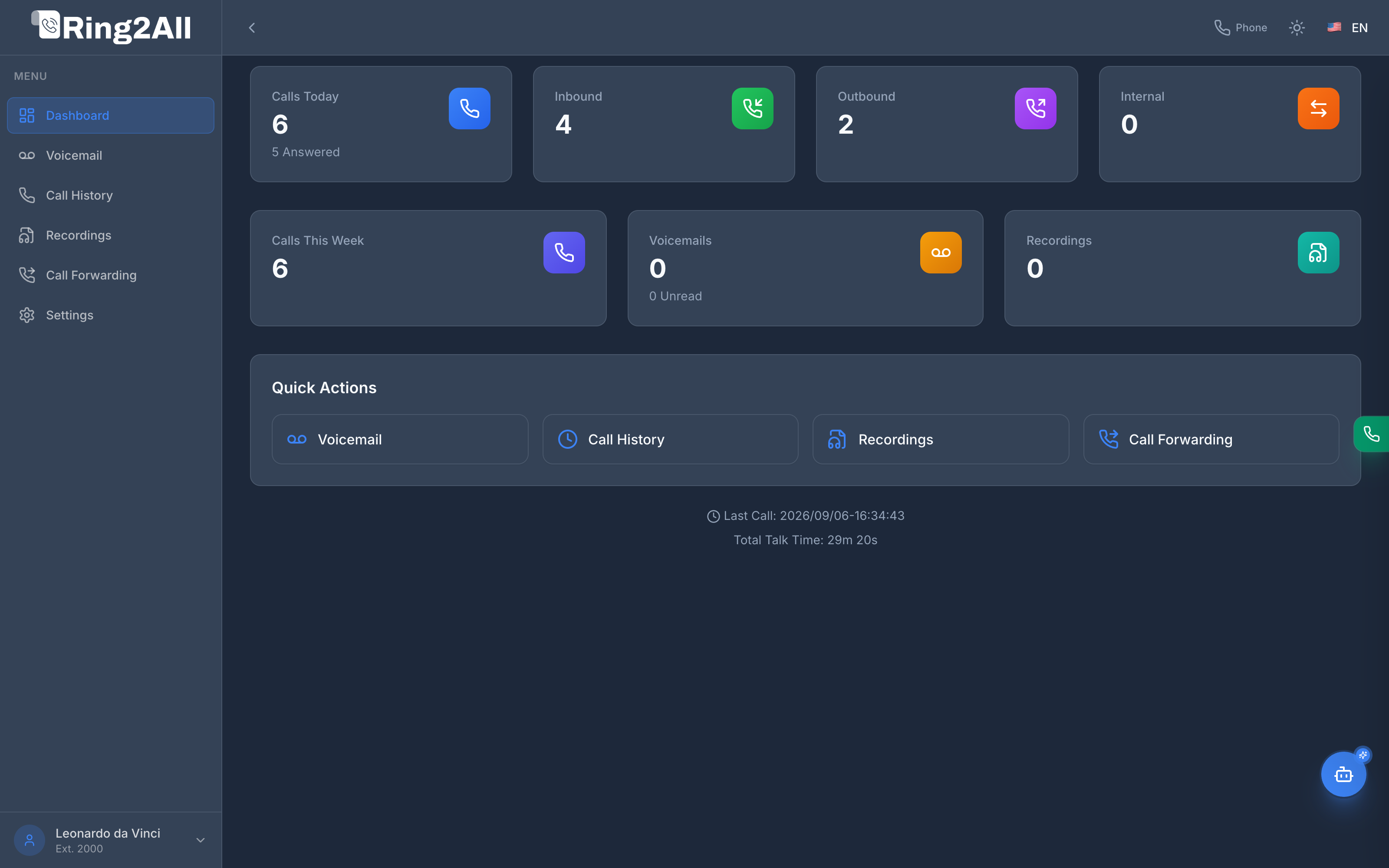
📊 Telemetry and KPI Cards
Section titled “📊 Telemetry and KPI Cards”The dashboard automatically computes metrics from the Telephony Server and CDR databases specifically filtered by the authenticated extension:
| Metric Card | Metric Source | Operational Purpose |
|---|---|---|
| Calls Today | Extension CDRs (Current Day) | Displays the cumulative total of calls processed by the extension today, along with the answered call count below. |
| Inbound Calls | Direction: Inbound |
Represents incoming calls routed to this extension from external DIDs, ring groups, queues, or other internal extensions. |
| Outbound Calls | Direction: Outbound |
Represents outgoing calls dialed by this extension to public numbers or external destinations. |
| Calls This Week | 7-Day Rolling CDR Window | Summarizes total voice activity across the current working week. |
| Voicemails | Voicemail Mailbox Storage | Indicates total messages stored in the user’s personal mailbox, emphasizing unread messages in real time. |
| Recordings | Media Vault (ss_cdr) |
Shows calls recorded for compliance, quality assurance, or training on this extension. |
⚡ Quick Actions
Section titled “⚡ Quick Actions”Directly beneath the primary KPI cards, a specialized Quick Actions dock allows users to navigate directly to their most common daily workflows:
- Voicemail: Jumps directly to the Smart Voicemail table with AI summaries and playback.
- Call History: Opens the full Call History log with granular filters.
- Recordings: Provides instant access to the Recordings audio vault.
⏱️ Telemetry & Live Telephony Dock
Section titled “⏱️ Telemetry & Live Telephony Dock”The lower section of the dashboard displays an ambient status footer:
- Last Call Timestamp: Exact timestamp of the last session processed by Telephony Server for this extension.
- Total Talk Time: Cumulative active voice duration (e.g.,
29m 20s) accumulated during the current working day.
🟢 Integrated Softphone & AI Copilot
Section titled “🟢 Integrated Softphone & AI Copilot”The dashboard layout integrates seamlessly with the extension’s real-time communication tools:
- Floating Green Phone Tab: Located on the right edge of the browser viewport. When the extension is registered with Kamailio/FreeSWITCH via WebSockets, this tab glows in vibrant emerald green (
bg-emerald-600), providing an instantaneous visual confirmation of registration. Clicking it expands the full WebRTC Softphone. - AI Copilot Floating Button: Positioned in the lower-right corner (
bottom-20), safely above any fixed action bars. Provides on-demand access to the conversational telephony assistant for checking extensions, active calls, or voicemails.