

CID Modifiers Module Documentation
Table of Contents
Section titled “Table of Contents”- Navigation & Access
- Screenshots & Visual Interface
- Module Overview (Technical)
- Module Overview (Commercial/Business)
- Module Overview (End User/Administrator)
- User Roles & Key Capabilities
- Configuration Fields Reference
- Source Types
- Action Types
- Common Scenarios & Examples
- Model Context Protocol (MCP) AI Integration
- Limitations & Important Notes
- Troubleshooting Tips
- Glossary
Navigation & Access
Section titled “Navigation & Access”To access the CID Modifiers module:
- Log in to the Ring2All Web Portal.
- In the left navigation sidebar, expand PBX Engine.
- Under Incoming Call Tools, click CID Modifiers (
/pbx/incoming-tools/cid-modifiers).
Screenshots & Visual Interface
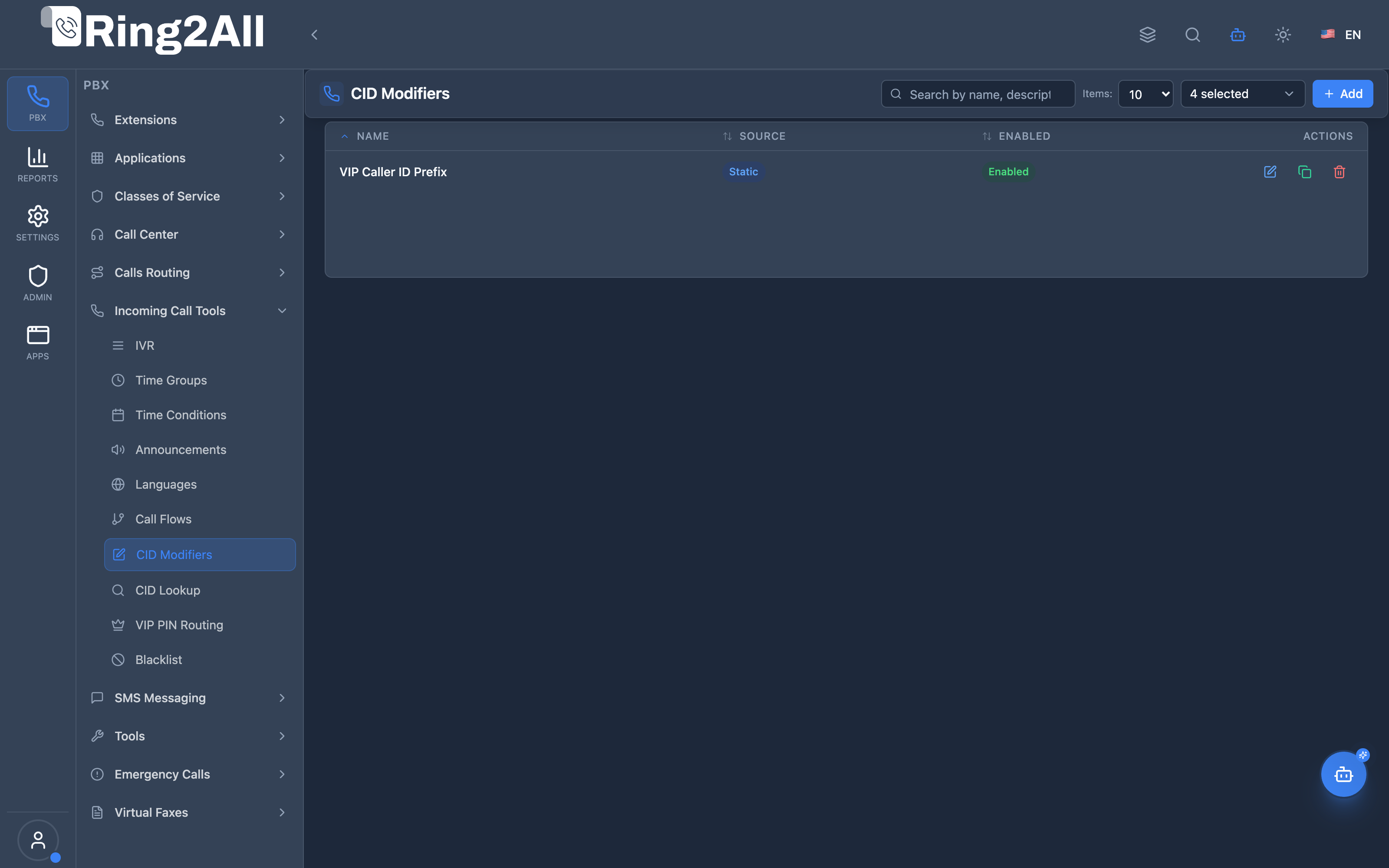
Section titled “Screenshots & Visual Interface”CID Modifiers Overview
Section titled “CID Modifiers Overview”Displays all caller ID manipulation rules, evaluation priority, condition patterns, modifier actions, and active status.
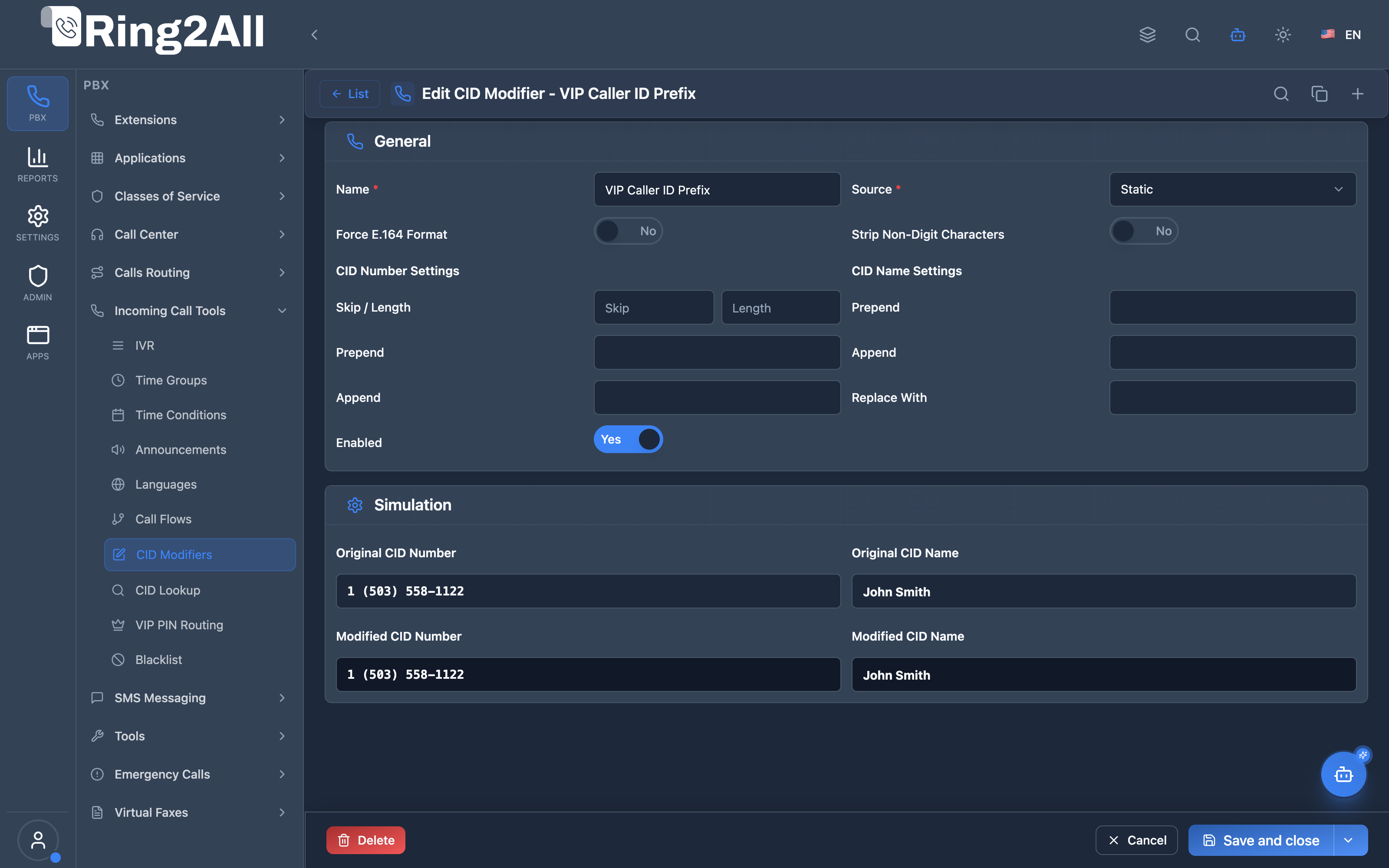
CID Modifier Configuration Form
Section titled “CID Modifier Configuration Form”Provides configuration for rule name, call direction, condition matching (pattern/regex), and transformation action (prepend, append, replace, strip, normalize).
1. Module Overview (Technical)
Section titled “1. Module Overview (Technical)”What Are CID Modifiers?
Section titled “What Are CID Modifiers?”CID Modifiers are Caller ID manipulation rules that transform caller ID number and/or name before the call is routed. They support pattern matching, number normalization, and dynamic lookups from databases or external APIs.
Architecture
Section titled “Architecture”┌─────────────────────────────────────────────────────────────────┐│ CID Modifier Processing │├─────────────────────────────────────────────────────────────────┤│ ││ Incoming Call: ││ ├─ Caller ID Number: 5058881234 ││ └─ Caller ID Name: WIRELESS CALLER ││ │ ││ ▼ ││ ┌──────────────────────────────────────────────────────────┐ ││ │ CID Modifier Rules (by priority) │ ││ │ │ ││ │ Rule 1 (priority 10): Normalize to E.164 │ ││ │ Pattern: ^505.* │ ││ │ Action: prepend + │ ││ │ Result: +5058881234 │ ││ │ │ ││ │ Rule 2 (priority 20): CRM Name Lookup │ ││ │ Source: HTTP │ ││ │ URL: https://crm.company.com/lookup?num=[CIDNUM] │ ││ │ Result: "John Smith" (from CRM) │ ││ │ │ ││ │ Rule 3 (priority 30): Add Department Prefix │ ││ │ Pattern: .* │ ││ │ Action: prepend "Sales: " to name │ ││ │ Result: "Sales: John Smith" │ ││ │ │ ││ └──────────────────────────────────────────────────────────┘ ││ │ ││ ▼ ││ Modified Call: ││ ├─ Caller ID Number: +5058881234 ││ └─ Caller ID Name: Sales: John Smith ││ │└─────────────────────────────────────────────────────────────────┘2. Module Overview (Commercial/Business)
Section titled “2. Module Overview (Commercial/Business)”Business Value
Section titled “Business Value”CID Modifiers enable intelligent caller identification:
| Without CID Modifiers | With CID Modifiers |
|---|---|
| Raw caller ID | Normalized E.164 format |
| “WIRELESS CALLER” | Customer name from CRM |
| No context | Department prefix |
| Inconsistent format | Standardized numbers |
Use Cases
Section titled “Use Cases”-
Number Normalization
- Convert local to E.164 (+15058881234)
- Strip trunk prefixes
-
CRM Integration
- Lookup customer name from database
- Display account number
-
Department Branding
- Prepend “Sales:” to name
- Add queue identifier
-
Outbound CID Control
- Set specific caller ID per route
- Corporate branding
Feature Highlights
Section titled “Feature Highlights”| Feature | Benefit |
|---|---|
| Pattern Matching | Regex condition matching |
| Multiple Sources | Static, Database, HTTP |
| Priority Order | Sequential rule processing |
| Stop On Match | Control rule cascade |
| E.164 Normalization | Standard number format |
| HTTP Lookup | External API integration |
3. Module Overview (End User/Administrator)
Section titled “3. Module Overview (End User/Administrator)”What Can You Do?
Section titled “What Can You Do?”- Create CID modification rules
- Set pattern conditions
- Choose action types (prepend, append, replace, etc.)
- Configure priority order
- Set up database or HTTP lookups
- Simulate modifications before saving
Administrator Workflow
Section titled “Administrator Workflow”┌─────────────────────────────────────────────────────────────────┐│ Creating a CID Modifier │├─────────────────────────────────────────────────────────────────┤│ ││ Tab: General ││ ├─ Name: "Add Country Code" ││ ├─ Source: Static ││ ├─ Direction: Inbound ││ ├─ Condition Field: Caller ID Number ││ ├─ Condition Pattern: ^[2-9][0-9]{9}$ ││ ├─ Action Type: Prepend ││ ├─ Action Value: +1 ││ ├─ Priority: 10 ││ ├─ Stop on Match: Off ││ └─ Enabled: ✓ ││ ││ Tab: Advanced Settings (for Static source) ││ ├─ CID Number Settings: ││ │ ├─ Skip: 0 ││ │ ├─ Length: 0 (all digits) ││ │ ├─ Prepend: +1 ││ │ └─ Append: (empty) ││ ├─ CID Name Settings: ││ │ ├─ Prepend: (empty) ││ │ ├─ Append: (empty) ││ │ ├─ Replace With: (empty) ││ │ ├─ Force E.164 Format: Off ││ │ ├─ Strip Non-Digit Characters: On ││ │ └─ Block Name if Empty: On ││ └─ Enabled: ✓ ││ ││ Section: Simulation ││ ├─ Test Number: 5058881234 ││ ├─ Test Name: WIRELESS CALLER ││ ├─ [Run Simulation] ││ ├─ Modified Number: +15058881234 ││ └─ Modified Name: WIRELESS CALLER ││ │└─────────────────────────────────────────────────────────────────┘Quick Tips
Section titled “Quick Tips”[!TIP] Use Simulation: Test your rules before saving to verify expected output.
[!TIP] Priority Matters: Lower numbers execute first. Plan your rule order.
[!CAUTION] Pattern Syntax: Use valid regex patterns or rules won’t match.
🎯 User Roles & Key Capabilities
Section titled “🎯 User Roles & Key Capabilities”| Role | Permissions & Responsibilities | Key Capabilities |
|---|---|---|
| Tenant Administrator | Full write access to CID Modifiers | Create and edit transformation rules (E.164 normalization, regex prepend/append, DB/HTTP lookups), set rule evaluation priority, and test via the real-time simulation engine |
| Call Center Supervisor / Operator | Read-only access | View active CID transformation rules to diagnose caller identification, name prefixing, or CRM lookup behavior on live calls |
| Platform / System Engineer | Telephony and FreeSWITCH engine access | Monitor FreeSWITCH Lua execution logs (caller_id_modifier.lua), verify session variable propagation, and tune ODBC/HTTP database query latencies |
4. Configuration Fields Reference
Section titled “4. Configuration Fields Reference”General Fields
Section titled “General Fields”| Field | Description | Example |
|---|---|---|
| Name | Rule identifier | Add Country Code |
| Source | Data source type | Static/Database/HTTP |
| Direction | Call direction | Inbound/Outbound/Internal |
| Condition Field | Field to evaluate | caller_id_number |
| Condition Pattern | Regex pattern | ^[2-9][0-9]{9}$ |
| Action Type | Modification type | prepend |
| Action Value | Value to apply | +1 |
| Priority | Execution order (0-999) | 10 |
| Stop on Match | Stop further rules | On/Off |
| Enabled | Rule active | On/Off |
Directions
Section titled “Directions”| Direction | Description |
|---|---|
| Inbound | External calls coming in |
| Outbound | Internal calls going out |
| Internal | Extension to extension |
Condition Fields
Section titled “Condition Fields”| Field | Description |
|---|---|
| caller_id_number | Caller’s phone number |
| caller_id_name | Caller’s name |
| destination_number | Number being called |
| source_number | Source number |
5. Source Types
Section titled “5. Source Types”Static Source
Section titled “Static Source”Manual configuration of transformation rules:
| Setting | Description |
|---|---|
| Skip | Digits to skip from start |
| Length | Output length (0 = all) |
| Prepend | Add before number |
| Append | Add after number |
| Force E.164 | Convert to +E.164 format |
| Strip Non-Digits | Remove non-numeric chars |
Database Source
Section titled “Database Source”Lookup caller info from external database:
| Setting | Description |
|---|---|
| Database | Database name |
| Host | Server address |
| Username | Auth username |
| Password | Auth password |
| Query | SQL returning cidname, cidnumber |
HTTP Source
Section titled “HTTP Source”Lookup from external API:
| Setting | Description |
|---|---|
| URL | API endpoint with [CIDNUM]/[CIDNAME] |
| Auth User | HTTP auth username |
| Auth Password | HTTP auth password |
| Timeout | Request timeout (seconds) |
| Retries | Retry attempts |
| Failover Behavior | What to do if lookup fails |
6. Action Types
Section titled “6. Action Types”Available Actions
Section titled “Available Actions”| Action | Description | Example |
|---|---|---|
| Prepend | Add before value | +1 + 5058881234 = +15058881234 |
| Append | Add after value | 5058881234 + -ext = 5058881234-ext |
| Replace | Complete replacement | Replace with custom value |
| Strip | Remove leading digits | Strip 1 from 15058881234 = 5058881234 |
| Set Name | Set caller name | “VIP Customer” |
| Set Number | Set caller number | “+18005551234” |
| Normalize | Convert to E.164 | 5058881234 → +15058881234 |
| Custom | Custom transformation | Variable-based |
7. Common Scenarios & Examples
Section titled “7. Common Scenarios & Examples”Scenario 1: E.164 Normalization
Section titled “Scenario 1: E.164 Normalization”Rule: “Add US Country Code”
| Setting | Value |
|---|---|
| Direction | Inbound |
| Condition Pattern | ^[2-9][0-9]{9}$ |
| Action Type | Prepend |
| Action Value | +1 |
| Priority | 10 |
Result: 5058881234 → +15058881234
Scenario 2: CRM Name Lookup
Section titled “Scenario 2: CRM Name Lookup”Rule: “CRM Customer Lookup”
| Setting | Value |
|---|---|
| Source | HTTP |
| Direction | Inbound |
| URL | https://crm.example.com/api/caller?num=[CIDNUM] |
| Timeout | 3 |
| Failover | Keep Original |
| Priority | 20 |
Result: “WIRELESS CALLER” → “John Smith”
Scenario 3: Department Prefix
Section titled “Scenario 3: Department Prefix”Rule: “Sales Queue Prefix”
| Setting | Value |
|---|---|
| Direction | Inbound |
| Action Type | Prepend (to name) |
| Action Value | “Sales: “ |
| Priority | 30 |
Result: “John Smith” → “Sales: John Smith”
Scenario 4: Strip Trunk Prefix
Section titled “Scenario 4: Strip Trunk Prefix”Rule: “Remove 9 Prefix”
| Setting | Value |
|---|---|
| Direction | Outbound |
| Condition Pattern | ^9[0-9]+$ |
| Action Type | Strip |
| Action Value | 1 |
| Priority | 5 |
Result: 915058881234 → 15058881234
8. Model Context Protocol (MCP) AI Integration
Section titled “8. Model Context Protocol (MCP) AI Integration”Ring2All exposes native Model Context Protocol (MCP) tools for Caller ID (CID) Modifiers, enabling AI agents, CRM integration engines, and PBX Copilots to inspect caller identification transformations, configure departmental name prefixes (e.g. [VIP] or Sales:), normalize phone numbers to E.164, and provision or adjust caller manipulation rules programmatically with domain-level isolation.
Available MCP Tools
Section titled “Available MCP Tools”| Tool Name | Description | Key Parameters |
|---|---|---|
list_cid_modifiers |
Lists all CID Modifiers configured in the domain, displaying rule name, call direction (inbound, outbound, internal), action type, and enabled status. |
search (optional string) |
get_cid_modifier_status |
Retrieves full configuration, prefix/suffix values, strip digit counts, and chained destination targets of a specific CID Modifier rule. | name (required string) |
create_cid_modifier |
Provisions a new Caller ID transformation rule (prepending department names, adding country codes, stripping carrier prefixes). Strictly enforces rule name and context uniqueness per domain. | name, actionType (prepend, append, replace, strip, set_name, set_number, normalize, custom), destinationModule, destinationData, direction, prependName, prependNumber, stripDigits |
update_cid_modifier |
Updates an existing CID Modifier’s transformation parameters, prefix text, action type, or enabled state. | name, newName, direction, actionType, prependName, enabled |
delete_cid_modifier |
Safely removes a CID Modifier rule from the PBX domain. | name (required string) |
Protection Guards & Integrity
Section titled “Protection Guards & Integrity”- Name & Context Uniqueness: The PBX validates that both the modifier
nameand the dialplan routingcontextare strictly unique within the tenant domain. - Immediate Call Processing: CID modification rules update database records instantly and are evaluated by Telephony Server routing handlers on subsequent incoming and outgoing INVITEs without daemon reboots.
AI Agent Operational Examples
Section titled “AI Agent Operational Examples”Querying CID Modifier Configuration
Section titled “Querying CID Modifier Configuration”{ "tool": "get_cid_modifier_status", "arguments": { "name": "Add VIP Tag to Caller Name" }}Provisioning an Inbound Department Prefix Rule
Section titled “Provisioning an Inbound Department Prefix Rule”{ "tool": "create_cid_modifier", "arguments": { "name": "Support Line Tag", "direction": "inbound", "actionType": "prepend", "prependName": "Support: ", "destinationModule": "queue", "destinationData": "800" }}Recommended Natural Language Prompts
Section titled “Recommended Natural Language Prompts”- “List all CID Modifiers configured in this domain.”
- “Create a Caller ID Modifier rule named ‘Sales Prefix’ that adds ’Sales: ’ before the caller’s name and routes to Ring Group 600.”
- “Update the ‘Support Line Tag’ rule to prepend ’[URGENT] ’ to the caller name.”
- “Delete the outdated CID modifier ‘Remove 9 Prefix’.”
9. Limitations & Important Notes
Section titled “9. Limitations & Important Notes”Technical Notes
Section titled “Technical Notes”[!NOTE] Processing Order: Rules execute by priority (lower first).
[!WARNING] Regex Patterns: Invalid patterns will cause rule to not match.
[!WARNING] HTTP Timeouts: Consider call setup time when using HTTP lookups.
Best Practices
Section titled “Best Practices”- Test First: Use simulation before saving
- Order Carefully: Plan priority sequence
- Use Stop on Match: Prevent redundant processing
- Monitor Timeouts: HTTP lookups add latency
- Log Changes: Enable for troubleshooting
10. Troubleshooting Tips
Section titled “10. Troubleshooting Tips”Common Issues
Section titled “Common Issues”| Symptom | Possible Cause | Solution |
|---|---|---|
| No modification | Pattern not matching | Test regex pattern |
| Wrong result | Priority order | Check rule priorities |
| HTTP timeout | Slow external API | Reduce timeout, add caching |
| Empty name | Lookup failed | Check failover behavior |
| Rule skipped | Disabled or invalid | Verify enabled status |
Diagnostic SQL
Section titled “Diagnostic SQL”List CID modifiers:
SELECT id, name, direction, action_type, condition_pattern, priority, enabledFROM public.cid_modifiersWHERE domain_id = [domain_id]ORDER BY priority;Telephony Server Logs
Section titled “Telephony Server Logs”# Check CID processinggrep "effective_caller_id" /var/log/freeswitch/freeswitch.loggrep "caller_id_number" /var/log/freeswitch/freeswitch.log11. Glossary
Section titled “11. Glossary”| Term | Definition |
|---|---|
| CID | Caller ID - phone number and name |
| E.164 | International phone number format (+15058881234) |
| CLID | Caller Line ID (same as CID) |
| Normalize | Convert to standard format |
| Prepend | Add to beginning |
| Append | Add to end |
| Strip | Remove from beginning |
Documentation last updated: January 2026