

Paging Groups & Intercom Module Documentation
Table of Contents
Section titled “Table of Contents”- Module Overview (Technical)
- Module Overview (Commercial/Business)
- Module Overview (End User/Administrator)
- Configuration Fields Reference
- Call Flow / Logic Explanation
- Common Scenarios & Examples
- Model Context Protocol (MCP) AI Integration
- Limitations & Important Notes
- Troubleshooting Tips
- Glossary
1. Module Overview (Technical)
Section titled “1. Module Overview (Technical)”What Are Paging Groups?
Section titled “What Are Paging Groups?”Paging Groups provide one-way or two-way audio broadcasting to multiple endpoints simultaneously. This includes:
- Paging: One-way announcements to groups of phones
- Intercom: Two-way communication (duplex mode)
- Multicast: Network-level audio broadcasting to compatible devices
The Four Modes
Section titled “The Four Modes”| Mode | Description | Use Case |
|---|---|---|
| Default | Standard SIP paging to selected extensions | Office announcements |
| Duplex | Two-way intercom communication | Warehouse communication |
| Multicast | RTP multicast to IP speakers | Factory floor PA |
| Hybrid | Both SIP extensions and multicast | Mixed environments |
Architecture
Section titled “Architecture”┌─────────────────────────────────────────────────────────────────┐│ Paging System Architecture │├─────────────────────────────────────────────────────────────────┤│ ││ User dials: *80 (Paging Group Code) ││ │ ││ ▼ ││ ┌──────────────────────────────────────────────────────────┐ ││ │ Paging Group Lookup │ ││ │ SELECT * FROM paging_groups WHERE code = '*80' │ ││ │ → Returns mode, members, settings │ ││ └──────────────────────────────────────────────────────────┘ ││ │ ││ ▼ ││ ┌──────────────────────────────────────────────────────────┐ ││ │ Based on Mode │ ││ │ │ ││ │ DEFAULT ────────────────────────────────────────────── │ ││ │ │ │ ││ │ ├─ Create conference room │ ││ │ ├─ Set auto-answer headers │ ││ │ ├─ Call each member extension │ ││ │ └─ Bridge caller to conference │ ││ │ │ ││ │ DUPLEX (Intercom) ──────────────────────────────────── │ ││ │ │ │ ││ │ ├─ Same as default │ ││ │ └─ Enable two-way audio for all participants │ ││ │ │ ││ │ MULTICAST ──────────────────────────────────────────── │ ││ │ │ │ ││ │ ├─ Answer caller │ ││ │ └─ Stream audio to multicast address (239.x.x.x) │ ││ │ │ ││ │ HYBRID ─────────────────────────────────────────────── │ ││ │ │ │ ││ │ ├─ Call SIP extensions (like default) │ ││ │ └─ Simultaneously stream to multicast │ ││ │ │ ││ └──────────────────────────────────────────────────────────┘ ││ │└─────────────────────────────────────────────────────────────────┘2. Module Overview (Commercial/Business)
Section titled “2. Module Overview (Commercial/Business)”Business Value
Section titled “Business Value”Paging Groups enable instant mass communication:
| External Systems | Built-In Paging |
|---|---|
| Separate PA system | Integrated with PBX |
| Additional hardware | Uses existing phones |
| Manual intercom setup | Configured via UI |
| Limited scalability | Unlimited groups |
Use Cases
Section titled “Use Cases”-
Office Announcements
- “John Smith, please come to reception”
- Emergency notifications
- Company-wide messages
-
Warehouse/Manufacturing
- Foreman announcements
- Safety alerts
- Shift change notifications
-
Intercom Communication
- Reception to back office
- Security to all stations
- Medical triage coordination
-
School/Campus
- Classroom announcements
- Emergency lockdown
- Bell system integration
Feature Highlights
Section titled “Feature Highlights”| Feature | Benefit |
|---|---|
| Auto-Answer | Phones answer automatically—no user action needed |
| Mute Participants | One-way paging (listeners can’t interrupt) |
| PIN Protection | Restrict who can initiate pages |
| Recording | Record all announcements for compliance |
| Multicast | Broadcast to IP speakers without SIP overhead |
| Skip Busy | Don’t interrupt ongoing calls |
3. Module Overview (End User/Administrator)
Section titled “3. Module Overview (End User/Administrator)”What Can You Do?
Section titled “What Can You Do?”- Create paging groups with assigned extension codes
- Add/remove member extensions
- Configure one-way (paging) or two-way (intercom) mode
- Set up multicast for IP speakers
- Protect pages with PIN codes
- Enable recording of announcements
Navigation
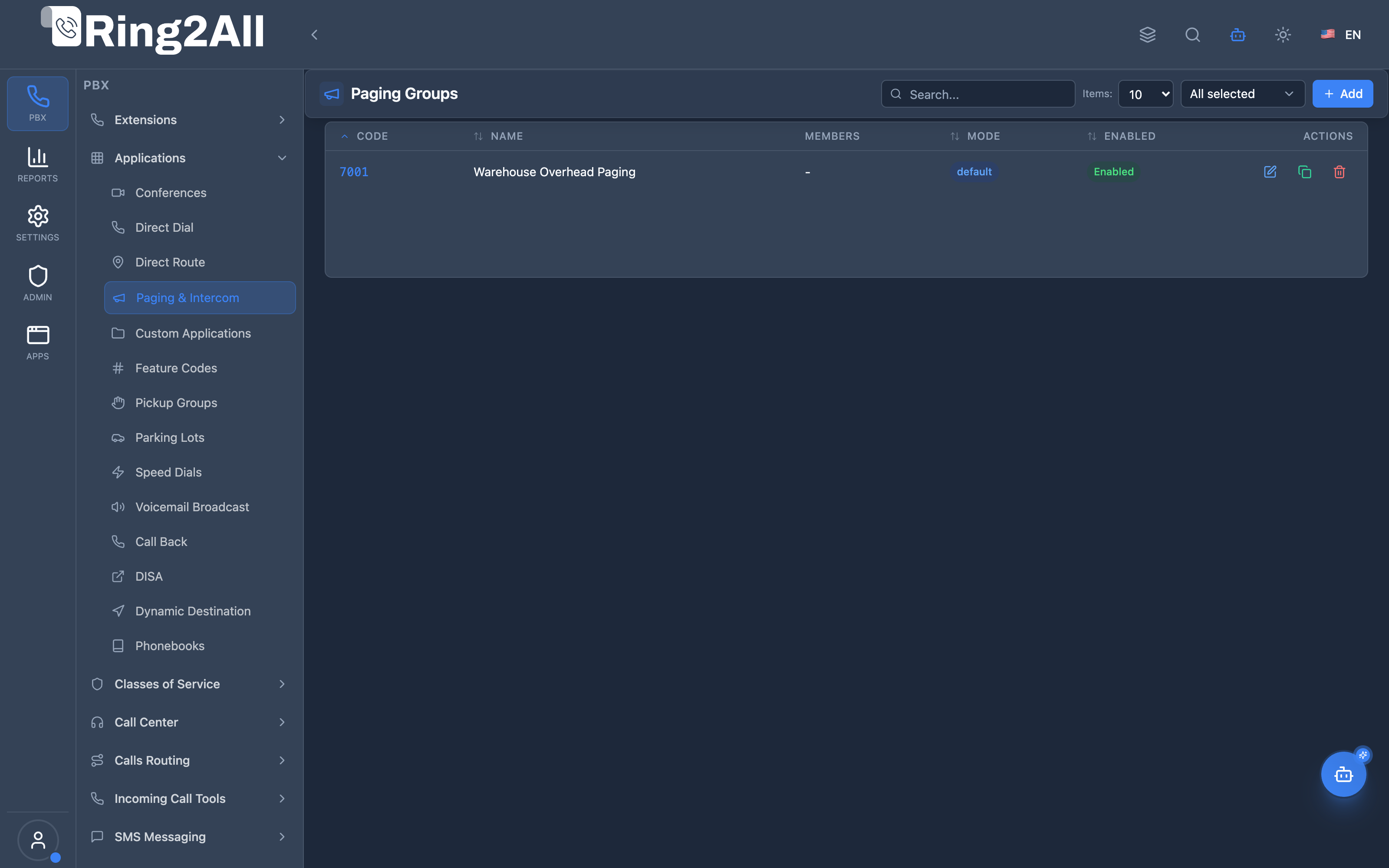
Section titled “Navigation”- Navigate to PBX → Applications → Paging & Intercom in the main sidebar.
- The list view displays all configured paging groups, detailing their dial Code, Name, Members count, Mode/Group Strategy, and active Status (Enabled/Disabled).
- Click the + Add button in the upper toolbar to configure a new paging group.
- Click any row or the edit icon to configure group extensions, broadcast strategies, auto-answer headers, or timeouts.
User Workflow
Section titled “User Workflow”┌─────────────────────────────────────────────────────────────────┐│ Creating a Paging Group │├─────────────────────────────────────────────────────────────────┤│ ││ Step 1: Basic Settings ││ ├─ Code: 7001 (or *80) ││ ├─ Group Name: "Warehouse Overhead Paging" ││ ├─ Strategy: Default (SIP auto-answer) ││ └─ Timeout: 15 seconds ││ ││ Step 2: Add Members ││ ├─ Search: "Warehouse" or "Floor" ││ ├─ Select extensions from the searchable list ││ └─ Counter shows "X of Y selected" ││ ││ Step 3: Caller ID Display ││ ├─ Name Template: Paging ${extension_name} ││ └─ Number Template: ${extension_number} ││ ││ Step 4: Enable & Save ││ └─ Users dial 7001 → Member phones beep and auto-answer ││ │└─────────────────────────────────────────────────────────────────┘Quick Tips
Section titled “Quick Tips”[!TIP] Auto-Answer Required: For paging to work, recipient IP phones must support and permit auto-answer SIP headers (
Alert-Info: info=alert-autoanswerorCall-Info: answer-after=0).
[!TIP] Skip Busy: When configuring large teams, skip busy extensions so active customer calls are not interrupted by overhead broadcasts.
[!CAUTION] Multicast Network Config: Multicast paging requires proper LAN switch configuration (IGMP snooping and multicast routing) if speakers reside on different VLANs.
4. Configuration Fields Reference
Section titled “4. Configuration Fields Reference”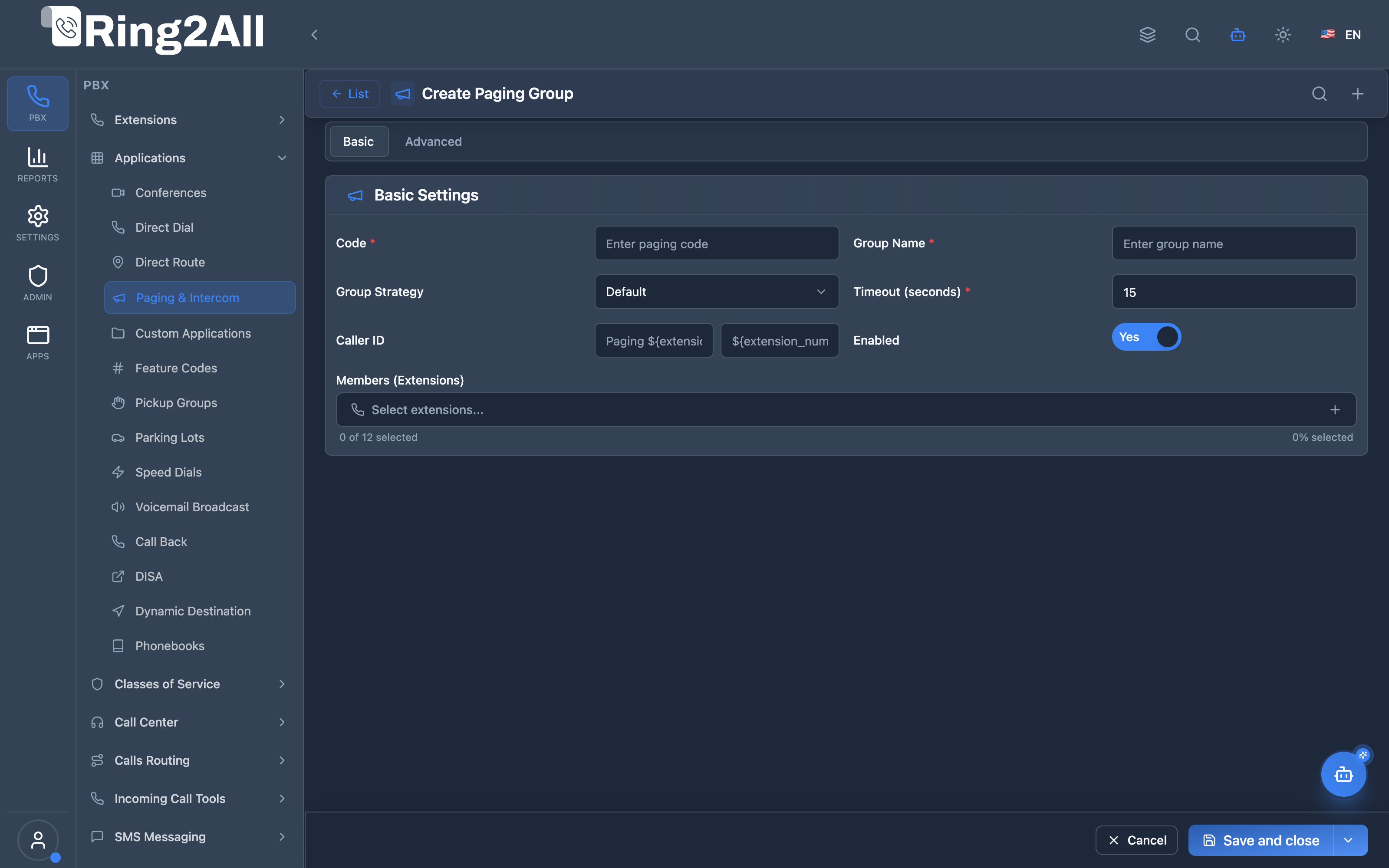
Basic Settings Tab
Section titled “Basic Settings Tab”| Field | Technical Description | User-Friendly Tooltip | Example | Required | Notes |
|---|---|---|---|---|---|
| Code * | Dialable extension or feature code for this paging group | Digits dialed by authorized users to initiate an announcement broadcast | 7001, *80 |
Yes | Must be unique within the domain dialplan registry. |
| Group Name * | Human-readable identifier for the paging group | Clear label describing the department or area targeted | Warehouse Overhead Paging, Executive Intercom |
Yes | Displayed in directories and audit logs. |
| Group Strategy (Mode) | Broadcast methodology and audio transmission mode | Operational audio mode (Default [One-way SIP], Duplex [Two-way intercom], or Multicast [RTP multicast]) |
Default |
Yes | FreeSWITCH conference-driven auto-answer. |
| Multicast Address | IP multicast address and UDP port for streaming audio directly to network hardware speakers | Multicast address and port (active when Mode is Multicast) | 239.255.10.10:5000 |
Conditional | Required only when Mode is set to Multicast. |
| Timeout (seconds) * | Maximum duration before automatically terminating page | Time limit in seconds for the broadcast session (5 - 120s) | 15, 30 |
Yes | FreeSWITCH leg_timeout. Protects against un-hung channels. |
| Caller ID Name | Display name presented to called endpoints | Caller ID name presented on receiving phone screens | Overhead Page |
No | Overrides originator display name. |
| Caller ID Number | Display number presented to called endpoints | Caller ID number presented on receiving phone screens | 7001 |
No | Overrides originator extension number. |
| Enabled | Master activation toggle | Instantly enable or disable this paging group | Yes / No (toggle) |
Yes | Default: Yes. |
| Members (Extensions) | Multi-select list of extensions included in this broadcast group | Select which phone extensions will auto-answer when this group is called | Multi-selection list | Yes | Recipients receive native sip_auto_answer=true. |
Advanced Settings Tab
Section titled “Advanced Settings Tab”Audio & Media Settings
Section titled “Audio & Media Settings”| Field | Technical Description | User-Friendly Tooltip | Default | Example | Notes |
|---|---|---|---|---|---|
| Audio Codec | RTP audio codec used for the broadcast session | Preferred audio codec for the stream | PCMU |
PCMU, PCMA, G722, OPUS |
Multicast speakers must support the selected codec. |
| Speaker Volume | Audio output volume adjustment applied to broadcast legs | Speaker volume adjustment (-5 to +5) | 5 |
0 (normal), 5 (loud) |
Sets FreeSWITCH speak_volume leg channel variable. |
| Pre-Page Announcement | Audio recording played to caller/listeners before bridging | Audio prompt played prior to the live broadcast | None | beep.wav, chime.wav |
Uploaded via Sound Prompts / Voice Recordings. |
| Record Session | Records the complete paging session to storage | Enable or disable automatic recording of announcements | Off |
Toggle (On/Off) |
Saves audio via FreeSWITCH record_session=true. |
| Skip Busy Extensions | Prevents interrupting active calls on recipient endpoints | Do not ring or auto-answer extensions currently on an active call | Off |
Toggle (On/Off) |
FreeSWITCH skip_busy=true originate channel variable. |
5. Call Flow / Logic Explanation
Section titled “5. Call Flow / Logic Explanation”Standard Paging Flow (Default Mode)
Section titled “Standard Paging Flow (Default Mode)”┌─────────────────────────────────────────────────────────────────┐│ Standard Paging Flow │├─────────────────────────────────────────────────────────────────┤│ ││ 1. User dials *80 (paging group code) ││ │ ││ ▼ ││ 2. Check PIN requirement (if configured) ││ ├─ PIN required → Prompt for PIN ││ │ ├─ Correct → Continue ││ │ └─ Wrong → "Invalid PIN" + hangup ││ └─ No PIN → Continue ││ │ ││ ▼ ││ 3. Play pre-announcement (if configured) ││ │ ││ ▼ ││ 4. Create dynamic conference for this page ││ │ ││ ▼ ││ 5. For each member extension: ││ ├─ Check if busy (if skip_busy enabled) ││ ├─ Set auto-answer SIP headers ││ └─ Bridge to conference (muted if mute_participants) ││ │ ││ ▼ ││ 6. Wait for specified timeout for endpoints to answer ││ │ ││ ▼ ││ 7. Caller speaks → Audio broadcast to all answered phones ││ │ ││ ▼ ││ 8. Caller hangs up → Conference ends, all legs disconnect ││ │└─────────────────────────────────────────────────────────────────┘Multicast Flow
Section titled “Multicast Flow”┌─────────────────────────────────────────────────────────────────┐│ Multicast Paging Flow │├─────────────────────────────────────────────────────────────────┤│ ││ 1. User dials *85 (multicast paging group) ││ │ ││ ▼ ││ 2. Answer caller ││ │ ││ ▼ ││ 3. Start RTP stream to multicast address: ││ Address: 239.255.10.10:5000 ││ Codec: PCMU (G.711µ) ││ │ ││ ▼ ││ 4. IP speakers (subscribed to 239.255.10.10) receive audio ││ │ ││ ▼ ││ 5. Caller hangs up → Stream stops ││ │└─────────────────────────────────────────────────────────────────┘6. Common Scenarios & Examples
Section titled “6. Common Scenarios & Examples”Scenario 1: Office-Wide Announcement
Section titled “Scenario 1: Office-Wide Announcement”Setup:
| Setting | Value |
|---|---|
| Code | *80 |
| Name | All Office |
| Mode | Default |
| Members | 1001-1050 (all office extensions) |
| Auto Answer | ✓ |
| Mute Participants | ✓ |
| Skip Busy | ✓ |
Result: Dial *80, all available phones auto-answer (muted), announcement plays.
Scenario 2: Warehouse Intercom
Section titled “Scenario 2: Warehouse Intercom”Setup:
| Setting | Value |
|---|---|
| Code | *70 |
| Name | Warehouse Intercom |
| Mode | Duplex |
| Members | 2001, 2002, 2003 (warehouse phones) |
| Intercom Mode | ✓ |
| Mute Participants | ✗ (allow responses) |
Result: Dial *70, all warehouse phones connect for two-way conversation.
Scenario 3: Factory Floor PA System
Section titled “Scenario 3: Factory Floor PA System”Setup:
| Setting | Value |
|---|---|
| Code | *85 |
| Name | Factory PA |
| Mode | Multicast |
| Multicast Address | 239.255.10.10 |
| Port | 5000 |
| Codec | PCMU |
Result: Dial *85, audio streams to all IP speakers configured for that multicast group.
Scenario 4: Protected Emergency Announcement
Section titled “Scenario 4: Protected Emergency Announcement”Setup:
| Setting | Value |
|---|---|
| Code | *911 |
| Name | Emergency Broadcast |
| Mode | Hybrid |
| PIN Code | 9911 |
| Members | ALL extensions |
| Multicast | (also to PA speakers) |
| Recording | ✓ |
Result: Only authorized users with PIN can trigger emergency broadcast to all phones and speakers. All broadcasts recorded.
7. Model Context Protocol (MCP) AI Integration
Section titled “7. Model Context Protocol (MCP) AI Integration”Paging and Intercom groups are exposed via the Model Context Protocol (MCP) for programmatic administration, membership audits, and direct voice broadcast origination by authorized AI operators.
Available MCP Tools
Section titled “Available MCP Tools”| Tool Name | Operation | Description | Access Level |
|---|---|---|---|
list_paging_groups |
Query | List all paging and intercom groups, audio modes, member counts, and multicast addresses. | Read-Only |
get_paging_group_status |
Query | Retrieve full group details including individual member extensions and audio parameters. | Read-Only |
create_paging_group |
Provisioning | Create a new paging or two-way intercom group with auto-answer headers and custom timeouts. | Admin / Superadmin |
update_paging_group |
Management | Add/remove member extensions, change broadcast audio mode, or adjust timeout limits. | Admin / Superadmin |
delete_paging_group |
Deprovisioning | Remove a paging group from the PBX. | Superadmin |
page_broadcast |
Live Telephony | Trigger a real-time live page broadcast originating from a specific extension to a paging group code. | Operator / Admin |
Tool Definitions & Parameter Reference
Section titled “Tool Definitions & Parameter Reference”create_paging_group
Section titled “create_paging_group”Provisions an auto-answer broadcast group within the domain.
{ "name": "create_paging_group", "description": "Create a new Paging / Intercom group to broadcast voice messages or execute two-way intercom to multiple extensions with auto-answer.", "inputSchema": { "type": "object", "properties": { "code": { "type": "string", "description": "Dial code for the paging group (e.g. '*84', '800', '99')." }, "name": { "type": "string", "description": "Name of the paging group (e.g. 'Warehouse Speakers')." }, "members": { "type": "array", "items": { "type": "string" }, "description": "Array of member extension numbers (e.g. ['2001', '2002', '2003'])." }, "mode": { "type": "string", "enum": ["default", "intercom", "multicast", "duplex"], "description": "Paging mode: 'default' (one-way), 'intercom' (two-way), 'multicast' (RTP stream), 'duplex' (conference)." }, "timeout": { "type": "number", "description": "Maximum broadcast duration in seconds (default: 30)." }, "autoAnswer": { "type": "boolean", "description": "Send SIP auto-answer headers (Call-Info / Alert-Info)." } }, "required": ["code", "name", "members"] }}Safety Safeguards & Number Uniqueness
Section titled “Safety Safeguards & Number Uniqueness”- Domain Number Collision Prevention: The service enforces
validateNumberUniqueness(code, domain.id, 'paging_groups')againstpublic.dialplan_registry. Paging codes cannot collide with Extensions, Conferences, Parking Lots, Speed Dials, or Feature Codes in the same domain. - Auto Dialplan Synchronization: Changes immediately sync to
public.dialplan_registryand reload Telephony Server XML configuration so endpoints can dial the paging code without server restart.
Example AI Assistant Prompts & Workflow
Section titled “Example AI Assistant Prompts & Workflow”Example 1: Creating a Warehouse Intercom Group
Section titled “Example 1: Creating a Warehouse Intercom Group”Admin Prompt:
*“Create a two-way intercom group with code 85 named ‘Warehouse Floor’ for extensions 3010, 3011, and 3012 with a 60-second timeout.”
AI Tool Execution:
{ "tool": "create_paging_group", "arguments": { "code": "*85", "name": "Warehouse Floor", "members": ["3010", "3011", "3012"], "mode": "intercom", "timeout": 60, "autoAnswer": true }}MCP Response:
{ "success": true, "data": { "code": "*85", "name": "Warehouse Floor", "mode": "intercom", "memberCount": 3, "message": "Paging group *85 created successfully." }}8. Limitations & Important Notes
Section titled “8. Limitations & Important Notes”Technical Limitations
Section titled “Technical Limitations”[!WARNING] Auto-Answer Support: Not all SIP phones support auto-answer. Older or basic phones may not activate.
[!WARNING] Multicast Network Requirements: Multicast requires IGMP-enabled switches and proper network configuration.
[!IMPORTANT] Codec Compatibility: Multicast endpoints must support the configured codec. PCMU (G.711µ) has widest support.
Best Practices
Section titled “Best Practices”- Test Auto-Answer: Verify phones actually auto-answer before relying on paging
- Network Planning for Multicast: Work with network team to enable IGMP snooping
- PIN Protection: Use PINs for high-impact pages (emergency, company-wide)
- Skip Busy: Always enable to avoid interrupting important calls
- Keep Groups Focused: Create smaller, targeted groups rather than one huge group
Phone Configuration
Section titled “Phone Configuration”For auto-answer to work, phones typically need:
- Auto-answer header support enabled
- Intercom mode enabled in phone settings
- Correct SIP headers:
Alert-Info: info=auto-answeror similar
9. Troubleshooting Tips
Section titled “9. Troubleshooting Tips”Common Issues
Section titled “Common Issues”| Symptom | Possible Cause | Solution |
|---|---|---|
| Phone doesn’t answer | Auto-answer not supported | Check phone model/settings |
| No audio on page | Codec mismatch | Verify codec compatibility |
| Multicast not working | Network issue | Check IGMP, switch config |
| Only some phones answer | Skip busy + busy phones | Expected behavior |
| “Invalid PIN” | Wrong PIN entered | Verify correct PIN |
| Recording not created | Path permissions | Check directory permissions |
Diagnostic SQL
Section titled “Diagnostic SQL”List paging groups:
SELECT pg.code, pg.name, pg.mode, pg.enabled, COUNT(m.id) as member_countFROM public.paging_groups pgLEFT JOIN public.paging_group_members m ON pg.id = m.paging_group_idWHERE pg.domain_id = [domain_id]GROUP BY pg.idORDER BY pg.code;Check members of a group:
SELECT pgm.extension, e.descriptionFROM public.paging_group_members pgmJOIN public.sip_extensions e ON pgm.extension = e.extensionWHERE pgm.paging_group_id = [group_id];Telephony Server Diagnostics
Section titled “Telephony Server Diagnostics”Check active conferences (paging uses conferences):
fs_cli -x "conference xml_list"Debug multicast:
# Check if multicast traffic is being senttcpdump -i eth0 host 239.255.10.10 and udp port 500010. Glossary
Section titled “10. Glossary”| Term | Definition |
|---|---|
| Paging | One-way audio broadcast to multiple phones |
| Intercom | Two-way audio communication between phones |
| Multicast | Network-level broadcast using IP multicast (239.x.x.x addresses) |
| Auto-Answer | Phone feature that answers incoming calls automatically |
| Duplex | Two-way audio communication mode |
| IGMP | Internet Group Management Protocol—enables multicast on switches |
| TTL | Time To Live—how many network hops multicast packets can travel |
| PCMU | G.711µ audio codec—widely supported, good quality |
| RTP | Real-time Transport Protocol—carries audio over IP networks |
| PA System | Public Address system—speakers for announcements |
| Barge-In | Ability to interrupt an ongoing announcement |
| Skip Busy | Don’t page extensions that are on active calls |
Documentation last updated: January 2026