

Priority Routing Module Documentation
Table of Contents
Section titled “Table of Contents”- Module Overview (Technical)
- Module Overview (Commercial/Business)
- Module Overview (End User/Administrator)
- Configuration Fields Reference
- Common Scenarios & Examples
- Model Context Protocol (MCP) AI Integration
- Limitations & Important Notes
- Troubleshooting Tips
- Glossary
1. Module Overview (Technical)
Section titled “1. Module Overview (Technical)”What Is Priority Routing?
Section titled “What Is Priority Routing?”Priority Routing allows administrators to define named routing rules with priority scores. These rules route calls to specific destinations and can be referenced by other modules like queues or VIP lists to give certain callers higher queue position scores.
Architecture
Section titled “Architecture”┌─────────────────────────────────────────────────────────────────┐│ Priority Routing System │├─────────────────────────────────────────────────────────────────┤│ ││ Priority Routing Rules: ││ ┌────────────────────────────────────────────────────────────┐ ││ │ Name │ Priority │ Route To │ ││ ├────────────────┼──────────┼────────────────────────────────┤ ││ │ VIP Customers │ 10 │ Queue → VIP Support │ ││ │ Gold Members │ 8 │ Queue → Premium Support │ ││ │ Partners │ 7 │ Queue → Partner Desk │ ││ │ Standard │ 5 │ Queue → General Support │ ││ └────────────────┴──────────┴────────────────────────────────┘ ││ ││ Usage: ││ ├─ Referenced by VIP Lists for caller scoring ││ ├─ Referenced by Queue configurations ││ └─ Consumed by routing engine for destination selection ││ │└─────────────────────────────────────────────────────────────────┘Integration Points
Section titled “Integration Points”Priority Routing rules can be referenced by:
- VIP Lists → Assign priority to matching callers
- Queue Profiles → Route to priority-specific destinations
- Routing Engine → Select destination based on priority
2. Module Overview (Commercial/Business)
Section titled “2. Module Overview (Commercial/Business)”Business Value
Section titled “Business Value”Priority Routing enables differentiated service levels:
| Without Priority Routing | With Priority Routing |
|---|---|
| All callers equal | VIP callers prioritized |
| No service tiers | Named priority tiers |
| Manual escalation | Automatic routing |
| No tracking | Named rules for reports |
Use Cases
Section titled “Use Cases”-
VIP Customer Handling
- Highest priority (10) for top clients
- Route directly to senior agents
-
Service Tier Management
- Gold/Silver/Bronze membership levels
- Different queue destinations per tier
-
Partner Program
- Partners get priority routing
- Dedicated support queues
-
Account-Based Routing
- Enterprise accounts to enterprise queue
- SMB accounts to SMB queue
Feature Highlights
Section titled “Feature Highlights”| Feature | Benefit |
|---|---|
| Priority Score (0-10) | 10 levels of prioritization |
| Named Rules | Easy identification |
| Module/Destination | Route to any PBX destination |
| Enable/Disable | Quick activation toggle |
3. Module Overview (End User/Administrator)
Section titled “3. Module Overview (End User/Administrator)”What Can You Do?
Section titled “What Can You Do?”- Create named priority routing rules
- Set priority scores (0-10, 10 = highest)
- Configure destination module/target
- Enable/disable rules
Navigation
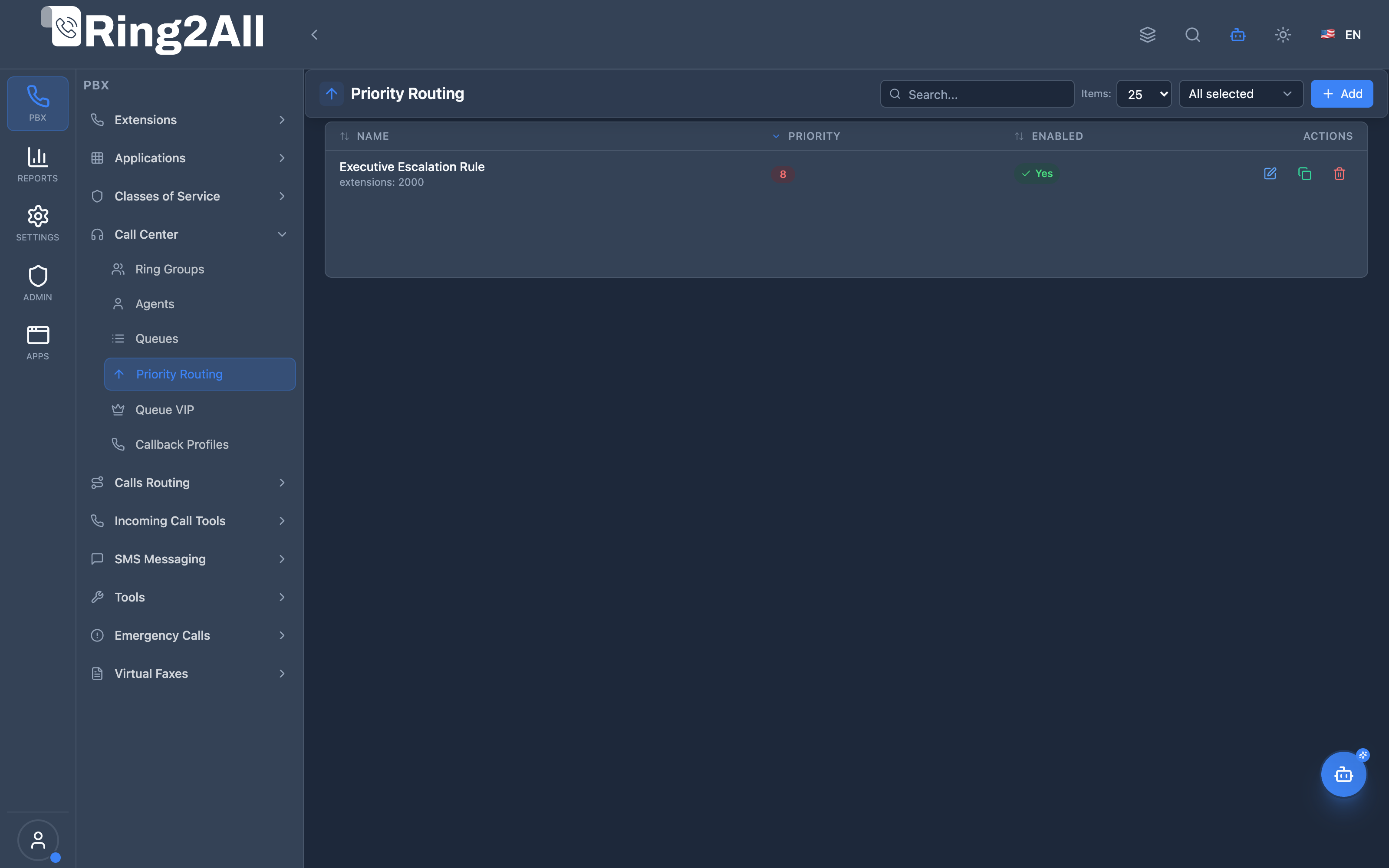
Section titled “Navigation”- Navigate to PBX Engine → Call Center → Priority Routing in the main navigation menu.
- The list view displays all configured Priority Routing rules with Name, Priority Badge (0-10), Destination Target, and Enabled status.
- Click the + Add button in the top toolbar to configure a new priority routing rule.
- Click any rule row or edit action to adjust priority weighting or destination routing.
Administrator Workflow
Section titled “Administrator Workflow”┌─────────────────────────────────────────────────────────────────┐│ Creating a Priority Routing Rule │├─────────────────────────────────────────────────────────────────┤│ ││ Priority Routing Information ││ ├─ Name: "Executive Escalation Rule" ││ ├─ Priority: 8 [●●●●●●●●○○] (Very High) ││ └─ Enabled: ✓ ││ ││ Routing ││ └─ Route To: Extension → 2000 (Alice Morgan) ││ ││ Save ││ │└─────────────────────────────────────────────────────────────────┘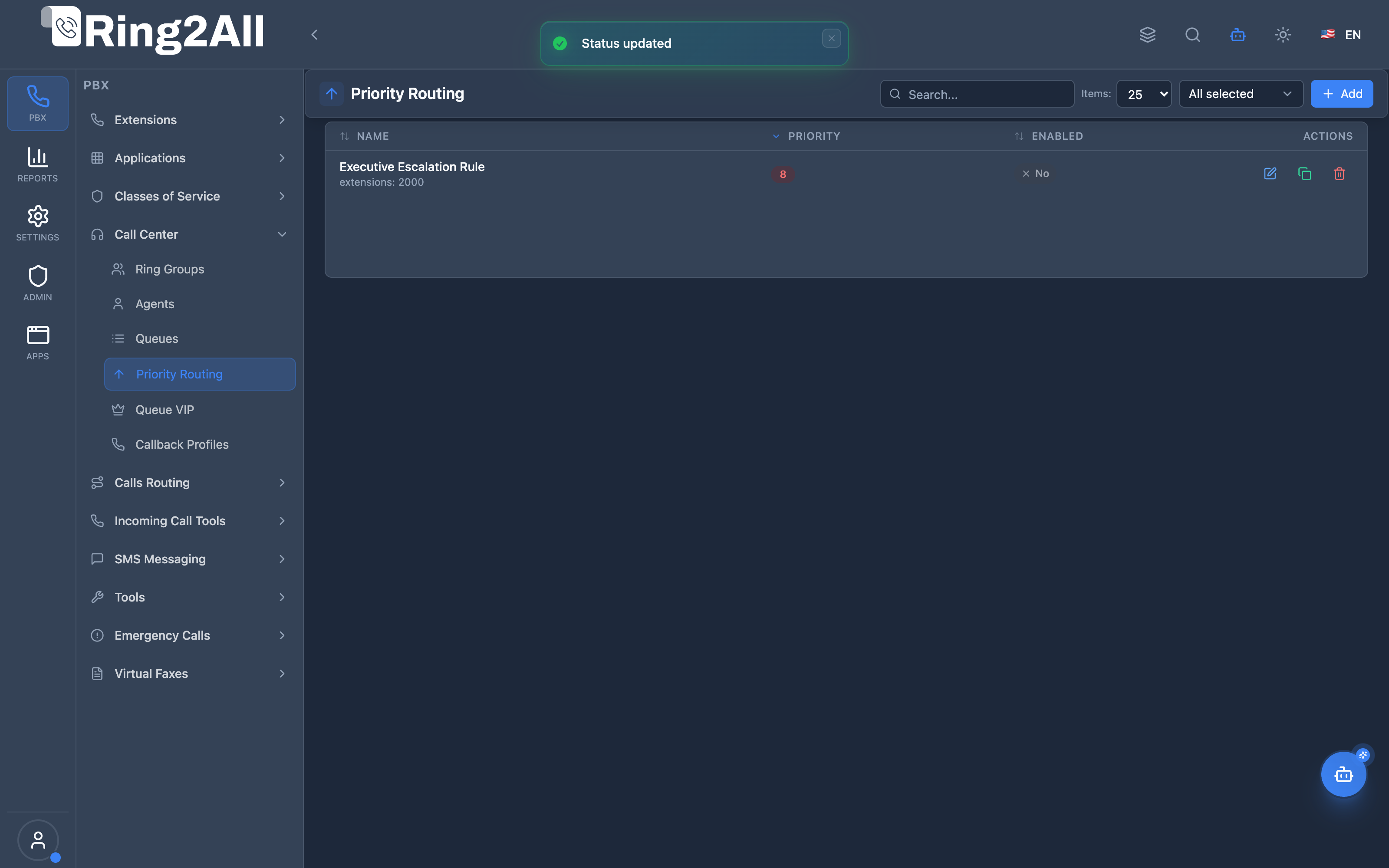
Priority Visual Scale
Section titled “Priority Visual Scale”| Score | Color Badge | Level | Description |
|---|---|---|---|
| 8-10 | 🔴 Red Badge | Critical / VIP | Immediate priority handling for VIPs and executives |
| 5-7 | 🟡 Yellow Badge | Important | Elevated tier for contracted partners and key accounts |
| 0-4 | 🟢 Green Badge | Standard | Normal day-to-day caller priority distribution |
Quick Tips
Section titled “Quick Tips”[!TIP] Use High Priorities Sparingly: Reserve levels 9-10 exclusively for top tier VIPs or executive hotlines.
[!TIP] Descriptive Rule Naming: Name rules clearly (e.g. “Enterprise Escalation” or “Gold Membership SLA”) so they can be readily identified in reports.
[!CAUTION] Priority Overlap: When multiple matching rules apply to a single call, the highest priority numerical score takes precedence.
4. Configuration Fields Reference
Section titled “4. Configuration Fields Reference”Priority Routing Information
Section titled “Priority Routing Information”| Field | Description | Type / Range | Default | Required |
|---|---|---|---|---|
| Name | Unique identifier for this priority routing rule | Text | None | Yes |
| Priority | Priority weight score evaluated by queue and routing engines (0-10, where 10 is highest) | Slider (0 - 10) | 0 |
Yes |
| Enabled | Master switch to activate or suspend this priority routing rule | Toggle (Boolean) | On | Yes |
Routing
Section titled “Routing”| Field | Description | Type / Options | Default | Required |
|---|---|---|---|---|
| Route To (Module) | Target PBX module category (e.g., Extension, Queue, Ring Group, IVR Menu, Voicemail) | Module Dropdown | None | No |
| Route To (Destination) | Specific entity or endpoint destination within the selected module | Target Dropdown | None | No |
Priority Score Guide
Section titled “Priority Score Guide”| Score Range | Classification | Typical Telephony Application |
|---|---|---|
| 10 | Critical Maximum | Executive hotlines, critical infrastructure alarms, tier-1 VIPs |
| 8-9 | Very High | Premium enterprise accounts, contracted SLA gold clients |
| 6-7 | Above Normal | Silver members, certified partner escalations |
| 5 | Normal Standard | Standard registered callers and general customer inquiries |
| 3-4 | Below Normal | Low-tier queues, trial prospects |
| 0-2 | Lowest Base | Unverified inbound callers, overflow baseline |
5. Common Scenarios & Examples
Section titled “5. Common Scenarios & Examples”Scenario 1: Customer Tier System
Section titled “Scenario 1: Customer Tier System”Rules:
| Name | Priority | Route To |
|---|---|---|
| Platinum | 10 | Queue: VIP Support |
| Gold | 8 | Queue: Premium Support |
| Silver | 6 | Queue: Priority Support |
| Bronze | 4 | Queue: Standard Support |
Usage: VIP Lists reference these rules to assign caller priorities.
Scenario 2: Partner Routing
Section titled “Scenario 2: Partner Routing”Rules:
| Name | Priority | Route To |
|---|---|---|
| Strategic Partners | 9 | Queue: Partner Desk |
| Resellers | 7 | Queue: Channel Support |
| Affiliates | 5 | Queue: General Support |
Scenario 3: Account Size Routing
Section titled “Scenario 3: Account Size Routing”Rules:
| Name | Priority | Route To |
|---|---|---|
| Enterprise | 10 | Queue: Enterprise Team |
| Mid-Market | 7 | Queue: Business Team |
| SMB | 5 | Queue: Small Business |
| Startup | 3 | Queue: Growth Team |
6. Model Context Protocol (MCP) AI Integration
Section titled “6. Model Context Protocol (MCP) AI Integration”Ring2All exposes native Model Context Protocol (MCP) tools for Priority Routing, empowering AI copilots and automated routing optimizers to inspect priority weighting structures, route high-value accounts directly to dedicated teams, and adjust routing weights dynamically.
Available MCP Tools
Section titled “Available MCP Tools”| Tool Name | Description | Key Parameters |
|---|---|---|
list_priority_routings |
Lists all Priority Routing rules defined in the domain, including destination module, target data, priority score, and enabled status. | search (optional string) |
get_priority_routing_status |
Retrieves full configuration and destination mapping of a specific Priority Routing rule. | name (required string) |
create_priority_routing |
Provisions a new Priority Routing rule targeting an extension, IVR, ACD queue, ring group, or voicemail with a priority score (1-100). | name, module, destination, priority (required); enabled |
update_priority_routing |
Updates rule destination module, destination target, priority score weight, or enabled status. | name (required); newName, module, destination, priority, enabled |
delete_priority_routing |
Deletes a Priority Routing rule from the PBX domain. | name (required string) |
AI Agent Operational Examples
Section titled “AI Agent Operational Examples”Querying Priority Routing Rules
Section titled “Querying Priority Routing Rules”{ "tool": "list_priority_routings", "arguments": { "search": "VIP" }}Creating an Enterprise Priority Routing Rule
Section titled “Creating an Enterprise Priority Routing Rule”{ "tool": "create_priority_routing", "arguments": { "name": "Enterprise High-Value Direct", "module": "queue", "destination": "850", "priority": 10, "enabled": true }}Recommended Natural Language Prompts
Section titled “Recommended Natural Language Prompts”- “List all priority routing rules and sort them by priority score.”
- “Create a priority routing rule named ‘Gold Resellers’ that routes to queue 800 with priority 8.”
- “Check what destination rule ‘Strategic Partners’ is currently forwarding to.”
7. Limitations & Important Notes
Section titled “7. Limitations & Important Notes”Technical Notes
Section titled “Technical Notes”[!NOTE] Configuration Module: Priority Routing is a configuration module. Rules are consumed by the routing engine and VIP lists—there is no dedicated Lua handler.
[!WARNING] Order of Evaluation: When multiple rules could apply, the highest priority score wins.
Best Practices
Section titled “Best Practices”- Plan Priority Tiers: Define your tier structure before creating rules
- Reserve Top Scores: Keep 9-10 for truly exceptional cases
- Use Meaningful Names: Names appear in reports and logs
- Test Integration: Verify VIP lists and queues reference correctly
- Document Rules: Keep a reference of what each priority level means
8. Troubleshooting Tips
Section titled “8. Troubleshooting Tips”Common Issues
Section titled “Common Issues”| Symptom | Possible Cause | Solution |
|---|---|---|
| Rule not applied | Rule disabled | Enable the rule |
| Wrong destination | Wrong module selected | Verify module/destination |
| Priority not working | Not linked to VIP list | Reference rule in VIP list |
| Unexpected routing | Higher priority rule matched | Check all enabled rules |
Diagnostic SQL
Section titled “Diagnostic SQL”List priority routing rules:
SELECT id, name, priority, module, destination, enabledFROM public.priority_routingWHERE domain_id = [domain_id]ORDER BY priority DESC;Check VIP list references:
SELECT vl.name as vip_list, pr.name as priority_rule, pr.priorityFROM public.vip_lists vlJOIN public.priority_routing pr ON vl.priority_routing_id = pr.idWHERE vl.domain_id = [domain_id];9. Glossary
Section titled “9. Glossary”| Term | Definition |
|---|---|
| Priority Routing | Named rule with priority score for call routing |
| Priority Score | 0-10 value (10 = highest priority) |
| VIP List | List of caller IDs that reference priority rules |
| Routing Engine | System component that evaluates and applies rules |
| Destination Module | Target type (Queue, Extension, IVR, etc.) |
Documentation last updated: January 2026