

Portal Voicemail & Smart AI
📖 Introduction
Section titled “📖 Introduction”The Voicemail module transforms traditional telephony voicemail boxes into an intelligent, AI-powered communication inbox. Subscribers can review incoming messages, listen to recordings directly within their web browser, filter by read/unread status, and review automated AI-generated transcripts, urgency flags, and extracted callback phone numbers.
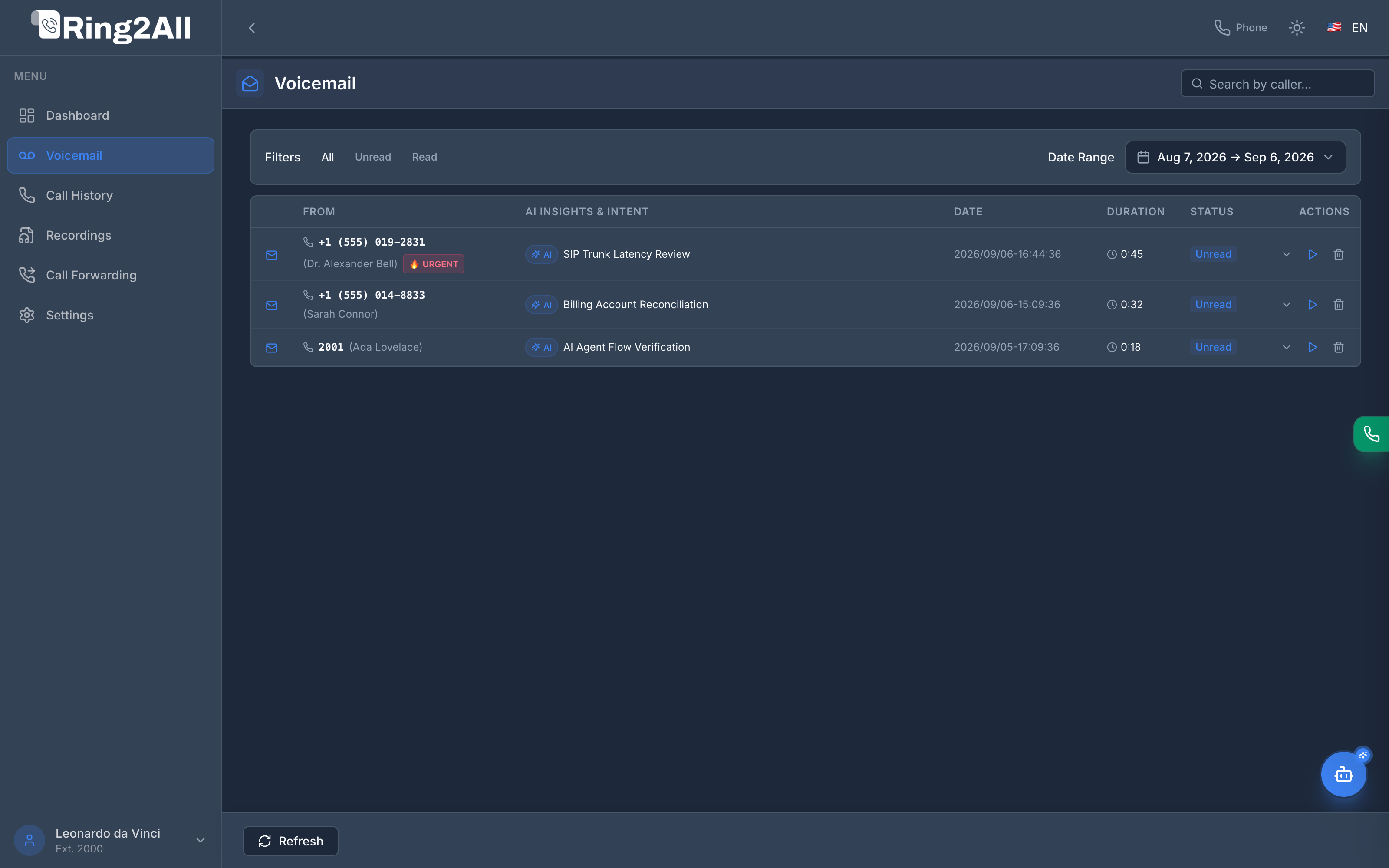
📋 Voicemail Data Grid
Section titled “📋 Voicemail Data Grid”The table provides a crystal-clear, structured breakdown of all messages deposited in the user’s extension mailbox:
| Column | Field Description | AI & Interactive Features |
|---|---|---|
| Status Icon | Mail envelope icon | Distinct blue icon for unread messages; hollow icon for listened messages. |
| From | Caller ID Name & Telephone Number | Displays caller identity (e.g., +1 (555) 019-2831 (Dr. Alexander Bell)). If the AI engine flags high priority, an orange 🔥 URGENT badge appears. |
| AI Insights & Intent | Extracted Call Purpose | AI-generated summary pill highlighting the caller’s objective (e.g., AI SIP Trunk Latency Review, AI Billing Account Reconciliation). |
| Date | ISO Timestamp | Exact arrival date and time of the voicemail message. |
| Duration | Playback Length | Total length of the audio recording (e.g., 0:45, 0:32). |
| Status | Reading Disposition | Highlights Unread or Read state with dedicated badges. |
| Actions | Message Controls | Expand row details (v), in-browser audio Play/Pause (▶), and Delete (🗑️). |
🤖 Smart Voicemail AI Breakdown
Section titled “🤖 Smart Voicemail AI Breakdown”Clicking the expand chevron (v) on any message row reveals the comprehensive Smart Voicemail AI Drawer:
┌─────────────────────────────────────────────────────────────────────────────┐│ ✦ AI Summary & Insights ││ Dr. Alexander Bell is reporting critical latency spikes across trunk-carrier-east ││ and requests immediate tier-2 callback regarding SLA performance. ││ ││ 📝 Full Audio Transcription (Whisper) ││ "Hello, this is Dr. Alexander Bell from technical operations. We are ││ noticing persistent RTP packet delay on the primary carrier trunk. Please ││ give me a call back at 555-019-2831 as soon as possible. Thank you." ││ ││ 📞 Callback Number: +1 (555) 019-2831 [📋 Copy] │└─────────────────────────────────────────────────────────────────────────────┘- Automatic Transcription: Audio is processed via Whisper speech-to-text models directly on message arrival.
- Intent & Urgency Classification: Natural language processing analyzes caller sentiment to flag mission-critical emergencies with the
🔥 URGENTvisual badge. - Extracted Callback Number: Detects any telephone numbers spoken by the caller and provides a one-click copy button (
📋) to facilitate rapid return calls.
🔍 Filters and Date Navigation
Section titled “🔍 Filters and Date Navigation”Subscribers can navigate high-volume mailboxes effortlessly:
- Status Filters: Instantly switch between
All,Unread, andRead. - Date Range Picker: Focus on voicemails received today, over the last 7 days, or within a customized calendar range.
- Search Bar: Real-time filtering by caller name or phone number.
- Refresh Control: Manual refresh trigger located on the fixed bottom bar to synchronize new incoming messages instantly.
💡 Productivity Tips
Section titled “💡 Productivity Tips”[!TIP] One-Click Callback: Expand an urgent voicemail, copy the extracted callback number, and paste it into the WebRTC Softphone keypad to return the call in seconds.
[!TIP] Zero Clutter: If AI integration is disabled by the administrator in ADMIN > AI Integration, the Voicemail module seamlessly falls back to standard audio playback without empty placeholders.