

Firewall Settings Module Documentation
Table of Contents
Section titled “Table of Contents”- Module Overview (Technical)
- Module Overview (Commercial & Business Value)
- 🎯 User Roles & Key Capabilities
- Visual Interface & Form Structure
- Architectural Flow & Security Governance
- Common Scenarios & Operational Playbooks
- Troubleshooting & Diagnostic Commands
- Model Context Protocol (MCP) AI Integration
- Glossary
1. Module Overview (Technical)
Section titled “1. Module Overview (Technical)”The Firewall Settings module (public.firewall_settings) governs the master operating state of host-level packet filtering and daemonized intrusion prevention on the Ring2All Billing application server. Operating as the control plane for underlying Linux network utilities (nftables/iptables and fail2ban), this module ensures that telecommunications rating APIs, web interfaces, and administrative ports are protected behind a deterministic, stateful security perimeter.
When enabled, the firewall enforces default-deny ingress policies, admitting only traffic explicitly whitelisted by services, rules, or access control entries. Concurrently, the Intrusion Detection subsystem scans log files for authentication abuse, actively applying dynamic jail bans to persistent attackers.
Data Model & Architecture Diagram
Section titled “Data Model & Architecture Diagram” ┌────────────────────────────────────────────────────────────────────────┐ │ Firewall Settings Entity (public.firewall_settings) │ │ • id: bigint (Primary Key) │ │ • firewall_enabled: boolean (Master nftables/iptables Ingress Filter) │ │ • fail2ban_enabled: boolean (Daemonized Log Parsing & Jail Monitor) │ │ • default_policy: 'drop' | 'reject' | 'accept' │ │ • log_dropped_packets: boolean │ │ • updated_at: timestamptz │ └───────────────────────────────────┬────────────────────────────────────┘ │ ┌─────────────────────────┴─────────────────────────┐ ▼ ▼ ┌───────────────────────────────────┐ ┌───────────────────────────────────┐ │ Linux netfilter Subsystem │ │ Fail2Ban Daemon Monitor │ │ • Default Ingress: DROP │ │ • Monitors /var/log/nginx/access │ │ • Established/Related: ACCEPT │ │ • Monitors Fastify auth logs │ │ • Allowed Services: TCP/UDP ports │ │ • Jail: ring2all-billing-auth │ └───────────────────────────────────┘ └───────────────────────────────────┘PostgreSQL Schema Architecture
Section titled “PostgreSQL Schema Architecture”public.firewall_settings:id: Numeric primary key (bigserial).firewall_enabled: Master switch. Whentrue, systemd servicenftables.service(oriptables) is kept in an active running state with strict chain filtering.fail2ban_enabled: Controls the operational state offail2ban.service. When active, specialized jail filters parse Fastify 401 unauthorized responses and NGINX error streams.updated_at: Timestamp recording when the security posture was modified.
2. Module Overview (Commercial & Business Value)
Section titled “2. Module Overview (Commercial & Business Value)”- Enterprise Hardening Out of the Box: Eliminates accidental exposure of internal billing microservices, database listening ports (
5432), or Redis cache instances (6379) to the public Internet. - Defense-in-Depth Against Infrastructure Takeover: Combines stateful packet filtering with dynamic log-based intrusion detection to stop automated port scans and brute force attacks before they consume server CPU cycles.
- Operational Simplicity: Provides telecom system administrators with a simple, high-level control panel to govern host security without requiring manual SSH command-line intervention for core service toggling.
3. 🎯 User Roles & Key Capabilities
Section titled “3. 🎯 User Roles & Key Capabilities”| User Role | Key Permissions | Core Responsibilities & Workflows |
|---|---|---|
| Super Administrator | Full Control (RW on Firewall Settings) |
Activates or deactivates the host packet filtering engine, enables Fail2Ban intrusion detection, and commits security profile changes. |
| Security Officer / SecOps | Audit & Verification | Audits current firewall and intrusion detection daemon states, verifies compliance against internal security baselines, and recommends policy updates. |
| Billing Operator | Read-Only (Status View) | Inspects whether the firewall is active to rule out network filtering issues during third-party payment gateway integration. |
4. Visual Interface & Form Structure
Section titled “4. Visual Interface & Form Structure”Level 1 — Firewall Settings View
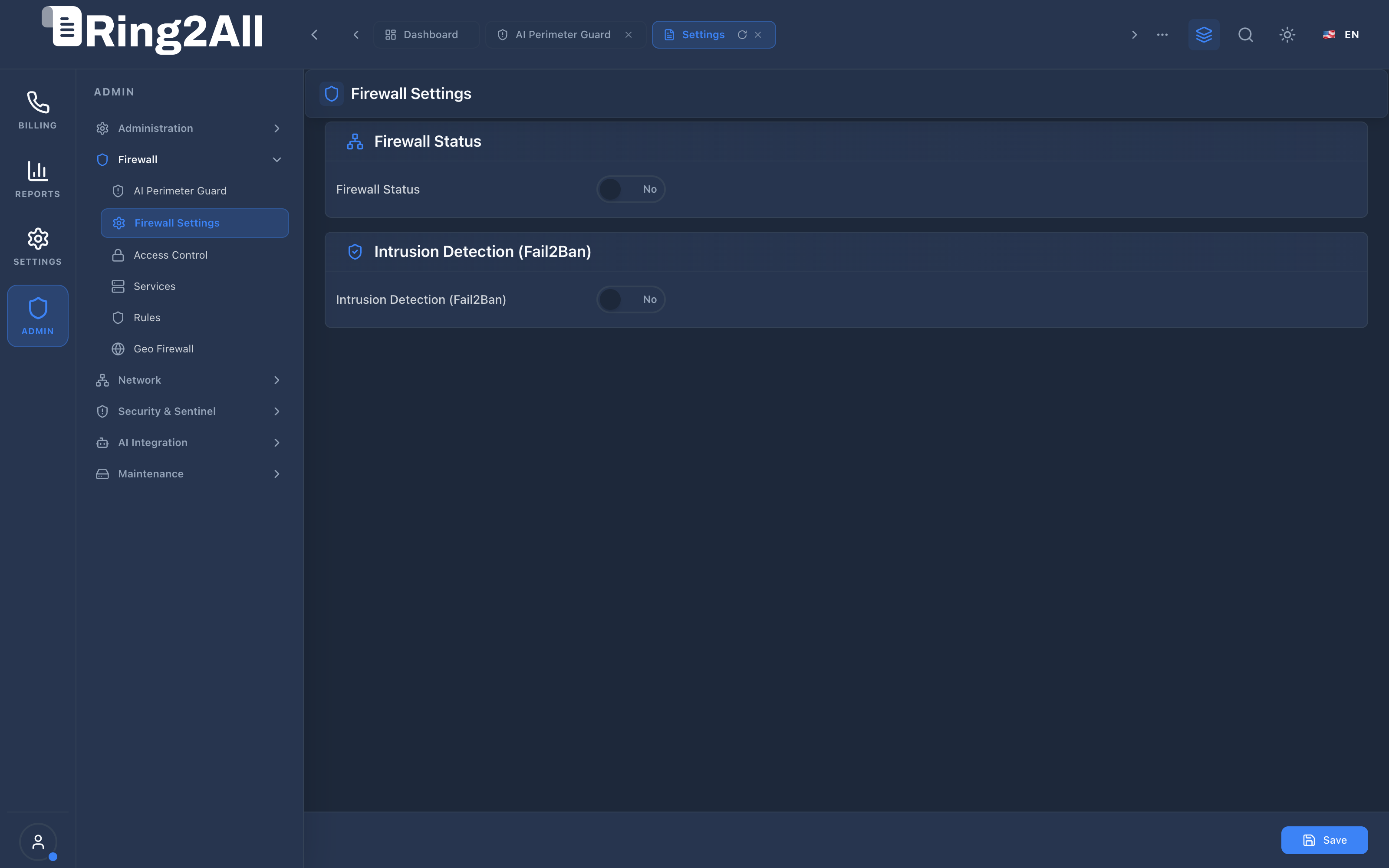
Section titled “Level 1 — Firewall Settings View”The interface presents clear, high-contrast operational cards organizing host firewall filtering and daemon intrusion detection controls, with a sticky action bar for committing changes.
Fields & Parameters Reference
Section titled “Fields & Parameters Reference”- Firewall Status (Toggle): Master switch controlling host packet filtering.
- Active (Yes): Linux kernel packet filtering rules are applied. All ports not explicitly defined in Services or Rules are blocked.
- Inactive (No): Kernel filtering is disabled; incoming traffic reaches listening sockets freely.
- Intrusion Detection (Fail2Ban) (Toggle): Controls automated log-based banning.
- Active (Yes): Fail2Ban daemon actively scans authentication logs, automatically banning source IPs that fail authentication repeatedly.
- Inactive (No): Intrusion monitoring is suspended; no automated bans are initiated.
- Save Button: Commits the configuration to PostgreSQL and signals the backend security agent to synchronize systemd services.
5. Architectural Flow & Security Governance
Section titled “5. Architectural Flow & Security Governance” ┌──────────────┐ 1. PUT /api/firewall/settings ┌────────────────────────┐ │ System Admin ├───────────────────────────────────────────────►│ Fastify 5 API Route │ └──────────────┘ └───────────┬────────────┘ │ 2. Update │ 3. Dispatch System Database │ Command Event ▼ ┌────────────────────────┐ │ ss_billing Database │ │ (firewall_settings) │ └────────────────────────┘ │ ┌────────────────────────────────┴────────────────────────────────┐ ▼ ▼ ┌──────────────────────────┐ ┌──────────────────────────┐ │ systemctl start nftables │ │ systemctl start fail2ban │ └──────────────────────────┘ └──────────────────────────┘- Administration Trigger: The administrator toggles the desired subsystem and clicks Save.
- Atomic Persistence: The Fastify API validates administrative privileges and records the state in
public.firewall_settings. - Daemon Synchronization: The backend security runner triggers the platform orchestration command via
systemctl, ensuring system services reflect the configured state.
6. Common Scenarios & Operational Playbooks
Section titled “6. Common Scenarios & Operational Playbooks”Playbook 1: Enabling Production Firewall Protection
Section titled “Playbook 1: Enabling Production Firewall Protection”- Navigate to ADMIN > Firewall > Firewall Settings.
- Verify under ADMIN > Firewall > Services that essential ports (HTTP: 80, HTTPS: 8443, API: 3003, SSH: 22) are correctly defined.
- Return to Firewall Settings.
- Toggle Firewall Status to Yes.
- Toggle Intrusion Detection (Fail2Ban) to Yes.
- Click Save in the bottom-right action bar.
- Verify immediate server responsiveness on active administrative sessions.
Playbook 2: Temporarily Suspending Filtering for Network Diagnosis
Section titled “Playbook 2: Temporarily Suspending Filtering for Network Diagnosis”- Navigate to ADMIN > Firewall > Firewall Settings.
- Toggle Firewall Status to No.
- Click Save.
- Perform end-to-end network latency or port reachability diagnosis with the carrier provider.
- Immediately return to Firewall Settings, toggle Firewall Status back to Yes, and click Save.
7. Troubleshooting & Diagnostic Commands
Section titled “7. Troubleshooting & Diagnostic Commands”Checking Service States via Systemd
Section titled “Checking Service States via Systemd”# Verify status of Linux packet filtersystemctl status nftables || systemctl status iptables
# Verify status of Fail2Ban intrusion detection daemonsystemctl status fail2ban
# Check Fail2Ban active jails and banned IPsfail2ban-client statusInspecting Database Settings
Section titled “Inspecting Database Settings”sudo -u postgres psql -d ss_billing -c \ "SELECT id, firewall_enabled, fail2ban_enabled, updated_at FROM firewall_settings;"8. Model Context Protocol (MCP) AI Integration
Section titled “8. Model Context Protocol (MCP) AI Integration”The Firewall Settings module connects directly to the Ring2All BSS MCP Server, providing security administrators and AI infrastructure assistants with read-only visibility into master firewall operating parameters and intrusion defense states.
Available MCP Tools
Section titled “Available MCP Tools”| Tool Name | Access Role | Description & Primary Function | Example Arguments |
|---|---|---|---|
get_firewall_settings |
Super Administrator |
Retrieves core firewall operating state, default policies, and Fail2Ban service status. | {} |
Sample MCP Tool Execution: get_firewall_settings
Section titled “Sample MCP Tool Execution: get_firewall_settings”Request Payload
Section titled “Request Payload”{ "name": "get_firewall_settings", "arguments": {}}Response Payload
Section titled “Response Payload”{ "firewallEnabled": true, "fail2banEnabled": true, "defaultPolicy": "DROP", "synFloodProtection": true, "pingProtection": false, "backend": "nftables", "updatedAt": "2026-09-08T10:00:00Z"}Conversational AI Prompts for Copilot
Section titled “Conversational AI Prompts for Copilot”- “Is the host firewall currently enabled and enforcing default-drop policies?”
- “What is the status of the Fail2Ban intrusion detection daemon?”
- “Verify if SYN flood protection is active on the billing server.”
9. Glossary
Section titled “9. Glossary”- Packet Filtering: The process of inspecting incoming and outgoing IP packets and either accepting, dropping, or rejecting them based on IP, port, and protocol.
- Fail2Ban: An open-source intrusion prevention framework that monitors application log files for suspicious activity and creates dynamic firewall rules.
- Default Deny: A security posture where all network traffic is blocked by default, requiring explicit rules to permit desired communication.
- Stateful Inspection: Tracking the state of active network connections to automatically permit returning traffic belonging to recognized sessions.
- Model Context Protocol (MCP): Open protocol standard that enables secure, controlled integration between Large Language Models and external tools, databases, and telecom rating engines.